ICT Components:
Hardware, Software, and
Networks
Understanding the Building Blocks of Information and
Communication Technology
Introduction to ICT
• ICT or information and communications technology (or technologies), is
the infrastructure and components that enable modern computing.
• ICT means all devices, networking components, applications and
systems that combined allow people and organizations (i.e., businesses,
nonprofit agencies, governments and criminal enterprises) to interact in
the digital world
ICT Components Overview
Main Components:
• Hardware
• Software
• Networks
Each component plays a specific role in ICT systems.
HARDWARE SECTION
What is Hardware?
Hardware refers to the physical components of a computer
system, including microprocessors, memory modules,
input/output (I/O) devices, and data storage, which
collectively enable computing processes and data transfer.
Input Devices
An input device is a computer device or hardware that allows the
user to provide data, input, instructions to the computer system.
An input device is a part of a computer that helps us send data or
instructions to the system. It lets us talk to the computer by
sending things like words, pictures, or sounds. The computer
takes this information and changes it into a form it can
understand.
Input Devices
Then, its main part, called the CPU (Central Processing Unit),
processes the information and gives us the result. Input devices
are like bridges that connect us to the computer. Without them,
we wouldn’t be able to use the computer properly. Some
common input devices are the keyboard, mouse, microphone,
and scanner. They make it easy and fun to work with computers.
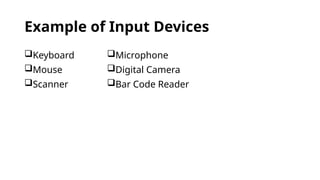
Example of Input Devices
Keyboard
Mouse
Scanner
Microphone
Digital Camera
Bar Code Reader
Output Devices
An output device is a hardware component of a computer
system that displays information to users. Monitor, Printer,
Speakers Headphones, Projector, GPS and Plotter are some
output devices of computer.
Output Devices
An output device is a computer hardware device that retrieves
and presents the result of the inserted input data from the
computer system and further translates that data into human-
understandable language. It takes the data from the computer
and changes it into a form we can understand, like text, pictures,
sounds, or even a printed page. These results help us know what
the computer has done with the input we gave.
Output Devices
There are four main types of output devices: visual, data,
print, and sound. Depending on what kind of output we
want, we can use different devices like a monitor for pictures,
a printer for papers, speakers for sound, and projectors for
big displays. These devices make using a computer more fun,
useful, and easy to understand for everyone!
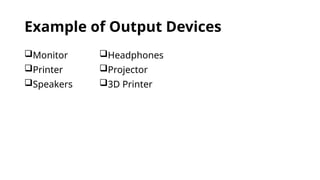
Example of Output Devices
Monitor
Printer
Speakers
Headphones
Projector
3D Printer
Processing and Storage Devices
Processing devices are responsible for the processing of information within
the computer system, and include devices such as the CPU, memory and
motherboard.
Storage devices allow data to be stored within a computer system, and
include devices such as hard disk drives, solid-state drives, optical drives, flash
storage devices, floppy disk drives (obsolete in today's world), and network-
attached storage devices.
Processing
CPU (Central Processing Unit)
Constructed from billions of transistors, the central processing unit (CPU)
can have multiple processing cores and is commonly referred to as the
“brain” of the computer. It is essential to all modern computing systems, as
it executes the commands and processes needed for your computer and
operating system. The CPU is also important in determining how fast
programs can run while doing tasks such as surfing the web, running
calculations for game physics and other programs, or building
spreadsheets.
GPU (Graphics Processing Unit)
The graphics processing unit (GPU) has many smaller, more
specialized cores. These cores deliver massive performance by
working together and dividing processing tasks across many
cores simultaneously (or in parallel). The GPU excels at highly
parallel tasks like rendering visuals during gameplay,
manipulating video data during content creation, and computing
results in intensive AI workloads.
Storage
Hard Drive (HDD)
A hard drive in a computer is an internal or external device
that stores data such as operating systems, applications and
user files. You may also have come across the term HDD. HDD
is a common abbreviation that stands for Hard Disk Drive.
HDDs are non-volatile storage devices, meaning they retain
stored data even when power isn't being supplied.
Solid-State Drive (SSD)
A solid-state drive (SSD) is a type of storage device that uses
non-volatile memory to store data persistently. Unlike
traditional hard drives that rely on spinning disks and
mechanical parts, SSDs have no moving components, which
allows for faster data access and improved durability. SSDs
typically use NAND flash memory, which retains data even
when the power is turned off.
Optical Drive
An optical drive is a device that reads and/or writes data onto a disc.
To read/write data onto a disc, an ODD uses a laser diode to receive and send
electromagnetic waves. Receiving these waves allows your computer to access what’s on
the disc. Sending these waves enables the computer to write files onto the disc.
You can use an optical drive to watch DVD movies, listen to music from your CD collection,
install software (like Windows), and back up important files to a CD, to name a few.
USB Flash Drive
A USB flash drive is a small, portable data storage device that uses
flash memory and connects to computers and other devices via a USB
interface. They are compact, durable, and can store a wide range of
data, typically ranging from 2 GB to 2 TB in capacity. USB flash drives
are commonly used for data storage, backup, and file transfer, offering
advantages over older storage media like floppy disks and CDs due to
their speed, capacity, and lack of moving parts.
SOFTWARE SECTION
What is Software?
Software is a collection of instructions, data, or computer
programs that are used to run machines and carry out
particular activities. It is the antithesis of hardware, which
refers to a computer's external components. A device's
running programs, scripts, and applications are collectively
referred to as "software" in this context.
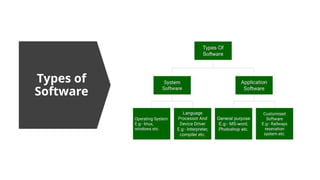
Types of
Software
System
Software
System software is
software that directly
operates the computer
hardware and provides the
basic functionality to the
users as well as to the
other software to operate
smoothly.
Or in other words, system
software basically controls
a computer’s internal
functioning and also
controls hardware devices
such as monitors, printers,
and storage devices, etc.
Types of System Software
Operating System: It is the main program of a computer system. When the
computer system ON it is the first software that loads into the computer's
memory. Basically, it manages all the resources such as computer memory, CPU,
printer, hard disk, etc., and provides an interface to the user, which helps the
user to interact with the computer system. It also provides various services to
other computer software.
Examples of operating systems are Linux, Apple macOS, Microsoft Windows, etc.
Types of System Software
Language Processor: As we know that system software converts
the human-readable language into a machine language and vice
versa. So, the conversion is done by the language processor. It
converts programs written in high-level programming languages
like Java, C, C++, Python, etc. (known as source code), into sets of
instructions that are easily readable by machines(known as object
code or machine code).
Types of System Software
Device Driver: A device driver is a program or software that
controls a device and helps that device to perform its functions.
Every device like a printer, mouse, modem, etc. needs a driver to
connect with the computer system eternally. So, when you
connect a new device with your computer system, first you need
to install the driver of that device so that your operating system
knows how to control or manage that device.
Applicati
on
Software
Software that performs
special functions or
provides functions that are
much more than the basic
operation of the computer
is known as application
software.
Or in other words,
application software is
designed to perform a
specific task for end-users.
It includes word processors,
spreadsheets, database
management, inventory,
payroll programs, etc.
Types of Application Software
General Purpose Software: This type of application software
is used for a variety of tasks, and it is not limited to
performing a specific task only.
For example, MS-Word, MS-Excel, PowerPoint, etc.
Types of Application Software
Customized Software: This type of application software is
used or designed to perform specific tasks or functions or
designed for specific organizations.
For example, railway reservation system, airline reservation
system, invoice management system, etc.
Types of Application Software
Utility Software: This type of application software is used to support
the computer infrastructure. It is designed to analyze, configure,
optimize and maintains the system, and take care of its requirements
as well.
For example, antivirus, disk fragmented, memory tester, disk repair,
disk cleaners, registry cleaners, disk space analyzer, etc.
NETWORK SECTION
What is a Network?
A network is a collection of interconnected devices that
communicate with each other to share resources and information.
It typically consists of at least two computers or devices connected
via cables or wirelessly. Networks can range from small setups, like
a home network with two computers, to large-scale systems
involving millions of devices, enabling functions such as file
sharing, internet access, and electronic communication.
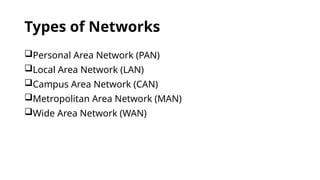
Types of Networks
Personal Area Network (PAN)
Local Area Network (LAN)
Campus Area Network (CAN)
Metropolitan Area Network (MAN)
Wide Area Network (WAN)
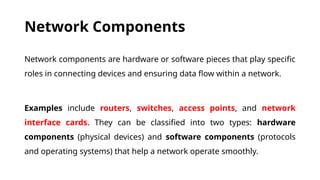
Network Components
Network components are hardware or software pieces that play specific
roles in connecting devices and ensuring data flow within a network.
Examples include routers, switches, access points, and network
interface cards. They can be classified into two types: hardware
components (physical devices) and software components (protocols
and operating systems) that help a network operate smoothly.
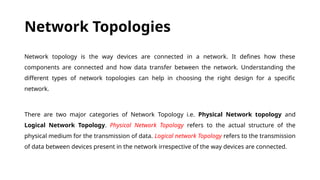
Network Topologies
Network topology is the way devices are connected in a network. It defines how these
components are connected and how data transfer between the network. Understanding the
different types of network topologies can help in choosing the right design for a specific
network.
There are two major categories of Network Topology i.e. Physical Network topology and
Logical Network Topology. Physical Network Topology refers to the actual structure of the
physical medium for the transmission of data. Logical network Topology refers to the transmission
of data between devices present in the network irrespective of the way devices are connected.
Types of Network Topology
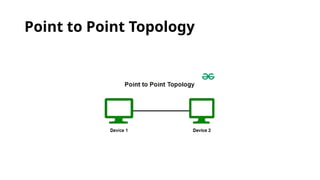
Point to Point Topology
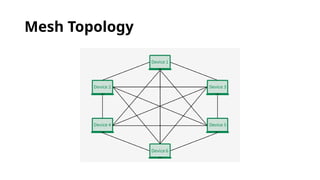
Mesh Topology
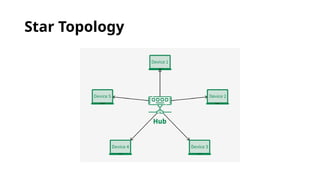
Star Topology
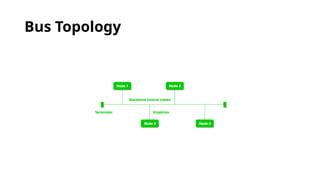
Bus Topology
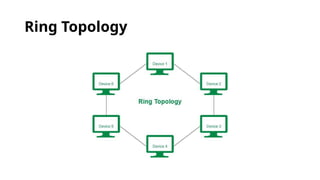
Ring Topology
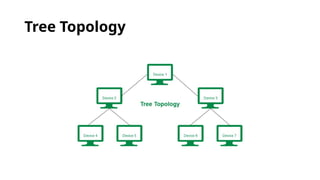
Tree Topology
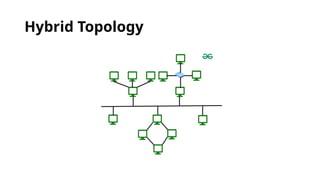
Hybrid Topology
Point to Point Topology
Mesh Topology
Star Topology
Bus Topology
Ring Topology
Tree Topology
Hybrid Topology
Internet and Intranet
Internet
The Internet is a global network of interconnected computers and devices
that allows users to access and share information and devices, allowing
them to communicate and exchange data. It enables users to access a wide
range of services, such as websites, emails, social media, online
applications, and cloud storage. Through standardized communication
protocols, the Internet facilitates the sharing of information, resources and
media across vast distances, making it an essential tool for education,
business, entertainment and personal communication worldwide.
History of the Internet
The Internet came in the year 1960 with the creation of the first working
model called ARPANET (Advanced Research Projects Agency). It allowed
multiple computers to work on a single network which was their
biggest achievement at that time. ARPANET uses packet switching to
communicate multiple computer systems under a single network. In
October 1969, using ARPANET first message was transferred from one
computer to another. After that technology continues to grow.
Intranet
An intranet is a kind of private network. For example, an
intranet is used by different organizations and only
members/staff of that organization have access to this. It is a
system in which multiple computers of an organization (or
the computers you want to connect) are connected through
an intranet.
Intranet
As this is a private network, so no one from the outside world
can access this network. So many organizations and
companies have their intranet network and only its members
and staff have access to this network. This is also used to
protect your data and provide data security to a particular
organization, as it is a private network and does not leak data
to the outside world.
ICT Components Hardware Software and Networks.pptx

  • 1.
    ICT Components: Hardware, Software,and Networks Understanding the Building Blocks of Information and Communication Technology
  • 2.
    Introduction to ICT •ICT or information and communications technology (or technologies), is the infrastructure and components that enable modern computing. • ICT means all devices, networking components, applications and systems that combined allow people and organizations (i.e., businesses, nonprofit agencies, governments and criminal enterprises) to interact in the digital world
  • 3.
    ICT Components Overview MainComponents: • Hardware • Software • Networks Each component plays a specific role in ICT systems.
  • 4.
  • 5.
    What is Hardware? Hardwarerefers to the physical components of a computer system, including microprocessors, memory modules, input/output (I/O) devices, and data storage, which collectively enable computing processes and data transfer.
  • 6.
    Input Devices An inputdevice is a computer device or hardware that allows the user to provide data, input, instructions to the computer system. An input device is a part of a computer that helps us send data or instructions to the system. It lets us talk to the computer by sending things like words, pictures, or sounds. The computer takes this information and changes it into a form it can understand.
  • 7.
    Input Devices Then, itsmain part, called the CPU (Central Processing Unit), processes the information and gives us the result. Input devices are like bridges that connect us to the computer. Without them, we wouldn’t be able to use the computer properly. Some common input devices are the keyboard, mouse, microphone, and scanner. They make it easy and fun to work with computers.
  • 8.
    Example of InputDevices Keyboard Mouse Scanner Microphone Digital Camera Bar Code Reader
  • 9.
    Output Devices An outputdevice is a hardware component of a computer system that displays information to users. Monitor, Printer, Speakers Headphones, Projector, GPS and Plotter are some output devices of computer.
  • 10.
    Output Devices An outputdevice is a computer hardware device that retrieves and presents the result of the inserted input data from the computer system and further translates that data into human- understandable language. It takes the data from the computer and changes it into a form we can understand, like text, pictures, sounds, or even a printed page. These results help us know what the computer has done with the input we gave.
  • 11.
    Output Devices There arefour main types of output devices: visual, data, print, and sound. Depending on what kind of output we want, we can use different devices like a monitor for pictures, a printer for papers, speakers for sound, and projectors for big displays. These devices make using a computer more fun, useful, and easy to understand for everyone!
  • 12.
    Example of OutputDevices Monitor Printer Speakers Headphones Projector 3D Printer
  • 13.
    Processing and StorageDevices Processing devices are responsible for the processing of information within the computer system, and include devices such as the CPU, memory and motherboard. Storage devices allow data to be stored within a computer system, and include devices such as hard disk drives, solid-state drives, optical drives, flash storage devices, floppy disk drives (obsolete in today's world), and network- attached storage devices.
  • 14.
  • 15.
    CPU (Central ProcessingUnit) Constructed from billions of transistors, the central processing unit (CPU) can have multiple processing cores and is commonly referred to as the “brain” of the computer. It is essential to all modern computing systems, as it executes the commands and processes needed for your computer and operating system. The CPU is also important in determining how fast programs can run while doing tasks such as surfing the web, running calculations for game physics and other programs, or building spreadsheets.
  • 16.
    GPU (Graphics ProcessingUnit) The graphics processing unit (GPU) has many smaller, more specialized cores. These cores deliver massive performance by working together and dividing processing tasks across many cores simultaneously (or in parallel). The GPU excels at highly parallel tasks like rendering visuals during gameplay, manipulating video data during content creation, and computing results in intensive AI workloads.
  • 17.
  • 18.
    Hard Drive (HDD) Ahard drive in a computer is an internal or external device that stores data such as operating systems, applications and user files. You may also have come across the term HDD. HDD is a common abbreviation that stands for Hard Disk Drive. HDDs are non-volatile storage devices, meaning they retain stored data even when power isn't being supplied.
  • 19.
    Solid-State Drive (SSD) Asolid-state drive (SSD) is a type of storage device that uses non-volatile memory to store data persistently. Unlike traditional hard drives that rely on spinning disks and mechanical parts, SSDs have no moving components, which allows for faster data access and improved durability. SSDs typically use NAND flash memory, which retains data even when the power is turned off.
  • 20.
    Optical Drive An opticaldrive is a device that reads and/or writes data onto a disc. To read/write data onto a disc, an ODD uses a laser diode to receive and send electromagnetic waves. Receiving these waves allows your computer to access what’s on the disc. Sending these waves enables the computer to write files onto the disc. You can use an optical drive to watch DVD movies, listen to music from your CD collection, install software (like Windows), and back up important files to a CD, to name a few.
  • 21.
    USB Flash Drive AUSB flash drive is a small, portable data storage device that uses flash memory and connects to computers and other devices via a USB interface. They are compact, durable, and can store a wide range of data, typically ranging from 2 GB to 2 TB in capacity. USB flash drives are commonly used for data storage, backup, and file transfer, offering advantages over older storage media like floppy disks and CDs due to their speed, capacity, and lack of moving parts.
  • 22.
  • 23.
    What is Software? Softwareis a collection of instructions, data, or computer programs that are used to run machines and carry out particular activities. It is the antithesis of hardware, which refers to a computer's external components. A device's running programs, scripts, and applications are collectively referred to as "software" in this context.
  • 24.
  • 25.
    System Software System software is softwarethat directly operates the computer hardware and provides the basic functionality to the users as well as to the other software to operate smoothly. Or in other words, system software basically controls a computer’s internal functioning and also controls hardware devices such as monitors, printers, and storage devices, etc.
  • 26.
    Types of SystemSoftware Operating System: It is the main program of a computer system. When the computer system ON it is the first software that loads into the computer's memory. Basically, it manages all the resources such as computer memory, CPU, printer, hard disk, etc., and provides an interface to the user, which helps the user to interact with the computer system. It also provides various services to other computer software. Examples of operating systems are Linux, Apple macOS, Microsoft Windows, etc.
  • 27.
    Types of SystemSoftware Language Processor: As we know that system software converts the human-readable language into a machine language and vice versa. So, the conversion is done by the language processor. It converts programs written in high-level programming languages like Java, C, C++, Python, etc. (known as source code), into sets of instructions that are easily readable by machines(known as object code or machine code).
  • 28.
    Types of SystemSoftware Device Driver: A device driver is a program or software that controls a device and helps that device to perform its functions. Every device like a printer, mouse, modem, etc. needs a driver to connect with the computer system eternally. So, when you connect a new device with your computer system, first you need to install the driver of that device so that your operating system knows how to control or manage that device.
  • 29.
    Applicati on Software Software that performs specialfunctions or provides functions that are much more than the basic operation of the computer is known as application software. Or in other words, application software is designed to perform a specific task for end-users. It includes word processors, spreadsheets, database management, inventory, payroll programs, etc.
  • 30.
    Types of ApplicationSoftware General Purpose Software: This type of application software is used for a variety of tasks, and it is not limited to performing a specific task only. For example, MS-Word, MS-Excel, PowerPoint, etc.
  • 31.
    Types of ApplicationSoftware Customized Software: This type of application software is used or designed to perform specific tasks or functions or designed for specific organizations. For example, railway reservation system, airline reservation system, invoice management system, etc.
  • 32.
    Types of ApplicationSoftware Utility Software: This type of application software is used to support the computer infrastructure. It is designed to analyze, configure, optimize and maintains the system, and take care of its requirements as well. For example, antivirus, disk fragmented, memory tester, disk repair, disk cleaners, registry cleaners, disk space analyzer, etc.
  • 33.
  • 34.
    What is aNetwork? A network is a collection of interconnected devices that communicate with each other to share resources and information. It typically consists of at least two computers or devices connected via cables or wirelessly. Networks can range from small setups, like a home network with two computers, to large-scale systems involving millions of devices, enabling functions such as file sharing, internet access, and electronic communication.
  • 35.
    Types of Networks PersonalArea Network (PAN) Local Area Network (LAN) Campus Area Network (CAN) Metropolitan Area Network (MAN) Wide Area Network (WAN)
  • 36.
    Network Components Network componentsare hardware or software pieces that play specific roles in connecting devices and ensuring data flow within a network. Examples include routers, switches, access points, and network interface cards. They can be classified into two types: hardware components (physical devices) and software components (protocols and operating systems) that help a network operate smoothly.
  • 37.
    Network Topologies Network topologyis the way devices are connected in a network. It defines how these components are connected and how data transfer between the network. Understanding the different types of network topologies can help in choosing the right design for a specific network. There are two major categories of Network Topology i.e. Physical Network topology and Logical Network Topology. Physical Network Topology refers to the actual structure of the physical medium for the transmission of data. Logical network Topology refers to the transmission of data between devices present in the network irrespective of the way devices are connected.
  • 38.
    Types of NetworkTopology Point to Point Topology Mesh Topology Star Topology Bus Topology Ring Topology Tree Topology Hybrid Topology
  • 39.
  • 40.
  • 41.
  • 42.
  • 43.
  • 44.
  • 45.
  • 46.
  • 47.
    Internet The Internet isa global network of interconnected computers and devices that allows users to access and share information and devices, allowing them to communicate and exchange data. It enables users to access a wide range of services, such as websites, emails, social media, online applications, and cloud storage. Through standardized communication protocols, the Internet facilitates the sharing of information, resources and media across vast distances, making it an essential tool for education, business, entertainment and personal communication worldwide.
  • 48.
    History of theInternet The Internet came in the year 1960 with the creation of the first working model called ARPANET (Advanced Research Projects Agency). It allowed multiple computers to work on a single network which was their biggest achievement at that time. ARPANET uses packet switching to communicate multiple computer systems under a single network. In October 1969, using ARPANET first message was transferred from one computer to another. After that technology continues to grow.
  • 49.
    Intranet An intranet isa kind of private network. For example, an intranet is used by different organizations and only members/staff of that organization have access to this. It is a system in which multiple computers of an organization (or the computers you want to connect) are connected through an intranet.
  • 50.
    Intranet As this isa private network, so no one from the outside world can access this network. So many organizations and companies have their intranet network and only its members and staff have access to this network. This is also used to protect your data and provide data security to a particular organization, as it is a private network and does not leak data to the outside world.