USING AND
MAINTAINING
HAND TOOLS
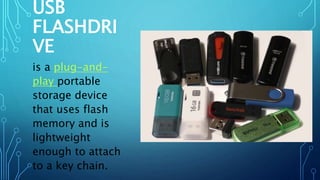
USB
FLASHDRI
VE
is a plug-and-
play portable
storage device
that uses flash
memory and is
lightweight
enough to attach
to a key chain.
MS
WORD
A word processing
application used for
creating documents
such as letters,
brochures, activity
programs, and
learning activities.
MS
POWERPOIN
T
s a presentation tool
that uses graphical
approach to
presentation in the
form of slides. Its
primary function is
to help a presenter
deliver its
presentation
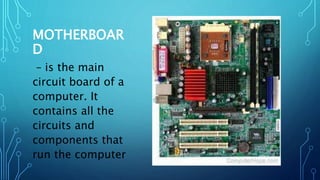
MOTHERBOAR
D
– is the main
circuit board of a
computer. It
contains all the
circuits and
components that
run the computer
MS
EXCEL
is a spreadsheet
program ideal for
entering, calculating,
and analyzing numeric
data such as sales
figures, sales taxes,
and students’ grades.
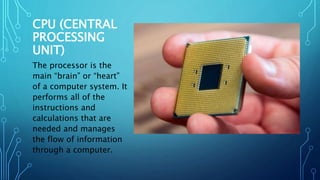
CPU (CENTRAL
PROCESSING
UNIT)
The processor is the
main “brain” or “heart”
of a computer system. It
performs all of the
instructions and
calculations that are
needed and manages
the flow of information
through a computer.
TRUE OR FALSE
INSTRUCTION: READ THE STATEMENTS CAREFULLY THEN WRITE
TRUE IF THE STATEMENT IS CORRECT AND WRITE FALSE IF IT IS
WRONG.
• ______1. Choosing the best tool for each task requires
training in the proper use of the tools.
• _______2. When obtaining the tool, all the associated tooling
and consumable parts, as recommended by the
manufacturer, must be included.
• _______3. The safe use of a tool depends on using the tool for
the purpose for which it was designed.
• _______4. All tools should be kept in good condition with
regular maintenance.
• _______5. Preparing for a task includes only knowing the task
to be done.
•_______6. Place parts or tools wherever you like.
•_______7. Preparing for a task includes also the
sequence of tasks to be done.
•_______8. Everyone is allowed to eat or drink while
working on a computer.
•_______9. Always disconnect a computer from the AC
power and any powered peripherals while you are
working on it.
•_______10. Know and understand in detail the scope
of your work to be accomplished.
• _______11. Choosing the best tool for each task DO NOT
require training in the proper use of the tools.
• _______12. A tool is a handheld device that aids in
accomplishing a task.
• _______13. Following the manufacturer’s guidance and
instruction for that specific tool is NOT necessary.
• _______14. All tools are kept in good condition with
regular maintenance.
• _______15. Damaged or defective equipment/tools
should be tagged and removed from service.
HARDWARE TOOLS
To complete hardware repairs, it is important to have
a toolkit that should contain all of the necessary
tools. As you gain experience, you will learn which
tools to have available for different types of jobs.
Hardware tools are grouped into these four
categories:
•Electro-Static Discharge (ESD) tools
•Hand tools
•Cleaning tools
•Diagnostic tools
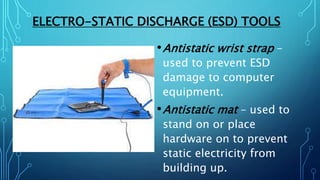
ELECTRO-STATIC DISCHARGE (ESD) TOOLS
•Antistatic wrist strap –
used to prevent ESD
damage to computer
equipment.
•Antistatic mat – used to
stand on or place
hardware on to prevent
static electricity from
building up.
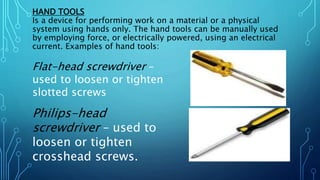
HAND TOOLS
Is a device for performing work on a material or a physical
system using hands only. The hand tools can be manually used
by employing force, or electrically powered, using an electrical
current. Examples of hand tools:
Flat-head screwdriver –
used to loosen or tighten
slotted screws
Philips-head
screwdriver – used to
loosen or tighten
crosshead screws.
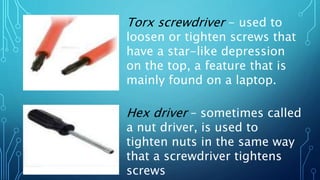
Torx screwdriver - used to
loosen or tighten screws that
have a star-like depression
on the top, a feature that is
mainly found on a laptop.
Hex driver – sometimes called
a nut driver, is used to
tighten nuts in the same way
that a screwdriver tightens
screws
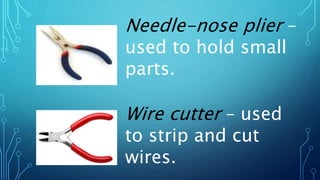
Needle-nose plier –
used to hold small
parts.
Wire cutter – used
to strip and cut
wires.
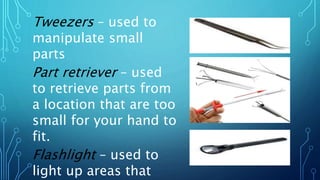
Tweezers – used to
manipulate small
parts
Part retriever – used
to retrieve parts from
a location that are too
small for your hand to
fit.
Flashlight – used to
light up areas that
CLEANING TOOLS
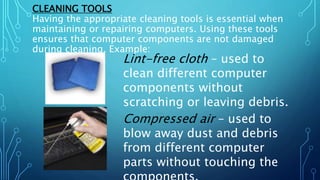
Having the appropriate cleaning tools is essential when
maintaining or repairing computers. Using these tools
ensures that computer components are not damaged
during cleaning. Example:
Lint-free cloth – used to
clean different computer
components without
scratching or leaving debris.
Compressed air – used to
blow away dust and debris
from different computer
parts without touching the
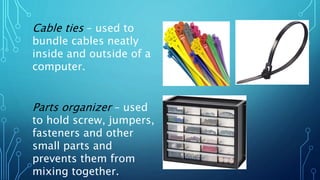
Cable ties – used to
bundle cables neatly
inside and outside of a
computer.
Parts organizer – used
to hold screw, jumpers,
fasteners and other
small parts and
prevents them from
mixing together.
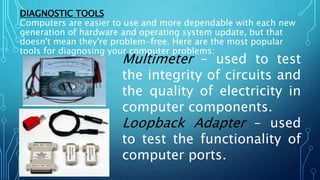
DIAGNOSTIC TOOLS
Computers are easier to use and more dependable with each new
generation of hardware and operating system update, but that
doesn't mean they're problem-free. Here are the most popular
tools for diagnosing your computer problems:
Multimeter – used to test
the integrity of circuits and
the quality of electricity in
computer components.
Loopback Adapter – used
to test the functionality of
computer ports.
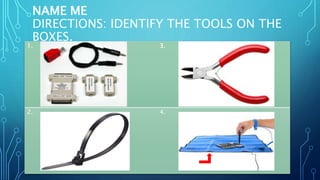
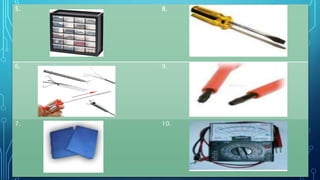
NAME ME
DIRECTIONS: IDENTIFY THE TOOLS ON THE
BOXES.
1. 3.
2. 4.
5. 8.
6. 9.
7. 10.

COMPUTER HAND TOOLS.pptx

  • 1.
  • 2.
    USB FLASHDRI VE is a plug-and- playportable storage device that uses flash memory and is lightweight enough to attach to a key chain.
  • 3.
    MS WORD A word processing applicationused for creating documents such as letters, brochures, activity programs, and learning activities.
  • 4.
    MS POWERPOIN T s a presentationtool that uses graphical approach to presentation in the form of slides. Its primary function is to help a presenter deliver its presentation
  • 5.
    MOTHERBOAR D – is themain circuit board of a computer. It contains all the circuits and components that run the computer
  • 6.
    MS EXCEL is a spreadsheet programideal for entering, calculating, and analyzing numeric data such as sales figures, sales taxes, and students’ grades.
  • 7.
    CPU (CENTRAL PROCESSING UNIT) The processoris the main “brain” or “heart” of a computer system. It performs all of the instructions and calculations that are needed and manages the flow of information through a computer.
  • 8.
    TRUE OR FALSE INSTRUCTION:READ THE STATEMENTS CAREFULLY THEN WRITE TRUE IF THE STATEMENT IS CORRECT AND WRITE FALSE IF IT IS WRONG. • ______1. Choosing the best tool for each task requires training in the proper use of the tools. • _______2. When obtaining the tool, all the associated tooling and consumable parts, as recommended by the manufacturer, must be included. • _______3. The safe use of a tool depends on using the tool for the purpose for which it was designed. • _______4. All tools should be kept in good condition with regular maintenance. • _______5. Preparing for a task includes only knowing the task to be done.
  • 9.
    •_______6. Place partsor tools wherever you like. •_______7. Preparing for a task includes also the sequence of tasks to be done. •_______8. Everyone is allowed to eat or drink while working on a computer. •_______9. Always disconnect a computer from the AC power and any powered peripherals while you are working on it. •_______10. Know and understand in detail the scope of your work to be accomplished.
  • 10.
    • _______11. Choosingthe best tool for each task DO NOT require training in the proper use of the tools. • _______12. A tool is a handheld device that aids in accomplishing a task. • _______13. Following the manufacturer’s guidance and instruction for that specific tool is NOT necessary. • _______14. All tools are kept in good condition with regular maintenance. • _______15. Damaged or defective equipment/tools should be tagged and removed from service.
  • 11.
    HARDWARE TOOLS To completehardware repairs, it is important to have a toolkit that should contain all of the necessary tools. As you gain experience, you will learn which tools to have available for different types of jobs. Hardware tools are grouped into these four categories: •Electro-Static Discharge (ESD) tools •Hand tools •Cleaning tools •Diagnostic tools
  • 12.
    ELECTRO-STATIC DISCHARGE (ESD)TOOLS •Antistatic wrist strap – used to prevent ESD damage to computer equipment. •Antistatic mat – used to stand on or place hardware on to prevent static electricity from building up.
  • 13.
    HAND TOOLS Is adevice for performing work on a material or a physical system using hands only. The hand tools can be manually used by employing force, or electrically powered, using an electrical current. Examples of hand tools: Flat-head screwdriver – used to loosen or tighten slotted screws Philips-head screwdriver – used to loosen or tighten crosshead screws.
  • 14.
    Torx screwdriver -used to loosen or tighten screws that have a star-like depression on the top, a feature that is mainly found on a laptop. Hex driver – sometimes called a nut driver, is used to tighten nuts in the same way that a screwdriver tightens screws
  • 15.
    Needle-nose plier – usedto hold small parts. Wire cutter – used to strip and cut wires.
  • 16.
    Tweezers – usedto manipulate small parts Part retriever – used to retrieve parts from a location that are too small for your hand to fit. Flashlight – used to light up areas that
  • 17.
    CLEANING TOOLS Having theappropriate cleaning tools is essential when maintaining or repairing computers. Using these tools ensures that computer components are not damaged during cleaning. Example: Lint-free cloth – used to clean different computer components without scratching or leaving debris. Compressed air – used to blow away dust and debris from different computer parts without touching the
  • 18.
    Cable ties –used to bundle cables neatly inside and outside of a computer. Parts organizer – used to hold screw, jumpers, fasteners and other small parts and prevents them from mixing together.
  • 19.
    DIAGNOSTIC TOOLS Computers areeasier to use and more dependable with each new generation of hardware and operating system update, but that doesn't mean they're problem-free. Here are the most popular tools for diagnosing your computer problems: Multimeter – used to test the integrity of circuits and the quality of electricity in computer components. Loopback Adapter – used to test the functionality of computer ports.
  • 20.
    NAME ME DIRECTIONS: IDENTIFYTHE TOOLS ON THE BOXES. 1. 3. 2. 4.
  • 21.

Editor's Notes

  • #13 Static electricity is easily generated by friction on carpets, tile flooring, clothing, hair, fabric, etc… The friction of moving air alone will charge suspended particles and cause the buildup of static electrical charges on people and objects in the environment. Grounded antistatic work mats used with antistatic wrist straps provide the most basic means for the controlled discharge of electrostatic electricity. Examples of ESD Tools: