Hybrid App
 Web development is all about communication. In this
case, communication between two parties, over the
HTTP protocol:
 The Server - This party is responsible
for serving pages.
 Languages used: PHP, Python, ASP.Net in C#,C++ or
Visual Basic.
 The Client - This party requests pages from
the Server, and displays them to the user. In most
cases, the client is a web browser.
 The User - The user uses the Client in order to
surf the web, fill in forms, watch videos online,
etc.
Language used:JavaScript,HTML*,CSS*
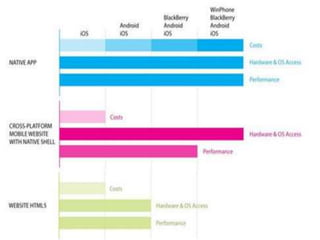
• Mobile application divided into three categories: native
applications, mobile Web and Hybrid Web technologies.
•Native applications are specifically developed for one
platform hence takes full advantage of device
capabilities.
•Web apps are not exactly mobile apps but Web sites
that are mobile optimized.
•A hybrid application is a mix of both native and Web
technologies that are leveraged to deliver a mix of
Web content and native capabilities.
Mobile Application
Why use Mobile App?
Mobile Apps offer better personalization.
Ease of Sending Notifications.
Making Use of Mobile Device Features.
Can have ability to Work Offline
Freedom in designing.
New Branding Experiences
New Stream of Conversions
Apps can works Faster than Websites.
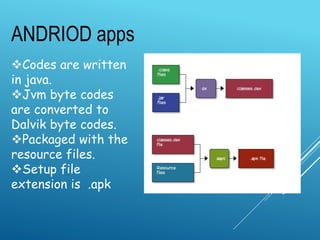
ANDRIOD apps
Codes are written
in java.
Jvm byte codes
are converted to
Dalvik byte codes.
Packaged with the
resource files.
Setup file
extension is .apk
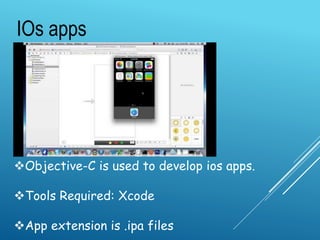
Objective-C is used to develop ios apps.
Tools Required: Xcode
App extension is .ipa files
IOs apps
windows apps
Languages which can be used :
Visual C++, Visual C# and Visual
Basic, Client-side Jscript, ASP.NET
IDE : Visual Studio
File format/extension : XAP
CROSS PLATFORM
DEVELOPMENT
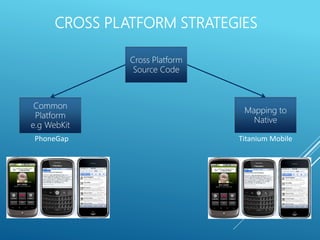
CROSS PLATFORM STRATEGIES
9
Common
Platform
e.g WebKit
Mapping to
Native
PhoneGap Titanium Mobile
Cross Platform
Source Code
 Cross-platform mobile development refers to the development of
mobile apps that can be used on multiple mobile platforms.
 Trend for BYOD is increasing.
 Development of corporate mobile apps and be able to send them
to many different mobile devices that operate on various networks
and use different operating systems.
 Uses CSS, HTML and JavaScript to develop the app that makes it
trendy.
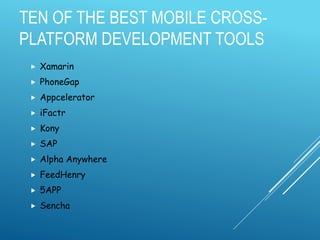
TEN OF THE BEST MOBILE CROSS-
PLATFORM DEVELOPMENT TOOLS
 Xamarin
 PhoneGap
 Appcelerator
 iFactr
 Kony
 SAP
 Alpha Anywhere
 FeedHenry
 5APP
 Sencha
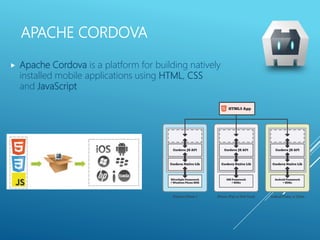
APACHE CORDOVA
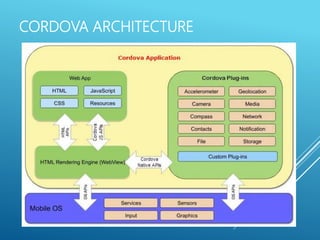
 Apache Cordova is a platform for building natively
installed mobile applications using HTML, CSS
and JavaScript
HISTORY
 Apache Cordova was originally called Phonegap build by
Nitobi
 Open-source & free software from the beginning (MIT
License), Apache License now
 Nitobi then aquired by Adobe and donated the PhoneGap
codebase to the Apache Software Foundation (ASF)
 PhoneGap is still a product of Adobe. It is a distribution of
Apache Cordova.
Think of Apache Cordova as the engine that powers
PhoneGap.
CORDOVA ARCHITECTURE
APACHE CORDOVA
APPLICATION’S USER INTERFACE
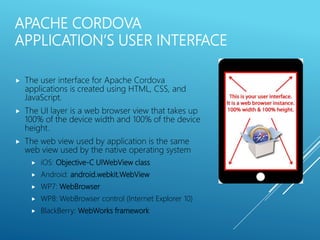
 The user interface for Apache Cordova
applications is created using HTML, CSS, and
JavaScript.
 The UI layer is a web browser view that takes up
100% of the device width and 100% of the device
height.
 The web view used by application is the same
web view used by the native operating system
 iOS: Objective-C UIWebView class
 Android: android.webkit.WebView
 WP7: WebBrowser
 WP8: WebBrowser control (Internet Explorer 10)
 BlackBerry: WebWorks framework
APACHE CORDOVA API
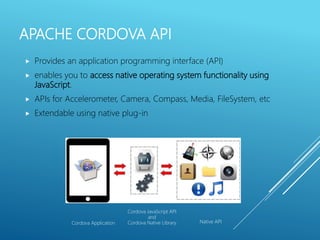
 Provides an application programming interface (API)
 enables you to access native operating system functionality using
JavaScript.
 APIs for Accelerometer, Camera, Compass, Media, FileSystem, etc
 Extendable using native plug-in
Cordova Application
Cordova JavaScript API
and
Cordova Native Library Native API
DEVELOPMENT USING CORDOVA
 Tools for development
 Any text editor
 Platform SDK e.g. Android SDT, Android SDK, BB
SDK, Xcode, Visual Studio Community with
Cordova Tools.
 Platform Emulator (usually provide along with
SDK)
 JS/HTML GUI Mobile framework e.g. JQuery,
Sencha Touch, dojo Mobile
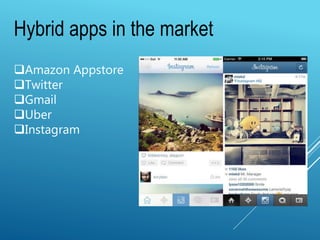
Hybrid apps in the market
Amazon Appstore
Twitter
Gmail
Uber
Instagram
Hybridapp
Hybridapp

Hybridapp

  • 1.
  • 2.
     Web developmentis all about communication. In this case, communication between two parties, over the HTTP protocol:  The Server - This party is responsible for serving pages.  Languages used: PHP, Python, ASP.Net in C#,C++ or Visual Basic.  The Client - This party requests pages from the Server, and displays them to the user. In most cases, the client is a web browser.  The User - The user uses the Client in order to surf the web, fill in forms, watch videos online, etc. Language used:JavaScript,HTML*,CSS*
  • 3.
    • Mobile applicationdivided into three categories: native applications, mobile Web and Hybrid Web technologies. •Native applications are specifically developed for one platform hence takes full advantage of device capabilities. •Web apps are not exactly mobile apps but Web sites that are mobile optimized. •A hybrid application is a mix of both native and Web technologies that are leveraged to deliver a mix of Web content and native capabilities. Mobile Application
  • 4.
    Why use MobileApp? Mobile Apps offer better personalization. Ease of Sending Notifications. Making Use of Mobile Device Features. Can have ability to Work Offline Freedom in designing. New Branding Experiences New Stream of Conversions Apps can works Faster than Websites.
  • 5.
    ANDRIOD apps Codes arewritten in java. Jvm byte codes are converted to Dalvik byte codes. Packaged with the resource files. Setup file extension is .apk
  • 6.
    Objective-C is usedto develop ios apps. Tools Required: Xcode App extension is .ipa files IOs apps
  • 7.
    windows apps Languages whichcan be used : Visual C++, Visual C# and Visual Basic, Client-side Jscript, ASP.NET IDE : Visual Studio File format/extension : XAP
  • 8.
  • 9.
    CROSS PLATFORM STRATEGIES 9 Common Platform e.gWebKit Mapping to Native PhoneGap Titanium Mobile Cross Platform Source Code
  • 10.
     Cross-platform mobiledevelopment refers to the development of mobile apps that can be used on multiple mobile platforms.  Trend for BYOD is increasing.  Development of corporate mobile apps and be able to send them to many different mobile devices that operate on various networks and use different operating systems.  Uses CSS, HTML and JavaScript to develop the app that makes it trendy.
  • 11.
    TEN OF THEBEST MOBILE CROSS- PLATFORM DEVELOPMENT TOOLS  Xamarin  PhoneGap  Appcelerator  iFactr  Kony  SAP  Alpha Anywhere  FeedHenry  5APP  Sencha
  • 13.
    APACHE CORDOVA  ApacheCordova is a platform for building natively installed mobile applications using HTML, CSS and JavaScript
  • 14.
    HISTORY  Apache Cordovawas originally called Phonegap build by Nitobi  Open-source & free software from the beginning (MIT License), Apache License now  Nitobi then aquired by Adobe and donated the PhoneGap codebase to the Apache Software Foundation (ASF)  PhoneGap is still a product of Adobe. It is a distribution of Apache Cordova. Think of Apache Cordova as the engine that powers PhoneGap.
  • 15.
  • 16.
    APACHE CORDOVA APPLICATION’S USERINTERFACE  The user interface for Apache Cordova applications is created using HTML, CSS, and JavaScript.  The UI layer is a web browser view that takes up 100% of the device width and 100% of the device height.  The web view used by application is the same web view used by the native operating system  iOS: Objective-C UIWebView class  Android: android.webkit.WebView  WP7: WebBrowser  WP8: WebBrowser control (Internet Explorer 10)  BlackBerry: WebWorks framework
  • 17.
    APACHE CORDOVA API Provides an application programming interface (API)  enables you to access native operating system functionality using JavaScript.  APIs for Accelerometer, Camera, Compass, Media, FileSystem, etc  Extendable using native plug-in Cordova Application Cordova JavaScript API and Cordova Native Library Native API
  • 18.
    DEVELOPMENT USING CORDOVA Tools for development  Any text editor  Platform SDK e.g. Android SDT, Android SDK, BB SDK, Xcode, Visual Studio Community with Cordova Tools.  Platform Emulator (usually provide along with SDK)  JS/HTML GUI Mobile framework e.g. JQuery, Sencha Touch, dojo Mobile
  • 19.
    Hybrid apps inthe market Amazon Appstore Twitter Gmail Uber Instagram

Editor's Notes

  • #17 Think of this as a “headless” web browser.  It renders HTML content, without the “chrome” or window decoration of a regular web browser.  You build your application to take advantage of this space, and you build navigational/interactive/content elements and application chrome into your HTML and CSS based user interface. -- https://github.com/mrlacey/phonegap-wp7/blob/master/framework/PhoneGap/NativeExecution.cs
  • #18 In addition to the “out of the box” functionality, you can also leverage PhoneGap’s JavaScript-to-native communication mechanism to write “native plugins”. PhoneGap native plugins enable you to write your own custom native classes and corresponding JavaScript interfaces for use within your PhoneGap applications. You build your application logic using JavaScript, and the PhoneGap API handles communication with the native operating system. If you need to access native functionality that isn’t already exposed, then you can easily create a native plugin to provide access to that native functionality. PhoneGap native plugins shouldn’t be thought of as “plugins” like Flash Player inside of a browser, rather you are “plugging in” additional functionality that extends the core PhoneGap framework.