

Microsoft Xamarin COE
@pMukteswar
Mukteswar Patnaik
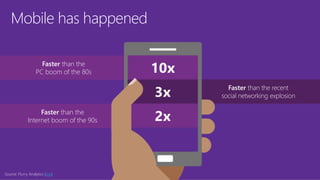
Mobile has happened
Faster than the
Internet boom of the 90s
Faster than the
PC boom of the 80s
Faster than the recent
social networking explosion
Source: Flurry Analytics (link)
Mobile is
transforming
how we live
and work…
Mobile represents the single largest
technology innovation of all time.
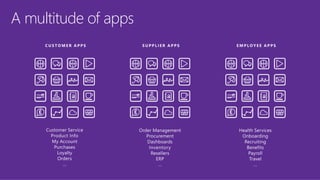
A multitude of apps
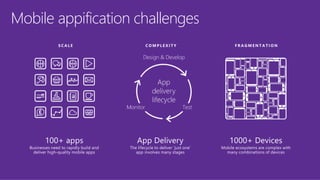
Mobile appification challenges
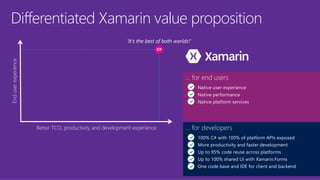
Differentiated Xamarin value proposition
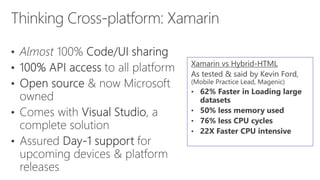
Better TCO, productivity and development experience
Enduserexperience
‘It’s the best of both worlds!’
... for developers
100% C# with 100% of platform APIs exposed
More productivity and faster development
Up to 95% code reuse across platforms
Up to 100% shared UI with Xamarin.Forms
One code base and IDE for client and backend
... for end users
Native user experience
Native performance
Native platform services
http://university.xamarin.com
http://developer.xamarin.com
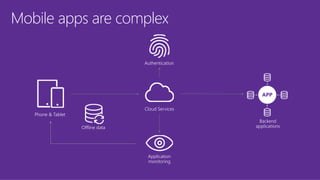
Mobile apps are complex
Authentication
Cloud Services
Offline data
Phone & Tablet
Application
monitoring
Backend
applications
APP
Cross Platform App Development
• Requirements for Xamarin [Click here]
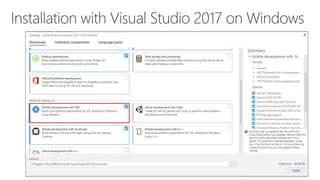
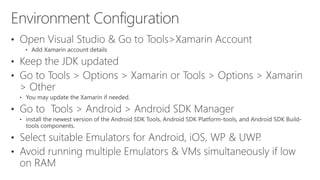
• Installation
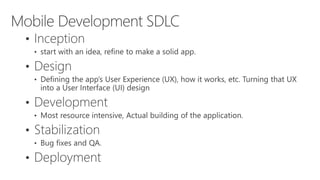
• Introduction to mobile SDLC
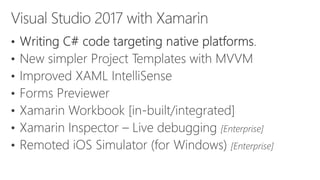
• Visual Studio with Xamarin
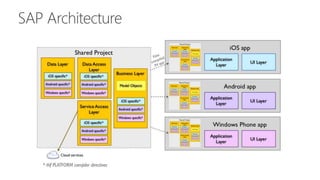
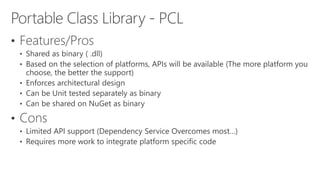
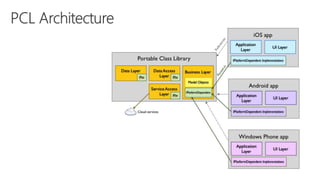
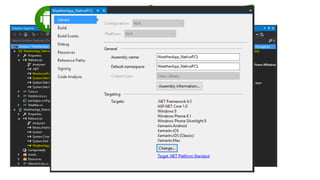
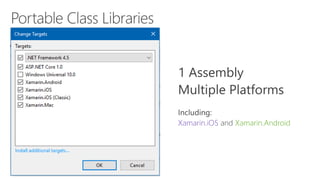
• Portable Class Libraries
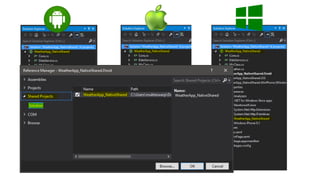
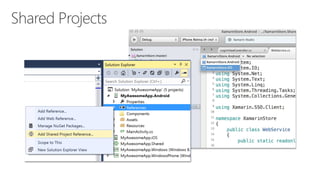
• Shared projects
• Configuring TFS for Xamarin
• Azure mobile Apps
We will talk about…
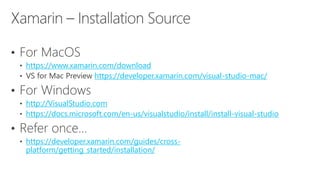
https://www.xamarin.com/download
https://developer.xamarin.com/visual-studio-mac/
http://VisualStudio.com
https://docs.microsoft.com/en-us/visualstudio/install/install-visual-studio
https://developer.xamarin.com/guides/cross-
platform/getting_started/installation/
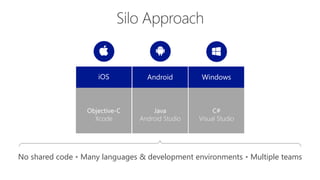
iOS WindowsAndroid
Objective-C
Xcode
C#
Visual Studio
Java
Android Studio
No shared code • Many languages & development environments • Multiple teams
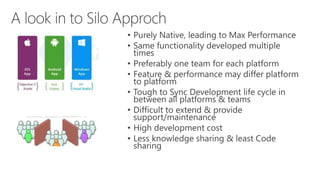
• Purely Native, leading to Max Performance
• Same functionality developed multiple
times
• Preferably one team for each platform
• Feature & performance may differ platform
to platform
• Tough to Sync Development life cycle in
between all platforms & teams
• Difficult to extend & provide
support/maintenance
• High development cost
• Less knowledge sharing & least Code
sharing
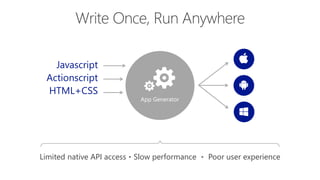
App Generator
Javascript
Actionscript
HTML+CSS
Limited native API access • Slow performance • Poor user experience
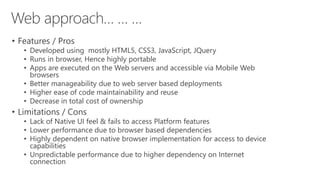
• Features / Pros
• Developed using mostly HTML5, CSS3, JavaScript, JQuery
• Runs in browser, Hence highly portable
• Apps are executed on the Web servers and accessible via Mobile Web
browsers
• Better manageability due to web server based deployments
• Higher ease of code maintainability and reuse
• Decrease in total cost of ownership
• Limitations / Cons
• Lack of Native UI feel & fails to access Platform features
• Lower performance due to browser based dependencies
• Highly dependent on native browser implementation for access to device
capabilities
• Unpredictable performance due to higher dependency on Internet
connection
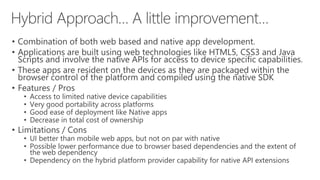
• Combination of both web based and native app development.
• Applications are built using web technologies like HTML5, CSS3 and Java
Scripts and involve the native APIs for access to device specific capabilities.
• These apps are resident on the devices as they are packaged within the
browser control of the platform and compiled using the native SDK
• Features / Pros
• Access to limited native device capabilities
• Very good portability across platforms
• Good ease of deployment like Native apps
• Decrease in total cost of ownership
• Limitations / Cons
• UI better than mobile web apps, but not on par with native
• Possible lower performance due to browser based dependencies and the extent of
the web dependency
• Dependency on the hybrid platform provider capability for native API extensions
“Facebook’s biggest mistake was
betting too much on HTML5
as opposed to native app development.”
~Mark Zuckerberg
[Facebook CEO]
• Transform the source code compiled into the native device specific platforms,
deployed directly on devices
• Provide specific APIs that leverage deep native integration capabilities and the
apps developed through this method have a rich user experience that closely
mirrors the native UX [User eXperience]
• Features / Pros
• Richer UX like native apps
• Leverage platform specific capabilities
• Can be ported to multiple platforms though development in a single language
• Deployment on the popular app stores ecosystems is high
• Limitations / Cons [Exception: Xamarin]
• The ability to develop the app is governed by the limitations of the platform APIs
• Certain native capability usage inhibits seamless portability of the app
• Not available for all platforms and are limited to certain/few [Xamarin: iOS, Android, WinPhone,
UWP, Xamarin.Mac]
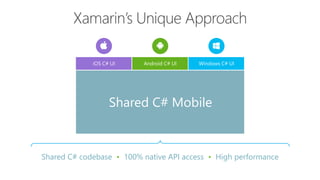
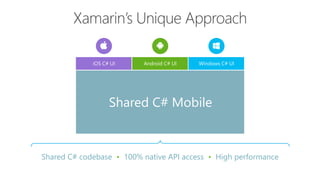
Shared C# codebase • 100% native API access • High performance
iOS C# UI Windows C# UIAndroid C# UI
Shared C# Mobile
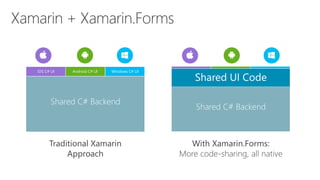
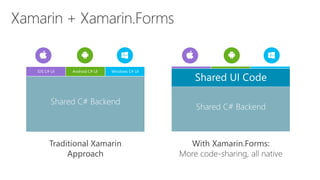
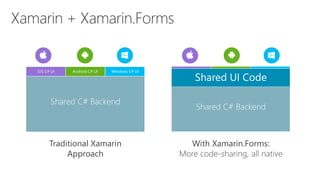
Traditional Xamarin
Approach
With Xamarin.Forms:
More code-sharing, all native
iOS C# UI Windows C# UIAndroid C# UI
Shared C# Backend
Shared UI Code
Shared C# Backend
Silo vs Web vs Hybrid
Cross-Platform
Native to All Platform
[SIMULTANEOUSLY]
vs
HTML 5
Proprietary languages
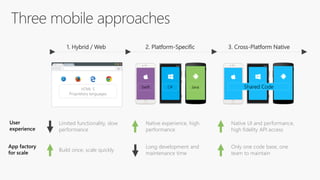
1. Hybrid / Web 2. Platform-Specific
Swift C# Java
3. Cross-Platform Native
Shared Code
Limited functionality, slow
performance
Native experience, high
performance
Native UI and performance,
high fidelity API access
Build once, scale quickly
Long development and
maintenance time
Only one code base, one
team to maintain
User
experience
App factory
for scale
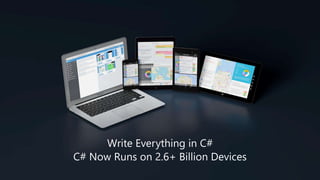
Write Everything in C#
C# Now Runs on 2.6+ Billion Devices
Shared C# codebase • 100% native API access • High performance
iOS C# UI Windows C# UIAndroid C# UI
Shared C# Mobile
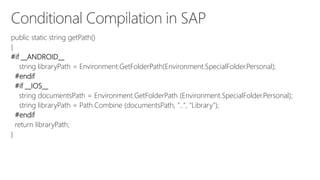
public static string getPath()
{
#if __ANDROID__
string libraryPath = Environment.GetFolderPath(Environment.SpecialFolder.Personal);
#endif
#if __IOS__
string documentsPath = Environment.GetFolderPath (Environment.SpecialFolder.Personal);
string libraryPath = Path.Combine (documentsPath, "..", "Library");
#endif
return libraryPath;
}
Traditional Xamarin
Approach
With Xamarin.Forms:
More code-sharing, all native
iOS C# UI Windows C# UIAndroid C# UI
Shared C# Backend
Shared UI Code
Shared C# Backend
Xamarin.iOS Xamarin.Android
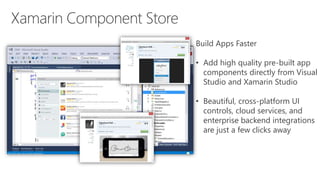
Build Apps Faster
• Add high quality pre-built app
components directly from Visual
Studio and Xamarin Studio
• Beautiful, cross-platform UI
controls, cloud services, and
enterprise backend integrations
are just a few clicks away
Mac
iOS
Android
Windows Phone
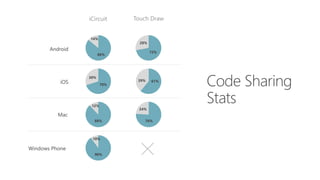
iCircuit Touch Draw
86%
14%
72%
28%
70%
30%
61%39%
88%
12%
76%
24%
90%
10%
[Clickhere]
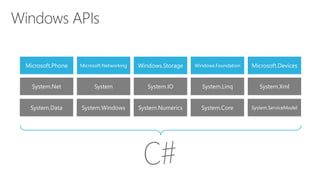
Microsoft.Phone Microsoft.Networking Windows.Storage Windows.Foundation Microsoft.Devices
System.Data System.Windows System.Numerics System.Core System.ServiceModel
System.Net System System.IO System.Linq System.Xml
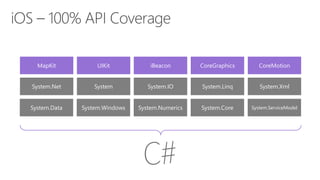
MapKit UIKit iBeacon CoreGraphics CoreMotion
System.Data System.Windows System.Numerics System.Core System.ServiceModel
System.Net System System.IO System.Linq System.Xml
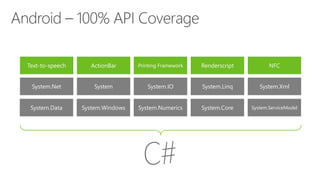
Text-to-speech ActionBar Printing Framework Renderscript NFC
System.Data System.Windows System.Numerics System.Core System.ServiceModel
System.Net System System.IO System.Linq System.Xml
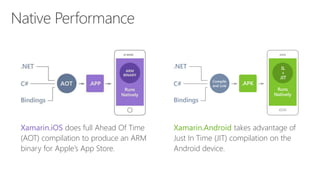
Xamarin.iOS does full Ahead Of Time
(AOT) compilation to produce an ARM
binary for Apple’s App Store.
Xamarin.Android takes advantage of
Just In Time (JIT) compilation on the
Android device.
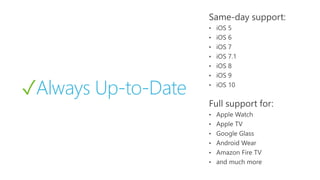
✓Always Up-to-Date
•
•
•
•
•
•
•
•
•
•
•
•
•
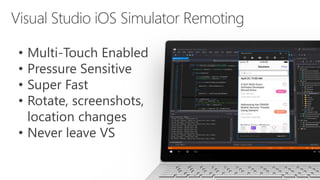
• Multi-Touch Enabled
• Pressure Sensitive
• Super Fast
• Rotate, screenshots,
location changes
• Never leave VS
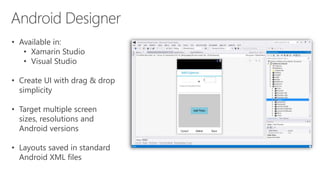
• Available in:
• Xamarin Studio
• Visual Studio
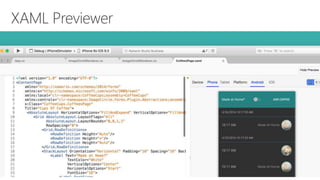
• Create UI with drag & drop
simplicity
• Target multiple screen
sizes, resolutions and
Android versions
• Layouts saved in standard
Android XML files
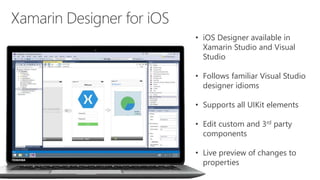
• iOS Designer available in
Xamarin Studio and Visual
Studio
• Follows familiar Visual Studio
designer idioms
• Supports all UIKit elements
• Edit custom and 3rd party
components
• Live preview of changes to
properties
Traditional Xamarin
Approach
With Xamarin.Forms:
More code-sharing, all native
iOS C# UI Windows C# UIAndroid C# UI
Shared C# Backend
Shared UI Code
Shared C# Backend
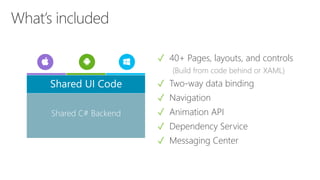
✓ 40+ Pages, layouts, and controls
(Build from code behind or XAML)
✓ Two-way data binding
✓ Navigation
✓ Animation API
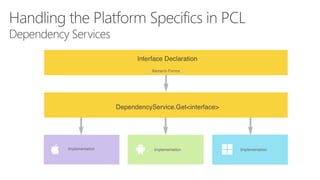
✓ Dependency Service
✓ Messaging Center
Shared C# Backend
Shared UI Code
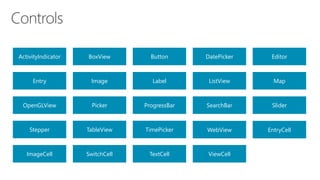
ActivityIndicator BoxView Button DatePicker Editor
Entry Image Label ListView Map
OpenGLView Picker ProgressBar SearchBar Slider
Stepper TableView TimePicker WebView EntryCell
ImageCell SwitchCell TextCell ViewCell
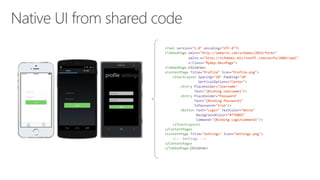
<?xml version="1.0" encoding="UTF-8"?>
<TabbedPage xmlns="http://xamarin.com/schemas/2014/forms"
xmlns:x="http://schemas.microsoft.com/winfx/2009/xaml"
x:Class="MyApp.MainPage">
<TabbedPage.Children>
<ContentPage Title="Profile" Icon="Profile.png">
<StackLayout Spacing="20" Padding="20"
VerticalOptions="Center">
<Entry Placeholder="Username"
Text="{Binding Username}"/>
<Entry Placeholder="Password"
Text="{Binding Password}"
IsPassword="true"/>
<Button Text="Login" TextColor="White"
BackgroundColor="#77D065"
Command="{Binding LoginCommand}"/>
</StackLayout>
</ContentPage>
<ContentPage Title="Settings" Icon="Settings.png">
<!-- Settings -->
</ContentPage>
</TabbedPage.Children>
Azure Mobile Apps with Xamarin
@pMukteswar
Mukteswar Patnaik
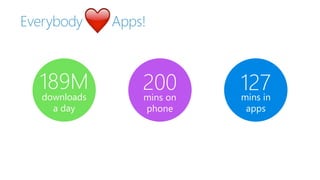
Everybody Apps!
189M
downloads
a day
200mins on
phone
127mins in
apps
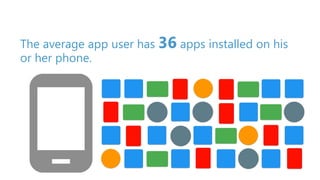
The average app user has 36 apps installed on his
or her phone.
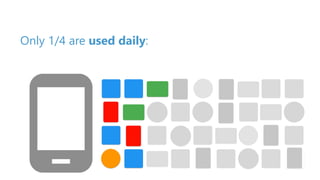
Only 1/4 are used daily:
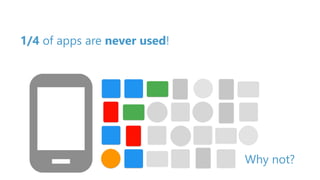
1/4 of apps are never used!
Why not?
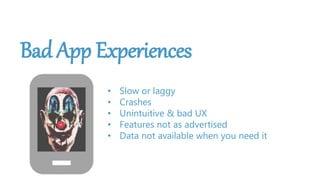
Bad App Experiences
• Slow or laggy
• Crashes
• Unintuitive & bad UX
• Features not as advertised
• Data not available when you need it
Your app craves connection
more than you do.
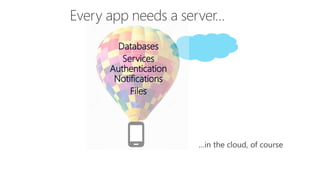
Databases
Services
Authentication
Notifications
Files
Courtesy of Microsoft
 A platform-as-a-service (PaaS) offering of Microsoft Azure
 A ready-made backend so the developer can focus on the app
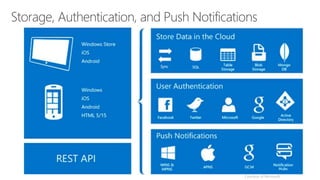
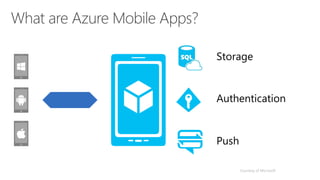
Storage
Authentication
Push
Courtesy of Microsoft
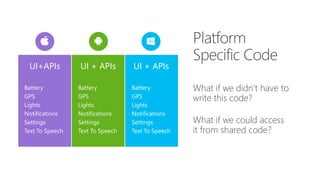
What if we didn’t have to
write this code?
What if we could access
it from shared code?
UI+APIs UI + APIsUI + APIs
Battery
GPS
Lights
Notifications
Settings
Text To Speech
Battery
GPS
Lights
Notifications
Settings
Text To Speech
Battery
GPS
Lights
Notifications
Settings
Text To Speech
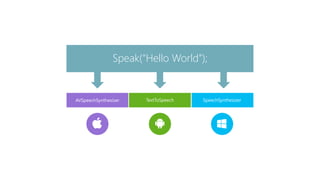
TextToSpeech
Speak(“Hello World”);
AVSpeechSynthesizer SpeechSynthesizer
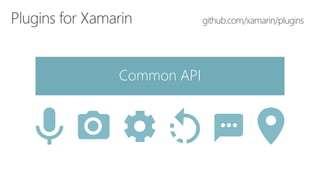
Common API
Demo
Thank You!
Q/A, If Any…
http://visualstudio.com
http://university.xamarin.com
http://developer.xamarin.com
http://open.xamarin.com
http://xamarin.com/prebuilt
http://GitHub.con/xamarin/plugins
http://GitHub.com/xamarin

Xamarin COE by Mukteswar Patnaik

  • 1.
  • 4.
    Mobile has happened Fasterthan the Internet boom of the 90s Faster than the PC boom of the 80s Faster than the recent social networking explosion Source: Flurry Analytics (link)
  • 5.
    Mobile is transforming how welive and work… Mobile represents the single largest technology innovation of all time.
  • 6.
  • 7.
  • 8.
    Differentiated Xamarin valueproposition Better TCO, productivity and development experience Enduserexperience ‘It’s the best of both worlds!’ ... for developers 100% C# with 100% of platform APIs exposed More productivity and faster development Up to 95% code reuse across platforms Up to 100% shared UI with Xamarin.Forms One code base and IDE for client and backend ... for end users Native user experience Native performance Native platform services
  • 10.
  • 11.
  • 12.
    Mobile apps arecomplex Authentication Cloud Services Offline data Phone & Tablet Application monitoring Backend applications APP
  • 13.
    Cross Platform AppDevelopment • Requirements for Xamarin [Click here] • Installation • Introduction to mobile SDLC • Visual Studio with Xamarin • Portable Class Libraries • Shared projects • Configuring TFS for Xamarin • Azure mobile Apps We will talk about…
  • 14.
  • 22.
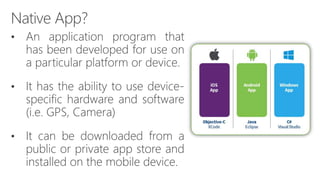
    iOS WindowsAndroid Objective-C Xcode C# Visual Studio Java AndroidStudio No shared code • Many languages & development environments • Multiple teams
  • 23.
    • Purely Native,leading to Max Performance • Same functionality developed multiple times • Preferably one team for each platform • Feature & performance may differ platform to platform • Tough to Sync Development life cycle in between all platforms & teams • Difficult to extend & provide support/maintenance • High development cost • Less knowledge sharing & least Code sharing
  • 24.
    App Generator Javascript Actionscript HTML+CSS Limited nativeAPI access • Slow performance • Poor user experience
  • 25.
    • Features /Pros • Developed using mostly HTML5, CSS3, JavaScript, JQuery • Runs in browser, Hence highly portable • Apps are executed on the Web servers and accessible via Mobile Web browsers • Better manageability due to web server based deployments • Higher ease of code maintainability and reuse • Decrease in total cost of ownership • Limitations / Cons • Lack of Native UI feel & fails to access Platform features • Lower performance due to browser based dependencies • Highly dependent on native browser implementation for access to device capabilities • Unpredictable performance due to higher dependency on Internet connection
  • 26.
    • Combination ofboth web based and native app development. • Applications are built using web technologies like HTML5, CSS3 and Java Scripts and involve the native APIs for access to device specific capabilities. • These apps are resident on the devices as they are packaged within the browser control of the platform and compiled using the native SDK • Features / Pros • Access to limited native device capabilities • Very good portability across platforms • Good ease of deployment like Native apps • Decrease in total cost of ownership • Limitations / Cons • UI better than mobile web apps, but not on par with native • Possible lower performance due to browser based dependencies and the extent of the web dependency • Dependency on the hybrid platform provider capability for native API extensions
  • 27.
    “Facebook’s biggest mistakewas betting too much on HTML5 as opposed to native app development.” ~Mark Zuckerberg [Facebook CEO]
  • 28.
    • Transform thesource code compiled into the native device specific platforms, deployed directly on devices • Provide specific APIs that leverage deep native integration capabilities and the apps developed through this method have a rich user experience that closely mirrors the native UX [User eXperience] • Features / Pros • Richer UX like native apps • Leverage platform specific capabilities • Can be ported to multiple platforms though development in a single language • Deployment on the popular app stores ecosystems is high • Limitations / Cons [Exception: Xamarin] • The ability to develop the app is governed by the limitations of the platform APIs • Certain native capability usage inhibits seamless portability of the app • Not available for all platforms and are limited to certain/few [Xamarin: iOS, Android, WinPhone, UWP, Xamarin.Mac]
  • 29.
    Shared C# codebase• 100% native API access • High performance iOS C# UI Windows C# UIAndroid C# UI Shared C# Mobile
  • 30.
    Traditional Xamarin Approach With Xamarin.Forms: Morecode-sharing, all native iOS C# UI Windows C# UIAndroid C# UI Shared C# Backend Shared UI Code Shared C# Backend
  • 31.
    Silo vs Webvs Hybrid Cross-Platform Native to All Platform [SIMULTANEOUSLY] vs
  • 32.
    HTML 5 Proprietary languages 1.Hybrid / Web 2. Platform-Specific Swift C# Java 3. Cross-Platform Native Shared Code Limited functionality, slow performance Native experience, high performance Native UI and performance, high fidelity API access Build once, scale quickly Long development and maintenance time Only one code base, one team to maintain User experience App factory for scale
  • 36.
    Write Everything inC# C# Now Runs on 2.6+ Billion Devices
  • 41.
    Shared C# codebase• 100% native API access • High performance iOS C# UI Windows C# UIAndroid C# UI Shared C# Mobile
  • 48.
    public static stringgetPath() { #if __ANDROID__ string libraryPath = Environment.GetFolderPath(Environment.SpecialFolder.Personal); #endif #if __IOS__ string documentsPath = Environment.GetFolderPath (Environment.SpecialFolder.Personal); string libraryPath = Path.Combine (documentsPath, "..", "Library"); #endif return libraryPath; }
  • 54.
    Traditional Xamarin Approach With Xamarin.Forms: Morecode-sharing, all native iOS C# UI Windows C# UIAndroid C# UI Shared C# Backend Shared UI Code Shared C# Backend
  • 56.
  • 58.
    Build Apps Faster •Add high quality pre-built app components directly from Visual Studio and Xamarin Studio • Beautiful, cross-platform UI controls, cloud services, and enterprise backend integrations are just a few clicks away
  • 60.
    Mac iOS Android Windows Phone iCircuit TouchDraw 86% 14% 72% 28% 70% 30% 61%39% 88% 12% 76% 24% 90% 10%
  • 61.
  • 63.
    Microsoft.Phone Microsoft.Networking Windows.StorageWindows.Foundation Microsoft.Devices System.Data System.Windows System.Numerics System.Core System.ServiceModel System.Net System System.IO System.Linq System.Xml
  • 64.
    MapKit UIKit iBeaconCoreGraphics CoreMotion System.Data System.Windows System.Numerics System.Core System.ServiceModel System.Net System System.IO System.Linq System.Xml
  • 65.
    Text-to-speech ActionBar PrintingFramework Renderscript NFC System.Data System.Windows System.Numerics System.Core System.ServiceModel System.Net System System.IO System.Linq System.Xml
  • 66.
    Xamarin.iOS does fullAhead Of Time (AOT) compilation to produce an ARM binary for Apple’s App Store. Xamarin.Android takes advantage of Just In Time (JIT) compilation on the Android device.
  • 67.
  • 70.
    • Multi-Touch Enabled •Pressure Sensitive • Super Fast • Rotate, screenshots, location changes • Never leave VS
  • 73.
    • Available in: •Xamarin Studio • Visual Studio • Create UI with drag & drop simplicity • Target multiple screen sizes, resolutions and Android versions • Layouts saved in standard Android XML files
  • 74.
    • iOS Designeravailable in Xamarin Studio and Visual Studio • Follows familiar Visual Studio designer idioms • Supports all UIKit elements • Edit custom and 3rd party components • Live preview of changes to properties
  • 77.
    Traditional Xamarin Approach With Xamarin.Forms: Morecode-sharing, all native iOS C# UI Windows C# UIAndroid C# UI Shared C# Backend Shared UI Code Shared C# Backend
  • 78.
    ✓ 40+ Pages,layouts, and controls (Build from code behind or XAML) ✓ Two-way data binding ✓ Navigation ✓ Animation API ✓ Dependency Service ✓ Messaging Center Shared C# Backend Shared UI Code
  • 79.
    ActivityIndicator BoxView ButtonDatePicker Editor Entry Image Label ListView Map OpenGLView Picker ProgressBar SearchBar Slider Stepper TableView TimePicker WebView EntryCell ImageCell SwitchCell TextCell ViewCell
  • 81.
    <?xml version="1.0" encoding="UTF-8"?> <TabbedPagexmlns="http://xamarin.com/schemas/2014/forms" xmlns:x="http://schemas.microsoft.com/winfx/2009/xaml" x:Class="MyApp.MainPage"> <TabbedPage.Children> <ContentPage Title="Profile" Icon="Profile.png"> <StackLayout Spacing="20" Padding="20" VerticalOptions="Center"> <Entry Placeholder="Username" Text="{Binding Username}"/> <Entry Placeholder="Password" Text="{Binding Password}" IsPassword="true"/> <Button Text="Login" TextColor="White" BackgroundColor="#77D065" Command="{Binding LoginCommand}"/> </StackLayout> </ContentPage> <ContentPage Title="Settings" Icon="Settings.png"> <!-- Settings --> </ContentPage> </TabbedPage.Children>
  • 83.
    Azure Mobile Appswith Xamarin @pMukteswar Mukteswar Patnaik
  • 85.
  • 86.
    The average appuser has 36 apps installed on his or her phone.
  • 87.
    Only 1/4 areused daily:
  • 88.
    1/4 of appsare never used! Why not?
  • 89.
    Bad App Experiences •Slow or laggy • Crashes • Unintuitive & bad UX • Features not as advertised • Data not available when you need it
  • 90.
    Your app cravesconnection more than you do.
  • 91.
  • 93.
  • 94.
     A platform-as-a-service(PaaS) offering of Microsoft Azure  A ready-made backend so the developer can focus on the app
  • 95.
  • 98.
    What if wedidn’t have to write this code? What if we could access it from shared code? UI+APIs UI + APIsUI + APIs Battery GPS Lights Notifications Settings Text To Speech Battery GPS Lights Notifications Settings Text To Speech Battery GPS Lights Notifications Settings Text To Speech
  • 99.
  • 100.
  • 101.
  • 102.
    Thank You! Q/A, IfAny… http://visualstudio.com http://university.xamarin.com http://developer.xamarin.com http://open.xamarin.com http://xamarin.com/prebuilt http://GitHub.con/xamarin/plugins http://GitHub.com/xamarin

Editor's Notes

  • #3 Mukteswar Patnaik… A C# Developer, Gadget freak, and currently contributing to Mobile Eco system & MobDevops.
  • #5 The mobile revolution is not “coming” or “under way”, it has already happened! And the mobile tidal wave proved to be faster and bigger than anything that came before it. Mobile is a key part of our customers' digital transformation. Aside from consumer apps, organizations are mobilizing their workforce and partners with a growing number of critical business apps.
  • #7 Many businesses have already started their journey to mobile with consumer apps some time ago, so they are familiar with some of the biggest challenges. When the iPhone came out there was ‘an app for that’. And now the same thing is happening across every aspect of the modern business. Businesses are realizing that in order to be successful and thrive they will have to support not just one mobile app but a multi-app mobile strategy. We call this the appification of modern business – the proliferation of targeted, highly optimized apps designed for a particular group of users or specific task or purpose.
  • #8 Many businesses have already started their journey to mobile with consumer apps some time ago, so they are familiar with some of the biggest challenges. When the iPhone came out there was ‘an app for that’. And now the same thing is happening across every aspect of the modern business. Businesses are realizing that in order to be successful and thrive they will have to support not just one mobile app but a multi-app mobile strategy. We call this the appification of modern business – the proliferation of targeted, highly optimized apps designed for a particular group of users or specific task or purpose.
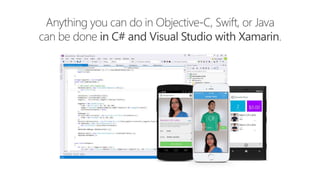
  • #9 Mobile is transformative because mobile apps are context-aware – and context-aware apps require full access to native device capabilities Mobile users - consumers and employees alike - are more likely to abandon apps that show poor performance or non-standard UI, navigation and controls because it slows them down and forces them to re-learn things they already know Xamarin takes .NET to the next level and extends it to iOS and Android Xamarin apps are 100% C# and 100% of Android + iOS platform APIs are exposed With Xamarin, everything you can do with Objective-C or Java, you can do with .NET Xamarin apps are 100% native apps, indistinguishable from platform-native apps created with Android Studio, Eclipse or Xcode Xamarin also includes powerful iOS and Android UI designers that enable you to create beautiful user experiences for Windows, iOS and Android in a visual designer with drag-and-drop simplicity Xamarin enables developers to use the same languages, libraries, and tools for all major mobile platforms, unlocking the extraordinary productivity of .NET for any iOS and Android while using existing skills and enabling effortless sharing of code among platforms With Xamarin, you can build native apps once and run them everywhere – giving developers the most productive and powerful platform for creating native cross-platform applications The cross-platform native approach combines the benefits of both worlds - you get the native user experience for each individual platform, and you also eliminate rework and increase organizational innovation and responsiveness by delivering more apps faster
  • #13 And to add to this – it’s not just an end-to-end problem, there is a top-down challenge as well. You can think of the mobile client really as the orchestration of vast amounts of data, pulled from disparate sources, and presented in elegant, intelligent, and actionable ways on a tiny screen. You can build a pretty screen, but the real user experience comes with the data and intelligence that flows through that screen. Three core elements of apps are security, authentication, and integration. So secure, performant access to data sources is a big part of building a great app. And this isn’t an outstanding digital experience yet – this is just the bare minimum.
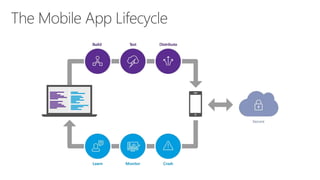
  • #18 The lifecycle of mobile development is largely no different than the SDLC for web or desktop applications. Not much different than desktop & Web SDLC phases can be used SDLC methodologies such as Agile, Spiral, Waterfall https://developer.xamarin.com/guides/cross-platform/getting_started/introduction_to_mobile_sdlc/#Mobile_Development_SDLC
  • #22 So we know what we want how do we get there? Let’s talk about the state of mobile development.
  • #23 Multiple Teams Multiple Code Bases Expensive & Slow Positive = Great apps delivered to user’s platform Negative = Development hampered by multiple code bases & fragmentation
  • #25 Unhappy Users Unhappy Developers Increase in Abandoned Apps Limited to what is implemented
  • #30 UI build natively per platform, leveraging C# C# + XAML C# + XML C# + XIB One shared app logic code base, iOS, Android, Mac, Windows Phone, Windows Store, Windows
  • #31 Xamarin recently introduced Xamarin.Forms a new library for cross platform user interface. We will touch up on this later, but this enables you to be highly productive, share code, but build out UI on each platform and access platform APIs. With Xamarin.Forms you now have a nice Shared UI Code layer, but still access to platform APIs You can start from native, pick a few screens, or start with forms, and replace with native later
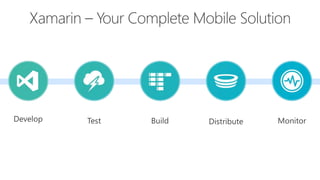
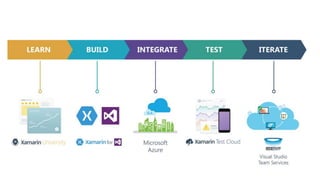
  • #39 Xamarin is your complete mobile solution. Xamarin Platform is usually what you hear about which is building native iOS, Android, Mac, and Windows Apps all in C# However Xamarin offers a wide range of products for developers to go mobile including Test Cloud, Hockey App, and a way to learn all of mobile with University.
  • #40 Xamarin is your complete mobile solution. Xamarin Platform is usually what you hear about which is building native iOS, Android, Mac, and Windows Apps all in C# However Xamarin offers a wide range of products for developers to go mobile including Test Cloud, Hockey App, and a way to learn all of mobile with University.
  • #42 UI build natively per platform, leveraging C# C# + XAML C# + XML C# + XIB One shared app logic code base, iOS, Android, Mac, Windows Phone, Windows Store, Windows
  • #55 Xamarin recently introduced Xamarin.Forms a new library for cross platform user interface. We will touch up on this later, but this enables you to be highly productive, share code, but build out UI on each platform and access platform APIs. With Xamarin.Forms you now have a nice Shared UI Code layer, but still access to platform APIs You can start from native, pick a few screens, or start with forms, and replace with native later
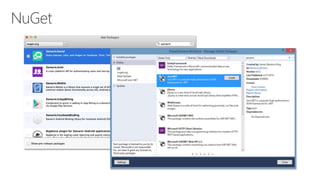
  • #58 Use all of your favorite libraries from NuGet or share and distribute your own!
  • #61 iCircuit is made by Frank Krueger, a long time Mono & Xamarin developer. Sharing code lead to 70 to 90% code reuse across platforms speeding up development Real-time circuit simulator and editor used to design analog and digital circuits http://praeclarum.org/post/42378027611/icircuit-code-reuse-part-cinq
  • #64 If you have ever developed for a Windows Platform before these .NET namespaces might look familiar. However, if we go to a new platform such as Windows Phone or Store we have a new SDK to use and a new set of namespaces.
  • #65 You can think of iOS and Android development the same with Xamarin. You can see we have all of our .NET namespaces and libraries, but Xamarin give us 100% api coverage of each iOS API in it’s SDK that we access view C#.
  • #66 The same is true for Android as well.
  • #67 There is no compromise on performance. Xamarin apps look and feel native because they are native. AOT compiler: compiles before running JIT compiler: compiles while running https://www.ibm.com/support/knowledgecenter/en/SSSTCZ_3.0.0/com.ibm.wrt.rtlinux.doc.30/realtime/aot.html
  • #68 Apple has a developer preview where Xamarin has alphas ready. Google does not offer this. Android versions are usually 4 to 8 weeks out for a stable release, but alphas and betas are usually earlier. Xamarin realizes how important having iOS ready because within 24 hours a large portion of iOS users upgrade Android on the other hand is much different. After 4 months on the market Android 4.4 only had 1% adoption
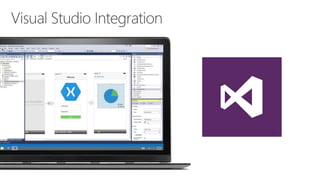
  • #70 Single Solution for iOS, Android, and Windows Leverage Entire Microsoft Ecosystem: ReSharper Team Foundation Server Azure ASP.NET Favorite Code Coverage and Profiling Tools Starter Compatible Visual Studio 2012, 2013, and 2015 including Community Edition
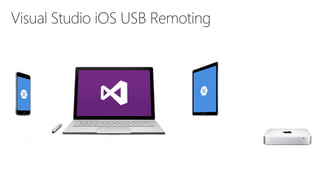
  • #72 Plug your iOS device into your PC USB port is automatically remoted to your Mac. Never leave your PC
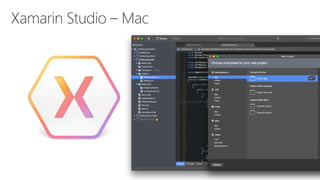
  • #73 Xamarin Studio on Mac offers: Android, iOS and Mac development World Class IDE with great features: Code Analysis Upload to Test Flight Git & Subversion Integration Code Completion Code Navigation Easy transition from Visual Studio The same Solution & Projects open in BOTH Xamarin Studio and Visual Studio!
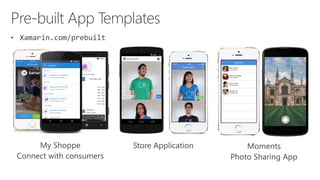
  • #76 If you are looking to get started will a full baked application simply head over to Xamarin’s pre-built page featuring these apps and many more!
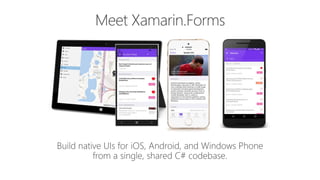
  • #77 Xamarin Forms is a new set of APIs allowing you to quickly and easily write shared User Interface code that is still rendered natively on each platform, while still providing direct access to the underlying SDKs if you need it.
  • #78 We see here the Xamarin approach we talked about earlier This enables you to be highly productive, share code, but build out UI on each platform and access platform APIs With Xamarin.Forms you now have a nice Shared UI Code layer, but still access to platform APIs You can start from native, pick a few screens, or start with forms, and replace with native later
  • #79 Xamarin.Forms is much more that just a framework and includes everything you need to get up and running to build out full native applications. If you are used to MVVM type of development you will feel right at home.
  • #80 First you have a set of pages for each screen of your application There are things like Content, and MasterDetail which gives you a nice flyout With a tabbed view you get the correct look on each platform iOS on bottom, Android on top, and on WP you have a Pivot control Inside of a page are layouts A lot of options from something simple like a stack panel to complex and powerful grids
  • #81 You have more than 40 controls, layouts, and pages to mix and match from. These are all of the controls you have out of the box, you can of course create your own. What is unique is you get the native control and have access to it. Consider an Entry Field On iOS it is mapped to UITextField Android it is EditText Windows Phone it is a TextBox
  • #83 Here is a quick example of a login page: Notice the data binding on the Entries Text fields. Additionally, there is a LoginCommand. Each has a native user interface
  • #88 Google survey
  • #93 92
  • #94 Extremely powerful You can do almost anything your backend would ever need to do with Azure. Data storage, authentication/authorization, push notifications, custom APIs, blob storage, etc. Flexible Need something lightweight? Azure is there. Need something robust and powerful? Azure is there. C# clients I’m a frontend developer, I care a lot about how easy this makes MY job (selfish) Many C# clients are written by Java developers, etc. Easy to use C# client Abstracts away much of pain of using a RESTful API C# Features Async / Await / TPL Uses C# idioms Properties, Fluent API Seems obvious, but not always true (first class citizen)
  • #95 References: https://docs.microsoft.com/en-us/azure/app-service-mobile/app-service-mobile-value-prop
  • #96 Notes: App Service aims to automate the creation of very common line-of-business mobile and web functionality The developers can focus on developing the parts of the app that are unique as opposed to the boilerplate, typical scenarios that must be re-created for each application
  • #97 Notes: Azure Mobile Apps is an app type of Azure App Service (others types include Web Apps, API Apps, and Logic Apps) Users don’t really care (and usually don’t know) what a mobile app is using for it’s backend Users care most about enjoying the app experience Devs should therefore spend most of their time building the best client experience they can Azure Mobile Apps helps devs by providing common mobile app backend features in a turnkey manner Data storage powered by SQL Database (but you don’t have to be a Database Admin to use it) User Authentication and Data Authorization Push Notifications (using services built into Android, iOS, Windows, and more) Other topics not covered in this lesson: Backend job processing using the scheduler Backend Logic Image and text courtesy of Microsoft
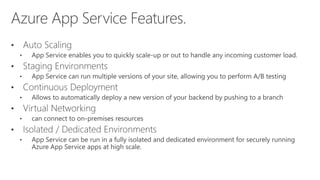
  • #98 Auto Scaling - App Service enables you to quickly scale-up or out to handle any incoming customer load. Manually select the number and size of VMs or set up auto-scaling to scale your mobile app backend based on load or schedule. Staging Environments - App Service can run multiple versions of your site, allowing you to perform A/B testing, test in production as part of a larger DevOps plan and do in-place staging of a new backend. Discover more about staging environments. Continuous Deployment - App Service can integrate with common SCM systems, allowing you to automatically deploy a new version of your backend by pushing to a branch of your SCM system. Discover more about deployment options. Virtual Networking - App Service can connect to on-premises resources using virtual network, ExpressRoute or hybrid connections. Discover more about hybrid connections, virtual networks, and ExpressRoute. Isolated / Dedicated Environments - App Service can be run in a fully isolated and dedicated enviroment for securely running Azure App Service apps at high scale. This is ideal for application workloads requiring very high scale, isolation or secure network access.
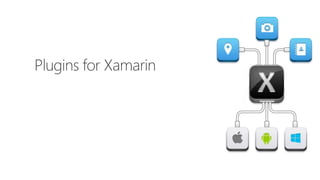
  • #99 A unique aspect of Xamarin.Forms is an abstraction over the user interface, but what about the platform specific functionality that makes these devices so special? That is where plugins for Xamarin come in.
  • #100 This is the platform specific code no matter how you are developing traditional Xamarin or with Xamarin.Forms. However, many platform APIs are the same bit of functionality, but with different APIs. What if we had 1 API?
  • #101 For instance text to speech, what if we could just say “Speak” and it would speak text with the underlying API.
  • #102 This is what Plugins for Xamarin are for! 1 API for all common APIs: Camera GPS Settings Notifications Battery And so much more!