Cross Platform App Development
using Xamarin
Who cares about Cross Platform?
 For most developers cross platform was just talk.
 Prior to 2010 70+% of all computers ran a version of Windows.
 MS was very good on backwards compatibility.
 XP was kept alive by .NET
 Picking Windows or Internet Explorer was a no brainer. Or more correctly
WinForms/WPF or Internet Explorer was a no brainer.
Cross
Platform
Strategies
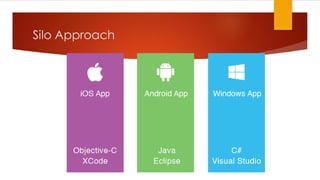
Silo Approach
Silo – Write App on every Target
Benefits
 Full native experience
 Total access to the device as
provided by SDK
 Share Web API
Negatives
 Minimal re-use mostly on back end
Web API
 Higher development cost from
multiple teams (silo teams) or
expensive multi-device developers
 Multiple codebases to maintain and
extend
 One platform rules the others are
subservient
Target Browser Not OS
Web Site
HTML – Write App using Mobile Web
Benefits
 Provide consist experience regardless
of target
 Cheap as it is just HTML
 Single codebase to maintain and
extend
 No need for revenue sharing as no
need to be in app stores
Negatives
 User experience tends to be webish
and not native
 Need to still test and debug multiple
targets
 Features tend to be a subset common
to all targets
HTML – Write App using Mobile Web
 Tools
 HTML5
 jQuery Mobile
 ASP.NET
 J2EE
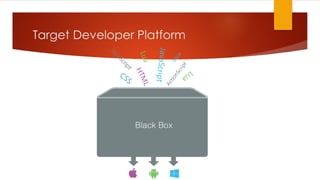
Target Developer Platform
MEAP – Write App using Mobile Enterprise
Application Platform
Benefits
 Provide consist experience regardless
of target
 Cheaper as App is developed once
for all targets
 Single codebase to maintain and
extend
 Apps can be in app store if needed
Negatives
 User experience tends to be webish
and not native
 Need to still test and debug multiple
targets even when MEAP only thing
updated
 Features tend to be a subset common
to all targets
 Vendor risk and lock in
MDAP – Write App using Mobile
Development Application Platform
 Strategies
 Tool generating target app
 Write app in single language and compile multiple targets
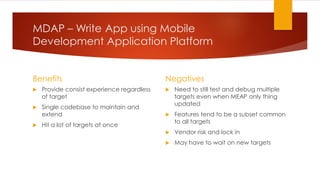
MDAP – Write App using Mobile
Development Application Platform
Benefits
 Provide consist experience regardless
of target
 Single codebase to maintain and
extend
 Hit a lot of targets at once
Negatives
 Need to still test and debug multiple
targets even when MEAP only thing
updated
 Features tend to be a subset common
to all targets
 Vendor risk and lock in
 May have to wait on new targets
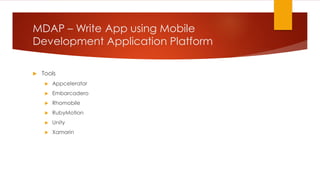
MDAP – Write App using Mobile
Development Application Platform
 Tools
 Appcelerator
 Embarcadero
 Rhomobile
 RubyMotion
 Unity
 Xamarin
Going Cross
Platform
using .NET
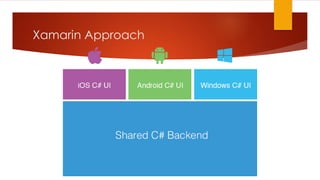
Xamarin Approach
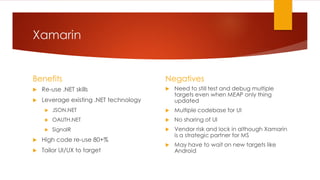
Xamarin
Benefits
 Re-use .NET skills
 Leverage existing .NET technology
 JSON.NET
 OAUTH.NET
 SignalR
 High code re-use 80+%
 Tailor UI/UX to target
Negatives
 Need to still test and debug multiple
targets even when MEAP only thing
updated
 Multiple codebase for UI
 No sharing of UI
 Vendor risk and lock in although Xamarin
is a strategic partner for MS
 May have to wait on new targets like
Android
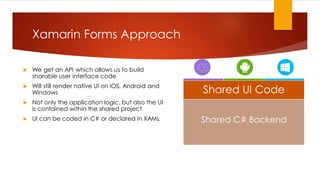
 We get an API which allows us to build
sharable user interface code
 Will still render native UI on iOS, Android and
Windows
 Not only the application logic, but also the UI
is contained within the shared project
 UI can be coded in C# or declared in XAML
Xamarin Forms Approach
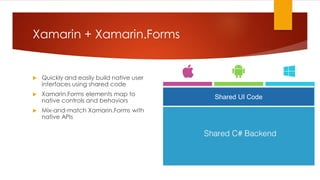
Shared C# Backend
Shared UI Code
 Xamarin Forms is a cross-platform natively backed UI toolkit abstraction that allows developers to
easily create user interfaces that can be shared across all targeted platforms ( iOS, Android and
Windows ).
 It allows rapid application development
 It’s an abstraction on top of the native OS and UI elements
 It will result in native apps with native look and feel
What is Xamarin Forms
Xamarin + Xamarin.Forms
 Quickly and easily build native user
interfaces using shared code
 Xamarin.Forms elements map to
native controls and behaviors
 Mix-and-match Xamarin.Forms with
native APIs
Shared UI Code
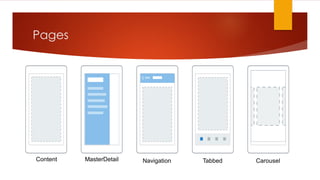
Pages
Content MasterDetail Navigation Tabbed Carousel
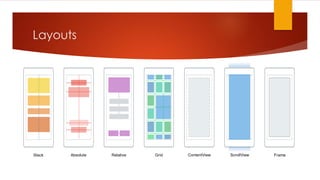
Layouts
Stack Absolute Relative Grid ContentView ScrollView Frame
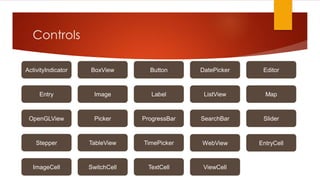
Controls
ActivityIndicator BoxView Button DatePicker Editor
Entry Image Label ListView Map
OpenGLView Picker ProgressBar SearchBar Slider
Stepper TableView TimePicker WebView EntryCell
ImageCell SwitchCell TextCell ViewCell

Cross platform apps using Xamarin

  • 1.
    Cross Platform AppDevelopment using Xamarin
  • 2.
    Who cares aboutCross Platform?  For most developers cross platform was just talk.  Prior to 2010 70+% of all computers ran a version of Windows.  MS was very good on backwards compatibility.  XP was kept alive by .NET  Picking Windows or Internet Explorer was a no brainer. Or more correctly WinForms/WPF or Internet Explorer was a no brainer.
  • 3.
  • 4.
  • 5.
    Silo – WriteApp on every Target Benefits  Full native experience  Total access to the device as provided by SDK  Share Web API Negatives  Minimal re-use mostly on back end Web API  Higher development cost from multiple teams (silo teams) or expensive multi-device developers  Multiple codebases to maintain and extend  One platform rules the others are subservient
  • 6.
    Target Browser NotOS Web Site
  • 7.
    HTML – WriteApp using Mobile Web Benefits  Provide consist experience regardless of target  Cheap as it is just HTML  Single codebase to maintain and extend  No need for revenue sharing as no need to be in app stores Negatives  User experience tends to be webish and not native  Need to still test and debug multiple targets  Features tend to be a subset common to all targets
  • 8.
    HTML – WriteApp using Mobile Web  Tools  HTML5  jQuery Mobile  ASP.NET  J2EE
  • 9.
  • 10.
    MEAP – WriteApp using Mobile Enterprise Application Platform Benefits  Provide consist experience regardless of target  Cheaper as App is developed once for all targets  Single codebase to maintain and extend  Apps can be in app store if needed Negatives  User experience tends to be webish and not native  Need to still test and debug multiple targets even when MEAP only thing updated  Features tend to be a subset common to all targets  Vendor risk and lock in
  • 11.
    MDAP – WriteApp using Mobile Development Application Platform  Strategies  Tool generating target app  Write app in single language and compile multiple targets
  • 12.
    MDAP – WriteApp using Mobile Development Application Platform Benefits  Provide consist experience regardless of target  Single codebase to maintain and extend  Hit a lot of targets at once Negatives  Need to still test and debug multiple targets even when MEAP only thing updated  Features tend to be a subset common to all targets  Vendor risk and lock in  May have to wait on new targets
  • 13.
    MDAP – WriteApp using Mobile Development Application Platform  Tools  Appcelerator  Embarcadero  Rhomobile  RubyMotion  Unity  Xamarin
  • 14.
  • 15.
  • 16.
    Xamarin Benefits  Re-use .NETskills  Leverage existing .NET technology  JSON.NET  OAUTH.NET  SignalR  High code re-use 80+%  Tailor UI/UX to target Negatives  Need to still test and debug multiple targets even when MEAP only thing updated  Multiple codebase for UI  No sharing of UI  Vendor risk and lock in although Xamarin is a strategic partner for MS  May have to wait on new targets like Android
  • 17.
     We getan API which allows us to build sharable user interface code  Will still render native UI on iOS, Android and Windows  Not only the application logic, but also the UI is contained within the shared project  UI can be coded in C# or declared in XAML Xamarin Forms Approach Shared C# Backend Shared UI Code
  • 18.
     Xamarin Formsis a cross-platform natively backed UI toolkit abstraction that allows developers to easily create user interfaces that can be shared across all targeted platforms ( iOS, Android and Windows ).  It allows rapid application development  It’s an abstraction on top of the native OS and UI elements  It will result in native apps with native look and feel What is Xamarin Forms
  • 19.
    Xamarin + Xamarin.Forms Quickly and easily build native user interfaces using shared code  Xamarin.Forms elements map to native controls and behaviors  Mix-and-match Xamarin.Forms with native APIs Shared UI Code
  • 20.
  • 21.
    Layouts Stack Absolute RelativeGrid ContentView ScrollView Frame
  • 22.
    Controls ActivityIndicator BoxView ButtonDatePicker Editor Entry Image Label ListView Map OpenGLView Picker ProgressBar SearchBar Slider Stepper TableView TimePicker WebView EntryCell ImageCell SwitchCell TextCell ViewCell