Flash Builder/Flex with PHP on Mobile DevicesKent Mitchell | Sr. Product Manager | ZendMihai Corlan | Developer Evangelist | Adobe
About UsKent MitchellSr. Director,  Product Managementkent@zend.comMihai CorlanAdobe WW Developer Evangelist  (since 2008)http://corlan.orghttp://twitter.com/mcorlanmihai.corlan@adobe.com2
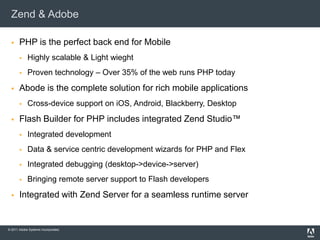
Zend & AdobePHP is the perfect back end for MobileHighly scalable & Light wieghtProven technology – Over 35% of the web runs PHP todayAbode is the complete solution for rich mobile applicationsCross-device support on iOS, Android, Blackberry, DesktopFlash Builder for PHP includes integrated Zend Studio™Integrated developmentData & service centric development wizards for PHP and FlexIntegrated debugging (desktop->device->server)Bringing remote server support to Flash developersIntegrated with Zend Server for a seamless runtime server
Agenda	New Flex Mobile and PHP Project Using DCD wizards to consume PHP servicesTesting your mobile Flex & PHP app on desktop and deviceDebugging your application on deviceNetwork MonitorQ&A
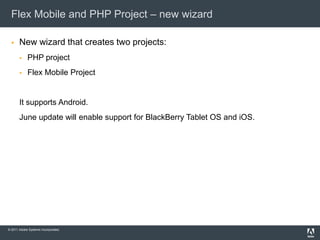
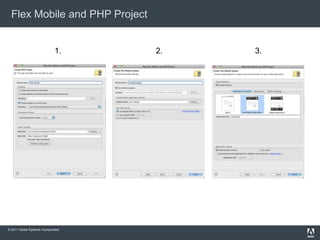
Flex Mobile and PHP Project – new wizardNew wizard that creates two projects:PHP projectFlex Mobile ProjectIt supports Android.June update will enable support for BlackBerry Tablet OS and iOS.
Flex Mobile and PHP Project1.3.2.
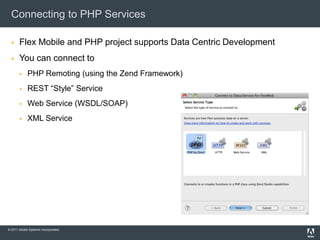
Connecting to PHP Services	Flex Mobile and PHP project supports Data Centric DevelopmentYou can connect toPHP Remoting (using the Zend Framework)REST “Style” ServiceWeb Service (WSDL/SOAP)XML Service
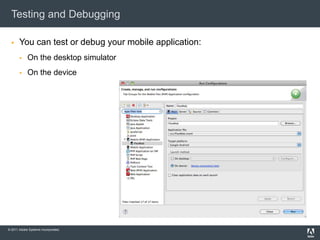
Testing and DebuggingYou can test or debug your mobile application:On the desktop simulatorOn the device
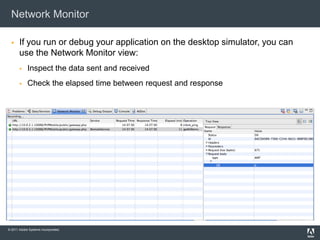
Network Monitor	If you run or debug your application on the desktop simulator, you can use the Network Monitor view:Inspect the data sent and receivedCheck the elapsed time between request and response
Running the app on the device (Testing/Debugging)When you run the app on the desktop simulator, the Flex URLs towards the PHP services are using localhost.When you want to run the Flex on the actual device, you’ll have to use the server IP address where the PHP services are hosted.There are two scenarios:If you want to debug the Flex app on the device, you’ll have to run the PHP code either on your computer or on a server that has debugging enabled;If you want to run the Flex app on the device, you can have the PHP code deployed on a server or on your computer.
Enabling Debugging on the Device for Flex Mobile and PHP appsConnect the mobile device to the same WiFi network as the computer on which you run the PHP code and Flash Builder for PHP (you can use a shared network from your computer)Edit the .flexProperties file and change the serverRootURL from http://localhost/[…] to http://IP_ADDRESS/[…]Open the Flex Service wrapper file and over write the _serviceControl.endpoint variable. You get the value you have to set by watching the value set for _serviceControl.endpoint in the _Super_ServiceName.as file while launching the app on debug mode.Note: You have to increment the value of the debug_session_id for each launch.
Q&AResources:http://www.adobe.com/devnet/http://corlan.orgEmail addresses:kent@zend.commihai.corlan@adobe.comThank you!
Demo time
Adobe, the Adobe logo, Adobe AIR, the Adobe AIR logo, the Adobe PDF logo, AIR, ColdFusion, ColdFusion Builder, Flash, Flash Builder, the Flash logo, Flex, LiveCycle, and Reader are either registered trademarks or trademarks of Adobe Systems Incorporated in the United States and/or other countries. All other trademarks are the property of their respective owners.© 2010 Adobe Systems Incorporated. All rights reserved. Printed in the USA. 9102xxxx 3/10Adobe, the Adobe logo, Adobe AIR, the Adobe AIR logo, ActionScript, AIR, Flash, Flash Builder, Flash Catalyst, the Flash logo, Flex, and LiveCycle are either registered trademarks or trademarks of Adobe Systems Incorporated in the United States and/or other countries. Microsoft and Windows are either registered trademarks or trademarks of Microsoft Corporation in the United States and/or other countries. Java is a trademark or registered trademark of Sun Microsystems, Inc. in the United States and other countries. All other trademarks are the property of their respective owners.Printed in the USA. 91023957 3/10

Flash Builder for PHP and Mobile development

  • 1.
    Flash Builder/Flex withPHP on Mobile DevicesKent Mitchell | Sr. Product Manager | ZendMihai Corlan | Developer Evangelist | Adobe
  • 2.
    About UsKent MitchellSr.Director, Product Managementkent@zend.comMihai CorlanAdobe WW Developer Evangelist (since 2008)http://corlan.orghttp://twitter.com/mcorlanmihai.corlan@adobe.com2
  • 3.
    Zend & AdobePHPis the perfect back end for MobileHighly scalable & Light wieghtProven technology – Over 35% of the web runs PHP todayAbode is the complete solution for rich mobile applicationsCross-device support on iOS, Android, Blackberry, DesktopFlash Builder for PHP includes integrated Zend Studio™Integrated developmentData & service centric development wizards for PHP and FlexIntegrated debugging (desktop->device->server)Bringing remote server support to Flash developersIntegrated with Zend Server for a seamless runtime server
  • 4.
    Agenda New Flex Mobileand PHP Project Using DCD wizards to consume PHP servicesTesting your mobile Flex & PHP app on desktop and deviceDebugging your application on deviceNetwork MonitorQ&A
  • 5.
    Flex Mobile andPHP Project – new wizardNew wizard that creates two projects:PHP projectFlex Mobile ProjectIt supports Android.June update will enable support for BlackBerry Tablet OS and iOS.
  • 6.
    Flex Mobile andPHP Project1.3.2.
  • 7.
    Connecting to PHPServices Flex Mobile and PHP project supports Data Centric DevelopmentYou can connect toPHP Remoting (using the Zend Framework)REST “Style” ServiceWeb Service (WSDL/SOAP)XML Service
  • 8.
    Testing and DebuggingYoucan test or debug your mobile application:On the desktop simulatorOn the device
  • 9.
    Network Monitor If yourun or debug your application on the desktop simulator, you can use the Network Monitor view:Inspect the data sent and receivedCheck the elapsed time between request and response
  • 10.
    Running the appon the device (Testing/Debugging)When you run the app on the desktop simulator, the Flex URLs towards the PHP services are using localhost.When you want to run the Flex on the actual device, you’ll have to use the server IP address where the PHP services are hosted.There are two scenarios:If you want to debug the Flex app on the device, you’ll have to run the PHP code either on your computer or on a server that has debugging enabled;If you want to run the Flex app on the device, you can have the PHP code deployed on a server or on your computer.
  • 11.
    Enabling Debugging onthe Device for Flex Mobile and PHP appsConnect the mobile device to the same WiFi network as the computer on which you run the PHP code and Flash Builder for PHP (you can use a shared network from your computer)Edit the .flexProperties file and change the serverRootURL from http://localhost/[…] to http://IP_ADDRESS/[…]Open the Flex Service wrapper file and over write the _serviceControl.endpoint variable. You get the value you have to set by watching the value set for _serviceControl.endpoint in the _Super_ServiceName.as file while launching the app on debug mode.Note: You have to increment the value of the debug_session_id for each launch.
  • 12.
  • 13.
  • 15.
    Adobe, the Adobelogo, Adobe AIR, the Adobe AIR logo, the Adobe PDF logo, AIR, ColdFusion, ColdFusion Builder, Flash, Flash Builder, the Flash logo, Flex, LiveCycle, and Reader are either registered trademarks or trademarks of Adobe Systems Incorporated in the United States and/or other countries. All other trademarks are the property of their respective owners.© 2010 Adobe Systems Incorporated. All rights reserved. Printed in the USA. 9102xxxx 3/10Adobe, the Adobe logo, Adobe AIR, the Adobe AIR logo, ActionScript, AIR, Flash, Flash Builder, Flash Catalyst, the Flash logo, Flex, and LiveCycle are either registered trademarks or trademarks of Adobe Systems Incorporated in the United States and/or other countries. Microsoft and Windows are either registered trademarks or trademarks of Microsoft Corporation in the United States and/or other countries. Java is a trademark or registered trademark of Sun Microsystems, Inc. in the United States and other countries. All other trademarks are the property of their respective owners.Printed in the USA. 91023957 3/10

Editor's Notes

  • #3 What about you? Who here created a mobile application?
  • #4 Comprehensive PHP and JavaScript debugging, built-in PHP unit testing, plus PHP profilingIntrospect PHP classes from Flash BuilderIntegrated Flex/PHP debuggingZend Server integration for seamless application monitoring and troubleshooting with code tracing for root-cause diagnostics