Cross Platform Mobile App
Development
in Review
Presented by: Joseph Payette, CTO
Native
● Use native build tools to create binary
compatible application packages
● Use existing application distribution channels,
such as the AppStore and Google Play
● Target platforms are completely different, and
differences must be considered when designing
nearly every aspect of the application
Hybrid Frameworks (a few)
PhoneGap/Apache Cordova
Use HTML5, Javascript, & CSS for UI, and Bridge API to
acces native features, plus Java and Objective-C for
custom components
Appcelerator Titanium
Use Javascript SDK for all features and Alloy Framework
for MVC
MoSync Wormhole
Use HTML5, Javascript, & CSS, and Bridge API to access
native features, plus C++ for custom components
Hybrid
●Use framework specific build tools to build a
native application shell with an embedded web
browser as the presentation layer
●Use existing application distribution channels,
such as the AppStore and Google Play
●Target platforms are completely different although
differences can be minimized by utilizing the
framework bridge
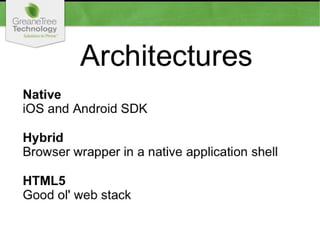
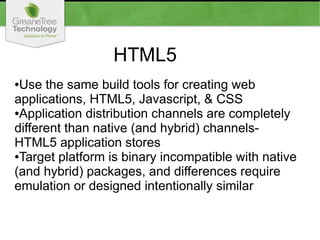
HTML5
●Use the same build tools for creating web
applications, HTML5, Javascript, & CSS
●Application distribution channels are completely
different than native (and hybrid) channels-
HTML5 application stores
●Target platform is binary incompatible with native
(and hybrid) packages, and differences require
emulation or designed intentionally similar
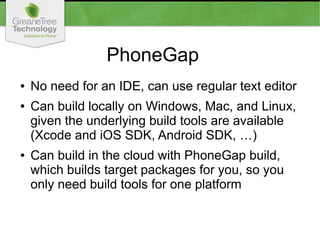
PhoneGap
● No need for an IDE, can use regular text editor
● Can build locally on Windows, Mac, and Linux,
given the underlying build tools are available
(Xcode and iOS SDK, Android SDK, …)
● Can build in the cloud with PhoneGap build,
which builds target packages for you, so you
only need build tools for one platform
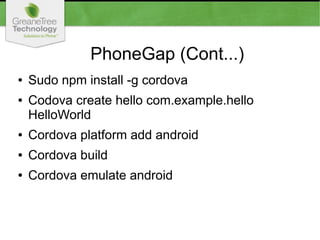
PhoneGap (Cont...)
● Sudo npm install -g cordova
● Codova create hello com.example.hello
HelloWorld
● Cordova platform add android
● Cordova build
● Cordova emulate android
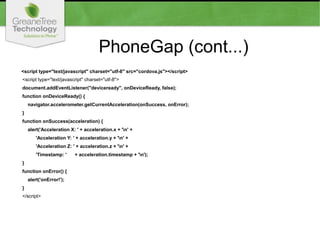
PhoneGap (cont...)
<script type="text/javascript" charset="utf-8" src="cordova.js"></script>
<script type="text/javascript" charset="utf-8">
document.addEventListener("deviceready", onDeviceReady, false);
function onDeviceReady() {
navigator.accelerometer.getCurrentAcceleration(onSuccess, onError);
}
function onSuccess(acceleration) {
alert('Acceleration X: ' + acceleration.x + 'n' +
'Acceleration Y: ' + acceleration.y + 'n' +
'Acceleration Z: ' + acceleration.z + 'n' +
'Timestamp: ' + acceleration.timestamp + 'n');
}
function onError() {
alert('onError!');
}
</script>
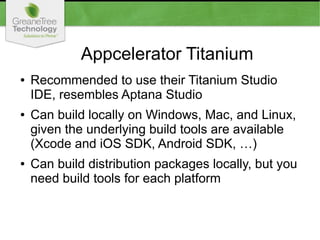
Appcelerator Titanium
● Recommended to use their Titanium Studio
IDE, resembles Aptana Studio
● Can build locally on Windows, Mac, and Linux,
given the underlying build tools are available
(Xcode and iOS SDK, Android SDK, …)
● Can build distribution packages locally, but you
need build tools for each platform
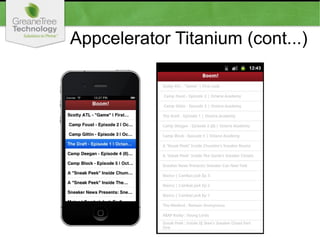
Appcelerator Titanium (cont...)
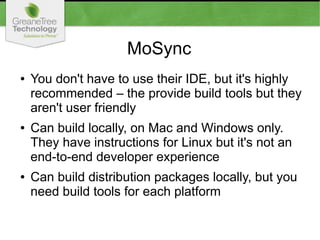
MoSync
● You don't have to use their IDE, but it's highly
recommended – the provide build tools but they
aren't user friendly
● Can build locally, on Mac and Windows only.
They have instructions for Linux but it's not an
end-to-end developer experience
● Can build distribution packages locally, but you
need build tools for each platform
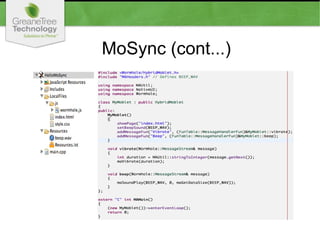
MoSync (cont...)
MoSync (cont...)
<!DOCTYPE html>
<html>
<head>
<script type="text/javascript" charset="utf-8" src="js/wormhole.js"></script>
function vibrate() {
mosync.bridge.send(["Custom", "Vibrate", "500"]);
}
document.addEventListener("deviceready", displayDeviceInfo, true);
document.addEventListener("backbutton", function() { mosync.app.exit(); }, true);
</head>
<body>
<div class="pane button" onclick="vibrate()">Vibrate</div>
</body>
</html>

Cross Platform Mobile App Development

  • 1.
    Cross Platform MobileApp Development in Review Presented by: Joseph Payette, CTO
  • 3.
    Native ● Use nativebuild tools to create binary compatible application packages ● Use existing application distribution channels, such as the AppStore and Google Play ● Target platforms are completely different, and differences must be considered when designing nearly every aspect of the application
  • 4.
    Hybrid Frameworks (afew) PhoneGap/Apache Cordova Use HTML5, Javascript, & CSS for UI, and Bridge API to acces native features, plus Java and Objective-C for custom components Appcelerator Titanium Use Javascript SDK for all features and Alloy Framework for MVC MoSync Wormhole Use HTML5, Javascript, & CSS, and Bridge API to access native features, plus C++ for custom components
  • 5.
    Hybrid ●Use framework specificbuild tools to build a native application shell with an embedded web browser as the presentation layer ●Use existing application distribution channels, such as the AppStore and Google Play ●Target platforms are completely different although differences can be minimized by utilizing the framework bridge
  • 6.
    HTML5 ●Use the samebuild tools for creating web applications, HTML5, Javascript, & CSS ●Application distribution channels are completely different than native (and hybrid) channels- HTML5 application stores ●Target platform is binary incompatible with native (and hybrid) packages, and differences require emulation or designed intentionally similar
  • 7.
    PhoneGap ● No needfor an IDE, can use regular text editor ● Can build locally on Windows, Mac, and Linux, given the underlying build tools are available (Xcode and iOS SDK, Android SDK, …) ● Can build in the cloud with PhoneGap build, which builds target packages for you, so you only need build tools for one platform
  • 8.
    PhoneGap (Cont...) ● Sudonpm install -g cordova ● Codova create hello com.example.hello HelloWorld ● Cordova platform add android ● Cordova build ● Cordova emulate android
  • 9.
    PhoneGap (cont...) <script type="text/javascript"charset="utf-8" src="cordova.js"></script> <script type="text/javascript" charset="utf-8"> document.addEventListener("deviceready", onDeviceReady, false); function onDeviceReady() { navigator.accelerometer.getCurrentAcceleration(onSuccess, onError); } function onSuccess(acceleration) { alert('Acceleration X: ' + acceleration.x + 'n' + 'Acceleration Y: ' + acceleration.y + 'n' + 'Acceleration Z: ' + acceleration.z + 'n' + 'Timestamp: ' + acceleration.timestamp + 'n'); } function onError() { alert('onError!'); } </script>
  • 10.
    Appcelerator Titanium ● Recommendedto use their Titanium Studio IDE, resembles Aptana Studio ● Can build locally on Windows, Mac, and Linux, given the underlying build tools are available (Xcode and iOS SDK, Android SDK, …) ● Can build distribution packages locally, but you need build tools for each platform
  • 11.
  • 12.
    MoSync ● You don'thave to use their IDE, but it's highly recommended – the provide build tools but they aren't user friendly ● Can build locally, on Mac and Windows only. They have instructions for Linux but it's not an end-to-end developer experience ● Can build distribution packages locally, but you need build tools for each platform
  • 13.
  • 14.
    MoSync (cont...) <!DOCTYPE html> <html> <head> <scripttype="text/javascript" charset="utf-8" src="js/wormhole.js"></script> function vibrate() { mosync.bridge.send(["Custom", "Vibrate", "500"]); } document.addEventListener("deviceready", displayDeviceInfo, true); document.addEventListener("backbutton", function() { mosync.app.exit(); }, true); </head> <body> <div class="pane button" onclick="vibrate()">Vibrate</div> </body> </html>