OWNING COMPUTERS
WITHOUT SHELL ACCESS
Who Am I?
• Royce Davis
• Senior Consultant – Accuvant LABS
• Cofounder: http://www.pentestgeek.com
• Author jigsaw.rb
• Twitter: @R3dy__
Talk Synopsis
• Uploading Binary Shells Is No Good
• Techniques To Avoid Shell Upload
• Metasploit Modules
• Command Execution
• Local & Cached Hash Dumping
• Other Possibilities
• Demo Modules
Background Story
• Imagine that you’re on a pentest and discover a LHF
vulnerability that gives you the local admin hash to all the
boxes.
• You try to use the psexec exploit module to pop a
meterpreter shell on multiple systems only to get flagged
by AV and stopped dead in your tracks.
• What do you do now?
• Enter SMBExec (Eric Milam a.k.a @Brav0hax)
• SMBExec is a great tool, however it still uploads a binary
to the target
Uploading Binary Shells Is No Good
• We’ve been uploading shells to take control of remote
hosts since the beginning of time so what’s the big deal?
• Shells contain binary signatures that can be recognized
and blocked
• Obfuscation only creates a different signature that could
still be recognized and blocked
• Shells can die leaving us with no way back into the target
machine
• They can also leave remnants of themselves
What Can We Do With A Shell?
If we’re going to bypass using shells on pentests we need to first
identify what purpose they serve and what additional functions to they
provide.
• Command execution
• Search the file system
• Create users
• Enumerate network resources
• Upload/download files
• Etc…
• Grab local/cached password hashes
• Dump all AD hashes from the DC
• Any others?
Using Native Windows Functions
Enter ‘psexec.rb’
• Metasploit already has several modules that use
DCERPC to make direct authenticated requests to
Windows APIs
• /exploit/windows/smb/psexec.rb
• Creates & Uploads a binary payload to the target over SMB
• Sends an RPC to the Service Control Manager (SCM)
• UUID: ‘367abb81-9844-35f1-ad32-98f038001003’
• Creates a service, starts it, cleans up after…
• MSDN Documentation
• http://msdn.microsoft.com/en-
us/library/windows/desktop/ms685942%28v=vs.85%29.aspx
Inside psexec.rb
DCERPC Requests:
The dcerpc.call instance method takes in two parameters. The first parameter is the
opcode reference to the particular Windows function you wish to call. The second
parameter is the function arguments in NDR (Network Data Representation) Format.
• dcerpc.call(0x0f, stubdata) – OpenSCManager
• dcerpc.call(0x0c, stubdata) – CreateService
• dcerpc.call(0x0, svc_handle) – CloseServiceHandle
• dcerpc.call(0x10, stubdata) – OpenService
• dcerpc.call(0x13, stubdata) – StartService
• dcerpc.call(0x02, stubdata) – DeleteService
• dcerpc.call(0x0, svc_handle) - CloseServiceHandle
Psexec.rb Cont.
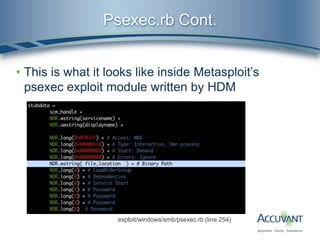
• This is what it looks like inside Metasploit’s
psexec exploit module written by HDM
exploit/windows/smb/psexec.rb (line 254)
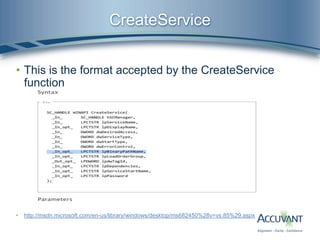
CreateService
• This is the format accepted by the CreateService
function
• http://msdn.microsoft.com/en-us/library/windows/desktop/ms682450%28v=vs.85%29.aspx
lpBinaryPathName MSDN Definition
• lpBinaryPathName [in, optional]
• The fully qualified path to the service binary file. If the path contains a space, it must be quoted
so that it is correctly interpreted. For example, "d:my sharemyservice.exe" should be
specified as ""d:my sharemyservice.exe"".
• The path can also include arguments for an auto-start service. For
example, "d:mysharemyservice.exe arg1 arg2". These arguments are passed to the service
entry point (typically the main function).
• If you specify a path on another computer, the share must be accessible by the computer
account of the local computer because this is the security context used in the remote call.
However, this requirement allows any potential vulnerabilities in the remote computer to affect
the local computer. Therefore, it is best to use a local file.
• psexec.rb looks like this:
• C:HjeKOplsYutVmBWn.exe  Probably a Meterpreter payload
• What if we tried this instead:
• C:windowssystem32cmd.exe /C echo dir C: ^> outputfile.txt > launchfile.bat &
C:windowssystem32cmd.exe /C launchfile.bat”
The Psexec Mixin
In order to provide accessibility to this functionality for other modules we
created a mixin which has been graciously accepted into the MSF.
lib/msf/core/exploit/smb/psexec.rb
• Slightly modified version of the original psexec.rb code wrapped in a
function which excepts a Windows command in the following format:
• [PATH TO cmd.exe] [/C] [INSERT WINDOWS COMMAND]
• The method is called like so ‘return psexec(command)’
• Returns ‘true’ if execution was successful
• Major difference is it does not try to delete cmd.exe after execution
• Also contains a ‘smb_read_file(smbshare, host, file)’ method for
convenient retrieval of command output
Demo psexec_command.rb
• Review the source code
• Explain some of my favorite uses related to
pentesting
• Demo the module
Dumping Password Hashes
• Current methods for dumping password hashes
• Post modules that require a meterpreter shell
• Upload a standalone binary like pwdump/fgdump…
• These methods extract specific registry key values from the
SYSTEM, SECURITY, and/or SAM registry hive
• This process can flag antivirus
• We need to somehow retrieve a copy of the registry hives and
extract the hashes from them offline on our attacking system
• We can look at the code from pwdump.py from the
creddump suite.
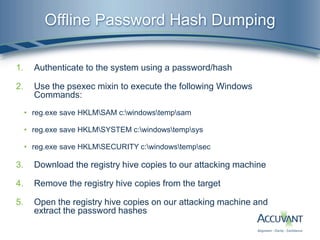
Offline Password Hash Dumping
1. Authenticate to the system using a password/hash
2. Use the psexec mixin to execute the following Windows
Commands:
• reg.exe save HKLMSAM c:windowstempsam
• reg.exe save HKLMSYSTEM c:windowstempsys
• reg.exe save HKLMSECURITY c:windowstempsec
3. Download the registry hive copies to our attacking machine
4. Remove the registry hive copies from the target
5. Open the registry hive copies on our attacking machine and
extract the password hashes
Demo hashgrab.rb & cachegrab.rb
• Thank you to:
• Brendan Dolan-Gavitt author of ‘creddump’.
• Carlos Perez – smart_hashdump.rb and other modules
• Brandon Perry – tools/reg.rb
• Review the source code
• Demo the module
Dumping All the Hashes
• The holy grail of most network pentests can be found
inside an ESE (Extensible Storage Engine) database
called NTDS.dit located on the Domain Controller
• Protected by operating system
• Requires inject into lsass and/or other black magics
• Contains a BOAT LOAD of information about the system
• Including password hashes and usernames for all AD
accounts!
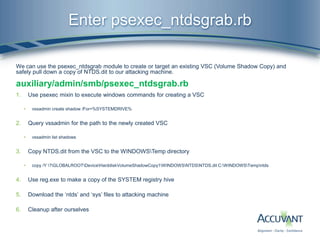
Enter psexec_ntdsgrab.rb
We can use the psexec_ntdsgrab module to create or target an existing VSC (Volume Shadow Copy) and
safely pull down a copy of NTDS.dit to our attacking machine.
auxiliary/admin/smb/psexec_ntdsgrab.rb
1. Use psexec mixin to execute windows commands for creating a VSC
• vssadmin create shadow /For=%SYSTEMDRIVE%
2. Query vssadmin for the path to the newly created VSC
• vssadmin list shadows
3. Copy NTDS.dit from the VSC to the WINDOWSTemp directory
• copy /Y ?GLOBALROOTDeviceHarddiskVolumeShadowCopy1WINDOWSNTDSNTDS.dit C:WINDOWSTempntds
4. Use reg.exe to make a copy of the SYSTEM registry hive
5. Download the ‘ntds’ and ‘sys’ files to attacking machine
6. Cleanup after ourselves
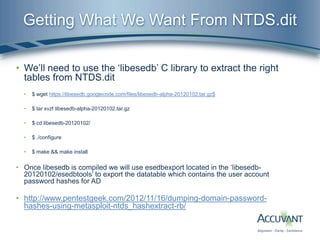
Getting What We Want From NTDS.dit
• We’ll need to use the ‘libesedb’ C library to extract the right
tables from NTDS.dit
• $ wget https://libesedb.googlecode.com/files/libesedb-alpha-20120102.tar.gz$
• $ tar xvzf libesedb-alpha-20120102.tar.gz
• $ cd libesedb-20120102/
• $ ./configure
• $ make && make install
• Once libesedb is compiled we will use esedbexport located in the ‘libesedb-
20120102/esedbtools’ to export the datatable which contains the user account
password hashes for AD
• http://www.pentestgeek.com/2012/11/16/dumping-domain-password-
hashes-using-metasploit-ntds_hashextract-rb/
Demo psexec_ntdsgrab.rb
• Grab NTDS.dit using MSF module
• Export tables from NTDS.dit using libesedb
• Extract hashes from exported datatable using
ntds_hashextract.rb
Closing
• Uploading a binary shell to the target can be harmful
to a penetration test
• DCERPC allows us to do a lot of the functions we
would ask of a binary shell without uploading one to
the target
• Metasploit modules already exist to achieve remote
command execution, grab local/cached password
hashes and dump AD hashes from a DC
• The sky is the limit as to what else we could do if we
all chose to adapt this style of thinking
Questions & Answers
4/23/201321
Owning Computers Without Shell Access
4/23/201322
Thank You!
Royce Davis
Accuvant LABS
Senior Consultant – Attack & Pen Team
royce.e.davis@gmail.com
http://www.pentestgeek.com
@R3dy__

Owning computers without shell access 2

  • 1.
  • 2.
    Who Am I? •Royce Davis • Senior Consultant – Accuvant LABS • Cofounder: http://www.pentestgeek.com • Author jigsaw.rb • Twitter: @R3dy__
  • 3.
    Talk Synopsis • UploadingBinary Shells Is No Good • Techniques To Avoid Shell Upload • Metasploit Modules • Command Execution • Local & Cached Hash Dumping • Other Possibilities • Demo Modules
  • 4.
    Background Story • Imaginethat you’re on a pentest and discover a LHF vulnerability that gives you the local admin hash to all the boxes. • You try to use the psexec exploit module to pop a meterpreter shell on multiple systems only to get flagged by AV and stopped dead in your tracks. • What do you do now? • Enter SMBExec (Eric Milam a.k.a @Brav0hax) • SMBExec is a great tool, however it still uploads a binary to the target
  • 5.
    Uploading Binary ShellsIs No Good • We’ve been uploading shells to take control of remote hosts since the beginning of time so what’s the big deal? • Shells contain binary signatures that can be recognized and blocked • Obfuscation only creates a different signature that could still be recognized and blocked • Shells can die leaving us with no way back into the target machine • They can also leave remnants of themselves
  • 6.
    What Can WeDo With A Shell? If we’re going to bypass using shells on pentests we need to first identify what purpose they serve and what additional functions to they provide. • Command execution • Search the file system • Create users • Enumerate network resources • Upload/download files • Etc… • Grab local/cached password hashes • Dump all AD hashes from the DC • Any others?
  • 7.
    Using Native WindowsFunctions Enter ‘psexec.rb’ • Metasploit already has several modules that use DCERPC to make direct authenticated requests to Windows APIs • /exploit/windows/smb/psexec.rb • Creates & Uploads a binary payload to the target over SMB • Sends an RPC to the Service Control Manager (SCM) • UUID: ‘367abb81-9844-35f1-ad32-98f038001003’ • Creates a service, starts it, cleans up after… • MSDN Documentation • http://msdn.microsoft.com/en- us/library/windows/desktop/ms685942%28v=vs.85%29.aspx
  • 8.
    Inside psexec.rb DCERPC Requests: Thedcerpc.call instance method takes in two parameters. The first parameter is the opcode reference to the particular Windows function you wish to call. The second parameter is the function arguments in NDR (Network Data Representation) Format. • dcerpc.call(0x0f, stubdata) – OpenSCManager • dcerpc.call(0x0c, stubdata) – CreateService • dcerpc.call(0x0, svc_handle) – CloseServiceHandle • dcerpc.call(0x10, stubdata) – OpenService • dcerpc.call(0x13, stubdata) – StartService • dcerpc.call(0x02, stubdata) – DeleteService • dcerpc.call(0x0, svc_handle) - CloseServiceHandle
  • 9.
    Psexec.rb Cont. • Thisis what it looks like inside Metasploit’s psexec exploit module written by HDM exploit/windows/smb/psexec.rb (line 254)
  • 10.
    CreateService • This isthe format accepted by the CreateService function • http://msdn.microsoft.com/en-us/library/windows/desktop/ms682450%28v=vs.85%29.aspx
  • 11.
    lpBinaryPathName MSDN Definition •lpBinaryPathName [in, optional] • The fully qualified path to the service binary file. If the path contains a space, it must be quoted so that it is correctly interpreted. For example, "d:my sharemyservice.exe" should be specified as ""d:my sharemyservice.exe"". • The path can also include arguments for an auto-start service. For example, "d:mysharemyservice.exe arg1 arg2". These arguments are passed to the service entry point (typically the main function). • If you specify a path on another computer, the share must be accessible by the computer account of the local computer because this is the security context used in the remote call. However, this requirement allows any potential vulnerabilities in the remote computer to affect the local computer. Therefore, it is best to use a local file. • psexec.rb looks like this: • C:HjeKOplsYutVmBWn.exe  Probably a Meterpreter payload • What if we tried this instead: • C:windowssystem32cmd.exe /C echo dir C: ^> outputfile.txt > launchfile.bat & C:windowssystem32cmd.exe /C launchfile.bat”
  • 12.
    The Psexec Mixin Inorder to provide accessibility to this functionality for other modules we created a mixin which has been graciously accepted into the MSF. lib/msf/core/exploit/smb/psexec.rb • Slightly modified version of the original psexec.rb code wrapped in a function which excepts a Windows command in the following format: • [PATH TO cmd.exe] [/C] [INSERT WINDOWS COMMAND] • The method is called like so ‘return psexec(command)’ • Returns ‘true’ if execution was successful • Major difference is it does not try to delete cmd.exe after execution • Also contains a ‘smb_read_file(smbshare, host, file)’ method for convenient retrieval of command output
  • 13.
    Demo psexec_command.rb • Reviewthe source code • Explain some of my favorite uses related to pentesting • Demo the module
  • 14.
    Dumping Password Hashes •Current methods for dumping password hashes • Post modules that require a meterpreter shell • Upload a standalone binary like pwdump/fgdump… • These methods extract specific registry key values from the SYSTEM, SECURITY, and/or SAM registry hive • This process can flag antivirus • We need to somehow retrieve a copy of the registry hives and extract the hashes from them offline on our attacking system • We can look at the code from pwdump.py from the creddump suite.
  • 15.
    Offline Password HashDumping 1. Authenticate to the system using a password/hash 2. Use the psexec mixin to execute the following Windows Commands: • reg.exe save HKLMSAM c:windowstempsam • reg.exe save HKLMSYSTEM c:windowstempsys • reg.exe save HKLMSECURITY c:windowstempsec 3. Download the registry hive copies to our attacking machine 4. Remove the registry hive copies from the target 5. Open the registry hive copies on our attacking machine and extract the password hashes
  • 16.
    Demo hashgrab.rb &cachegrab.rb • Thank you to: • Brendan Dolan-Gavitt author of ‘creddump’. • Carlos Perez – smart_hashdump.rb and other modules • Brandon Perry – tools/reg.rb • Review the source code • Demo the module
  • 17.
    Dumping All theHashes • The holy grail of most network pentests can be found inside an ESE (Extensible Storage Engine) database called NTDS.dit located on the Domain Controller • Protected by operating system • Requires inject into lsass and/or other black magics • Contains a BOAT LOAD of information about the system • Including password hashes and usernames for all AD accounts!
  • 18.
    Enter psexec_ntdsgrab.rb We canuse the psexec_ntdsgrab module to create or target an existing VSC (Volume Shadow Copy) and safely pull down a copy of NTDS.dit to our attacking machine. auxiliary/admin/smb/psexec_ntdsgrab.rb 1. Use psexec mixin to execute windows commands for creating a VSC • vssadmin create shadow /For=%SYSTEMDRIVE% 2. Query vssadmin for the path to the newly created VSC • vssadmin list shadows 3. Copy NTDS.dit from the VSC to the WINDOWSTemp directory • copy /Y ?GLOBALROOTDeviceHarddiskVolumeShadowCopy1WINDOWSNTDSNTDS.dit C:WINDOWSTempntds 4. Use reg.exe to make a copy of the SYSTEM registry hive 5. Download the ‘ntds’ and ‘sys’ files to attacking machine 6. Cleanup after ourselves
  • 19.
    Getting What WeWant From NTDS.dit • We’ll need to use the ‘libesedb’ C library to extract the right tables from NTDS.dit • $ wget https://libesedb.googlecode.com/files/libesedb-alpha-20120102.tar.gz$ • $ tar xvzf libesedb-alpha-20120102.tar.gz • $ cd libesedb-20120102/ • $ ./configure • $ make && make install • Once libesedb is compiled we will use esedbexport located in the ‘libesedb- 20120102/esedbtools’ to export the datatable which contains the user account password hashes for AD • http://www.pentestgeek.com/2012/11/16/dumping-domain-password- hashes-using-metasploit-ntds_hashextract-rb/
  • 20.
    Demo psexec_ntdsgrab.rb • GrabNTDS.dit using MSF module • Export tables from NTDS.dit using libesedb • Extract hashes from exported datatable using ntds_hashextract.rb
  • 21.
    Closing • Uploading abinary shell to the target can be harmful to a penetration test • DCERPC allows us to do a lot of the functions we would ask of a binary shell without uploading one to the target • Metasploit modules already exist to achieve remote command execution, grab local/cached password hashes and dump AD hashes from a DC • The sky is the limit as to what else we could do if we all chose to adapt this style of thinking
  • 22.
  • 23.
    Owning Computers WithoutShell Access 4/23/201322 Thank You! Royce Davis Accuvant LABS Senior Consultant – Attack & Pen Team royce.e.davis@gmail.com http://www.pentestgeek.com @R3dy__

Editor's Notes

  • #5 Transition into uploading shells is no good.
  • #6 Transition into what can we do with a shell, why upload one in the first place?