Austin DFIR
Remote
Access & Agent
DeploymentsFacilitator: Chris Gerritz (Infocyte)
Austin DFIR - Gerritz (Infocyte)
Validating integrity via live forensic analysis of a set of hosts
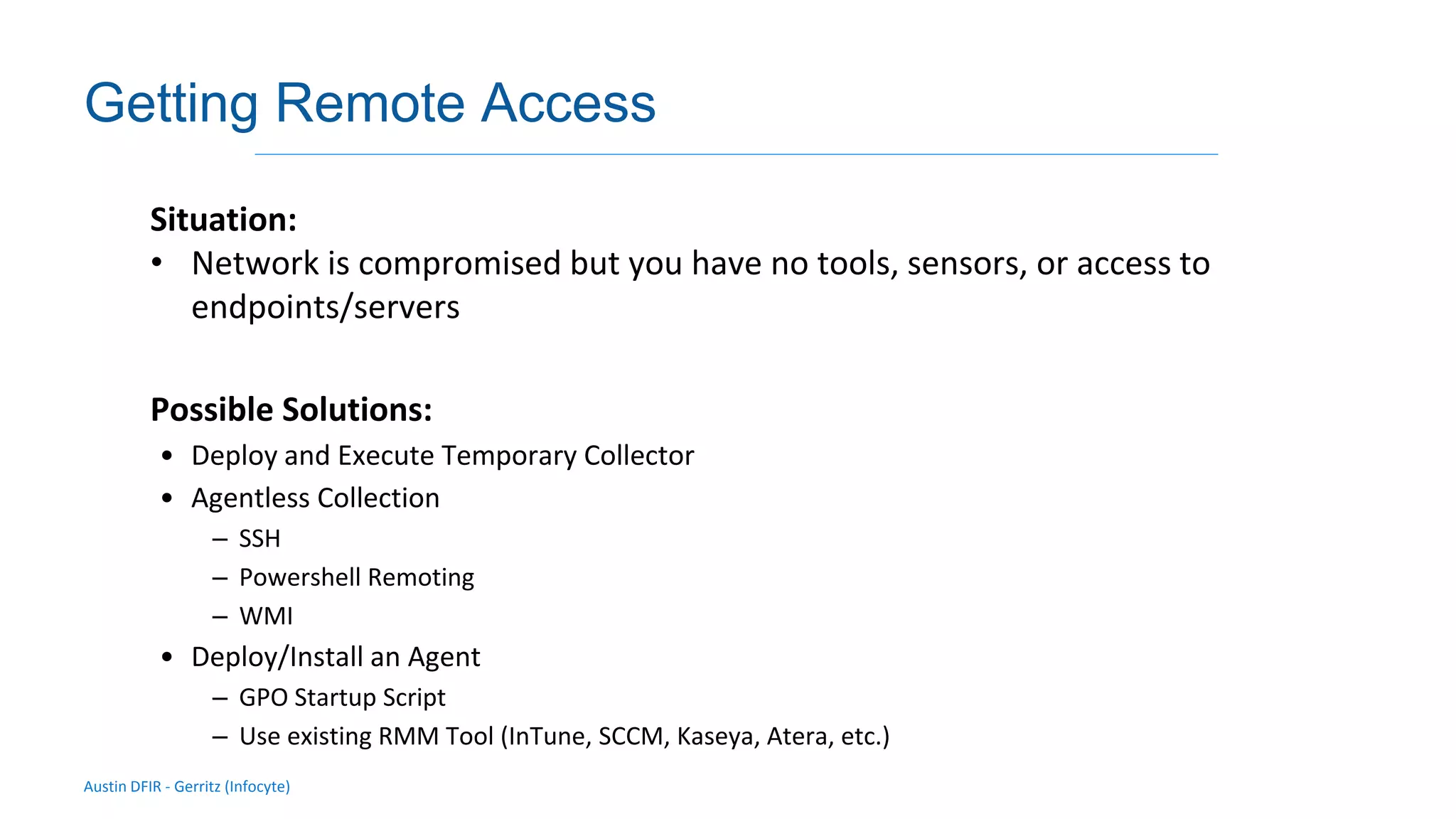
Getting Remote Access
Situation:
• Network is compromised but you have no tools, sensors, or access to
endpoints/servers
Possible Solutions:
• Deploy and Execute Temporary Collector
• Agentless Collection
– SSH
– Powershell Remoting
– WMI
• Deploy/Install an Agent
– GPO Startup Script
– Use existing RMM Tool (InTune, SCCM, Kaseya, Atera, etc.)
Built-In Remote
Management
(Agentless)
By Chris Gerritz (Infocyte)
Austin DFIR - Gerritz (Infocyte)
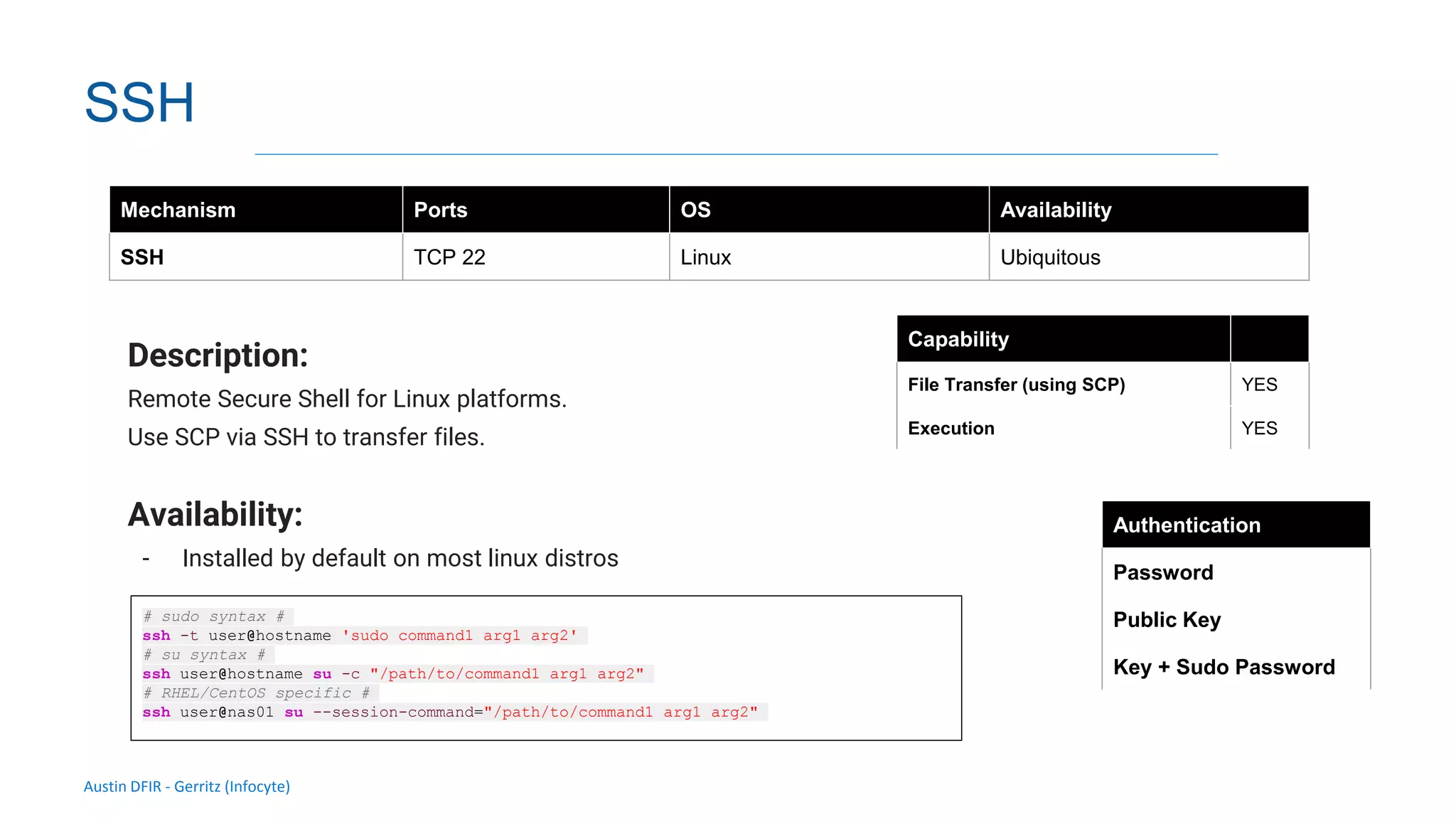
SSH
Description:
Remote Secure Shell for Linux platforms.
Use SCP via SSH to transfer files.
Availability:
- Installed by default on most linux distros
Mechanism Ports OS Availability
SSH TCP 22 Linux Ubiquitous
Authentication
Password
Public Key
Key + Sudo Password
Capability
File Transfer (using SCP) YES
Execution YES
# sudo syntax #
ssh -t user@hostname 'sudo command1 arg1 arg2'
# su syntax #
ssh user@hostname su -c "/path/to/command1 arg1 arg2"
# RHEL/CentOS specific #
ssh user@nas01 su --session-command="/path/to/command1 arg1 arg2"
Austin DFIR - Gerritz (Infocyte)
Validating integrity via live forensic analysis of a set of hosts
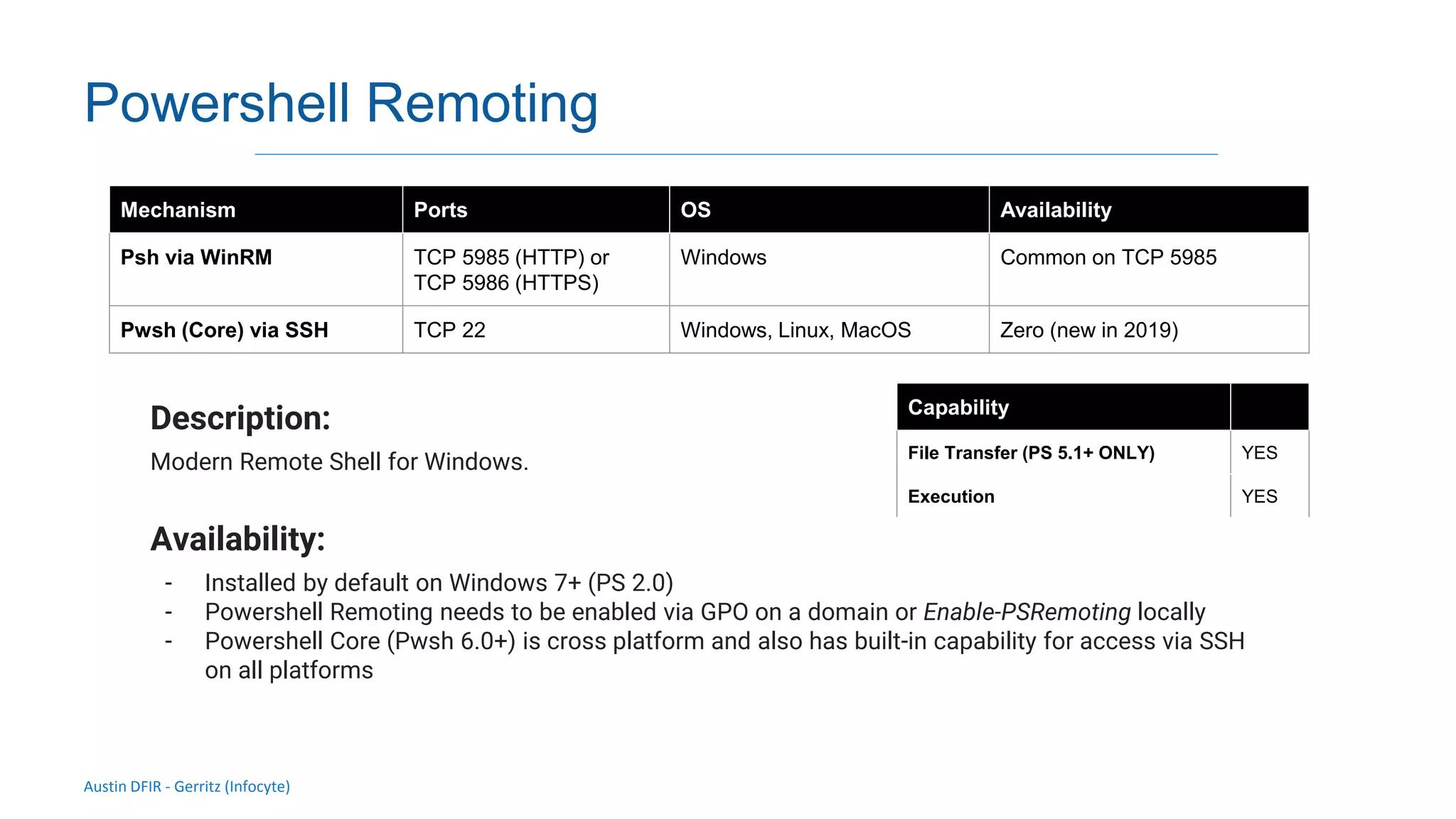
Powershell Remoting
Description:
Modern Remote Shell for Windows.
Availability:
- Installed by default on Windows 7+ (PS 2.0)
- Powershell Remoting needs to be enabled via GPO on a domain or Enable-PSRemoting locally
- Powershell Core (Pwsh 6.0+) is cross platform and also has built-in capability for access via SSH
on all platforms
Mechanism Ports OS Availability
Psh via WinRM TCP 5985 (HTTP) or
TCP 5986 (HTTPS)
Windows Common on TCP 5985
Pwsh (Core) via SSH TCP 22 Windows, Linux, MacOS Zero (new in 2019)
Capability
File Transfer (PS 5.1+ ONLY) YES
Execution YES
Austin DFIR - Gerritz (Infocyte)
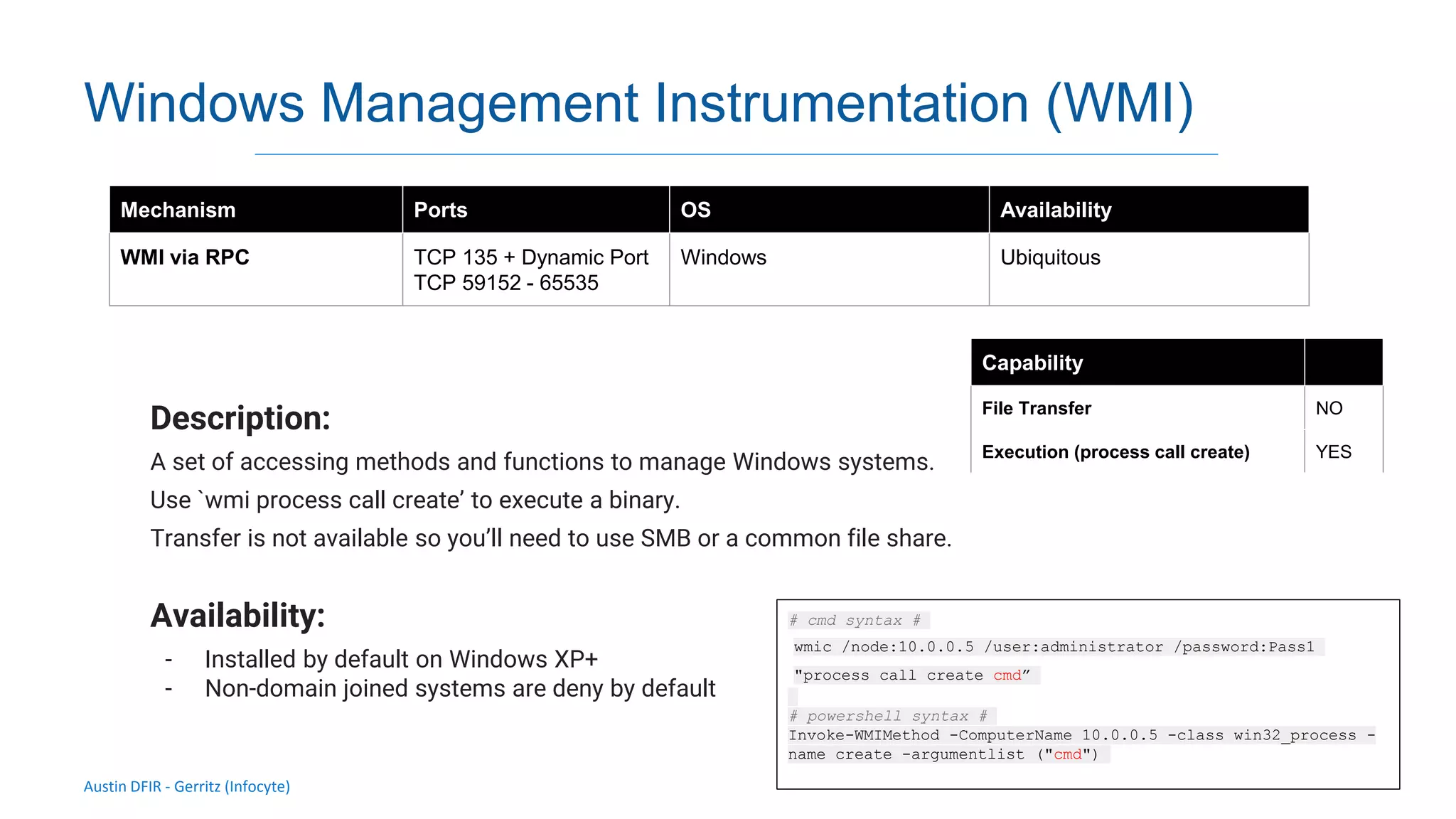
Windows Management Instrumentation (WMI)
Description:
A set of accessing methods and functions to manage Windows systems.
Use `wmi process call create’ to execute a binary.
Transfer is not available so you’ll need to use SMB or a common file share.
Availability:
- Installed by default on Windows XP+
- Non-domain joined systems are deny by default
Mechanism Ports OS Availability
WMI via RPC TCP 135 + Dynamic Port
TCP 59152 - 65535
Windows Ubiquitous
Capability
File Transfer NO
Execution (process call create) YES
# cmd syntax #
wmic /node:10.0.0.5 /user:administrator /password:Pass1
"process call create cmd”
# powershell syntax #
Invoke-WMIMethod -ComputerName 10.0.0.5 -class win32_process -
name create -argumentlist ("cmd")
Austin DFIR - Gerritz (Infocyte)
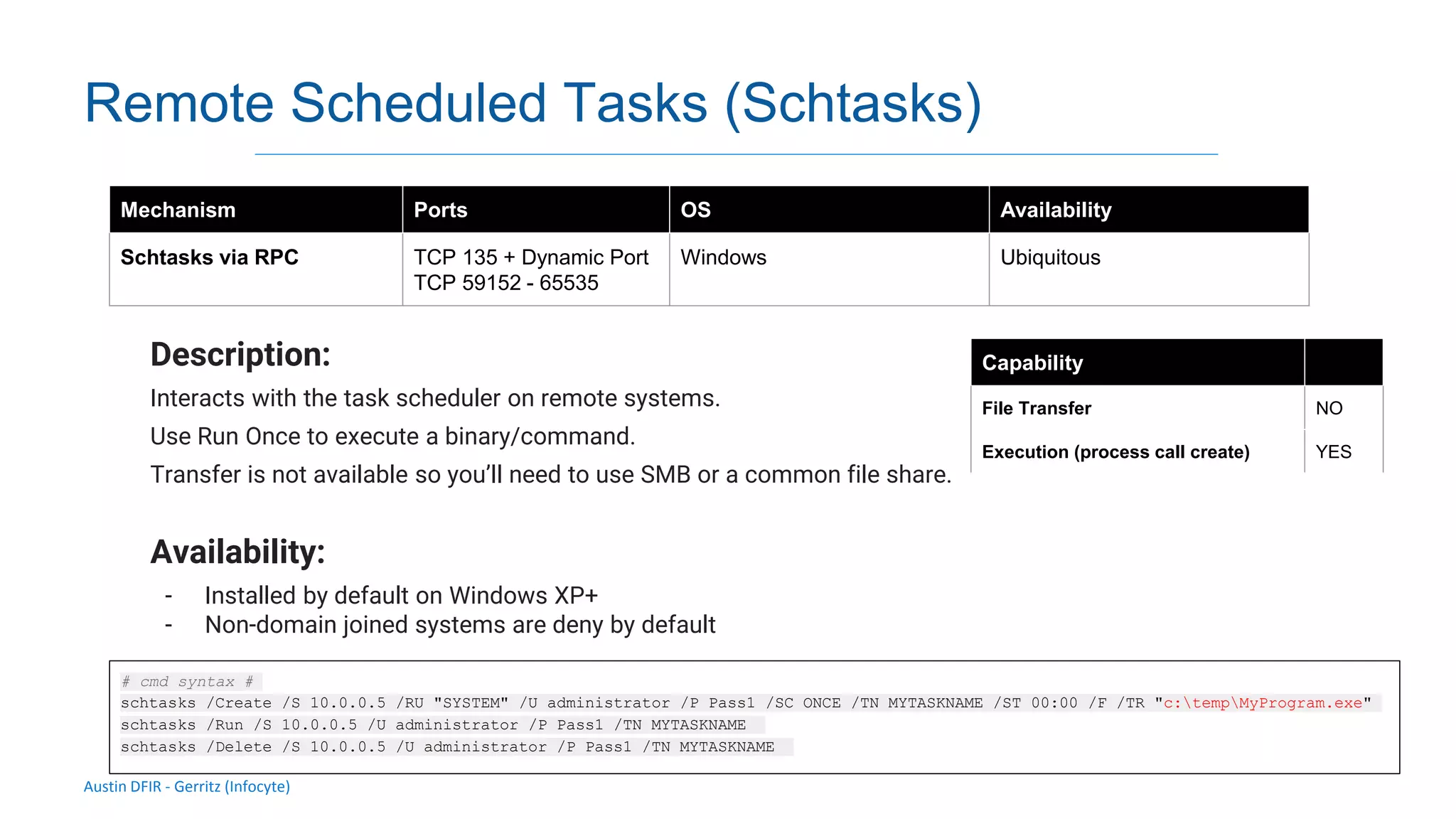
Remote Scheduled Tasks (Schtasks)
Description:
Interacts with the task scheduler on remote systems.
Use Run Once to execute a binary/command.
Transfer is not available so you’ll need to use SMB or a common file share.
Availability:
- Installed by default on Windows XP+
- Non-domain joined systems are deny by default
Mechanism Ports OS Availability
Schtasks via RPC TCP 135 + Dynamic Port
TCP 59152 - 65535
Windows Ubiquitous
Capability
File Transfer NO
Execution (process call create) YES
# cmd syntax #
schtasks /Create /S 10.0.0.5 /RU "SYSTEM" /U administrator /P Pass1 /SC ONCE /TN MYTASKNAME /ST 00:00 /F /TR "c:tempMyProgram.exe"
schtasks /Run /S 10.0.0.5 /U administrator /P Pass1 /TN MYTASKNAME
schtasks /Delete /S 10.0.0.5 /U administrator /P Pass1 /TN MYTASKNAME
Austin DFIR - Gerritz (Infocyte)
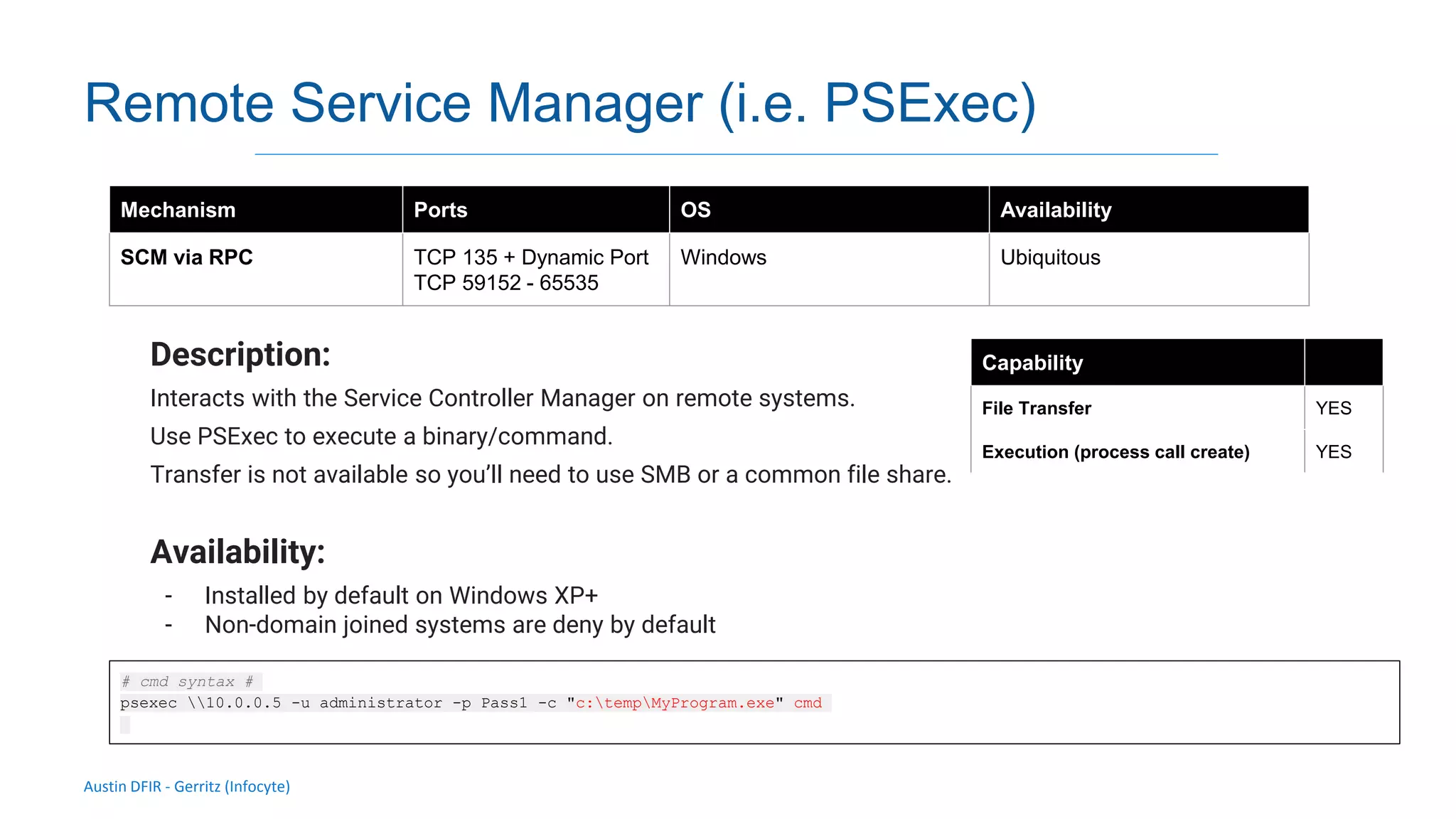
Remote Service Manager (i.e. PSExec)
Description:
Interacts with the Service Controller Manager on remote systems.
Use PSExec to execute a binary/command.
Transfer is not available so you’ll need to use SMB or a common file share.
Availability:
- Installed by default on Windows XP+
- Non-domain joined systems are deny by default
Mechanism Ports OS Availability
SCM via RPC TCP 135 + Dynamic Port
TCP 59152 - 65535
Windows Ubiquitous
Capability
File Transfer YES
Execution (process call create) YES
# cmd syntax #
psexec 10.0.0.5 -u administrator -p Pass1 -c "c:tempMyProgram.exe" cmd
Austin DFIR - Gerritz (Infocyte)
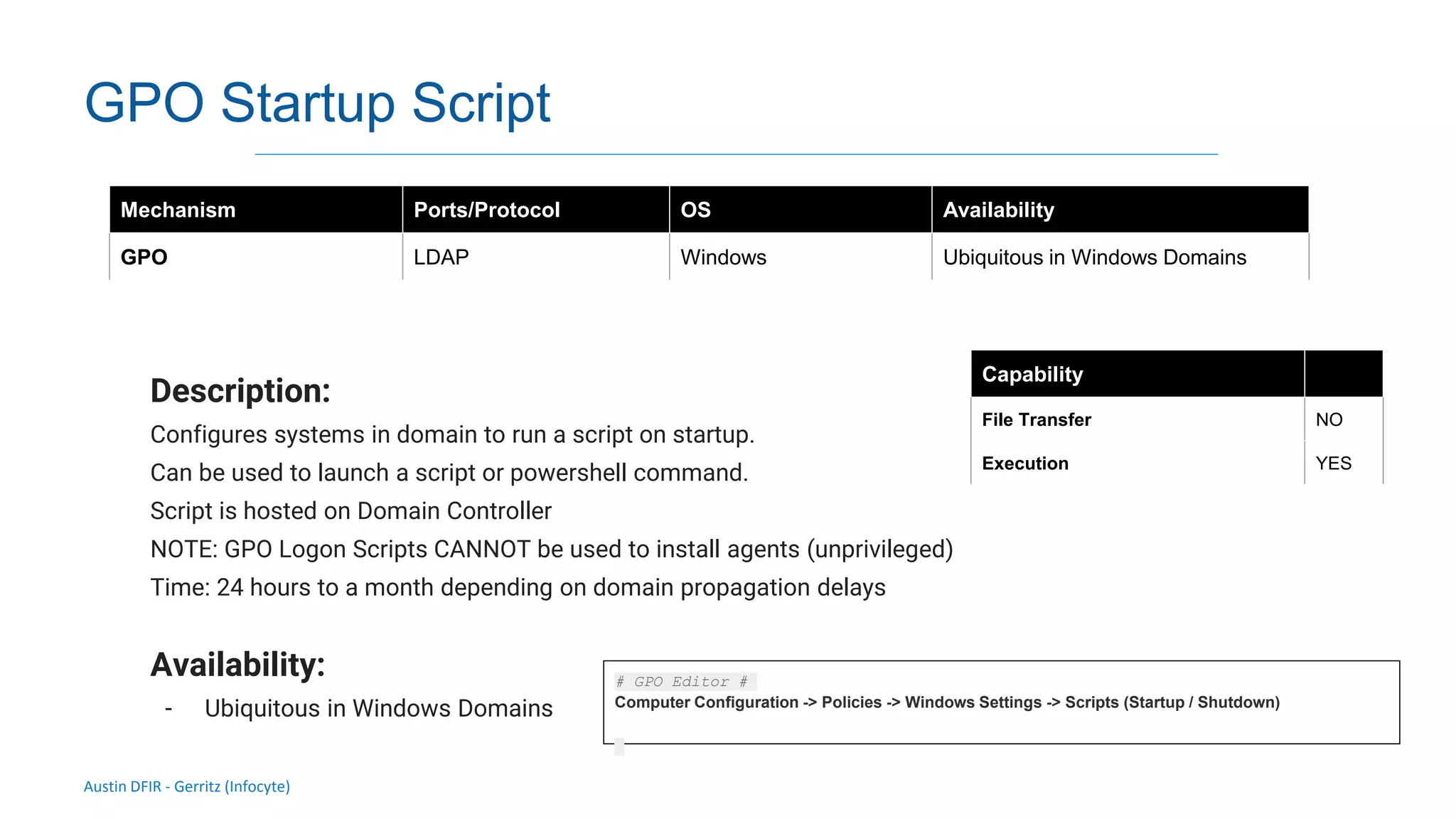
GPO Startup Script
Description:
Configures systems in domain to run a script on startup.
Can be used to launch a script or powershell command.
Script is hosted on Domain Controller
NOTE: GPO Logon Scripts CANNOT be used to install agents (unprivileged)
Time: 24 hours to a month depending on domain propagation delays
Availability:
- Ubiquitous in Windows Domains
Mechanism Ports/Protocol OS Availability
GPO LDAP Windows Ubiquitous in Windows Domains
Capability
File Transfer NO
Execution YES
# GPO Editor #
Computer Configuration -> Policies -> Windows Settings -> Scripts (Startup / Shutdown)
Austin DFIR - Gerritz (Infocyte)
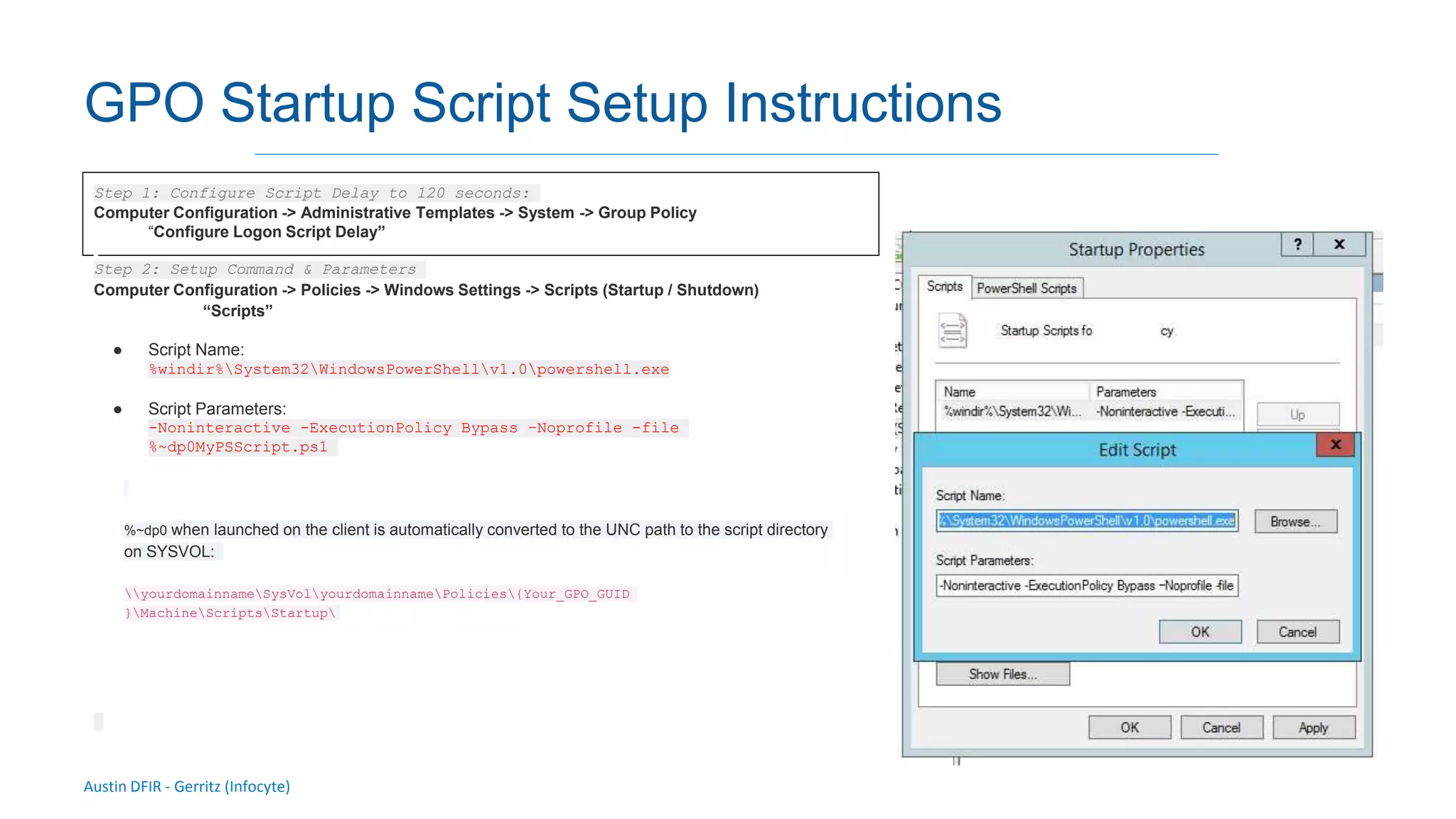
GPO Startup Script Setup Instructions
Step 1: Configure Script Delay to 120 seconds:
Computer Configuration -> Administrative Templates -> System -> Group Policy
“Configure Logon Script Delay”
Step 2: Setup Command & Parameters
Computer Configuration -> Policies -> Windows Settings -> Scripts (Startup / Shutdown)
“Scripts”
● Script Name:
%windir%System32WindowsPowerShellv1.0powershell.exe
● Script Parameters:
-Noninteractive -ExecutionPolicy Bypass –Noprofile -file
%~dp0MyPSScript.ps1
%~dp0 when launched on the client is automatically converted to the UNC path to the script directory
on SYSVOL:
yourdomainnameSysVolyourdomainnamePolicies{Your_GPO_GUID
}MachineScriptsStartup
Reverse
Download
By Chris Gerritz (Infocyte)
Austin DFIR - Gerritz (Infocyte)
Validating integrity via live forensic analysis of a set of hosts
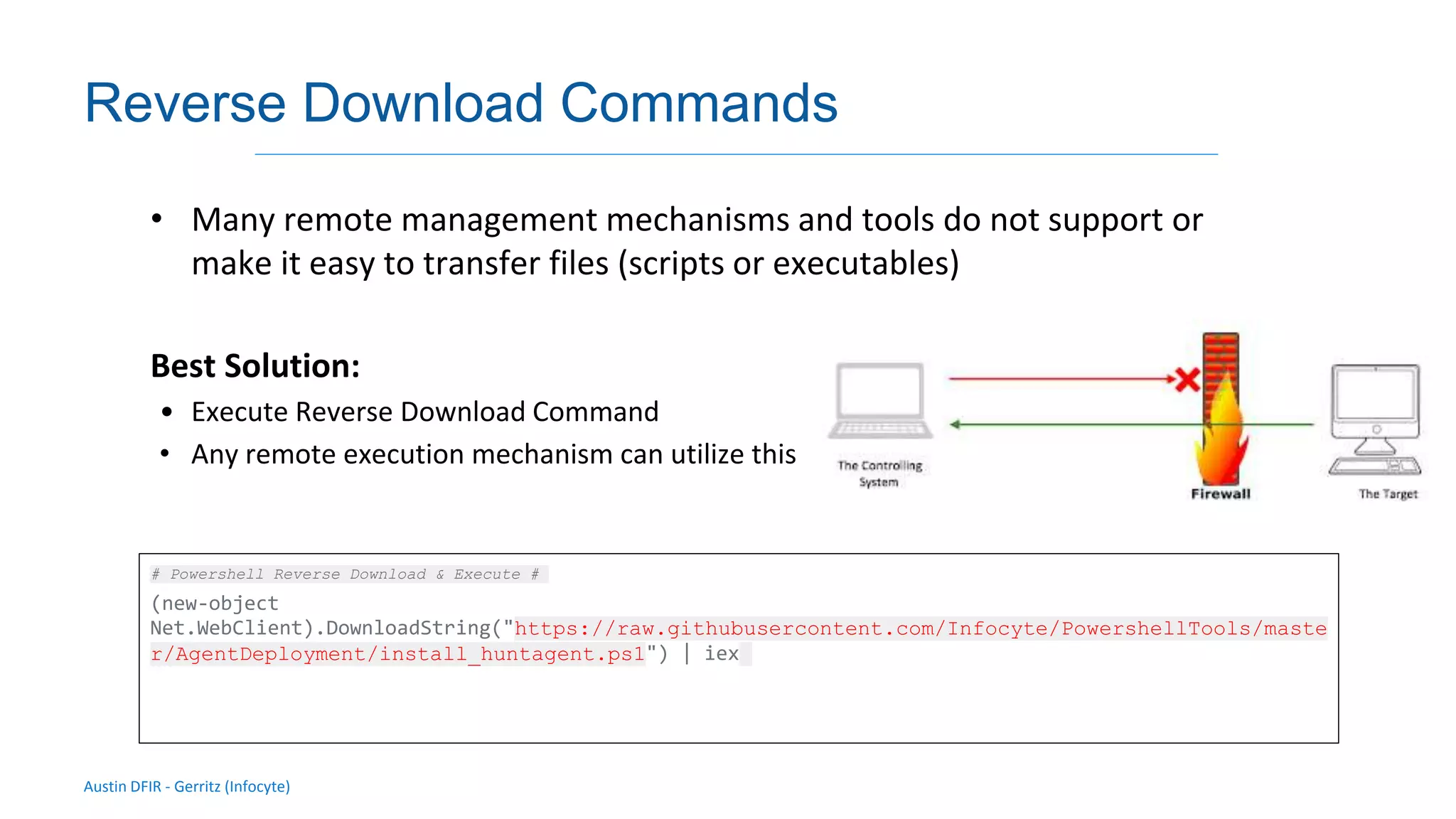
Reverse Download Commands
• Many remote management mechanisms and tools do not support or
make it easy to transfer files (scripts or executables)
Best Solution:
• Execute Reverse Download Command
• Any remote execution mechanism can utilize this
# Powershell Reverse Download & Execute #
(new-object
Net.WebClient).DownloadString("https://raw.githubusercontent.com/Infocyte/PowershellTools/maste
r/AgentDeployment/install_huntagent.ps1") | iex
Third Party
Tools/Agents
By Chris Gerritz (Infocyte)
Austin DFIR - Gerritz (Infocyte)
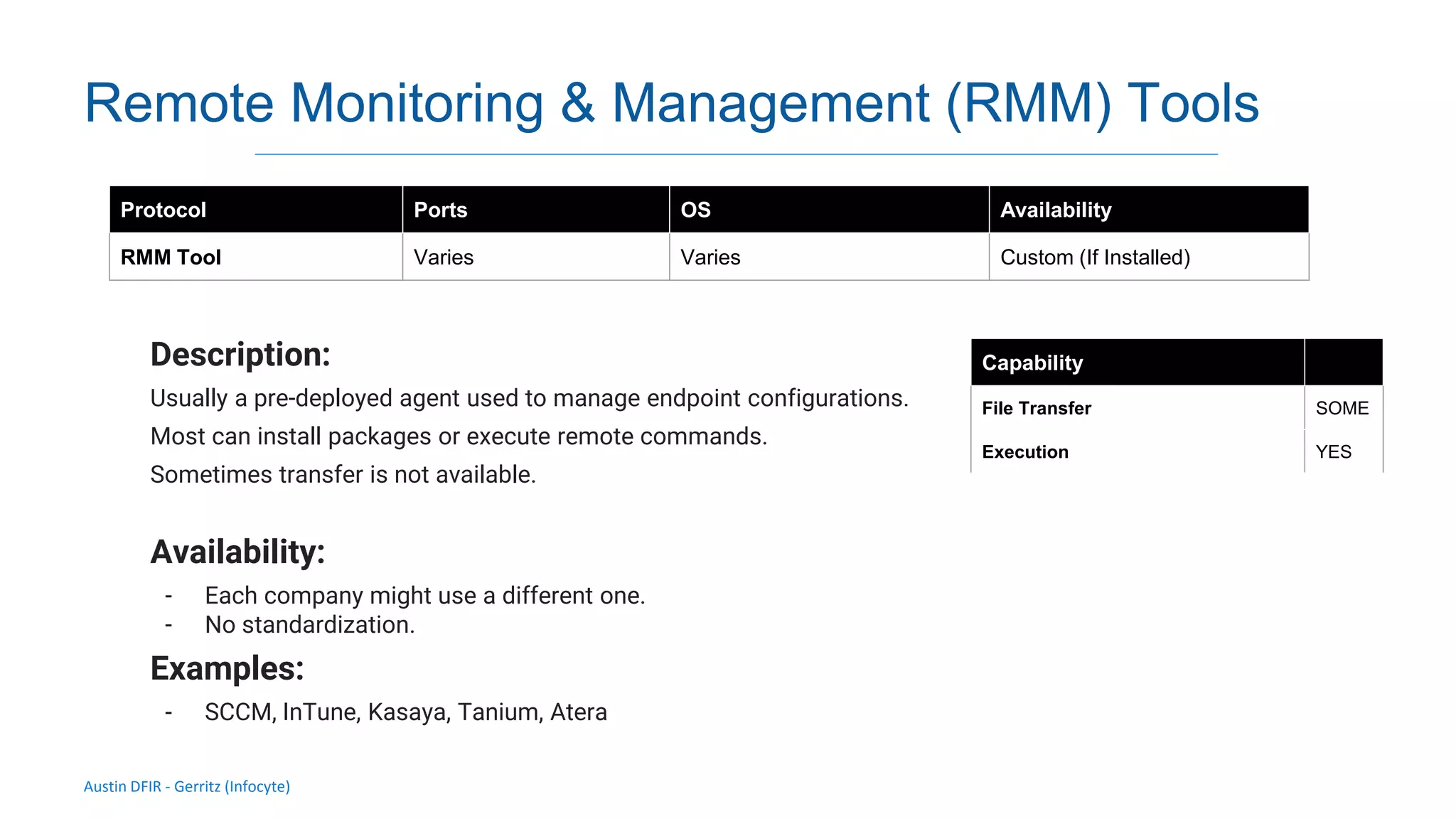
Remote Monitoring & Management (RMM) Tools
Description:
Usually a pre-deployed agent used to manage endpoint configurations.
Most can install packages or execute remote commands.
Sometimes transfer is not available.
Availability:
- Each company might use a different one.
- No standardization.
Examples:
- SCCM, InTune, Kasaya, Tanium, Atera
Protocol Ports OS Availability
RMM Tool Varies Varies Custom (If Installed)
Capability
File Transfer SOME
Execution YES
Austin DFIR - Gerritz (Infocyte)
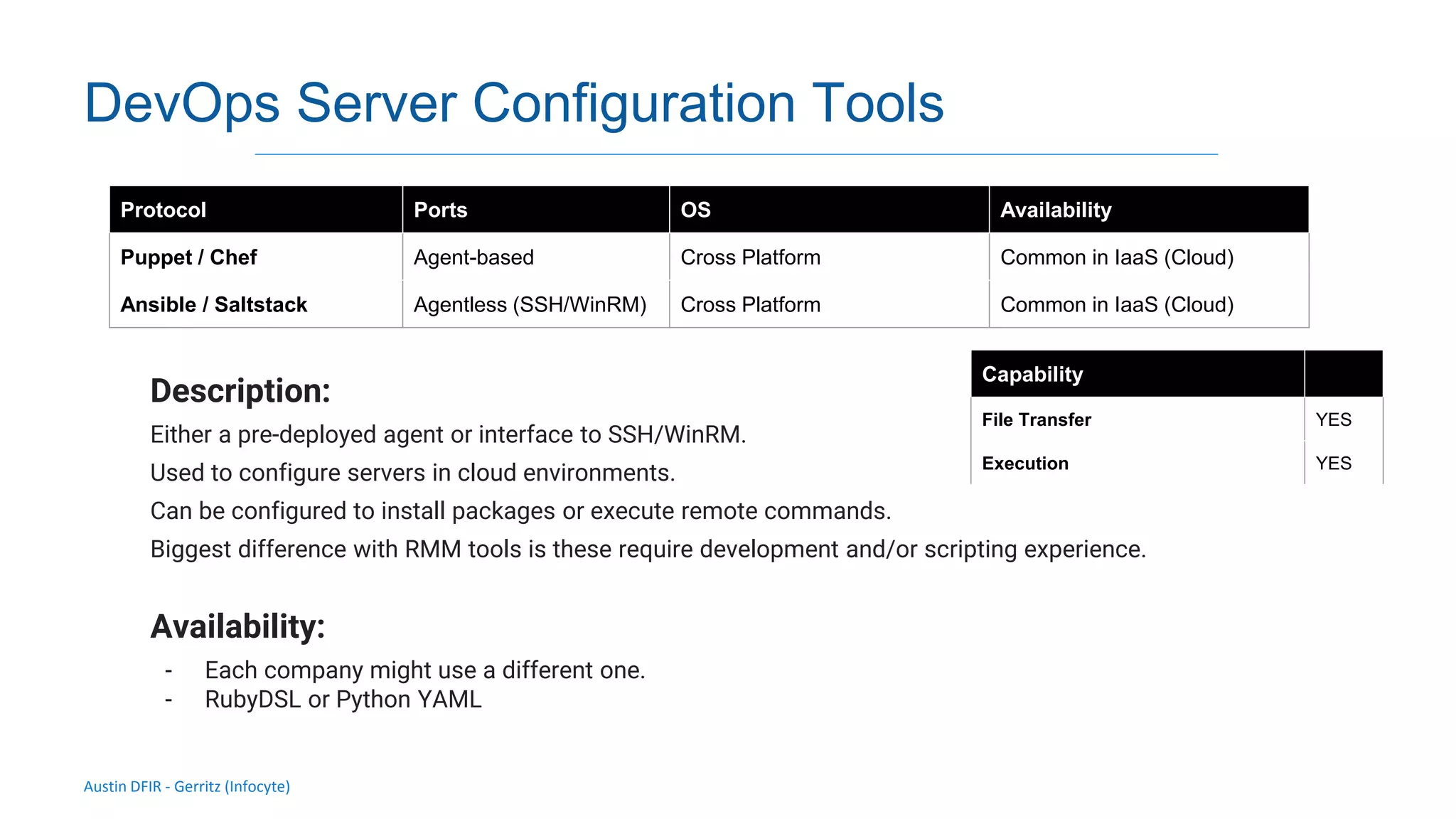
DevOps Server Configuration Tools
Description:
Either a pre-deployed agent or interface to SSH/WinRM.
Used to configure servers in cloud environments.
Can be configured to install packages or execute remote commands.
Biggest difference with RMM tools is these require development and/or scripting experience.
Availability:
- Each company might use a different one.
- RubyDSL or Python YAML
Protocol Ports OS Availability
Puppet / Chef Agent-based Cross Platform Common in IaaS (Cloud)
Ansible / Saltstack Agentless (SSH/WinRM) Cross Platform Common in IaaS (Cloud)
Capability
File Transfer YES
Execution YES
Troubleshooting
By Chris Gerritz (Infocyte)
Austin DFIR - Gerritz (Infocyte)
Validating integrity via live forensic analysis of a set of hosts
Testing / Troubleshooting RPC
Error: 0x800706BA RPC Server Unavailable
• Possible Issues: The Windows Firewall is blocking the connection.
• DCOM or WMI Service is not running
Error: 0x80070005 – Access is denied by DCOM
• Possible Issues: The user does not have remote access to the computer through
DCOM. (Run DCOMCNFG)
WMI Diagnostic Tool (local):
https://www.microsoft.com/en-us/download/details.aspx?id=7684
WBEMTEST (remote):
https://docs.microsoft.com/en-us/configmgr/develop/core/understand/introduction-to-wbemtest
- Microsoft Support
Austin DFIR - Gerritz (Infocyte)
Validating integrity via live forensic analysis of a set of hosts
Testing / Troubleshooting RPC
• RPC-based mechanisms are very complex due to multiple subsystem
involvement:
– Windows Firewall -> DCOM -> WMI -> Account Privileges
– Each subsystem can deny access (“Access Denied” isn’t always what you think it is)
or fail
Possible Solutions:
• Check Account Permissions and Status
• Check Firewall Rule enabled to allow RPC, DCOM, and/or WMI
• Check Services are Running and set to Automatic
• Check DCOM & WMI Permissions
• If all Fails: WMI Class Rebuild?
Services:
● DCOM Server Process Launcher
● Remote Procedure Call (RPC)
● RPC Endpoint Mapper
● Windows Management Instrumentation
Austin DFIR - Gerritz (Infocyte)
Validating integrity via live forensic analysis of a set of hosts
Open Source Network Test Script
Test-ICNetworkTest
https://github.com/Infocyte/PowershellTools/tre
e/master/NetworkDiagnostics
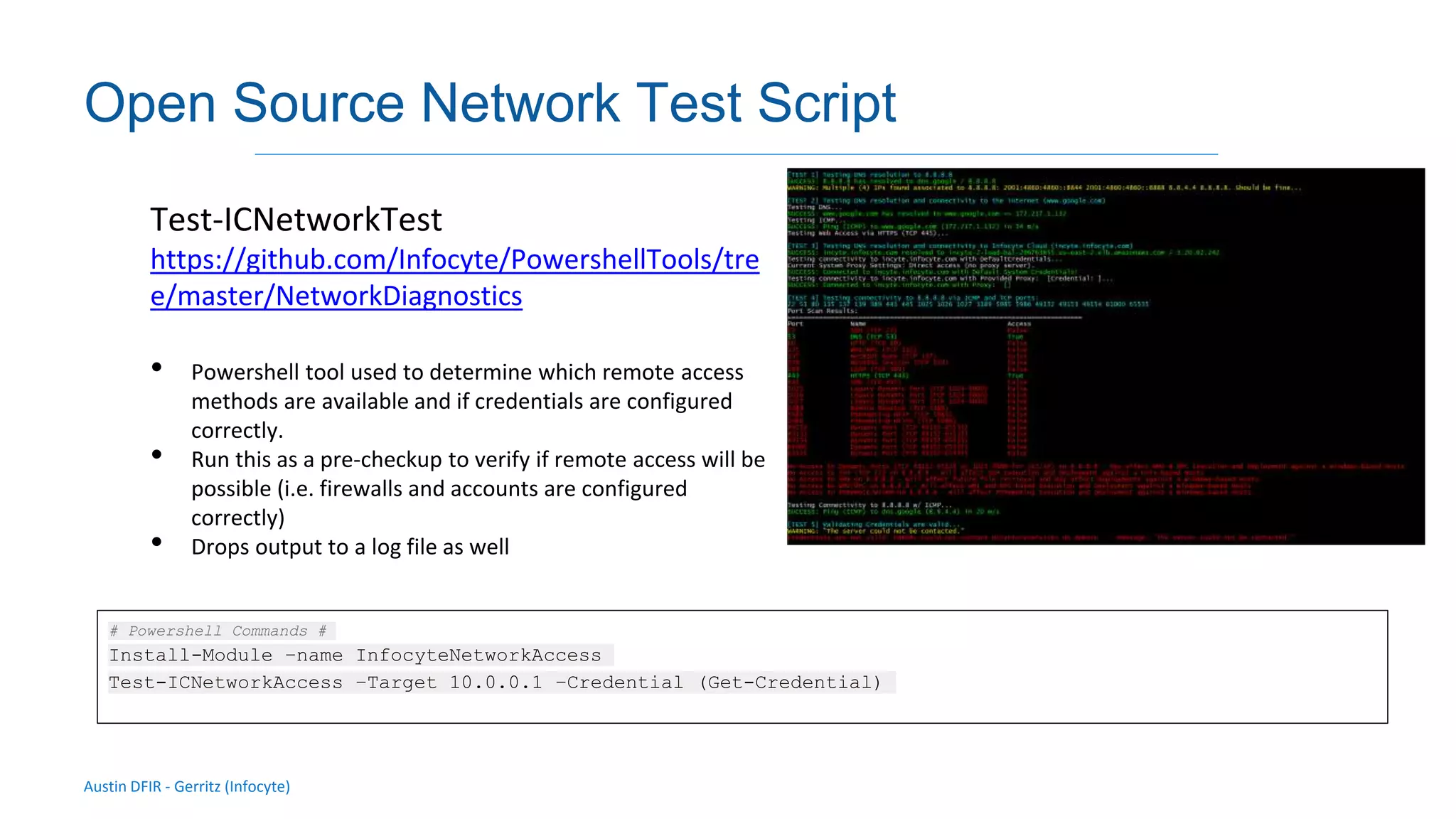
• Powershell tool used to determine which remote access
methods are available and if credentials are configured
correctly.
• Run this as a pre-checkup to verify if remote access will be
possible (i.e. firewalls and accounts are configured
correctly)
• Drops output to a log file as well
# Powershell Commands #
Install-Module –name InfocyteNetworkAccess
Test-ICNetworkAccess –Target 10.0.0.1 –Credential (Get-Credential)

DFIR Austin Training (Feb 2020): Remote Access & Deploying Agents

  • 1.
    Austin DFIR Remote Access &Agent DeploymentsFacilitator: Chris Gerritz (Infocyte)
  • 2.
    Austin DFIR -Gerritz (Infocyte) Validating integrity via live forensic analysis of a set of hosts Getting Remote Access Situation: • Network is compromised but you have no tools, sensors, or access to endpoints/servers Possible Solutions: • Deploy and Execute Temporary Collector • Agentless Collection – SSH – Powershell Remoting – WMI • Deploy/Install an Agent – GPO Startup Script – Use existing RMM Tool (InTune, SCCM, Kaseya, Atera, etc.)
  • 3.
  • 4.
    Austin DFIR -Gerritz (Infocyte) SSH Description: Remote Secure Shell for Linux platforms. Use SCP via SSH to transfer files. Availability: - Installed by default on most linux distros Mechanism Ports OS Availability SSH TCP 22 Linux Ubiquitous Authentication Password Public Key Key + Sudo Password Capability File Transfer (using SCP) YES Execution YES # sudo syntax # ssh -t user@hostname 'sudo command1 arg1 arg2' # su syntax # ssh user@hostname su -c "/path/to/command1 arg1 arg2" # RHEL/CentOS specific # ssh user@nas01 su --session-command="/path/to/command1 arg1 arg2"
  • 5.
    Austin DFIR -Gerritz (Infocyte) Validating integrity via live forensic analysis of a set of hosts Powershell Remoting Description: Modern Remote Shell for Windows. Availability: - Installed by default on Windows 7+ (PS 2.0) - Powershell Remoting needs to be enabled via GPO on a domain or Enable-PSRemoting locally - Powershell Core (Pwsh 6.0+) is cross platform and also has built-in capability for access via SSH on all platforms Mechanism Ports OS Availability Psh via WinRM TCP 5985 (HTTP) or TCP 5986 (HTTPS) Windows Common on TCP 5985 Pwsh (Core) via SSH TCP 22 Windows, Linux, MacOS Zero (new in 2019) Capability File Transfer (PS 5.1+ ONLY) YES Execution YES
  • 6.
    Austin DFIR -Gerritz (Infocyte) Windows Management Instrumentation (WMI) Description: A set of accessing methods and functions to manage Windows systems. Use `wmi process call create’ to execute a binary. Transfer is not available so you’ll need to use SMB or a common file share. Availability: - Installed by default on Windows XP+ - Non-domain joined systems are deny by default Mechanism Ports OS Availability WMI via RPC TCP 135 + Dynamic Port TCP 59152 - 65535 Windows Ubiquitous Capability File Transfer NO Execution (process call create) YES # cmd syntax # wmic /node:10.0.0.5 /user:administrator /password:Pass1 "process call create cmd” # powershell syntax # Invoke-WMIMethod -ComputerName 10.0.0.5 -class win32_process - name create -argumentlist ("cmd")
  • 7.
    Austin DFIR -Gerritz (Infocyte) Remote Scheduled Tasks (Schtasks) Description: Interacts with the task scheduler on remote systems. Use Run Once to execute a binary/command. Transfer is not available so you’ll need to use SMB or a common file share. Availability: - Installed by default on Windows XP+ - Non-domain joined systems are deny by default Mechanism Ports OS Availability Schtasks via RPC TCP 135 + Dynamic Port TCP 59152 - 65535 Windows Ubiquitous Capability File Transfer NO Execution (process call create) YES # cmd syntax # schtasks /Create /S 10.0.0.5 /RU "SYSTEM" /U administrator /P Pass1 /SC ONCE /TN MYTASKNAME /ST 00:00 /F /TR "c:tempMyProgram.exe" schtasks /Run /S 10.0.0.5 /U administrator /P Pass1 /TN MYTASKNAME schtasks /Delete /S 10.0.0.5 /U administrator /P Pass1 /TN MYTASKNAME
  • 8.
    Austin DFIR -Gerritz (Infocyte) Remote Service Manager (i.e. PSExec) Description: Interacts with the Service Controller Manager on remote systems. Use PSExec to execute a binary/command. Transfer is not available so you’ll need to use SMB or a common file share. Availability: - Installed by default on Windows XP+ - Non-domain joined systems are deny by default Mechanism Ports OS Availability SCM via RPC TCP 135 + Dynamic Port TCP 59152 - 65535 Windows Ubiquitous Capability File Transfer YES Execution (process call create) YES # cmd syntax # psexec 10.0.0.5 -u administrator -p Pass1 -c "c:tempMyProgram.exe" cmd
  • 9.
    Austin DFIR -Gerritz (Infocyte) GPO Startup Script Description: Configures systems in domain to run a script on startup. Can be used to launch a script or powershell command. Script is hosted on Domain Controller NOTE: GPO Logon Scripts CANNOT be used to install agents (unprivileged) Time: 24 hours to a month depending on domain propagation delays Availability: - Ubiquitous in Windows Domains Mechanism Ports/Protocol OS Availability GPO LDAP Windows Ubiquitous in Windows Domains Capability File Transfer NO Execution YES # GPO Editor # Computer Configuration -> Policies -> Windows Settings -> Scripts (Startup / Shutdown)
  • 10.
    Austin DFIR -Gerritz (Infocyte) GPO Startup Script Setup Instructions Step 1: Configure Script Delay to 120 seconds: Computer Configuration -> Administrative Templates -> System -> Group Policy “Configure Logon Script Delay” Step 2: Setup Command & Parameters Computer Configuration -> Policies -> Windows Settings -> Scripts (Startup / Shutdown) “Scripts” ● Script Name: %windir%System32WindowsPowerShellv1.0powershell.exe ● Script Parameters: -Noninteractive -ExecutionPolicy Bypass –Noprofile -file %~dp0MyPSScript.ps1 %~dp0 when launched on the client is automatically converted to the UNC path to the script directory on SYSVOL: yourdomainnameSysVolyourdomainnamePolicies{Your_GPO_GUID }MachineScriptsStartup
  • 11.
  • 12.
    Austin DFIR -Gerritz (Infocyte) Validating integrity via live forensic analysis of a set of hosts Reverse Download Commands • Many remote management mechanisms and tools do not support or make it easy to transfer files (scripts or executables) Best Solution: • Execute Reverse Download Command • Any remote execution mechanism can utilize this # Powershell Reverse Download & Execute # (new-object Net.WebClient).DownloadString("https://raw.githubusercontent.com/Infocyte/PowershellTools/maste r/AgentDeployment/install_huntagent.ps1") | iex
  • 13.
  • 14.
    Austin DFIR -Gerritz (Infocyte) Remote Monitoring & Management (RMM) Tools Description: Usually a pre-deployed agent used to manage endpoint configurations. Most can install packages or execute remote commands. Sometimes transfer is not available. Availability: - Each company might use a different one. - No standardization. Examples: - SCCM, InTune, Kasaya, Tanium, Atera Protocol Ports OS Availability RMM Tool Varies Varies Custom (If Installed) Capability File Transfer SOME Execution YES
  • 15.
    Austin DFIR -Gerritz (Infocyte) DevOps Server Configuration Tools Description: Either a pre-deployed agent or interface to SSH/WinRM. Used to configure servers in cloud environments. Can be configured to install packages or execute remote commands. Biggest difference with RMM tools is these require development and/or scripting experience. Availability: - Each company might use a different one. - RubyDSL or Python YAML Protocol Ports OS Availability Puppet / Chef Agent-based Cross Platform Common in IaaS (Cloud) Ansible / Saltstack Agentless (SSH/WinRM) Cross Platform Common in IaaS (Cloud) Capability File Transfer YES Execution YES
  • 16.
  • 17.
    Austin DFIR -Gerritz (Infocyte) Validating integrity via live forensic analysis of a set of hosts Testing / Troubleshooting RPC Error: 0x800706BA RPC Server Unavailable • Possible Issues: The Windows Firewall is blocking the connection. • DCOM or WMI Service is not running Error: 0x80070005 – Access is denied by DCOM • Possible Issues: The user does not have remote access to the computer through DCOM. (Run DCOMCNFG) WMI Diagnostic Tool (local): https://www.microsoft.com/en-us/download/details.aspx?id=7684 WBEMTEST (remote): https://docs.microsoft.com/en-us/configmgr/develop/core/understand/introduction-to-wbemtest - Microsoft Support
  • 18.
    Austin DFIR -Gerritz (Infocyte) Validating integrity via live forensic analysis of a set of hosts Testing / Troubleshooting RPC • RPC-based mechanisms are very complex due to multiple subsystem involvement: – Windows Firewall -> DCOM -> WMI -> Account Privileges – Each subsystem can deny access (“Access Denied” isn’t always what you think it is) or fail Possible Solutions: • Check Account Permissions and Status • Check Firewall Rule enabled to allow RPC, DCOM, and/or WMI • Check Services are Running and set to Automatic • Check DCOM & WMI Permissions • If all Fails: WMI Class Rebuild? Services: ● DCOM Server Process Launcher ● Remote Procedure Call (RPC) ● RPC Endpoint Mapper ● Windows Management Instrumentation
  • 19.
    Austin DFIR -Gerritz (Infocyte) Validating integrity via live forensic analysis of a set of hosts Open Source Network Test Script Test-ICNetworkTest https://github.com/Infocyte/PowershellTools/tre e/master/NetworkDiagnostics • Powershell tool used to determine which remote access methods are available and if credentials are configured correctly. • Run this as a pre-checkup to verify if remote access will be possible (i.e. firewalls and accounts are configured correctly) • Drops output to a log file as well # Powershell Commands # Install-Module –name InfocyteNetworkAccess Test-ICNetworkAccess –Target 10.0.0.1 –Credential (Get-Credential)