HTTP Connector
Introductions
• The HTTP connector can send and receive
HTTP and HTTPS requests given a selected
host, port and address
• Use the connector as an HTTP Listener
Connector for requests that arrive at a certain
address, subsequently generating an HTTP
response
Introductions
• Use the connector as an HTTP Request
Connector to send requests to a certain
address and receive the returned response
• Use TLS encryption to send or receive HTTPS
requests
• Send Authenticated Requests, via Basic
Authentication, Digest and OAuth
HTTP Listener Quick Reference for
Studio Users
• To instantiate the connector as an HTTP
listener connector, you must place it onto a
blank Anypoint Studio canvas into the Source
section of a new flow
HTTP Listener Quick Reference for
Studio Users
HTTP Listener Quick Reference for
Studio Users
HTTP Requester Quick Reference
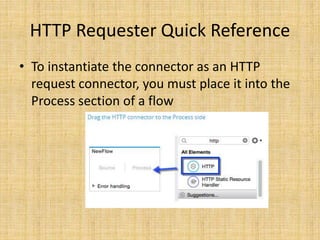
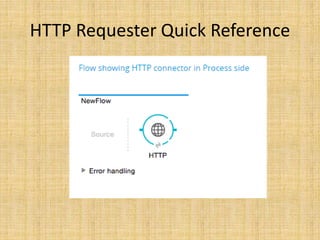
• To instantiate the connector as an HTTP
request connector, you must place it into the
Process section of a flow
HTTP Requester Quick Reference
Debugging
• Gaining visibility into HTTP inbound and
outbound behavior can be achieved by
enabling underlying library loggers with log4j2
Logging Listener and Request Activity
• By enabling the DEBUG level on
org.mule.module.http.internal.HttpMessageL
ogger, activity coming from all HTTP Listener
and Request components will be logged
Logging Packet Metadata
• Achieved by enabling the DEBUG level on
com.ning.http.client.providers.grizzly
• This will log the metadata of the request
packets from AsyncHTTPClientFilter and the
response packets from AhcEventFilter
Non-blocking Processing
• The HTTP Connector (both the HTTP Listener
and the HTTP Request connector) can be used
with a non-blocking processing strategy
• The message processor will still be free to
process other messages that keep arriving to it
Question and answer

Http connector

  • 1.
  • 2.
    Introductions • The HTTPconnector can send and receive HTTP and HTTPS requests given a selected host, port and address • Use the connector as an HTTP Listener Connector for requests that arrive at a certain address, subsequently generating an HTTP response
  • 3.
    Introductions • Use theconnector as an HTTP Request Connector to send requests to a certain address and receive the returned response • Use TLS encryption to send or receive HTTPS requests • Send Authenticated Requests, via Basic Authentication, Digest and OAuth
  • 4.
    HTTP Listener QuickReference for Studio Users • To instantiate the connector as an HTTP listener connector, you must place it onto a blank Anypoint Studio canvas into the Source section of a new flow
  • 5.
    HTTP Listener QuickReference for Studio Users
  • 6.
    HTTP Listener QuickReference for Studio Users
  • 7.
    HTTP Requester QuickReference • To instantiate the connector as an HTTP request connector, you must place it into the Process section of a flow
  • 8.
  • 9.
    Debugging • Gaining visibilityinto HTTP inbound and outbound behavior can be achieved by enabling underlying library loggers with log4j2
  • 10.
    Logging Listener andRequest Activity • By enabling the DEBUG level on org.mule.module.http.internal.HttpMessageL ogger, activity coming from all HTTP Listener and Request components will be logged
  • 11.
    Logging Packet Metadata •Achieved by enabling the DEBUG level on com.ning.http.client.providers.grizzly • This will log the metadata of the request packets from AsyncHTTPClientFilter and the response packets from AhcEventFilter
  • 12.
    Non-blocking Processing • TheHTTP Connector (both the HTTP Listener and the HTTP Request connector) can be used with a non-blocking processing strategy • The message processor will still be free to process other messages that keep arriving to it
  • 13.