MULE FLOW ELEMENTS
 Building upon the information presented
in Mule Concepts, this section offers more
detailed descriptions of the different types of
message sources and message processors,
and what they do within a Mule flow.
Elements :
 Anypoint Connectors receive or send
messages between Mule and one or more
external sources, such as files, databases, or
Web services. Connectors can act as
message sources by working as inbound
endpoints, they can act as a message
processor that performs an operation in middle
of a flow, or they can fall at the end of a flow
and act as the recipient of the final payload
data.
 Connectors in Mule are either endpoint-
based or operation-based. Endpoint-based
connectors follow either a one-way or request-
response exchange pattern and are often (but
not always) named and based around a
standard data communication protocol, such
as FTP, JMS, and SMTP. Operation-based
connectors follow an information exchange
pattern based on the operation that you select
and are often (but not always) named and
based around one or more specific third-party
APIs.
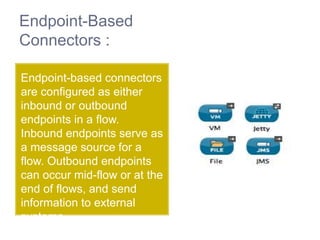
Endpoint-Based
Connectors :
Endpoint-based connectors
are configured as either
inbound or outbound
endpoints in a flow.
Inbound endpoints serve as
a message source for a
flow. Outbound endpoints
can occur mid-flow or at the
end of flows, and send
information to external
systems.
Operation-Based Connectors
When you add an operation-based
connector to your flow, you
immediately define a specific
operation for that connector to
perform.
The XML element of the connector
differs according to the operation that
you select, taking the
form <connectorName>:<operation>.
For
example, sfdc:query orsfdc:upsert-
bulk. The remaining configuration
 Components are message processors which
execute business logic on messages. They
enable you to perform specific actions without
writing any Mule-specific code. You can drop a
component – a POJO, Spring bean, Java
bean, or script – into a flow to perform almost
any customized task within your Mule
application. For example, you can use a
component to verify that items on an invoice
are in stock in a warehouse, or to update a
database with a customer’s order history.
Scripting Components
Mule includes
several scripting
components that you can use
in flows to execute custom
business logic. These
components enable you to
drop a chunk of custom-
written logic into your flow to
act upon messages.
The example below illustrates
the use of a Groovy script
component. The script uses
the value of state to determine
Web Service
Components
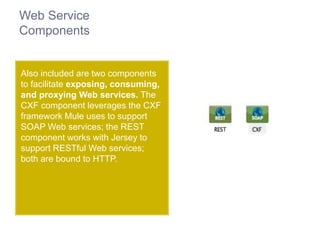
Also included are two components
to facilitate exposing, consuming,
and proxying Web services. The
CXF component leverages the CXF
framework Mule uses to support
SOAP Web services; the REST
component works with Jersey to
support RESTful Web services;
both are bound to HTTP.
HTTP Component
Further, Mule provides an HTTP
component to facilitate working
with calls over HTTP. Use
the HTTP Static Resource
Handler to easily serve up
static content when called.
Other Components
 Use a Logger component to log
activities in the flow as they occur.
 Use an Expression component to
evaluate a particular expression upon a
message in a flow.
 Use an Invoke component to invoke the
method of an object specified with a
Mule expression.
 Use an Echo component to return the
payload of a message as a call
response.
 Use a Flow Ref component to access
another flow from within a flow.
 Use a Batch Execute component to kick
off processing of a batch job.
 Mule provides numerous options for handling errors. Errors,
or faults, that occur within Mule are referred to
as exceptions; when an activity in your Mule instance fails,
Mule throws an exception. To manage these exceptions, Mule
allows you to configure exception strategies.
 Mule’s default exception strategy — which implicitly applies to
all Mule applications — manages errors (such as, thrown
exceptions) in Mule flows. When your flows require more
sophisticated error management, you can implement one or
more exception strategies to construct precise, efficient
protocols for handling errors.
 From a high level perspective, errors that occur in Mule fall
into one of two categories: System Exceptions,
and Messaging Exceptions.
System Exceptions :
 Mule invokes a System Exception Strategy when an exception is
thrown at the system-level (i.e., when no message is involved,
exceptions are handled by system exception strategies). For
example, system exception strategies handle exceptions that occur:
 During application start-up
 When a connection to an external system fails
 When a system exception occurs, Mule sends an exception
notification to registered listeners, logs the exception, and — if the
exception was caused by a connection failure — executes
the reconnection strategy. System Exception Strategies are not
configurable in Mule.
 As an example, imagine Mule establishes a connection to a JMS
broker in order to receive a message. When Mule attempts to use
the connection to consume a message the connection fails, which
causes Mule to invoke the system exception strategy. Because the
failure occurred before any message was received for processing,
Mule invoked the system, rather than messaging, exception
strategy.
Messaging Exceptions :
 Mule invokes a Messaging Exception
Strategy whenever an exception is thrown within
a flow. Whenever a message is involved,
exceptions are handled by messaging exception
strategies.
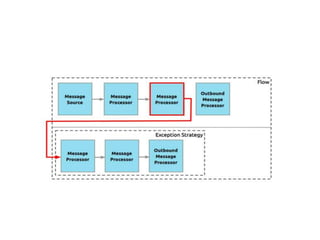
 When a message being processed through a
Mule flow throws an exception, normal flow
execution stops. Mule transfers the message to
the message processor sequence within the
exception strategy. You can incorporate any
number of message processors into an exception
strategy to handle the exception precisely as you
wish. The diagram below illustrates what happens
when a message throws an exception.
 In a Mule flow, a Transformer prepares a message
for further processing by enhancing or altering the
contents of the message properties, variables, or
payload. Data transformation is one of the most
powerful functionalities of Mule: rather than
spending a lot of time building a customized
connection between resources or processors, you
can just use a pre-built transformer to perform a
standard data conversion. For example, if the
message source in a flow receives data in XML
format, but a downstream message processor
expects a Java object, you can use an XML-to-
Object transformer to convert the format of the
message payload.
Transformer Library :
 Out of the box, Mule provides a set of standard
transformers to handle the most common data
transformation scenarios. Typically, these elements
require minimal configuration so as to facilitate quick
construction of applications that must juggle different
data formats between resources and processors. If
Mule doesn’t have the particular transformer you
need, you can arrange several transformers in a
sequence to achieve the output you need. For
example, if you need to implement an A-to-C
transformation but no such transformer exists, you
can arrange a sequence – A-to-B, B-to-C – which
effectively simulates an A-to-C transformer. For
example, to convert XML to JSON, use an XML-to-
Object transformer followed by an Object-to-JSON
transformer.
 Building upon the information presented
in Mule Concepts, this section offers more
detailed descriptions of the different types of
message sources and message processors,
and what they do within a Mule flow.
ThankYou!!!!!!!!!

Elements in a muleflow

  • 1.
  • 2.
     Building uponthe information presented in Mule Concepts, this section offers more detailed descriptions of the different types of message sources and message processors, and what they do within a Mule flow.
  • 3.
  • 4.
     Anypoint Connectorsreceive or send messages between Mule and one or more external sources, such as files, databases, or Web services. Connectors can act as message sources by working as inbound endpoints, they can act as a message processor that performs an operation in middle of a flow, or they can fall at the end of a flow and act as the recipient of the final payload data.
  • 5.
     Connectors inMule are either endpoint- based or operation-based. Endpoint-based connectors follow either a one-way or request- response exchange pattern and are often (but not always) named and based around a standard data communication protocol, such as FTP, JMS, and SMTP. Operation-based connectors follow an information exchange pattern based on the operation that you select and are often (but not always) named and based around one or more specific third-party APIs.
  • 6.
    Endpoint-Based Connectors : Endpoint-based connectors areconfigured as either inbound or outbound endpoints in a flow. Inbound endpoints serve as a message source for a flow. Outbound endpoints can occur mid-flow or at the end of flows, and send information to external systems.
  • 7.
    Operation-Based Connectors When youadd an operation-based connector to your flow, you immediately define a specific operation for that connector to perform. The XML element of the connector differs according to the operation that you select, taking the form <connectorName>:<operation>. For example, sfdc:query orsfdc:upsert- bulk. The remaining configuration
  • 8.
     Components aremessage processors which execute business logic on messages. They enable you to perform specific actions without writing any Mule-specific code. You can drop a component – a POJO, Spring bean, Java bean, or script – into a flow to perform almost any customized task within your Mule application. For example, you can use a component to verify that items on an invoice are in stock in a warehouse, or to update a database with a customer’s order history.
  • 9.
    Scripting Components Mule includes severalscripting components that you can use in flows to execute custom business logic. These components enable you to drop a chunk of custom- written logic into your flow to act upon messages. The example below illustrates the use of a Groovy script component. The script uses the value of state to determine
  • 10.
    Web Service Components Also includedare two components to facilitate exposing, consuming, and proxying Web services. The CXF component leverages the CXF framework Mule uses to support SOAP Web services; the REST component works with Jersey to support RESTful Web services; both are bound to HTTP.
  • 11.
    HTTP Component Further, Muleprovides an HTTP component to facilitate working with calls over HTTP. Use the HTTP Static Resource Handler to easily serve up static content when called.
  • 12.
    Other Components  Usea Logger component to log activities in the flow as they occur.  Use an Expression component to evaluate a particular expression upon a message in a flow.  Use an Invoke component to invoke the method of an object specified with a Mule expression.  Use an Echo component to return the payload of a message as a call response.  Use a Flow Ref component to access another flow from within a flow.  Use a Batch Execute component to kick off processing of a batch job.
  • 13.
     Mule providesnumerous options for handling errors. Errors, or faults, that occur within Mule are referred to as exceptions; when an activity in your Mule instance fails, Mule throws an exception. To manage these exceptions, Mule allows you to configure exception strategies.  Mule’s default exception strategy — which implicitly applies to all Mule applications — manages errors (such as, thrown exceptions) in Mule flows. When your flows require more sophisticated error management, you can implement one or more exception strategies to construct precise, efficient protocols for handling errors.  From a high level perspective, errors that occur in Mule fall into one of two categories: System Exceptions, and Messaging Exceptions.
  • 14.
    System Exceptions : Mule invokes a System Exception Strategy when an exception is thrown at the system-level (i.e., when no message is involved, exceptions are handled by system exception strategies). For example, system exception strategies handle exceptions that occur:  During application start-up  When a connection to an external system fails  When a system exception occurs, Mule sends an exception notification to registered listeners, logs the exception, and — if the exception was caused by a connection failure — executes the reconnection strategy. System Exception Strategies are not configurable in Mule.  As an example, imagine Mule establishes a connection to a JMS broker in order to receive a message. When Mule attempts to use the connection to consume a message the connection fails, which causes Mule to invoke the system exception strategy. Because the failure occurred before any message was received for processing, Mule invoked the system, rather than messaging, exception strategy.
  • 15.
    Messaging Exceptions : Mule invokes a Messaging Exception Strategy whenever an exception is thrown within a flow. Whenever a message is involved, exceptions are handled by messaging exception strategies.  When a message being processed through a Mule flow throws an exception, normal flow execution stops. Mule transfers the message to the message processor sequence within the exception strategy. You can incorporate any number of message processors into an exception strategy to handle the exception precisely as you wish. The diagram below illustrates what happens when a message throws an exception.
  • 17.
     In aMule flow, a Transformer prepares a message for further processing by enhancing or altering the contents of the message properties, variables, or payload. Data transformation is one of the most powerful functionalities of Mule: rather than spending a lot of time building a customized connection between resources or processors, you can just use a pre-built transformer to perform a standard data conversion. For example, if the message source in a flow receives data in XML format, but a downstream message processor expects a Java object, you can use an XML-to- Object transformer to convert the format of the message payload.
  • 18.
    Transformer Library : Out of the box, Mule provides a set of standard transformers to handle the most common data transformation scenarios. Typically, these elements require minimal configuration so as to facilitate quick construction of applications that must juggle different data formats between resources and processors. If Mule doesn’t have the particular transformer you need, you can arrange several transformers in a sequence to achieve the output you need. For example, if you need to implement an A-to-C transformation but no such transformer exists, you can arrange a sequence – A-to-B, B-to-C – which effectively simulates an A-to-C transformer. For example, to convert XML to JSON, use an XML-to- Object transformer followed by an Object-to-JSON transformer.
  • 19.
     Building uponthe information presented in Mule Concepts, this section offers more detailed descriptions of the different types of message sources and message processors, and what they do within a Mule flow.
  • 20.