Selenium 4 THE NEXT GEN BROWSER
AUTOMATION FRAMEWORK
Agenda
•Selenium Architecture
•Selenium 4
• WebDriver API
• Relative Locators
• Chrome DevTools Protocol
• Selenium Grid
•Beyond Selenium 4
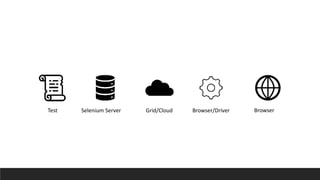
Architecture
Test Selenium Server Grid/Cloud Browser/Driver Browser
Relative locators
Relative Locators
A friendly way of locating elements using terms that users
normally use,
•above
•below
•toLeftOf
•toRightOf
•near
It started with Sahi. Sahi had Relation APIs, which are a lovely
way of finding elements.
How does Relative Locators
work?
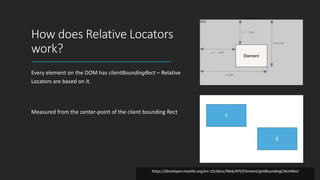
Every element on the DOM has clientBoundingRect – Relative
Locators are based on it.
Measured from the center-point of the client bounding Rect
https://developer.mozilla.org/en-US/docs/Web/API/Element/getBoundingClientRect
Chrome DevTools
Protocol
Chrome
DevTools
The Chrome DevTools Protocol is developed to enable a debugger inside
Chromium-based browsers.
Selenium 4 now have native support for Chrome DevTools Protocol
through “DevTools” interface.
This helps us getting Chrome Development properties such as
Application Cache, Fetch, Network, Performance, Profiler, Resource
Timing, Security and Target CDP domains etc.
Authentication
Selenium 4, offers a mechanism to
register a username and password
that can be used to authenticate
against these sites.
Network
Interception
Selenium 4 allows you to stub out
the backend of the application,
intercepting network traffic in the
test and returning pre-canned
responses
Selenium
Grid
Grid Modes
Standalone
Hub & Node
Distributed
Docker
Router
New
Session?
New Session
Queuer
Event Bus
Distributor
Session Map
Yes
No
New Session
Queue
Node
Requested
Capabilities
Node
Client
Error
No
Selenium 4 Grid Flow
GraphQL Querying
support for Grid 4
What You Ask Is What You Get.
GraphQL is an API specification standard and an Open-Source
data query and manipulation language.
It has a server-side runtime fulfilling those queries along with
the data.
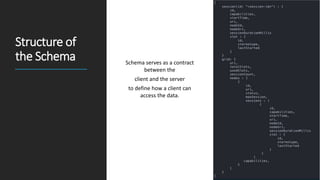
Structure of
the Schema Schema serves as a contract
between the
client and the server
to define how a client can
access the data.
Querying
GraphQL
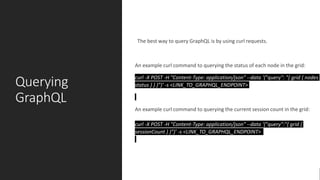
The best way to query GraphQL is by using curl requests.
An example curl command to querying the status of each node in the grid:
curl -X POST -H "Content-Type: application/json" --data '{"query": "{ grid { nodes
status } } }"}' -s <LINK_TO_GRAPHQL_ENDPOINT>
An example curl command to querying the current session count in the grid:
curl -X POST -H "Content-Type: application/json" --data '{"query":"{ grid {
sessionCount } }"}' -s <LINK_TO_GRAPHQL_ENDPOINT>
Three Pillars of
Observability: Telemetry
Logs
Traces
Metrics
Grid
Observability
Selenium server is instrumented
with tracing using Open
Telemetry.
Every request to the server is
traced from start to end.
Each trace consists of a series of
spans as a request is executed
within the server.
https://github.com/manoj9788/tracing-selenium-grid
Tracing
concepts
Span is the building block of a trace; a
named operation that represents a
function call or an execution of a
microservice
Trace is a collection of linked spans. Each
trace has unique id
Span Attributes are key-value pairs that
contains additional information about
each Span
Events are time stamped logs within a
span.
Demo Time 
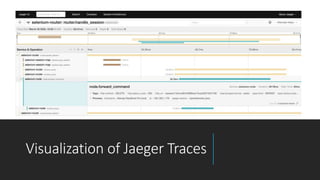
Visualization of Jaeger Traces
Beyond
Selenium 4
WebDriver BiDi
(Bi-Directional API)
New Locator Strategy at Server leve
FindByImage, FindByAI
References
https://www.oreilly.com/library/view/distributed-
systems-observability/9781492033431/ch04.html
https://github.com/manoj9788/tracing-selenium-
grid
https://www.jaegertracing.io/docs/1.17/getting-
started/
https://www.honeycomb.io/what-is-observability/
Thank you MANOJ KUMAR
@MANOJ9788

Selenium-4

Editor's Notes

  • #6 You know, finding elements on a page can be really difficult. I've seen loads of people using very complicated XPATH expressions, and trying to figure out complex CSS selectors and things like that. There have been whole talks about the subject at SeleniumConf. Surely there must be a better way to do this? Think about how we describe where an element is on the page. Think about how you’d do this over the phone. You’d never talk about the raw DOM, “Ah, find the fifth DIV element nested inside the SPAN with an ‘id’ of ‘foo.’” You’d just never say that! Instead, think off a conversational way of telling elements where they are in the page - you’d say something like, “just find that thing above that image, and to the right of that link,” when talking about where things are located on the page. 
  • #7 It started with Sahi. Sahi had Relation APIs, which are a lovely way of finding elements.
  • #8 Right hand side of 1 is left of the left most edge of 2 The top edge of 2 is at the same level as the bottom-edge of 1 This means that 1 is above 2 and 2 is below 1
  • #11 One feature that people have been asking for since we started the project has been the ability to authenticate to a web site. Previously, you could do this by crafting the URL the browser went to properly, but this leaks credentials to any man-in-the-middle and leaves them in server logs, so browsers have slowly removed this piece of functionality. That’s unfortunate, since it’s something that we know people frequently need to do in their tests. In Selenium 4, we now offer a mechanism to register a username and password that can be used to authenticate against these sites.
  • #12 A common complaint of Selenium tests is that they’re slow and flaky. While the bindings to the browser are excellent, and fully described by the W3C WebDriver spec, it is true that any end-to-end test is likely to suffer more flakiness than a simple unit test—there are just more moving parts, and more possibilities for things to go wrong. One way to resolve this issue is to stub out the backend of the application, intercepting network traffic in the test and returning pre-canned responses. Tools such as mountebank make this easy for API testing. Wouldn’t it be nice if there was a similar tool for Selenium? With Selenium 4, we now provide a mechanism to do this, using the NetworkInterceptor (well, that’s what we call it in the Java bindings). Pass it your WebDriver instance, and it’ll be called every time the browser is about to make an HTTP request, allowing you to return almost anything you want. 
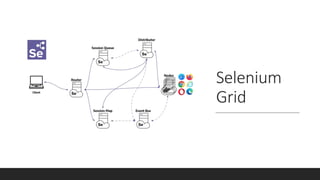
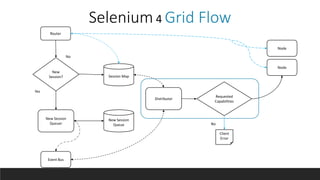
  • #15 Router faces the internet and take incoming traffic and figures out....where to send it.. If the request belongs to an existing session, the Router will send the session id to the Session Map, and the Session Map will return the Node where the session is running. After this, the Router will forward the request to the Node. If it is a new session request, the Router will forward it to the New Session Queuer, which will add it to the New Session Queue. Upon successfully adding the request to the queue, The New Session Queuer will trigger an event through the Event Bus. . The Distributor picks up this event and polls the queue. It now attempts to create a session If the requested capabilities do not exist in any of the registered Nodes, then the request is rejected immediately and the client receives a response. If the requested capabilities match the capabilities of any of Node slots, Distributor attempts to get the available slot. If all the slots are busy, the Distributor will ask the queuer to add the request to the front of the queue. The Distributor receives the request again after the request retry interval. It will attempt retries until the request is successful or has timed out. If request times out while retrying or adding to the front of the queue its rejected. After getting an available slot and session creation, the Distributor passes the new session response to the New Session Queuer via the Event Bus. The New Session Queuer will respond to the client when it receives the event.
  • #19 I’ll never forget a time when I had to debug systems by SSHing into the servers and parsing the logs. We were monitoring standard infrastructure metrics like CPU, memory, and networking. But each of them were telling us everything was fine, while an external health check tool was telling us that the system was intermittently down. Telemetry consists of those “outputs”—it’s the data generated by your system that documents its state. Telemetry gets generated because of instrumentation: code or tooling that captures data about the state of your running system and stores it in various formats. Some examples of software telemetry include: metrics, logs, traces, and structured events. To reiterate, telemetry is data that your system generates that tells you about the system’s health. Telemetry gets generated from instrumentation, which is code or tooling that gathers data from your system in real-time. And now, what is OpenTelemetry: Its an Observability framework for cloud-native software.
  • #21 Span Each trace is made up of timed operations called spans. A span has a start and end time and it represents operations done by a service. The granularity of span depends on how it is instrumented. Each span has a unique identifier. All spans within a trace have the same trace id. Trace Tracing allows one to trace a request through multiple services, starting from its origin to its final destination. This request’s journey helps in debugging, monitoring the end-to-end flow, and identifying failures. A trace depicts the end-to-end request flow. Each trace has a unique id as its identifier. Events Events are timed-stamped logs within a span. They provide additional context to the existing spans. Events also contain key-value pairs as event attributes.
  • #24 The work on BiDi features in the W3C WebDriver specification will be a game changer in the kind of functionality automated testers will have access to in a single tool. Selenium 4 will be released with Dev Tools support for Chrome, Edge and Firefox. Testers will no longer need to choose between working with a browser vendor collaborated driver implementation and a tool that can only access the Chrome DevTools Protocol. Being able to start any browser with a single interface to execute commands remotely, in parallel, and at scale, as well as choosing which type of commands make sense to use with which type of interaction is going to provide significant flexibility. This will be useful for both testers who are used to working with Selenium, and developers who are demanding increased access to lower level browser functionality. The key will be the cross-browser vendor supported access that won’t need to modify the production browsers being used by actual people.
  • #26 WebDriver BiDi The original WebDriver spec is designed to allow you to have the test running very remotely from the browser. So SauceLabs, BrowserStack services like that are easy to do, but also you can set up like an internal grid at work. Things like Puppeteer,  Cypress, Playwright, things like that. They assume that you're running locally and what they do is they hook into the browser debugging protocols. And the main difference between the browser debugging protocols and the WebDriver spec, there are many. The major one is that the browser can send events to your test, right? So when people say, oh my well, my test using Puppeteer is so much faster. What's actually happening is an event is coming from the browser. And they're saving 200 milliseconds, 100 milliseconds. Instead of polling for an update, they get the update coming straight to them.  Now, the problem with depending on a browser debugging protocol is obviously these things are designed for debugging browsers And so they change with every single release of the browser because there's no requirement for them to be stable API that people write code against. You want to be able to take the same APIs and apply them consistently between browsers. And so what we're doing with WebDriver BiDi is we are taking the lessons learned from that event-driven model where the browser can send events and you can send commands to the browser in a sort of bi-directional way.  So you can find an element using the current W3C WebDriver spec. And you can pass the element into WebDriver BiDi. And similarly, you could take a reference from WebDriver BiDi and you could use that in standard W3C WebDriver.