






Alex Theedom @readlearncode
Java EE 8:
What Servlet 4.0 and
HTTP/2 mean?
@readlearncode readlearncode.com
Who am I?
Alex Theedom
Author
Trainer
Blogger
Speaker
What’s on?
@readlearncode readlearncode.com
• Why Do We Need HTTP/2
• Workarounds to HTTP1.1
• HTTP Sockets
• Topline HTTP/2 Features
• Servlet 4.0 Features
• Server Support
• Status Update
• Extract Bits
• Q&A
What’s on?
Why Do We Need HTTP/2?
@readlearncode readlearncode.com
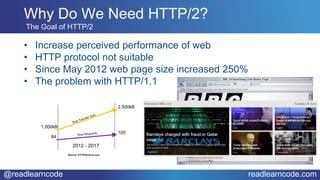
• Increase perceived performance of web
• HTTP protocol not suitable
• Since May 2012 web page size increased 250%
• The problem with HTTP/1.1
Source: HTTPArchive.com
Why Do We Need HTTP/2?
The Goal of HTTP/2
@readlearncode readlearncode.com
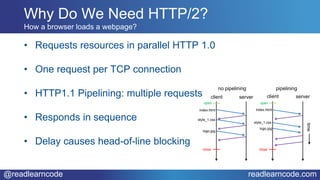
• Requests resources in parallel HTTP 1.0
• One request per TCP connection
• HTTP1.1 Pipelining: multiple requests
• Responds in sequence
• Delay causes head-of-line blocking
How a browser loads a webpage?
open
close
client server
no pipelining
index.html
style_1.css
logo.jpg
open
close
client server
pipelining
time
index.html
style_1.css
logo.jpg
Why Do We Need HTTP/2?
Workarounds
@readlearncode readlearncode.com
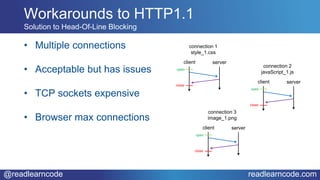
• Multiple connections
• Acceptable but has issues
• TCP sockets expensive
• Browser max connections
Workarounds to HTTP1.1
Solution to Head-Of-Line Blocking
open
close
client server
connection 1
style_1.css
open
close
client server
connection 2
javaScript_1.js
open
close
client server
connection 3
image_1.png
@readlearncode readlearncode.com
Workarounds to HTTP1.1
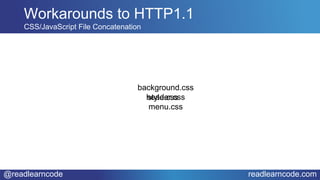
CSS/JavaScript File Concatenation
background.css
header.css
menu.css
style.css
@readlearncode readlearncode.com
Workarounds to HTTP1.1
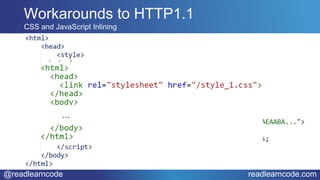
CSS and JavaScript Inlining
…
@readlearncode readlearncode.com
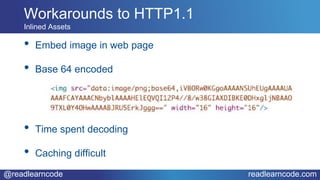
• Embed image in web page
• Base 64 encoded
• Time spent decoding
• Caching difficult
Workarounds to HTTP1.1
Inlined Assets
@readlearncode readlearncode.com
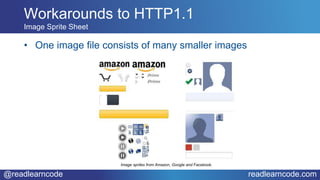
• One image file consists of many smaller images
Workarounds to HTTP1.1
Image Sprite Sheet
Image sprites from Amazon, Google and Facebook.
@readlearncode readlearncode.com
Workarounds to HTTP1.1
Domain Sharding
web page
y.example.com
x.example.com
domain 2
domain 1
logo.jpg
icon.jpg
header.css
menu.css
HTTP Sockets
@readlearncode readlearncode.com
• Not much specified
• Two maximum open sockets (ignored by browsers)
• Throw away resources
HTTP Sockets
What HTTP1.1 Says About Sockets
@readlearncode readlearncode.com
• Much is specified
• Scares resources
• Only open one socket
HTTP Sockets
What HTTP/2 Says About Sockets
Topline HTTP/2 Features
@readlearncode readlearncode.com
• HTTP/2 is comprised of two specifications
• Hypertext Transfer Protocol version 2 - RFC7540
• HPACK - Header Compression for HTTP/2 - RFC7541
• Binary Protocol Based on Frames
Topline HTTP/2 Features
What’s new
@readlearncode readlearncode.com
• Request/Response Multiplexing
• Binary Framing
• Header Compression
• Stream Prioritization
• Server Push
Topline HTTP/2 Features
Features
@readlearncode readlearncode.com
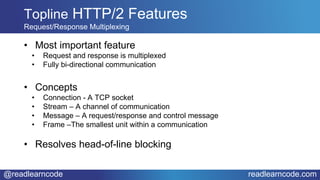
• Most important feature
• Request and response is multiplexed
• Fully bi-directional communication
• Concepts
• Connection - A TCP socket
• Stream – A channel of communication
• Message – A request/response and control message
• Frame –The smallest unit within a communication
• Resolves head-of-line blocking
Topline HTTP/2 Features
Request/Response Multiplexing
@readlearncode readlearncode.com
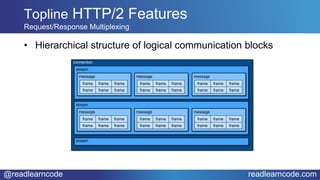
• Hierarchical structure of logical communication blocks
Topline HTTP/2 Features
Request/Response Multiplexing
connection
stream
frame frame frame
frame frame frame
message
stream
frame frame frame
frame frame frame
message
frame frame frame
frame frame frame
message
stream
frame frame frame
frame frame frame
message
frame frame frame
frame frame frame
message
frame frame frame
frame frame frame
message
@readlearncode readlearncode.com
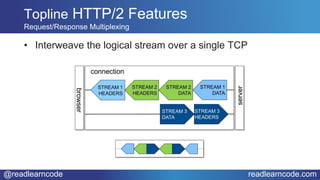
• Interweave the logical stream over a single TCP
Topline HTTP/2 Features
Request/Response Multiplexing
@readlearncode readlearncode.com
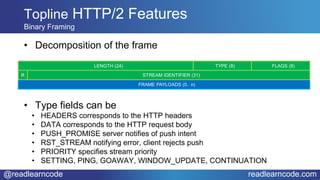
• Decomposition of the frame
• Type fields can be
• HEADERS corresponds to the HTTP headers
• DATA corresponds to the HTTP request body
• PUSH_PROMISE server notifies of push intent
• RST_STREAM notifying error, client rejects push
• PRIORITY specifies stream priority
• SETTING, PING, GOAWAY, WINDOW_UPDATE, CONTINUATION
Topline HTTP/2 Features
Binary Framing
@readlearncode readlearncode.com
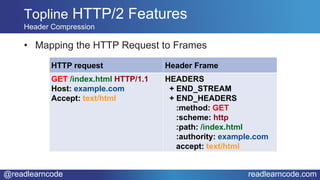
• Mapping the HTTP Request to Frames
Topline HTTP/2 Features
Header Compression
HTTP request Header Frame
GET /index.html HTTP/1.1
Host: example.com
Accept: text/html
HEADERS
+ END_STREAM
+ END_HEADERS
:method: GET
:scheme: http
:path: /index.html
:authority: example.com
accept: text/html
@readlearncode readlearncode.com
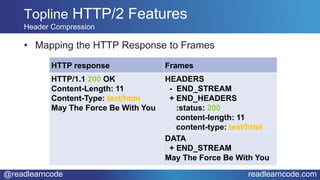
• Mapping the HTTP Response to Frames
Topline HTTP/2 Features
Header Compression
HTTP response Frames
HTTP/1.1 200 OK
Content-Length: 11
Content-Type: text/html
May The Force Be With You
HEADERS
- END_STREAM
+ END_HEADERS
:status: 200
content-length: 11
content-type: text/html
DATA
+ END_STREAM
May The Force Be With You
@readlearncode readlearncode.com
Topline HTTP/2 Features
HPACK header compression
HTTP Request 1
:method GET
:scheme https
:host example.com
:path /index.html
:authority example.org
:accept text/html
user-agent Mozilla/5.0
HTTP Request 2
:method GET
:scheme https
:host example.com
:path /info.html
:authority example.org
:accept text/html
user-agent Mozilla/5.0
HEADERS frame (Stream 1)
:method GET
:scheme https
:host example.com
:path /index.html
:authority example.org
:accept text/html
user-agent Mozilla/5.0
HEADERS frame (Stream 3)
:path /info.html
@readlearncode readlearncode.com
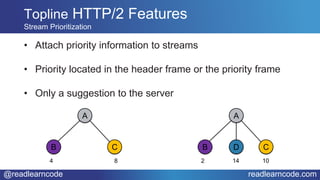
• Attach priority information to streams
• Priority located in the header frame or the priority frame
• Only a suggestion to the server
Topline HTTP/2 Features
Stream Prioritization
B D C
A
2 14 10
B C
A
4 8
@readlearncode readlearncode.com
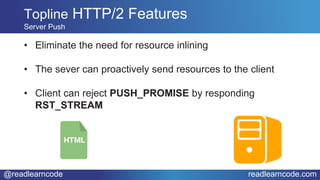
• Eliminate the need for resource inlining
• The sever can proactively send resources to the client
• Client can reject PUSH_PROMISE by responding
RST_STREAM
Topline HTTP/2 Features
Server Push
Servlet 4.0 Features
@readlearncode readlearncode.com
Servlet 4.0 Features
Server Push
• Most visible improvements in servlets
• Best place to know what resources a request needs
@readlearncode readlearncode.com
Servlet 4.0 Features
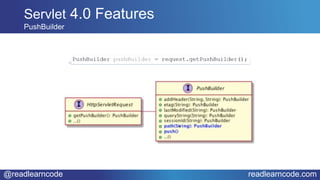
PushBuilder
@readlearncode readlearncode.com
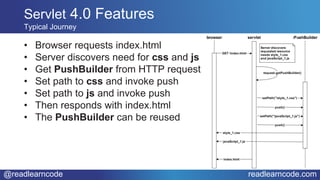
• Browser requests index.html
• Server discovers need for css and js
• Get PushBuilder from HTTP request
• Set path to css and invoke push
• Set path to js and invoke push
• Then responds with index.html
• The PushBuilder can be reused
Servlet 4.0 Features
Typical Journey
@readlearncode readlearncode.com
Servlet 4.0 Features
PushBuilder Dive Deeper
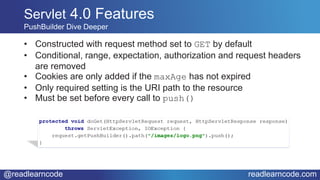
• Constructed with request method set to GET by default
• Conditional, range, expectation, authorization and request headers
are removed
• Cookies are only added if the maxAge has not expired
• Only required setting is the URI path to the resource
• Must be set before every call to push()
@readlearncode readlearncode.com
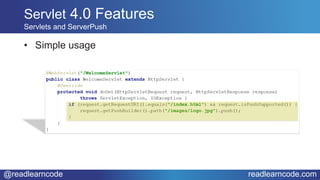
• Simple usage
Servlet 4.0 Features
Servlets and ServerPush
@readlearncode readlearncode.com
Servlet 4.0 Features
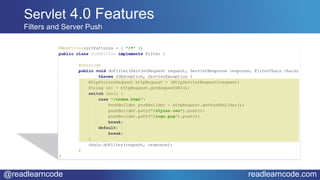
Filters and Server Push
@readlearncode readlearncode.com
• Web framework use case most important
• Dependent on knowing the resources the client requires
• Frameworks best placed to take advantage of server push
• JSF users get server push for free
Servlet 4.0 Features
JSF Use Case
@readlearncode readlearncode.com
• SETTINGS_ENABLE_PUSH clients disable server push
• RST_STREAM rejects cached resources
• Servlet containers must honour request to not receive
Servlet 4.0 Features
Disable/Reject Server Push
@readlearncode readlearncode.com
• Perfectly backward compatible
• Rework to take advantage of Server Push
• Consider removing frontend workarounds
• JSF developers do nothing
Servlet 4.0 Features
Backward Compatible
Server Support
@readlearncode readlearncode.com
• GlassFish 5.0 (nightly)
Reference implementation
• Payara 5.0
Has a branch for Java EE 8 development
• Jetty Stable-9 (9.4.5.v20170502)
org.eclipse.jetty.servlets.PushCacheFilter/PushBuilder
Server Implementation
Servlet Support
@readlearncode readlearncode.com
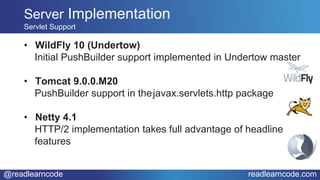
• WildFly 10 (Undertow)
Initial PushBuilder support implemented in Undertow master
• Tomcat 9.0.0.M20
PushBuilder support in thejavax.servlets.http package
• Netty 4.1
HTTP/2 implementation takes full advantage of headline
features
Server Implementation
Servlet Support
Status Update
@readlearncode readlearncode.com
• As of 23 May 2017 in Public Review ballot status
• Issue Tracker: github.com/javaee/servlet-spec/issues
• JCP Specification: jcp.org/en/jsr/detail?id=369
• Twitter: @servlet_spec
Status Update
JSP 369: Servlet Specification
Extra Bits
@readlearncode readlearncode.com
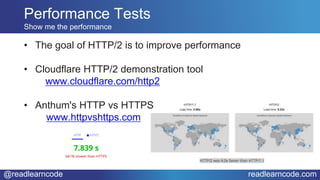
• The goal of HTTP/2 is to improve performance
• Cloudflare HTTP/2 demonstration tool
www.cloudflare.com/http2
• Anthum's HTTP vs HTTPS
www.httpvshttps.com
Performance Tests
Show me the performance
@readlearncode readlearncode.com
• Daniel Stenberg book: bagder.gitbooks.io/http2-explained
• Free O’Reilly e-book:
www.oreilly.com/webops-perf/free/HTTP2-high-perf-
browser-networking.csp
• FAQ: http2.github.io/faq
Useful Resources
@readlearncode readlearncode.com
Q & A
Alex Theedom @readlearncode
Java EE 8:
What Servlet 4.0 and
HTTP/2 mean?

JDKIO: Java EE 8 what Servlet 4 and HTTP2 mean to you

  • 1.
    Alex Theedom @readlearncode JavaEE 8: What Servlet 4.0 and HTTP/2 mean?
  • 2.
    @readlearncode readlearncode.com Who amI? Alex Theedom Author Trainer Blogger Speaker
  • 3.
  • 4.
    @readlearncode readlearncode.com • WhyDo We Need HTTP/2 • Workarounds to HTTP1.1 • HTTP Sockets • Topline HTTP/2 Features • Servlet 4.0 Features • Server Support • Status Update • Extract Bits • Q&A What’s on?
  • 5.
    Why Do WeNeed HTTP/2?
  • 6.
    @readlearncode readlearncode.com • Increaseperceived performance of web • HTTP protocol not suitable • Since May 2012 web page size increased 250% • The problem with HTTP/1.1 Source: HTTPArchive.com Why Do We Need HTTP/2? The Goal of HTTP/2
  • 7.
    @readlearncode readlearncode.com • Requestsresources in parallel HTTP 1.0 • One request per TCP connection • HTTP1.1 Pipelining: multiple requests • Responds in sequence • Delay causes head-of-line blocking How a browser loads a webpage? open close client server no pipelining index.html style_1.css logo.jpg open close client server pipelining time index.html style_1.css logo.jpg Why Do We Need HTTP/2?
  • 8.
  • 9.
    @readlearncode readlearncode.com • Multipleconnections • Acceptable but has issues • TCP sockets expensive • Browser max connections Workarounds to HTTP1.1 Solution to Head-Of-Line Blocking open close client server connection 1 style_1.css open close client server connection 2 javaScript_1.js open close client server connection 3 image_1.png
  • 10.
    @readlearncode readlearncode.com Workarounds toHTTP1.1 CSS/JavaScript File Concatenation background.css header.css menu.css style.css
  • 11.
    @readlearncode readlearncode.com Workarounds toHTTP1.1 CSS and JavaScript Inlining …
  • 12.
    @readlearncode readlearncode.com • Embedimage in web page • Base 64 encoded • Time spent decoding • Caching difficult Workarounds to HTTP1.1 Inlined Assets
  • 13.
    @readlearncode readlearncode.com • Oneimage file consists of many smaller images Workarounds to HTTP1.1 Image Sprite Sheet Image sprites from Amazon, Google and Facebook.
  • 14.
    @readlearncode readlearncode.com Workarounds toHTTP1.1 Domain Sharding web page y.example.com x.example.com domain 2 domain 1 logo.jpg icon.jpg header.css menu.css
  • 15.
  • 16.
    @readlearncode readlearncode.com • Notmuch specified • Two maximum open sockets (ignored by browsers) • Throw away resources HTTP Sockets What HTTP1.1 Says About Sockets
  • 17.
    @readlearncode readlearncode.com • Muchis specified • Scares resources • Only open one socket HTTP Sockets What HTTP/2 Says About Sockets
  • 18.
  • 19.
    @readlearncode readlearncode.com • HTTP/2is comprised of two specifications • Hypertext Transfer Protocol version 2 - RFC7540 • HPACK - Header Compression for HTTP/2 - RFC7541 • Binary Protocol Based on Frames Topline HTTP/2 Features What’s new
  • 20.
    @readlearncode readlearncode.com • Request/ResponseMultiplexing • Binary Framing • Header Compression • Stream Prioritization • Server Push Topline HTTP/2 Features Features
  • 21.
    @readlearncode readlearncode.com • Mostimportant feature • Request and response is multiplexed • Fully bi-directional communication • Concepts • Connection - A TCP socket • Stream – A channel of communication • Message – A request/response and control message • Frame –The smallest unit within a communication • Resolves head-of-line blocking Topline HTTP/2 Features Request/Response Multiplexing
  • 22.
    @readlearncode readlearncode.com • Hierarchicalstructure of logical communication blocks Topline HTTP/2 Features Request/Response Multiplexing connection stream frame frame frame frame frame frame message stream frame frame frame frame frame frame message frame frame frame frame frame frame message stream frame frame frame frame frame frame message frame frame frame frame frame frame message frame frame frame frame frame frame message
  • 23.
    @readlearncode readlearncode.com • Interweavethe logical stream over a single TCP Topline HTTP/2 Features Request/Response Multiplexing
  • 24.
    @readlearncode readlearncode.com • Decompositionof the frame • Type fields can be • HEADERS corresponds to the HTTP headers • DATA corresponds to the HTTP request body • PUSH_PROMISE server notifies of push intent • RST_STREAM notifying error, client rejects push • PRIORITY specifies stream priority • SETTING, PING, GOAWAY, WINDOW_UPDATE, CONTINUATION Topline HTTP/2 Features Binary Framing
  • 25.
    @readlearncode readlearncode.com • Mappingthe HTTP Request to Frames Topline HTTP/2 Features Header Compression HTTP request Header Frame GET /index.html HTTP/1.1 Host: example.com Accept: text/html HEADERS + END_STREAM + END_HEADERS :method: GET :scheme: http :path: /index.html :authority: example.com accept: text/html
  • 26.
    @readlearncode readlearncode.com • Mappingthe HTTP Response to Frames Topline HTTP/2 Features Header Compression HTTP response Frames HTTP/1.1 200 OK Content-Length: 11 Content-Type: text/html May The Force Be With You HEADERS - END_STREAM + END_HEADERS :status: 200 content-length: 11 content-type: text/html DATA + END_STREAM May The Force Be With You
  • 27.
    @readlearncode readlearncode.com Topline HTTP/2Features HPACK header compression HTTP Request 1 :method GET :scheme https :host example.com :path /index.html :authority example.org :accept text/html user-agent Mozilla/5.0 HTTP Request 2 :method GET :scheme https :host example.com :path /info.html :authority example.org :accept text/html user-agent Mozilla/5.0 HEADERS frame (Stream 1) :method GET :scheme https :host example.com :path /index.html :authority example.org :accept text/html user-agent Mozilla/5.0 HEADERS frame (Stream 3) :path /info.html
  • 28.
    @readlearncode readlearncode.com • Attachpriority information to streams • Priority located in the header frame or the priority frame • Only a suggestion to the server Topline HTTP/2 Features Stream Prioritization B D C A 2 14 10 B C A 4 8
  • 29.
    @readlearncode readlearncode.com • Eliminatethe need for resource inlining • The sever can proactively send resources to the client • Client can reject PUSH_PROMISE by responding RST_STREAM Topline HTTP/2 Features Server Push
  • 30.
  • 31.
    @readlearncode readlearncode.com Servlet 4.0Features Server Push • Most visible improvements in servlets • Best place to know what resources a request needs
  • 32.
  • 33.
    @readlearncode readlearncode.com • Browserrequests index.html • Server discovers need for css and js • Get PushBuilder from HTTP request • Set path to css and invoke push • Set path to js and invoke push • Then responds with index.html • The PushBuilder can be reused Servlet 4.0 Features Typical Journey
  • 34.
    @readlearncode readlearncode.com Servlet 4.0Features PushBuilder Dive Deeper • Constructed with request method set to GET by default • Conditional, range, expectation, authorization and request headers are removed • Cookies are only added if the maxAge has not expired • Only required setting is the URI path to the resource • Must be set before every call to push()
  • 35.
    @readlearncode readlearncode.com • Simpleusage Servlet 4.0 Features Servlets and ServerPush
  • 36.
    @readlearncode readlearncode.com Servlet 4.0Features Filters and Server Push
  • 37.
    @readlearncode readlearncode.com • Webframework use case most important • Dependent on knowing the resources the client requires • Frameworks best placed to take advantage of server push • JSF users get server push for free Servlet 4.0 Features JSF Use Case
  • 38.
    @readlearncode readlearncode.com • SETTINGS_ENABLE_PUSHclients disable server push • RST_STREAM rejects cached resources • Servlet containers must honour request to not receive Servlet 4.0 Features Disable/Reject Server Push
  • 39.
    @readlearncode readlearncode.com • Perfectlybackward compatible • Rework to take advantage of Server Push • Consider removing frontend workarounds • JSF developers do nothing Servlet 4.0 Features Backward Compatible
  • 40.
  • 41.
    @readlearncode readlearncode.com • GlassFish5.0 (nightly) Reference implementation • Payara 5.0 Has a branch for Java EE 8 development • Jetty Stable-9 (9.4.5.v20170502) org.eclipse.jetty.servlets.PushCacheFilter/PushBuilder Server Implementation Servlet Support
  • 42.
    @readlearncode readlearncode.com • WildFly10 (Undertow) Initial PushBuilder support implemented in Undertow master • Tomcat 9.0.0.M20 PushBuilder support in thejavax.servlets.http package • Netty 4.1 HTTP/2 implementation takes full advantage of headline features Server Implementation Servlet Support
  • 43.
  • 44.
    @readlearncode readlearncode.com • Asof 23 May 2017 in Public Review ballot status • Issue Tracker: github.com/javaee/servlet-spec/issues • JCP Specification: jcp.org/en/jsr/detail?id=369 • Twitter: @servlet_spec Status Update JSP 369: Servlet Specification
  • 45.
  • 46.
    @readlearncode readlearncode.com • Thegoal of HTTP/2 is to improve performance • Cloudflare HTTP/2 demonstration tool www.cloudflare.com/http2 • Anthum's HTTP vs HTTPS www.httpvshttps.com Performance Tests Show me the performance
  • 47.
    @readlearncode readlearncode.com • DanielStenberg book: bagder.gitbooks.io/http2-explained • Free O’Reilly e-book: www.oreilly.com/webops-perf/free/HTTP2-high-perf- browser-networking.csp • FAQ: http2.github.io/faq Useful Resources
  • 48.
  • 49.
    Alex Theedom @readlearncode JavaEE 8: What Servlet 4.0 and HTTP/2 mean?

Editor's Notes

  • #5 Here is how I am going to spend the next 45 mins or so. I will establish the reasons why we need HTTP/2 Then I will look at the some of the work arounds that are used to overcome the short comings in HTTP1.1 Then I will focus in on the constrasting ways that HTTP1 and 2 percieve the usage of sockets Then I will look at the topline features of HTTP/2 And then how they manifest themselves in servlets 4 with plenty of code examples A quick look at the current state of server support for Servlets Current status of java ee and sevlet spec If there is time. I will look at some extra goodies and Then I will finish with some questions and answers
  • #7 The goal of HTTP/2 is to increase the perceived performance of the web browsing experience. Web pages download more resource now compared to 22 years ago when the HTTP protocol was standardised. A typical page back then was just a simple HTML page with a few images and weighed less than 1K in size. The HTTP protocol was designed to serve this kind of page. Fast forward to 2017 and the average web page looks completely different. It is still essentially HTML but now it is dependent on an average of 120 resources and these 120 resources are essential for today’s rich web experiences and we want this experience.  The HTTP protocol wasn't designed to deliver this kind of web experience and is very inefficient at delivering the kind of content we are now accustomed to. Over the last 22 years, as the demands on the HTTP protocol increased, web developers looked for ways to overcome the protocol's limitations and have developed some very effective solution. However good they are, they are just workarounds, hacks to compensate for the protocols limitations. We will be looking at some of those workarounds later on. If the protocol was better these workarounds would not be necessary. In fact over the last six years, since April 2011, the average size of a top 1000 web page has increased by over 300% to 2,101 bytes according to the HTTP Archive and the average web page now loads over 120 resources. Lets start by looking at the problems with HTTP 1.
  • #8 The browser requests the webpages from the server and finds that it requires more resources in order to render the page properly. It then starts to request these resources one at a time. So the browser will load the stylesheet and wait for the server to respond with this resource, then the browser requests the logo image and waits for the response, and so on until all the resources are loaded. In the beginning HTTP 1.0 allowed only one request to be made via a single TCP connection. In HTTP/1.1 this was addressed with pipelining and the browser was able to make multiple requests. A request is sent for all the required resources. Firstly a request for the index page, then a request is sent for the style sheet, then the image file and so on and the browsers waits for the server to respond with the requested resources. The server will respond in the order in which the resources were requested, but what happens if the style sheet takes time to return to the client: the browser must wait until it is received, the other requested resources are not returned until the server responds with the style sheet file. This problem is called head-of-line blocking.
  • #10 So instead of one connection, multiple connections are set up. For example: on connection 1 the browsers loads the stylesheet on connection 2 it loads the javaScript on connection 3 it loads the image file and so on. This an acceptable solution but this solution has two main issues. TCP sockets are expensive to create, not an efficient use of TCP connections and For a given browser there is maximum number of connection per host Given these restrictions we looked for a different way to optimize page loading.
  • #11 Create one large CSS file containing all the site's styles and one large JavaScript file with all the required dynamic logic, even the page itself could contain all it's required CSS and JavaScript. This can reduce the number of HTTP requests for a given web page to one.
  • #12 Another way is to use assest inlining. Inlining assets is a special case of file concatenation. It’s the practice of embedding CSS stylesheets, external JavaScript files, and images directly into an HTML page. For example, if you have web page that looks like this: You could run it through an inlining tool to get something like this. You can see that the stylesheet is now embeded inline with the HTML code as is the javascript and the image. This can reduce the number of HTTP requests for a given web page to one.
  • #13 As we have just seen, resources can be embedded directly inside the web page. We have seen that the CSS and JavaScript can be embedded into the HTML. The way images are embeded is that the image is base64 encoded and inserted into the web page, it is deployed to the webserver with the image encoding inline, and then when the web page is loaded it is extracted and decoded using base 64. A lot of time is spent encoding and decoding and caching cannot be easily done.
  • #14 An image sprite is a single image file made up of all the sprites you use on the web page. Instead of 10 images we have just one. Each sprite is cut from the sprite sheet on the client side before use. Image sprites in the wild from Amazon, Google and Facebook.
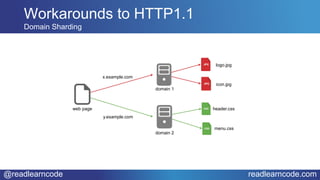
  • #15 To over come the maximum number of connection to a host by the browser we can host the style sheets on one host and the JavaScript on another. This way we are not bound to one host. Here we open a connection to server 1 and request the logo.jpg and icon.jpg files and we open a connection to a different server and request the header.css and the menu.css. So we have opened two connections to two domains rather than 4 connections to one domain. Sharding has become fairly ubiquitous, and as a result the average number of TCP connections opened during page loading has hit around 35 (source: HTTPArchive). Chrome 24 Firefox 6 Internet Explorer 11
  • #17 What does HTTP1.1 say about sockets. Socket are seen by HTTP1.1 as a throw away resource as the specification does not say much about how they are to be used nor is there any mention of how many sockets a browser should open to a given host. It just by industry consensus that they open 5 or 8 connections. Mosaic opened just one and then Internet Explorer opened 4. Even though the specification says nothing about the number of open sockets the browsers decided to restrict it to an arbitory number
  • #18 In contrast sockets are seen as a scares resource and the specification talks much about how they are to be used. But essentially, a browser should ideally open only one socket to the server and do all it needs over this one socket. 
  • #19 The consequence of this is that everything that was done in N sockets in HTTP1.1 is now done over just one socket connection in HTTP/2.
  • #20 Lets now have a look at the topline features of HTTP/2 Specification.
  • #21 HTTP/2 is comprised of two specifications: Hypertext Transfer Protocol version 2 - RFC7540 HPACK - Header Compression for HTTP/2 - RFC7541
  • #22 Request/Response Multiplexing – the most important change - Over a single TCP connection request and response is multiplexed with full bi-directional communication. Binary Framing - The TCP connection is broken down into frames Header Compression – removes duplication from headers Stream Prioritization – give priority processing to streams Server Push – anticipates required assets Upgrade From HTTP1.1 – how to upgrade to HTTP/2
  • #23 Top Line Features of HTTP/2 Request/Response Multiplexing Over a single TCP connection request and response is multiplexed with full bi-directional communication. Lets defined some terms used when talking about multiplexing: Connection – A single TCP socket Stream – A channel within a connection Message – A logical message, such as a request or a response and control message Frame – The smallest unit of communication in HTTP/2. A request/response is broken down into smaller parts. In HTTP 1.1, for a given request you would have just one HTTP request now, with HTTP/2, we break it down into smaller frames  and this is how we resolve head of line blocking. Now that communication has been broken down into frames, you can interweave the logical streams over a single TCP connection, and the issue of head-of-line blocking is removed.
  • #24 The TCP connection is broken down into frames. For a given connection you have multiple streams, for each stream you can have multiple messages and for each message you have multiple frames. You can see that there is a hierarchy. Frame is the fundamental unit of communication
  • #25 Once broken down into frames you can interweave the logical stream over a single TCP connection. The diagram in Figure 4 shows three streams in flight over a single connection. The server sends two responses and the client sends one request.   In stream 1, the server sends the HEADERS frame for a response. Next, in stream 2, it sends the HEADERS frame for a different response, followed by the DATA frames for both responses. The two responses are interwoven as shown. While the server sends the responses, the client makes a request by sending the HEADERS and DATA frames of a new message. Because the server does not have to wait for the completed communication before it does something else the head of line blocking problem does not occur. The benefits of frame interweaving are multiple:   All requests and responses occur over a single socket. No response or request can block any other. Reduced latency. Increased page loading. Eliminates the need for HTTP 1.1 hacks.
  • #26 Solves head-of-line blocking problem Type fields. The frame has a header and the header consists of some information: A frame consists of length of payload (24), type(8), some configuration flags(8), a reserved bit, Stream identifier(31) and Frame Payload (0 ...) The stream identifier refers to the 1, 2, 3 in the previous diagram. There are many different types of frames: Type fields can be HEADERS, corresponds to the HTTP headers DATA corresponds to the HTTP request body. If you have a large body you may have multiple of them data 1, data2 etc PUSH_PROMISE RST_STREAM, notifies there is an error, and allows the client to rejects server push promise request because it already has resource PRIORITY, refers to the stream priority SETTING, PING, GOAWAY, WINDOW_UPDATE, CONTINUATION Lets see how the HTTP request is mapped to frames HEADERS: The frame contains only HTTP header information. DATA: The frame contains all or a part of the message’s payload. PRIORITY: Specifies the importance to give to the stream. RST_STREAM: Notifies of an error: a rejection of a push promise. Terminates stream. SETTINGS: Specifies connection configurations. PUSH_PROMISE: Notifies of an intent to push resources to the client. PING: Heartbeat and round-trip time. GOAWAY: Desist notice to stop producing streams for the current connection. WINDOW_UPDATE: Used to manage the flow control of streams. CONTINUATION: Used to continue a sequence of header fragments.
  • #27 On the left we have an HTTP request and on the right we have it mapped into a header frame. In the header frame you have two configurations the first is END_STREAM which is set to false (the minus means false) this means that this is NOT the last frame for this request and you should expect more frames and if you set END_HEADERS to true then this frame is the last frame in the stream that contains header information. Then we map the familiar header information from the HTTP 1.1 request. The colon denotes that this is a sudo header and references its definition in the HTTP2 specification. Lets look at the response.
  • #28 On the left is an HTTP1.1 header response. This splits into two frames: header frame and a data frame. In the header frame the end_stream is minus because this is not the last frame and the end_header is true as this is the last frame with header information. In the data frame the end_stream is marked plus as it is the last frame. The header frame contains a lot of information that has been duplicated between requests. How can we optimize this?
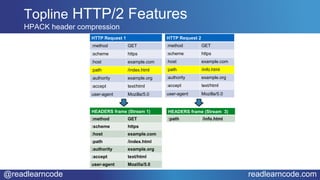
  • #29 Between requests there is a lot of information that is the same. Between request 1 and 2 the only difference is the path. So why send the same information over and over again? Instead of sending the data over and over again. We use HPACK header compression. HPACK keeps a table of the headers on the client and server, then when the second and subsequent headers are sent across it just references the header number on the header table. Then the server/client knows which header you are actually using.
  • #30 HTTP/2 provides the ability to attach priority information to streams which gives priority to one resource over another. The priority can be entered in the header frame or the priority frame. We can also define a hierarchy between streams, however it is only advice to the server, which is completely free to ignore the priority information. If it cannot respect the priority it can ignore it. Stream A, b, d, c C will take 3 times the resources as B
  • #31 Eliminate the need for resource inlining. The sever can proactively send resources to the client. The server tries to prepopulates the browsers cache with resources so that when the resource is needed it is already available, and does not need to be requested again, saving time. The way it works. The client sends header frames to the server to get a file, in this case an index.html at some point the server will respond with the file. The server knows that if I am requesting that file I will also want to request the resources that the file requires to render that html file. In this case a CCS and an image. The Server can decide to proactively send those resources to the client even though the client has not asked for those resources. The server knows that those resources will be requested. So the server sends a push promise frame for the CSS and a push promise frame for the image. Then the server sends the index file. The client can ignore those resources. It knows that those resources are in the cache so it declines the push promise so it will not be sent to the client.
  • #33 Server push is the most visible of the many improvements in HTTP/2 to appear in the servlet API. All of the new features in HTTP/2, including server push, are aimed at improving the perceived performance of the web browsing experience. Server push is enabled to improve perceived browser performance because servers are in a much better position than clients to know what additional assets (such as images, stylesheets and javascripts) a request might ask for next. For example, it is possible for servers to know that whenever a browser requests an index.html page, it will then request an image, a stylesheet and javascript, etc. Since servers know this, they can pre-emptively start sending these assets while processing the index.html. Server push is not a replacement for web sockets. it just allows you to populate the browser cache.
  • #34 To use server push, obtain a reference to a PushBuilder from an HttpServletRequest, mutate the builder as desired, then call push().
  • #35 The browser requests the index.html page. The server will discover that it needs the style_1.css and the javaScript_1.js files, so we get a pushbuilder from the HTTP request and set the path to the style_1.css file and invoke push, then we set the path to the javaScript_1.js file and invoke a push again. Note in this case the css and javascript will return to the client first and then the index returns. Its simply you get the push builder from the HTTP Request request and set the path to the resource and push. There are two things to note in this sequence diagram,  the push builder can be reused. In the example I use the push builder to push two resources the css file and the javaScript file. the second thing is that the index.html is returned to the browser after the push resource. The reason is that if the index returns before the push resources the browser will analysis it and see that it needs the two resources. It will look in the cache and see that it does not have those resources and it will request them. At this point the browser cache will not be prepopulated. So the pushed resources must be returned first before the index is sent. One of the frames types mentioned earlier was a RST_STREAM this is how the client can decline a push promise. So if the server pushes a resource and the browser already has it in the cache then rather than let the server send the file it will send an RST_STREAM frame saying that it already has the files file so don't send it.
  • #36 This builds a push request based on the HttpServletRequest from which this builder was obtained. PushBuilder pushBuilder = request.getPushBuilder(); The push request is constructed with the request method set to GET. Conditional, range, expectation, authorization and request headers are removed. Cookies are only added if the maxAge has not expired. The request header will be set to the request URL and any query string that was present. If either of the headers If-Modified-Since or If-None-Match were present then isConditional() will be set to true. The only required setting is the URI path to be used for the push request. This must be called before every call to push(). If the path includes a query string, the query string will be appended to the existing query string (if any) and no de-duplication will occur. Paths beginning with '/' are treated as absolute paths. All other paths are treated as relative to the context path of the request used to create this builder instance. The path may include a query string. pushBuilder.path("/images/logo.png") The resource is pushed by calling the push() method on the pushBuilder instance. protected void doGet(HttpServletRequest request, HttpServletResponse response) throws ServletException, IOException { request.getPushBuilder().path("/images/logo.png").push(); } This code snippet pushes the header.jpg image to the client that made this request.
  • #37 This code snippet pushes the header.jpg image to the client that made this request. You can test if Server Push is supported by the browser by calling the isPushSupported method.
  • #38 A different way of solving this problem is to implement the server push in a filter. jetty has a PushCacheFilter in the org.eclipse.jetty.servlets package
  • #39 One of the most important use cases for the server push is the framework case. It is completely dependent on the server having prior knowledge of the resources that the client will ask for before the client asks for them. So web frameworks, not just JSF, are in a very good position to take advantage of server push, because the page author has to explicitly indicate at runtime which resources relates with which pages. All this means is that JSF users get this feature for free without having to refactor their code. So JSF is able to use server push very easily. Every time JSF is going to render a style sheet for example it will call the method encodeResourceURL and this is the entry point and here we can initialize the call the server push.
  • #40 The client can explicitly disabled server push by sending a SETTINGS_ENABLE_PUSH setting value of 0 (zero). In addition to allowing clients to disable server push with the SETTINGS_ENABLE_PUSH setting, servlet containers must honor a client’s request to not receive a pushed response on a finer grained basis by heeding the CANCEL or REFUSED_STREAM code that references the pushed stream’s stream identifier. One common use of this interaction is when a browser already has the resource in its cache.
  • #41 Your current code is perfectly compatible with Servlet 4 and you can run it without modification. However if you want to take advantage of the Server Push feature you will need do some work, but as we have seen this can be implemented as a filter, so the rework change can be transparent. And as just mentioned JSF gets if for free
  • #43 The reference implementation for the Java EE 8 is the GlassFish project Version 5.0. This is progressing nicely. Jetty Jetty is a Web Server and Servlet container which supports HTTP/2, WebSockets, OSGi, JMX, JNDI, JAAS. Jetty's stable release 9.3.x has had PushBuilder support for a few months and it is being actively used by their HTTP/2 adopters They have implemented their own packaging for Servlet 4.0 API and includes a PushCacheFilter in the org.eclipse.jetty.servlets package. This is a more sophisticated implementation of the example we saw earlier. WildFly 10 (Undertow) They have an initial PushBuilder support implemented in Undertow master, however it is not part of any release yet. It should be possible to use it in Wildfly by simply replacing the existing Undertow and Servlet API jars.   https://github.com/payara/Payara/tree/Payara-5
  • #44 WildFly 10 (Undertow) They have an initial PushBuilder support implemented in Undertow master, however it is not part of any release yet. It should be possible to use it in Wildfly by simply replacing the existing Undertow and Servlet API jars. Tomcat 9 Currently supports Servlets 4.0's PushBuilder in the javax.servlets.http package. Netty 4.1 Its worth mentioning that Netty 4.1, an asynchronous event-driven network application framework,  has an HTTP/2 implemetations that takes full advantage of the main headline features.
  • #46 The specification is currently in public review the last stage finishes 20th May and hopefully ready for JavaOne in 1st week in October. HTTP/2 is the main issue but the Expert Group are tackling other issue which you can follow on the issue tracker. The issue tracker has moved to github. This is the link to the issue tracker where you can review the current issues that are being ironed out And the full JCP specification is available at this link here.
  • #48 The goal of HTTP/2 is to improve performance. So lets see just how much faster it really is. Cloudflare has a neat online tool (cloudflare.com/http2) that downloads 200 image slices in both HTTP1.1 and HTTP/2. The browser has to use many separate TCP connections to load the slices. This incurs significant amount of overhead because only a small number of images are downloaded in parallel. I ran this a few days ago and the demo showed that HTTP/2 was 4.0x faster than HTTP/1.1. HTTP1.1 vs HTTP/2 HTTPS Another tool that tests HTTP1.1 against HTTP/2 is Anthum's HTTP vs HTTPS (httpvshttps.com). Plaintext HTTP/1.1 is compared against encrypted HTTP/2 HTTPS on a non-caching, nginx server with a direct, non-proxied connection.
  • #58 On the left we have an HTTP request and on the right we have it mapped into a header frame. In the header frame you have two configurations the first is END_STREAM which is set to false (the minus means false) this means that this is NOT the last frame for this request and you should expect more frames and if you set END_HEADERS to true then this frame is the last frame in the stream that contains header information. Then we map the familiar header information from the HTTP 1.1 request. The colon denotes that this is a sudo header and references its definition in the HTTP2 specification. Lets look at the response.
  • #59 On the left is an HTTP1.1 header response. This splits into two frames: header frame and a data frame. In the header frame the end_stream is minus because this is not the last frame and the end_header is true as this is the last frame with header information. In the data frame the end_stream is marked plus as it is the last frame. The header frame contains a lot of information that has been duplicated between requests. How can we optimize this?