
Mulesoft
HTTP Connector
https://docs.mulesoft.com/mule-user-guide/v/3.8/http-connector
Kumar Gaurav
k10gaurav@gmail.com
Agenda
• Introduction
• Ways it works
• HTTP Listener
• HTTP Requester
• Sample Use Case
• Conclusion
About
The HTTP connector can send and receive HTTP and HTTPS requests given
a selected host, port and address.
Depending on your needs, you can either:
 Listen for HTTP requests
 Send HTTP requests
Through additional configuration, the connector allows you to:
 Use TLS encryption to send or receive HTTPS requests
 Send Authenticated Requests, via Basic Authentication, Digest and OAuth
Ways it works
In Studio, the HTTP connector can work in one of two ways, depending on
where it’s placed in a flow:
 As an HTTP Listener
 As an HTTP Requester
As HTTP Listener
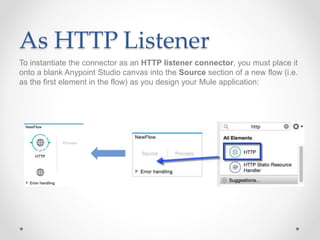
To instantiate the connector as an HTTP listener connector, you must place it
onto a blank Anypoint Studio canvas into the Source section of a new flow (i.e.
as the first element in the flow) as you design your Mule application:
As HTTP Requester
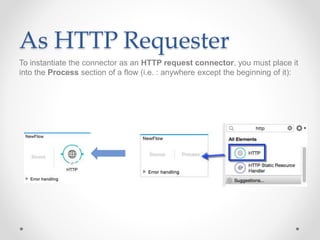
To instantiate the connector as an HTTP request connector, you must place it
into the Process section of a flow (i.e. : anywhere except the beginning of it):
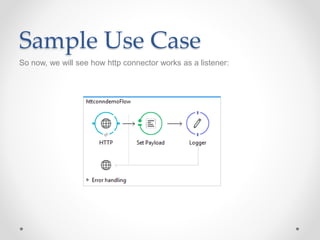
Sample Use Case
So now, we will see how http connector works as a listener:
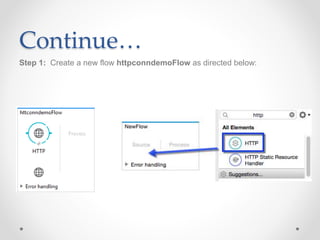
Continue…
Step 1: Create a new flow httpconndemoFlow as directed below:
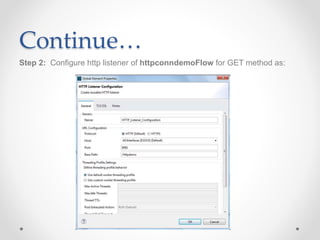
Continue…
Step 2: Configure http listener of httpconndemoFlow for GET method as:
Continue…
Step 3: Add a set payload transformer and a logger just after it
Value:
#['This is a sample payload']
Message:
#['LOGGER_MSG- '+message.payload]
Continue…
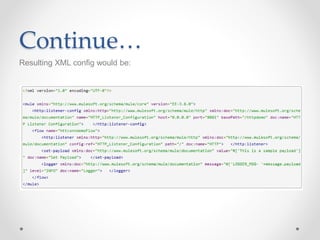
Resulting XML config would be:
Continue…
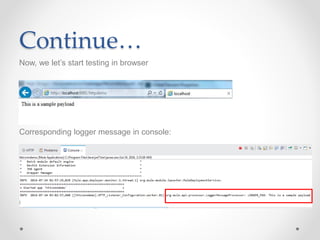
Now, we let’s start testing in browser
Corresponding logger message in console:
Conclusion
So this way we have seen how http connector works as a listener, Similarly http
requester can be configured and be used.
HTTP listener can be configured for different HTTP methods- GET, POST, etc.
Thank you!

Mulesoft http connector