HTML 5: Audio And Video
5
HTML 5: Audio
And Video:
HTML5 features include native audio and video
support without the need for Flash.
The HTML5 <audio> and <video> tags make it
simple to add media to a website. You need to set
src attribute to identify the media source and
include a controls attribute so the user can play and
pause the media.
Embedded Videos:
Here is the simplest form of embedding a video file in your
webpage
<video src = "foo.mp4" width = "300" height =
"200" controls>
Your browser does not support the <video>
element.
</video>
The current HTML5 draft specification does not specify which
video formats browsers should support in the video tag
Most commonly used video formats are:
Ogg − Ogg files with Thedora video codec and Vorbis audio
codec.
mpeg4 − MPEG4 files with H.264 video codec and AAC audio
codec.
You can use <source> tag to specify media along with media
type and many other attributes. A video element allows multiple
source elements and browser will use the first recognized
format −
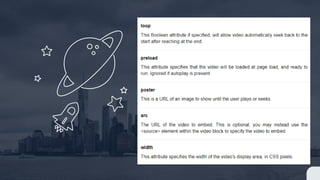
Video Attribute Specification
The HTML5 video tag can have a number of attributes to control
the look and feel and various functionalities of the control:
HTML 5: Audio And Video

HTML 5: Audio And Video

  • 1.
    HTML 5: AudioAnd Video 5
  • 2.
    HTML 5: Audio AndVideo: HTML5 features include native audio and video support without the need for Flash. The HTML5 <audio> and <video> tags make it simple to add media to a website. You need to set src attribute to identify the media source and include a controls attribute so the user can play and pause the media.
  • 3.
    Embedded Videos: Here isthe simplest form of embedding a video file in your webpage <video src = "foo.mp4" width = "300" height = "200" controls> Your browser does not support the <video> element. </video> The current HTML5 draft specification does not specify which video formats browsers should support in the video tag
  • 4.
    Most commonly usedvideo formats are: Ogg − Ogg files with Thedora video codec and Vorbis audio codec. mpeg4 − MPEG4 files with H.264 video codec and AAC audio codec. You can use <source> tag to specify media along with media type and many other attributes. A video element allows multiple source elements and browser will use the first recognized format −
  • 5.
    Video Attribute Specification TheHTML5 video tag can have a number of attributes to control the look and feel and various functionalities of the control: