

HP-UX 11iv3 Ignite-UX
with NFSV4 and SSH
Tunnel

Dusan Baljevic
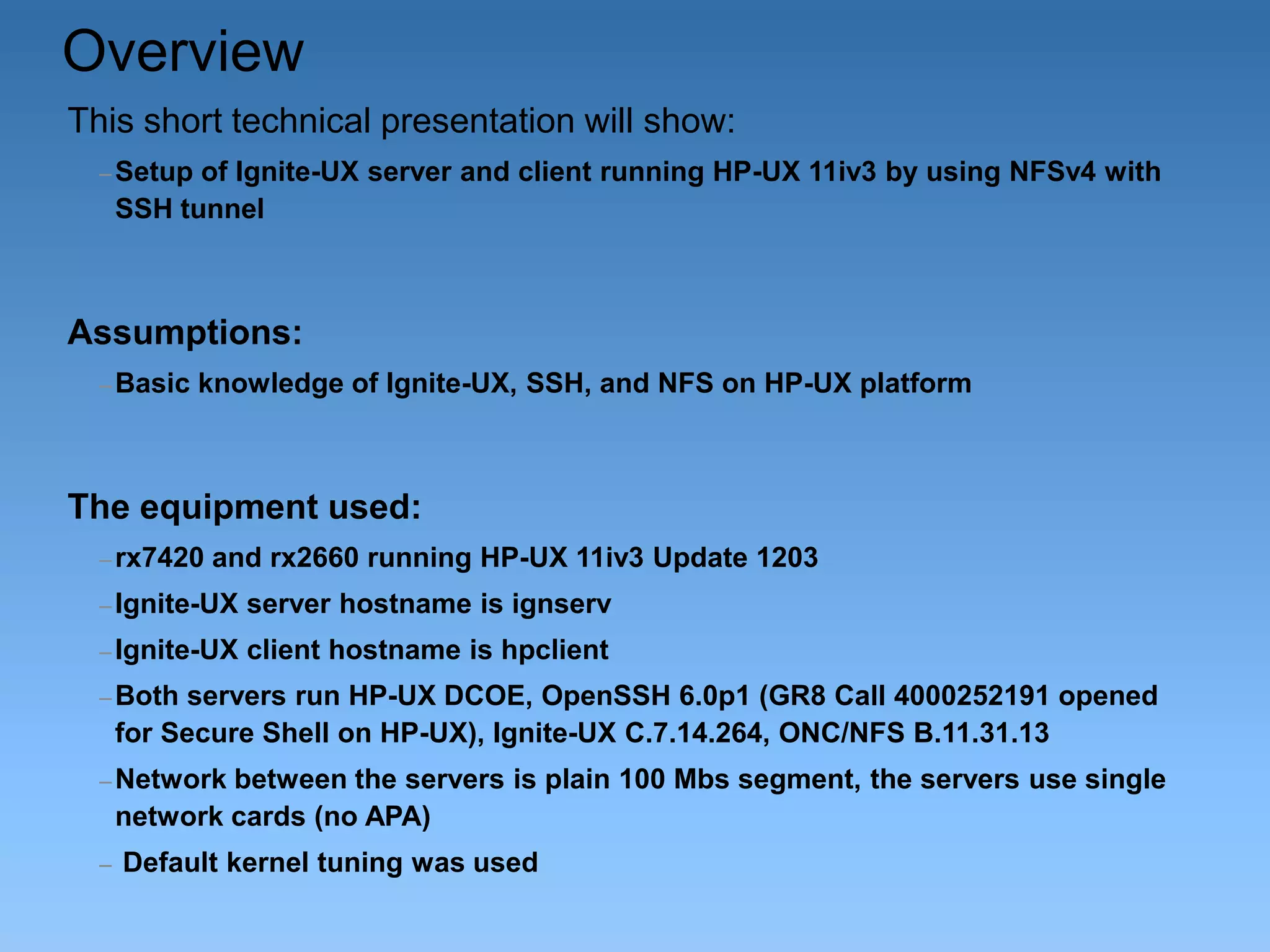
Overview
This short technical presentation will show:
– Setup

of Ignite-UX server and client running HP-UX 11iv3 by using NFSv4 with
SSH tunnel

Assumptions:
– Basic

knowledge of Ignite-UX, SSH, and NFS on HP-UX platform

The equipment used:
– rx7420

and rx2660 running HP-UX 11iv3 Update 1203

– Ignite-UX

server hostname is ignserv

– Ignite-UX

client hostname is hpclient

– Both

servers run HP-UX DCOE, OpenSSH 6.0p1 (GR8 Call 4000252191 opened
for Secure Shell on HP-UX), Ignite-UX C.7.14.264, ONC/NFS B.11.31.13

– Network

between the servers is plain 100 Mbs segment, the servers use single
network cards (no APA)

–

Default kernel tuning was used
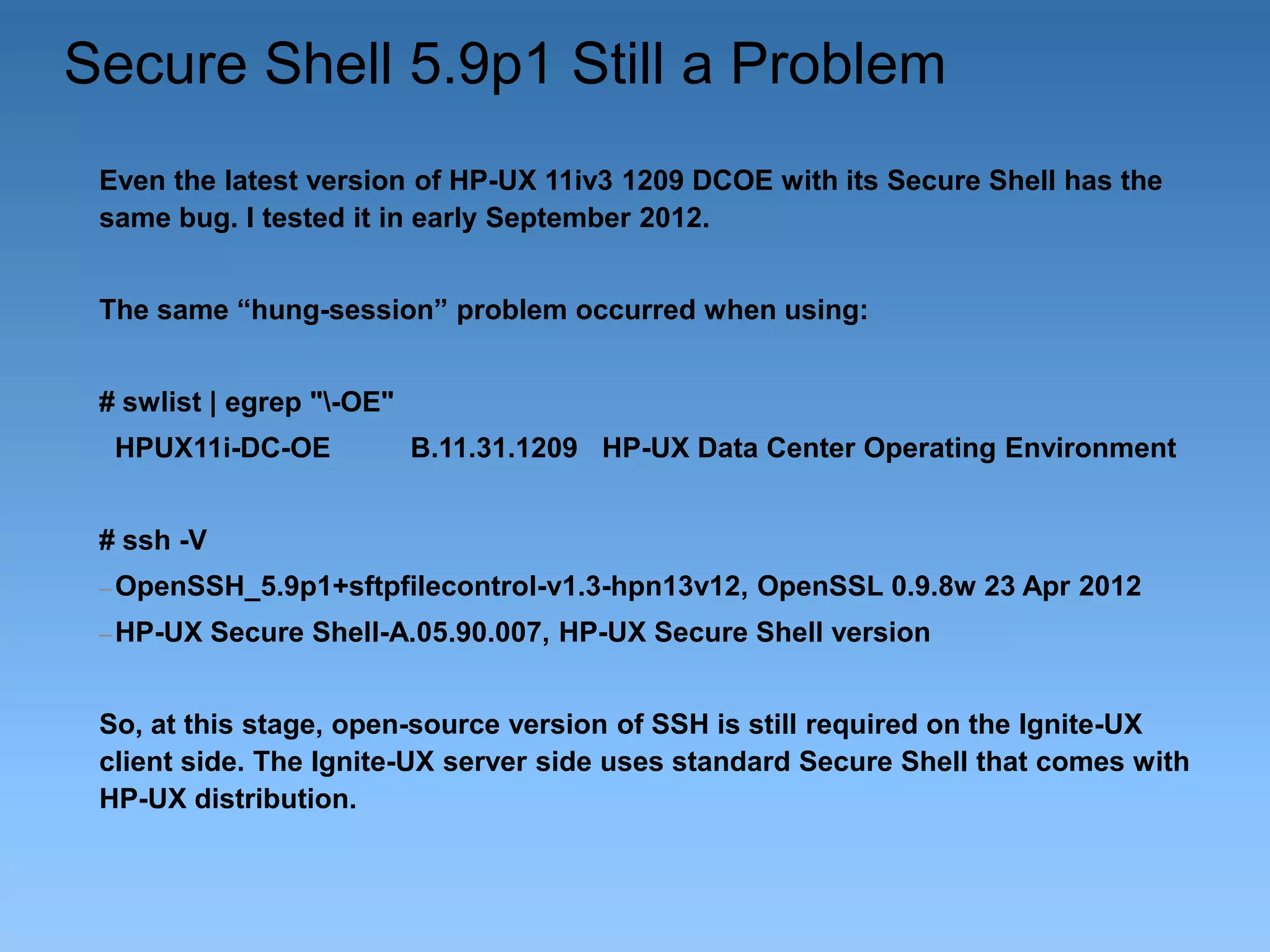
Secure Shell 5.9p1 Still a Problem
Even the latest version of HP-UX 11iv3 1209 DCOE with its Secure Shell has the
same bug. I tested it in early September 2012.

The same “hung-session” problem occurred when using:
# swlist | egrep "-OE"
HPUX11i-DC-OE

B.11.31.1209 HP-UX Data Center Operating Environment

# ssh -V
– OpenSSH_5.9p1+sftpfilecontrol-v1.3-hpn13v12,
– HP-UX

OpenSSL 0.9.8w 23 Apr 2012

Secure Shell-A.05.90.007, HP-UX Secure Shell version

So, at this stage, open-source version of SSH is still required on the Ignite-UX
client side. The Ignite-UX server side uses standard Secure Shell that comes with
HP-UX distribution.
Why This Presentation?
–Secure

environment to run Ignite-UX when only SSH is
allowed between servers;

–An

alternative solution to run Ignite-UX, which was not
documented before;

–An

opportunity to use new features through NFSv4;

–The

flexibility of tools available on HP-UX 11iv3;

–Simple

and robust solution for Disaster Recovery O/S backups
in secure environments.
Why NFSv4 with SSH Tunnel
•

With HP-UX 11i we support Kerberos encryption with all NFS-versions
(NFSv2, NFSv3, and NFSv4);

•

This would possibly be faster than port forwarding with SSH, but the
NFS ports would still need to be opened between two servers;

•

With NFSv4 and SSH tunnel, a new method is possible, where IgniteUX and pre-mounted file systems (NFS) can be used. In this case, we
will use localhost as target for saving the O/S image:

make_net_recovery –s localhost ...
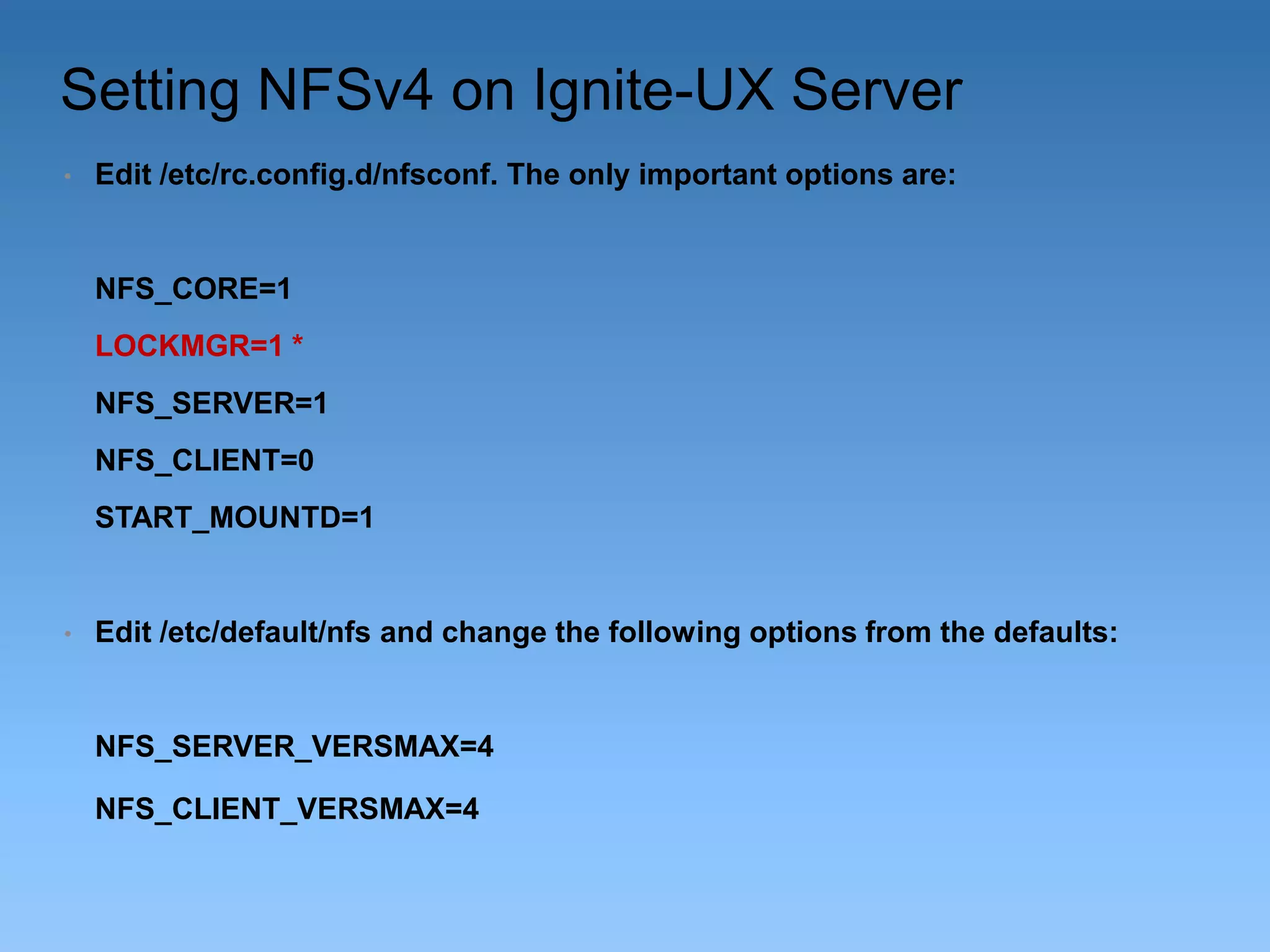
Setting NFSv4 on Ignite-UX Server
•

Edit /etc/rc.config.d/nfsconf. The only important options are:

NFS_CORE=1
LOCKMGR=1 *
NFS_SERVER=1
NFS_CLIENT=0
START_MOUNTD=1

•

Edit /etc/default/nfs and change the following options from the defaults:

NFS_SERVER_VERSMAX=4
NFS_CLIENT_VERSMAX=4
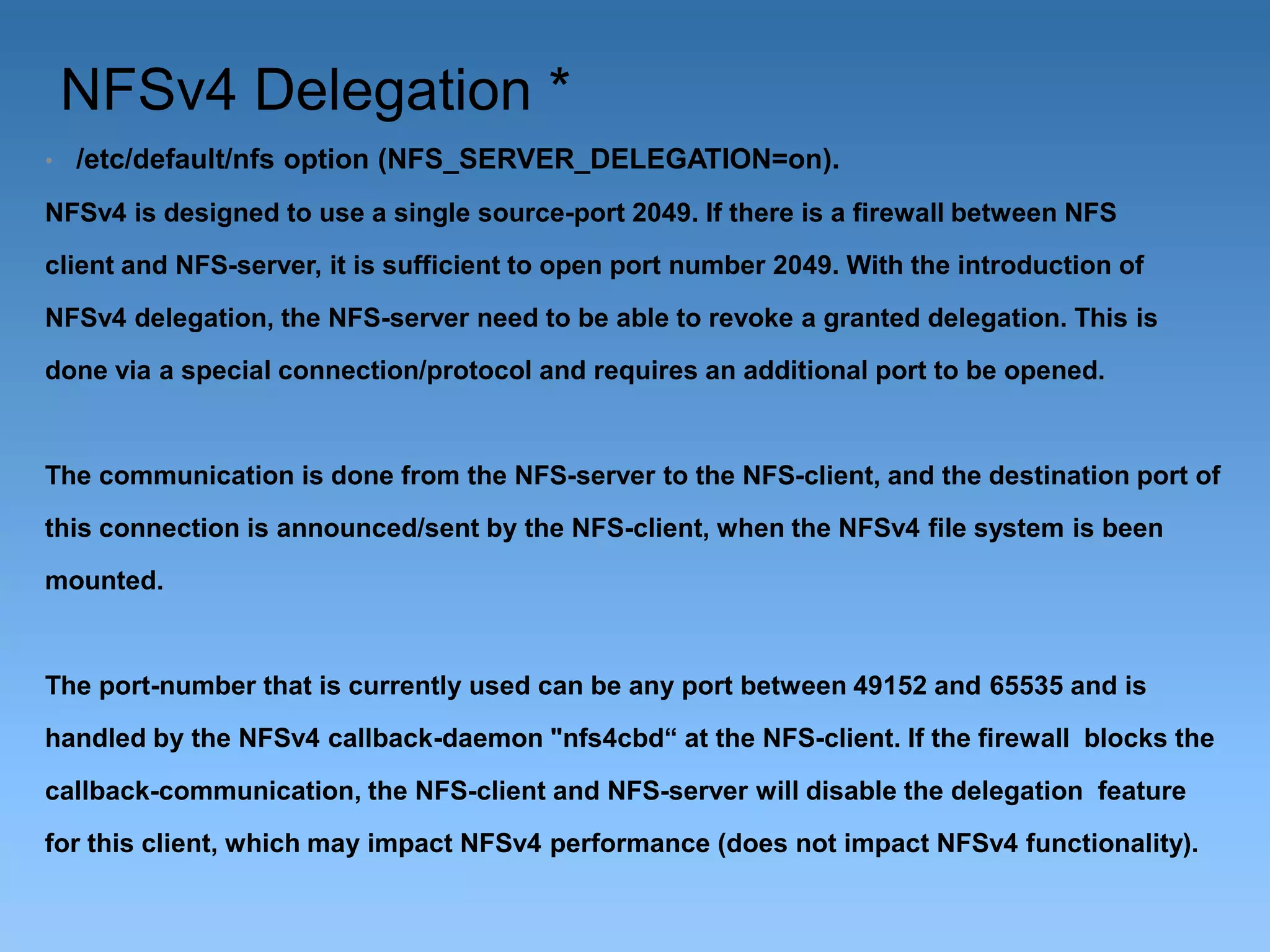
NFSv4 Delegation *
•

/etc/default/nfs option (NFS_SERVER_DELEGATION=on).

NFSv4 is designed to use a single source-port 2049. If there is a firewall between NFS
client and NFS-server, it is sufficient to open port number 2049. With the introduction of
NFSv4 delegation, the NFS-server need to be able to revoke a granted delegation. This is
done via a special connection/protocol and requires an additional port to be opened.

The communication is done from the NFS-server to the NFS-client, and the destination port of
this connection is announced/sent by the NFS-client, when the NFSv4 file system is been
mounted.

The port-number that is currently used can be any port between 49152 and 65535 and is
handled by the NFSv4 callback-daemon "nfs4cbd“ at the NFS-client. If the firewall blocks the
callback-communication, the NFS-client and NFS-server will disable the delegation feature
for this client, which may impact NFSv4 performance (does not impact NFSv4 functionality).
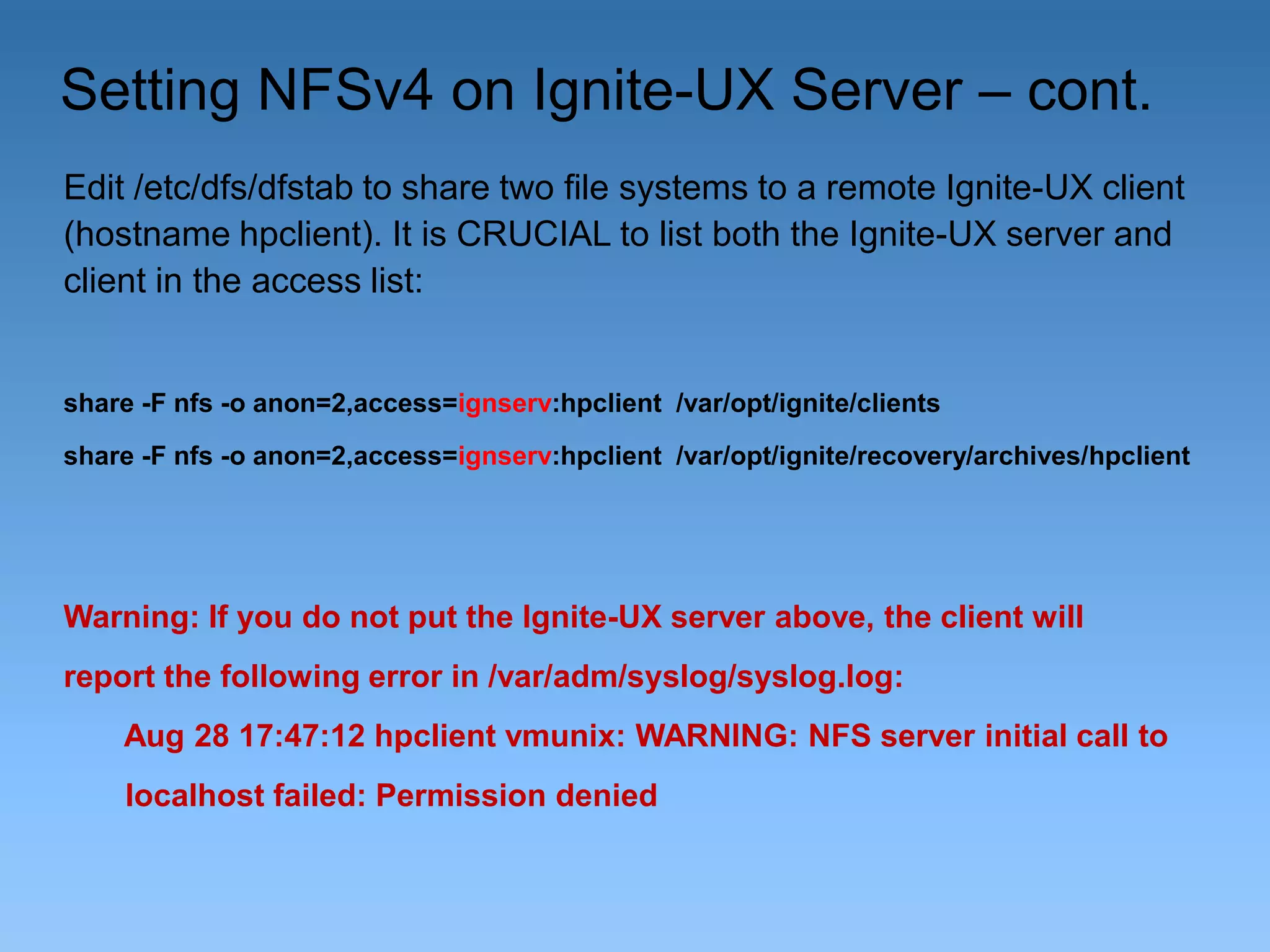
Setting NFSv4 on Ignite-UX Server – cont.
Edit /etc/dfs/dfstab to share two file systems to a remote Ignite-UX client
(hostname hpclient). It is CRUCIAL to list both the Ignite-UX server and
client in the access list:

share -F nfs -o anon=2,access=ignserv:hpclient /var/opt/ignite/clients
share -F nfs -o anon=2,access=ignserv:hpclient /var/opt/ignite/recovery/archives/hpclient

Warning: If you do not put the Ignite-UX server above, the client will
report the following error in /var/adm/syslog/syslog.log:
Aug 28 17:47:12 hpclient vmunix: WARNING: NFS server initial call to
localhost failed: Permission denied
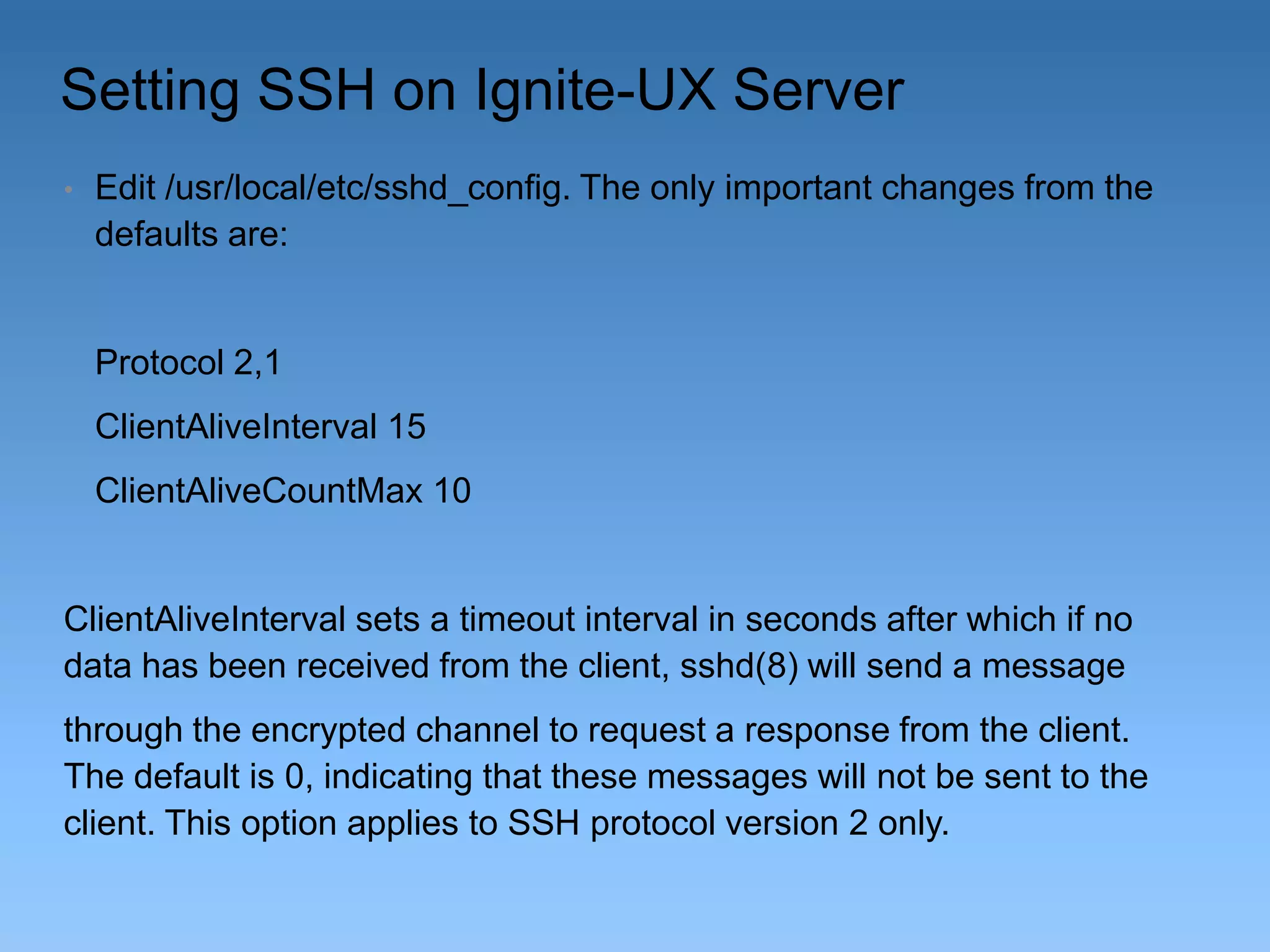
Setting SSH on Ignite-UX Server
•

Edit /usr/local/etc/sshd_config. The only important changes from the
defaults are:

Protocol 2,1
ClientAliveInterval 15

ClientAliveCountMax 10

ClientAliveInterval sets a timeout interval in seconds after which if no
data has been received from the client, sshd(8) will send a message
through the encrypted channel to request a response from the client.
The default is 0, indicating that these messages will not be sent to the
client. This option applies to SSH protocol version 2 only.
Setting SSH on Ignite-UX Server cont.
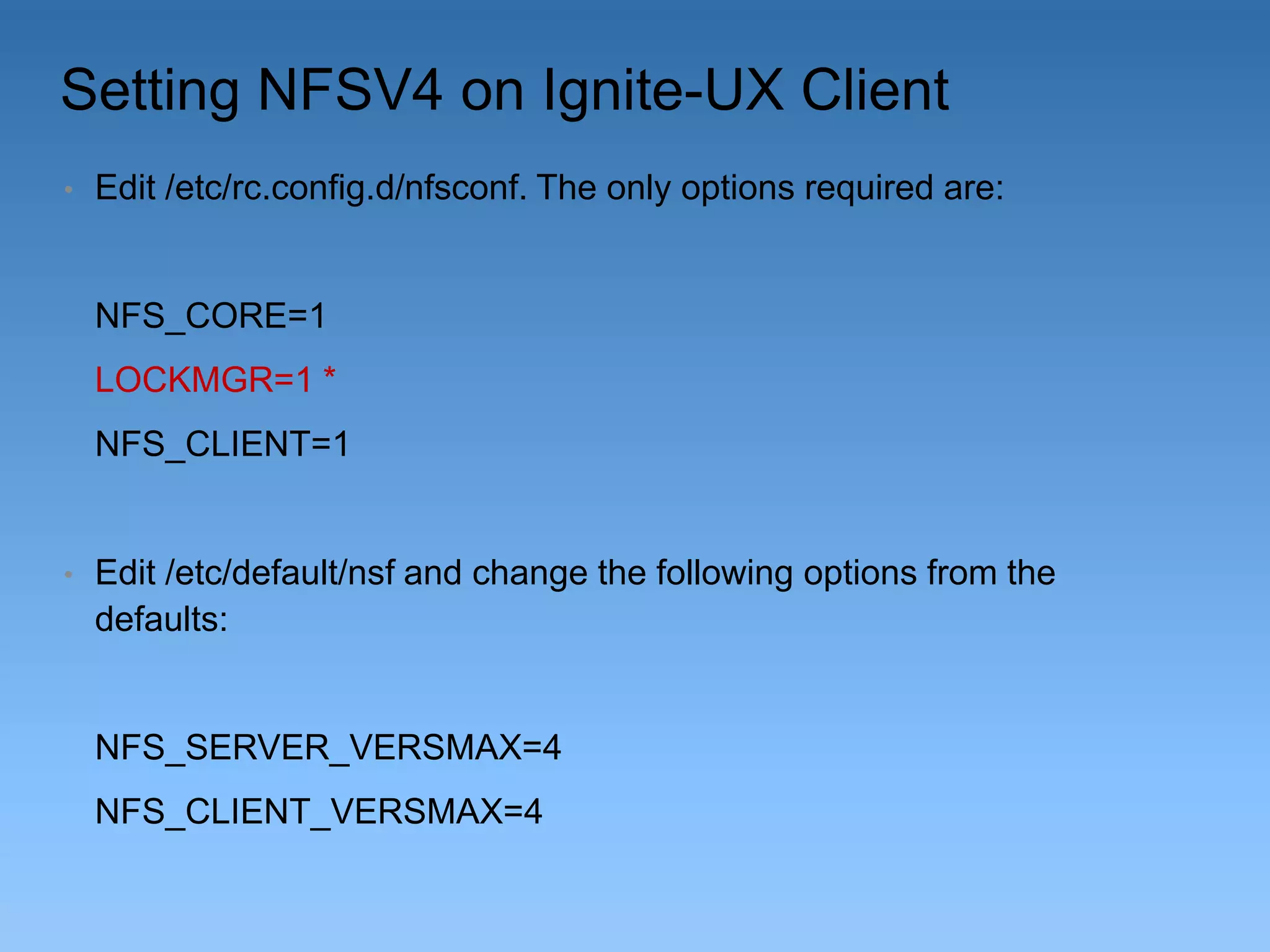
ClientAliveCountMax Sets the number of client alive messages which may
be sent without sshd receiving any messages back from the client.

If this threshold is reached while client alive messages are being sent, sshd
will disconnect the client, terminating the session. It is important to note that
the use of client alive messages is very different from TCPKeepAlive (below).
The client alive messages are sent through the encrypted channel and therefore will not be spoofable. The TCP keepalive option enabled by
TCPKeepAlive is spoofable. The client alive mechanism is valuable when the
client or server depend on knowing when a connection has become inactive.
The default value is 3. If ClientAliveInterval is set to 15, and
ClientAliveCountMax is 10, unresponsive ssh clients will be disconnected after
approximately 150 seconds.
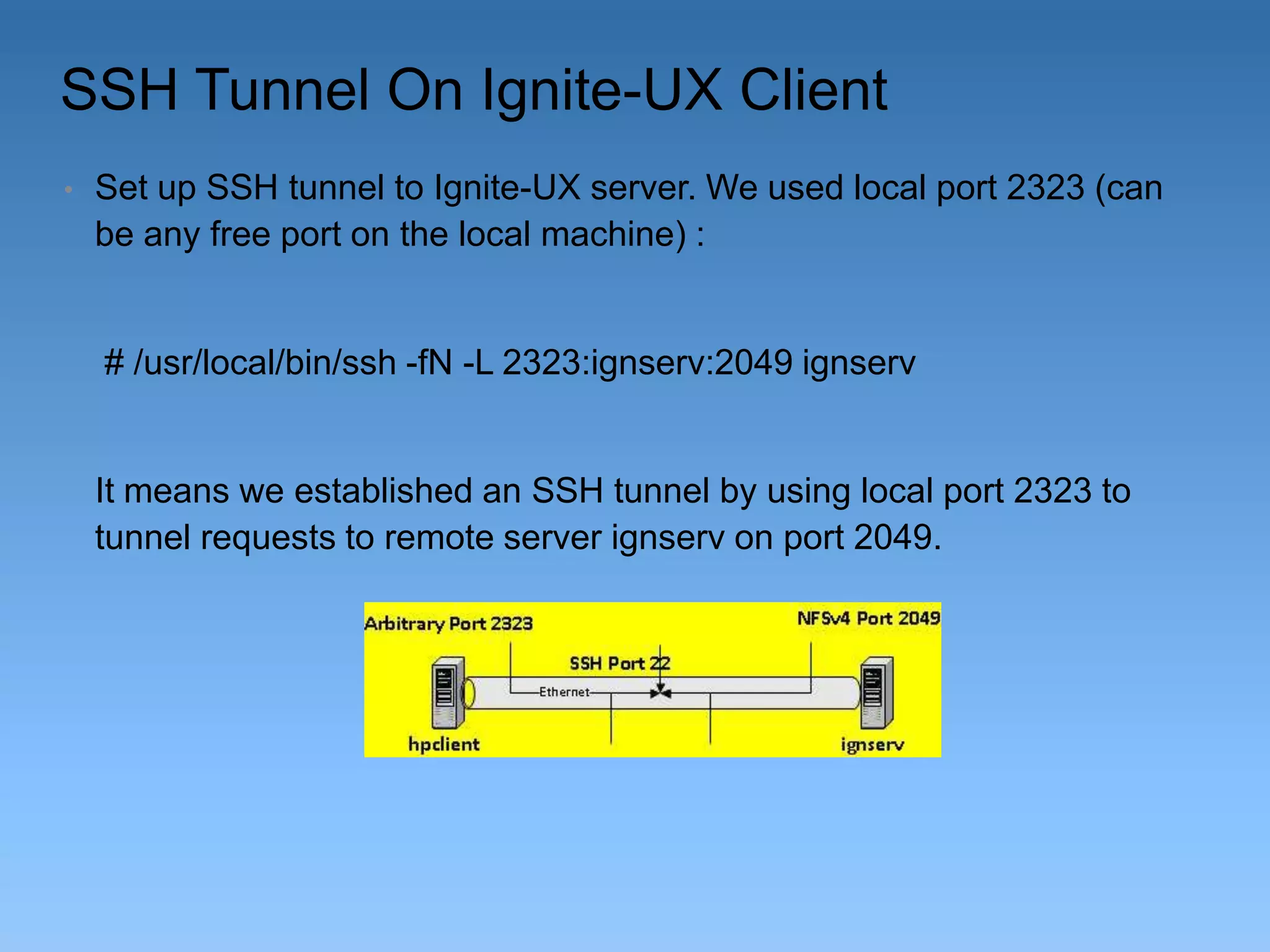
Setting NFSV4 on Ignite-UX Client
•

Edit /etc/rc.config.d/nfsconf. The only options required are:

NFS_CORE=1
LOCKMGR=1 *
NFS_CLIENT=1

•

Edit /etc/default/nsf and change the following options from the
defaults:

NFS_SERVER_VERSMAX=4
NFS_CLIENT_VERSMAX=4
SSH Tunnel On Ignite-UX Client
•

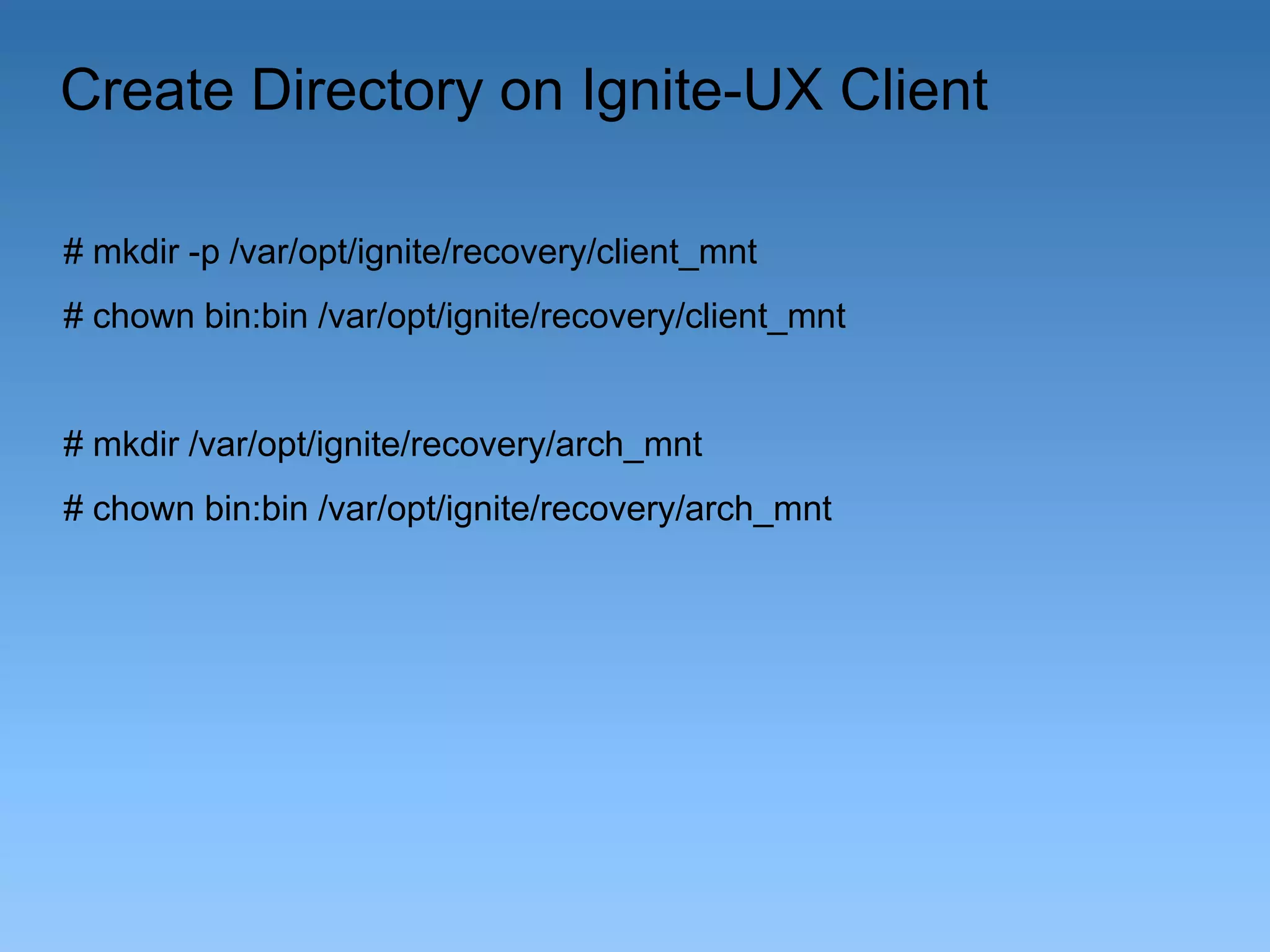
Set up SSH tunnel to Ignite-UX server. We used local port 2323 (can
be any free port on the local machine) :

# /usr/local/bin/ssh -fN -L 2323:ignserv:2049 ignserv

It means we established an SSH tunnel by using local port 2323 to
tunnel requests to remote server ignserv on port 2049.
Create Directory on Ignite-UX Client
# mkdir -p /var/opt/ignite/recovery/client_mnt
# chown bin:bin /var/opt/ignite/recovery/client_mnt

# mkdir /var/opt/ignite/recovery/arch_mnt
# chown bin:bin /var/opt/ignite/recovery/arch_mnt
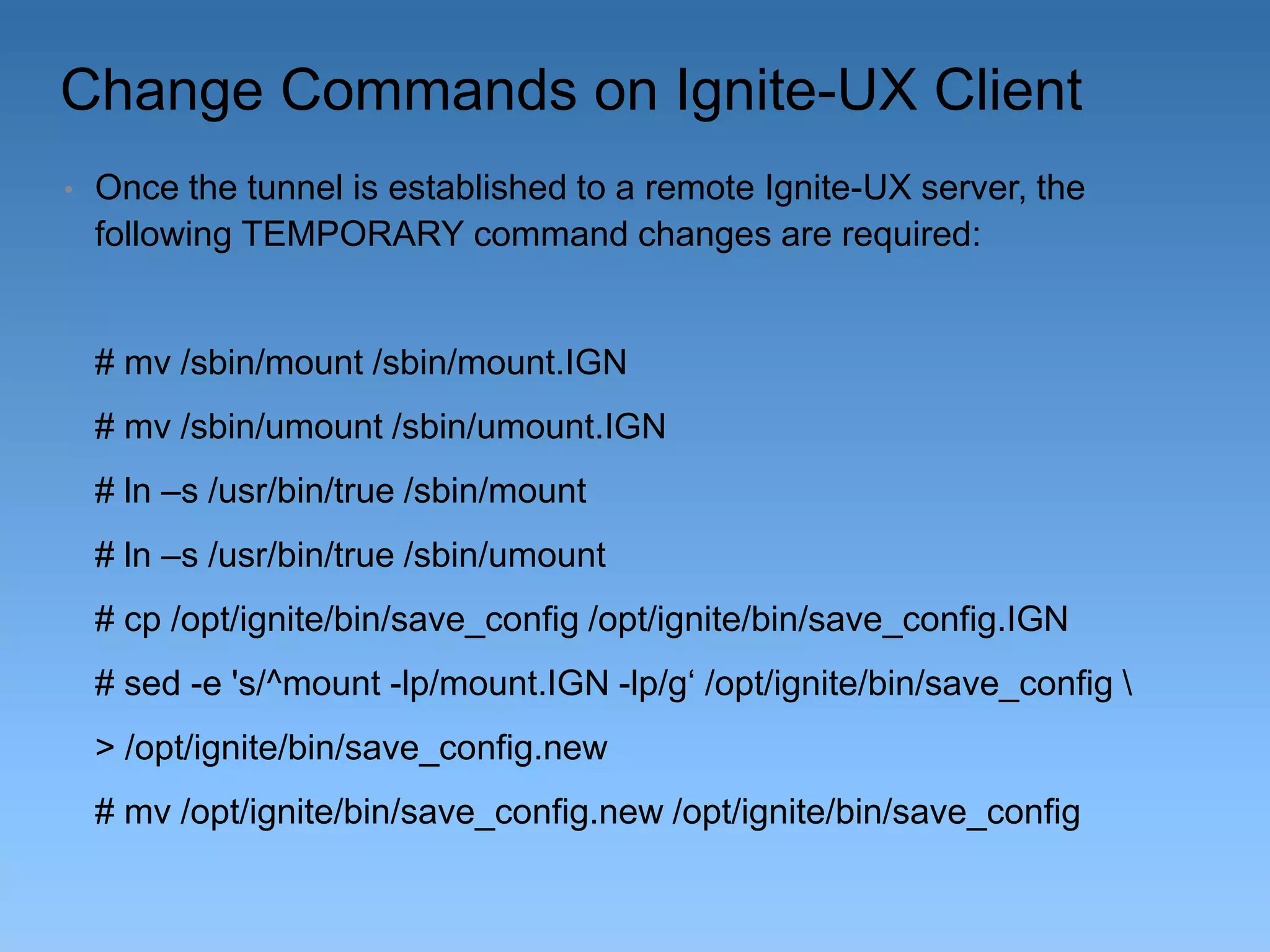
Change Commands on Ignite-UX Client
•

Once the tunnel is established to a remote Ignite-UX server, the
following TEMPORARY command changes are required:

# mv /sbin/mount /sbin/mount.IGN
# mv /sbin/umount /sbin/umount.IGN

# ln –s /usr/bin/true /sbin/mount
# ln –s /usr/bin/true /sbin/umount
# cp /opt/ignite/bin/save_config /opt/ignite/bin/save_config.IGN
# sed -e 's/^mount -lp/mount.IGN -lp/g‘ /opt/ignite/bin/save_config 
> /opt/ignite/bin/save_config.new
# mv /opt/ignite/bin/save_config.new /opt/ignite/bin/save_config
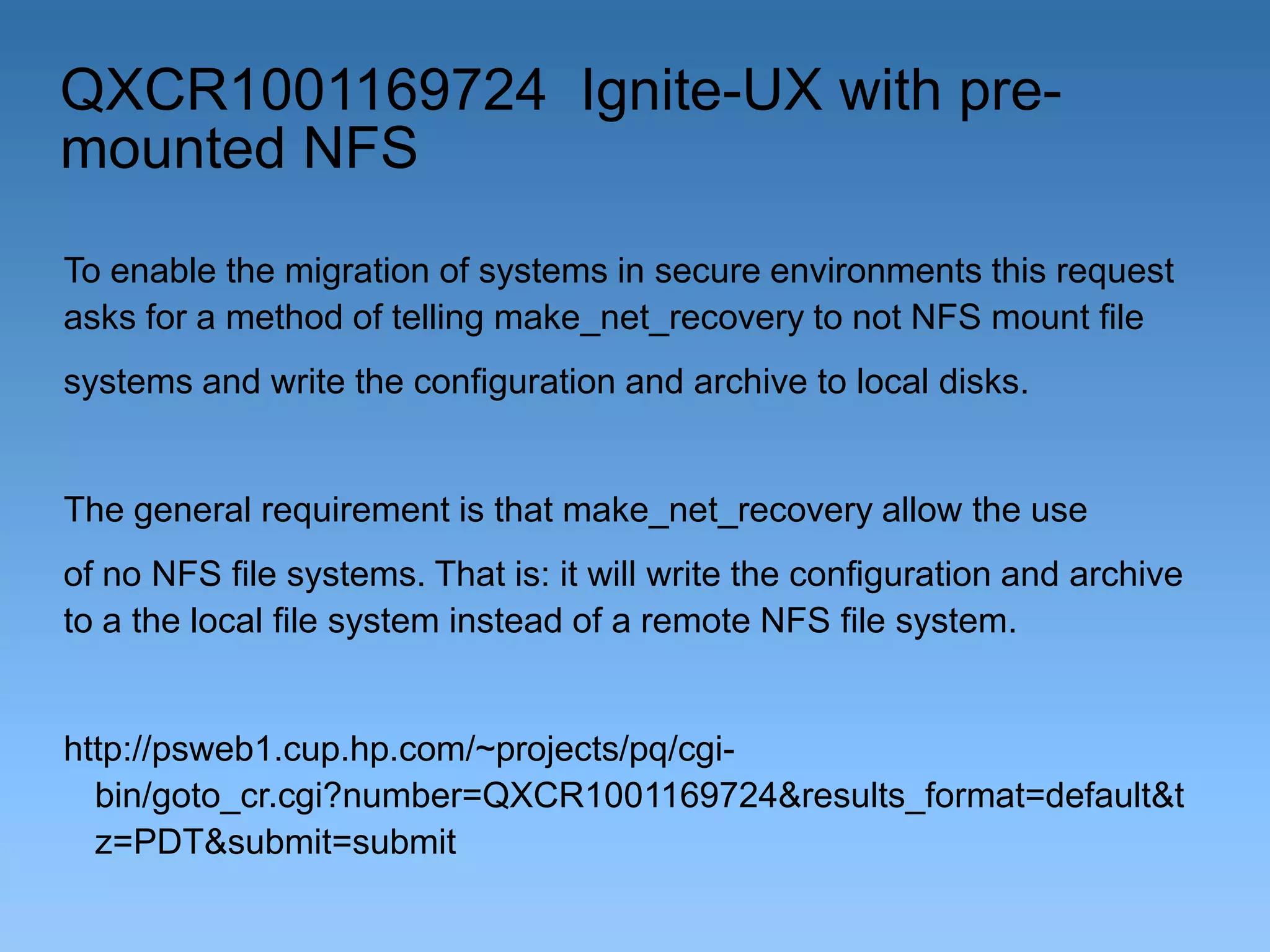
QXCR1001169724 Ignite-UX with premounted NFS
To enable the migration of systems in secure environments this request
asks for a method of telling make_net_recovery to not NFS mount file
systems and write the configuration and archive to local disks.

The general requirement is that make_net_recovery allow the use
of no NFS file systems. That is: it will write the configuration and archive
to a the local file system instead of a remote NFS file system.

http://psweb1.cup.hp.com/~projects/pq/cgibin/goto_cr.cgi?number=QXCR1001169724&results_format=default&t
z=PDT&submit=submit
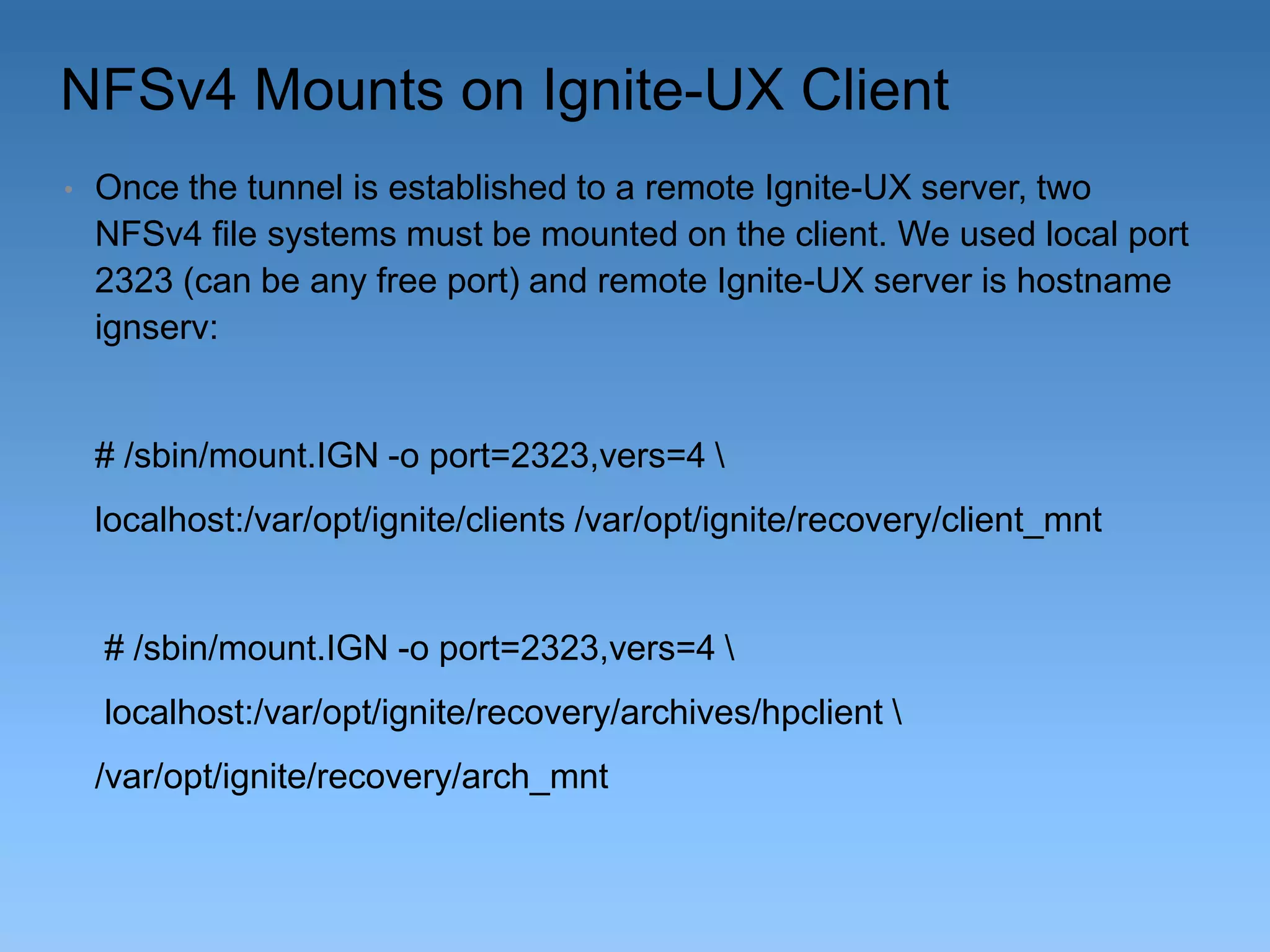
NFSv4 Mounts on Ignite-UX Client
•

Once the tunnel is established to a remote Ignite-UX server, two
NFSv4 file systems must be mounted on the client. We used local port
2323 (can be any free port) and remote Ignite-UX server is hostname
ignserv:

# /sbin/mount.IGN -o port=2323,vers=4 
localhost:/var/opt/ignite/clients /var/opt/ignite/recovery/client_mnt

# /sbin/mount.IGN -o port=2323,vers=4 

localhost:/var/opt/ignite/recovery/archives/hpclient 
/var/opt/ignite/recovery/arch_mnt
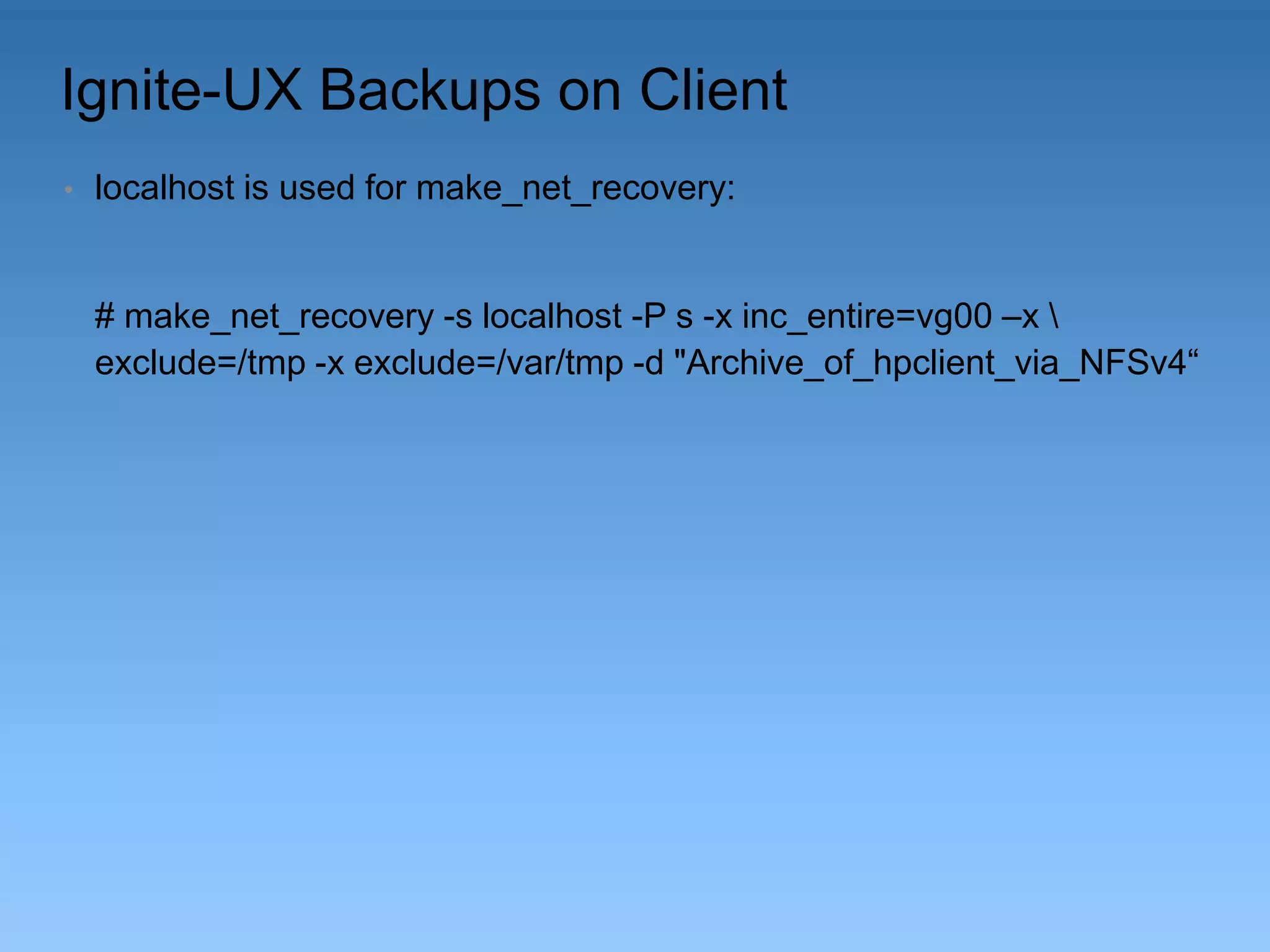
Ignite-UX Backups on Client
•

localhost is used for make_net_recovery:

# make_net_recovery -s localhost -P s -x inc_entire=vg00 –x 
exclude=/tmp -x exclude=/var/tmp -d "Archive_of_hpclient_via_NFSv4“
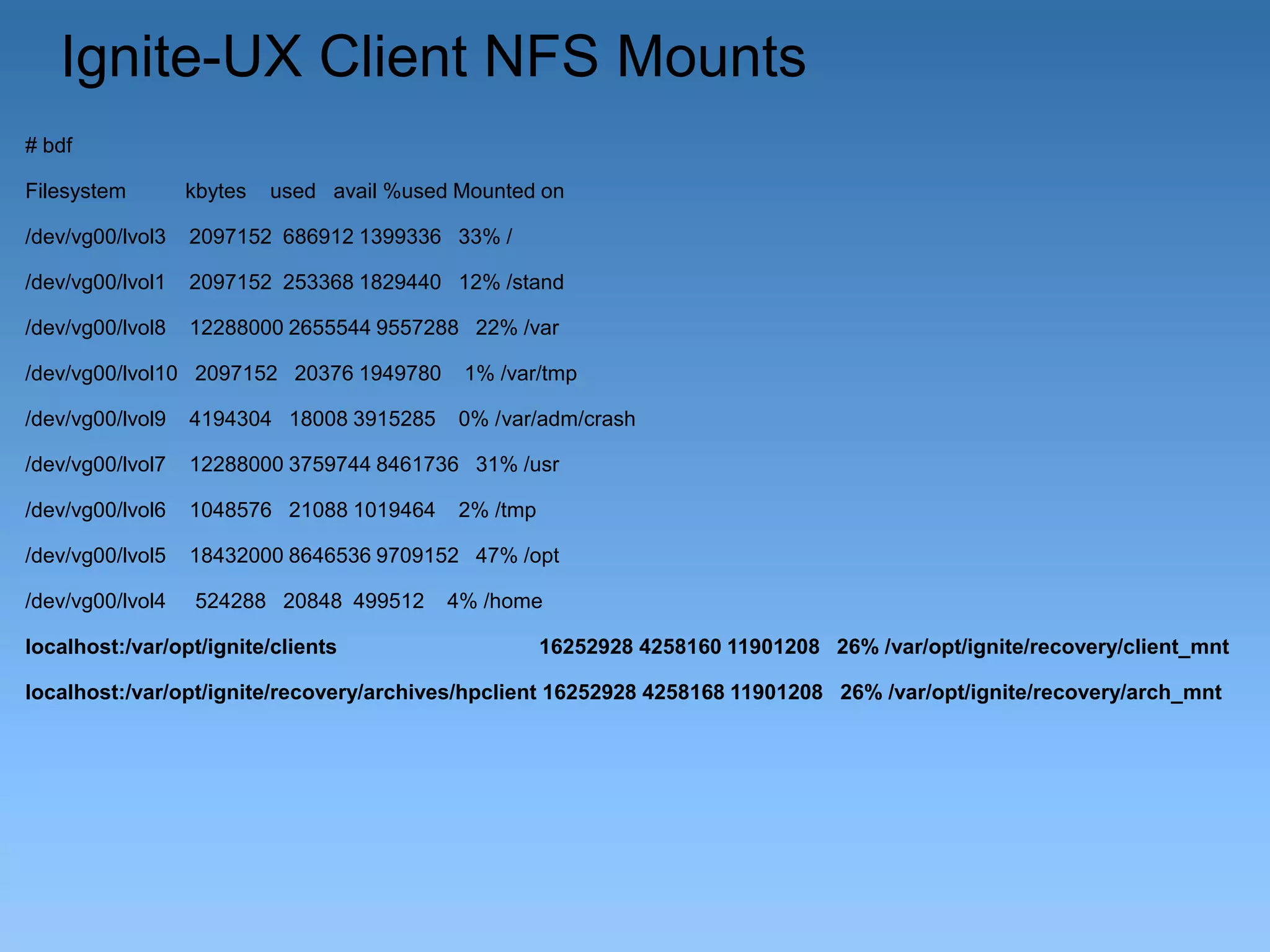
Ignite-UX Client NFS Mounts
# bdf
Filesystem

kbytes

used avail %used Mounted on

/dev/vg00/lvol3

2097152 686912 1399336 33% /

/dev/vg00/lvol1

2097152 253368 1829440 12% /stand

/dev/vg00/lvol8

12288000 2655544 9557288 22% /var

/dev/vg00/lvol10 2097152 20376 1949780

1% /var/tmp

/dev/vg00/lvol9

4194304 18008 3915285

0% /var/adm/crash

/dev/vg00/lvol7

12288000 3759744 8461736 31% /usr

/dev/vg00/lvol6

1048576 21088 1019464

/dev/vg00/lvol5

18432000 8646536 9709152 47% /opt

/dev/vg00/lvol4

524288 20848 499512

localhost:/var/opt/ignite/clients

2% /tmp

4% /home
16252928 4258160 11901208 26% /var/opt/ignite/recovery/client_mnt

localhost:/var/opt/ignite/recovery/archives/hpclient 16252928 4258168 11901208 26% /var/opt/ignite/recovery/arch_mnt
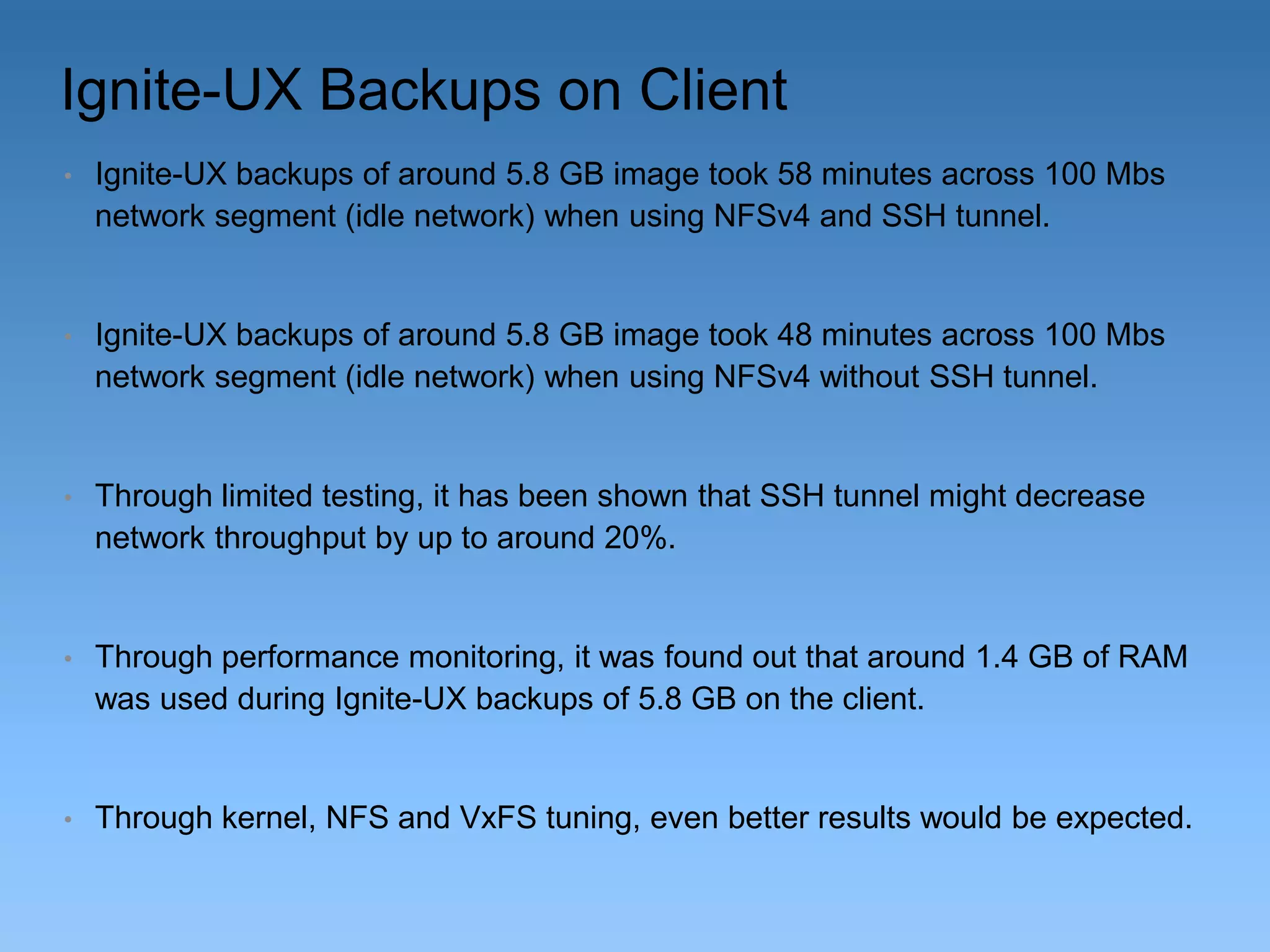
Ignite-UX Backups on Client
•

Ignite-UX backups of around 5.8 GB image took 58 minutes across 100 Mbs
network segment (idle network) when using NFSv4 and SSH tunnel.

•

Ignite-UX backups of around 5.8 GB image took 48 minutes across 100 Mbs
network segment (idle network) when using NFSv4 without SSH tunnel.

•

Through limited testing, it has been shown that SSH tunnel might decrease
network throughput by up to around 20%.

•

Through performance monitoring, it was found out that around 1.4 GB of RAM
was used during Ignite-UX backups of 5.8 GB on the client.

•

Through kernel, NFS and VxFS tuning, even better results would be expected.
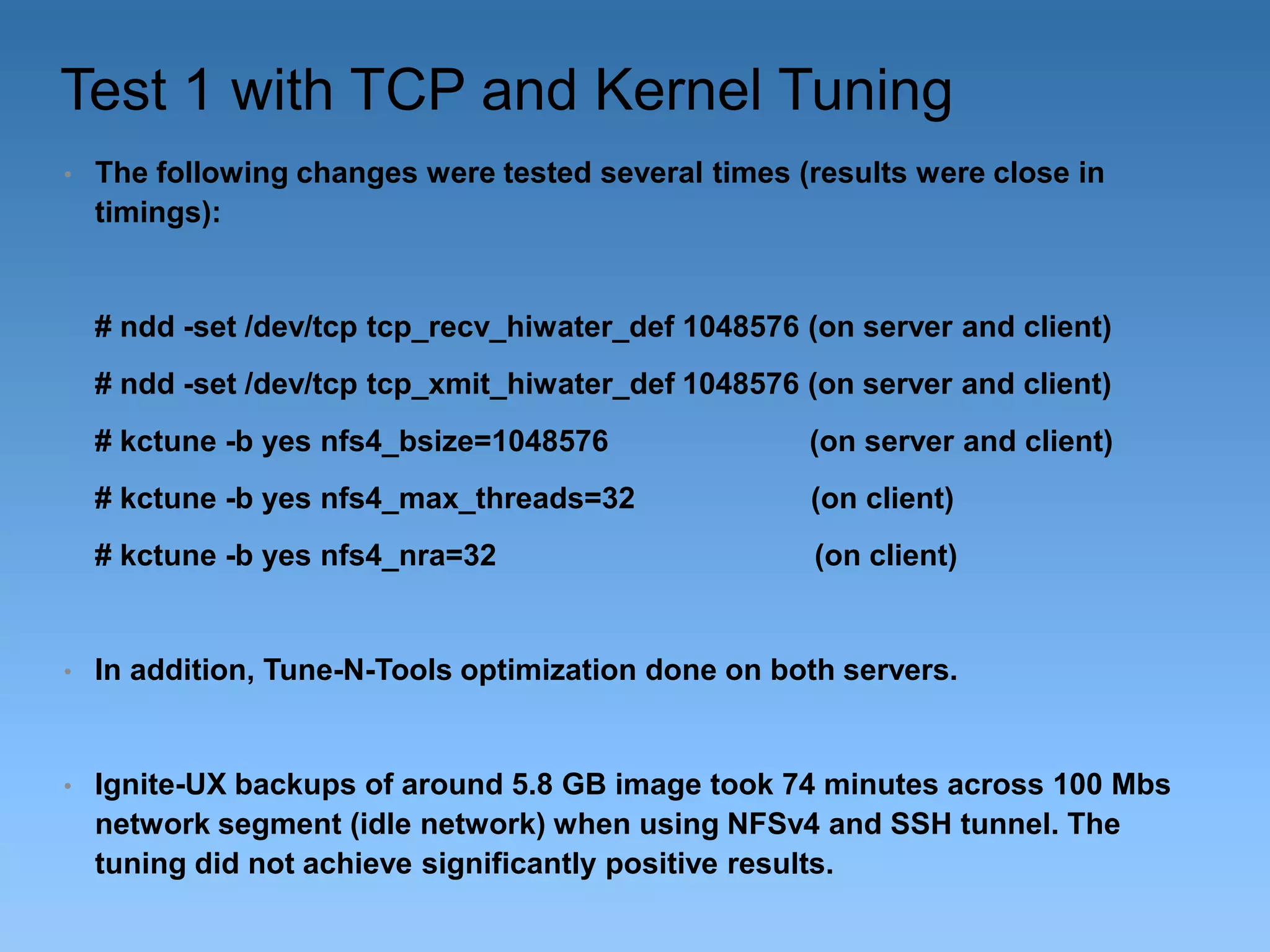
Test 1 with TCP and Kernel Tuning
•

The following changes were tested several times (results were close in
timings):

# ndd -set /dev/tcp tcp_recv_hiwater_def 1048576 (on server and client)

# ndd -set /dev/tcp tcp_xmit_hiwater_def 1048576 (on server and client)
# kctune -b yes nfs4_bsize=1048576

(on server and client)

# kctune -b yes nfs4_max_threads=32

(on client)

# kctune -b yes nfs4_nra=32

(on client)

•

In addition, Tune-N-Tools optimization done on both servers.

•

Ignite-UX backups of around 5.8 GB image took 74 minutes across 100 Mbs
network segment (idle network) when using NFSv4 and SSH tunnel. The
tuning did not achieve significantly positive results.
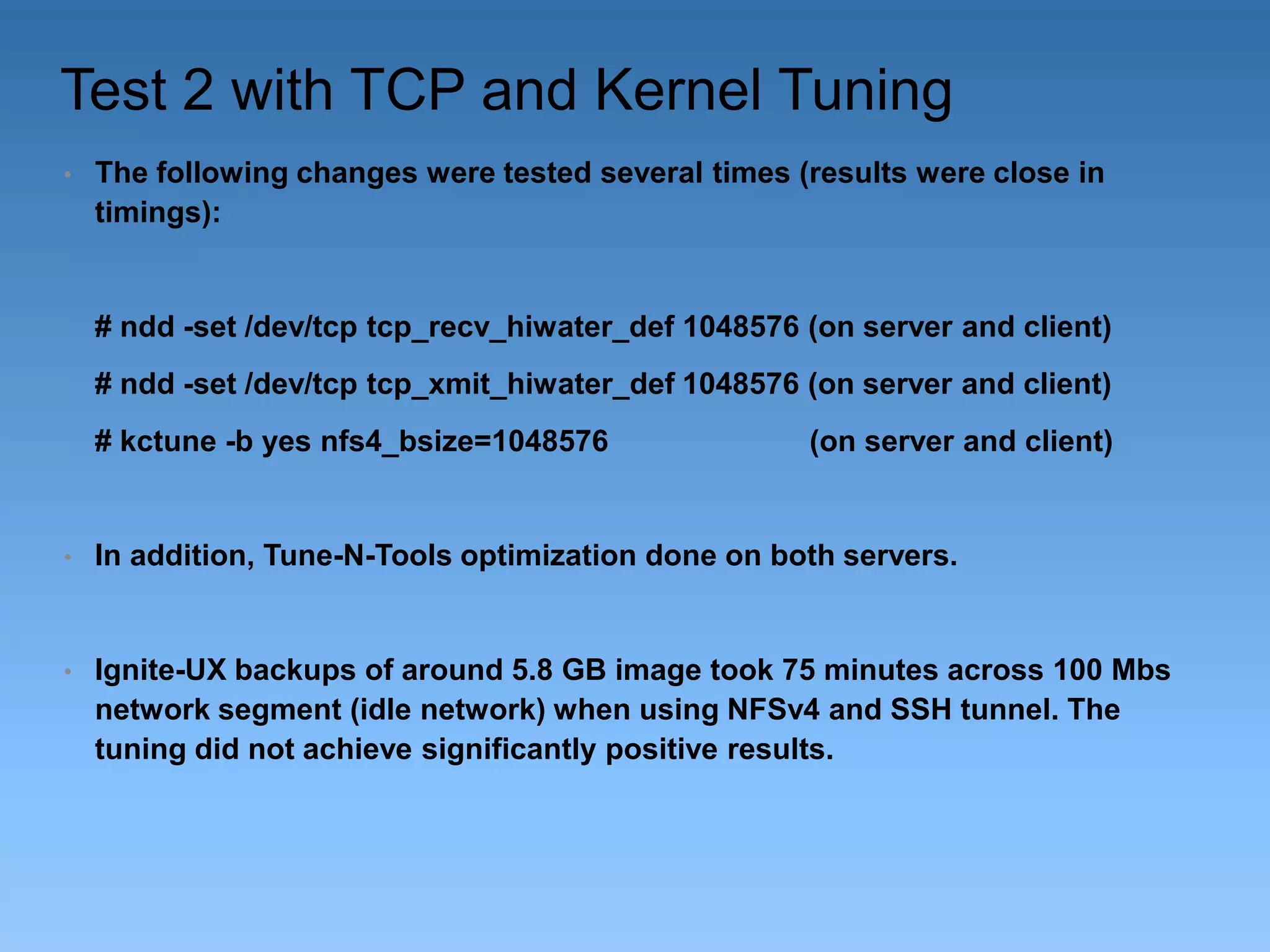
Test 2 with TCP and Kernel Tuning
•

The following changes were tested several times (results were close in
timings):

# ndd -set /dev/tcp tcp_recv_hiwater_def 1048576 (on server and client)

# ndd -set /dev/tcp tcp_xmit_hiwater_def 1048576 (on server and client)
# kctune -b yes nfs4_bsize=1048576

(on server and client)

•

In addition, Tune-N-Tools optimization done on both servers.

•

Ignite-UX backups of around 5.8 GB image took 75 minutes across 100 Mbs
network segment (idle network) when using NFSv4 and SSH tunnel. The
tuning did not achieve significantly positive results.
Test 3 with TCP and Kernel Tuning
•

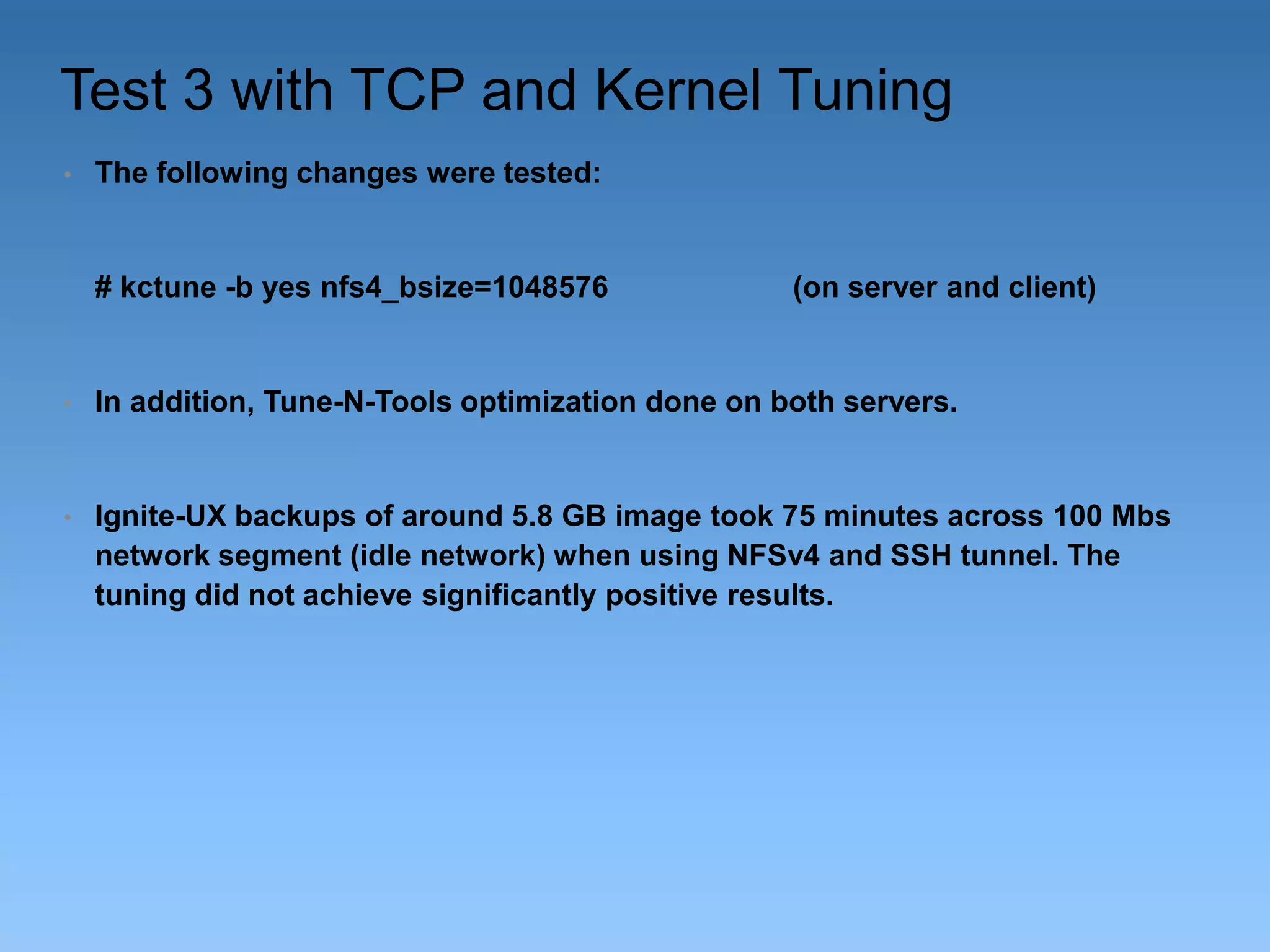
The following changes were tested:

# kctune -b yes nfs4_bsize=1048576

(on server and client)

•

In addition, Tune-N-Tools optimization done on both servers.

•

Ignite-UX backups of around 5.8 GB image took 75 minutes across 100 Mbs
network segment (idle network) when using NFSv4 and SSH tunnel. The
tuning did not achieve significantly positive results.
Change Commands on Ignite-UX Client
•

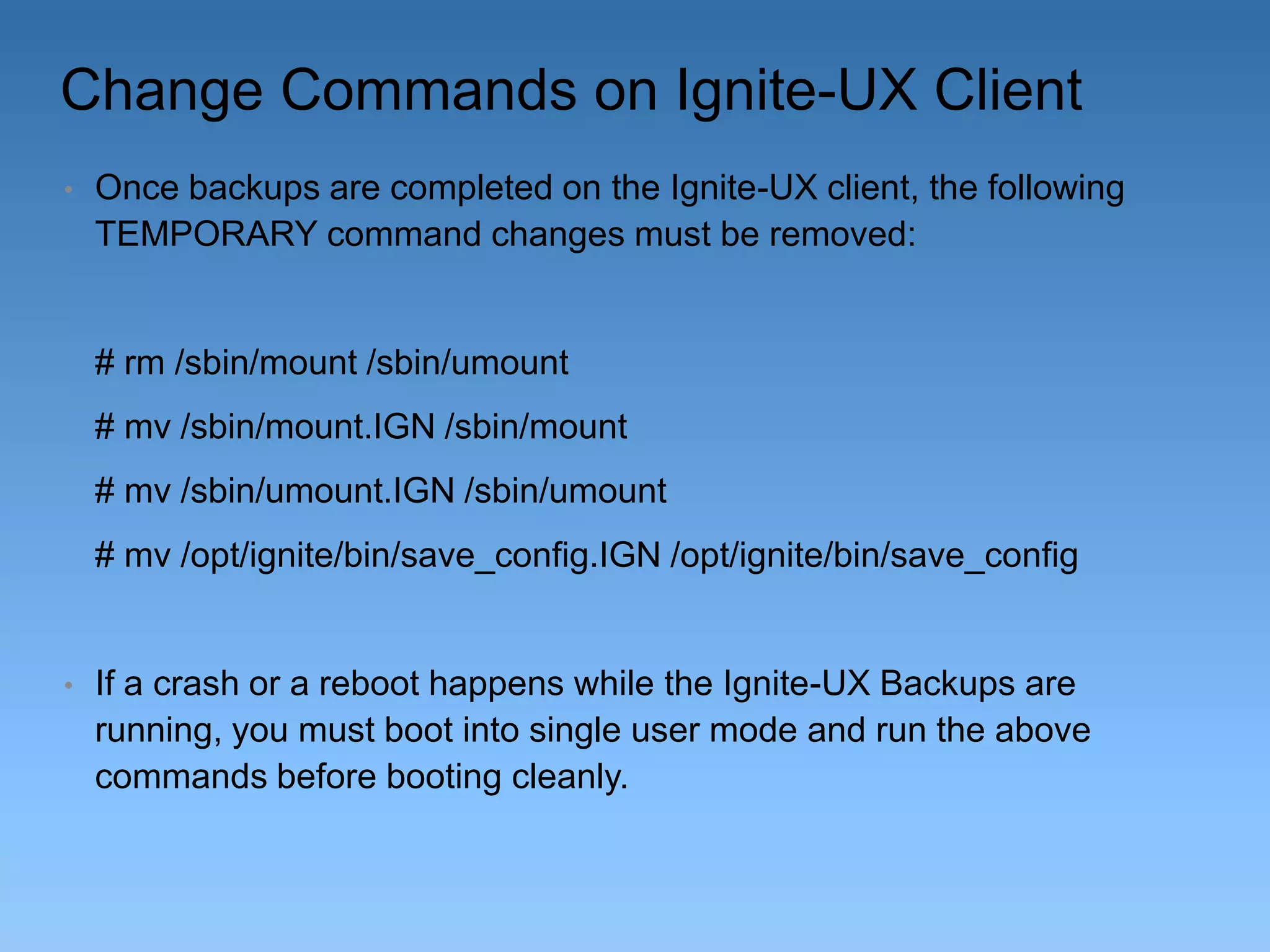
Once backups are completed on the Ignite-UX client, the following
TEMPORARY command changes must be removed:

# rm /sbin/mount /sbin/umount
# mv /sbin/mount.IGN /sbin/mount

# mv /sbin/umount.IGN /sbin/umount
# mv /opt/ignite/bin/save_config.IGN /opt/ignite/bin/save_config

•

If a crash or a reboot happens while the Ignite-UX Backups are
running, you must boot into single user mode and run the above
commands before booting cleanly.
Ignite-UX Recovery
•

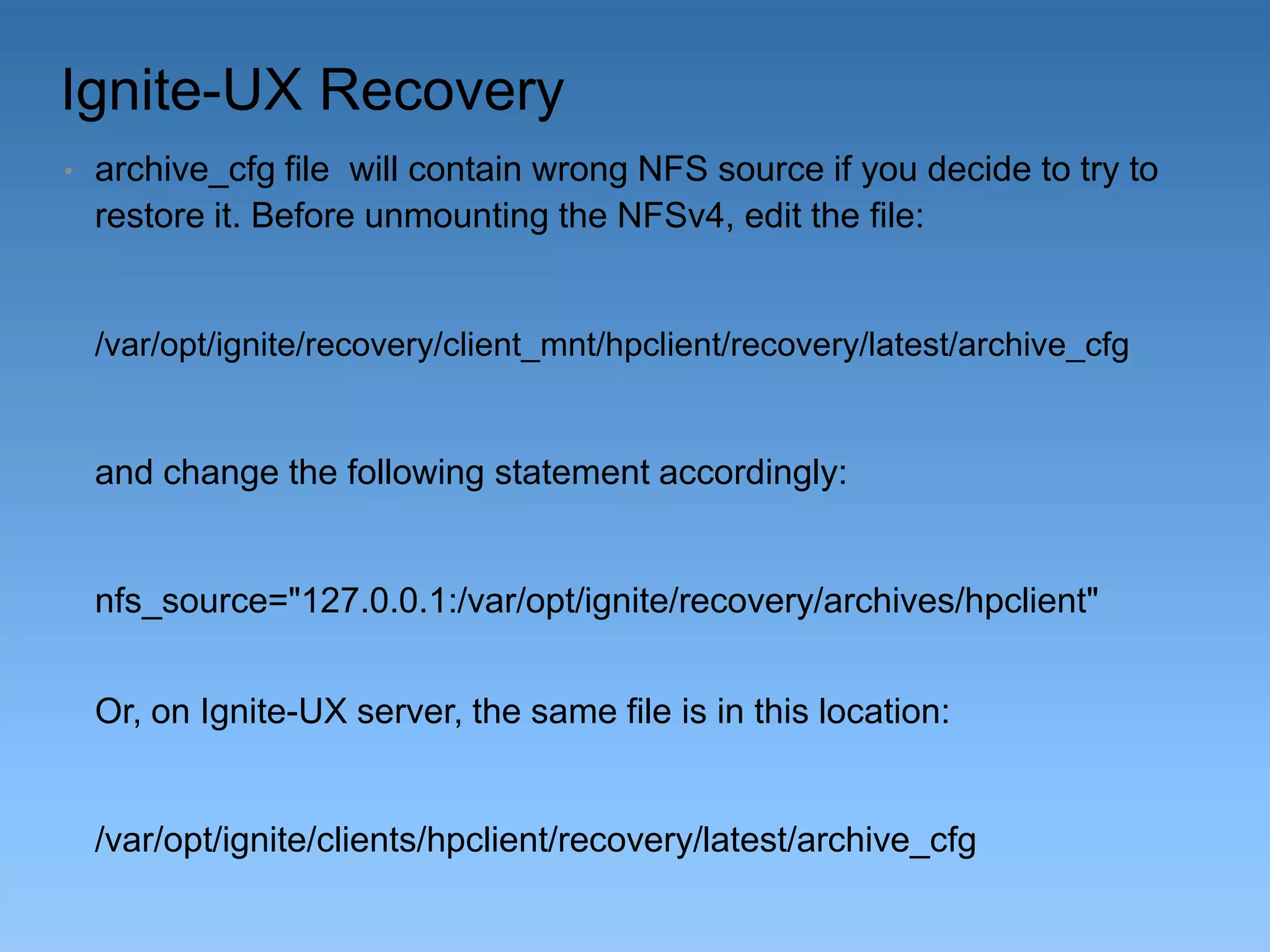
archive_cfg file will contain wrong NFS source if you decide to try to
restore it. Before unmounting the NFSv4, edit the file:

/var/opt/ignite/recovery/client_mnt/hpclient/recovery/latest/archive_cfg

and change the following statement accordingly:

nfs_source="127.0.0.1:/var/opt/ignite/recovery/archives/hpclient"
Or, on Ignite-UX server, the same file is in this location:

/var/opt/ignite/clients/hpclient/recovery/latest/archive_cfg
Ignite-UX Recovery cont.
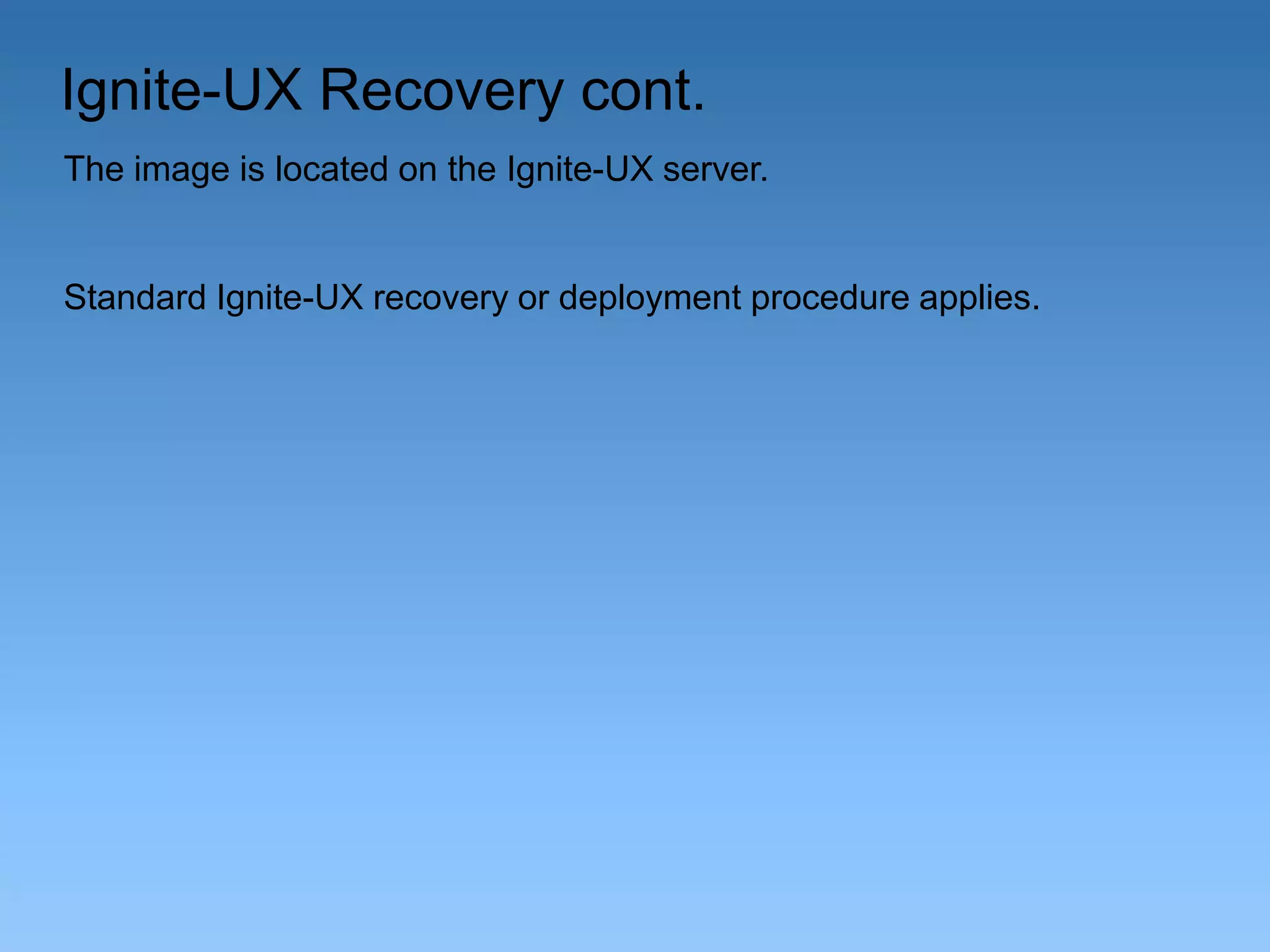
The image is located on the Ignite-UX server.

Standard Ignite-UX recovery or deployment procedure applies.
For More Information
Ignite-UX Documentation

http://www.hp.com/go/ignite-ux-docs

NFS Services Administration Guide HP-UX 11iv3
http://h20000.www2.hp.com/bc/docs/support/SupportManual/c0323
1925/c03231925.pdf

Shell script that automates the backup process:

http://www.circlingcycle.com.au/Unix-sources/HP-UX-ignite-viaNFSv4-and-SSH-tunnel.sh.txt
Shell Script (Embedded PDF)
THANK YOU!

HP-UX 11iv3 Ignite-UX with NFSv4 and SSH Tunnel by Dusan Baljevic

  • 1.
    HP-UX 11iv3 Ignite-UX withNFSV4 and SSH Tunnel Dusan Baljevic
  • 2.
    Overview This short technicalpresentation will show: – Setup of Ignite-UX server and client running HP-UX 11iv3 by using NFSv4 with SSH tunnel Assumptions: – Basic knowledge of Ignite-UX, SSH, and NFS on HP-UX platform The equipment used: – rx7420 and rx2660 running HP-UX 11iv3 Update 1203 – Ignite-UX server hostname is ignserv – Ignite-UX client hostname is hpclient – Both servers run HP-UX DCOE, OpenSSH 6.0p1 (GR8 Call 4000252191 opened for Secure Shell on HP-UX), Ignite-UX C.7.14.264, ONC/NFS B.11.31.13 – Network between the servers is plain 100 Mbs segment, the servers use single network cards (no APA) – Default kernel tuning was used
  • 3.
    Secure Shell 5.9p1Still a Problem Even the latest version of HP-UX 11iv3 1209 DCOE with its Secure Shell has the same bug. I tested it in early September 2012. The same “hung-session” problem occurred when using: # swlist | egrep "-OE" HPUX11i-DC-OE B.11.31.1209 HP-UX Data Center Operating Environment # ssh -V – OpenSSH_5.9p1+sftpfilecontrol-v1.3-hpn13v12, – HP-UX OpenSSL 0.9.8w 23 Apr 2012 Secure Shell-A.05.90.007, HP-UX Secure Shell version So, at this stage, open-source version of SSH is still required on the Ignite-UX client side. The Ignite-UX server side uses standard Secure Shell that comes with HP-UX distribution.
  • 4.
    Why This Presentation? –Secure environmentto run Ignite-UX when only SSH is allowed between servers; –An alternative solution to run Ignite-UX, which was not documented before; –An opportunity to use new features through NFSv4; –The flexibility of tools available on HP-UX 11iv3; –Simple and robust solution for Disaster Recovery O/S backups in secure environments.
  • 5.
    Why NFSv4 withSSH Tunnel • With HP-UX 11i we support Kerberos encryption with all NFS-versions (NFSv2, NFSv3, and NFSv4); • This would possibly be faster than port forwarding with SSH, but the NFS ports would still need to be opened between two servers; • With NFSv4 and SSH tunnel, a new method is possible, where IgniteUX and pre-mounted file systems (NFS) can be used. In this case, we will use localhost as target for saving the O/S image: make_net_recovery –s localhost ...
  • 6.
    Setting NFSv4 onIgnite-UX Server • Edit /etc/rc.config.d/nfsconf. The only important options are: NFS_CORE=1 LOCKMGR=1 * NFS_SERVER=1 NFS_CLIENT=0 START_MOUNTD=1 • Edit /etc/default/nfs and change the following options from the defaults: NFS_SERVER_VERSMAX=4 NFS_CLIENT_VERSMAX=4
  • 7.
    NFSv4 Delegation * • /etc/default/nfsoption (NFS_SERVER_DELEGATION=on). NFSv4 is designed to use a single source-port 2049. If there is a firewall between NFS client and NFS-server, it is sufficient to open port number 2049. With the introduction of NFSv4 delegation, the NFS-server need to be able to revoke a granted delegation. This is done via a special connection/protocol and requires an additional port to be opened. The communication is done from the NFS-server to the NFS-client, and the destination port of this connection is announced/sent by the NFS-client, when the NFSv4 file system is been mounted. The port-number that is currently used can be any port between 49152 and 65535 and is handled by the NFSv4 callback-daemon "nfs4cbd“ at the NFS-client. If the firewall blocks the callback-communication, the NFS-client and NFS-server will disable the delegation feature for this client, which may impact NFSv4 performance (does not impact NFSv4 functionality).
  • 8.
    Setting NFSv4 onIgnite-UX Server – cont. Edit /etc/dfs/dfstab to share two file systems to a remote Ignite-UX client (hostname hpclient). It is CRUCIAL to list both the Ignite-UX server and client in the access list: share -F nfs -o anon=2,access=ignserv:hpclient /var/opt/ignite/clients share -F nfs -o anon=2,access=ignserv:hpclient /var/opt/ignite/recovery/archives/hpclient Warning: If you do not put the Ignite-UX server above, the client will report the following error in /var/adm/syslog/syslog.log: Aug 28 17:47:12 hpclient vmunix: WARNING: NFS server initial call to localhost failed: Permission denied
  • 9.
    Setting SSH onIgnite-UX Server • Edit /usr/local/etc/sshd_config. The only important changes from the defaults are: Protocol 2,1 ClientAliveInterval 15 ClientAliveCountMax 10 ClientAliveInterval sets a timeout interval in seconds after which if no data has been received from the client, sshd(8) will send a message through the encrypted channel to request a response from the client. The default is 0, indicating that these messages will not be sent to the client. This option applies to SSH protocol version 2 only.
  • 10.
    Setting SSH onIgnite-UX Server cont. ClientAliveCountMax Sets the number of client alive messages which may be sent without sshd receiving any messages back from the client. If this threshold is reached while client alive messages are being sent, sshd will disconnect the client, terminating the session. It is important to note that the use of client alive messages is very different from TCPKeepAlive (below). The client alive messages are sent through the encrypted channel and therefore will not be spoofable. The TCP keepalive option enabled by TCPKeepAlive is spoofable. The client alive mechanism is valuable when the client or server depend on knowing when a connection has become inactive. The default value is 3. If ClientAliveInterval is set to 15, and ClientAliveCountMax is 10, unresponsive ssh clients will be disconnected after approximately 150 seconds.
  • 11.
    Setting NFSV4 onIgnite-UX Client • Edit /etc/rc.config.d/nfsconf. The only options required are: NFS_CORE=1 LOCKMGR=1 * NFS_CLIENT=1 • Edit /etc/default/nsf and change the following options from the defaults: NFS_SERVER_VERSMAX=4 NFS_CLIENT_VERSMAX=4
  • 12.
    SSH Tunnel OnIgnite-UX Client • Set up SSH tunnel to Ignite-UX server. We used local port 2323 (can be any free port on the local machine) : # /usr/local/bin/ssh -fN -L 2323:ignserv:2049 ignserv It means we established an SSH tunnel by using local port 2323 to tunnel requests to remote server ignserv on port 2049.
  • 13.
    Create Directory onIgnite-UX Client # mkdir -p /var/opt/ignite/recovery/client_mnt # chown bin:bin /var/opt/ignite/recovery/client_mnt # mkdir /var/opt/ignite/recovery/arch_mnt # chown bin:bin /var/opt/ignite/recovery/arch_mnt
  • 14.
    Change Commands onIgnite-UX Client • Once the tunnel is established to a remote Ignite-UX server, the following TEMPORARY command changes are required: # mv /sbin/mount /sbin/mount.IGN # mv /sbin/umount /sbin/umount.IGN # ln –s /usr/bin/true /sbin/mount # ln –s /usr/bin/true /sbin/umount # cp /opt/ignite/bin/save_config /opt/ignite/bin/save_config.IGN # sed -e 's/^mount -lp/mount.IGN -lp/g‘ /opt/ignite/bin/save_config > /opt/ignite/bin/save_config.new # mv /opt/ignite/bin/save_config.new /opt/ignite/bin/save_config
  • 15.
    QXCR1001169724 Ignite-UX withpremounted NFS To enable the migration of systems in secure environments this request asks for a method of telling make_net_recovery to not NFS mount file systems and write the configuration and archive to local disks. The general requirement is that make_net_recovery allow the use of no NFS file systems. That is: it will write the configuration and archive to a the local file system instead of a remote NFS file system. http://psweb1.cup.hp.com/~projects/pq/cgibin/goto_cr.cgi?number=QXCR1001169724&results_format=default&t z=PDT&submit=submit
  • 16.
    NFSv4 Mounts onIgnite-UX Client • Once the tunnel is established to a remote Ignite-UX server, two NFSv4 file systems must be mounted on the client. We used local port 2323 (can be any free port) and remote Ignite-UX server is hostname ignserv: # /sbin/mount.IGN -o port=2323,vers=4 localhost:/var/opt/ignite/clients /var/opt/ignite/recovery/client_mnt # /sbin/mount.IGN -o port=2323,vers=4 localhost:/var/opt/ignite/recovery/archives/hpclient /var/opt/ignite/recovery/arch_mnt
  • 17.
    Ignite-UX Backups onClient • localhost is used for make_net_recovery: # make_net_recovery -s localhost -P s -x inc_entire=vg00 –x exclude=/tmp -x exclude=/var/tmp -d "Archive_of_hpclient_via_NFSv4“
  • 18.
    Ignite-UX Client NFSMounts # bdf Filesystem kbytes used avail %used Mounted on /dev/vg00/lvol3 2097152 686912 1399336 33% / /dev/vg00/lvol1 2097152 253368 1829440 12% /stand /dev/vg00/lvol8 12288000 2655544 9557288 22% /var /dev/vg00/lvol10 2097152 20376 1949780 1% /var/tmp /dev/vg00/lvol9 4194304 18008 3915285 0% /var/adm/crash /dev/vg00/lvol7 12288000 3759744 8461736 31% /usr /dev/vg00/lvol6 1048576 21088 1019464 /dev/vg00/lvol5 18432000 8646536 9709152 47% /opt /dev/vg00/lvol4 524288 20848 499512 localhost:/var/opt/ignite/clients 2% /tmp 4% /home 16252928 4258160 11901208 26% /var/opt/ignite/recovery/client_mnt localhost:/var/opt/ignite/recovery/archives/hpclient 16252928 4258168 11901208 26% /var/opt/ignite/recovery/arch_mnt
  • 19.
    Ignite-UX Backups onClient • Ignite-UX backups of around 5.8 GB image took 58 minutes across 100 Mbs network segment (idle network) when using NFSv4 and SSH tunnel. • Ignite-UX backups of around 5.8 GB image took 48 minutes across 100 Mbs network segment (idle network) when using NFSv4 without SSH tunnel. • Through limited testing, it has been shown that SSH tunnel might decrease network throughput by up to around 20%. • Through performance monitoring, it was found out that around 1.4 GB of RAM was used during Ignite-UX backups of 5.8 GB on the client. • Through kernel, NFS and VxFS tuning, even better results would be expected.
  • 20.
    Test 1 withTCP and Kernel Tuning • The following changes were tested several times (results were close in timings): # ndd -set /dev/tcp tcp_recv_hiwater_def 1048576 (on server and client) # ndd -set /dev/tcp tcp_xmit_hiwater_def 1048576 (on server and client) # kctune -b yes nfs4_bsize=1048576 (on server and client) # kctune -b yes nfs4_max_threads=32 (on client) # kctune -b yes nfs4_nra=32 (on client) • In addition, Tune-N-Tools optimization done on both servers. • Ignite-UX backups of around 5.8 GB image took 74 minutes across 100 Mbs network segment (idle network) when using NFSv4 and SSH tunnel. The tuning did not achieve significantly positive results.
  • 21.
    Test 2 withTCP and Kernel Tuning • The following changes were tested several times (results were close in timings): # ndd -set /dev/tcp tcp_recv_hiwater_def 1048576 (on server and client) # ndd -set /dev/tcp tcp_xmit_hiwater_def 1048576 (on server and client) # kctune -b yes nfs4_bsize=1048576 (on server and client) • In addition, Tune-N-Tools optimization done on both servers. • Ignite-UX backups of around 5.8 GB image took 75 minutes across 100 Mbs network segment (idle network) when using NFSv4 and SSH tunnel. The tuning did not achieve significantly positive results.
  • 22.
    Test 3 withTCP and Kernel Tuning • The following changes were tested: # kctune -b yes nfs4_bsize=1048576 (on server and client) • In addition, Tune-N-Tools optimization done on both servers. • Ignite-UX backups of around 5.8 GB image took 75 minutes across 100 Mbs network segment (idle network) when using NFSv4 and SSH tunnel. The tuning did not achieve significantly positive results.
  • 23.
    Change Commands onIgnite-UX Client • Once backups are completed on the Ignite-UX client, the following TEMPORARY command changes must be removed: # rm /sbin/mount /sbin/umount # mv /sbin/mount.IGN /sbin/mount # mv /sbin/umount.IGN /sbin/umount # mv /opt/ignite/bin/save_config.IGN /opt/ignite/bin/save_config • If a crash or a reboot happens while the Ignite-UX Backups are running, you must boot into single user mode and run the above commands before booting cleanly.
  • 24.
    Ignite-UX Recovery • archive_cfg filewill contain wrong NFS source if you decide to try to restore it. Before unmounting the NFSv4, edit the file: /var/opt/ignite/recovery/client_mnt/hpclient/recovery/latest/archive_cfg and change the following statement accordingly: nfs_source="127.0.0.1:/var/opt/ignite/recovery/archives/hpclient" Or, on Ignite-UX server, the same file is in this location: /var/opt/ignite/clients/hpclient/recovery/latest/archive_cfg
  • 25.
    Ignite-UX Recovery cont. Theimage is located on the Ignite-UX server. Standard Ignite-UX recovery or deployment procedure applies.
  • 26.
    For More Information Ignite-UXDocumentation http://www.hp.com/go/ignite-ux-docs NFS Services Administration Guide HP-UX 11iv3 http://h20000.www2.hp.com/bc/docs/support/SupportManual/c0323 1925/c03231925.pdf Shell script that automates the backup process: http://www.circlingcycle.com.au/Unix-sources/HP-UX-ignite-viaNFSv4-and-SSH-tunnel.sh.txt
  • 27.
  • 28.

Editor's Notes

  • #2 * Without LOCKMGR being enabled, the following error is displayed on the client when NFS mount is attempted:#mount -o port=2323,vers=4 localhost:/var/opt/ignite/clients /var/opt/ignite/recovery/client_mntchannel 2: open failed: administratively prohibited: open failednfs mount: localhost NFS service not available RPC: Successnfs mount: retrying: /var/opt/ignite/recovery/client_mntchannel 2: open failed: administratively prohibited: open failednfs mount: giving up on: /var/opt/ignite/recovery/client_mnt
  • #3 * SAW document http://sawpro.atlanta.hp.com/km/saw/view.do?docId=ttr_na-SSB_1001209969&hsid=42564915&sz=1823There is no command/tool that can be used todetermine if the delegation feature is enabled or disabled.
  • #4 * Without LOCKMGR being enabled, the following error is displayed on the client when NFS mount is attempted:#mount -o port=2323,vers=4 localhost:/var/opt/ignite/clients /var/opt/ignite/recovery/client_mntchannel 2: open failed: administratively prohibited: open failednfs mount: localhost NFS service not available RPC: Successnfs mount: retrying: /var/opt/ignite/recovery/client_mntchannel 2: open failed: administratively prohibited: open failednfs mount: giving up on: /var/opt/ignite/recovery/client_mnt