How User Centered Web Design Techniques  Enhance Online Marketing    Key points of this webcast presented by Kim Krause Berg,  Search Marketing and UX Manager of LiBeck Integrated Marketing  will include... > Everything placed on a web page has a reason for being there (and if not, remove it.) > Stakeholders and management have different and sometimes conflicting priorities for company web sites such as ecommerce, services, corporate information, and software application based travel sites. Your goal is to always be the end-user's advocate. > Holistic search marketing includes usability, information architecture, search engine optimization, social media marketing, mobile web site design focused on marketing, accessibility, and content development. The integration of user centered techniques offers track able ROI benefits.
How User Centered Web Design Techniques Enhance Online Marketing    Webcast by: Kimberly Krause Berg Usability, SEO Marketing Manager Libeck Integrated Marketing Usability/SEO/Information Architecture Consulting, Cre8pc.com Founder, Cre8asiteforums.com June 15, 2011
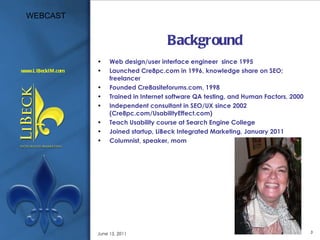
Background Web design/user interface engineer  since 1995 Launched Cre8pc.com in 1996, knowledge share on SEO; freelancer Founded Cre8asiteforums.com, 1998 Trained in Internet software QA testing, and Human Factors, 2000 Independent consultant in SEO/UX since 2002 (Cre8pc.com/UsabilityEffect.com) Teach Usability course at Search Engine College Joined startup, LiBeck Integrated Marketing, January 2011 Columnist, speaker, mom June 15, 2011
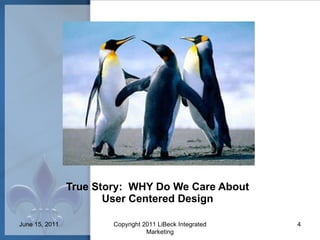
True Story:  WHY Do We Care About User Centered Design June 15, 2011 Copyright 2011 LiBeck Integrated Marketing
It’s all about your end user. Meeting Business Requirements And…did you know SEO is a Business Requirement (or should be!) Accessibility = Everybodyability We’re social creatures. June 15, 2011 Copyright 2011 LiBeck Integrated Marketing
KEY TAKEAWAYS Everything placed on a web page has a reason for being there (and if not, remove it.) 2. Stakeholders and management have different and sometimes conflicting priorities for company web sites such as ecommerce, services, corporate information and software application based travel sites. Your goal is to always be the end-user's advocate. 3.Holistic search marketing includes usability, information architecture, search engine optimization, social media marketing, mobile web site design focused on marketing, accessibility and content development.  The integration of user centered techniques offers track-able ROI benefits .
Online Marketing and UX Have the same goal Search engines focus on the searcher’s experience. Buzz helps with rank and clicks. Customer oriented content focuses on users and THEIR needs and interests.
Online Marketing and UX Have the same goal Both marketers and site designers want to increase conversion rates. Both marketers and site designers want to satisfy their customers and site visitors. When we play together, the universe is at peace.  (Ok, we get paid.)
The Days of Alta Vista Are Gone Most of the techniques to follow can be applied to your: Homepage Landing pages Product pages Navigation And even some software applications June 15, 2011
NAVIGATION How to optimize navigation for search and usability. June 15, 2011 Copyright 2011 LiBeck Integrated Marketing
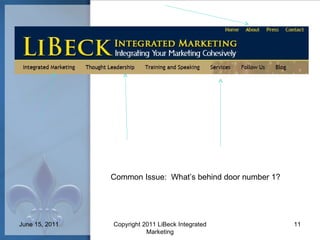
Common Issue:  What’s behind door number 1? June 15, 2011 Copyright 2011 LiBeck Integrated Marketing
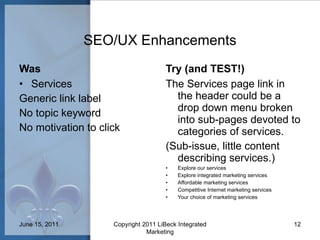
SEO/UX Enhancements Was Services Generic link label No topic keyword No motivation to click Try (and TEST!) The Services page link in the header could be a drop down menu broken into sub-pages devoted to categories of services.  (Sub-issue, little content describing services.) Explore our services Explore integrated marketing services Affordable marketing services Competitive Internet marketing services Your choice of marketing services June 15, 2011 Copyright 2011 LiBeck Integrated Marketing
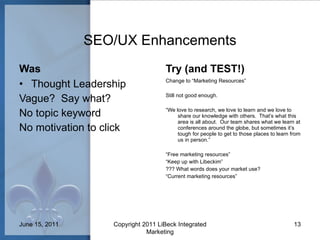
SEO/UX Enhancements Was Thought Leadership Vague?  Say what? No topic keyword No motivation to click Try (and TEST!) Change to “Marketing Resources” Still not good enough. “ We love to research, we love to learn and we love to share our knowledge with others.  That’s what this area is all about.  Our team shares what we learn at conferences around the globe, but sometimes it’s tough for people to get to those places to learn from us in person.” “ Free marketing resources” “ Keep up with Libeckim” ??? What words does your market use? “ Current marketing resources” June 15, 2011 Copyright 2011 LiBeck Integrated Marketing
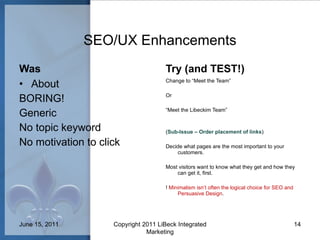
SEO/UX Enhancements Was About BORING! Generic No topic keyword No motivation to click Try (and TEST!) Change to “Meet the Team” Or “ Meet the Libeckim Team” ( Sub-Issue – Order placement of links ) Decide what pages are the most important to your customers.  Most visitors want to know what they get and how they can get it, first. !  Minimalism isn’t often the logical choice for SEO and Persuasive Design . June 15, 2011 Copyright 2011 LiBeck Integrated Marketing
CONTENT How to optimize Content for search and usability. June 15, 2011 Copyright 2011 LiBeck Integrated Marketing
Content Checklist Tagline Add a tagline to the header of each page that includes keywords and describes the purpose of the web site. Your new tagline should be in text and contain a clear solution, explain how and address who the site is targeting. This is an opportunity for user understanding (in seconds) and search engine “understandability”. What solution do you provide?  How (using what tactics)?  To whom?  Remember that the goal of your web site visitors is to find the object of their desire. June 15, 2011
Content Checklist Who Where What Why How When Who are you?  Whom are you addressing? Where are you located? Where in the world are you selling? Where are the sales? What are you offering? What do your visitors want the most?  What makes you so special? Why are you doing what you do?  Why should anyone believe you? Why is your company so special? How do we contact you?  How old is your company? How do we subscribe/order/signup? How long is the sale? How do you pick your products? When can we order/call/signup?  On homepage, product pages, landing pages June 15, 2011
When a site addresses these initial questions on the homepage, it saves visitors from having to click around to get the answers.  It’s preferable to quickly guide them to pages that help them complete a task, such as a sales lead, product browsing, fill out a form, etc. rather than hunting for information. Your search marketing efforts bring in visitors.  Your persuasive, usable design makes them stay! Why?
NITTY GRITTY DETAILS How to optimize SMALL DETAILS for search and usability. June 15, 2011 Copyright 2011 LiBeck Integrated Marketing
June 15, 2011
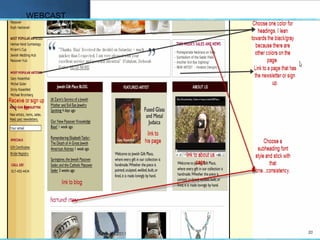
Be sure your product pages contain content in addition to cart elements.  Treat each product page as a standalone landing page. Add text captions to your images (very easy to do in Wordpress’s media library.) 3.  Add content to the homepage and landing pages that contain no more than 3  embedded links. The anchor text on these links should go to key pages on the inside of the web site and be keyword oriented and descriptive. Use embedded, targeted links to guide customers towards making a purchase. If your target market/audience may not be all English-speaking,  insert variations of strong keywords in other languages in text links and content. Signal to search engines where important content is by using header tags (h1, h2, etc.).  Add keywords to headings and sub-headings (but be natural about it!) Continued >
7.  Play with verbs!  Go. Find. Order. Buy. Search. Read more.  And describe the task or topic along with it.  “Read more about [insert topic], “Buy [product name] now” 8. Mobile design relies more heavily on text than images, as does accessibility software (JAWS).  Motivate and be concise with every word you choose. 9. Always, always, always, look into your logs and analytics to find all the ways people are finding your web site.  Experiment with their search terms by adding them into your content, headings, captions and embedded text links. 10. Show off your team.  Add bio’s.  Give each person their own page that acts as a landing page that comes up on a search for their name or area(s) of expertise.  Make sure that page links to a key task! 11. Display products with description, incentive and "Add to cart" or at minimum, "Get more information on [insert keyword here].  (Never use "click here".) 12. Incorporate trigger words in content – “free”, “new”, “limited time special”, “For sale”, “special”, “lowest price”.
Resources We We Monitor ( http://www.futurenowinc.com/wewe.htm ) Ambient Findability,  By Peter Morville Search Usability,  by Shari Thurow Call to Action,  by Bryan and Jeffrey Eisenberg Designing Search , by Greg Nudelman Audience, Relevance and Search , by Mathewson, Donatone, Fishel Landing Page Optimization , by Tim Ash What Makes Them Click , by Susan Weinschenk, Ph.D Internet Marketing an Hour a Day , by Matt Bailey June 15, 2011
Please Stay in Touch Facebook : http://www.facebook.com/cre8pc Email: cre8pc@gmail.com (General) or kim.berg@libeckim.com (Libeckim) or kim@searchenginecollege.com (for course information) Twitter: “ kim_cre8pc ” June 15, 2011

Aquent/AMA Webcast: How User Centered Web Design Techniques Enhance Online Marketing

  • 1.
    How User CenteredWeb Design Techniques Enhance Online Marketing Key points of this webcast presented by Kim Krause Berg, Search Marketing and UX Manager of LiBeck Integrated Marketing will include... > Everything placed on a web page has a reason for being there (and if not, remove it.) > Stakeholders and management have different and sometimes conflicting priorities for company web sites such as ecommerce, services, corporate information, and software application based travel sites. Your goal is to always be the end-user's advocate. > Holistic search marketing includes usability, information architecture, search engine optimization, social media marketing, mobile web site design focused on marketing, accessibility, and content development. The integration of user centered techniques offers track able ROI benefits.
  • 2.
    How User CenteredWeb Design Techniques Enhance Online Marketing  Webcast by: Kimberly Krause Berg Usability, SEO Marketing Manager Libeck Integrated Marketing Usability/SEO/Information Architecture Consulting, Cre8pc.com Founder, Cre8asiteforums.com June 15, 2011
  • 3.
    Background Web design/userinterface engineer since 1995 Launched Cre8pc.com in 1996, knowledge share on SEO; freelancer Founded Cre8asiteforums.com, 1998 Trained in Internet software QA testing, and Human Factors, 2000 Independent consultant in SEO/UX since 2002 (Cre8pc.com/UsabilityEffect.com) Teach Usability course at Search Engine College Joined startup, LiBeck Integrated Marketing, January 2011 Columnist, speaker, mom June 15, 2011
  • 4.
    True Story: WHY Do We Care About User Centered Design June 15, 2011 Copyright 2011 LiBeck Integrated Marketing
  • 5.
    It’s all aboutyour end user. Meeting Business Requirements And…did you know SEO is a Business Requirement (or should be!) Accessibility = Everybodyability We’re social creatures. June 15, 2011 Copyright 2011 LiBeck Integrated Marketing
  • 6.
    KEY TAKEAWAYS Everythingplaced on a web page has a reason for being there (and if not, remove it.) 2. Stakeholders and management have different and sometimes conflicting priorities for company web sites such as ecommerce, services, corporate information and software application based travel sites. Your goal is to always be the end-user's advocate. 3.Holistic search marketing includes usability, information architecture, search engine optimization, social media marketing, mobile web site design focused on marketing, accessibility and content development.  The integration of user centered techniques offers track-able ROI benefits .
  • 7.
    Online Marketing andUX Have the same goal Search engines focus on the searcher’s experience. Buzz helps with rank and clicks. Customer oriented content focuses on users and THEIR needs and interests.
  • 8.
    Online Marketing andUX Have the same goal Both marketers and site designers want to increase conversion rates. Both marketers and site designers want to satisfy their customers and site visitors. When we play together, the universe is at peace. (Ok, we get paid.)
  • 9.
    The Days ofAlta Vista Are Gone Most of the techniques to follow can be applied to your: Homepage Landing pages Product pages Navigation And even some software applications June 15, 2011
  • 10.
    NAVIGATION How tooptimize navigation for search and usability. June 15, 2011 Copyright 2011 LiBeck Integrated Marketing
  • 11.
    Common Issue: What’s behind door number 1? June 15, 2011 Copyright 2011 LiBeck Integrated Marketing
  • 12.
    SEO/UX Enhancements WasServices Generic link label No topic keyword No motivation to click Try (and TEST!) The Services page link in the header could be a drop down menu broken into sub-pages devoted to categories of services.  (Sub-issue, little content describing services.) Explore our services Explore integrated marketing services Affordable marketing services Competitive Internet marketing services Your choice of marketing services June 15, 2011 Copyright 2011 LiBeck Integrated Marketing
  • 13.
    SEO/UX Enhancements WasThought Leadership Vague? Say what? No topic keyword No motivation to click Try (and TEST!) Change to “Marketing Resources” Still not good enough. “ We love to research, we love to learn and we love to share our knowledge with others.  That’s what this area is all about.  Our team shares what we learn at conferences around the globe, but sometimes it’s tough for people to get to those places to learn from us in person.” “ Free marketing resources” “ Keep up with Libeckim” ??? What words does your market use? “ Current marketing resources” June 15, 2011 Copyright 2011 LiBeck Integrated Marketing
  • 14.
    SEO/UX Enhancements WasAbout BORING! Generic No topic keyword No motivation to click Try (and TEST!) Change to “Meet the Team” Or “ Meet the Libeckim Team” ( Sub-Issue – Order placement of links ) Decide what pages are the most important to your customers. Most visitors want to know what they get and how they can get it, first. ! Minimalism isn’t often the logical choice for SEO and Persuasive Design . June 15, 2011 Copyright 2011 LiBeck Integrated Marketing
  • 15.
    CONTENT How tooptimize Content for search and usability. June 15, 2011 Copyright 2011 LiBeck Integrated Marketing
  • 16.
    Content Checklist TaglineAdd a tagline to the header of each page that includes keywords and describes the purpose of the web site. Your new tagline should be in text and contain a clear solution, explain how and address who the site is targeting. This is an opportunity for user understanding (in seconds) and search engine “understandability”. What solution do you provide? How (using what tactics)? To whom? Remember that the goal of your web site visitors is to find the object of their desire. June 15, 2011
  • 17.
    Content Checklist WhoWhere What Why How When Who are you? Whom are you addressing? Where are you located? Where in the world are you selling? Where are the sales? What are you offering? What do your visitors want the most? What makes you so special? Why are you doing what you do? Why should anyone believe you? Why is your company so special? How do we contact you? How old is your company? How do we subscribe/order/signup? How long is the sale? How do you pick your products? When can we order/call/signup? On homepage, product pages, landing pages June 15, 2011
  • 18.
    When a siteaddresses these initial questions on the homepage, it saves visitors from having to click around to get the answers. It’s preferable to quickly guide them to pages that help them complete a task, such as a sales lead, product browsing, fill out a form, etc. rather than hunting for information. Your search marketing efforts bring in visitors. Your persuasive, usable design makes them stay! Why?
  • 19.
    NITTY GRITTY DETAILSHow to optimize SMALL DETAILS for search and usability. June 15, 2011 Copyright 2011 LiBeck Integrated Marketing
  • 20.
  • 21.
    Be sure yourproduct pages contain content in addition to cart elements. Treat each product page as a standalone landing page. Add text captions to your images (very easy to do in Wordpress’s media library.) 3. Add content to the homepage and landing pages that contain no more than 3 embedded links. The anchor text on these links should go to key pages on the inside of the web site and be keyword oriented and descriptive. Use embedded, targeted links to guide customers towards making a purchase. If your target market/audience may not be all English-speaking, insert variations of strong keywords in other languages in text links and content. Signal to search engines where important content is by using header tags (h1, h2, etc.). Add keywords to headings and sub-headings (but be natural about it!) Continued >
  • 22.
    7. Playwith verbs! Go. Find. Order. Buy. Search. Read more. And describe the task or topic along with it. “Read more about [insert topic], “Buy [product name] now” 8. Mobile design relies more heavily on text than images, as does accessibility software (JAWS). Motivate and be concise with every word you choose. 9. Always, always, always, look into your logs and analytics to find all the ways people are finding your web site. Experiment with their search terms by adding them into your content, headings, captions and embedded text links. 10. Show off your team. Add bio’s. Give each person their own page that acts as a landing page that comes up on a search for their name or area(s) of expertise. Make sure that page links to a key task! 11. Display products with description, incentive and "Add to cart" or at minimum, "Get more information on [insert keyword here]. (Never use "click here".) 12. Incorporate trigger words in content – “free”, “new”, “limited time special”, “For sale”, “special”, “lowest price”.
  • 23.
    Resources We WeMonitor ( http://www.futurenowinc.com/wewe.htm ) Ambient Findability, By Peter Morville Search Usability, by Shari Thurow Call to Action, by Bryan and Jeffrey Eisenberg Designing Search , by Greg Nudelman Audience, Relevance and Search , by Mathewson, Donatone, Fishel Landing Page Optimization , by Tim Ash What Makes Them Click , by Susan Weinschenk, Ph.D Internet Marketing an Hour a Day , by Matt Bailey June 15, 2011
  • 24.
    Please Stay inTouch Facebook : http://www.facebook.com/cre8pc Email: cre8pc@gmail.com (General) or kim.berg@libeckim.com (Libeckim) or kim@searchenginecollege.com (for course information) Twitter: “ kim_cre8pc ” June 15, 2011