How to Write an RFP
Managing Your Buying Process to
Make the Decision for You
2
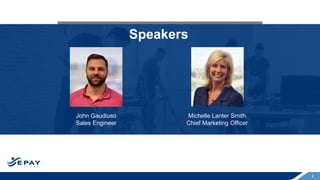
Speakers
Michelle Lanter Smith
Chief Marketing Officer
John Gaudiuso
Sales Engineer
3
Agenda
• Who is EPAY Systems
• What is an RFP
• RFP Timeline
• Things to Include in an RFP
• How to Evaluate Responses
• Common Mistakes to Avoid in your RFP
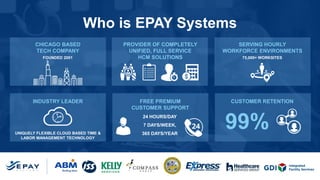
Who is EPAY Systems
CHICAGO BASED
TECH COMPANY
PROVIDER OF COMPLETELY
UNIFIED, FULL SERVICE
HCM SOLUTIONS
SERVING HOURLY
WORKFORCE ENVIRONMENTS
INDUSTRY LEADER FREE PREMIUM
CUSTOMER SUPPORT
CUSTOMER RETENTION
FOUNDED 2001
UNIQUELY FLEXIBLE CLOUD BASED TIME &
LABOR MANAGEMENT TECHNOLOGY
24 HOURS/DAY
7 DAYS/WEEK,
365 DAYS/YEAR
75,000+ WORKSITES
99%
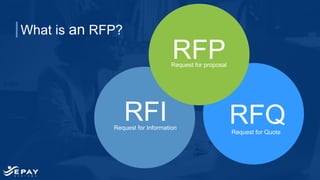
Request for Information
RFI
Request for proposal
RFQ
RFP
Request for Quote
What is an RFP?
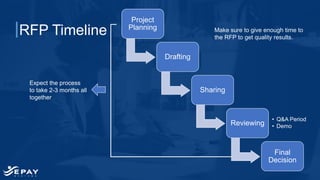
RFP Timeline Make sure to give enough time to
the RFP to get quality results.
Expect the process
to take 2-3 months all
together
Project
Planning
Drafting
Sharing
Reviewing
• Q&A Period
• Demo
Final
Decision
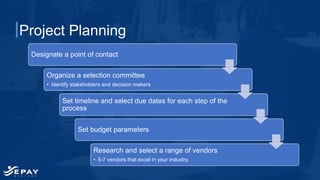
Project Planning
Designate a point of contact
Organize a selection committee
• Identify stakeholders and decision makers
Set timeline and select due dates for each step of the
process
Set budget parameters
Research and select a range of vendors
• 5-7 vendors that excel in your industry.
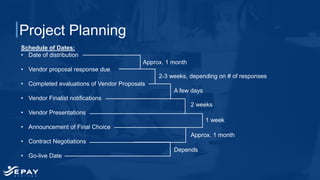
Project Planning
Schedule of Dates:
• Date of distribution
• Vendor proposal response due
• Completed evaluations of Vendor Proposals
• Vendor Finalist notifications
• Vendor Presentations
• Announcement of Final Choice
• Contract Negotiations
• Go-live Date
Approx. 1 month
2-3 weeks, depending on # of responses
2 weeks
A few days
1 week
Approx. 1 month
Depends
Drafting:
Things to
Include
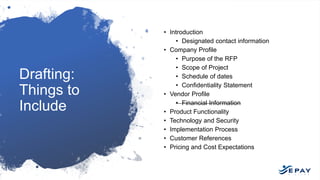
• Introduction
• Designated contact information
• Company Profile
• Purpose of the RFP
• Scope of Project
• Schedule of dates
• Confidentiality Statement
• Vendor Profile
• Financial Information
• Product Functionality
• Technology and Security
• Implementation Process
• Customer References
• Pricing and Cost Expectations
Drafting: Set Up for Success
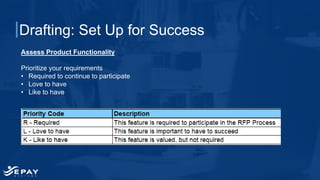
Assess Product Functionality
Prioritize your requirements
• Required to continue to participate
• Love to have
• Like to have
Drafting: Set Up for Success
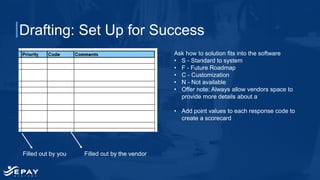
Ask how to solution fits into the software
• S - Standard to system
• F - Future Roadmap
• C - Customization
• N - Not available
• Offer note: Always allow vendors space to
provide more details about a
• Add point values to each response code to
create a scorecard
Filled out by you Filled out by the vendor
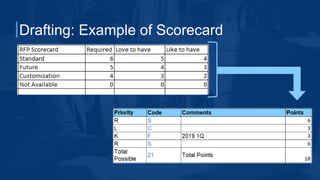
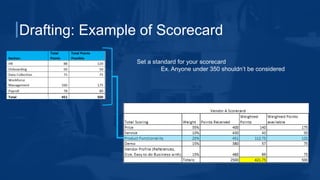
Drafting: Example of Scorecard
Set a standard for your scorecard
Ex. Anyone under 350 shouldn’t be considered
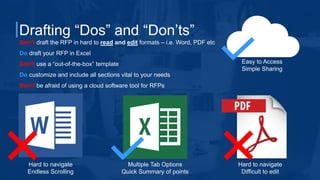
Drafting “Dos” and “Don’ts”
Don’t draft the RFP in hard to read and edit formats – i.e. Word, PDF etc
Do draft your RFP in Excel
Don’t use a “out-of-the-box” template
Do customize and include all sections vital to your needs
Don’t be afraid of using a cloud software tool for RFPs
Hard to navigate
Endless Scrolling
Multiple Tab Options
Quick Summary of points
Hard to navigate
Difficult to edit
Easy to Access
Simple Sharing
Sharing the RFP:
“Dos” and “Don’ts”
• Do post the RFP on your homepage
• Don’t let that be the only way for vendors to get it
• Do research and create a select list of vendors
• Don’t send to a vendor without contacting
someone there
• Do ask for a designated contact at each vendor
• Do make it easy to find
• Don’t let it get stagnant– follow up!
• Do follow-up to check if the vendor intends to send
a response
Q&A Process
Two options for answering questions:
Day to day
This is one of emails strengths. You can get new
questions and easily cc all vendor contacts on the
thread to share the question and answer, leaving a
fair playing field.
*Note: This can be very time consuming for your
designated contact.
Set Question Period
Another option is to collect all the questions for two
weeks after sharing and then compile all the answers
in a singular document with the answers, that can be
send to all vendor contacts at the end of every week
or every two weeks.
Reviewing and
Evaluating
Once you have received the final submissions:
• Use the points for Scoring – helps maintain
objectivity
• Select Finalists
• The factors that determine your finalists
should be decided during your planning
stages
• Once you select finalists then:
• Schedule demos
• Request Customer References
Customer References
• Don’t ask until you are down until your final
vendors
• Don’t be too picky with references
• Consider accepting video references for
preliminary evaluations
• Don’t ask for more references until you have
followed through with the first set
• Give them time to reach out to their customer
references so they know to expect your call
Vendor
Presentations
• Pace the presentations out
• Back to back presentations can be exhausting
and you will miss information
• Don’t try to control the presentation
• This means requiring a scripted demo
• Don’t require in person presentations
• Make sure the presentation is recorded
• Make sure that all your stakeholders and decision
makers are at the presentation
• Decide how to handle questions from stakeholders
and decision makers
• Allow adequate time
• Perhaps consider time limits on different sections
• Create a scorecard for the presentations
Common Mistakes to Avoid
Don’t cut off contact after issuing
Do expect further questions from vendors – they want to give you the best proposal
possible
Do release questions and answers to all vendors
Do expect an NDA from a private company before sharing financials
Don’t require the RFP to be delivered in hardcopy or CD-ROM
Do strive for as much objectivity as possible – that is after all, the purpose of the RFP
Do attach any additional documentation that needs shared and include a summary of
required documents for the vendor
21
Questions?
Connect with Us
on Social Media
Visit Our
Website
www.EPAYsystems.com
Take a two-minute tour
Take the survey
Request a demo of EPAY Systems
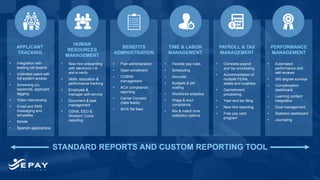
STANDARD REPORTS AND CUSTOM REPORTING TOOL
APPLICANT
TRACKING
BENEFITS
ADMINISTRATION
PAYROLL & TAX
MANAGEMENT
TIME & LABOR
MANAGEMENT
HUMAN
RESOURCES
MANAGEMENT
PERFORMANCE
MANAGEMENT
• Integration with
leading job boards
• Unlimited users with
full system access
• Screening q’s,
keywords, applicant
tagging
• Video interviewing
• Email and SMS
messaging and
templates
• Mobile
• Spanish applications
• Plan administration
• Open enrollment
• COBRA
management
• ACA compliance
reporting
• Carrier Connect
(data feeds)
• 401K file feed
• Complete payroll
and tax processing
• Accommodation of
multiple FEINs,
states and localities
• Garnishment
processing
• Year-end tax filing
• New hire reporting
• Free pay card
program
• Flexible pay rules
• Scheduling
• Accruals
• Budgets & job
costing
• Workforce analytics
• Wage & hour
compliance
• Mix & match time
collection options
• New hire onboarding
with electronic I-9
and e-verify
• Skills, education &
performance tracking
• Employee &
manager self-service
• Document & task
management
• OSHA, EEO &
Workers’ Comp
reporting
• Automated
performance and
self-reviews
• 360 degree surveys
• Compensation
dashboard
• Learning content
integration
• Goal management
• Statistics dashboard
• Journaling

How to Write an RFP

  • 1.
    How to Writean RFP Managing Your Buying Process to Make the Decision for You
  • 2.
    2 Speakers Michelle Lanter Smith ChiefMarketing Officer John Gaudiuso Sales Engineer
  • 3.
    3 Agenda • Who isEPAY Systems • What is an RFP • RFP Timeline • Things to Include in an RFP • How to Evaluate Responses • Common Mistakes to Avoid in your RFP
  • 4.
    Who is EPAYSystems CHICAGO BASED TECH COMPANY PROVIDER OF COMPLETELY UNIFIED, FULL SERVICE HCM SOLUTIONS SERVING HOURLY WORKFORCE ENVIRONMENTS INDUSTRY LEADER FREE PREMIUM CUSTOMER SUPPORT CUSTOMER RETENTION FOUNDED 2001 UNIQUELY FLEXIBLE CLOUD BASED TIME & LABOR MANAGEMENT TECHNOLOGY 24 HOURS/DAY 7 DAYS/WEEK, 365 DAYS/YEAR 75,000+ WORKSITES 99%
  • 5.
    Request for Information RFI Requestfor proposal RFQ RFP Request for Quote What is an RFP?
  • 6.
    RFP Timeline Makesure to give enough time to the RFP to get quality results. Expect the process to take 2-3 months all together Project Planning Drafting Sharing Reviewing • Q&A Period • Demo Final Decision
  • 7.
    Project Planning Designate apoint of contact Organize a selection committee • Identify stakeholders and decision makers Set timeline and select due dates for each step of the process Set budget parameters Research and select a range of vendors • 5-7 vendors that excel in your industry.
  • 8.
    Project Planning Schedule ofDates: • Date of distribution • Vendor proposal response due • Completed evaluations of Vendor Proposals • Vendor Finalist notifications • Vendor Presentations • Announcement of Final Choice • Contract Negotiations • Go-live Date Approx. 1 month 2-3 weeks, depending on # of responses 2 weeks A few days 1 week Approx. 1 month Depends
  • 9.
    Drafting: Things to Include • Introduction •Designated contact information • Company Profile • Purpose of the RFP • Scope of Project • Schedule of dates • Confidentiality Statement • Vendor Profile • Financial Information • Product Functionality • Technology and Security • Implementation Process • Customer References • Pricing and Cost Expectations
  • 10.
    Drafting: Set Upfor Success Assess Product Functionality Prioritize your requirements • Required to continue to participate • Love to have • Like to have
  • 11.
    Drafting: Set Upfor Success Ask how to solution fits into the software • S - Standard to system • F - Future Roadmap • C - Customization • N - Not available • Offer note: Always allow vendors space to provide more details about a • Add point values to each response code to create a scorecard Filled out by you Filled out by the vendor
  • 12.
  • 13.
    Drafting: Example ofScorecard Set a standard for your scorecard Ex. Anyone under 350 shouldn’t be considered
  • 14.
    Drafting “Dos” and“Don’ts” Don’t draft the RFP in hard to read and edit formats – i.e. Word, PDF etc Do draft your RFP in Excel Don’t use a “out-of-the-box” template Do customize and include all sections vital to your needs Don’t be afraid of using a cloud software tool for RFPs Hard to navigate Endless Scrolling Multiple Tab Options Quick Summary of points Hard to navigate Difficult to edit Easy to Access Simple Sharing
  • 15.
    Sharing the RFP: “Dos”and “Don’ts” • Do post the RFP on your homepage • Don’t let that be the only way for vendors to get it • Do research and create a select list of vendors • Don’t send to a vendor without contacting someone there • Do ask for a designated contact at each vendor • Do make it easy to find • Don’t let it get stagnant– follow up! • Do follow-up to check if the vendor intends to send a response
  • 16.
    Q&A Process Two optionsfor answering questions: Day to day This is one of emails strengths. You can get new questions and easily cc all vendor contacts on the thread to share the question and answer, leaving a fair playing field. *Note: This can be very time consuming for your designated contact. Set Question Period Another option is to collect all the questions for two weeks after sharing and then compile all the answers in a singular document with the answers, that can be send to all vendor contacts at the end of every week or every two weeks.
  • 17.
    Reviewing and Evaluating Once youhave received the final submissions: • Use the points for Scoring – helps maintain objectivity • Select Finalists • The factors that determine your finalists should be decided during your planning stages • Once you select finalists then: • Schedule demos • Request Customer References
  • 18.
    Customer References • Don’task until you are down until your final vendors • Don’t be too picky with references • Consider accepting video references for preliminary evaluations • Don’t ask for more references until you have followed through with the first set • Give them time to reach out to their customer references so they know to expect your call
  • 19.
    Vendor Presentations • Pace thepresentations out • Back to back presentations can be exhausting and you will miss information • Don’t try to control the presentation • This means requiring a scripted demo • Don’t require in person presentations • Make sure the presentation is recorded • Make sure that all your stakeholders and decision makers are at the presentation • Decide how to handle questions from stakeholders and decision makers • Allow adequate time • Perhaps consider time limits on different sections • Create a scorecard for the presentations
  • 20.
    Common Mistakes toAvoid Don’t cut off contact after issuing Do expect further questions from vendors – they want to give you the best proposal possible Do release questions and answers to all vendors Do expect an NDA from a private company before sharing financials Don’t require the RFP to be delivered in hardcopy or CD-ROM Do strive for as much objectivity as possible – that is after all, the purpose of the RFP Do attach any additional documentation that needs shared and include a summary of required documents for the vendor
  • 21.
  • 22.
    Connect with Us onSocial Media Visit Our Website www.EPAYsystems.com Take a two-minute tour Take the survey Request a demo of EPAY Systems
  • 23.
    STANDARD REPORTS ANDCUSTOM REPORTING TOOL APPLICANT TRACKING BENEFITS ADMINISTRATION PAYROLL & TAX MANAGEMENT TIME & LABOR MANAGEMENT HUMAN RESOURCES MANAGEMENT PERFORMANCE MANAGEMENT • Integration with leading job boards • Unlimited users with full system access • Screening q’s, keywords, applicant tagging • Video interviewing • Email and SMS messaging and templates • Mobile • Spanish applications • Plan administration • Open enrollment • COBRA management • ACA compliance reporting • Carrier Connect (data feeds) • 401K file feed • Complete payroll and tax processing • Accommodation of multiple FEINs, states and localities • Garnishment processing • Year-end tax filing • New hire reporting • Free pay card program • Flexible pay rules • Scheduling • Accruals • Budgets & job costing • Workforce analytics • Wage & hour compliance • Mix & match time collection options • New hire onboarding with electronic I-9 and e-verify • Skills, education & performance tracking • Employee & manager self-service • Document & task management • OSHA, EEO & Workers’ Comp reporting • Automated performance and self-reviews • 360 degree surveys • Compensation dashboard • Learning content integration • Goal management • Statistics dashboard • Journaling