DevOps in a Vacuum of
Silos
Kellyn Gorman
Sr. Cloud Solution Architect, SME for Oracle on Azure
Microsoft
Who am I
Kellyn Pot’Vin-Gorman
• Database Administrator for last couple decades
• DevOps Engineer at last two companies
• Currently SME for Oracle on Azure at Microsoft in the
Customer Architecture and Engineering Team, (CAE)
• Blog at DBAkevlar.com
• Yes, my husband is on the same team I’m on- get over it,
we like working together.
• Live in an RV, renovating a floating home in Portland, OR
with my husband- no the kids aren’t invited...
DevOps is
Difficult
Enough…
• No one talks about the additional challenge of silo’d
teams and what it can do to a DevOps initiative.
• My goal is to:
• Use a real use case,(without any names )
• Discuss the cultural challenges toppled by:
• Silos
• Location
• Project
• How we were able to overcome and build out a full
DevOps Solution
Goal
To design a new product which
met requirements from
customers.
Must be cloud and out of initial
development in current
datacenter
Ability to deploy upwards of
200 customer environments a
year
Environment
• New product based off of some examples on-prem
• Oracle database on Linux
• Windows server
• .Net application
• No real workload to measure for migration
• No previous Oracle workloads in Azure, only SQL Server
• Tight timeline to deploy for customers
• Varying sizes, depending on what modules customer purchased which could effect the
size of the deployment greatly.
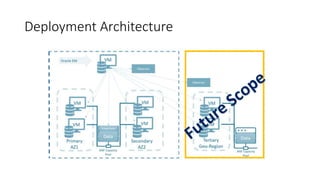
Deployment Architecture
Challenges
• Teams involved were dispersed across the globe
• Teams were incredibly siloed
• Had their own set of tools, applications, scripting languages, etc.
• Often disagreements on who’s tool or script set would be used
• Current deployments were done in a very serialized steps, with sign off from each team,
often manual steps to next team via email.
• Lack of communication.
First Challenge- the workload
• Isolating what a sample workload, even a small one would look like was important.
• Sizing out and then attempting to identify what size each combination of modules would produce
and then tagging each size.
• Once sized out, created a spreadsheet to identify the needs for:
• vCPU
• Memory
• MB/s
• IOPS
• Storage
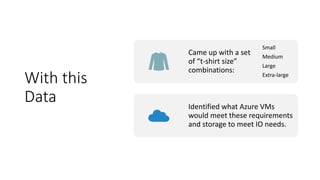
With this
Data
Came up with a set
of “t-shirt size”
combinations:
Small
Medium
Large
Extra-large
Identified what Azure VMs
would meet these requirements
and storage to meet IO needs.
Second Challenge- The Image
• This is IaaS in Azure with Oracle
• Linux VM image had to be chosen:
• Oracle Linux was first choice
• Changed to RedHat Linux after Cloud team identified need to use Azure monitoring services with Linux,
which is supported by RedHat, as is Oracle.
• Oracle installation of 18c was chosen
• Installed Oracle binaries and as much ASM, DataGuard, etc. that can be available to an image.
• Built out Perfected Image and then used Image catalog to then deploy from just as we would with a
marketplace image, but at a customer’s level of availability.
• Deters from someone having one-off images and having to recreate the image each time.
https://docs.microsoft.com/en-us/azure/virtual-machines/linux/image-builder
Where They
Were At:
• Marketplace Image with Installed OS
• DevOps team was attempting to automate OS install
with PowerShell cmdlets.
• Install Linux support libraries
• Install Oracle, ASM, DataGuard 18c
• Switch to DBA Team
• Build out database
• Test out build
• Created script as system was built to perform same
steps using BASH from CLI for database, but both
install and test steps together.
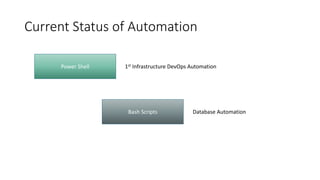
Current Status of Automation
Bash Scripts
Power Shell
Database Automation
1st Infrastructure DevOps Automation
First Impasse
• Weeks to get the server deployed to the DBA team involvement.
• Upon asking, discovered the steps that were involved:
• Ticket system to request server
• Team to deploy server required very specific information for Linux and system was designed for Windows
servers, leaving many back and forth discussions.
• No ETA or deadline requirements.
• No image existed; the group created the VM through the Azure portal individually.
• If they used any automation, it was from ARM templates to deploy a server with a market image.
• Used deprecated Powershell commands to perform the deployment
Azure CLI
Introduced
• As the BASH scripts from the DBA team were quite
mature:
• Migrated the infrastructure deployment to the
BASH script using AZ commands
• These could be ported to other DevOps
tools as the process matured.
• Already had working examples from my
other projects that I’d created.
• By placing the infrastructure into the database
deployment, it removed the ticketing system
from the scenario.
• Brought on a second DevOps team that had
more mature methods and tools to work with
the DBA team.
• This team also came with a scrum master to
assist in directing some of the project workload.
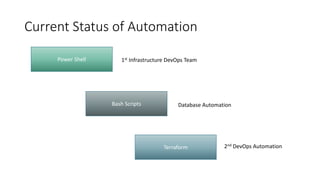
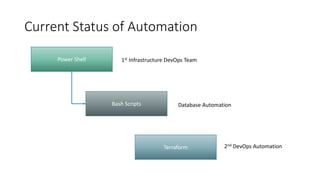
Current Status of Automation
Bash Scripts
Terraform
Database Automation
2nd DevOps Automation
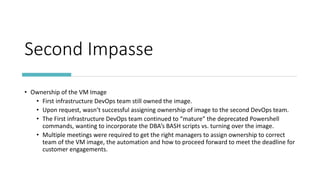
Power Shell 1st Infrastructure DevOps Team
Second Impasse
• Ownership of the VM Image
• First infrastructure DevOps team still owned the image.
• Upon request, wasn’t successful assigning ownership of image to the second DevOps team.
• The First infrastructure DevOps team continued to “mature” the deprecated Powershell
commands, wanting to incorporate the DBA’s BASH scripts vs. turning over the image.
• Multiple meetings were required to get the right managers to assign ownership to correct
team of the VM image, the automation and how to proceed forward to meet the deadline for
customer engagements.
Current Status of Automation
Bash Scripts
Terraform
Database Automation
2nd DevOps Automation
Power Shell 1st Infrastructure DevOps Team
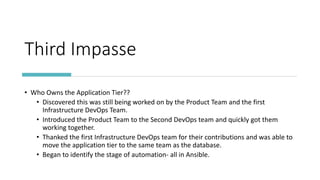
Third Impasse
• Who Owns the Application Tier??
• Discovered this was still being worked on by the Product Team and the first
Infrastructure DevOps Team.
• Introduced the Product Team to the Second DevOps team and quickly got them
working together.
• Thanked the first Infrastructure DevOps team for their contributions and was able to
move the application tier to the same team as the database.
• Began to identify the stage of automation- all in Ansible.
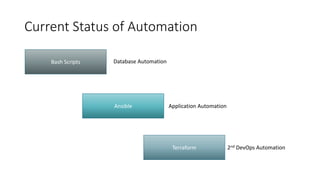
Current Status of Automation
Bash Scripts
Ansible
Terraform
Database Automation
Application Automation
2nd DevOps Automation
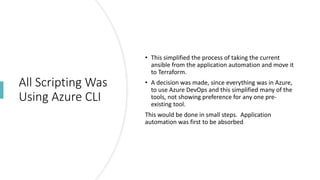
All Scripting Was
Using Azure CLI
• This simplified the process of taking the current
ansible from the application automation and move it
to Terraform.
• A decision was made, since everything was in Azure,
to use Azure DevOps and this simplified many of the
tools, not showing preference for any one pre-
existing tool.
This would be done in small steps. Application
automation was first to be absorbed
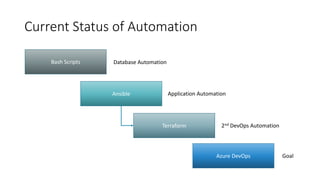
Current Status of Automation
Bash Scripts
Ansible
Terraform
Azure DevOps
Database Automation
Application Automation
2nd DevOps Automation
Goal
Terraform Deployment of Oracle in Azure Demo
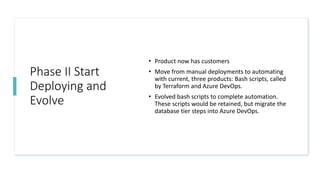
Phase II Start
Deploying and
Evolve
• Product now has customers
• Move from manual deployments to automating
with current, three products: Bash scripts, called
by Terraform and Azure DevOps.
• Evolved bash scripts to complete automation.
These scripts would be retained, but migrate the
database tier steps into Azure DevOps.
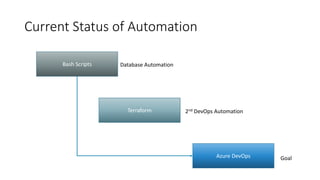
Current Status of Automation
Bash Scripts
Terraform
Azure DevOps
Database Automation
2nd DevOps Automation
Goal
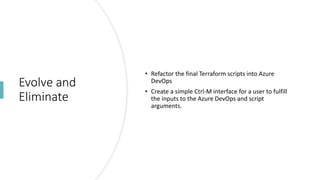
Evolve and
Eliminate
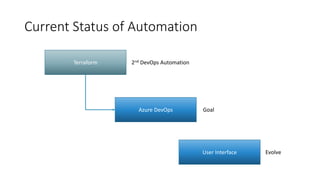
• Refactor the final Terraform scripts into Azure
DevOps
• Create a simple Ctrl-M interface for a user to fulfill
the inputs to the Azure DevOps and script
arguments.
Current Status of Automation
Terraform
Azure DevOps
2nd DevOps Automation
Goal
User Interface Evolve
Final Impasse
• Backups and Data Refreshes were put off from being
tested
• Slow response time and “IO throttling” was evident
• Product was already priced out and large
requirement for table level refreshes were impacting
success of product
• Commvault was brought in to use their snapshot and
table level refresh options ONLY for small customers
• Re-educate customers on how best work in the cloud
• Snapshot database creation for trouble-shooting
or table level restores.
Success of
Project
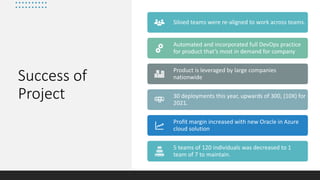
Siloed teams were re-aligned to work across teams.
Automated and incorporated full DevOps practice
for product that’s most in demand for company
Product is leveraged by large companies
nationwide
30 deployments this year, upwards of 300, (10X) for
2021.
Profit margin increased with new Oracle in Azure
cloud solution
5 teams of 120 individuals was decreased to 1
team of 7 to maintain.
Q&A
Thank you
Kellyn Gorman
Twitter: @DBAKevlar
Email: kegorman@microsoft.com

DevOps in Silos

  • 1.
    DevOps in aVacuum of Silos Kellyn Gorman Sr. Cloud Solution Architect, SME for Oracle on Azure Microsoft
  • 2.
    Who am I KellynPot’Vin-Gorman • Database Administrator for last couple decades • DevOps Engineer at last two companies • Currently SME for Oracle on Azure at Microsoft in the Customer Architecture and Engineering Team, (CAE) • Blog at DBAkevlar.com • Yes, my husband is on the same team I’m on- get over it, we like working together. • Live in an RV, renovating a floating home in Portland, OR with my husband- no the kids aren’t invited...
  • 3.
    DevOps is Difficult Enough… • Noone talks about the additional challenge of silo’d teams and what it can do to a DevOps initiative. • My goal is to: • Use a real use case,(without any names ) • Discuss the cultural challenges toppled by: • Silos • Location • Project • How we were able to overcome and build out a full DevOps Solution
  • 4.
    Goal To design anew product which met requirements from customers. Must be cloud and out of initial development in current datacenter Ability to deploy upwards of 200 customer environments a year
  • 5.
    Environment • New productbased off of some examples on-prem • Oracle database on Linux • Windows server • .Net application • No real workload to measure for migration • No previous Oracle workloads in Azure, only SQL Server • Tight timeline to deploy for customers • Varying sizes, depending on what modules customer purchased which could effect the size of the deployment greatly.
  • 6.
  • 7.
    Challenges • Teams involvedwere dispersed across the globe • Teams were incredibly siloed • Had their own set of tools, applications, scripting languages, etc. • Often disagreements on who’s tool or script set would be used • Current deployments were done in a very serialized steps, with sign off from each team, often manual steps to next team via email. • Lack of communication.
  • 8.
    First Challenge- theworkload • Isolating what a sample workload, even a small one would look like was important. • Sizing out and then attempting to identify what size each combination of modules would produce and then tagging each size. • Once sized out, created a spreadsheet to identify the needs for: • vCPU • Memory • MB/s • IOPS • Storage
  • 9.
    With this Data Came upwith a set of “t-shirt size” combinations: Small Medium Large Extra-large Identified what Azure VMs would meet these requirements and storage to meet IO needs.
  • 10.
    Second Challenge- TheImage • This is IaaS in Azure with Oracle • Linux VM image had to be chosen: • Oracle Linux was first choice • Changed to RedHat Linux after Cloud team identified need to use Azure monitoring services with Linux, which is supported by RedHat, as is Oracle. • Oracle installation of 18c was chosen • Installed Oracle binaries and as much ASM, DataGuard, etc. that can be available to an image. • Built out Perfected Image and then used Image catalog to then deploy from just as we would with a marketplace image, but at a customer’s level of availability. • Deters from someone having one-off images and having to recreate the image each time. https://docs.microsoft.com/en-us/azure/virtual-machines/linux/image-builder
  • 11.
    Where They Were At: •Marketplace Image with Installed OS • DevOps team was attempting to automate OS install with PowerShell cmdlets. • Install Linux support libraries • Install Oracle, ASM, DataGuard 18c • Switch to DBA Team • Build out database • Test out build • Created script as system was built to perform same steps using BASH from CLI for database, but both install and test steps together.
  • 12.
    Current Status ofAutomation Bash Scripts Power Shell Database Automation 1st Infrastructure DevOps Automation
  • 13.
    First Impasse • Weeksto get the server deployed to the DBA team involvement. • Upon asking, discovered the steps that were involved: • Ticket system to request server • Team to deploy server required very specific information for Linux and system was designed for Windows servers, leaving many back and forth discussions. • No ETA or deadline requirements. • No image existed; the group created the VM through the Azure portal individually. • If they used any automation, it was from ARM templates to deploy a server with a market image. • Used deprecated Powershell commands to perform the deployment
  • 14.
    Azure CLI Introduced • Asthe BASH scripts from the DBA team were quite mature: • Migrated the infrastructure deployment to the BASH script using AZ commands • These could be ported to other DevOps tools as the process matured. • Already had working examples from my other projects that I’d created. • By placing the infrastructure into the database deployment, it removed the ticketing system from the scenario. • Brought on a second DevOps team that had more mature methods and tools to work with the DBA team. • This team also came with a scrum master to assist in directing some of the project workload.
  • 15.
    Current Status ofAutomation Bash Scripts Terraform Database Automation 2nd DevOps Automation Power Shell 1st Infrastructure DevOps Team
  • 16.
    Second Impasse • Ownershipof the VM Image • First infrastructure DevOps team still owned the image. • Upon request, wasn’t successful assigning ownership of image to the second DevOps team. • The First infrastructure DevOps team continued to “mature” the deprecated Powershell commands, wanting to incorporate the DBA’s BASH scripts vs. turning over the image. • Multiple meetings were required to get the right managers to assign ownership to correct team of the VM image, the automation and how to proceed forward to meet the deadline for customer engagements.
  • 17.
    Current Status ofAutomation Bash Scripts Terraform Database Automation 2nd DevOps Automation Power Shell 1st Infrastructure DevOps Team
  • 18.
    Third Impasse • WhoOwns the Application Tier?? • Discovered this was still being worked on by the Product Team and the first Infrastructure DevOps Team. • Introduced the Product Team to the Second DevOps team and quickly got them working together. • Thanked the first Infrastructure DevOps team for their contributions and was able to move the application tier to the same team as the database. • Began to identify the stage of automation- all in Ansible.
  • 19.
    Current Status ofAutomation Bash Scripts Ansible Terraform Database Automation Application Automation 2nd DevOps Automation
  • 20.
    All Scripting Was UsingAzure CLI • This simplified the process of taking the current ansible from the application automation and move it to Terraform. • A decision was made, since everything was in Azure, to use Azure DevOps and this simplified many of the tools, not showing preference for any one pre- existing tool. This would be done in small steps. Application automation was first to be absorbed
  • 21.
    Current Status ofAutomation Bash Scripts Ansible Terraform Azure DevOps Database Automation Application Automation 2nd DevOps Automation Goal
  • 22.
    Terraform Deployment ofOracle in Azure Demo
  • 23.
    Phase II Start Deployingand Evolve • Product now has customers • Move from manual deployments to automating with current, three products: Bash scripts, called by Terraform and Azure DevOps. • Evolved bash scripts to complete automation. These scripts would be retained, but migrate the database tier steps into Azure DevOps.
  • 24.
    Current Status ofAutomation Bash Scripts Terraform Azure DevOps Database Automation 2nd DevOps Automation Goal
  • 25.
    Evolve and Eliminate • Refactorthe final Terraform scripts into Azure DevOps • Create a simple Ctrl-M interface for a user to fulfill the inputs to the Azure DevOps and script arguments.
  • 26.
    Current Status ofAutomation Terraform Azure DevOps 2nd DevOps Automation Goal User Interface Evolve
  • 27.
    Final Impasse • Backupsand Data Refreshes were put off from being tested • Slow response time and “IO throttling” was evident • Product was already priced out and large requirement for table level refreshes were impacting success of product • Commvault was brought in to use their snapshot and table level refresh options ONLY for small customers • Re-educate customers on how best work in the cloud • Snapshot database creation for trouble-shooting or table level restores.
  • 28.
    Success of Project Siloed teamswere re-aligned to work across teams. Automated and incorporated full DevOps practice for product that’s most in demand for company Product is leveraged by large companies nationwide 30 deployments this year, upwards of 300, (10X) for 2021. Profit margin increased with new Oracle in Azure cloud solution 5 teams of 120 individuals was decreased to 1 team of 7 to maintain.
  • 29.
  • 30.
    Thank you Kellyn Gorman Twitter:@DBAKevlar Email: kegorman@microsoft.com

Editor's Notes

  • #23 cd clouddrive/terraform terraform init terraform plan -out Terraformora.tfplan terraform apply Terraformora.tfplan
  • #29 Future scope will add: - Tier 1 customer having a geo-regional deployment or Azure Availability zone deployment automation - All snapshots for backups and deprecation of all table refreshes for customers - ANF for large customers to optimize workload - Exadata customer migration