Financial Modelling 
HANDBOOK 
NET PRESENT 
financialmodellinghandbook.com 
How to model 
VALUE
ABOUT THE FINANCIAL MODELLING HANDBOOK 
Financial modelling should be collaborative. Collaboration reduces error, speeds up development time and lowers cost. The Financial Modelling Handbook is a collaborative, crowd-sourced guide to building better financial models using the FAST Standard. 
www.financialmodellinghandbook.com/contribute
financialmodellinghandbook.com 
KOMAL 
Komal Aggarwal is a Financial Modeller with F1F9. 
She has worked on Oil & Gas, mining and energy sector projects. 
She is fond of adventure sports. 
Financial Modelling 
HANDBOOK
In this guide we will consider how to model a net present value (“NPV”). We will also consider the Excel functions available that are specific to calculating an NPV. 
financialmodellinghandbook.com 
Financial Modelling 
DOWNLOAD THIS GUIDE AND THE ACCOMPANYING EXCEL EXAMPLE 
HANDBOOK 
NET PRESENT 
How to model 
VALUE
financialmodellinghandbook.com 
Financial Modelling 
HANDBOOK 
HOW TO CALCULATE NPV 
To calculate an NPV, we need the following information: 
A valuation date 
Cash flows 
Timing of cash flows; and 
A percentage rate of return. 
1 
2 
3 
4
financialmodellinghandbook.com 
Financial Modelling 
HANDBOOK 
CALCULATION OF YEARS FROM PV DATE 
First, let’s calculate how far each of the cash flows is from the valuation date. 
By subtracting one date from another, Excel will calculate the number of days between two dates. So 2 January 2001 minus 1 January 2001 is one day. 
We can then express that as a proportion of number of days in a year. 
The formula in cell K13 is (K12 - $F10) / $F11.
financialmodellinghandbook.com 
Financial Modelling 
HANDBOOK 
CALCULATING DISCOUNT FACTOR 
Now let’s calculate a discount factor. The formula in cell J17 is 1 / (1 + $F15) ^ J16. 
Note that both discount rate and the timing assumptions are expressed in years. It is important that both are expressed using the same time period.
financialmodellinghandbook.com 
Financial Modelling 
HANDBOOK 
CALCULATING PRESENT VALUE OF CASH FLOWS 
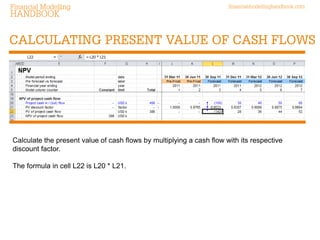
Calculate the present value of cash flows by multiplying a cash flow with its respective discount factor. 
The formula in cell L22 is L20 * L21.
financialmodellinghandbook.com 
Financial Modelling 
HANDBOOK 
CALCULATING NET PRESENT VALUE 
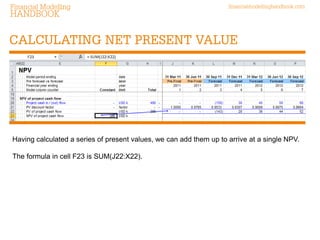
Having calculated a series of present values, we can add them up to arrive at a single NPV. 
The formula in cell F23 is SUM(J22:X22).
financialmodellinghandbook.com 
Financial Modelling 
HANDBOOK 
EXCEL IN-BUILT FUNCTION - NPV 
NPV function The syntax of = NPV() is “(rate, value1, value2,…)”. This function takes the discount rate and a stream of cash flow values and calculates an NPV. Things to note: It is a black box function: a user has no idea whether the answer is right or wrong. The valuation date is not made explicit – and it is not possible to choose a valuation date. = NPV() assumes that the first cash flow occurs one period after the valuation date (at the end of the first period). Cash flows are assumed to occur at equal intervals. = NPV() does not consider the actual number of days between cash flow dates.
financialmodellinghandbook.com 
Financial Modelling 
HANDBOOK 
EXCEL IN-BUILT FUNCTION - XNPV 
XNPV function The syntax of = XNPV() is “(rate, values, dates)”. This function takes a discount rate, a range of cash flows and a range of dates at which each cash flow occurs. Things to note: It is a black box function: a user has no idea whether the answer is right or wrong. The first cash flow is assumed to occur at the valuation date (at the start of the first period). The NPV is calculated using actual day counts.

How to model Net Present Value

  • 1.
    Financial Modelling HANDBOOK NET PRESENT financialmodellinghandbook.com How to model VALUE
  • 2.
    ABOUT THE FINANCIALMODELLING HANDBOOK Financial modelling should be collaborative. Collaboration reduces error, speeds up development time and lowers cost. The Financial Modelling Handbook is a collaborative, crowd-sourced guide to building better financial models using the FAST Standard. www.financialmodellinghandbook.com/contribute
  • 3.
    financialmodellinghandbook.com KOMAL KomalAggarwal is a Financial Modeller with F1F9. She has worked on Oil & Gas, mining and energy sector projects. She is fond of adventure sports. Financial Modelling HANDBOOK
  • 4.
    In this guidewe will consider how to model a net present value (“NPV”). We will also consider the Excel functions available that are specific to calculating an NPV. financialmodellinghandbook.com Financial Modelling DOWNLOAD THIS GUIDE AND THE ACCOMPANYING EXCEL EXAMPLE HANDBOOK NET PRESENT How to model VALUE
  • 5.
    financialmodellinghandbook.com Financial Modelling HANDBOOK HOW TO CALCULATE NPV To calculate an NPV, we need the following information: A valuation date Cash flows Timing of cash flows; and A percentage rate of return. 1 2 3 4
  • 6.
    financialmodellinghandbook.com Financial Modelling HANDBOOK CALCULATION OF YEARS FROM PV DATE First, let’s calculate how far each of the cash flows is from the valuation date. By subtracting one date from another, Excel will calculate the number of days between two dates. So 2 January 2001 minus 1 January 2001 is one day. We can then express that as a proportion of number of days in a year. The formula in cell K13 is (K12 - $F10) / $F11.
  • 7.
    financialmodellinghandbook.com Financial Modelling HANDBOOK CALCULATING DISCOUNT FACTOR Now let’s calculate a discount factor. The formula in cell J17 is 1 / (1 + $F15) ^ J16. Note that both discount rate and the timing assumptions are expressed in years. It is important that both are expressed using the same time period.
  • 8.
    financialmodellinghandbook.com Financial Modelling HANDBOOK CALCULATING PRESENT VALUE OF CASH FLOWS Calculate the present value of cash flows by multiplying a cash flow with its respective discount factor. The formula in cell L22 is L20 * L21.
  • 9.
    financialmodellinghandbook.com Financial Modelling HANDBOOK CALCULATING NET PRESENT VALUE Having calculated a series of present values, we can add them up to arrive at a single NPV. The formula in cell F23 is SUM(J22:X22).
  • 10.
    financialmodellinghandbook.com Financial Modelling HANDBOOK EXCEL IN-BUILT FUNCTION - NPV NPV function The syntax of = NPV() is “(rate, value1, value2,…)”. This function takes the discount rate and a stream of cash flow values and calculates an NPV. Things to note: It is a black box function: a user has no idea whether the answer is right or wrong. The valuation date is not made explicit – and it is not possible to choose a valuation date. = NPV() assumes that the first cash flow occurs one period after the valuation date (at the end of the first period). Cash flows are assumed to occur at equal intervals. = NPV() does not consider the actual number of days between cash flow dates.
  • 11.
    financialmodellinghandbook.com Financial Modelling HANDBOOK EXCEL IN-BUILT FUNCTION - XNPV XNPV function The syntax of = XNPV() is “(rate, values, dates)”. This function takes a discount rate, a range of cash flows and a range of dates at which each cash flow occurs. Things to note: It is a black box function: a user has no idea whether the answer is right or wrong. The first cash flow is assumed to occur at the valuation date (at the start of the first period). The NPV is calculated using actual day counts.