Jill Hubbard, South-Metro Salem STEM Partnership
Engineering and Computer Science Teacher, Tualatin High School
Former Senior Design Engineer – Intel Corporation
What is it?
When is it?
How Can My Class Participate?
Sample Lesson Plan
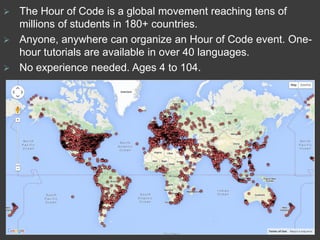
 The Hour of Code is a global movement reaching tens of
millions of students in 180+ countries.
 Anyone, anywhere can organize an Hour of Code event. One-
hour tutorials are available in over 40 languages.
 No experience needed. Ages 4 to 104.
When & Why
 Students spend just ONE HOUR anytime
during the week of December 7-13
 An online, engaging and self-guided introduction to
computer science designed to demystify code and
show that anybody can learn the basics.
 Fosters problem-solving skills, logic and creativity.
 Exposes non-traditional students to coding.
 Encourages students to move from consumers to
producers of technology.
 Used in many 21st-century career paths (art, music,
entertainment, animation, storytelling,…)
How
 Code.org provides self-guided lessons. Teachers
do not need to know anything about coding
 Student access to devices (Tablets, PC, Macs,
Chromebooks, smartphones), internet, and ear
buds
 No devices, no problem! There are “unplugged”
activities too!
 Students can work independently, in pairs, or in
groups
Here is a Sample Lesson Plan
Including …
 An introduction video for students
 A few words before they begin
 Links to tutorials separated by levels
(beginner, intermediate, advanced)
 What students can do if they finish early
 Where students can learn more
Let’s Learn!
When you’re stuck you can…..
 Ask for help from a classmate
 Try different things to see what happens
 Try a new challenge
“Learning to program is like learning a new
language; you won’t be fluent right away.”
Check Out Starter Tutorials Here
Over 50 More Tutorials Here!
 I’ve never programmed before?
 Star Wars – Building a Galaxy
 Minecraft - Need I Say More!
 Angry/Flappy Birds – Try not to blow up the birds?!
 I’ve done some programming.
 An Introduction To Javascript – Drawing With Code
 Code Combat – Solve quests & learn javascript
 Lightbot – Like to solve puzzles?
 I’m the next Steve Jobs.
 https://www.codecademy.com/learn
 https://www.khanacademy.org/computing/computer-programming
 https://www.codeschool.com/
When You Complete Your Tutorial
 Click the “I‘ve finished my Hour of Code” button
provided by the tutorial.
 Print or Save your Hour of Code certificate, using
the link provided by the tutorial.
 Try another tutorial that looks fun or check out:
 https://www.codecademy.com/learn
Want to learn more?
 Free Online Resources
 Check out classes offered during or after school!
 https://www.codecademy.com/learn
 https://www.codeschool.com/
 https://www.khanacademy.org/computing/compu
ter-programming
 http://appinventor.mit.edu/explore/
 https://scratch.mit.edu/
 http://www.alice.org/index.php
 http://csunplugged.org/
 https://unity3d.com/learn/tutorials
Share What You’re Doing!
Use Twitter or Facebook?
Tweet/Post during your Hour
Of Code!
Use @STEMOregon
#HourOfCode and we’ll
retweet!

Hour Of Code : A Sample Lesson With Links To Activites

  • 2.
    Jill Hubbard, South-MetroSalem STEM Partnership Engineering and Computer Science Teacher, Tualatin High School Former Senior Design Engineer – Intel Corporation What is it? When is it? How Can My Class Participate? Sample Lesson Plan
  • 3.
     The Hourof Code is a global movement reaching tens of millions of students in 180+ countries.  Anyone, anywhere can organize an Hour of Code event. One- hour tutorials are available in over 40 languages.  No experience needed. Ages 4 to 104.
  • 4.
    When & Why Students spend just ONE HOUR anytime during the week of December 7-13  An online, engaging and self-guided introduction to computer science designed to demystify code and show that anybody can learn the basics.  Fosters problem-solving skills, logic and creativity.  Exposes non-traditional students to coding.  Encourages students to move from consumers to producers of technology.  Used in many 21st-century career paths (art, music, entertainment, animation, storytelling,…)
  • 5.
    How  Code.org providesself-guided lessons. Teachers do not need to know anything about coding  Student access to devices (Tablets, PC, Macs, Chromebooks, smartphones), internet, and ear buds  No devices, no problem! There are “unplugged” activities too!  Students can work independently, in pairs, or in groups
  • 6.
    Here is aSample Lesson Plan Including …  An introduction video for students  A few words before they begin  Links to tutorials separated by levels (beginner, intermediate, advanced)  What students can do if they finish early  Where students can learn more
  • 7.
    Let’s Learn! When you’restuck you can…..  Ask for help from a classmate  Try different things to see what happens  Try a new challenge “Learning to program is like learning a new language; you won’t be fluent right away.”
  • 8.
    Check Out StarterTutorials Here Over 50 More Tutorials Here!  I’ve never programmed before?  Star Wars – Building a Galaxy  Minecraft - Need I Say More!  Angry/Flappy Birds – Try not to blow up the birds?!  I’ve done some programming.  An Introduction To Javascript – Drawing With Code  Code Combat – Solve quests & learn javascript  Lightbot – Like to solve puzzles?  I’m the next Steve Jobs.  https://www.codecademy.com/learn  https://www.khanacademy.org/computing/computer-programming  https://www.codeschool.com/
  • 9.
    When You CompleteYour Tutorial  Click the “I‘ve finished my Hour of Code” button provided by the tutorial.  Print or Save your Hour of Code certificate, using the link provided by the tutorial.  Try another tutorial that looks fun or check out:  https://www.codecademy.com/learn
  • 10.
    Want to learnmore?  Free Online Resources  Check out classes offered during or after school!  https://www.codecademy.com/learn  https://www.codeschool.com/  https://www.khanacademy.org/computing/compu ter-programming  http://appinventor.mit.edu/explore/  https://scratch.mit.edu/  http://www.alice.org/index.php  http://csunplugged.org/  https://unity3d.com/learn/tutorials
  • 11.
    Share What You’reDoing! Use Twitter or Facebook? Tweet/Post during your Hour Of Code! Use @STEMOregon #HourOfCode and we’ll retweet!