DEPARTMENT OF COMPUTER ENGINEERING
PADRE CONCEICAO COLLEGE OF ENGINEERING
VERNA GOA – 403722
2015-2016
FINAL YEAR PROJECT
SMART ENVIRONMENT & HOME AUTOMATION
By
Pratiksha Gaonkar 201203067
Rahul Kalgutkar 201203096
Kshama Kumar 201203109
Akshata Naik 201203147
Viraj Verlekar 201203182
Sangeeta Debnath 201308622
Internal Guide: Ms. Shona Afonso
Internal Co-guide: Ms. Natasha D’Costa
PADRE CONCEICAO COLLEGE OF ENGINEERING
VERNA GOA – 403722
2015-2016
CERTIFICATE
This is to certify that this is a bonafide record of project work done on
“SMART ENVIRONMENT & HOME AUTOMATION”
By
Pratiksha Gaonkar
Rahul Kalgutkar
Kshama Kumar
Akshata Naik
Viraj Verlekar
Sangeeta Debnath
Under the guidance of Ms. Shona Afonso and Ms. Natasha D’Costa, for the semesters VII and VIII,
Department of Computer Engineering.
Approved By:
[Shona Afonso] [Natasha D’Costa]
[Anusha Pai] [External Examiner] [Dr. Luis Mesquita]
CONTENTS
CHAPTER Page No
ACKNOWLEDGEMENT
ABSTRACT
1. INTRODUCTION 1
2. SYSTEM OVERVIEW 3
3. REQUIREMENTS 4
a) Hardware Requirements 4
3.a.1) Arduino Uno 5
3.a.2) Relay 7
3.a.3) DHT22 8
3.a.4) HC-05 (Bluetooth device) 10
3.a.5) LDR 11
3.a.6) Laser 12
3.a.7) IR LED 14
3.a.8) IR Receiver 15
3.b.7) AC->DC Converter (Power Supply & Fan) 16
b) Software Requirements 17
3.b.1) Arduino Software 17
3.b.2) Android Studio 18
4. CIRCUIT CONNECTIONS 19
4.1) Arduino and Dht22 20
4.2) Arduino and LDR + Buzzer Connection 21
4.3) Arduino and Relay Connection 22
4.4) Arduino and HC-05 Connection 23
4.5) Arduino and IR Connection 24
4.6) Combining Various Units 25
5. CREATION OF ANDROID PROJECT 26
6. IMPLEMENTATION 30
6.a) Arduino Code 30
6.a.1) Introduction 31
6.a.2) Code for Room Controls 32
6.a.3) Code for Temperature and Humidity 34
6.a.4) Code for Burglary Alarm 35
6.a.5) Code for IR 37
6.b) Android Code 39
6.b.1) Introduction 40
6.b.2) Initialization Function 41
6.b.3) Connect Function 42
6.b.4) Function to Start Connection 43
6.b.5) Function to Stop Connection 44
7. ANDROID APP 45
7.1) Home Page 45
7.2) Room Controls 46
7.3) Temperature and Humidity 47
7.4) Alarm 48
7.5) IR Send 49
7.6) IR Receive 50
8. APPLICATIONS 51
9. REFERENCES 53
SMART ENVIRONMENT & HOME AUTOMATION
ACKNOWLEDGEMENT
We are using this opportunity to express our gratitude to everyone who supported us throughout
the course of this project. We are thankful for their aspiring guidance, invaluably constructive
criticism and friendly advice during the project work. We are sincerely grateful to them for
sharing their truthful and illuminating views on a number of issues related to the project.
We are thankful to our principal “Dr. Luis C. Mesquita” for granting us the opportunity
to undertake this project and providing laboratory facilities, thereby allowing us to
complete our project on time and helping us through all the official work.
We express our warm thanks to Ms Shona Afonso and Ms Natasha D'Costa for their support and
guidance at Padre Conceicao College Of Engineering.
Nevertheless, we express our gratitude toward our families and colleagues for their kind co-
operation and encouragement which helped us in completion of this project.
SMART ENVIRONMENT & HOME AUTOMATION
ABSTRACT
Smart environment is a small world where different kinds of smart devices are continuously
working to make inhabitants lives more comfortable.
Smart environments aim is to satisfy the experience of individuals from every environment by
replacing the hazardous work, physical labor and repetitive tasks with automated agents.
Home automation may include centralized control of lighting, heating appliances, security
locks of gates and doors and other systems, to provide improved convenience, comfort, energy
efficiency and security.
Home automation can provide increased quality of life for the elderly and disabled who might
otherwise require caregivers or institutional care.
SMART ENVIRONMENT & HOME AUTOMATION
1
CHAPTER 1
INTRODUCTION
The “Home Automation” concept has existed for many years. The terms “Smart Environment”
followed and have been used to introduce the concept of networking appliances and devices in
the house. Smart Environment represents a great research opportunity in creating new fields in
engineering, architecture and computing. Home Automation is becoming popular nowadays
and entered quickly in this emerging market. This system is of great use to the end users,
especially the disabled and the elderly.
Due to the advancement of wireless technology, there are several different of connections are
introduced such as GSM, WIFI and Bluetooth. Each of the connection has their own unique
specifications and applications. Among the three popular wireless connections that often
implemented in Home Automation project, Bluetooth is being chosen with its suitable
capability. Bluetooth with globally available frequencies of 2400Hz is able to provide
connectivity up to 100 meters at speed of up to 3Mbps depending on the Bluetooth device.
The capabilities of Bluetooth are more than enough to be implemented in the design. Also,
most of the current laptop/notebook or cell phones are come with built-in Bluetooth adapter. It
will indirectly reduce the cost of this system.
Without the switches on the wall, the designed system limited the control only at the GUI. This
issue brings inconvenient to the people in the house. This designed system remains the physical
switches with the modified low voltage activating method, in order to provide safer physical
SMART ENVIRONMENT & HOME AUTOMATION
2
control to the user compared to the conventional high voltage switches. The Bluetooth
connection in this system is established by Bluetooth module that directly receives/ transmits
commands to/from smart phone.
SMART ENVIRONMENT & HOME AUTOMATION
3
CHAPTER 2
SYSTEM OVERVIEW
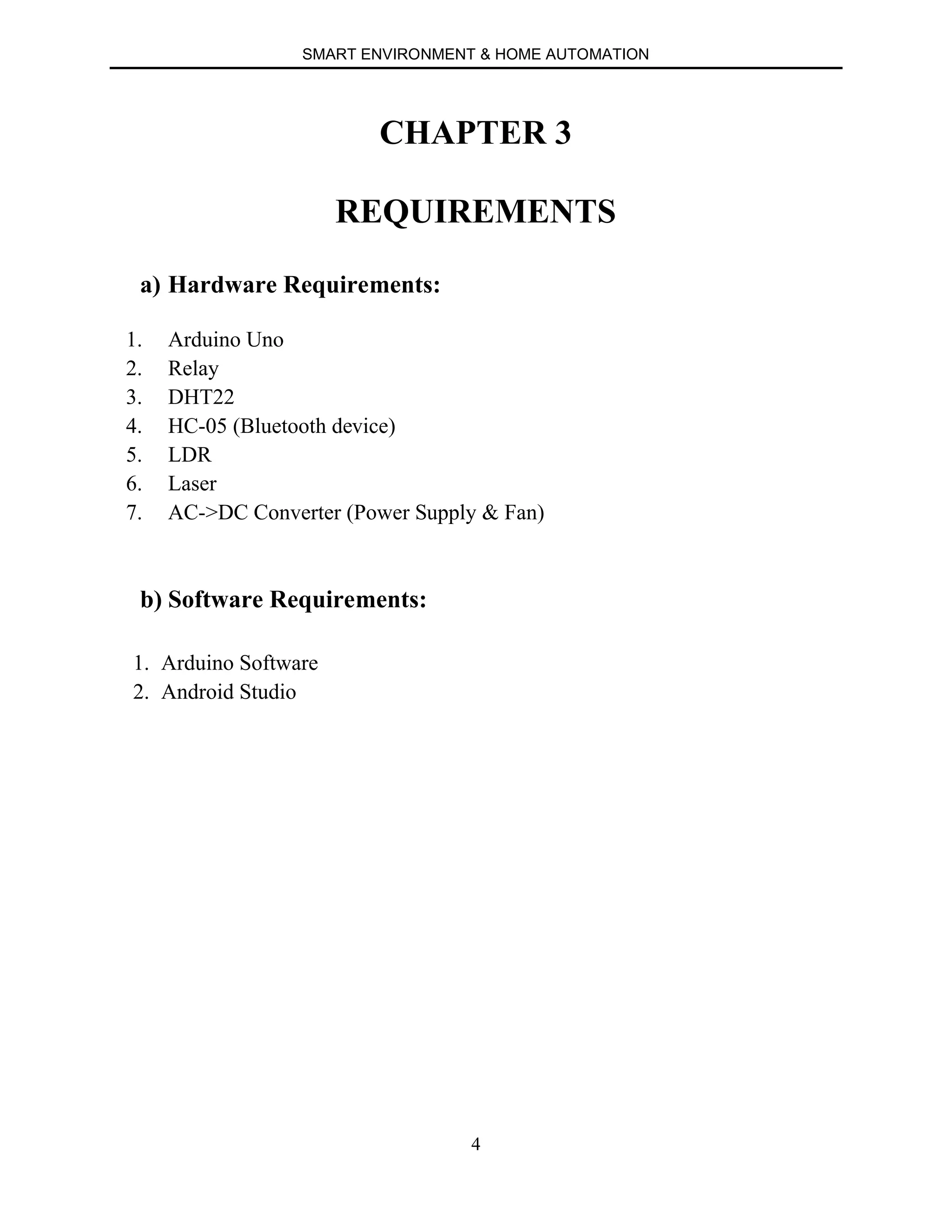
Fig 1 Block Diagram of the System
Fig 1 illustrates the overall control function of the system. The Bluetooth wireless
connection enabled the system communicates with graphical user interface (GUI) on
smart phone without cable. The target home appliances are controlled by the system Main
Control Board.
The sensors that connected to the main control board measure room temperature in the
house. The indication from the sensor is able to remind the user to switch on/off the
heater, fan or air cond. in the house. The home appliance on/off status and temperature
reading are synchronized to the two GUIs on personal computer or laptop or smart phone.
The switches status and sensor reading are in real-time monitoring by the main control
board. Any changes on the status or reading will be transmitted to the GUIs.
SMART ENVIRONMENT & HOME AUTOMATION
4
CHAPTER 3
REQUIREMENTS
a) Hardware Requirements:
1. Arduino Uno
2. Relay
3. DHT22
4. HC-05 (Bluetooth device)
5. LDR
6. Laser
7. AC->DC Converter (Power Supply & Fan)
b) Software Requirements:
1. Arduino Software
2. Android Studio
SMART ENVIRONMENT & HOME AUTOMATION
5
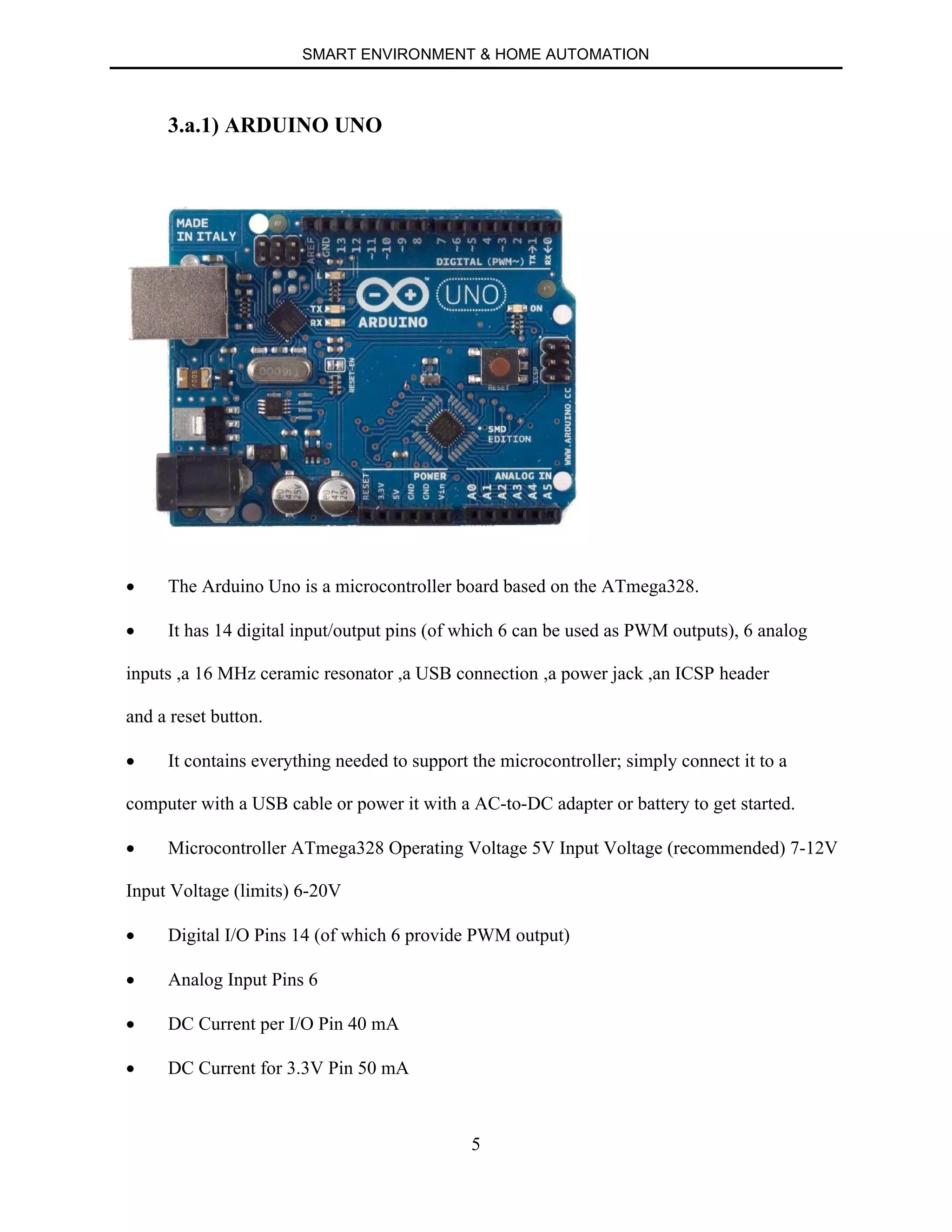
3.a.1) ARDUINO UNO
∑ The Arduino Uno is a microcontroller board based on the ATmega328.
∑ It has 14 digital input/output pins (of which 6 can be used as PWM outputs), 6 analog
inputs ,a 16 MHz ceramic resonator ,a USB connection ,a power jack ,an ICSP header
and a reset button.
∑ It contains everything needed to support the microcontroller; simply connect it to a
computer with a USB cable or power it with a AC-to-DC adapter or battery to get started.
∑ Microcontroller ATmega328 Operating Voltage 5V Input Voltage (recommended) 7-12V
Input Voltage (limits) 6-20V
∑ Digital I/O Pins 14 (of which 6 provide PWM output)
∑ Analog Input Pins 6
∑ DC Current per I/O Pin 40 mA
∑ DC Current for 3.3V Pin 50 mA
SMART ENVIRONMENT & HOME AUTOMATION
6
∑ Flash Memory 32 KB (ATmega328) of which 0.5 KB used by boot loader
∑ SRAM 2 KB (ATmega328)
∑ EEPROM 1 KB (ATmega328)
∑ Clock Speed 16 MHz
SMART ENVIRONMENT & HOME AUTOMATION
7
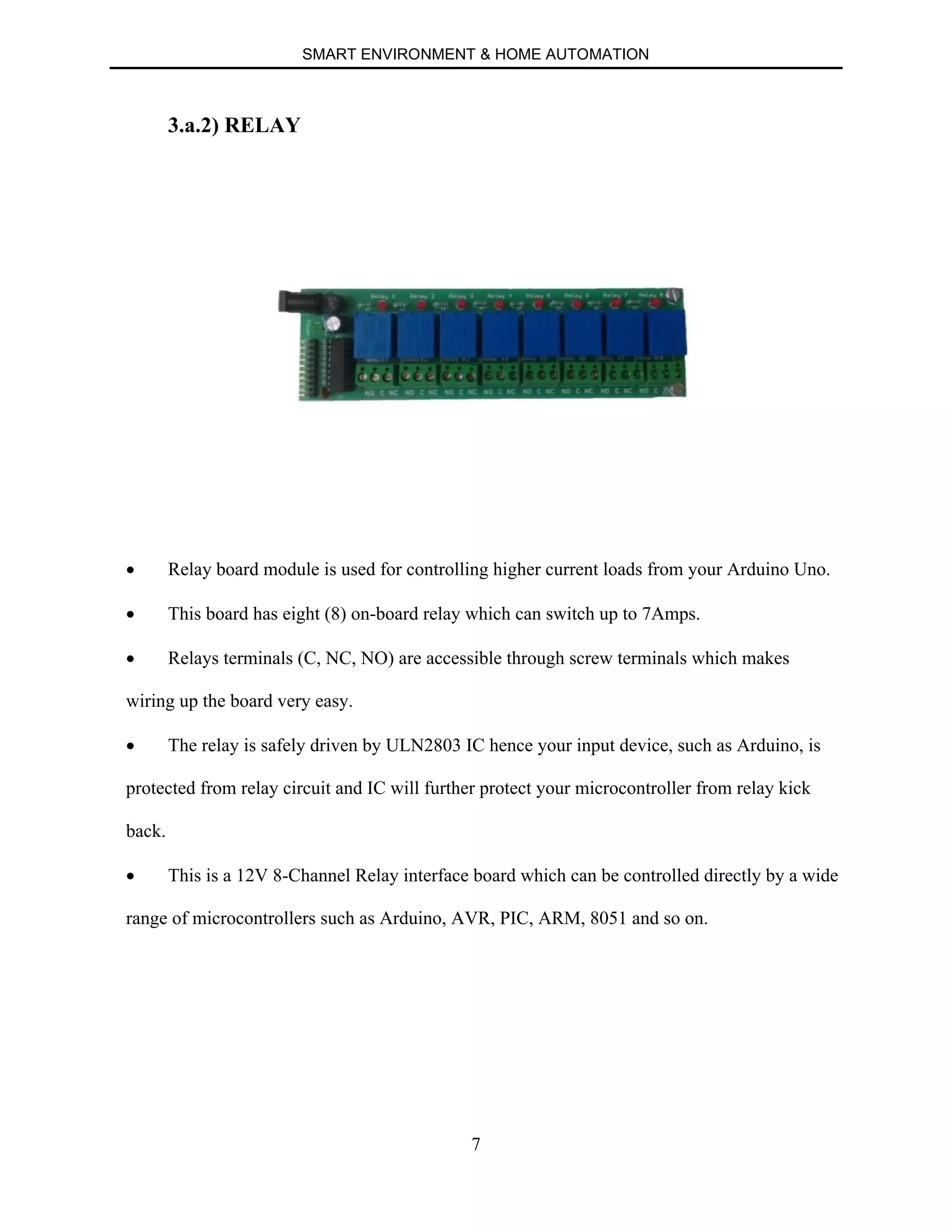
3.a.2) RELAY
∑ Relay board module is used for controlling higher current loads from your Arduino Uno.
∑ This board has eight (8) on-board relay which can switch up to 7Amps.
∑ Relays terminals (C, NC, NO) are accessible through screw terminals which makes
wiring up the board very easy.
∑ The relay is safely driven by ULN2803 IC hence your input device, such as Arduino, is
protected from relay circuit and IC will further protect your microcontroller from relay kick
back.
∑ This is a 12V 8-Channel Relay interface board which can be controlled directly by a wide
range of microcontrollers such as Arduino, AVR, PIC, ARM, 8051 and so on.
SMART ENVIRONMENT & HOME AUTOMATION
8
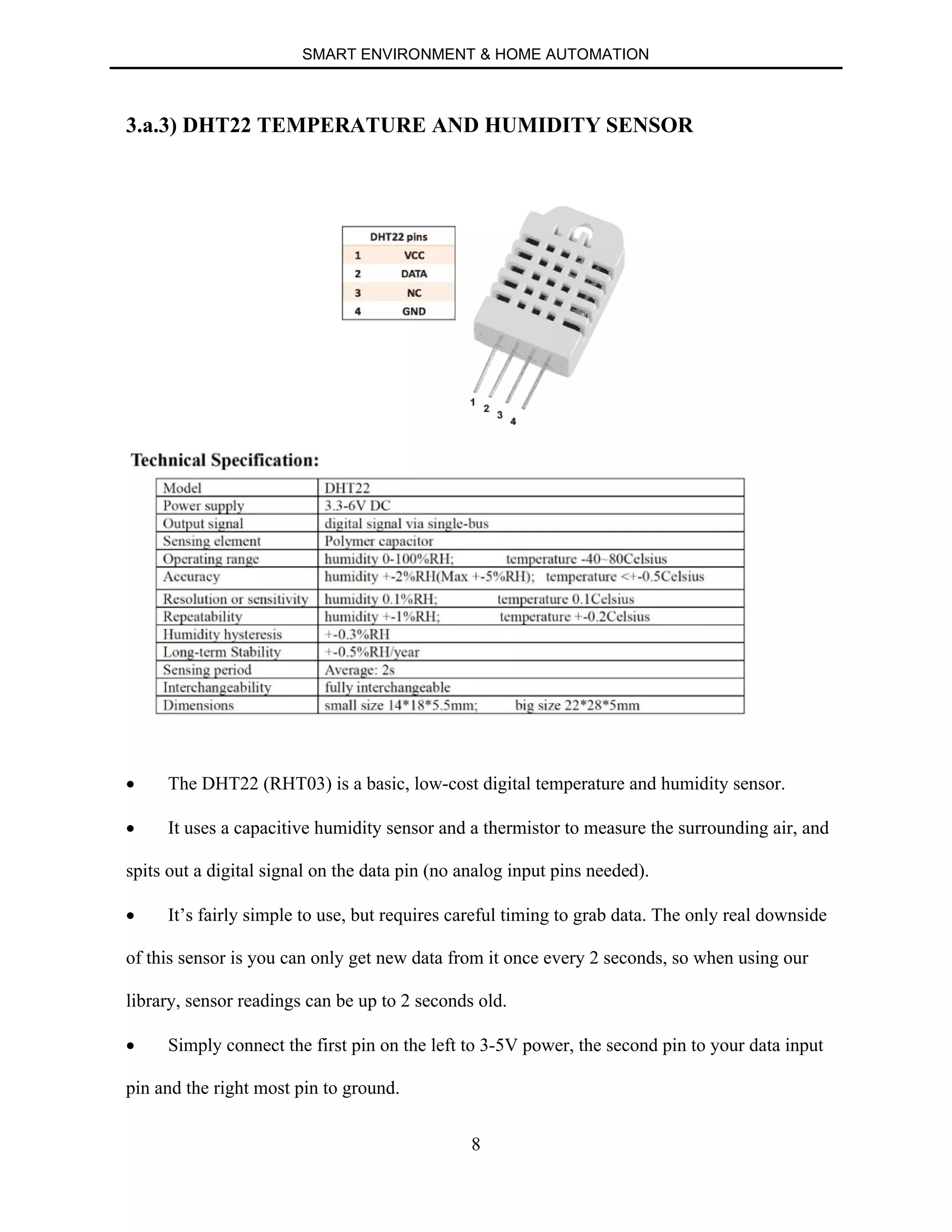
3.a.3) DHT22 TEMPERATURE AND HUMIDITY SENSOR
∑ The DHT22 (RHT03) is a basic, low-cost digital temperature and humidity sensor.
∑ It uses a capacitive humidity sensor and a thermistor to measure the surrounding air, and
spits out a digital signal on the data pin (no analog input pins needed).
∑ It’s fairly simple to use, but requires careful timing to grab data. The only real downside
of this sensor is you can only get new data from it once every 2 seconds, so when using our
library, sensor readings can be up to 2 seconds old.
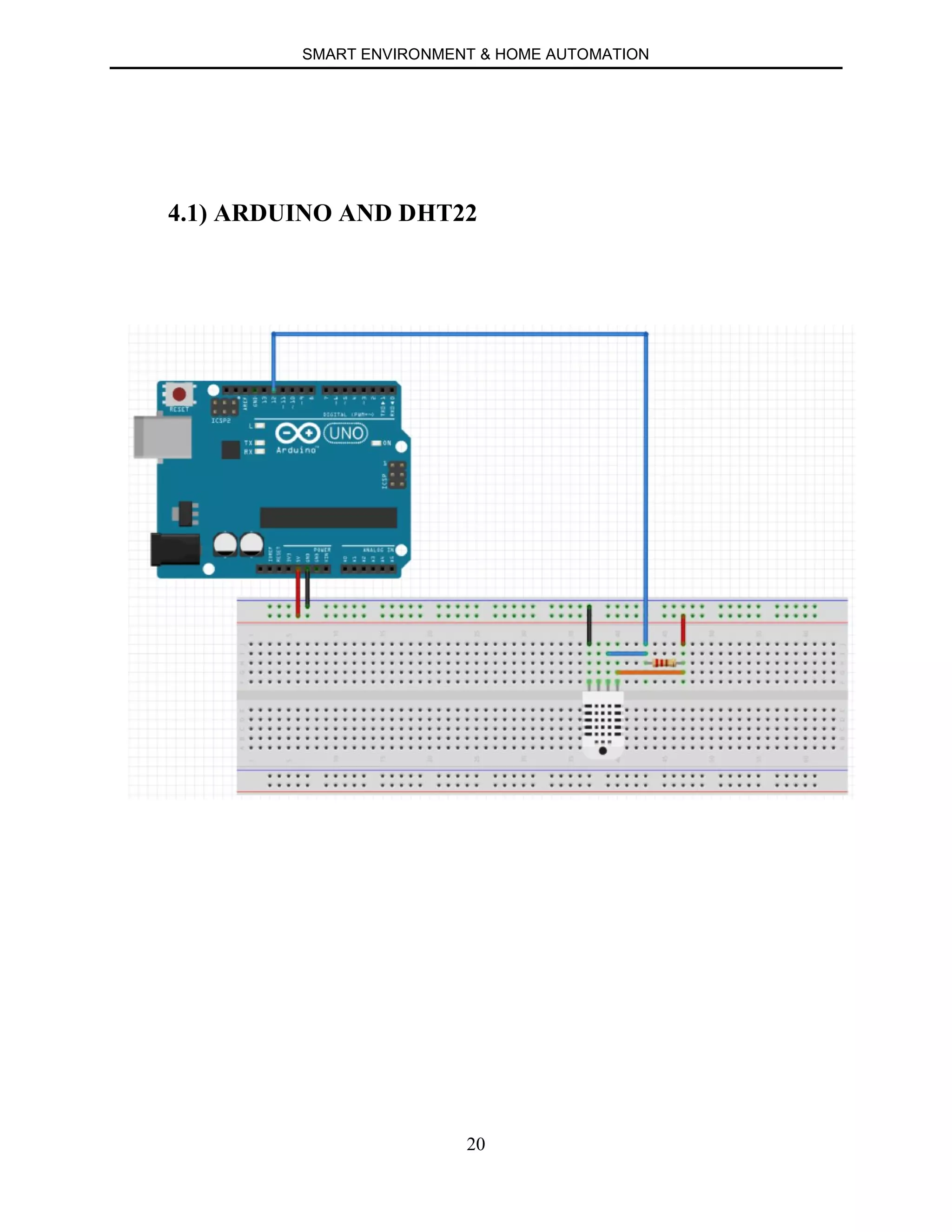
∑ Simply connect the first pin on the left to 3-5V power, the second pin to your data input
pin and the right most pin to ground.
SMART ENVIRONMENT & HOME AUTOMATION
9
∑ Feature & Application: High precision Capacitive type Full range temperature
compensated Relative humidity and temperature measurement Calibrated digital signal
Outstanding long-term stability Extra components not needed Long transmission distance Low
power consumption 4 pins packaged and fully interchangeable.
SMART ENVIRONMENT & HOME AUTOMATION
10
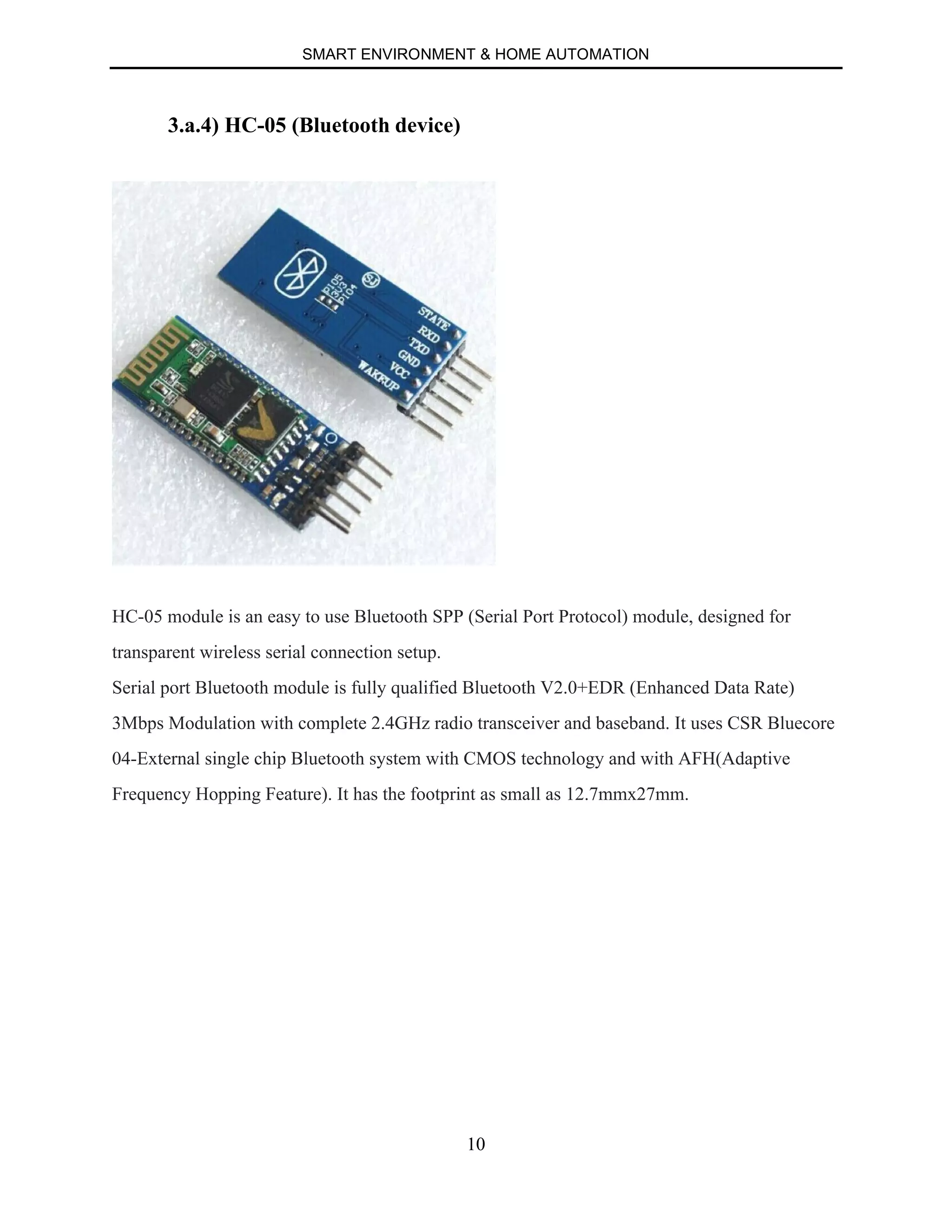
3.a.4) HC-05 (Bluetooth device)
HC-05 module is an easy to use Bluetooth SPP (Serial Port Protocol) module, designed for
transparent wireless serial connection setup.
Serial port Bluetooth module is fully qualified Bluetooth V2.0+EDR (Enhanced Data Rate)
3Mbps Modulation with complete 2.4GHz radio transceiver and baseband. It uses CSR Bluecore
04-External single chip Bluetooth system with CMOS technology and with AFH(Adaptive
Frequency Hopping Feature). It has the footprint as small as 12.7mmx27mm.
SMART ENVIRONMENT & HOME AUTOMATION
11
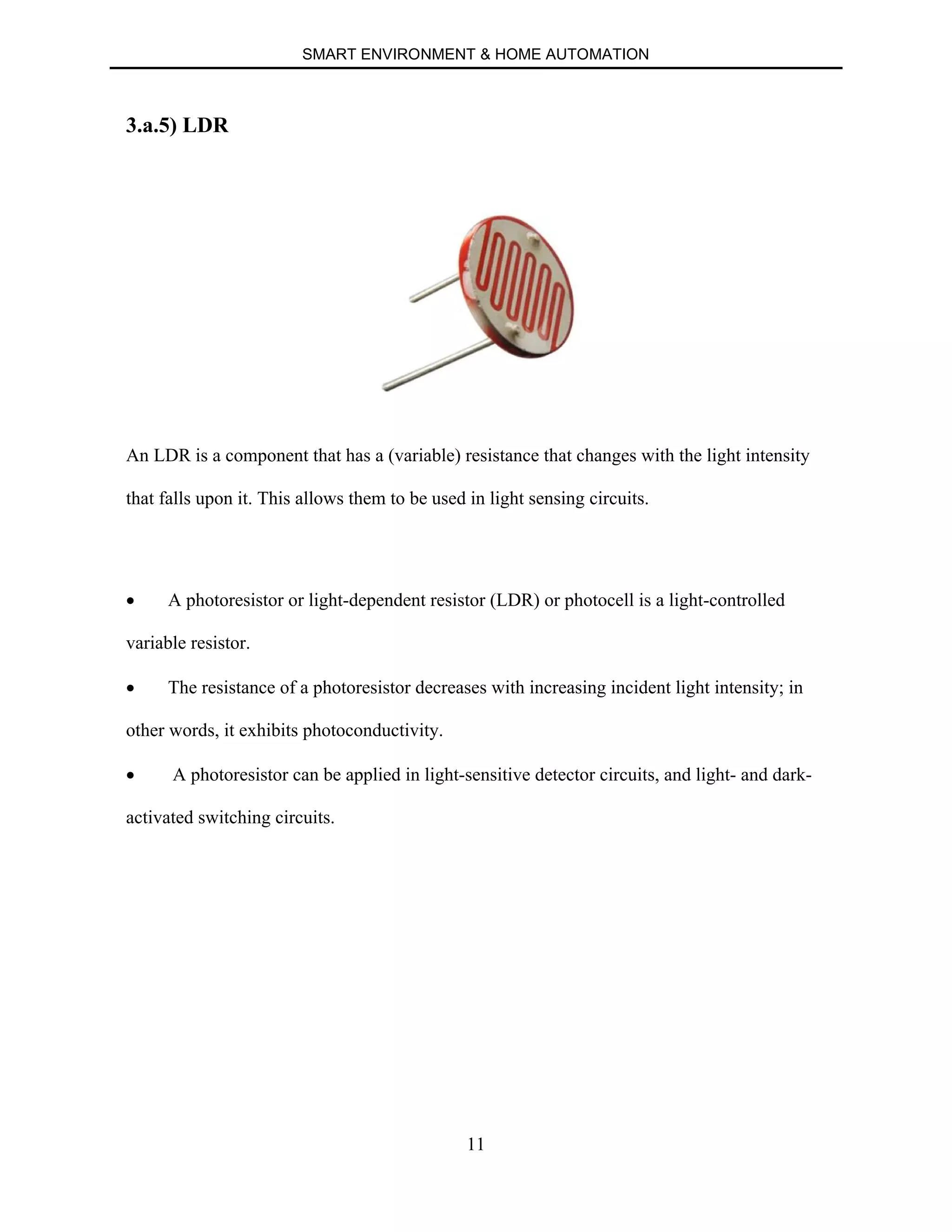
3.a.5) LDR
An LDR is a component that has a (variable) resistance that changes with the light intensity
that falls upon it. This allows them to be used in light sensing circuits.
∑ A photoresistor or light-dependent resistor (LDR) or photocell is a light-controlled
variable resistor.
∑ The resistance of a photoresistor decreases with increasing incident light intensity; in
other words, it exhibits photoconductivity.
∑ A photoresistor can be applied in light-sensitive detector circuits, and light- and dark-
activated switching circuits.
SMART ENVIRONMENT & HOME AUTOMATION
12
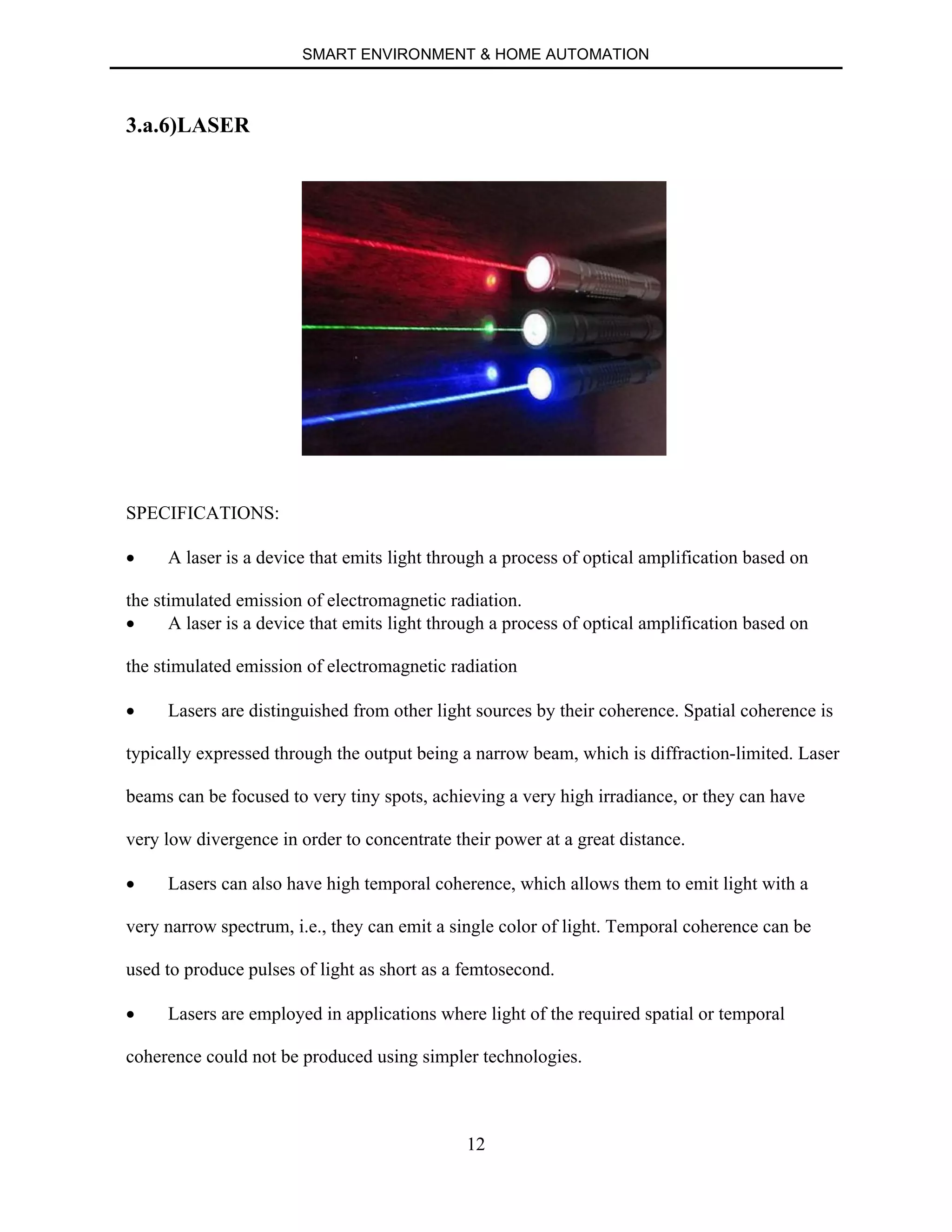
3.a.6)LASER
SPECIFICATIONS:
∑ A laser is a device that emits light through a process of optical amplification based on
the stimulated emission of electromagnetic radiation.
∑ A laser is a device that emits light through a process of optical amplification based on
the stimulated emission of electromagnetic radiation
∑ Lasers are distinguished from other light sources by their coherence. Spatial coherence is
typically expressed through the output being a narrow beam, which is diffraction-limited. Laser
beams can be focused to very tiny spots, achieving a very high irradiance, or they can have
very low divergence in order to concentrate their power at a great distance.
∑ Lasers can also have high temporal coherence, which allows them to emit light with a
very narrow spectrum, i.e., they can emit a single color of light. Temporal coherence can be
used to produce pulses of light as short as a femtosecond.
∑ Lasers are employed in applications where light of the required spatial or temporal
coherence could not be produced using simpler technologies.
SMART ENVIRONMENT & HOME AUTOMATION
13
∑ Most of the laser uses feedback from an optical cavity—a pair of mirrors on either end of
the gain medium. Light bounces back and forth between the mirrors, passing through the gain
medium and being amplified each time. Typically one of the two mirrors, the output coupler, is
partially transparent
SMART ENVIRONMENT & HOME AUTOMATION
14
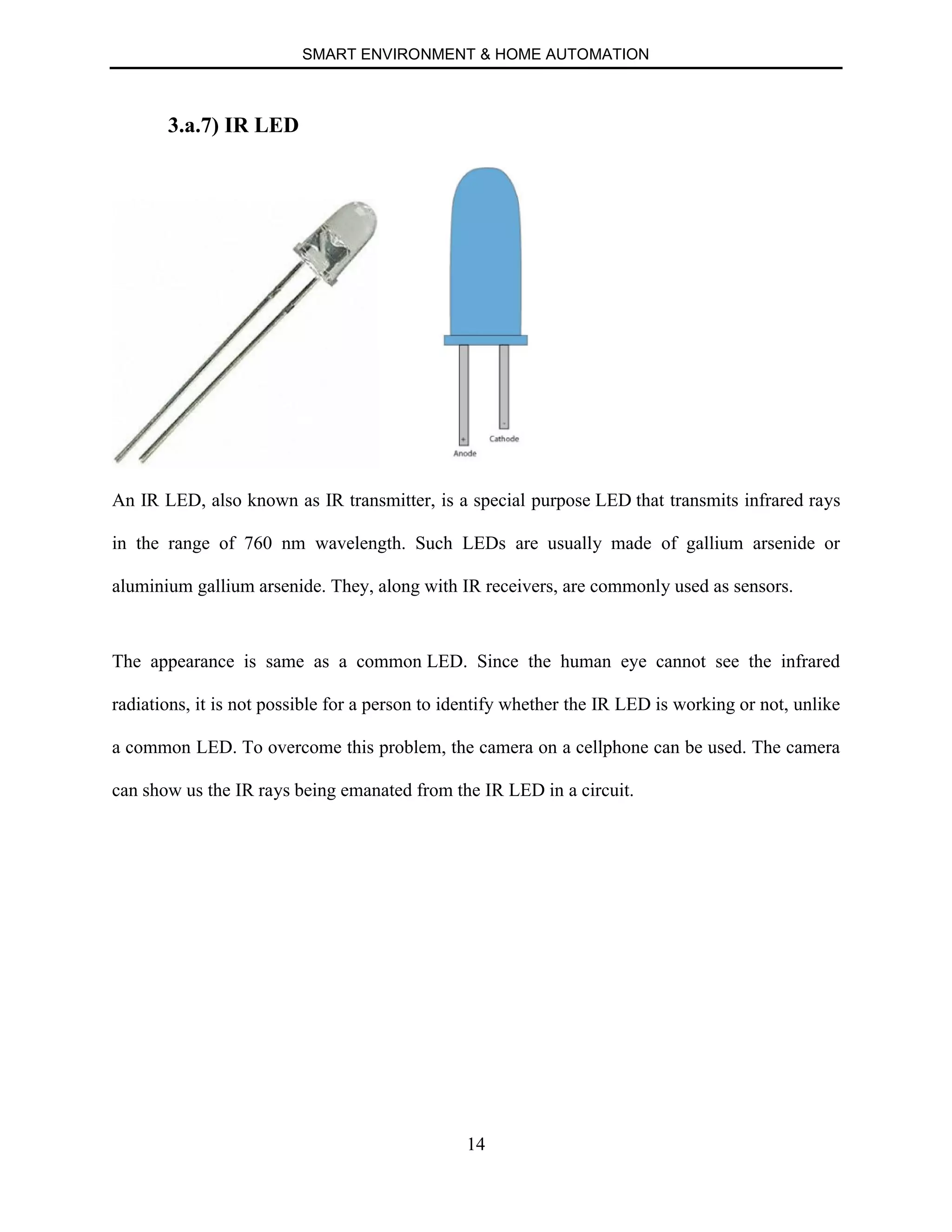
3.a.7) IR LED
An IR LED, also known as IR transmitter, is a special purpose LED that transmits infrared rays
in the range of 760 nm wavelength. Such LEDs are usually made of gallium arsenide or
aluminium gallium arsenide. They, along with IR receivers, are commonly used as sensors.
The appearance is same as a common LED. Since the human eye cannot see the infrared
radiations, it is not possible for a person to identify whether the IR LED is working or not, unlike
a common LED. To overcome this problem, the camera on a cellphone can be used. The camera
can show us the IR rays being emanated from the IR LED in a circuit.
SMART ENVIRONMENT & HOME AUTOMATION
15
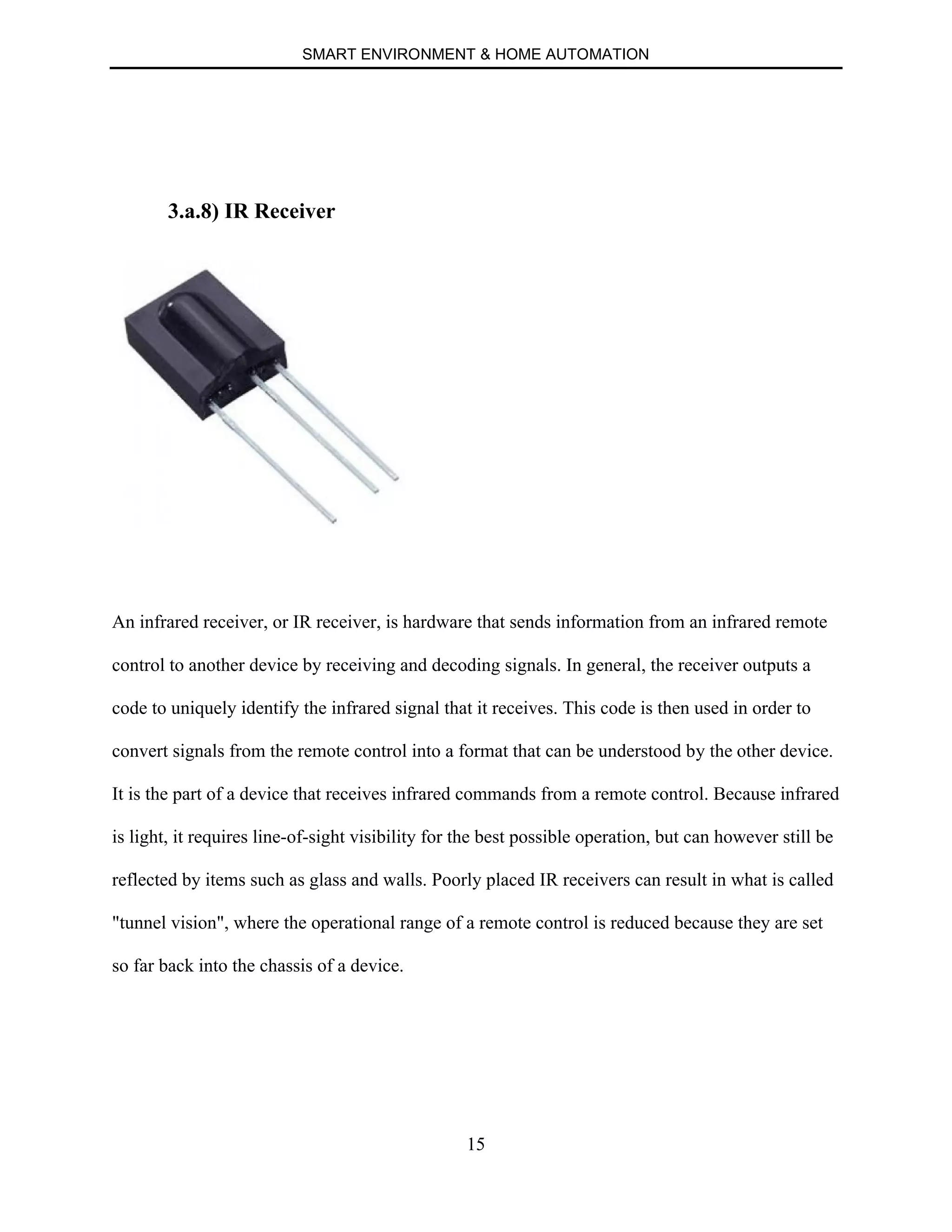
3.a.8) IR Receiver
An infrared receiver, or IR receiver, is hardware that sends information from an infrared remote
control to another device by receiving and decoding signals. In general, the receiver outputs a
code to uniquely identify the infrared signal that it receives. This code is then used in order to
convert signals from the remote control into a format that can be understood by the other device.
It is the part of a device that receives infrared commands from a remote control. Because infrared
is light, it requires line-of-sight visibility for the best possible operation, but can however still be
reflected by items such as glass and walls. Poorly placed IR receivers can result in what is called
"tunnel vision", where the operational range of a remote control is reduced because they are set
so far back into the chassis of a device.
SMART ENVIRONMENT & HOME AUTOMATION
16
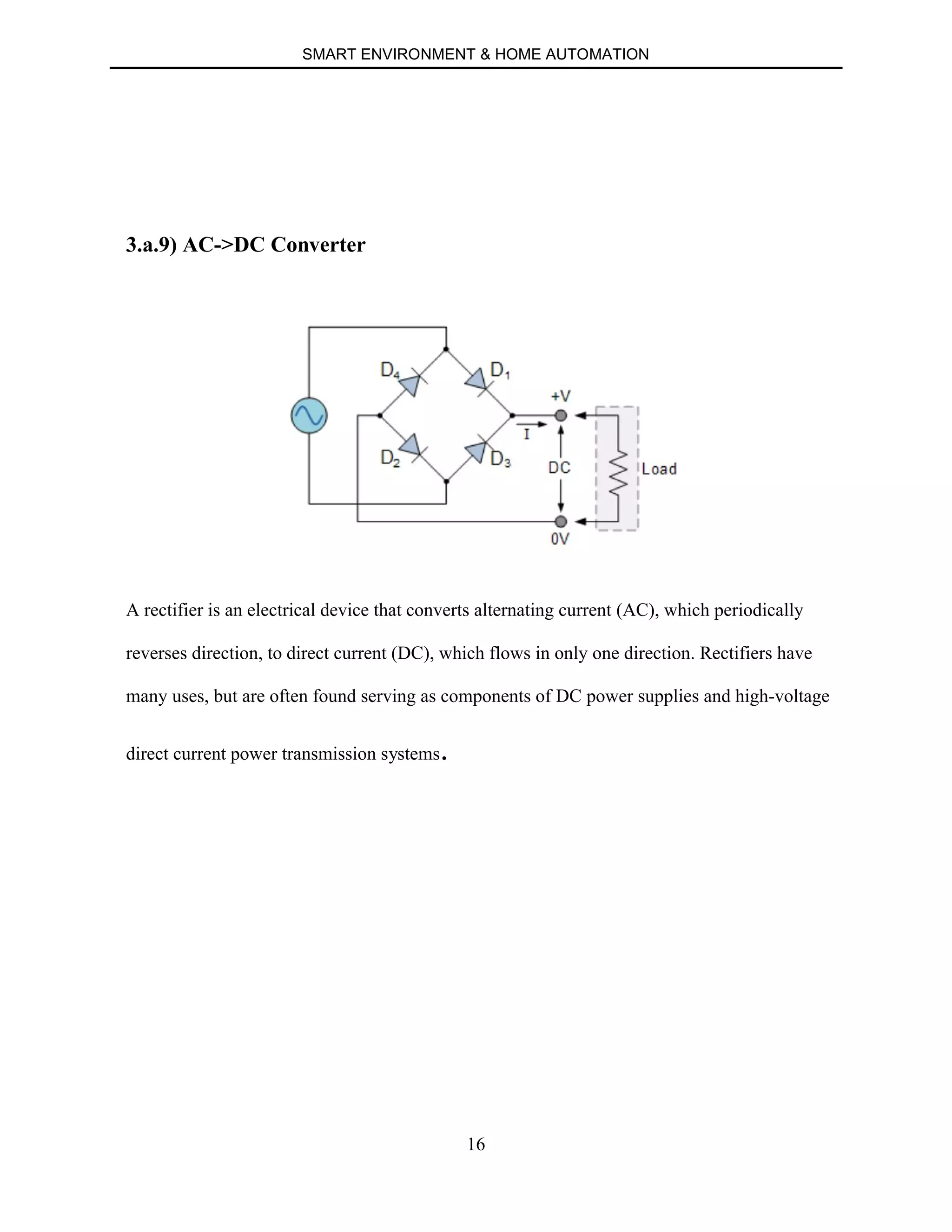
3.a.9) AC->DC Converter
A rectifier is an electrical device that converts alternating current (AC), which periodically
reverses direction, to direct current (DC), which flows in only one direction. Rectifiers have
many uses, but are often found serving as components of DC power supplies and high-voltage
direct current power transmission systems.
SMART ENVIRONMENT & HOME AUTOMATION
17
b) Software Requirements
1. Arduino Software
2. Android Studio
3.b.1) Arduino Software
The open-source Arduino Software (IDE) makes it easy to write code and upload it to the board.
It runs on Windows, Mac OS X, and Linux. The environment is written in Java and based on
Processing and other open-source software.
This software can be used with any Arduino board. The Arduino IDE supports
the C and C++ programming languages using special rules of code organization. The Arduino
IDE supplies a software library called "Wiring" from the Wiring project, which provides many
common input and output procedures. A typical Arduino C/C++ sketch consist of two functions
that are compiled and linked with a program stub main() into an executable cyclic
executive program:
∑ setup(): a function that runs once at the start of a program and that can initialize settings.
∑ loop(): a function called repeatedly until the board powers off.
After compilation and linking with the GNU tool chain, also included with the IDE distribution,
the Arduino IDE employs the program avrdude to convert the executable code into a text file in
hexadecimal coding that is loaded into the Arduino board by a loader program in the board's
firmware.
SMART ENVIRONMENT & HOME AUTOMATION
18
3.b.2) Android Studio
Android Studio is the official integrated development environment (IDE) for Android platform
development.
Features of android studio:
∑ Gradle-based build support.
∑ Android-specific refactoring and quick fixes.
∑ Lint tools to catch performance, usability, version compatibility and other problems.
∑ ProGuard integration and app-signing capabilities.
∑ Template-based wizards to create common Android designs and components.
∑ A rich layout editor that allows users to drag-and-drop UI components, option to preview
layouts on multiple screen configurations.
∑ Support for building Android Wear apps
∑ Built-in support for Google Cloud Platform, enabling integration with Google Cloud
Messaging and App Engine.
SMART ENVIRONMENT & HOME AUTOMATION
19
CHAPTER 4
CIRCUIT CONNECTIONS
4.1) ARDUINO AND DHT22
4.2) ARDUINO AND LDR + BUZZER CONNECTION
4.3) ARDUINO AND RELAY CONNECTION
4.4) ARDUINO AND IR CONNECTION
4.5) COMBINING VARIOUS UNITS
SMART ENVIRONMENT & HOME AUTOMATION
20
4.1) ARDUINO AND DHT22
SMART ENVIRONMENT & HOME AUTOMATION
21
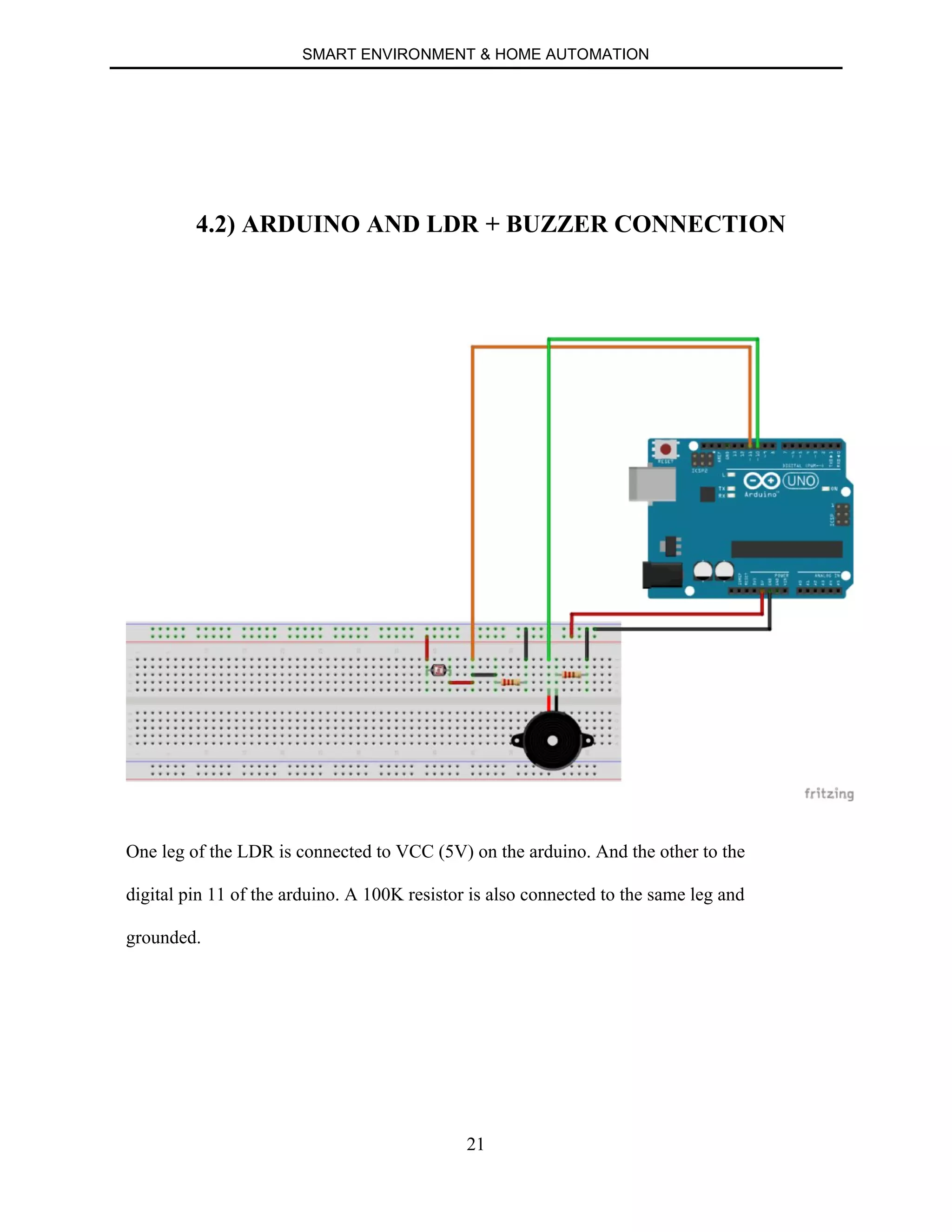
4.2) ARDUINO AND LDR + BUZZER CONNECTION
One leg of the LDR is connected to VCC (5V) on the arduino. And the other to the
digital pin 11 of the arduino. A 100K resistor is also connected to the same leg and
grounded.
SMART ENVIRONMENT & HOME AUTOMATION
22
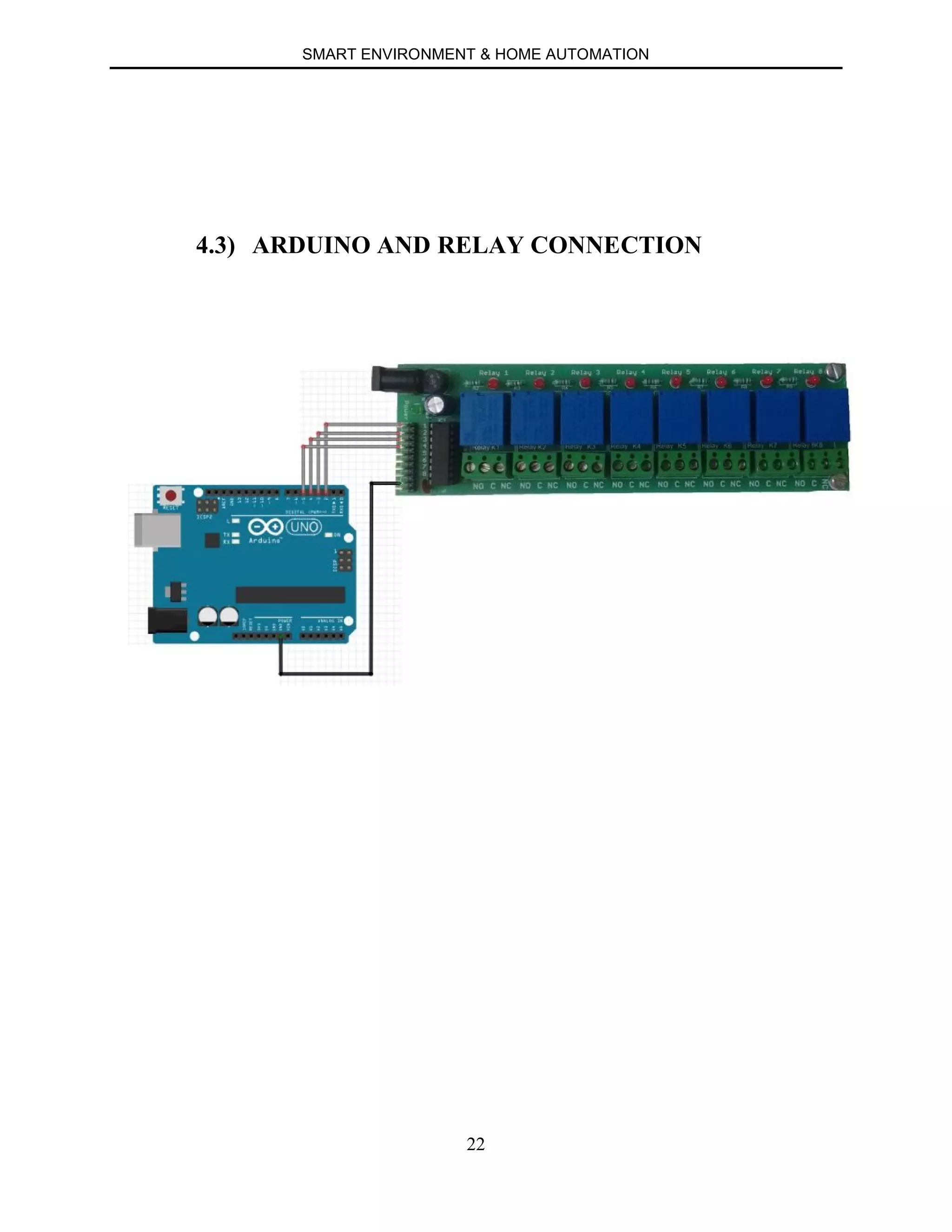
4.3) ARDUINO AND RELAY CONNECTION
SMART ENVIRONMENT & HOME AUTOMATION
23
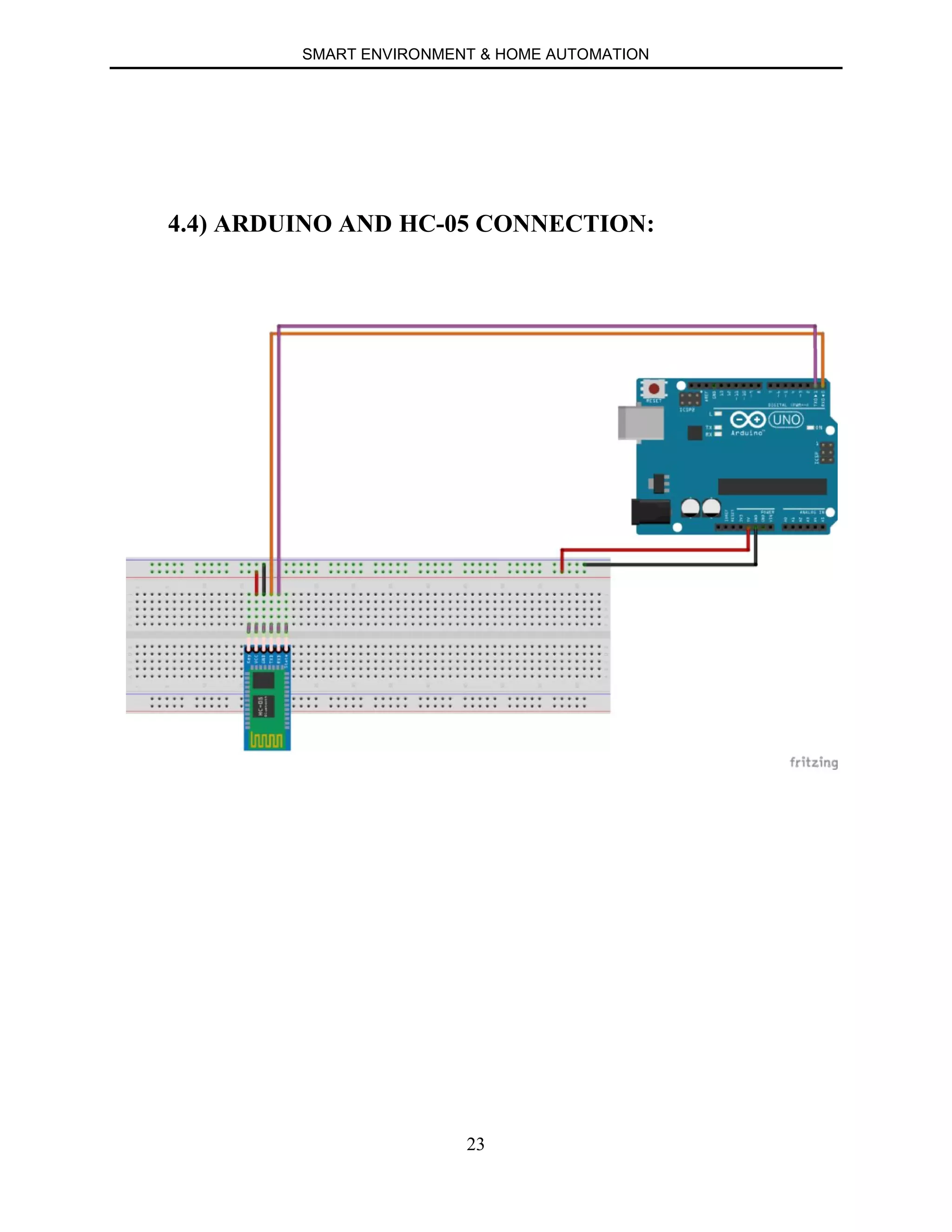
4.4) ARDUINO AND HC-05 CONNECTION:
SMART ENVIRONMENT & HOME AUTOMATION
24
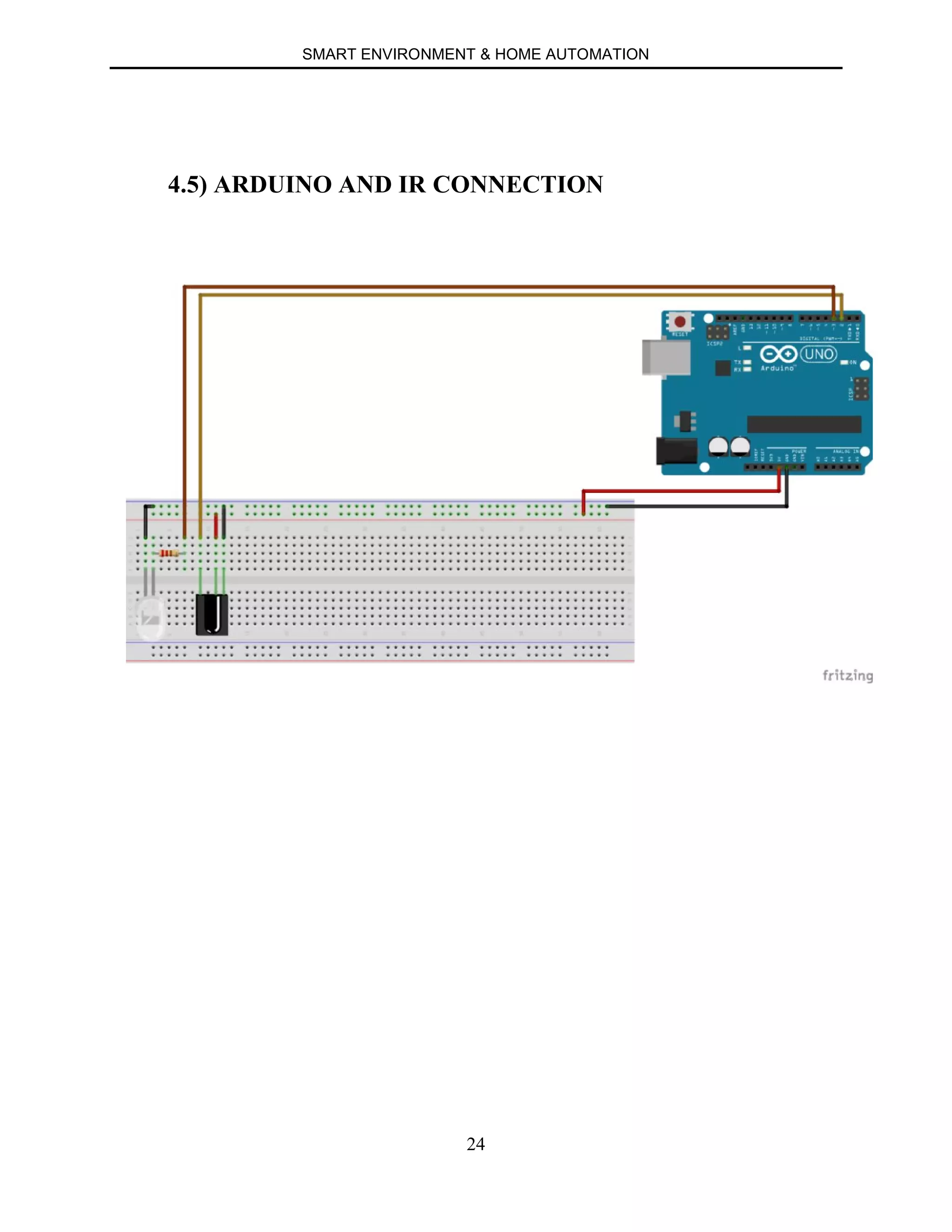
4.5) ARDUINO AND IR CONNECTION
SMART ENVIRONMENT & HOME AUTOMATION
25
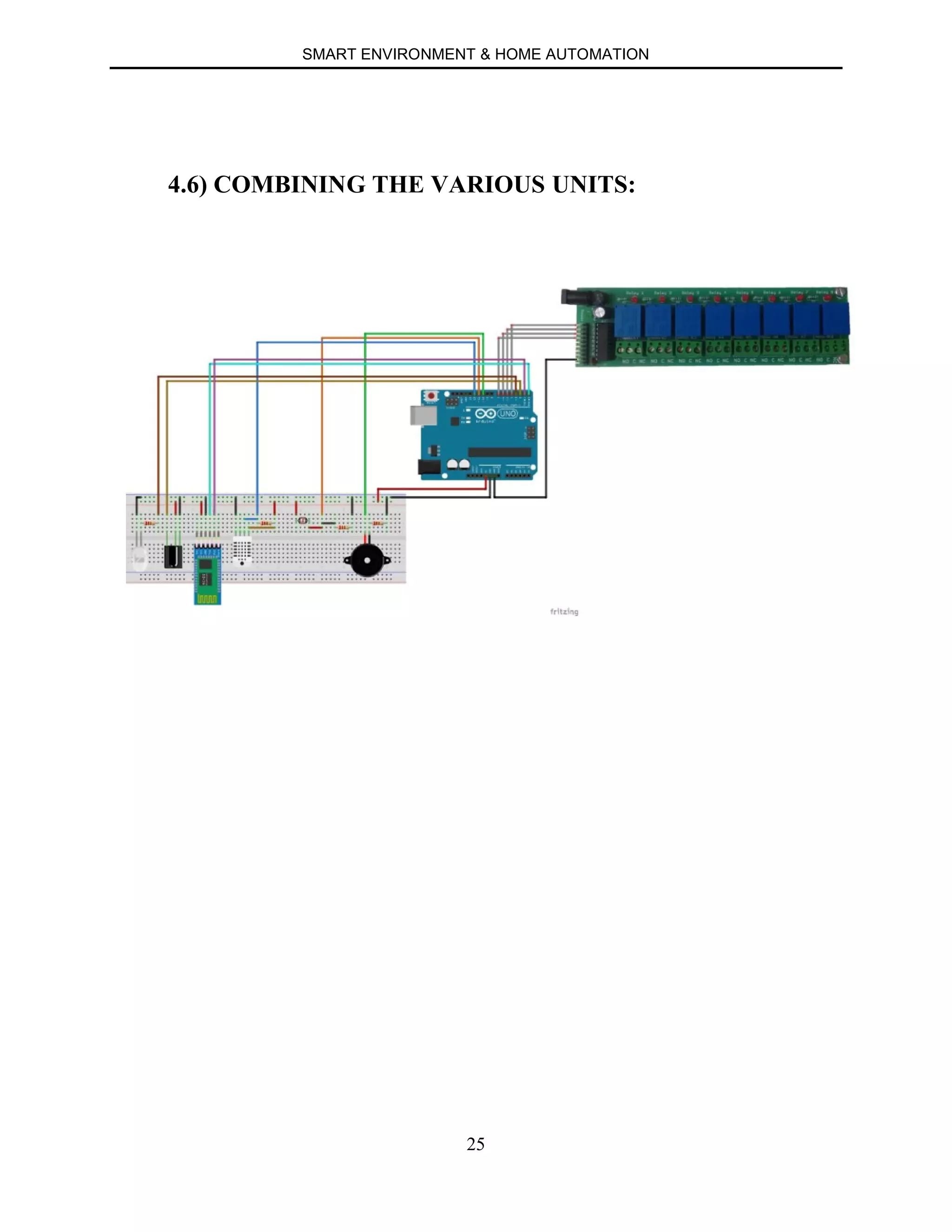
4.6) COMBINING THE VARIOUS UNITS:
SMART ENVIRONMENT & HOME AUTOMATION
26
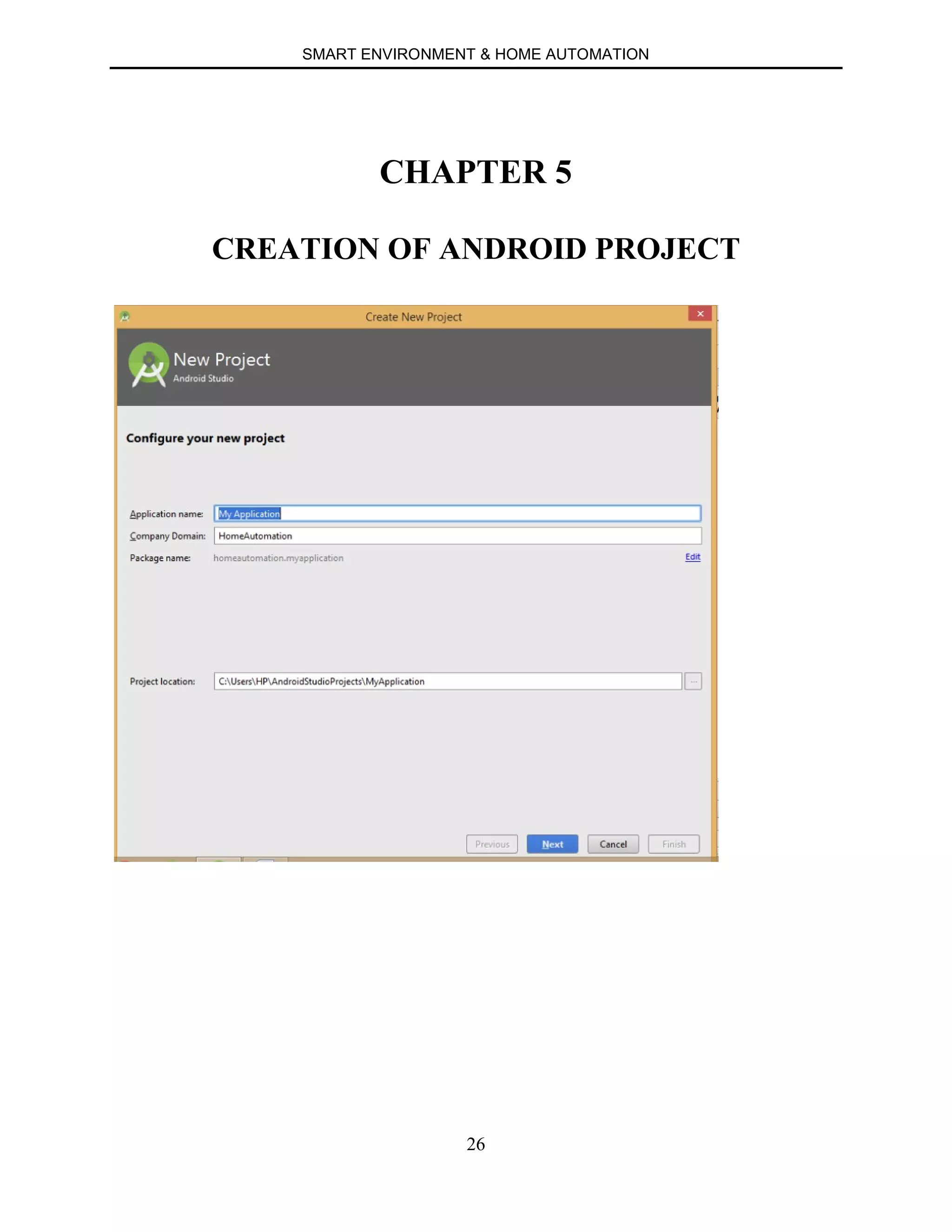
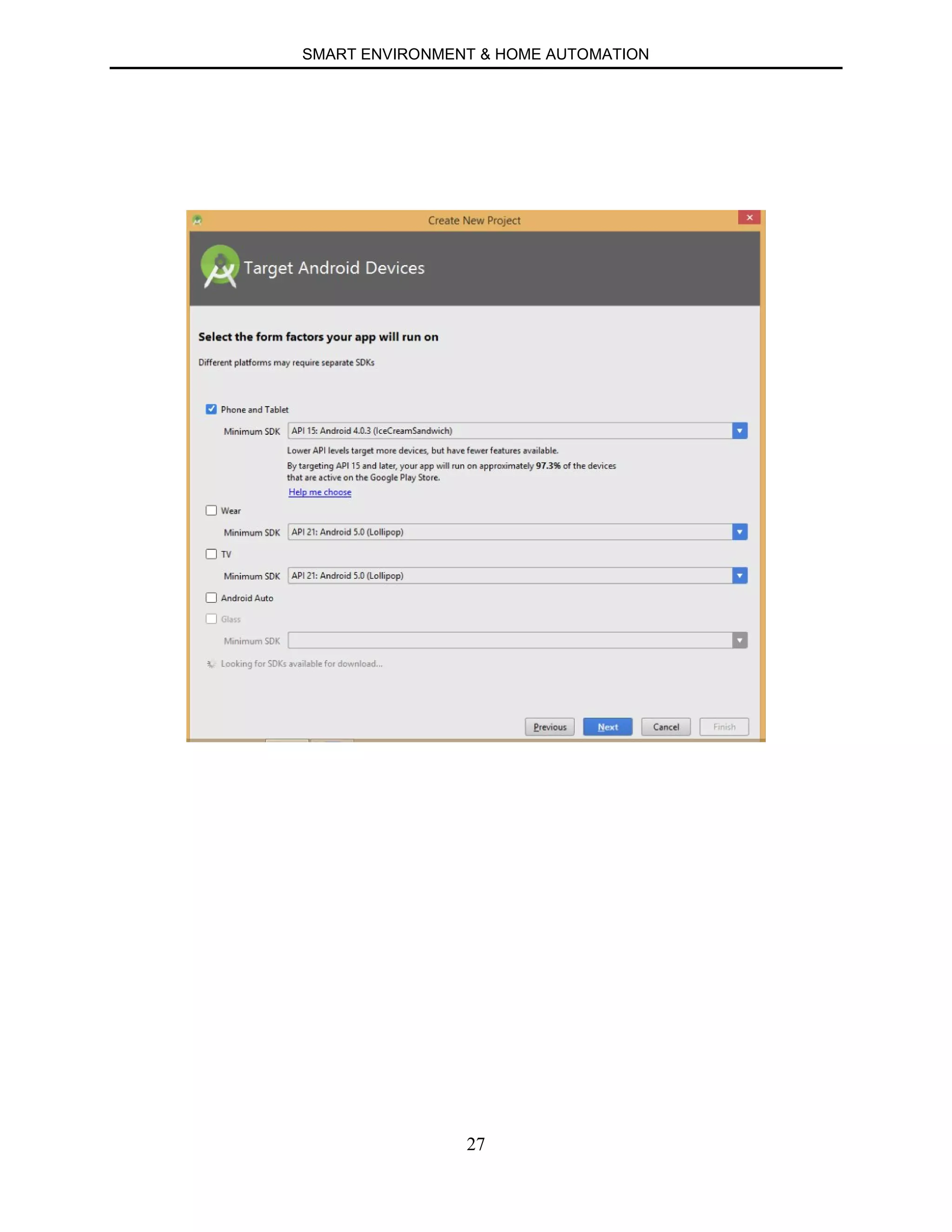
CHAPTER 5
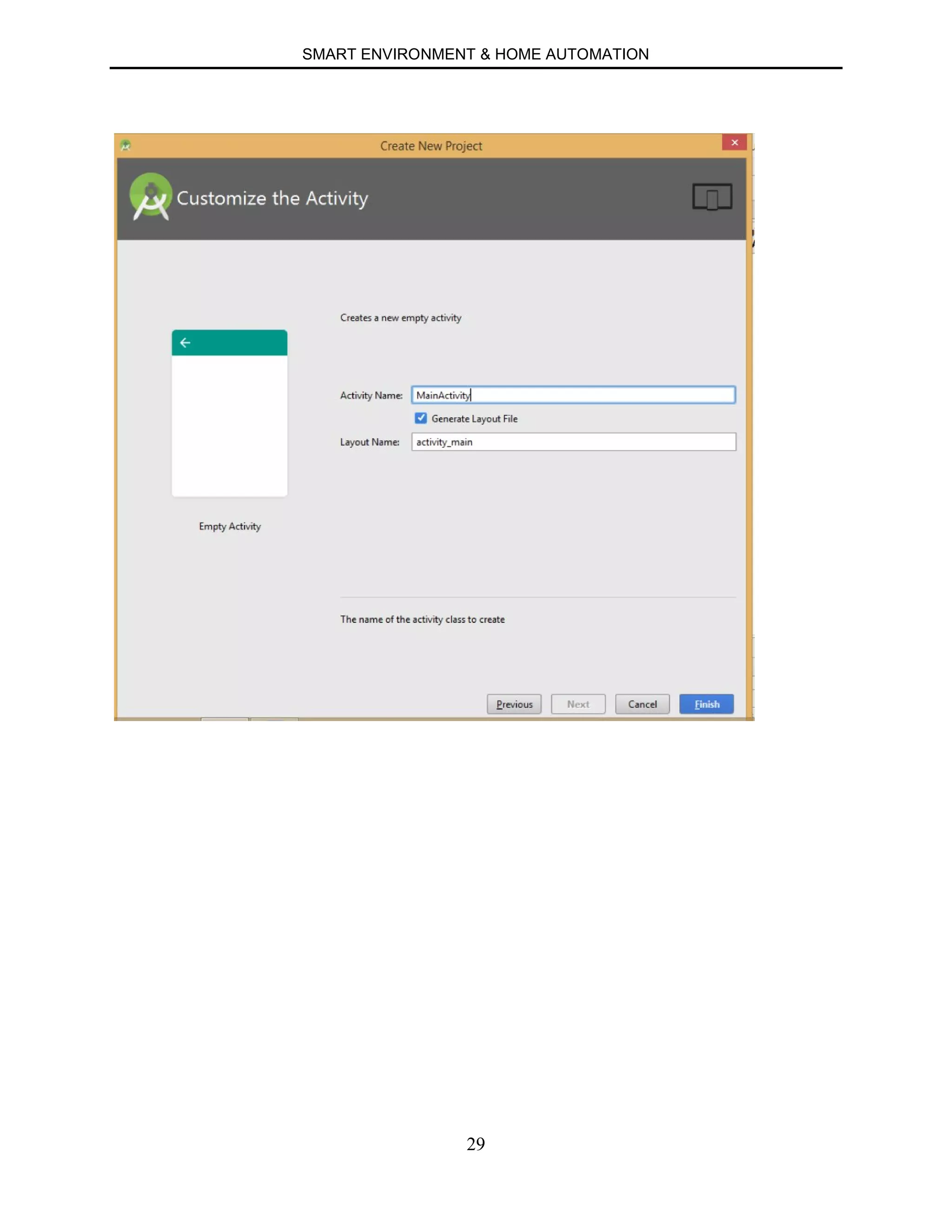
CREATION OF ANDROID PROJECT
SMART ENVIRONMENT & HOME AUTOMATION
27
SMART ENVIRONMENT & HOME AUTOMATION
28
SMART ENVIRONMENT & HOME AUTOMATION
29
SMART ENVIRONMENT & HOME AUTOMATION
30
CHAPTER 6
IMPLEMENTATION
6. a) ARDUINO CODE
6.a.1) INTRODUCTION
6.a.2) CODE FOR ROOM CONTROLS
6.a.3) CODE FOR TEMPERATURE AND HUMIDITY
6.a.4) CODE FOR BURGLARY ALARM
6.a.5) CODE FOR IR
SMART ENVIRONMENT & HOME AUTOMATION
31
6.a.1) INTRODUCTION
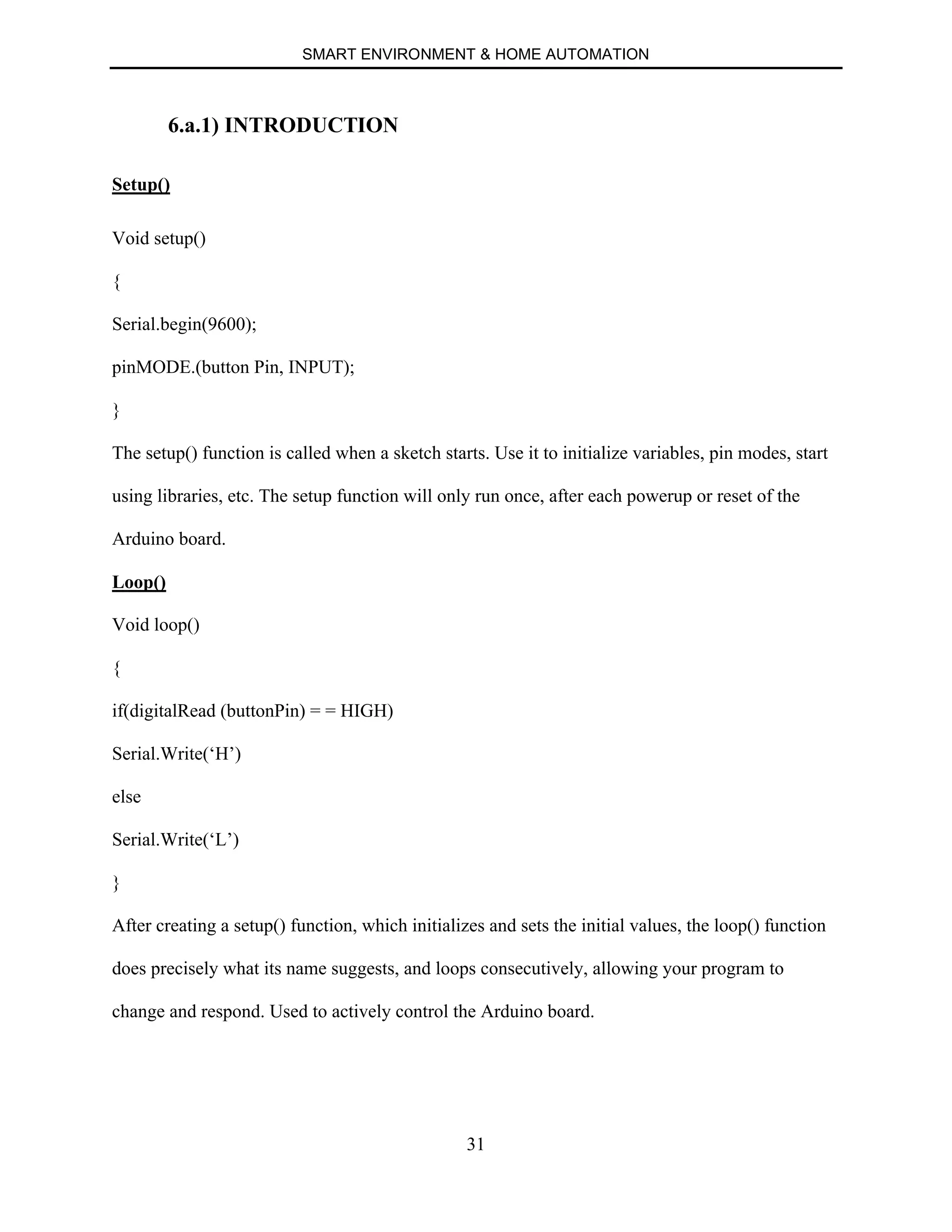
Setup()
Void setup()
{
Serial.begin(9600);
pinMODE.(button Pin, INPUT);
}
The setup() function is called when a sketch starts. Use it to initialize variables, pin modes, start
using libraries, etc. The setup function will only run once, after each powerup or reset of the
Arduino board.
Loop()
Void loop()
{
if(digitalRead (buttonPin) = = HIGH)
Serial.Write(‘H’)
else
Serial.Write(‘L’)
}
After creating a setup() function, which initializes and sets the initial values, the loop() function
does precisely what its name suggests, and loops consecutively, allowing your program to
change and respond. Used to actively control the Arduino board.
SMART ENVIRONMENT & HOME AUTOMATION
32
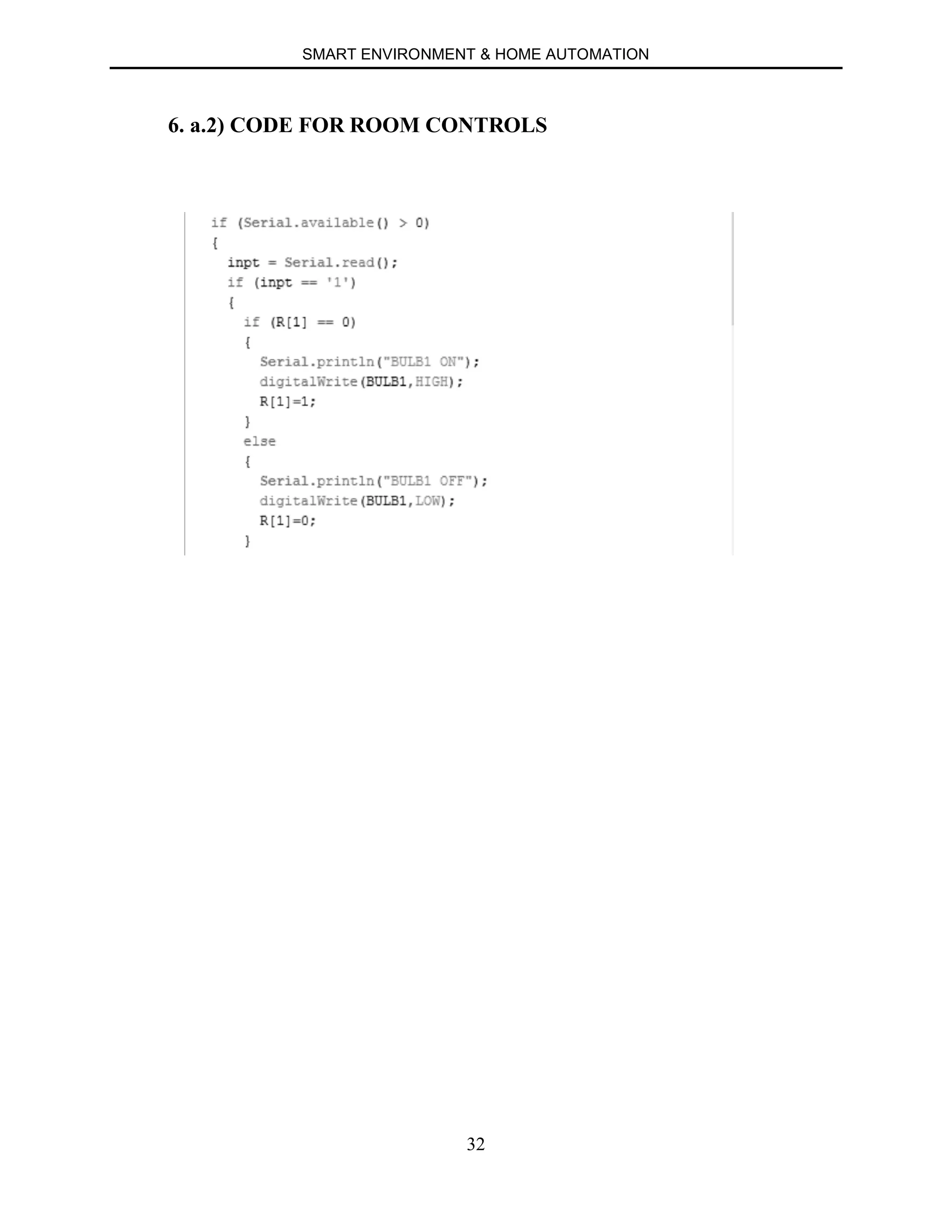
6. a.2) CODE FOR ROOM CONTROLS
SMART ENVIRONMENT & HOME AUTOMATION
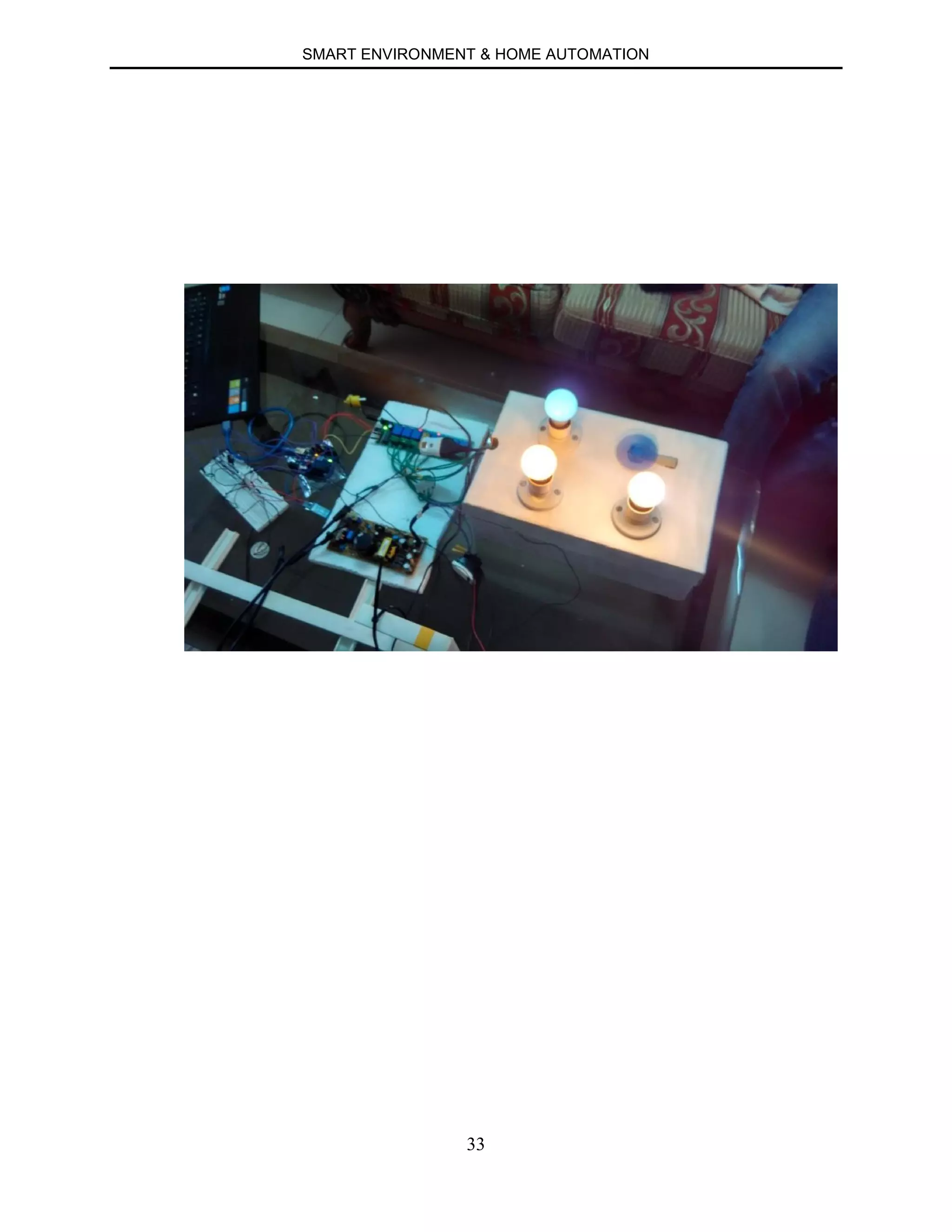
33
SMART ENVIRONMENT & HOME AUTOMATION
34
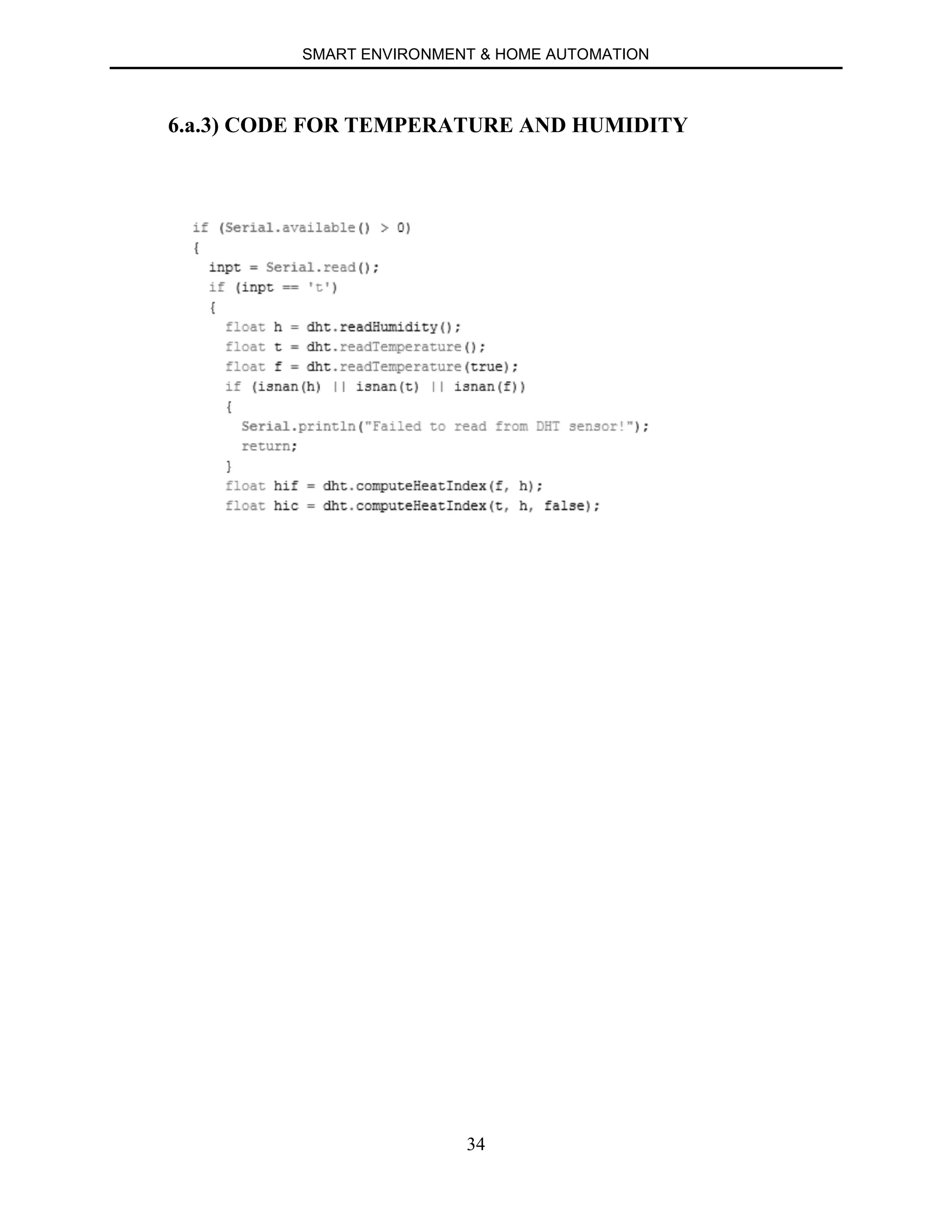
6.a.3) CODE FOR TEMPERATURE AND HUMIDITY
SMART ENVIRONMENT & HOME AUTOMATION
35
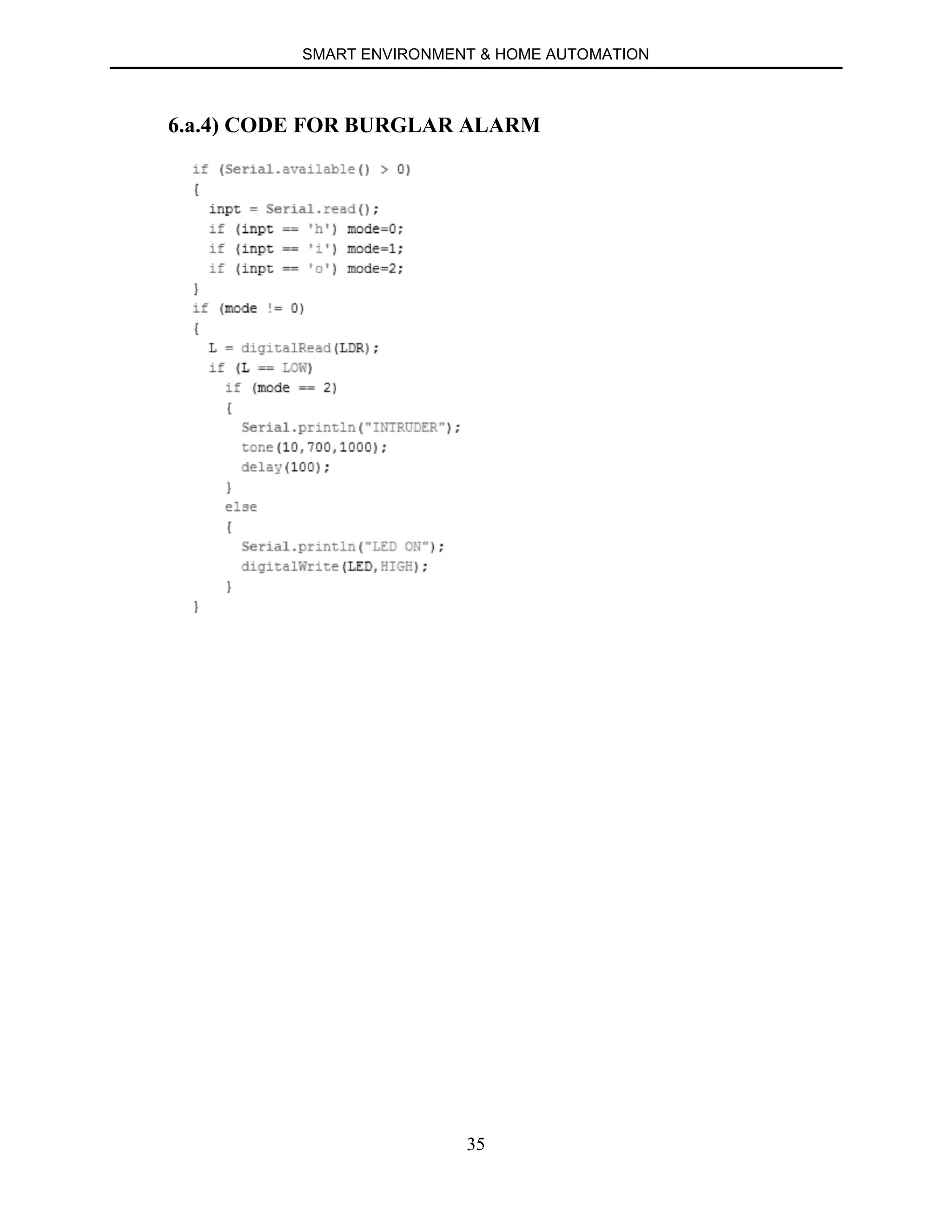
6.a.4) CODE FOR BURGLAR ALARM
SMART ENVIRONMENT & HOME AUTOMATION
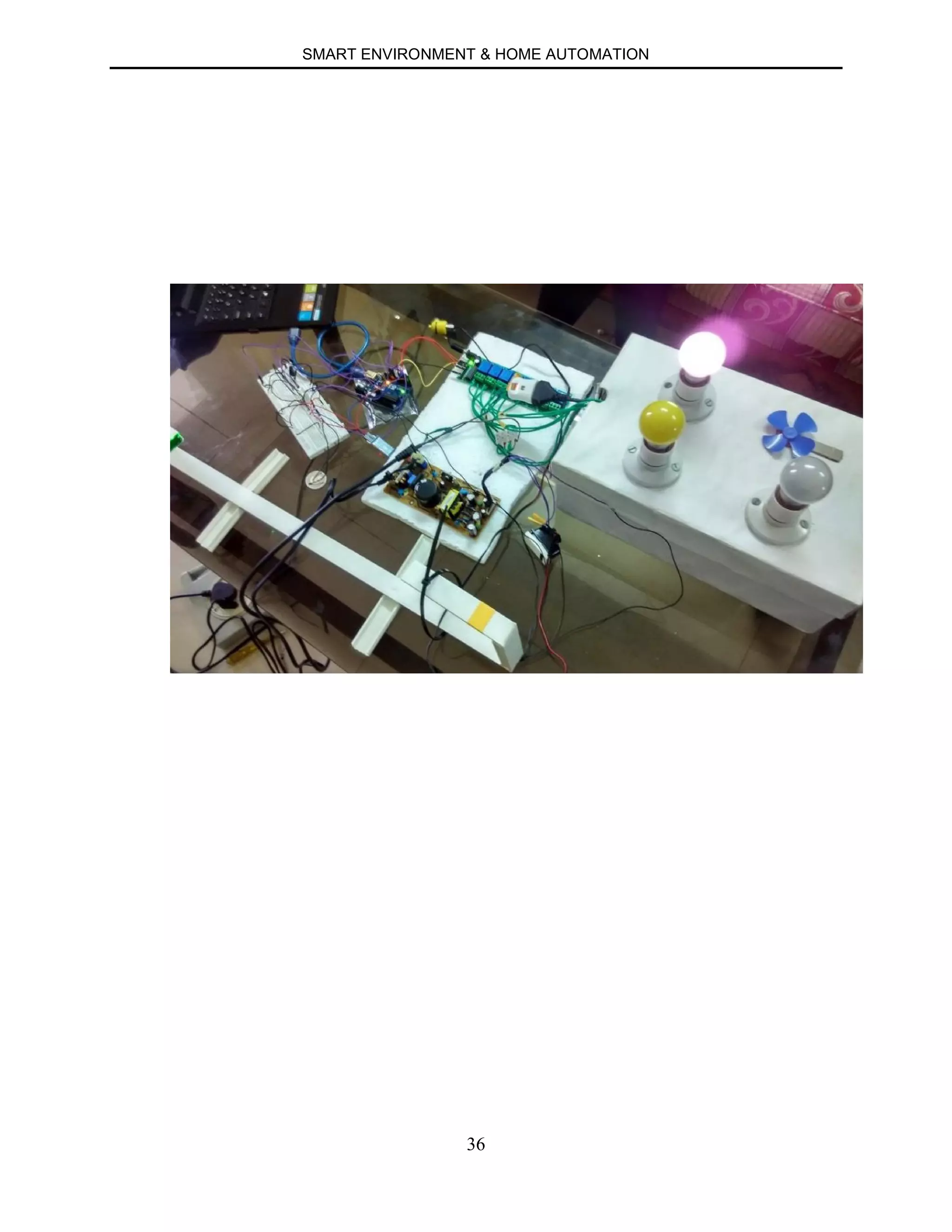
36
SMART ENVIRONMENT & HOME AUTOMATION
37
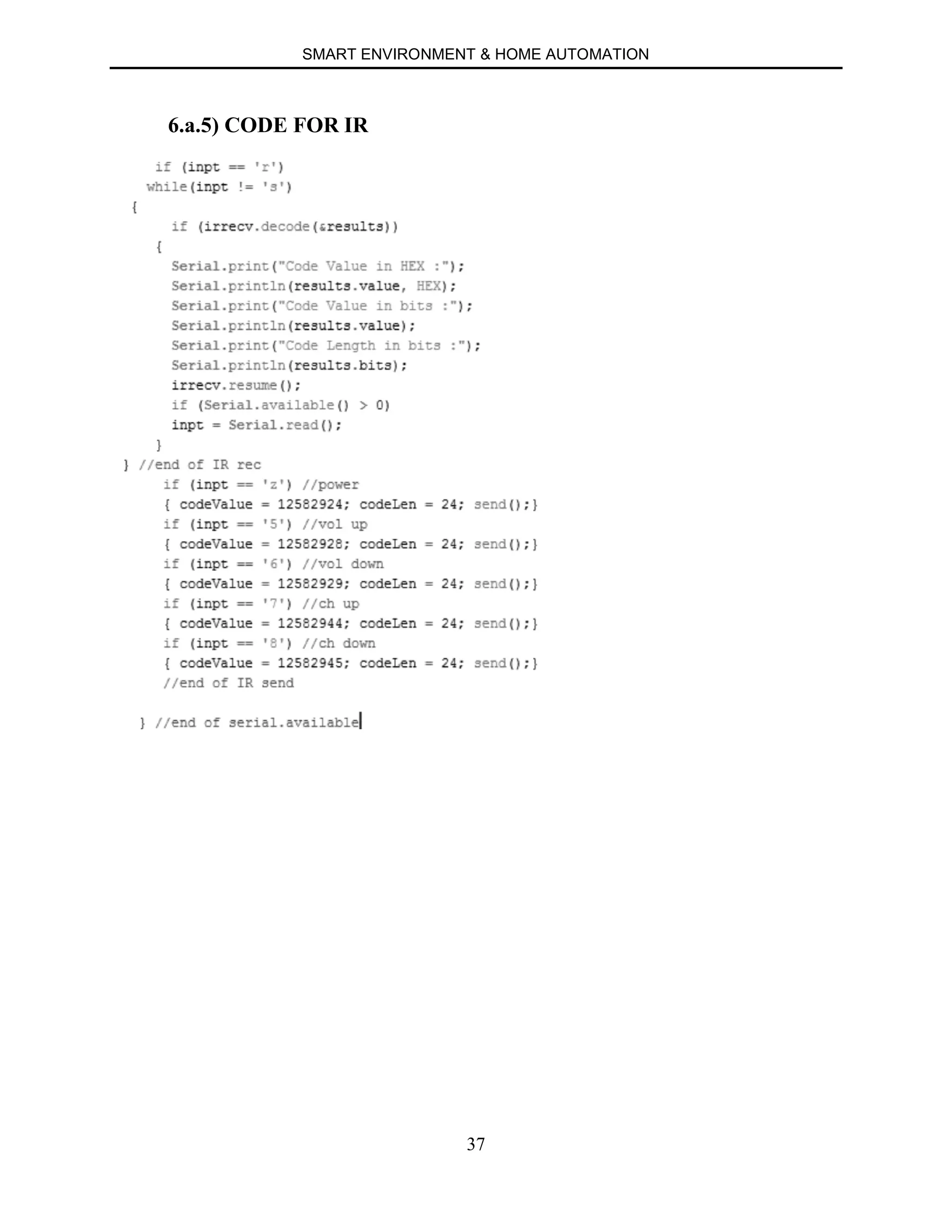
6.a.5) CODE FOR IR
SMART ENVIRONMENT & HOME AUTOMATION
38
SMART ENVIRONMENT & HOME AUTOMATION
39
6.b) ANDROID CODE
6.b.1) INTRODUCTION
6.b.2) INITIALIZATION FUNCTION
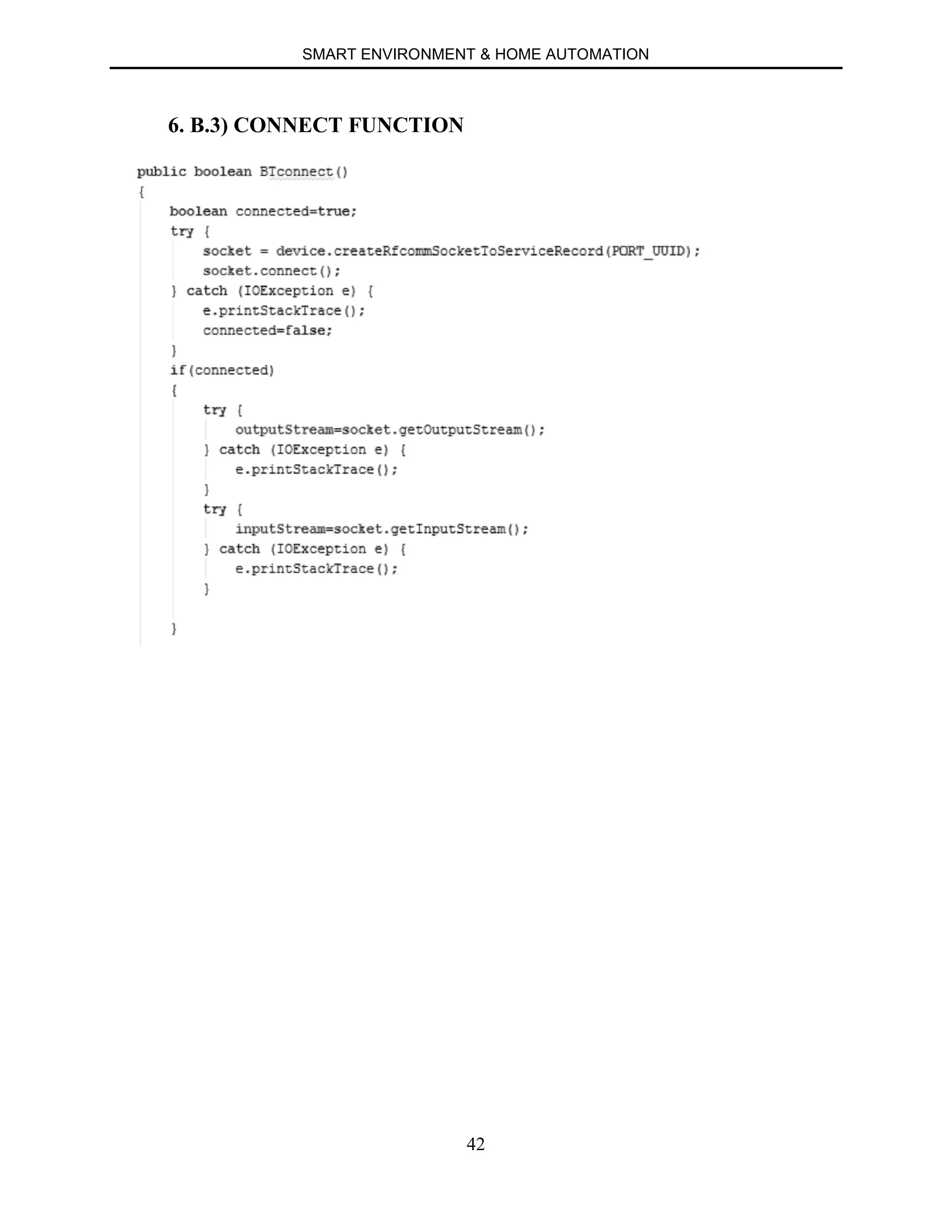
6.b.3) CONNECT FUNCTION
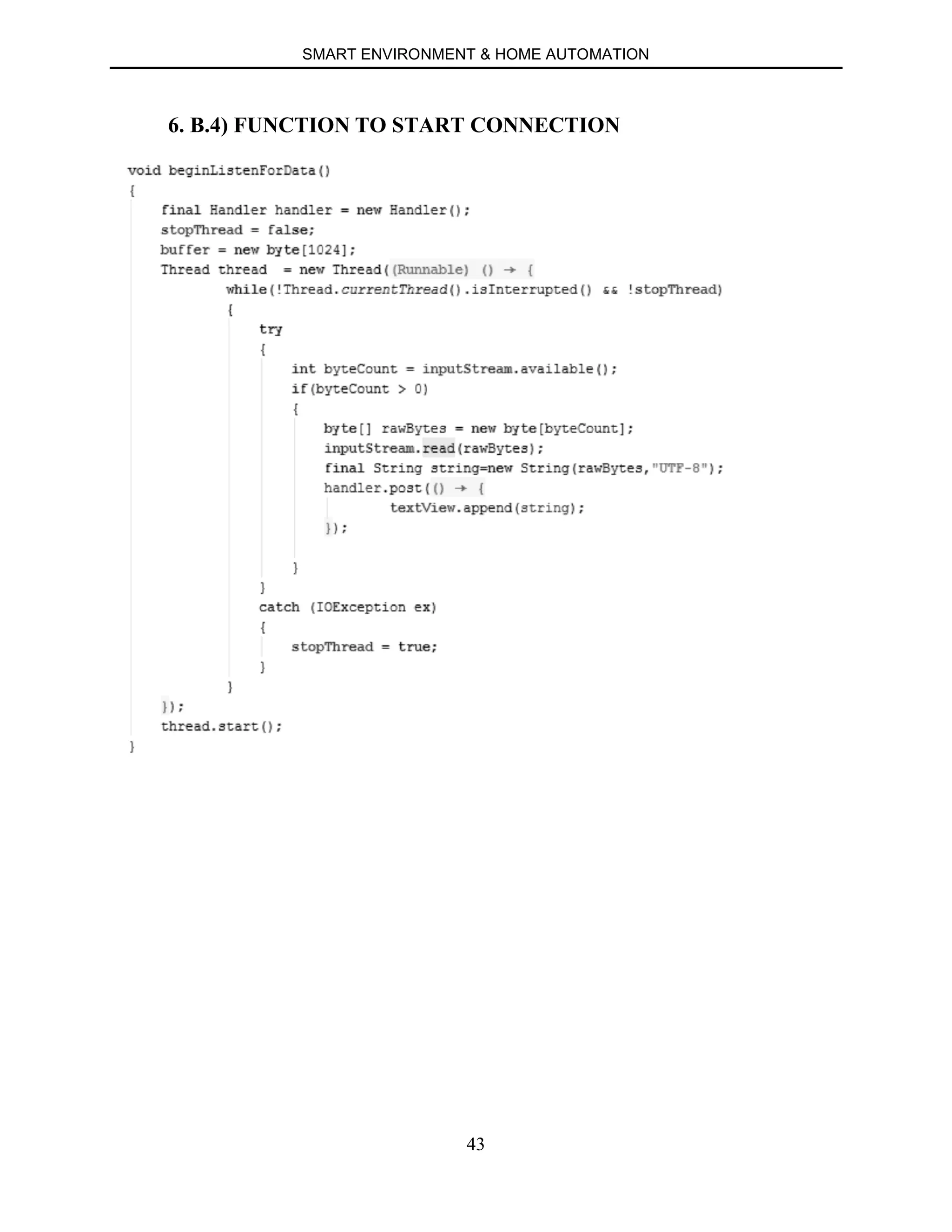
6.b.4) FUNCTION TO START CONNECTION
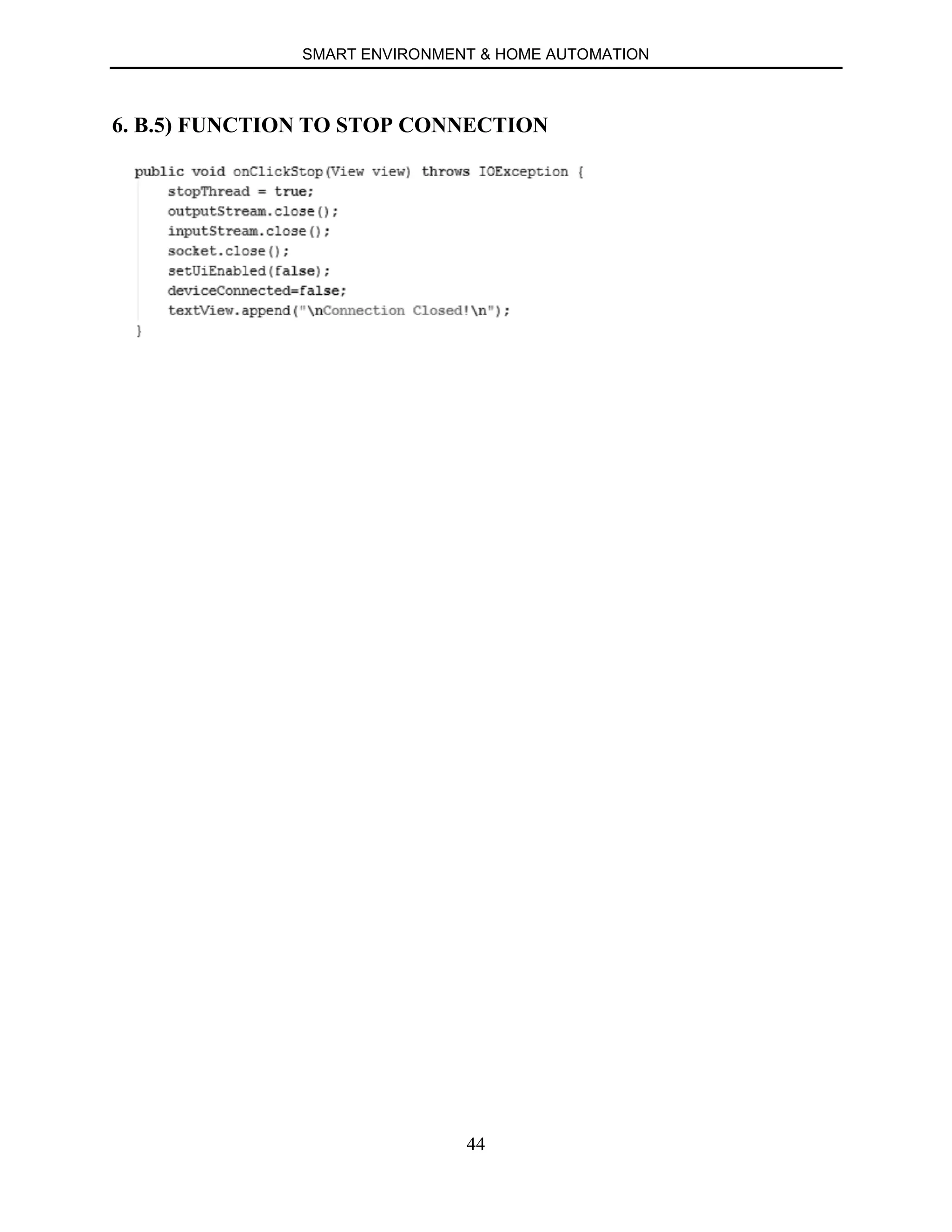
6.b.5) FUNCTION TO STOP CONNECTION
SMART ENVIRONMENT & HOME AUTOMATION
40
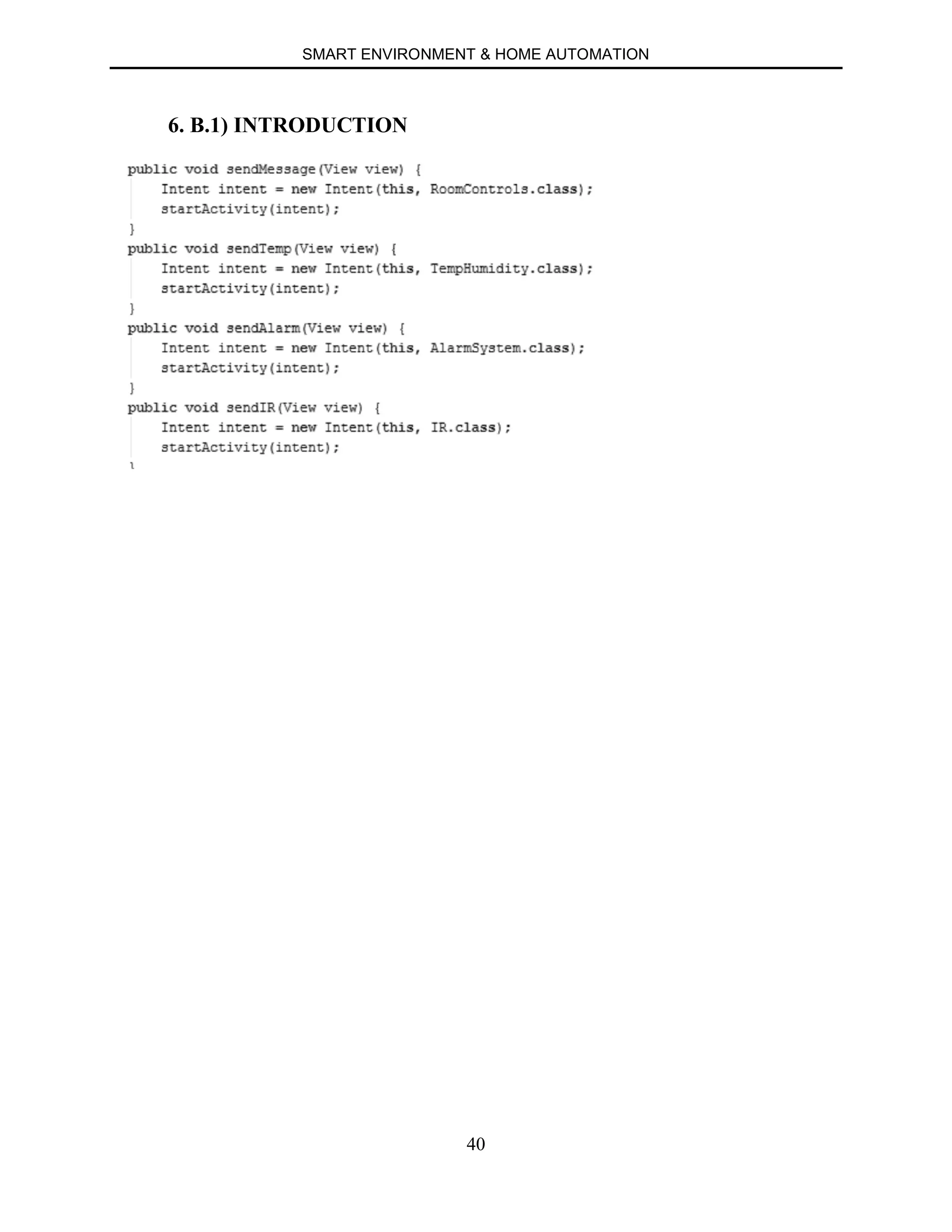
6. B.1) INTRODUCTION
SMART ENVIRONMENT & HOME AUTOMATION
41
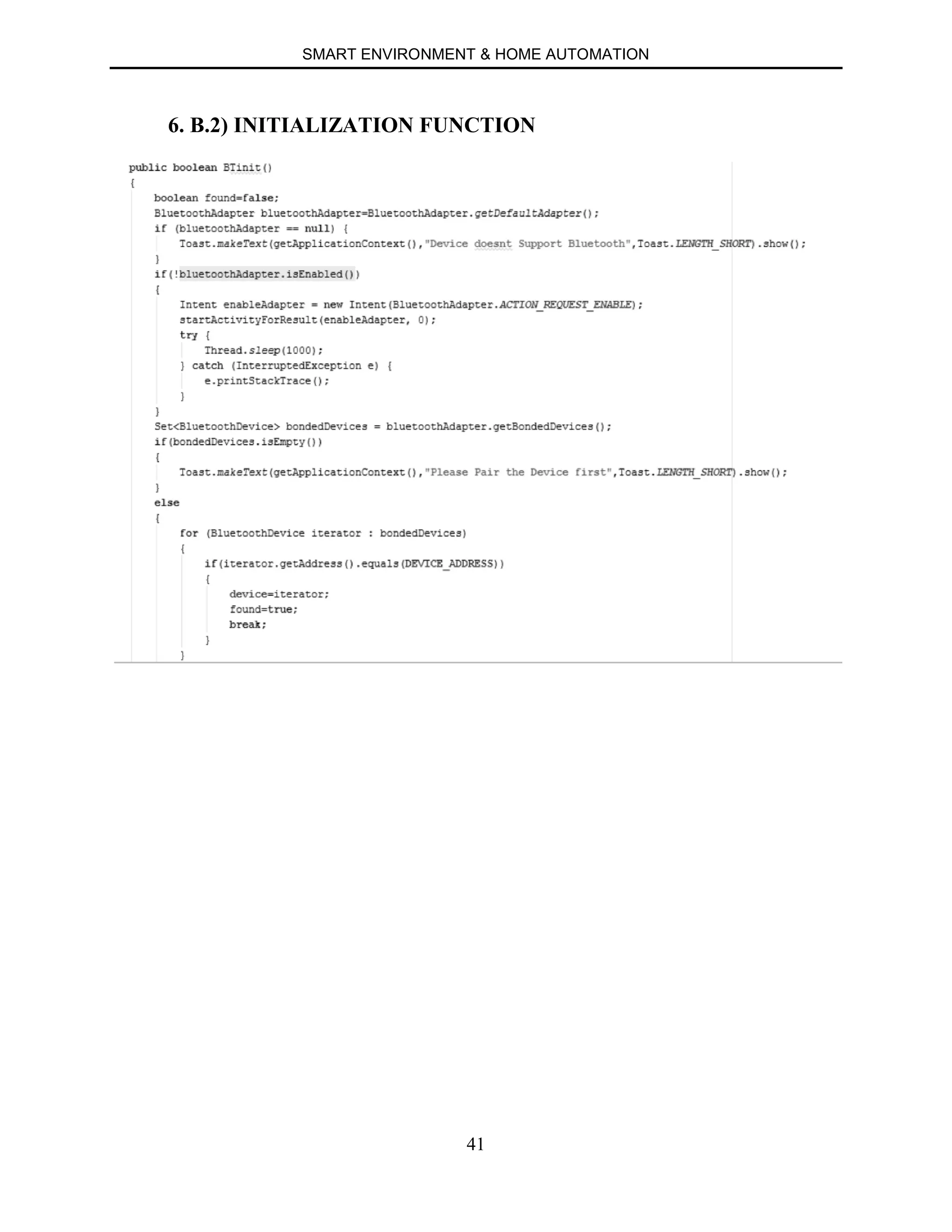
6. B.2) INITIALIZATION FUNCTION
SMART ENVIRONMENT & HOME AUTOMATION
42
6. B.3) CONNECT FUNCTION
SMART ENVIRONMENT & HOME AUTOMATION
43
6. B.4) FUNCTION TO START CONNECTION
SMART ENVIRONMENT & HOME AUTOMATION
44
6. B.5) FUNCTION TO STOP CONNECTION
SMART ENVIRONMENT & HOME AUTOMATION
45
CHAPTER 7
ANDROID APP
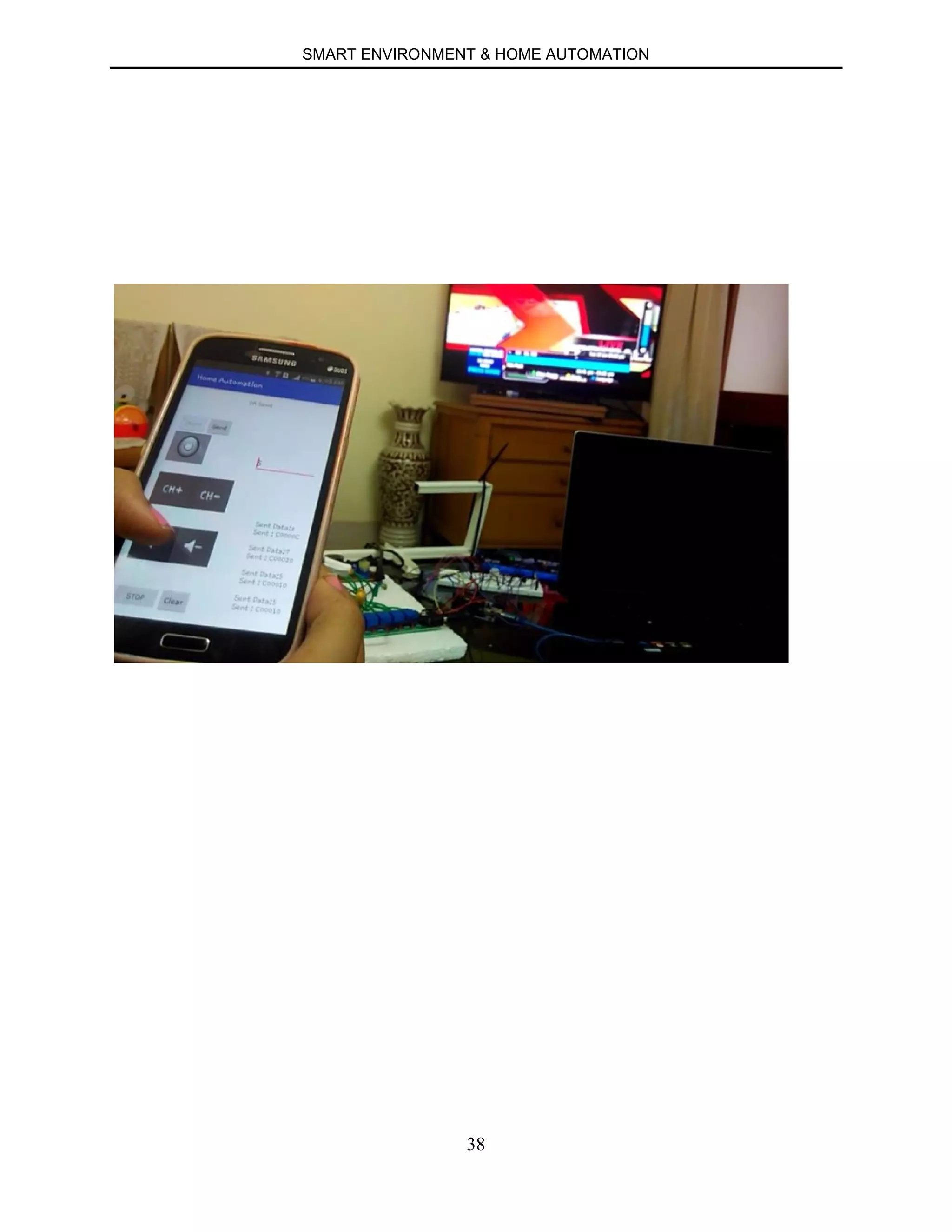
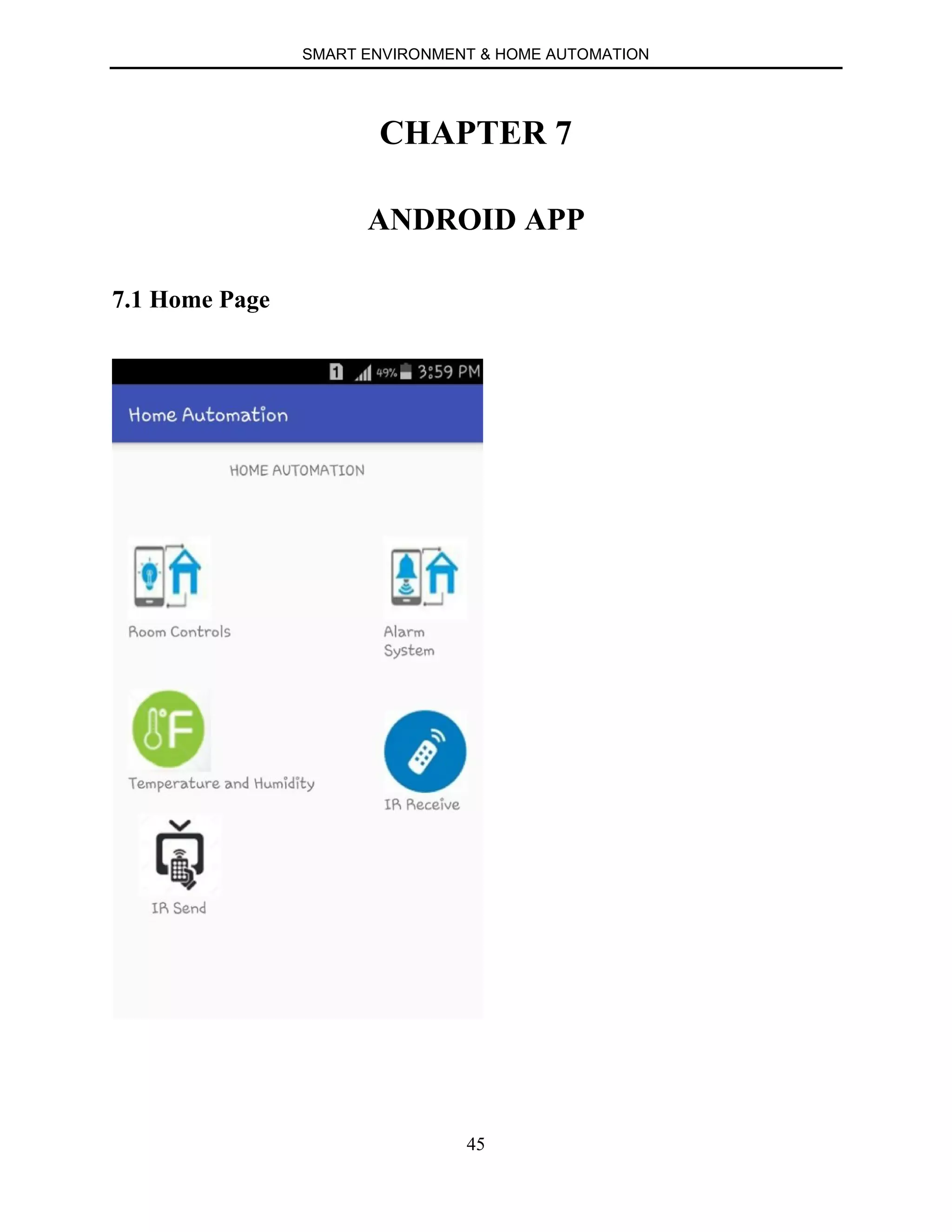
7.1 Home Page
SMART ENVIRONMENT & HOME AUTOMATION
46
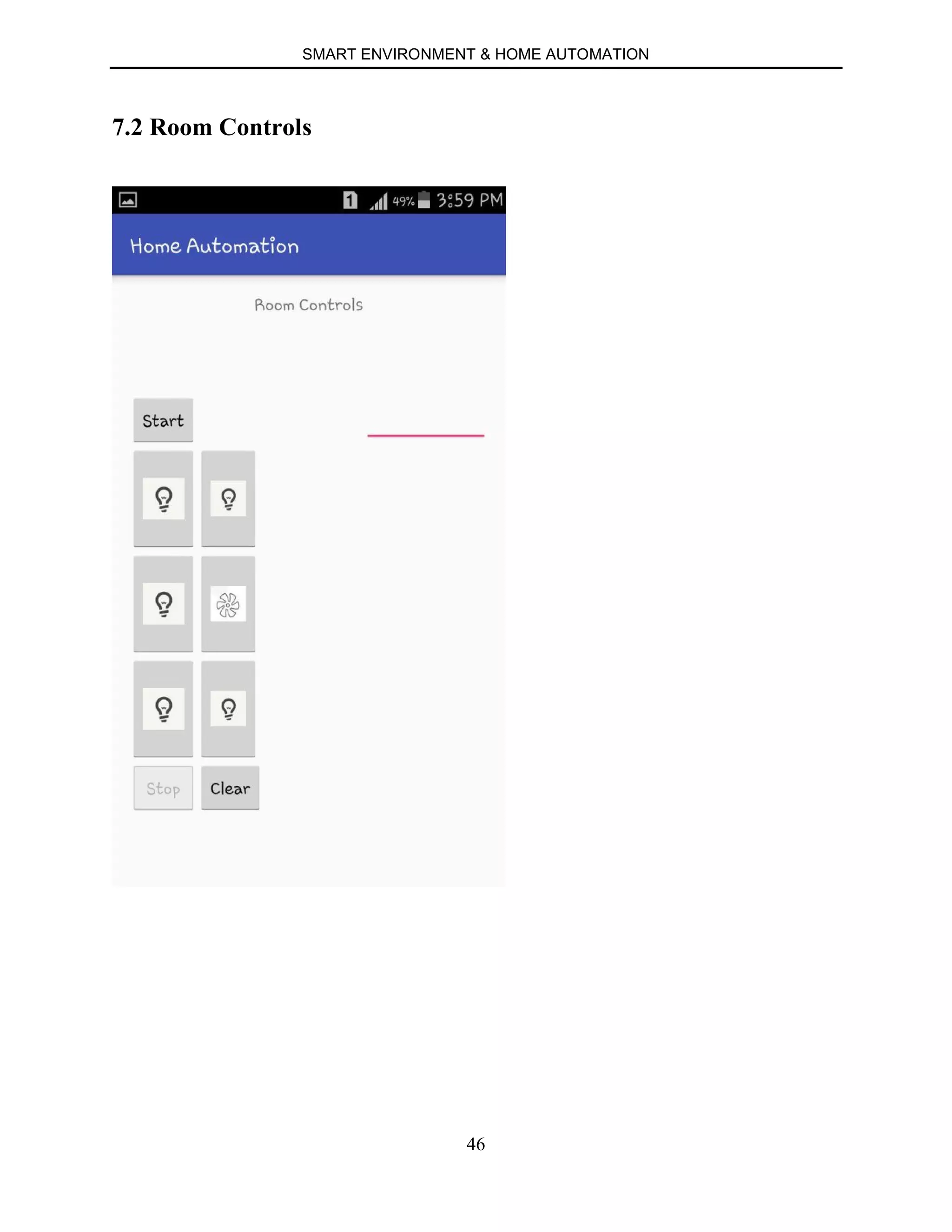
7.2 Room Controls
SMART ENVIRONMENT & HOME AUTOMATION
47
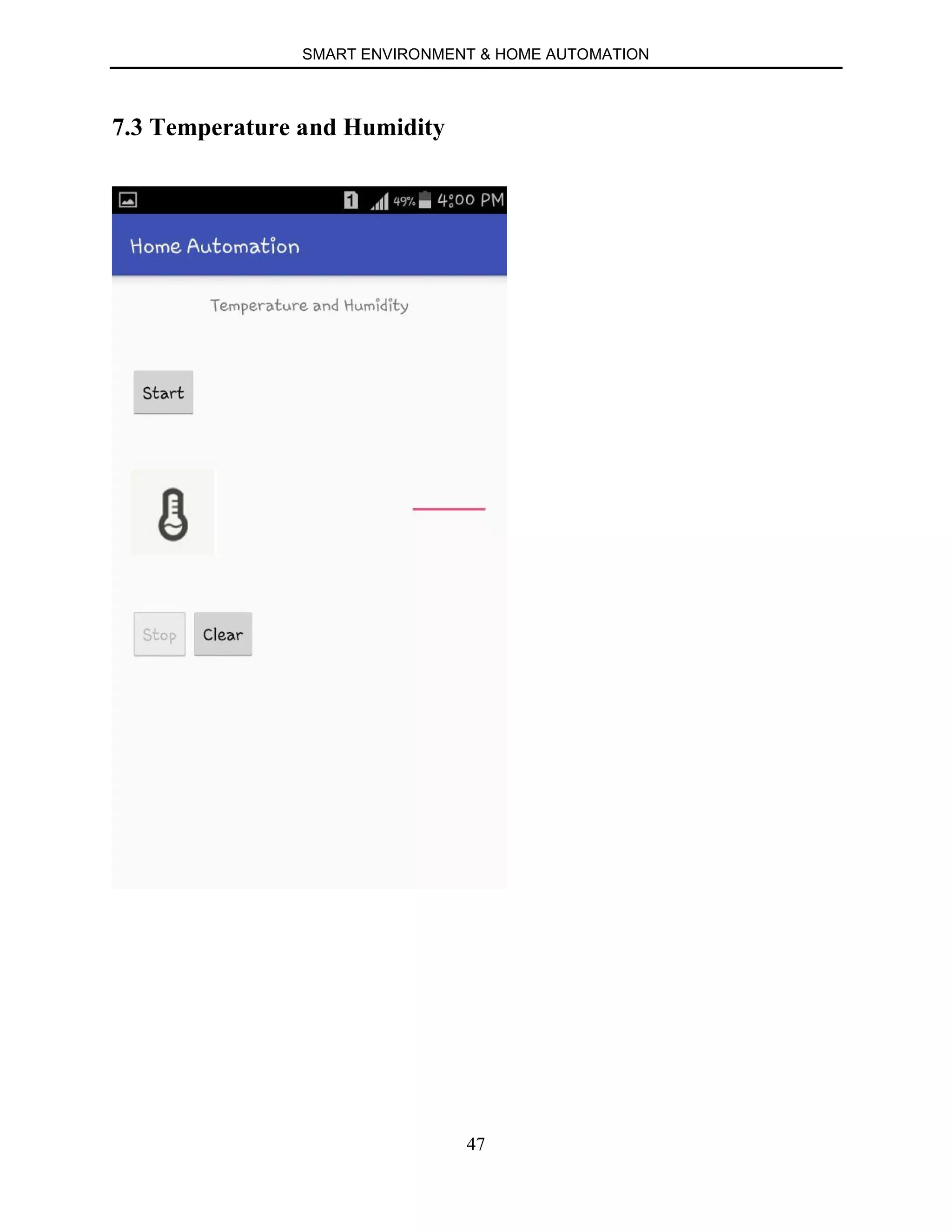
7.3 Temperature and Humidity
SMART ENVIRONMENT & HOME AUTOMATION
48
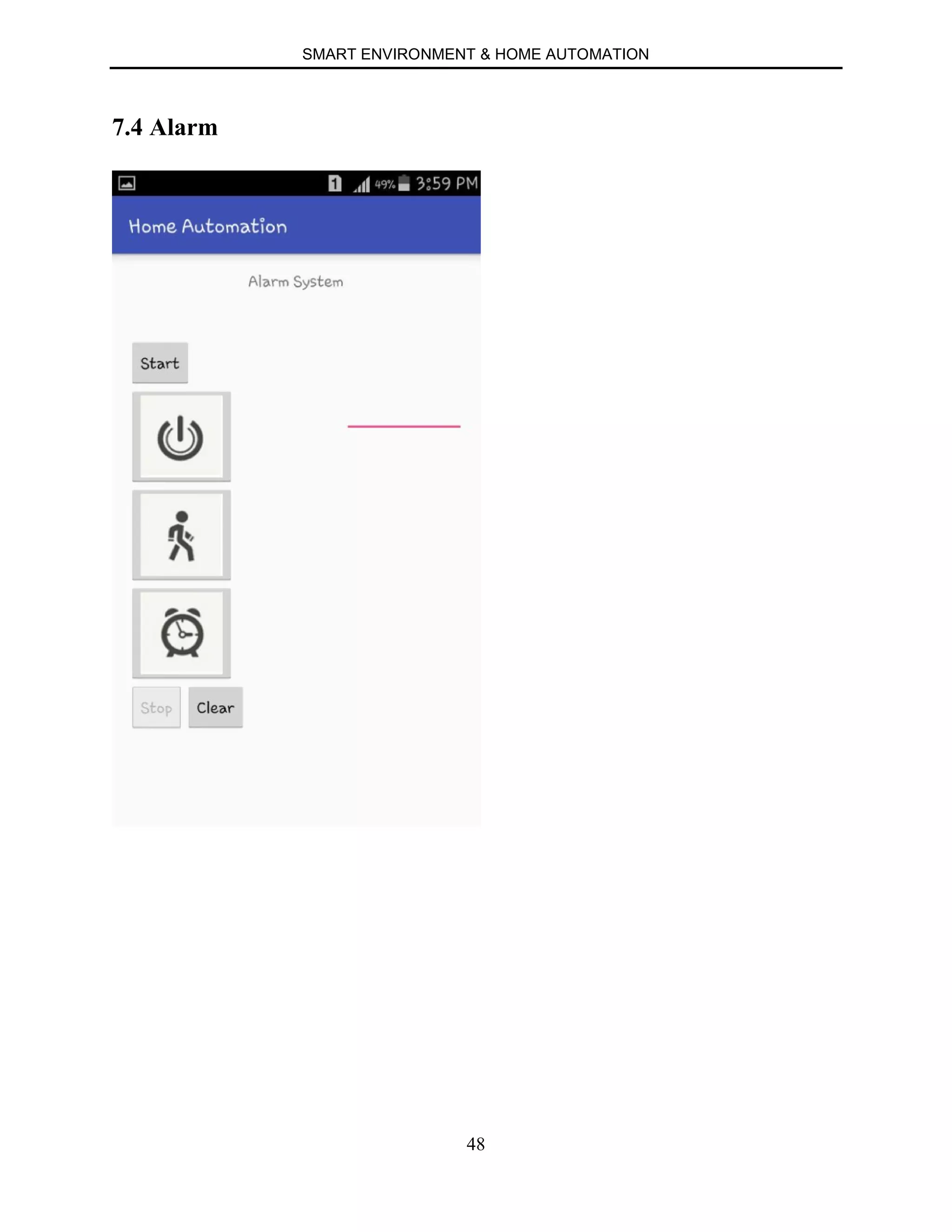
7.4 Alarm
SMART ENVIRONMENT & HOME AUTOMATION
49
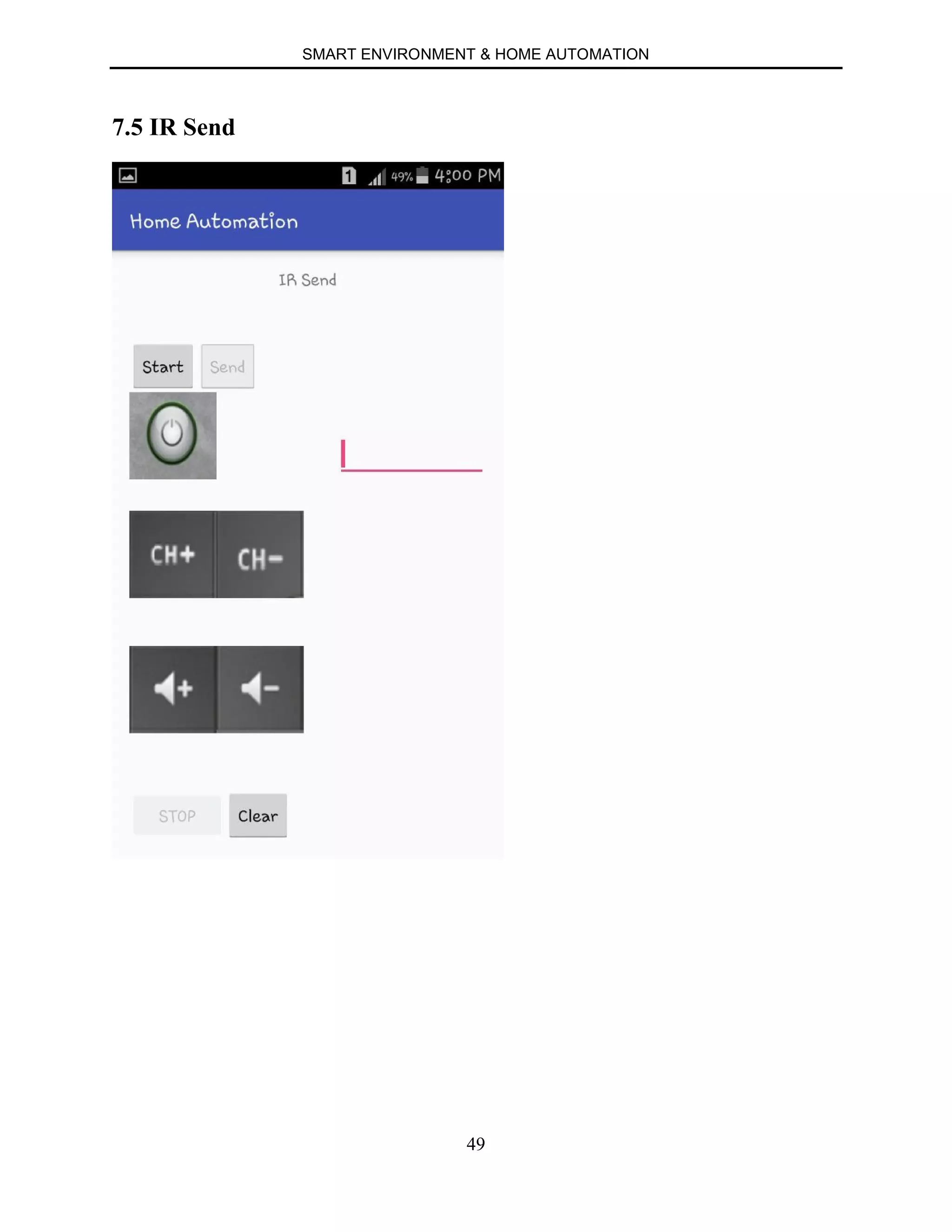
7.5 IR Send
SMART ENVIRONMENT & HOME AUTOMATION
50
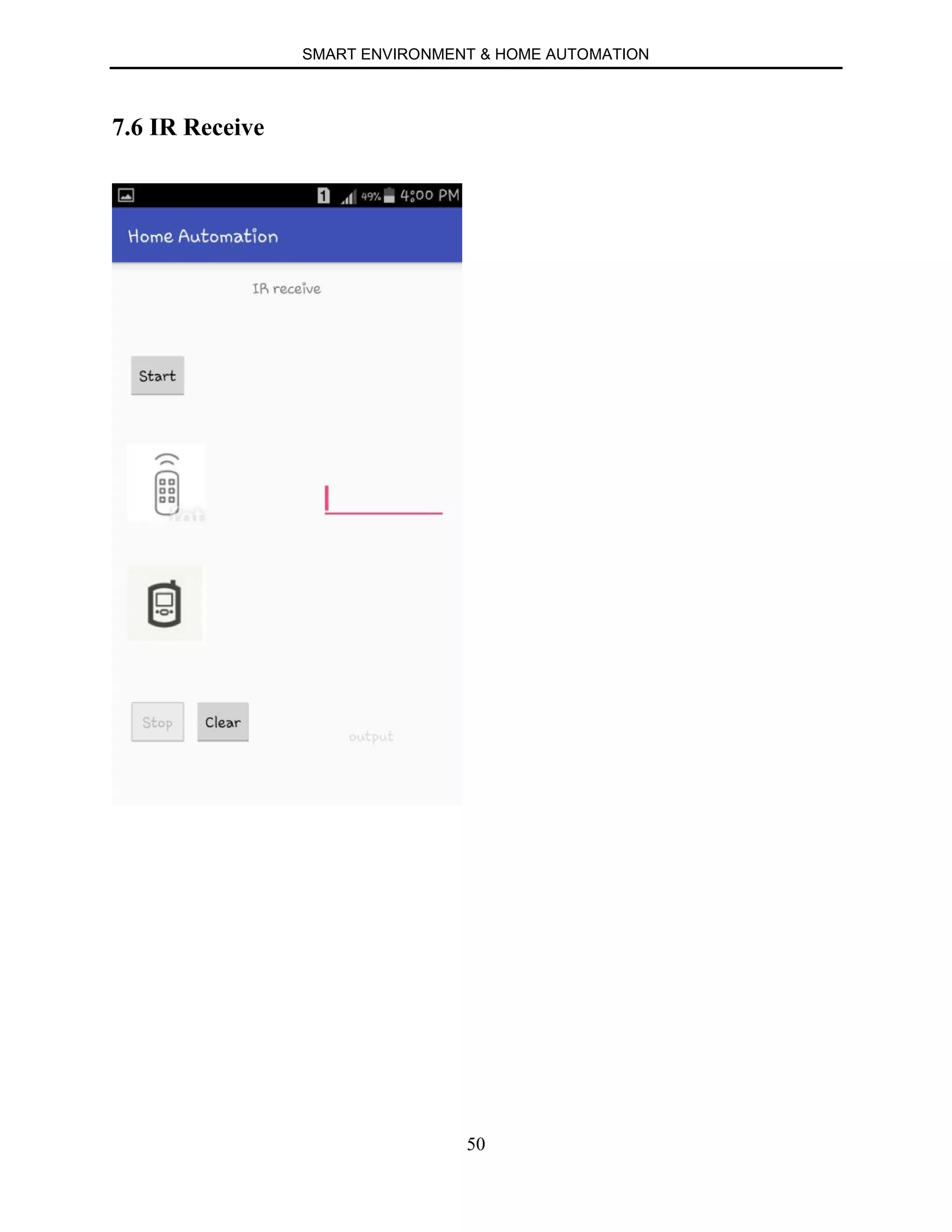
7.6 IR Receive
SMART ENVIRONMENT & HOME AUTOMATION
51
APPLICATIONS
∑ We live in a time unlike any other. With so many technological advancements at
our fingertips, our lives are made easier, which is very fortunate considering the
fast-paced lives most of us lead. In recent years, great strides have been made in
making homes a bit more “tech savvy.” This technology, in short, allows the
homeowner to run his or her home while away through a remote, often on a
Smartphone or IPad. In fact, these homes have been labeled as being “smart,” due
to the fact that they can seemingly think on their own. This ability to “think,” also
known as being an automated home, helps homeowners in a number of ways.
∑ Any day-to-day, repeatable process is automatable with smart home applications.
The greater the control and flexibility of these processes, the more energy and
cost savings the resident experiences, which are factors anyone who pays utilities
strives to moderate. The smart home revolution is likely to be more of an
evolution, with the incorporation of one or two home systems at a time, gradually
automating our households through smart mobile devices.
∑ Burglar alarms are used in residential, commercial, industrial, and military
properties for protection against burglary (theft) or property damage, as well as
personal protection against intruders.
∑ Home Automation not only allows you to make sure lights are off when you are
gone to save electricity, it also allows you to turn them on at specific times if you
would like it to look like you are home. This also helps increase the safety and
security of your home.
SMART ENVIRONMENT & HOME AUTOMATION
52
∑ Perhaps this benefit will not apply to everyone, but for those who habitually
worry about whether or not they have taken care of everything at home before
leaving for the day, a home automation system is a perfect investment. In short, it
offers peace of mind. This is quite beneficial for those individuals who leave each
day, obsessively worrying if everything is in order. With so many stresses in daily
life, it is nice to take at least one off the list by being able to see what is going on
at home without physically being there.
∑ Bluetooth Smart, or Bluetooth Low Energy (BLE), is energy efficient version of
Bluetooth wireless technology often seen in smartphones, and ideal for use with a
headset. Though its range is limited, its energy usage is quite low. Its energy
efficiency, combined with its compatibility with existing smartphones and other
devices, makes it easy for developers and OEMs to create solutions that can
immediately be added to existing systems.
SMART ENVIRONMENT & HOME AUTOMATION
53
REFERENCES
∑ https://www.arduino.cc/
∑ https://developer.android.com
∑ http://www.tutorialspoint.com/android/android_studio.htm
∑ http://fritzing.org/
∑ https://en.wikipedia.org/

Home Automation

  • 1.
    DEPARTMENT OF COMPUTERENGINEERING PADRE CONCEICAO COLLEGE OF ENGINEERING VERNA GOA – 403722 2015-2016 FINAL YEAR PROJECT SMART ENVIRONMENT & HOME AUTOMATION By Pratiksha Gaonkar 201203067 Rahul Kalgutkar 201203096 Kshama Kumar 201203109 Akshata Naik 201203147 Viraj Verlekar 201203182 Sangeeta Debnath 201308622 Internal Guide: Ms. Shona Afonso Internal Co-guide: Ms. Natasha D’Costa
  • 2.
    PADRE CONCEICAO COLLEGEOF ENGINEERING VERNA GOA – 403722 2015-2016 CERTIFICATE This is to certify that this is a bonafide record of project work done on “SMART ENVIRONMENT & HOME AUTOMATION” By Pratiksha Gaonkar Rahul Kalgutkar Kshama Kumar Akshata Naik Viraj Verlekar Sangeeta Debnath Under the guidance of Ms. Shona Afonso and Ms. Natasha D’Costa, for the semesters VII and VIII, Department of Computer Engineering. Approved By: [Shona Afonso] [Natasha D’Costa] [Anusha Pai] [External Examiner] [Dr. Luis Mesquita]
  • 3.
    CONTENTS CHAPTER Page No ACKNOWLEDGEMENT ABSTRACT 1.INTRODUCTION 1 2. SYSTEM OVERVIEW 3 3. REQUIREMENTS 4 a) Hardware Requirements 4 3.a.1) Arduino Uno 5 3.a.2) Relay 7 3.a.3) DHT22 8 3.a.4) HC-05 (Bluetooth device) 10 3.a.5) LDR 11 3.a.6) Laser 12 3.a.7) IR LED 14 3.a.8) IR Receiver 15 3.b.7) AC->DC Converter (Power Supply & Fan) 16 b) Software Requirements 17 3.b.1) Arduino Software 17
  • 4.
    3.b.2) Android Studio18 4. CIRCUIT CONNECTIONS 19 4.1) Arduino and Dht22 20 4.2) Arduino and LDR + Buzzer Connection 21 4.3) Arduino and Relay Connection 22 4.4) Arduino and HC-05 Connection 23 4.5) Arduino and IR Connection 24 4.6) Combining Various Units 25 5. CREATION OF ANDROID PROJECT 26 6. IMPLEMENTATION 30 6.a) Arduino Code 30 6.a.1) Introduction 31 6.a.2) Code for Room Controls 32 6.a.3) Code for Temperature and Humidity 34 6.a.4) Code for Burglary Alarm 35 6.a.5) Code for IR 37 6.b) Android Code 39 6.b.1) Introduction 40 6.b.2) Initialization Function 41 6.b.3) Connect Function 42 6.b.4) Function to Start Connection 43
  • 5.
    6.b.5) Function toStop Connection 44 7. ANDROID APP 45 7.1) Home Page 45 7.2) Room Controls 46 7.3) Temperature and Humidity 47 7.4) Alarm 48 7.5) IR Send 49 7.6) IR Receive 50 8. APPLICATIONS 51 9. REFERENCES 53
  • 6.
    SMART ENVIRONMENT &HOME AUTOMATION ACKNOWLEDGEMENT We are using this opportunity to express our gratitude to everyone who supported us throughout the course of this project. We are thankful for their aspiring guidance, invaluably constructive criticism and friendly advice during the project work. We are sincerely grateful to them for sharing their truthful and illuminating views on a number of issues related to the project. We are thankful to our principal “Dr. Luis C. Mesquita” for granting us the opportunity to undertake this project and providing laboratory facilities, thereby allowing us to complete our project on time and helping us through all the official work. We express our warm thanks to Ms Shona Afonso and Ms Natasha D'Costa for their support and guidance at Padre Conceicao College Of Engineering. Nevertheless, we express our gratitude toward our families and colleagues for their kind co- operation and encouragement which helped us in completion of this project.
  • 7.
    SMART ENVIRONMENT &HOME AUTOMATION ABSTRACT Smart environment is a small world where different kinds of smart devices are continuously working to make inhabitants lives more comfortable. Smart environments aim is to satisfy the experience of individuals from every environment by replacing the hazardous work, physical labor and repetitive tasks with automated agents. Home automation may include centralized control of lighting, heating appliances, security locks of gates and doors and other systems, to provide improved convenience, comfort, energy efficiency and security. Home automation can provide increased quality of life for the elderly and disabled who might otherwise require caregivers or institutional care.
  • 8.
    SMART ENVIRONMENT &HOME AUTOMATION 1 CHAPTER 1 INTRODUCTION The “Home Automation” concept has existed for many years. The terms “Smart Environment” followed and have been used to introduce the concept of networking appliances and devices in the house. Smart Environment represents a great research opportunity in creating new fields in engineering, architecture and computing. Home Automation is becoming popular nowadays and entered quickly in this emerging market. This system is of great use to the end users, especially the disabled and the elderly. Due to the advancement of wireless technology, there are several different of connections are introduced such as GSM, WIFI and Bluetooth. Each of the connection has their own unique specifications and applications. Among the three popular wireless connections that often implemented in Home Automation project, Bluetooth is being chosen with its suitable capability. Bluetooth with globally available frequencies of 2400Hz is able to provide connectivity up to 100 meters at speed of up to 3Mbps depending on the Bluetooth device. The capabilities of Bluetooth are more than enough to be implemented in the design. Also, most of the current laptop/notebook or cell phones are come with built-in Bluetooth adapter. It will indirectly reduce the cost of this system. Without the switches on the wall, the designed system limited the control only at the GUI. This issue brings inconvenient to the people in the house. This designed system remains the physical switches with the modified low voltage activating method, in order to provide safer physical
  • 9.
    SMART ENVIRONMENT &HOME AUTOMATION 2 control to the user compared to the conventional high voltage switches. The Bluetooth connection in this system is established by Bluetooth module that directly receives/ transmits commands to/from smart phone.
  • 10.
    SMART ENVIRONMENT &HOME AUTOMATION 3 CHAPTER 2 SYSTEM OVERVIEW Fig 1 Block Diagram of the System Fig 1 illustrates the overall control function of the system. The Bluetooth wireless connection enabled the system communicates with graphical user interface (GUI) on smart phone without cable. The target home appliances are controlled by the system Main Control Board. The sensors that connected to the main control board measure room temperature in the house. The indication from the sensor is able to remind the user to switch on/off the heater, fan or air cond. in the house. The home appliance on/off status and temperature reading are synchronized to the two GUIs on personal computer or laptop or smart phone. The switches status and sensor reading are in real-time monitoring by the main control board. Any changes on the status or reading will be transmitted to the GUIs.
  • 11.
    SMART ENVIRONMENT &HOME AUTOMATION 4 CHAPTER 3 REQUIREMENTS a) Hardware Requirements: 1. Arduino Uno 2. Relay 3. DHT22 4. HC-05 (Bluetooth device) 5. LDR 6. Laser 7. AC->DC Converter (Power Supply & Fan) b) Software Requirements: 1. Arduino Software 2. Android Studio
  • 12.
    SMART ENVIRONMENT &HOME AUTOMATION 5 3.a.1) ARDUINO UNO ∑ The Arduino Uno is a microcontroller board based on the ATmega328. ∑ It has 14 digital input/output pins (of which 6 can be used as PWM outputs), 6 analog inputs ,a 16 MHz ceramic resonator ,a USB connection ,a power jack ,an ICSP header and a reset button. ∑ It contains everything needed to support the microcontroller; simply connect it to a computer with a USB cable or power it with a AC-to-DC adapter or battery to get started. ∑ Microcontroller ATmega328 Operating Voltage 5V Input Voltage (recommended) 7-12V Input Voltage (limits) 6-20V ∑ Digital I/O Pins 14 (of which 6 provide PWM output) ∑ Analog Input Pins 6 ∑ DC Current per I/O Pin 40 mA ∑ DC Current for 3.3V Pin 50 mA
  • 13.
    SMART ENVIRONMENT &HOME AUTOMATION 6 ∑ Flash Memory 32 KB (ATmega328) of which 0.5 KB used by boot loader ∑ SRAM 2 KB (ATmega328) ∑ EEPROM 1 KB (ATmega328) ∑ Clock Speed 16 MHz
  • 14.
    SMART ENVIRONMENT &HOME AUTOMATION 7 3.a.2) RELAY ∑ Relay board module is used for controlling higher current loads from your Arduino Uno. ∑ This board has eight (8) on-board relay which can switch up to 7Amps. ∑ Relays terminals (C, NC, NO) are accessible through screw terminals which makes wiring up the board very easy. ∑ The relay is safely driven by ULN2803 IC hence your input device, such as Arduino, is protected from relay circuit and IC will further protect your microcontroller from relay kick back. ∑ This is a 12V 8-Channel Relay interface board which can be controlled directly by a wide range of microcontrollers such as Arduino, AVR, PIC, ARM, 8051 and so on.
  • 15.
    SMART ENVIRONMENT &HOME AUTOMATION 8 3.a.3) DHT22 TEMPERATURE AND HUMIDITY SENSOR ∑ The DHT22 (RHT03) is a basic, low-cost digital temperature and humidity sensor. ∑ It uses a capacitive humidity sensor and a thermistor to measure the surrounding air, and spits out a digital signal on the data pin (no analog input pins needed). ∑ It’s fairly simple to use, but requires careful timing to grab data. The only real downside of this sensor is you can only get new data from it once every 2 seconds, so when using our library, sensor readings can be up to 2 seconds old. ∑ Simply connect the first pin on the left to 3-5V power, the second pin to your data input pin and the right most pin to ground.
  • 16.
    SMART ENVIRONMENT &HOME AUTOMATION 9 ∑ Feature & Application: High precision Capacitive type Full range temperature compensated Relative humidity and temperature measurement Calibrated digital signal Outstanding long-term stability Extra components not needed Long transmission distance Low power consumption 4 pins packaged and fully interchangeable.
  • 17.
    SMART ENVIRONMENT &HOME AUTOMATION 10 3.a.4) HC-05 (Bluetooth device) HC-05 module is an easy to use Bluetooth SPP (Serial Port Protocol) module, designed for transparent wireless serial connection setup. Serial port Bluetooth module is fully qualified Bluetooth V2.0+EDR (Enhanced Data Rate) 3Mbps Modulation with complete 2.4GHz radio transceiver and baseband. It uses CSR Bluecore 04-External single chip Bluetooth system with CMOS technology and with AFH(Adaptive Frequency Hopping Feature). It has the footprint as small as 12.7mmx27mm.
  • 18.
    SMART ENVIRONMENT &HOME AUTOMATION 11 3.a.5) LDR An LDR is a component that has a (variable) resistance that changes with the light intensity that falls upon it. This allows them to be used in light sensing circuits. ∑ A photoresistor or light-dependent resistor (LDR) or photocell is a light-controlled variable resistor. ∑ The resistance of a photoresistor decreases with increasing incident light intensity; in other words, it exhibits photoconductivity. ∑ A photoresistor can be applied in light-sensitive detector circuits, and light- and dark- activated switching circuits.
  • 19.
    SMART ENVIRONMENT &HOME AUTOMATION 12 3.a.6)LASER SPECIFICATIONS: ∑ A laser is a device that emits light through a process of optical amplification based on the stimulated emission of electromagnetic radiation. ∑ A laser is a device that emits light through a process of optical amplification based on the stimulated emission of electromagnetic radiation ∑ Lasers are distinguished from other light sources by their coherence. Spatial coherence is typically expressed through the output being a narrow beam, which is diffraction-limited. Laser beams can be focused to very tiny spots, achieving a very high irradiance, or they can have very low divergence in order to concentrate their power at a great distance. ∑ Lasers can also have high temporal coherence, which allows them to emit light with a very narrow spectrum, i.e., they can emit a single color of light. Temporal coherence can be used to produce pulses of light as short as a femtosecond. ∑ Lasers are employed in applications where light of the required spatial or temporal coherence could not be produced using simpler technologies.
  • 20.
    SMART ENVIRONMENT &HOME AUTOMATION 13 ∑ Most of the laser uses feedback from an optical cavity—a pair of mirrors on either end of the gain medium. Light bounces back and forth between the mirrors, passing through the gain medium and being amplified each time. Typically one of the two mirrors, the output coupler, is partially transparent
  • 21.
    SMART ENVIRONMENT &HOME AUTOMATION 14 3.a.7) IR LED An IR LED, also known as IR transmitter, is a special purpose LED that transmits infrared rays in the range of 760 nm wavelength. Such LEDs are usually made of gallium arsenide or aluminium gallium arsenide. They, along with IR receivers, are commonly used as sensors. The appearance is same as a common LED. Since the human eye cannot see the infrared radiations, it is not possible for a person to identify whether the IR LED is working or not, unlike a common LED. To overcome this problem, the camera on a cellphone can be used. The camera can show us the IR rays being emanated from the IR LED in a circuit.
  • 22.
    SMART ENVIRONMENT &HOME AUTOMATION 15 3.a.8) IR Receiver An infrared receiver, or IR receiver, is hardware that sends information from an infrared remote control to another device by receiving and decoding signals. In general, the receiver outputs a code to uniquely identify the infrared signal that it receives. This code is then used in order to convert signals from the remote control into a format that can be understood by the other device. It is the part of a device that receives infrared commands from a remote control. Because infrared is light, it requires line-of-sight visibility for the best possible operation, but can however still be reflected by items such as glass and walls. Poorly placed IR receivers can result in what is called "tunnel vision", where the operational range of a remote control is reduced because they are set so far back into the chassis of a device.
  • 23.
    SMART ENVIRONMENT &HOME AUTOMATION 16 3.a.9) AC->DC Converter A rectifier is an electrical device that converts alternating current (AC), which periodically reverses direction, to direct current (DC), which flows in only one direction. Rectifiers have many uses, but are often found serving as components of DC power supplies and high-voltage direct current power transmission systems.
  • 24.
    SMART ENVIRONMENT &HOME AUTOMATION 17 b) Software Requirements 1. Arduino Software 2. Android Studio 3.b.1) Arduino Software The open-source Arduino Software (IDE) makes it easy to write code and upload it to the board. It runs on Windows, Mac OS X, and Linux. The environment is written in Java and based on Processing and other open-source software. This software can be used with any Arduino board. The Arduino IDE supports the C and C++ programming languages using special rules of code organization. The Arduino IDE supplies a software library called "Wiring" from the Wiring project, which provides many common input and output procedures. A typical Arduino C/C++ sketch consist of two functions that are compiled and linked with a program stub main() into an executable cyclic executive program: ∑ setup(): a function that runs once at the start of a program and that can initialize settings. ∑ loop(): a function called repeatedly until the board powers off. After compilation and linking with the GNU tool chain, also included with the IDE distribution, the Arduino IDE employs the program avrdude to convert the executable code into a text file in hexadecimal coding that is loaded into the Arduino board by a loader program in the board's firmware.
  • 25.
    SMART ENVIRONMENT &HOME AUTOMATION 18 3.b.2) Android Studio Android Studio is the official integrated development environment (IDE) for Android platform development. Features of android studio: ∑ Gradle-based build support. ∑ Android-specific refactoring and quick fixes. ∑ Lint tools to catch performance, usability, version compatibility and other problems. ∑ ProGuard integration and app-signing capabilities. ∑ Template-based wizards to create common Android designs and components. ∑ A rich layout editor that allows users to drag-and-drop UI components, option to preview layouts on multiple screen configurations. ∑ Support for building Android Wear apps ∑ Built-in support for Google Cloud Platform, enabling integration with Google Cloud Messaging and App Engine.
  • 26.
    SMART ENVIRONMENT &HOME AUTOMATION 19 CHAPTER 4 CIRCUIT CONNECTIONS 4.1) ARDUINO AND DHT22 4.2) ARDUINO AND LDR + BUZZER CONNECTION 4.3) ARDUINO AND RELAY CONNECTION 4.4) ARDUINO AND IR CONNECTION 4.5) COMBINING VARIOUS UNITS
  • 27.
    SMART ENVIRONMENT &HOME AUTOMATION 20 4.1) ARDUINO AND DHT22
  • 28.
    SMART ENVIRONMENT &HOME AUTOMATION 21 4.2) ARDUINO AND LDR + BUZZER CONNECTION One leg of the LDR is connected to VCC (5V) on the arduino. And the other to the digital pin 11 of the arduino. A 100K resistor is also connected to the same leg and grounded.
  • 29.
    SMART ENVIRONMENT &HOME AUTOMATION 22 4.3) ARDUINO AND RELAY CONNECTION
  • 30.
    SMART ENVIRONMENT &HOME AUTOMATION 23 4.4) ARDUINO AND HC-05 CONNECTION:
  • 31.
    SMART ENVIRONMENT &HOME AUTOMATION 24 4.5) ARDUINO AND IR CONNECTION
  • 32.
    SMART ENVIRONMENT &HOME AUTOMATION 25 4.6) COMBINING THE VARIOUS UNITS:
  • 33.
    SMART ENVIRONMENT &HOME AUTOMATION 26 CHAPTER 5 CREATION OF ANDROID PROJECT
  • 34.
    SMART ENVIRONMENT &HOME AUTOMATION 27
  • 35.
    SMART ENVIRONMENT &HOME AUTOMATION 28
  • 36.
    SMART ENVIRONMENT &HOME AUTOMATION 29
  • 37.
    SMART ENVIRONMENT &HOME AUTOMATION 30 CHAPTER 6 IMPLEMENTATION 6. a) ARDUINO CODE 6.a.1) INTRODUCTION 6.a.2) CODE FOR ROOM CONTROLS 6.a.3) CODE FOR TEMPERATURE AND HUMIDITY 6.a.4) CODE FOR BURGLARY ALARM 6.a.5) CODE FOR IR
  • 38.
    SMART ENVIRONMENT &HOME AUTOMATION 31 6.a.1) INTRODUCTION Setup() Void setup() { Serial.begin(9600); pinMODE.(button Pin, INPUT); } The setup() function is called when a sketch starts. Use it to initialize variables, pin modes, start using libraries, etc. The setup function will only run once, after each powerup or reset of the Arduino board. Loop() Void loop() { if(digitalRead (buttonPin) = = HIGH) Serial.Write(‘H’) else Serial.Write(‘L’) } After creating a setup() function, which initializes and sets the initial values, the loop() function does precisely what its name suggests, and loops consecutively, allowing your program to change and respond. Used to actively control the Arduino board.
  • 39.
    SMART ENVIRONMENT &HOME AUTOMATION 32 6. a.2) CODE FOR ROOM CONTROLS
  • 40.
    SMART ENVIRONMENT &HOME AUTOMATION 33
  • 41.
    SMART ENVIRONMENT &HOME AUTOMATION 34 6.a.3) CODE FOR TEMPERATURE AND HUMIDITY
  • 42.
    SMART ENVIRONMENT &HOME AUTOMATION 35 6.a.4) CODE FOR BURGLAR ALARM
  • 43.
    SMART ENVIRONMENT &HOME AUTOMATION 36
  • 44.
    SMART ENVIRONMENT &HOME AUTOMATION 37 6.a.5) CODE FOR IR
  • 45.
    SMART ENVIRONMENT &HOME AUTOMATION 38
  • 46.
    SMART ENVIRONMENT &HOME AUTOMATION 39 6.b) ANDROID CODE 6.b.1) INTRODUCTION 6.b.2) INITIALIZATION FUNCTION 6.b.3) CONNECT FUNCTION 6.b.4) FUNCTION TO START CONNECTION 6.b.5) FUNCTION TO STOP CONNECTION
  • 47.
    SMART ENVIRONMENT &HOME AUTOMATION 40 6. B.1) INTRODUCTION
  • 48.
    SMART ENVIRONMENT &HOME AUTOMATION 41 6. B.2) INITIALIZATION FUNCTION
  • 49.
    SMART ENVIRONMENT &HOME AUTOMATION 42 6. B.3) CONNECT FUNCTION
  • 50.
    SMART ENVIRONMENT &HOME AUTOMATION 43 6. B.4) FUNCTION TO START CONNECTION
  • 51.
    SMART ENVIRONMENT &HOME AUTOMATION 44 6. B.5) FUNCTION TO STOP CONNECTION
  • 52.
    SMART ENVIRONMENT &HOME AUTOMATION 45 CHAPTER 7 ANDROID APP 7.1 Home Page
  • 53.
    SMART ENVIRONMENT &HOME AUTOMATION 46 7.2 Room Controls
  • 54.
    SMART ENVIRONMENT &HOME AUTOMATION 47 7.3 Temperature and Humidity
  • 55.
    SMART ENVIRONMENT &HOME AUTOMATION 48 7.4 Alarm
  • 56.
    SMART ENVIRONMENT &HOME AUTOMATION 49 7.5 IR Send
  • 57.
    SMART ENVIRONMENT &HOME AUTOMATION 50 7.6 IR Receive
  • 58.
    SMART ENVIRONMENT &HOME AUTOMATION 51 APPLICATIONS ∑ We live in a time unlike any other. With so many technological advancements at our fingertips, our lives are made easier, which is very fortunate considering the fast-paced lives most of us lead. In recent years, great strides have been made in making homes a bit more “tech savvy.” This technology, in short, allows the homeowner to run his or her home while away through a remote, often on a Smartphone or IPad. In fact, these homes have been labeled as being “smart,” due to the fact that they can seemingly think on their own. This ability to “think,” also known as being an automated home, helps homeowners in a number of ways. ∑ Any day-to-day, repeatable process is automatable with smart home applications. The greater the control and flexibility of these processes, the more energy and cost savings the resident experiences, which are factors anyone who pays utilities strives to moderate. The smart home revolution is likely to be more of an evolution, with the incorporation of one or two home systems at a time, gradually automating our households through smart mobile devices. ∑ Burglar alarms are used in residential, commercial, industrial, and military properties for protection against burglary (theft) or property damage, as well as personal protection against intruders. ∑ Home Automation not only allows you to make sure lights are off when you are gone to save electricity, it also allows you to turn them on at specific times if you would like it to look like you are home. This also helps increase the safety and security of your home.
  • 59.
    SMART ENVIRONMENT &HOME AUTOMATION 52 ∑ Perhaps this benefit will not apply to everyone, but for those who habitually worry about whether or not they have taken care of everything at home before leaving for the day, a home automation system is a perfect investment. In short, it offers peace of mind. This is quite beneficial for those individuals who leave each day, obsessively worrying if everything is in order. With so many stresses in daily life, it is nice to take at least one off the list by being able to see what is going on at home without physically being there. ∑ Bluetooth Smart, or Bluetooth Low Energy (BLE), is energy efficient version of Bluetooth wireless technology often seen in smartphones, and ideal for use with a headset. Though its range is limited, its energy usage is quite low. Its energy efficiency, combined with its compatibility with existing smartphones and other devices, makes it easy for developers and OEMs to create solutions that can immediately be added to existing systems.
  • 60.
    SMART ENVIRONMENT &HOME AUTOMATION 53 REFERENCES ∑ https://www.arduino.cc/ ∑ https://developer.android.com ∑ http://www.tutorialspoint.com/android/android_studio.htm ∑ http://fritzing.org/ ∑ https://en.wikipedia.org/