HOME AUTOMATION BY USING ANDROID PHONE
S.VARUN NAIDU(B.TECH 3RD
YEAR EEE)
KABITA KUMARI(B.TECH 3RD
YEAR EEE)
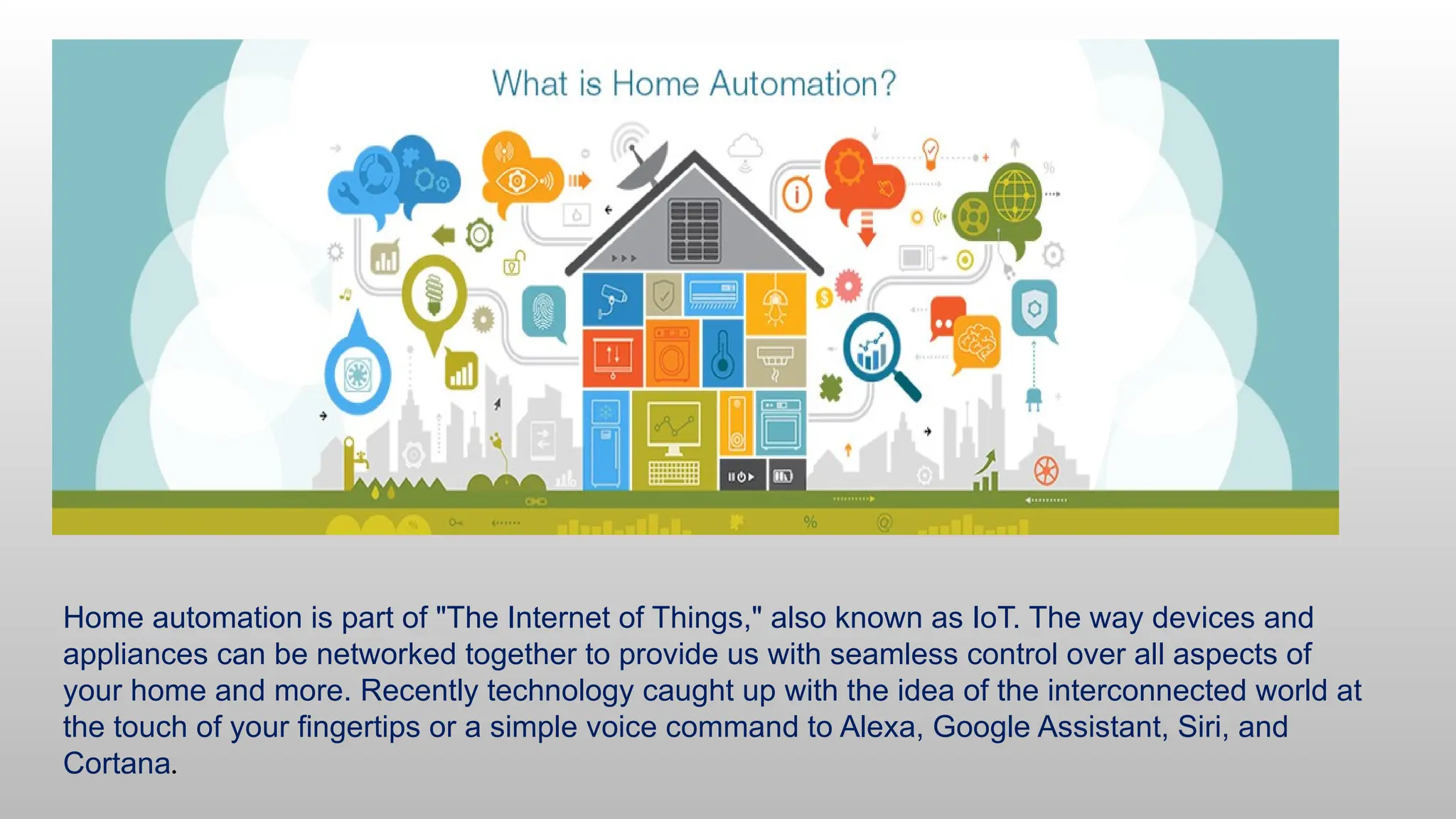
Home automation is part of "The Internet of Things," also known as IoT. The way devices and
appliances can be networked together to provide us with seamless control over all aspects of
your home and more. Recently technology caught up with the idea of the interconnected world at
the touch of your fingertips or a simple voice command to Alexa, Google Assistant, Siri, and
Cortana.
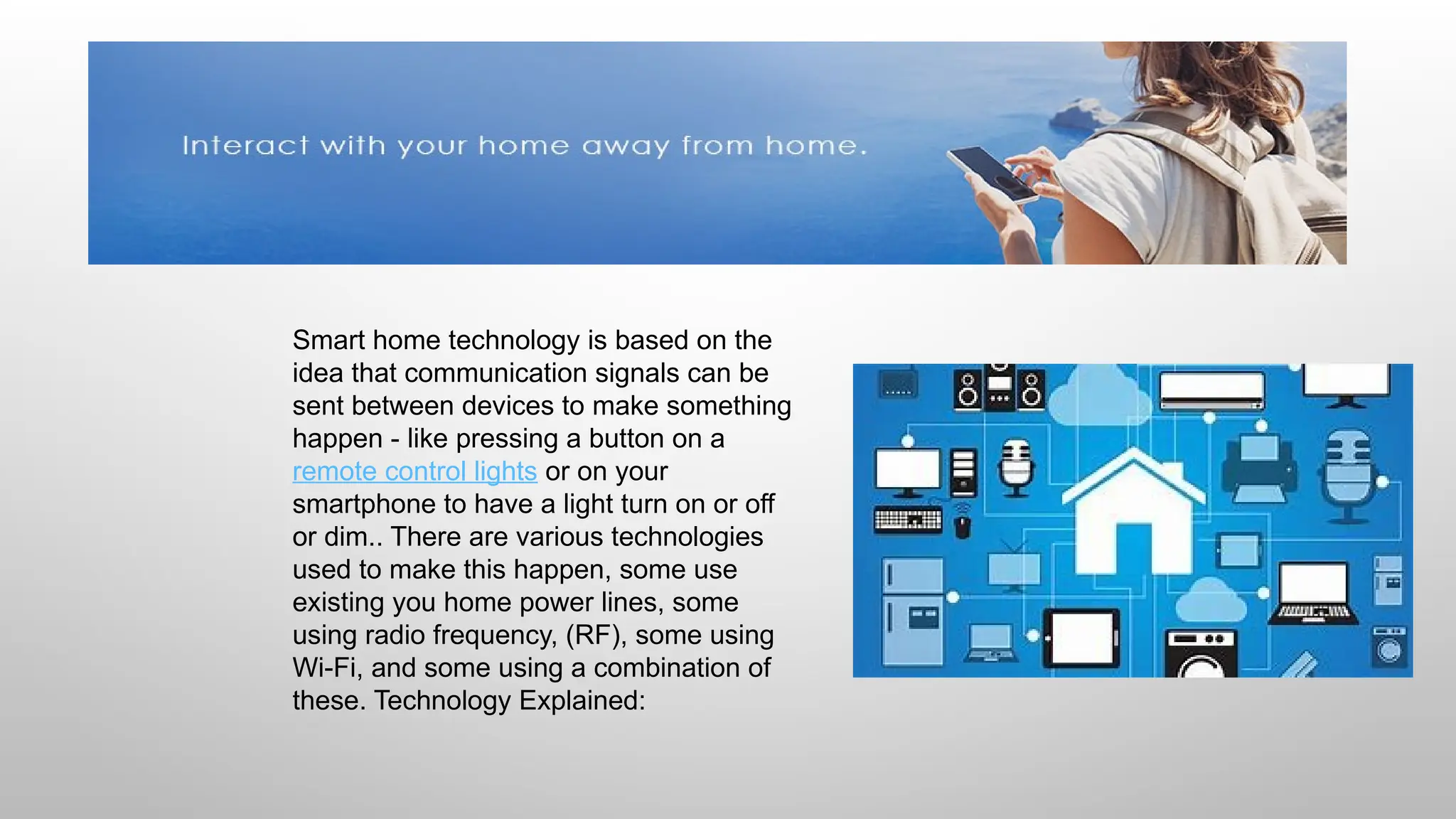
Smart home technology is based on the
idea that communication signals can be
sent between devices to make something
happen - like pressing a button on a
remote control lights or on your
smartphone to have a light turn on or off
or dim.. There are various technologies
used to make this happen, some use
existing you home power lines, some
using radio frequency, (RF), some using
Wi-Fi, and some using a combination of
these. Technology Explained:
HOW DOES SMART HOME TECHNOLOGY WORK?
Wi-Fi
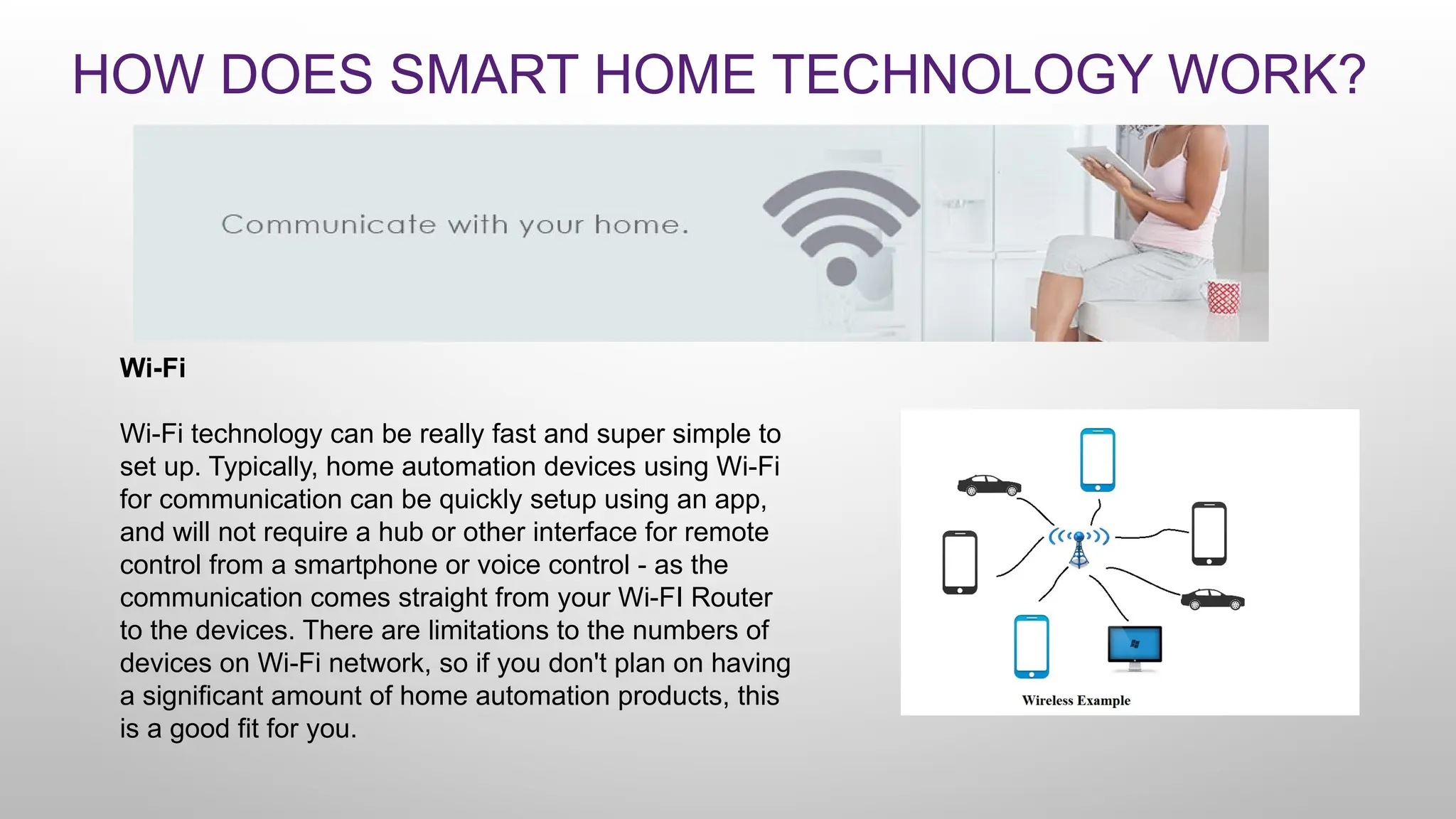
Wi-Fi technology can be really fast and super simple to
set up. Typically, home automation devices using Wi-Fi
for communication can be quickly setup using an app,
and will not require a hub or other interface for remote
control from a smartphone or voice control - as the
communication comes straight from your Wi-FI Router
to the devices. There are limitations to the numbers of
devices on Wi-Fi network, so if you don't plan on having
a significant amount of home automation products, this
is a good fit for you.
Z-Wave & Zigbee
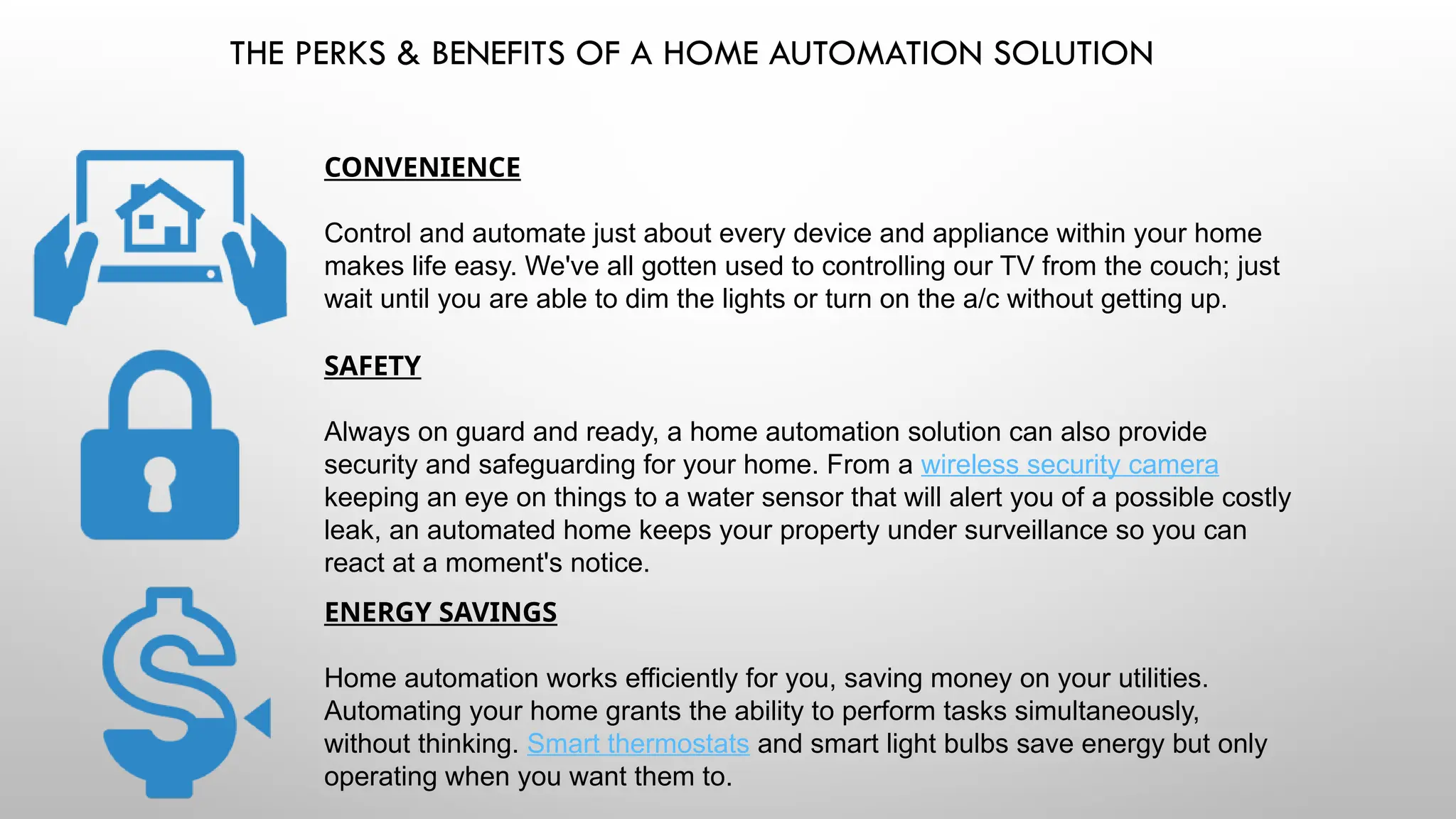
Z-Wave and Zigbee are the two most popular
wireless technologies, using RF to communicate
between devices. These technologies are
licensed out, meaning any number of companies
can create their own products using Z-Wave and
Zigbee technology. As a result (for the most
part) all Z-Wave devices can work with each and
all Zigbee devices can work together -
regardless of brand. A Hub, or other Z-Wave
interfaces will be required for smartphone
control or voice control of Z-Wave products.
THE PERKS & BENEFITS OF A HOME AUTOMATION SOLUTION
CONVENIENCE
Control and automate just about every device and appliance within your home
makes life easy. We've all gotten used to controlling our TV from the couch; just
wait until you are able to dim the lights or turn on the a/c without getting up.
SAFETY
Always on guard and ready, a home automation solution can also provide
security and safeguarding for your home. From a wireless security camera
keeping an eye on things to a water sensor that will alert you of a possible costly
leak, an automated home keeps your property under surveillance so you can
react at a moment's notice.
ENERGY SAVINGS
Home automation works efficiently for you, saving money on your utilities.
Automating your home grants the ability to perform tasks simultaneously,
without thinking. Smart thermostats and smart light bulbs save energy but only
operating when you want them to.
Customization
The many conveniences of a smart home rely on the freedom to do what you
please. Set schedules when you would like air conditioner to turn off or on, when
you want the lights to turn on and to what brightness. Label lights using a home
automation app for your devices, and use your voice to tell them when you want
them on or off.
FUN
Home automation gets you involved. Set your personal preferences and
actions, then sit back and enjoy using the latest in home automation
technology. Though such technology might seem complex, it remains
completely flexible and user-friendly making for a fun experience.
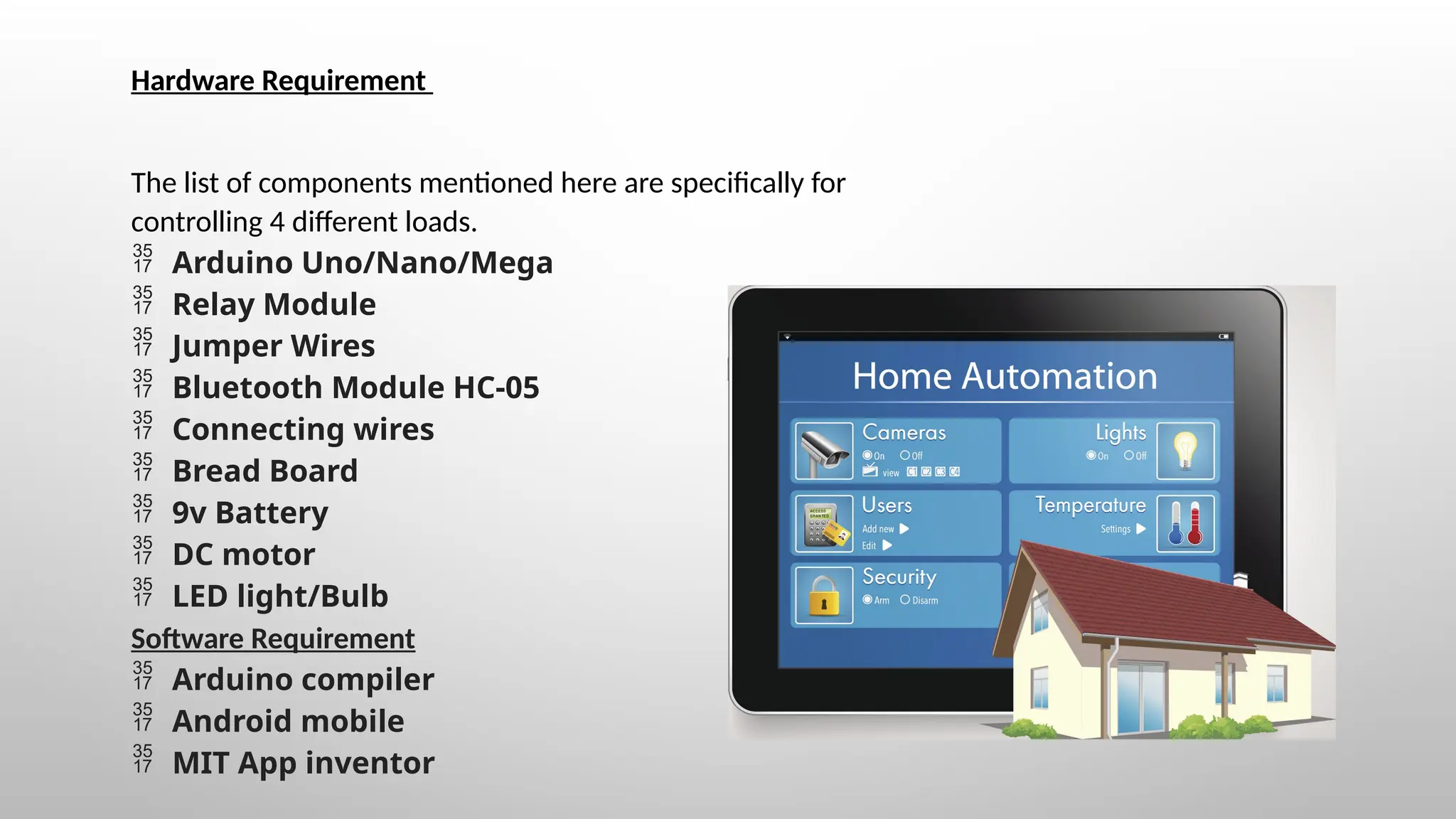
Hardware Requirement
The list of components mentioned here are specifically for
controlling 4 different loads.
 Arduino Uno/Nano/Mega
 Relay Module
 Jumper Wires
 Bluetooth Module HC-05
 Connecting wires
 Bread Board
 9v Battery
 DC motor
 LED light/Bulb
Software Requirement
 Arduino compiler
 Android mobile
 MIT App inventor
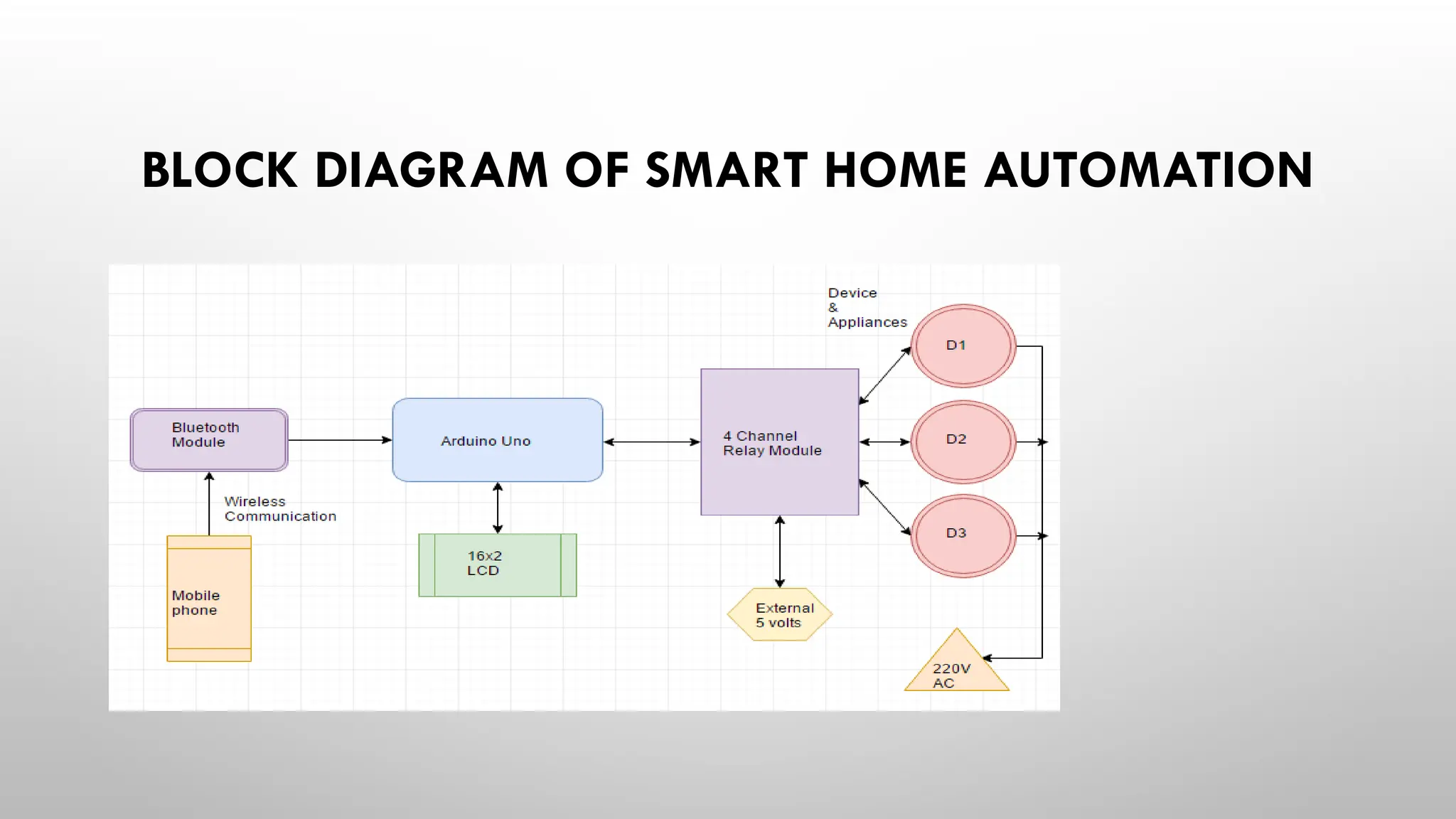
BLOCK DIAGRAM OF SMART HOME AUTOMATION
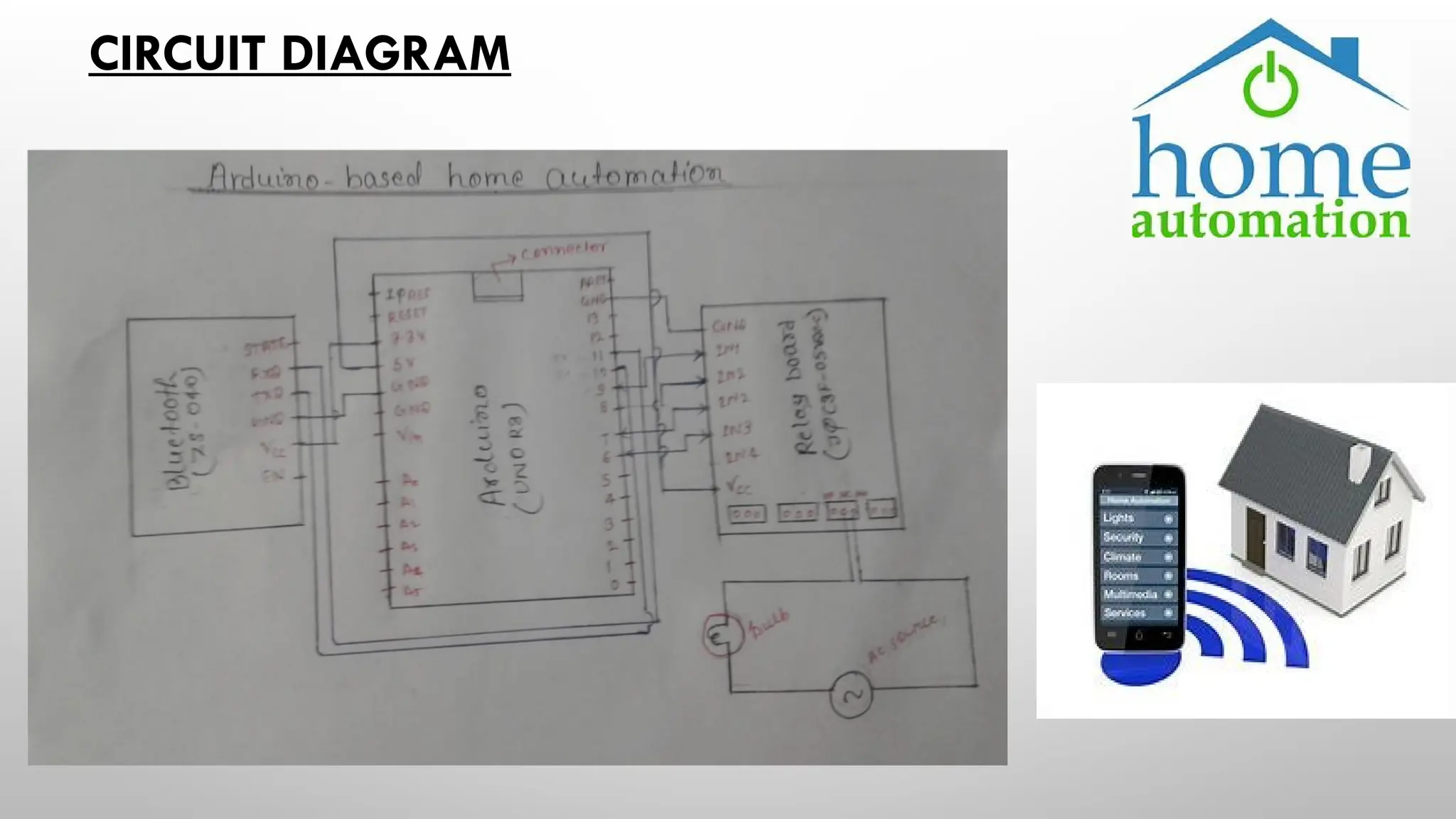
CIRCUIT DIAGRAM
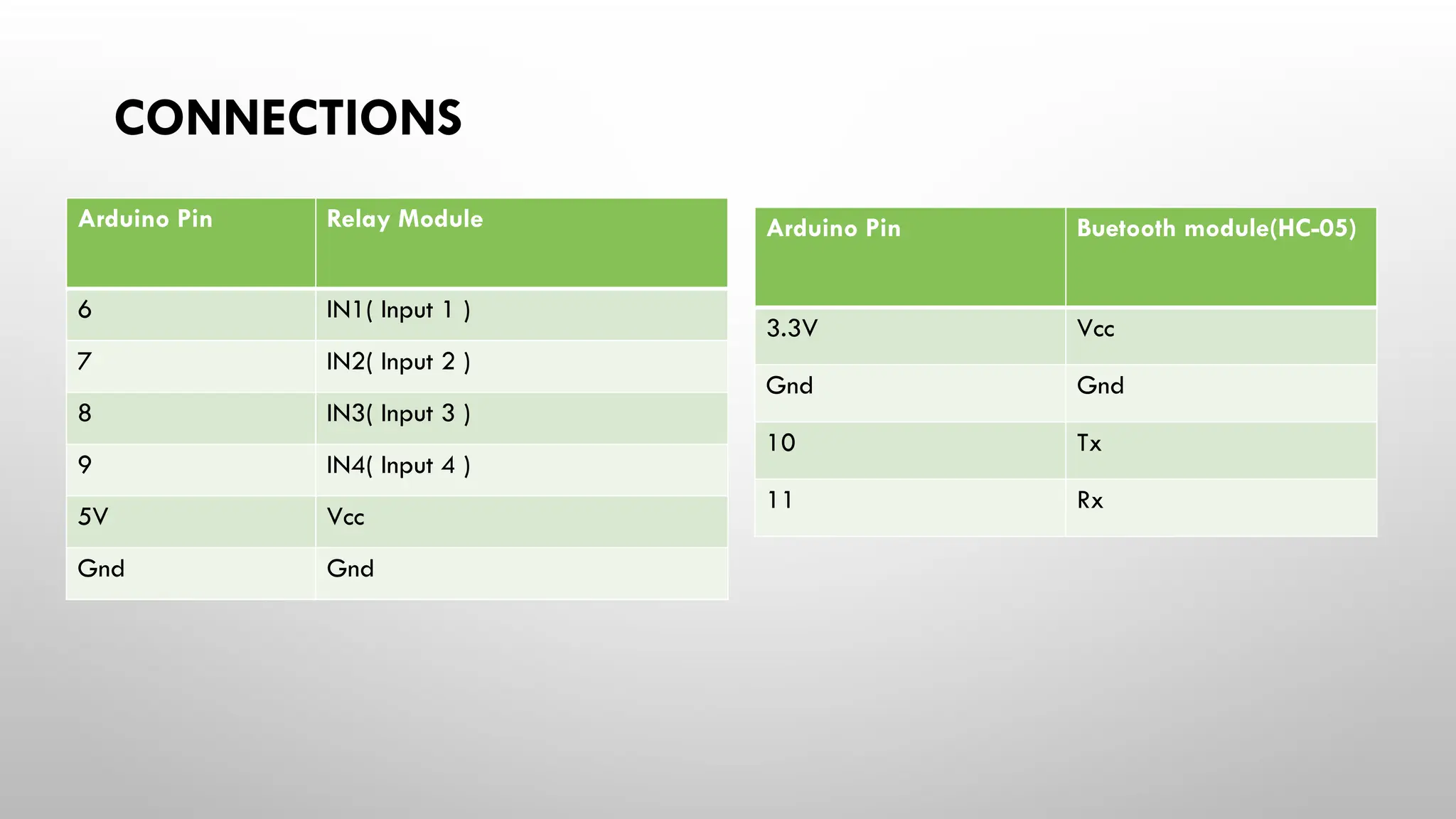
CONNECTIONS
Arduino Pin Buetooth module(HC-05)
3.3V Vcc
Gnd Gnd
10 Tx
11 Rx
Arduino Pin Relay Module
6 IN1( Input 1 )
7 IN2( Input 2 )
8 IN3( Input 3 )
9 IN4( Input 4 )
5V Vcc
Gnd Gnd
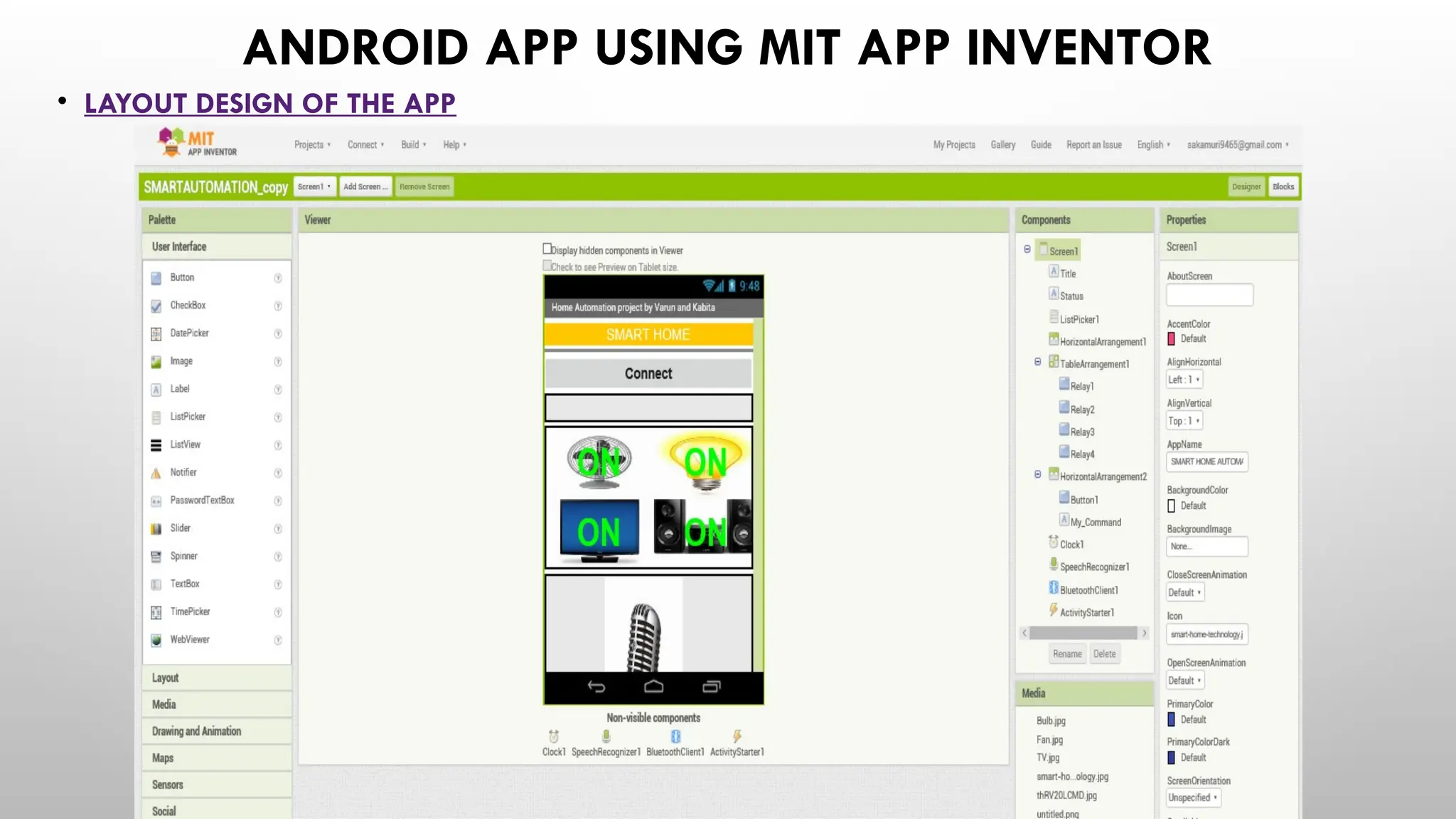
ANDROID APP USING MIT APP INVENTOR
• LAYOUT DESIGN OF THE APP
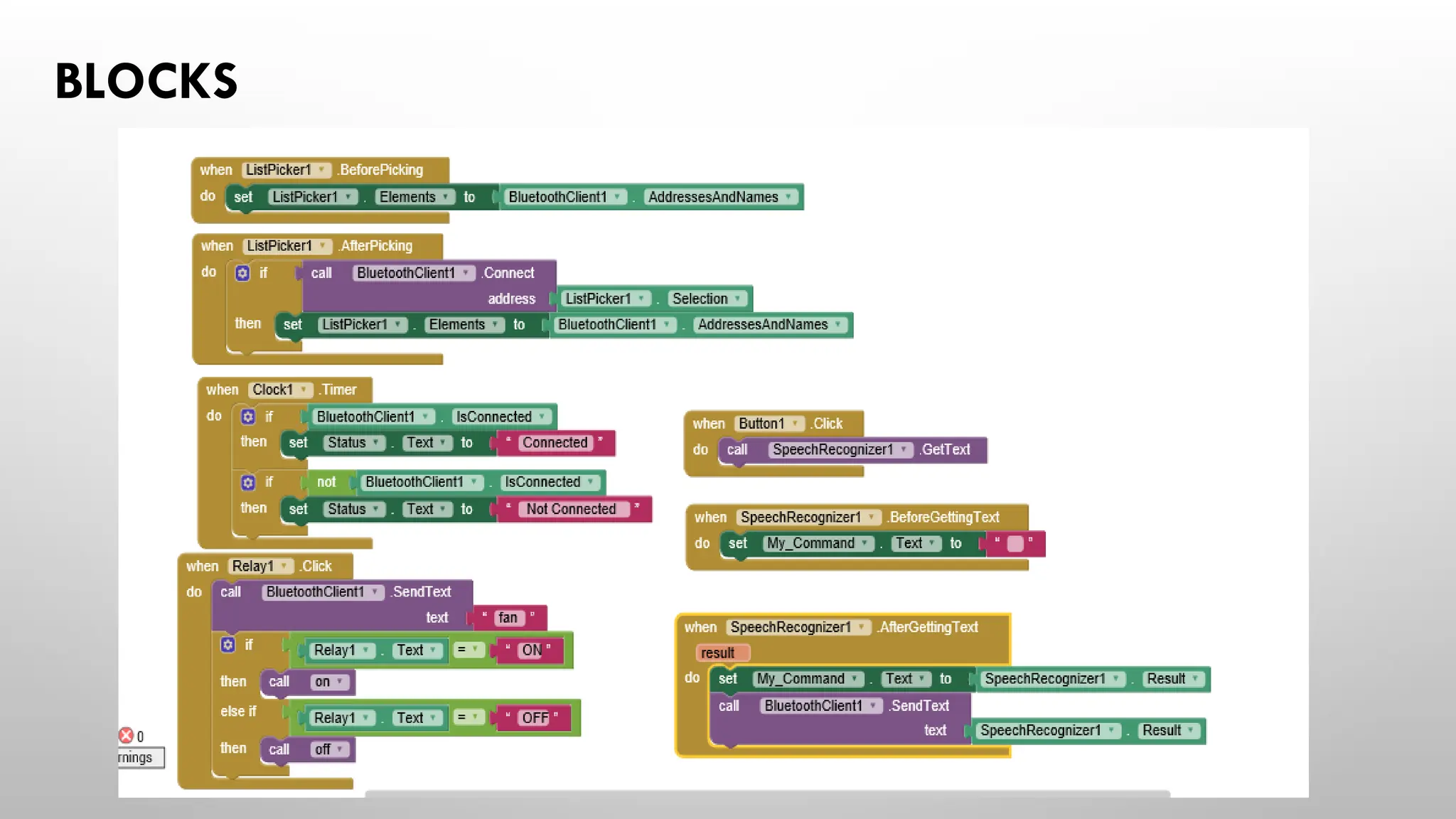
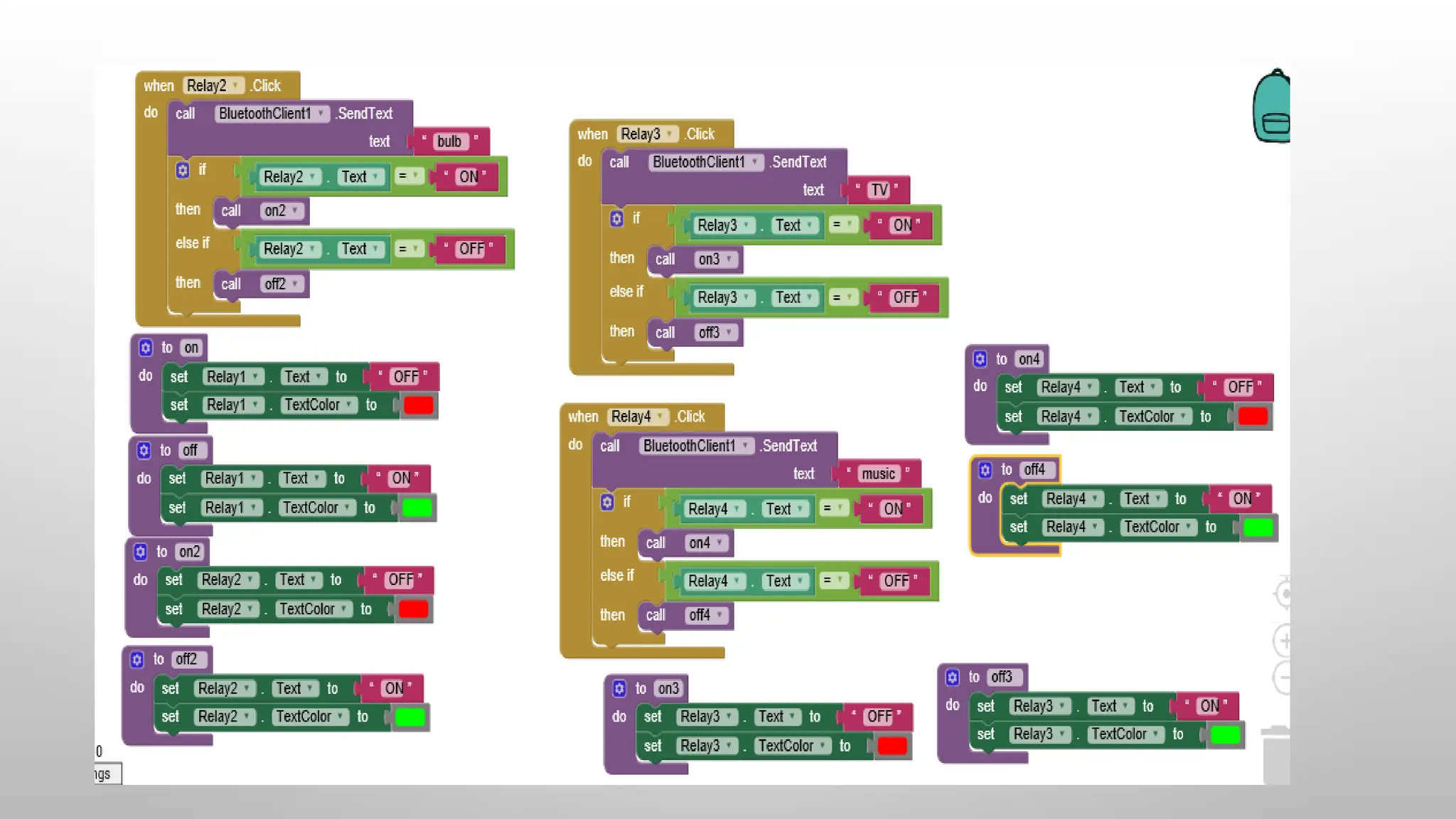
BLOCKS
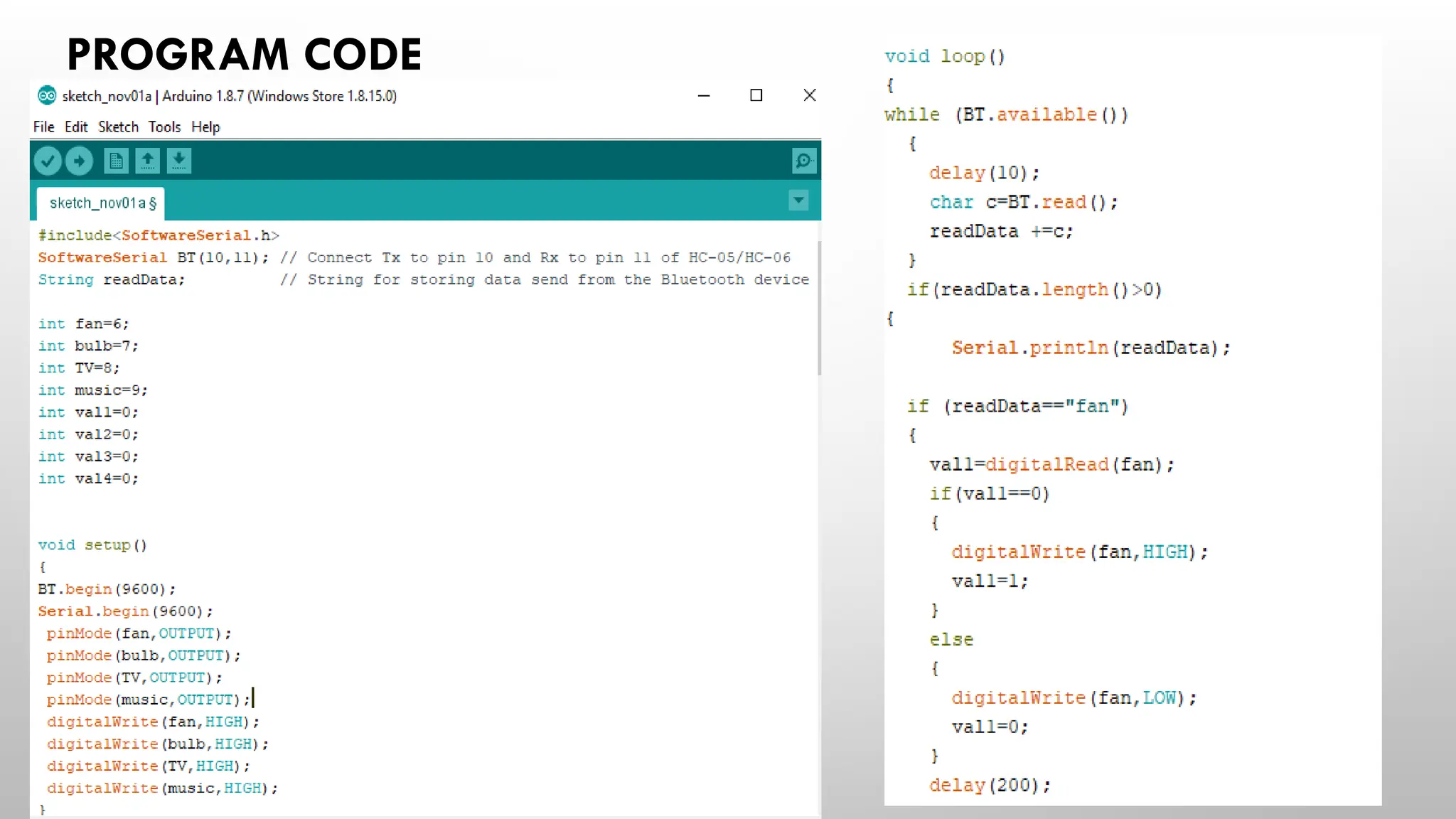
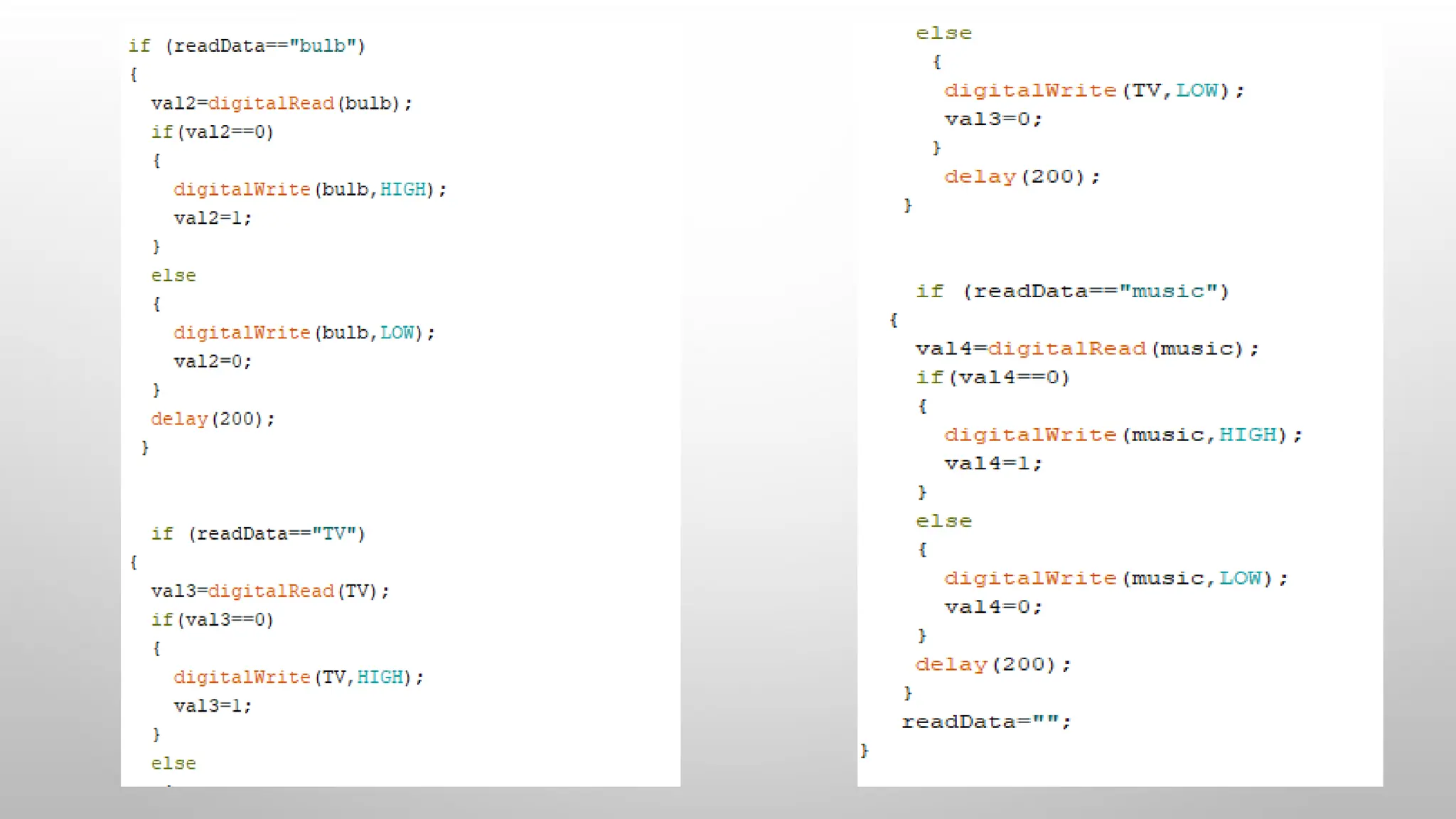
PROGRAM CODE
WORKING OF THE PROJECT
• IN THIS PROJECT WE HAVE USED ARDUINO UNO MICROCONTROLLER FOR CONTROLLING THE
WHOLE PROCESS OF THE PROJECT AND WE HAVE USED HC-05 BLUETOOTH MODULE FOR
WIRELESS COMMUNICATION.THIS BLUETOOTH MODULE CAN BE USED UP TO A RANGE UPTO
30 FEET(10METRES).
• FOR CONTROLLING THE APPLIANCES WE HAVE BEEN USED A 4 CHANNEL RELAY MODULE.WE
HAVE USED TWO DC MOTORS,ONE BULB FOR SHOWING THE OUTPUT.
• HOME APPLIANCES WILL TURNED ON AND OFF WHEN USER WILL TOUCH BUTTON IN THE
BLUETOOTH MOBILE APP IN ANDROID MOBILE PHONE.FIRST WE HAVE INSTALL THE APP THAT
WHICH WE HAVE DEVELOPED USING MIT APP INVENTOR.
• AFTER INSTALLING THE APP, YOU NEED TO OPEN IT AND THEN SEARCH BLUETOOTH DEVICE
AND SELECT HC-05 BLUETOOTH DEVICE. AND THEN CONFIGURE KEYS.
• HERE IN THIS PROJECT WE HAVE USED SMART HOME AUTOMATION APP.
• DOWNLOAD AND INSTALL SMART HOME AUTOMATION APP
• TURNED ON MOBILE BLUETOOTH.
• NOW OPEN SMART HOME AUTOMATION APP
• PRESS CONNECT OPTION IN APP
• SELECT DESIRED BLUETOOTH DEVICE (BLUETOOTH MODULE HC-05).
• NOW BY PRESSING THE DESIRED KEYS THE OUTPUT CONNECTED TO YOUR DEVECES WIIL BE
TURNED ON OR OFF ACCORDING TO YOUR COMMAND.
HOME AUTOMATION BY USING ANDROID PHONE.pptx

HOME AUTOMATION BY USING ANDROID PHONE.pptx

  • 1.
    HOME AUTOMATION BYUSING ANDROID PHONE S.VARUN NAIDU(B.TECH 3RD YEAR EEE) KABITA KUMARI(B.TECH 3RD YEAR EEE)
  • 2.
    Home automation ispart of "The Internet of Things," also known as IoT. The way devices and appliances can be networked together to provide us with seamless control over all aspects of your home and more. Recently technology caught up with the idea of the interconnected world at the touch of your fingertips or a simple voice command to Alexa, Google Assistant, Siri, and Cortana.
  • 3.
    Smart home technologyis based on the idea that communication signals can be sent between devices to make something happen - like pressing a button on a remote control lights or on your smartphone to have a light turn on or off or dim.. There are various technologies used to make this happen, some use existing you home power lines, some using radio frequency, (RF), some using Wi-Fi, and some using a combination of these. Technology Explained:
  • 4.
    HOW DOES SMARTHOME TECHNOLOGY WORK? Wi-Fi Wi-Fi technology can be really fast and super simple to set up. Typically, home automation devices using Wi-Fi for communication can be quickly setup using an app, and will not require a hub or other interface for remote control from a smartphone or voice control - as the communication comes straight from your Wi-FI Router to the devices. There are limitations to the numbers of devices on Wi-Fi network, so if you don't plan on having a significant amount of home automation products, this is a good fit for you.
  • 5.
    Z-Wave & Zigbee Z-Waveand Zigbee are the two most popular wireless technologies, using RF to communicate between devices. These technologies are licensed out, meaning any number of companies can create their own products using Z-Wave and Zigbee technology. As a result (for the most part) all Z-Wave devices can work with each and all Zigbee devices can work together - regardless of brand. A Hub, or other Z-Wave interfaces will be required for smartphone control or voice control of Z-Wave products.
  • 6.
    THE PERKS &BENEFITS OF A HOME AUTOMATION SOLUTION CONVENIENCE Control and automate just about every device and appliance within your home makes life easy. We've all gotten used to controlling our TV from the couch; just wait until you are able to dim the lights or turn on the a/c without getting up. SAFETY Always on guard and ready, a home automation solution can also provide security and safeguarding for your home. From a wireless security camera keeping an eye on things to a water sensor that will alert you of a possible costly leak, an automated home keeps your property under surveillance so you can react at a moment's notice. ENERGY SAVINGS Home automation works efficiently for you, saving money on your utilities. Automating your home grants the ability to perform tasks simultaneously, without thinking. Smart thermostats and smart light bulbs save energy but only operating when you want them to.
  • 7.
    Customization The many conveniencesof a smart home rely on the freedom to do what you please. Set schedules when you would like air conditioner to turn off or on, when you want the lights to turn on and to what brightness. Label lights using a home automation app for your devices, and use your voice to tell them when you want them on or off. FUN Home automation gets you involved. Set your personal preferences and actions, then sit back and enjoy using the latest in home automation technology. Though such technology might seem complex, it remains completely flexible and user-friendly making for a fun experience.
  • 8.
    Hardware Requirement The listof components mentioned here are specifically for controlling 4 different loads.  Arduino Uno/Nano/Mega  Relay Module  Jumper Wires  Bluetooth Module HC-05  Connecting wires  Bread Board  9v Battery  DC motor  LED light/Bulb Software Requirement  Arduino compiler  Android mobile  MIT App inventor
  • 9.
    BLOCK DIAGRAM OFSMART HOME AUTOMATION
  • 10.
  • 11.
    CONNECTIONS Arduino Pin Buetoothmodule(HC-05) 3.3V Vcc Gnd Gnd 10 Tx 11 Rx Arduino Pin Relay Module 6 IN1( Input 1 ) 7 IN2( Input 2 ) 8 IN3( Input 3 ) 9 IN4( Input 4 ) 5V Vcc Gnd Gnd
  • 12.
    ANDROID APP USINGMIT APP INVENTOR • LAYOUT DESIGN OF THE APP
  • 13.
  • 15.
  • 17.
    WORKING OF THEPROJECT • IN THIS PROJECT WE HAVE USED ARDUINO UNO MICROCONTROLLER FOR CONTROLLING THE WHOLE PROCESS OF THE PROJECT AND WE HAVE USED HC-05 BLUETOOTH MODULE FOR WIRELESS COMMUNICATION.THIS BLUETOOTH MODULE CAN BE USED UP TO A RANGE UPTO 30 FEET(10METRES). • FOR CONTROLLING THE APPLIANCES WE HAVE BEEN USED A 4 CHANNEL RELAY MODULE.WE HAVE USED TWO DC MOTORS,ONE BULB FOR SHOWING THE OUTPUT. • HOME APPLIANCES WILL TURNED ON AND OFF WHEN USER WILL TOUCH BUTTON IN THE BLUETOOTH MOBILE APP IN ANDROID MOBILE PHONE.FIRST WE HAVE INSTALL THE APP THAT WHICH WE HAVE DEVELOPED USING MIT APP INVENTOR.
  • 18.
    • AFTER INSTALLINGTHE APP, YOU NEED TO OPEN IT AND THEN SEARCH BLUETOOTH DEVICE AND SELECT HC-05 BLUETOOTH DEVICE. AND THEN CONFIGURE KEYS. • HERE IN THIS PROJECT WE HAVE USED SMART HOME AUTOMATION APP. • DOWNLOAD AND INSTALL SMART HOME AUTOMATION APP • TURNED ON MOBILE BLUETOOTH. • NOW OPEN SMART HOME AUTOMATION APP • PRESS CONNECT OPTION IN APP • SELECT DESIRED BLUETOOTH DEVICE (BLUETOOTH MODULE HC-05). • NOW BY PRESSING THE DESIRED KEYS THE OUTPUT CONNECTED TO YOUR DEVECES WIIL BE TURNED ON OR OFF ACCORDING TO YOUR COMMAND.