Hospital Management
                        System

                        OOSD Assignment 1
Presented by Group 4:
Vivek Sachdeva
                        Object Oriented Analysis
Nesa Simon David
Eric
Presentation Outline
   Introduction
   Project description
     Scope
     Assumptions
   Package diagrams
   System sequence diagrams
   Activity diagrams
   System contracts
   Conclusion
Introduction
   Parkside Hospital
   Hospital Management System
       Patient details and registration
       Consultations
       Resource allocation
       Pharmaceuticals management
       Billing and payments
       User interface conforming to usability guidelines
       Database with audio/visual and past consultations
       Future extensions (web, remote a/v consulting, etc)
       Management reports, security levels, accounting, etc.
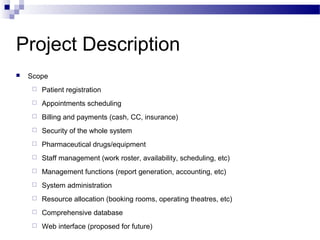
Project Description
   Scope
        Patient registration
        Appointments scheduling
        Billing and payments (cash, CC, insurance)
        Security of the whole system
        Pharmaceutical drugs/equipment
        Staff management (work roster, availability, scheduling, etc)
        Management functions (report generation, accounting, etc)
        System administration
        Resource allocation (booking rooms, operating theatres, etc)
        Comprehensive database
        Web interface (proposed for future)
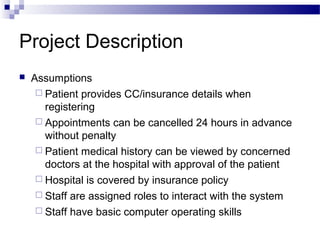
Project Description
   Assumptions
      Patient provides CC/insurance details when
       registering
      Appointments can be cancelled 24 hours in advance
       without penalty
      Patient medical history can be viewed by concerned
       doctors at the hospital with approval of the patient
      Hospital is covered by insurance policy
      Staff are assigned roles to interact with the system
      Staff have basic computer operating skills
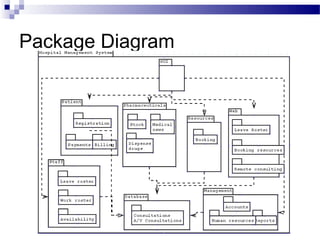
Package Diagram
Activity Diagrams

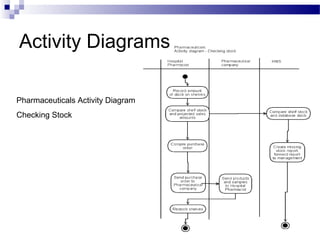
Pharmaceuticals Activity Diagram
Checking Stock
Activity Diagrams


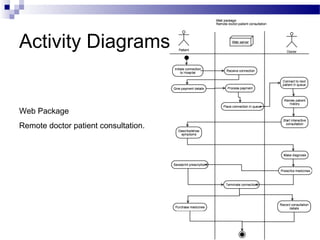
Web Package
Remote doctor patient consultation.
Activity Diagrams


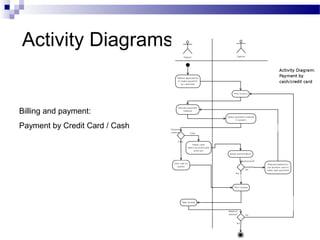
Billing and payment:
Payment by Credit Card / Cash
Activity Diagrams


Billing and payment:
Payment by Insurance
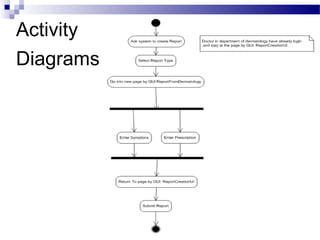
Activity
Diagrams
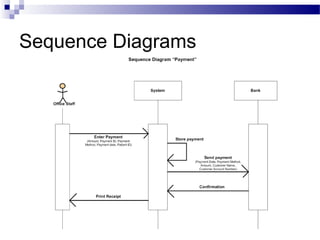
Sequence Diagrams
Sequence Diagrams
Sequence Diagrams


Payment Use
Case
Payment
System Contracts                                      Package

             Contract for the Enter Payment

     Contract


     Name:              Enter payment(Amount, Payment ID, Payment Method,
                        Payment Date, Patient ID)
     Responsibilities   Enter patient payment into the system
     :
     Type:              System
     Exceptions:        If the combination of Payment ID, Payment Method
                        and patient ID is not valid, indicate that it was an error.
     Output:            None
     Preconditions:     A valid patient ID exists.
     Post conditions:   A new payment was entered, linking to the Customer
                        and the Payment.
Payment
System Contracts                                    Package
     Contract for the Store Payment

     Contract


     Name:              Store Payment
     Responsibilities   Store patient payment into the system
     :
     Type:              System
     Exceptions:        None
     Output:            Display “Payment has been stored”
     Preconditions:     The combination of payment ID, payment Method and
                        patient ID is valid.
     Post               A new patient payment was stored, linking to the
     Conditions:        Customer and Payment.
Payment
System Contracts                                      Package
     Contract for the Send Payment

     Contract


     Name:               Send Payment (Payment Date, Payment Method, Amount,
                         Customer Name, Customer Account Number)
     Responsibilities:   Send the stored patient payment to the bank system
     Type:               System
     Exceptions:         If the bank doesn’t exist, indicate that it was an error.
     Output:             Message payment has been sent to the bank system.
     Preconditions:      Patient payment must be stored in the system.
     Post Conditions:    Payment details have been sent to the bank system.
Payment
System Contracts                                     Package
     Contract for the Confirmation

     Contract


     Name:               Confirmation
     Responsibilities:   Confirmation of the payment detail
     Type:               System
     Exceptions:         If the Payment details are not valid, indicate that it was an
                         error.
     Output:             Display “Payment has been confirmed”
     Preconditions:      Patient payment must be sent by hospital
     Post Conditions:    Confirmation of payment has been made
Payment
System Contracts                                      Package
     Contract for the Print Receipt

     Contract


     Name:               Print Receipt
     Responsibilities:   Print the Patient payment receipt
     Type:               System
     Exceptions:         If the printer does not work, indicate that it was an error.
     Output:             Receipt
     Preconditions:      Confirmation must be done by the bank system
     Post Conditions:    Print out the receipt
System Contracts
     Contract for the Create Report

     Contract


     Name:               Create Report (patient, doctor, symptoms, prescription)
     Responsibilities:   Create a Report from Dermatology
     Type:               System
     Exceptions:         If the combination of patient, doctor, symptoms and
                         prescription is not valid, indicate that it was an error.
                         Object may not be found; method/operation may not be
                         found.
     Output:             An object of report from Dermatology
     Preconditions:      Patient, doctor, symptoms, prescription must be know to
                         the system.
     Post Conditions:    A new instance of report from dermatology was created.
System Contracts
              Contract for making payment through the web interface
Contract


Name:                  Make Payment (Patient, Amount)
Responsibilities:      To allow the patient to pay through the web interface

Type:                  System
Exceptions:            Patient does not exist; credit card authentication error


Output:                confirmation from payment processor
Preconditions:         Patient has a debit balance, patient is able to pay with credit card, patient is
                       logged in, invoice has been viewed by patient.

Post Conditions:       Payment created, credit card authentication successful, confirmation from
                       payment processor received, patient gets receipt..
Conclusion
   Project will take approx 1 year to complete
   Project will be developed modularly
   We use Event – driven method.
Q&A

Hospital Management System

  • 1.
    Hospital Management System OOSD Assignment 1 Presented by Group 4: Vivek Sachdeva Object Oriented Analysis Nesa Simon David Eric
  • 2.
    Presentation Outline  Introduction  Project description  Scope  Assumptions  Package diagrams  System sequence diagrams  Activity diagrams  System contracts  Conclusion
  • 3.
    Introduction  Parkside Hospital  Hospital Management System  Patient details and registration  Consultations  Resource allocation  Pharmaceuticals management  Billing and payments  User interface conforming to usability guidelines  Database with audio/visual and past consultations  Future extensions (web, remote a/v consulting, etc)  Management reports, security levels, accounting, etc.
  • 4.
    Project Description  Scope  Patient registration  Appointments scheduling  Billing and payments (cash, CC, insurance)  Security of the whole system  Pharmaceutical drugs/equipment  Staff management (work roster, availability, scheduling, etc)  Management functions (report generation, accounting, etc)  System administration  Resource allocation (booking rooms, operating theatres, etc)  Comprehensive database  Web interface (proposed for future)
  • 5.
    Project Description  Assumptions  Patient provides CC/insurance details when registering  Appointments can be cancelled 24 hours in advance without penalty  Patient medical history can be viewed by concerned doctors at the hospital with approval of the patient  Hospital is covered by insurance policy  Staff are assigned roles to interact with the system  Staff have basic computer operating skills
  • 6.
  • 7.
  • 8.
    Activity Diagrams Web Package Remotedoctor patient consultation.
  • 9.
    Activity Diagrams Billing andpayment: Payment by Credit Card / Cash
  • 10.
    Activity Diagrams Billing andpayment: Payment by Insurance
  • 11.
  • 12.
  • 13.
  • 14.
  • 15.
    Payment System Contracts Package Contract for the Enter Payment Contract Name: Enter payment(Amount, Payment ID, Payment Method, Payment Date, Patient ID) Responsibilities Enter patient payment into the system : Type: System Exceptions: If the combination of Payment ID, Payment Method and patient ID is not valid, indicate that it was an error. Output: None Preconditions: A valid patient ID exists. Post conditions: A new payment was entered, linking to the Customer and the Payment.
  • 16.
    Payment System Contracts Package Contract for the Store Payment Contract Name: Store Payment Responsibilities Store patient payment into the system : Type: System Exceptions: None Output: Display “Payment has been stored” Preconditions: The combination of payment ID, payment Method and patient ID is valid. Post A new patient payment was stored, linking to the Conditions: Customer and Payment.
  • 17.
    Payment System Contracts Package Contract for the Send Payment Contract Name: Send Payment (Payment Date, Payment Method, Amount, Customer Name, Customer Account Number) Responsibilities: Send the stored patient payment to the bank system Type: System Exceptions: If the bank doesn’t exist, indicate that it was an error. Output: Message payment has been sent to the bank system. Preconditions: Patient payment must be stored in the system. Post Conditions: Payment details have been sent to the bank system.
  • 18.
    Payment System Contracts Package Contract for the Confirmation Contract Name: Confirmation Responsibilities: Confirmation of the payment detail Type: System Exceptions: If the Payment details are not valid, indicate that it was an error. Output: Display “Payment has been confirmed” Preconditions: Patient payment must be sent by hospital Post Conditions: Confirmation of payment has been made
  • 19.
    Payment System Contracts Package Contract for the Print Receipt Contract Name: Print Receipt Responsibilities: Print the Patient payment receipt Type: System Exceptions: If the printer does not work, indicate that it was an error. Output: Receipt Preconditions: Confirmation must be done by the bank system Post Conditions: Print out the receipt
  • 20.
    System Contracts Contract for the Create Report Contract Name: Create Report (patient, doctor, symptoms, prescription) Responsibilities: Create a Report from Dermatology Type: System Exceptions: If the combination of patient, doctor, symptoms and prescription is not valid, indicate that it was an error. Object may not be found; method/operation may not be found. Output: An object of report from Dermatology Preconditions: Patient, doctor, symptoms, prescription must be know to the system. Post Conditions: A new instance of report from dermatology was created.
  • 21.
    System Contracts Contract for making payment through the web interface Contract Name: Make Payment (Patient, Amount) Responsibilities: To allow the patient to pay through the web interface Type: System Exceptions: Patient does not exist; credit card authentication error Output: confirmation from payment processor Preconditions: Patient has a debit balance, patient is able to pay with credit card, patient is logged in, invoice has been viewed by patient. Post Conditions: Payment created, credit card authentication successful, confirmation from payment processor received, patient gets receipt..
  • 22.
    Conclusion  Project will take approx 1 year to complete  Project will be developed modularly  We use Event – driven method.
  • 23.