hosted by
HBaseConAsia2018
HBase and OpenTSDB Practices
at Huawei
Pankaj Kumar, Zhongchaoqiang, Guoyijun, Zhiwei
{Pankaj.kr, zhongchaoqiang, guoyijun, wei.zhi}@huawei.com
hosted by
HBase Tech Lead @ Huawei India
Apache HBase Contributor
5 years of experience in Big Data related projects
$ whoami
3
HBase @ Huawei
Migrated from 1.0.2 version
1.3.1 version +
 Secondary index
 MOB
 Multi split
Migrating to 2.1.x cluster this year
Content
01
02
HBase Practices
OpenTSDB Practices
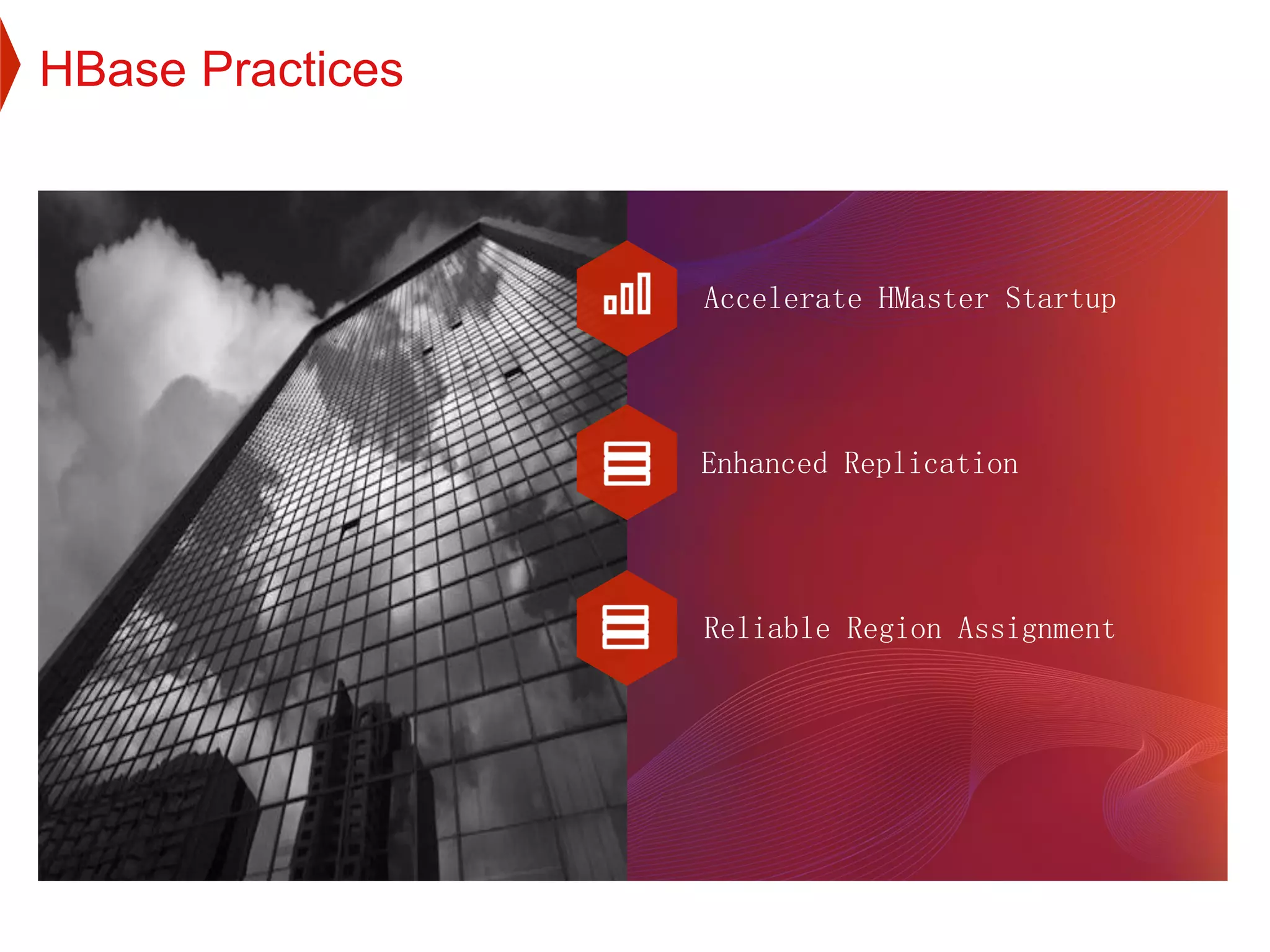
Accelerate HMaster Startup
Enhanced Replication
Reliable Region Assignment
HBase Practices
1.1 Accelerate HMaster Startup
7
Accelerate HMaster Startup
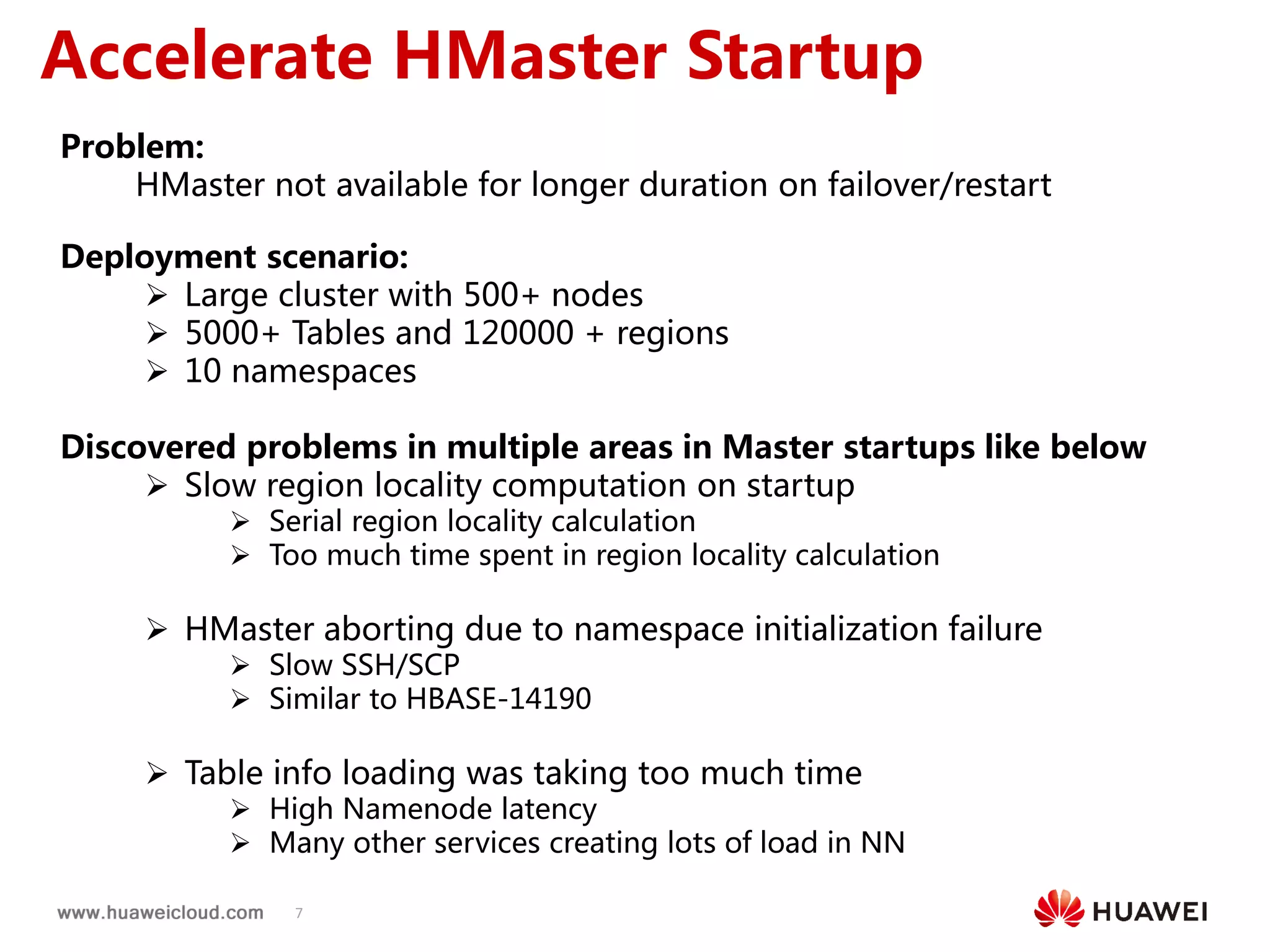
Problem:
HMaster not available for longer duration on failover/restart
Deployment scenario:
 Large cluster with 500+ nodes
 5000+ Tables and 120000 + regions
 10 namespaces
Discovered problems in multiple areas in Master startups like below
 Slow region locality computation on startup
 Serial region locality calculation
 Too much time spent in region locality calculation
 HMaster aborting due to namespace initialization failure
 Slow SSH/SCP
 Similar to HBASE-14190
 Table info loading was taking too much time
 High Namenode latency
 Many other services creating lots of load in NN
8
Accelerate HMaster Startup
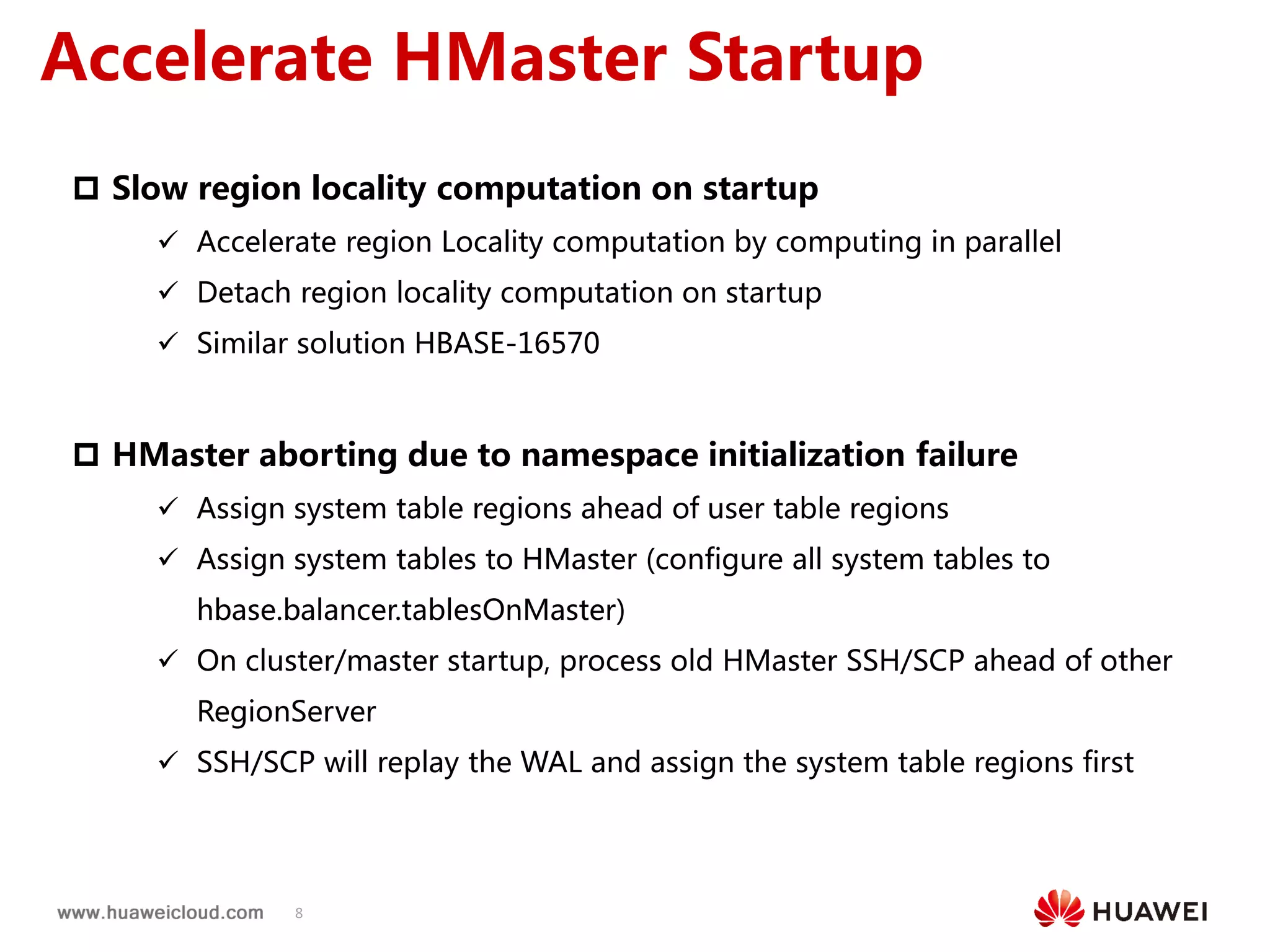
 Slow region locality computation on startup
 Accelerate region Locality computation by computing in parallel
 Detach region locality computation on startup
 Similar solution HBASE-16570
 HMaster aborting due to namespace initialization failure
 Assign system table regions ahead of user table regions
 Assign system tables to HMaster (configure all system tables to
hbase.balancer.tablesOnMaster)
 On cluster/master startup, process old HMaster SSH/SCP ahead of other
RegionServer
 SSH/SCP will replay the WAL and assign the system table regions first
9
Accelerate HMaster Startup
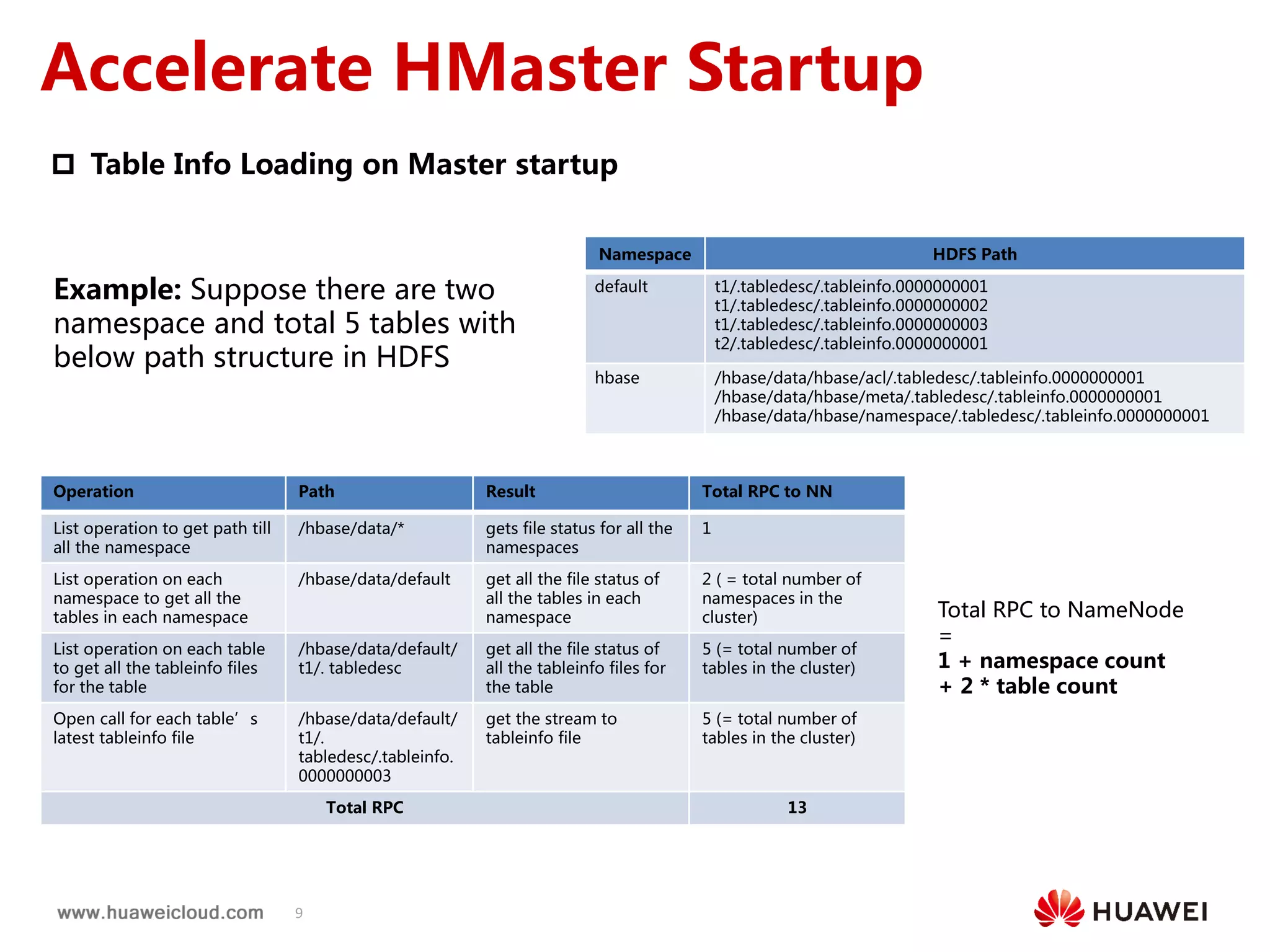
 Table Info Loading on Master startup
Namespace HDFS Path
default t1/.tabledesc/.tableinfo.0000000001
t1/.tabledesc/.tableinfo.0000000002
t1/.tabledesc/.tableinfo.0000000003
t2/.tabledesc/.tableinfo.0000000001
hbase /hbase/data/hbase/acl/.tabledesc/.tableinfo.0000000001
/hbase/data/hbase/meta/.tabledesc/.tableinfo.0000000001
/hbase/data/hbase/namespace/.tabledesc/.tableinfo.0000000001
Operation Path Result Total RPC to NN
List operation to get path till
all the namespace
/hbase/data/* gets file status for all the
namespaces
1
List operation on each
namespace to get all the
tables in each namespace
/hbase/data/default get all the file status of
all the tables in each
namespace
2 ( = total number of
namespaces in the
cluster)
List operation on each table
to get all the tableinfo files
for the table
/hbase/data/default/
t1/. tabledesc
get all the file status of
all the tableinfo files for
the table
5 (= total number of
tables in the cluster)
Open call for each table’s
latest tableinfo file
/hbase/data/default/
t1/.
tabledesc/.tableinfo.
0000000003
get the stream to
tableinfo file
5 (= total number of
tables in the cluster)
Total RPC 13
Example: Suppose there are two
namespace and total 5 tables with
below path structure in HDFS
Total RPC to NameNode
=
1 + namespace count
+ 2 * table count
10
Accelerate HMaster Startup
Table Info Loading on Master startup
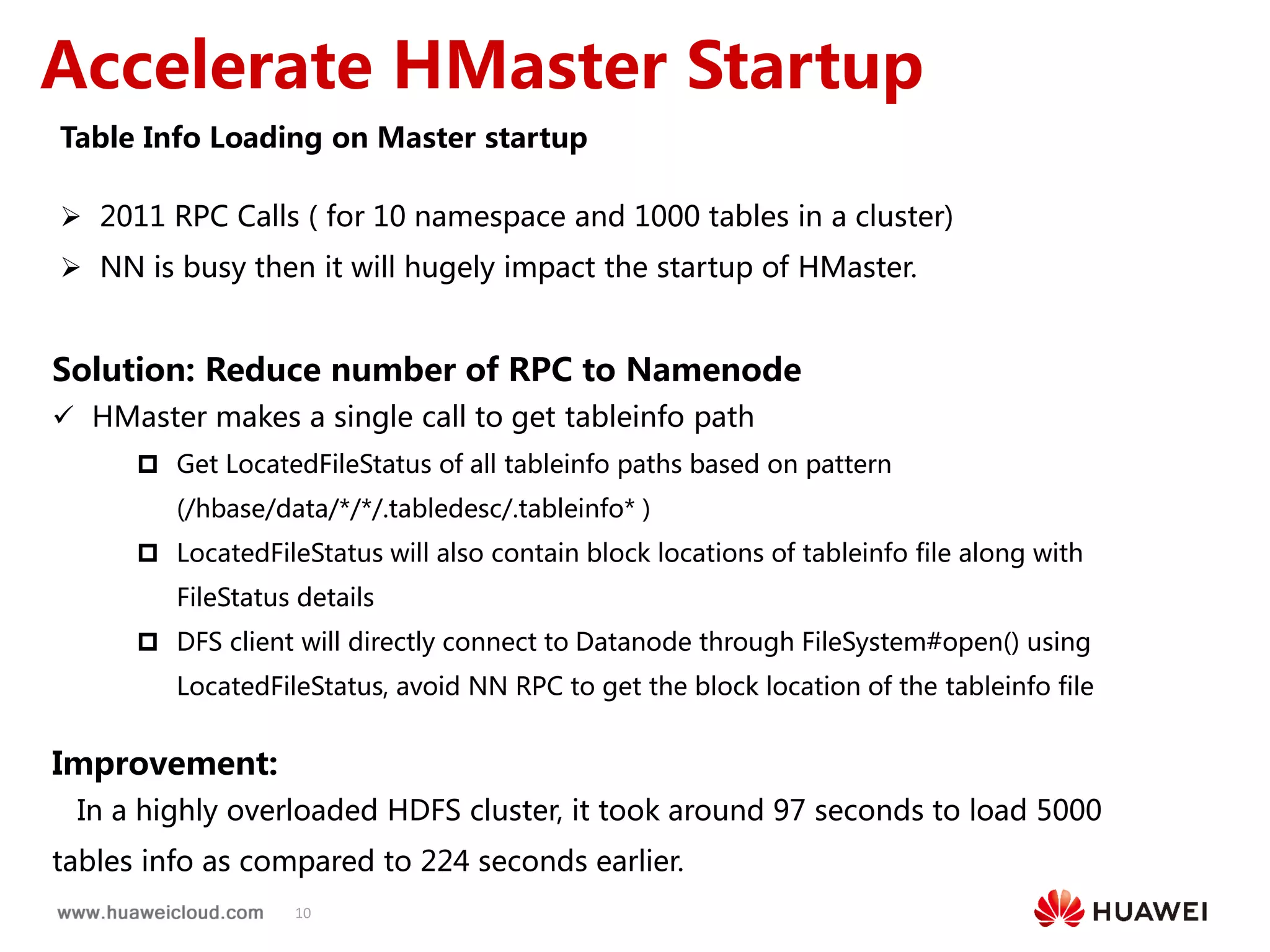
 2011 RPC Calls ( for 10 namespace and 1000 tables in a cluster)
 NN is busy then it will hugely impact the startup of HMaster.
Solution: Reduce number of RPC to Namenode
 HMaster makes a single call to get tableinfo path
 Get LocatedFileStatus of all tableinfo paths based on pattern
(/hbase/data/*/*/.tabledesc/.tableinfo* )
 LocatedFileStatus will also contain block locations of tableinfo file along with
FileStatus details
 DFS client will directly connect to Datanode through FileSystem#open() using
LocatedFileStatus, avoid NN RPC to get the block location of the tableinfo file
Improvement:
In a highly overloaded HDFS cluster, it took around 97 seconds to load 5000
tables info as compared to 224 seconds earlier.
1.2 Enhanced Replication
12
Adaptive call timeout
Problem:
 Replication may timeout when peer cluster is not able to replicate the
entries
 Can be solved by increasing hbase.rpc.timeout at source cluster
 Impact other RPC request
 In Bulkload replication scenario fixed RPC timeout may not
guarantee bigger HFile copy
 Refer HBASE-14937
Solution:
 Source cluster should wait longer
 New configuration parameter hbase.replication.rpc.timeout, default
value will be same as hbase.rpc.timeout
 On each CallTimeOutException increase this replication timeout value
by fixed multiplier
 Increase the replication to certain number of configured times
13
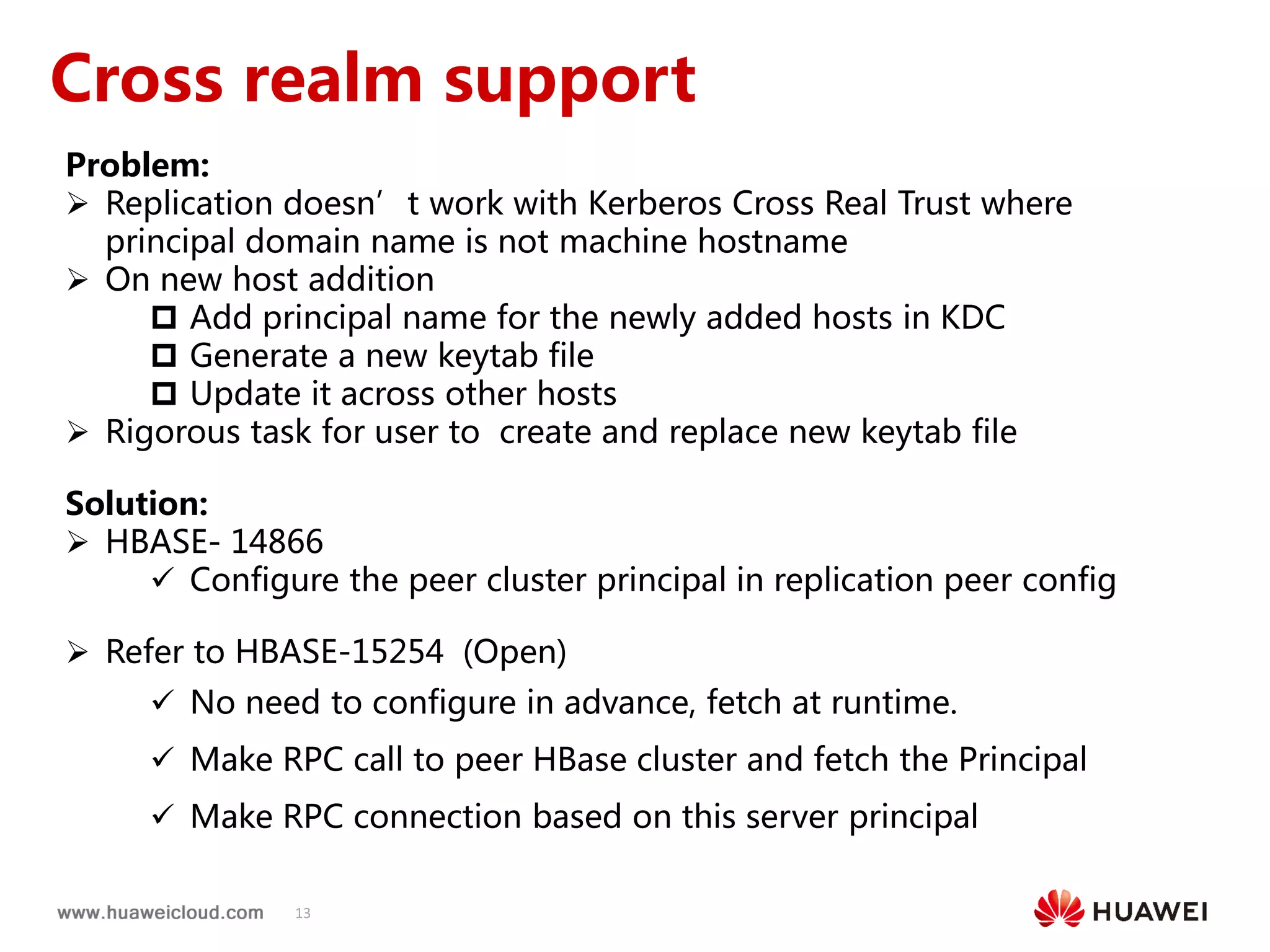
Cross realm support
Problem:
 Replication doesn’t work with Kerberos Cross Real Trust where
principal domain name is not machine hostname
 On new host addition
 Add principal name for the newly added hosts in KDC
 Generate a new keytab file
 Update it across other hosts
 Rigorous task for user to create and replace new keytab file
Solution:
 HBASE- 14866
 Configure the peer cluster principal in replication peer config
 Refer to HBASE-15254 (Open)
 No need to configure in advance, fetch at runtime.
 Make RPC call to peer HBase cluster and fetch the Principal
 Make RPC connection based on this server principal
1.3 Reliable Region Assignment
15
RIT Problem
Problem:
 Region stuck in transition for longer duration due to some fault in cluster
 Zookeeper node version mismatch
 Slow RS response
 Unstable Network
 Client will not be able to perform read/write operation on those regions which are in transition
 Balancer will not run
 Region can’t be recovered until cluster restart
Solution:
 Recover the regions by reassigning them
 Schedule a chore service
 Run periodically and identify the region which stuck in transition from a longer duration (configurable
threshold)
 Recover the region by reassigning them
 New HBCK command to recover regions which are in transition from longer duration
16
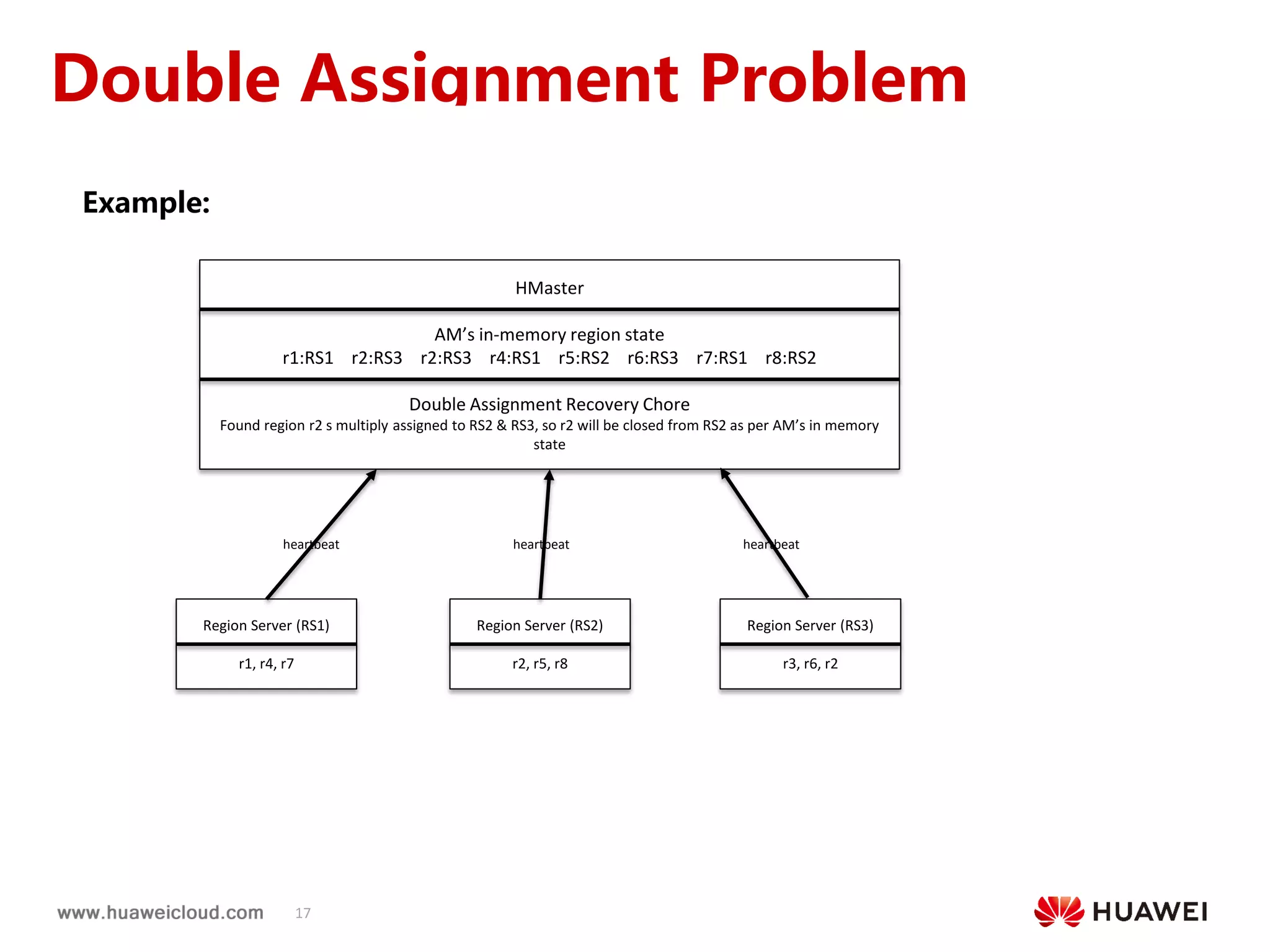
Double Assignment Problem
Problem:
 HMaster may assign region to multiple RegionServer in a faulty cluster environment
 Call time out from a overloaded RegionServer
 Old or new client may receive inconsistent data
 Can’t be recovered until cluster restart
Solution:
 Multiply assigned regions should be closed and assign uniquely
 Region server send server load details to HMaster through heartbeat
 Schedule a chore service which run periodically and recover the regions
 Collect each region server load from HMaster memory
 Identify the duplicate regions from the region list
 Validate the duplicate regions with HMaster Assignment Manager in-memory region state
 Close the region from the old region server
 Assign the region
17
Double Assignment Problem
Example:
HMaster
AM’s in-memory region state
r1:RS1 r2:RS3 r2:RS3 r4:RS1 r5:RS2 r6:RS3 r7:RS1 r8:RS2
Double Assignment Recovery Chore
Found region r2 s multiply assigned to RS2 & RS3, so r2 will be closed from RS2 as per AM’s in memory
state
Region Server (RS1)
r1, r4, r7
heartbeatheartbeat heartbeat
Region Server (RS2)
r2, r5, r8
Region Server (RS3)
r3, r6, r2
OpenTSDB Basics
OpenTSDB Improvement
2.1 TSDB Basics
20
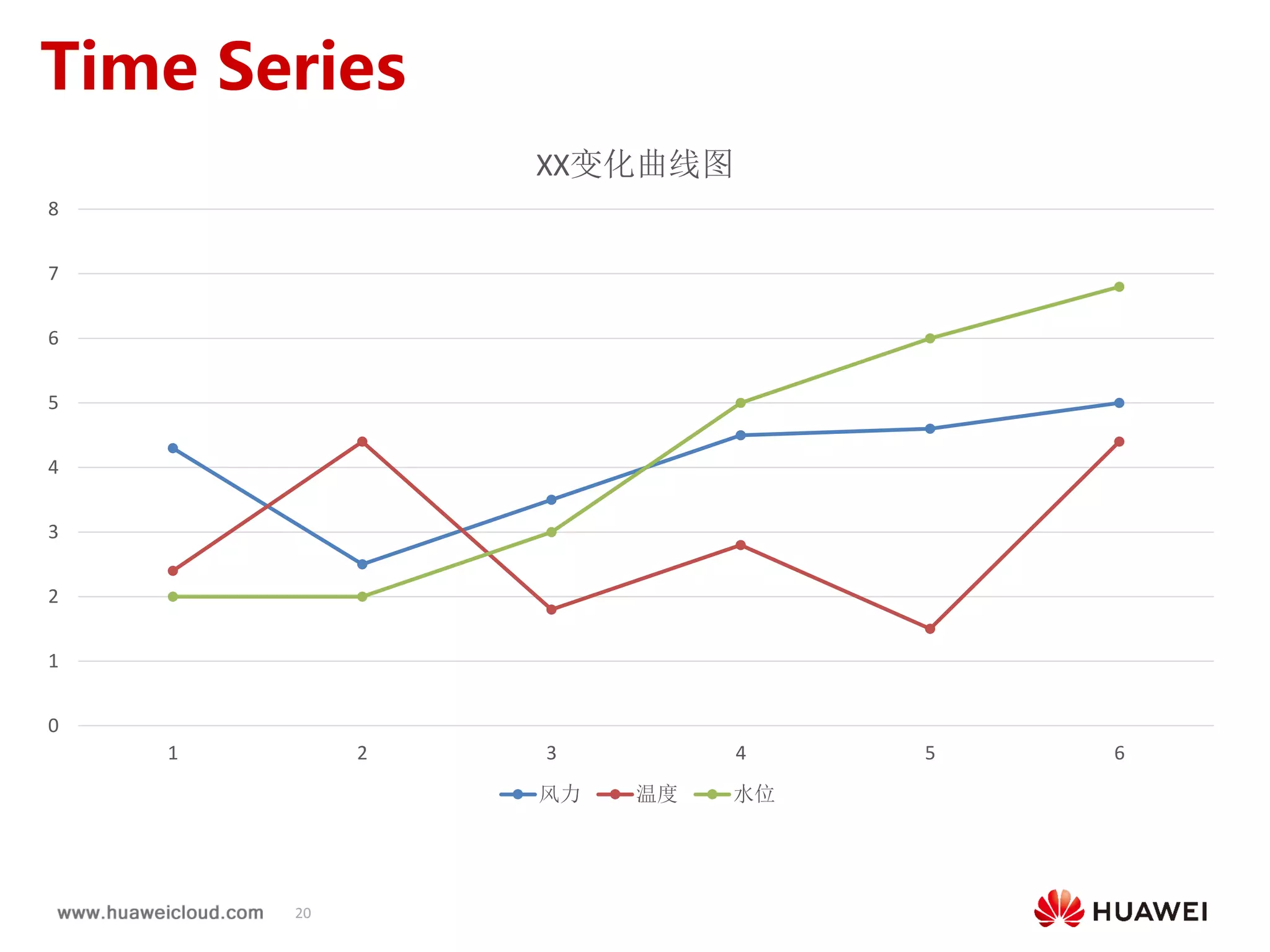
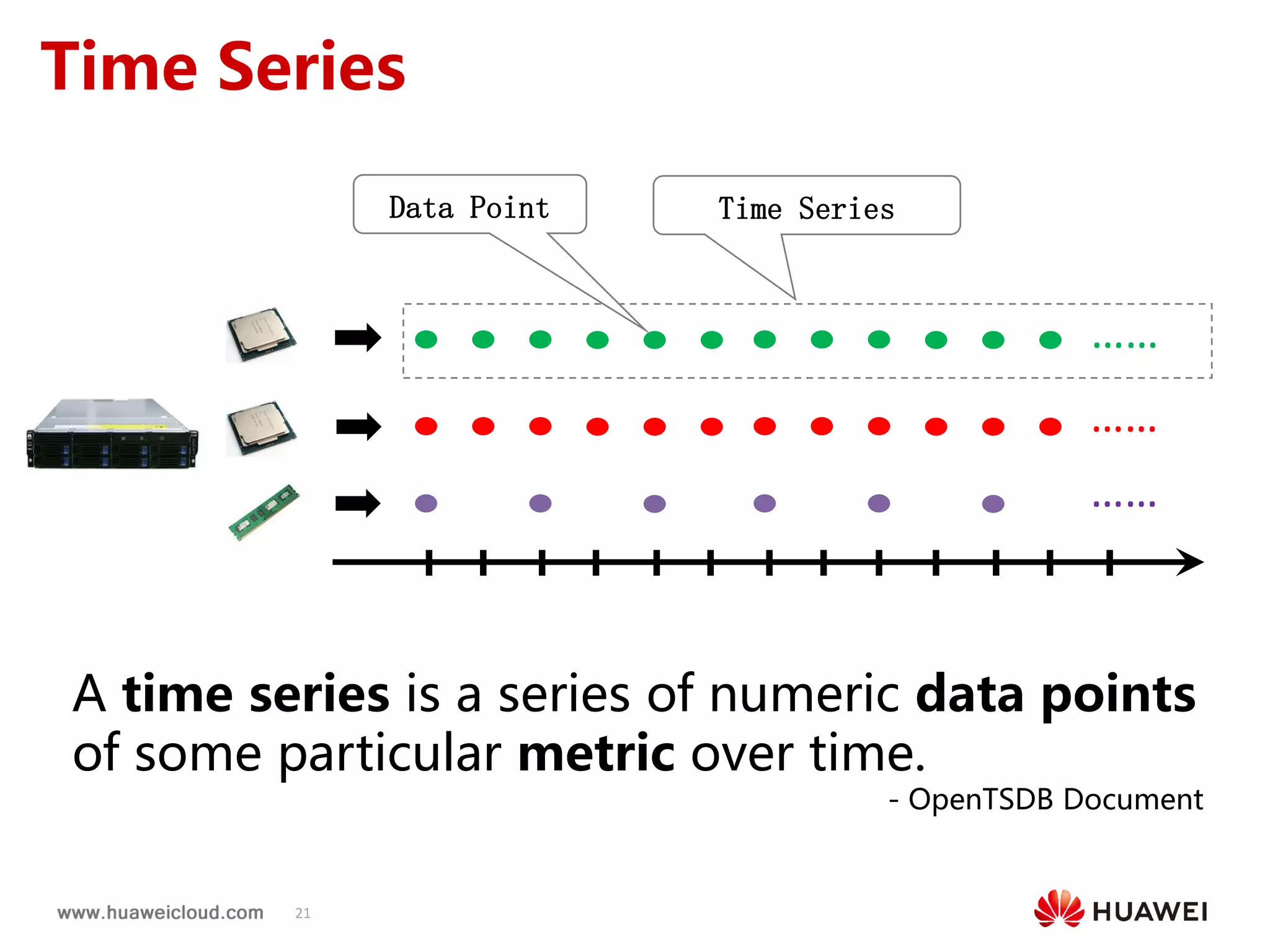
Time Series
0
1
2
3
4
5
6
7
8
1 2 3 4 5 6
XX变化曲线图
风力 温度 水位
21
Time Series
……
……
……
Time SeriesData Point
A time series is a series of numeric data points
of some particular metric over time.
- OpenTSDB Document
22
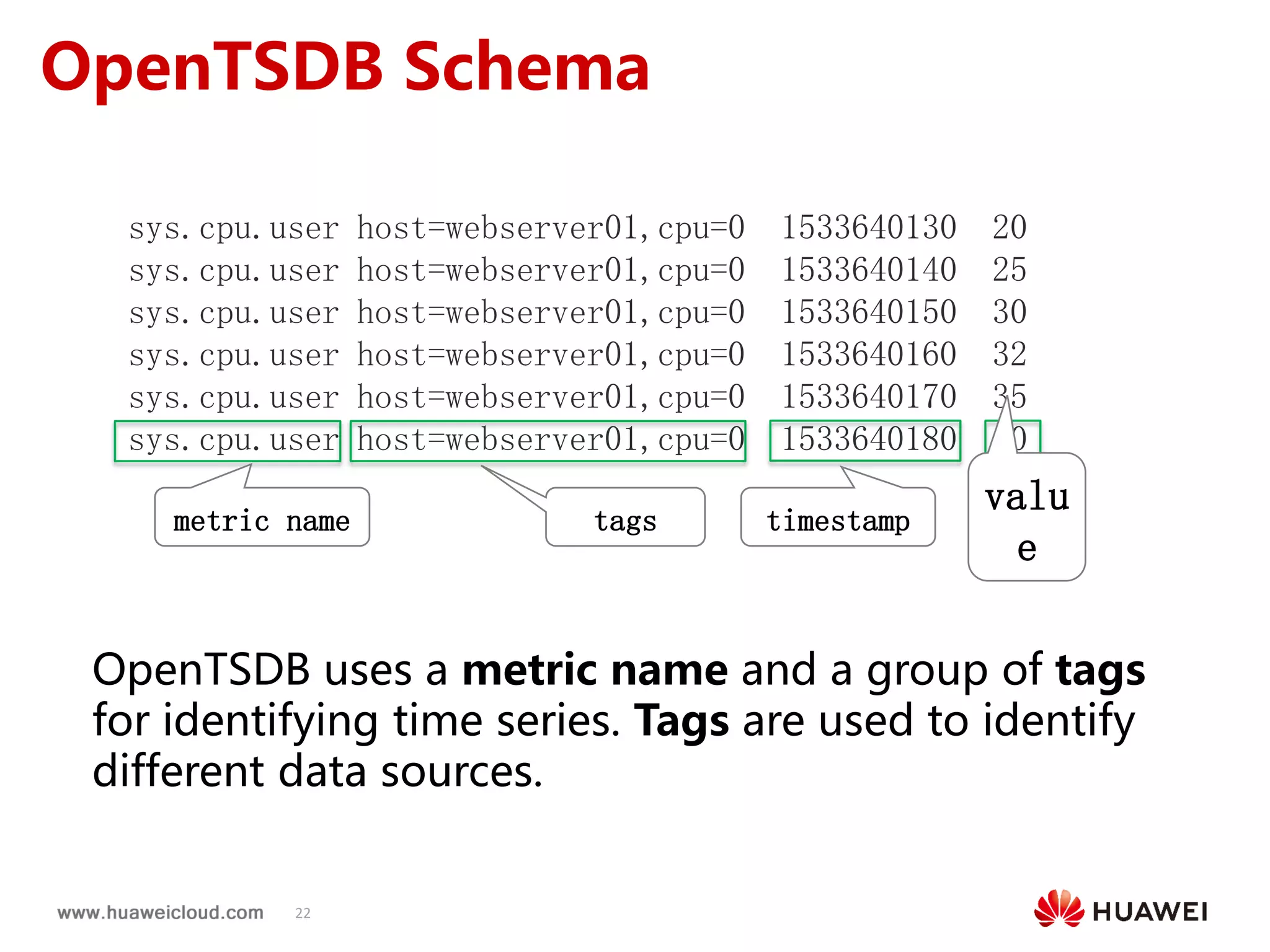
OpenTSDB Schema
sys.cpu.user host=webserver01,cpu=0 1533640130 20
sys.cpu.user host=webserver01,cpu=0 1533640140 25
sys.cpu.user host=webserver01,cpu=0 1533640150 30
sys.cpu.user host=webserver01,cpu=0 1533640160 32
sys.cpu.user host=webserver01,cpu=0 1533640170 35
sys.cpu.user host=webserver01,cpu=0 1533640180 40
metric name tags timestamp
valu
e
OpenTSDB uses a metric name and a group of tags
for identifying time series. Tags are used to identify
different data sources.
23
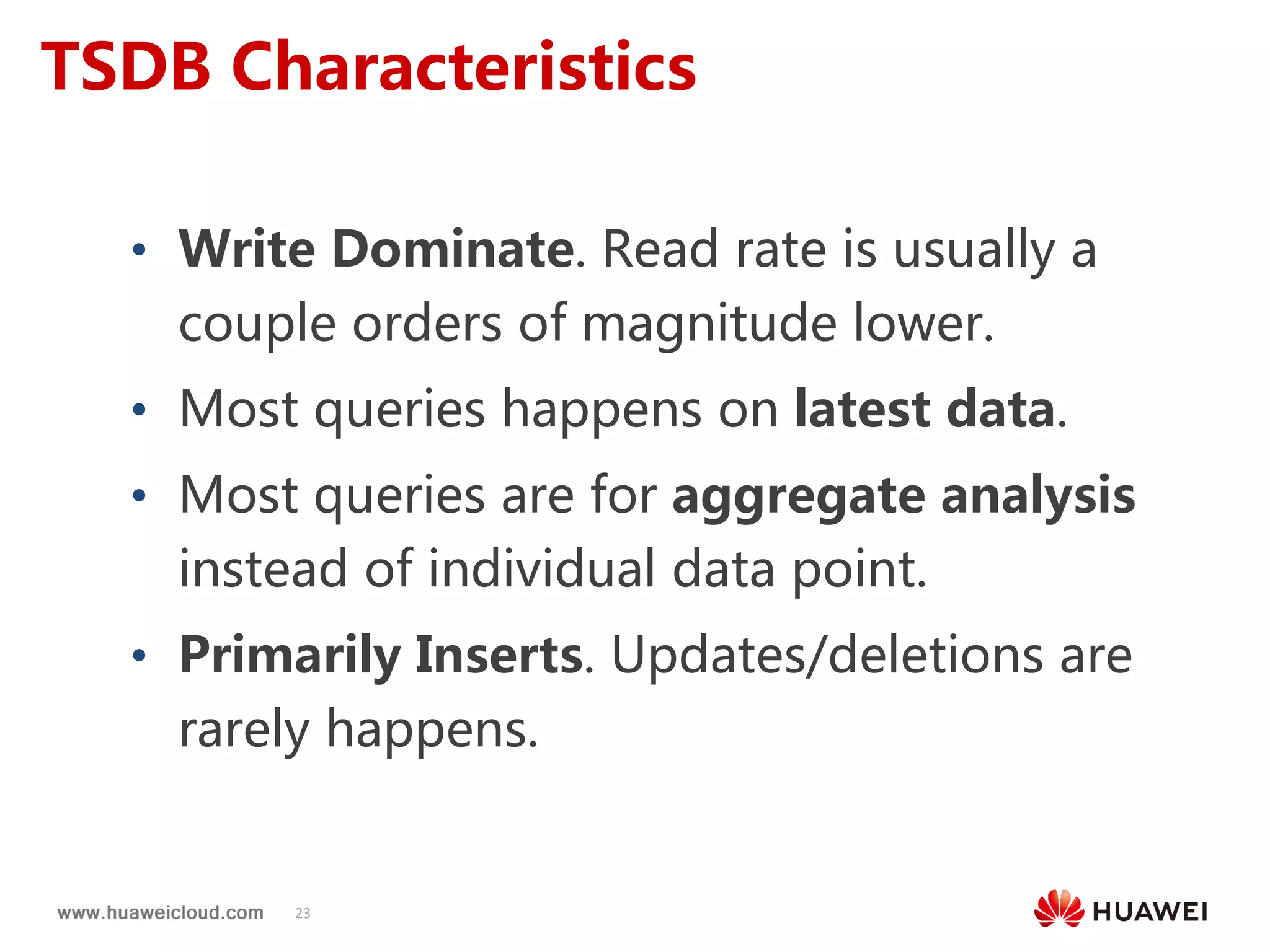
TSDB Characteristics
• Write Dominate. Read rate is usually a
couple orders of magnitude lower.
• Most queries happens on latest data.
• Most queries are for aggregate analysis
instead of individual data point.
• Primarily Inserts. Updates/deletions are
rarely happens.
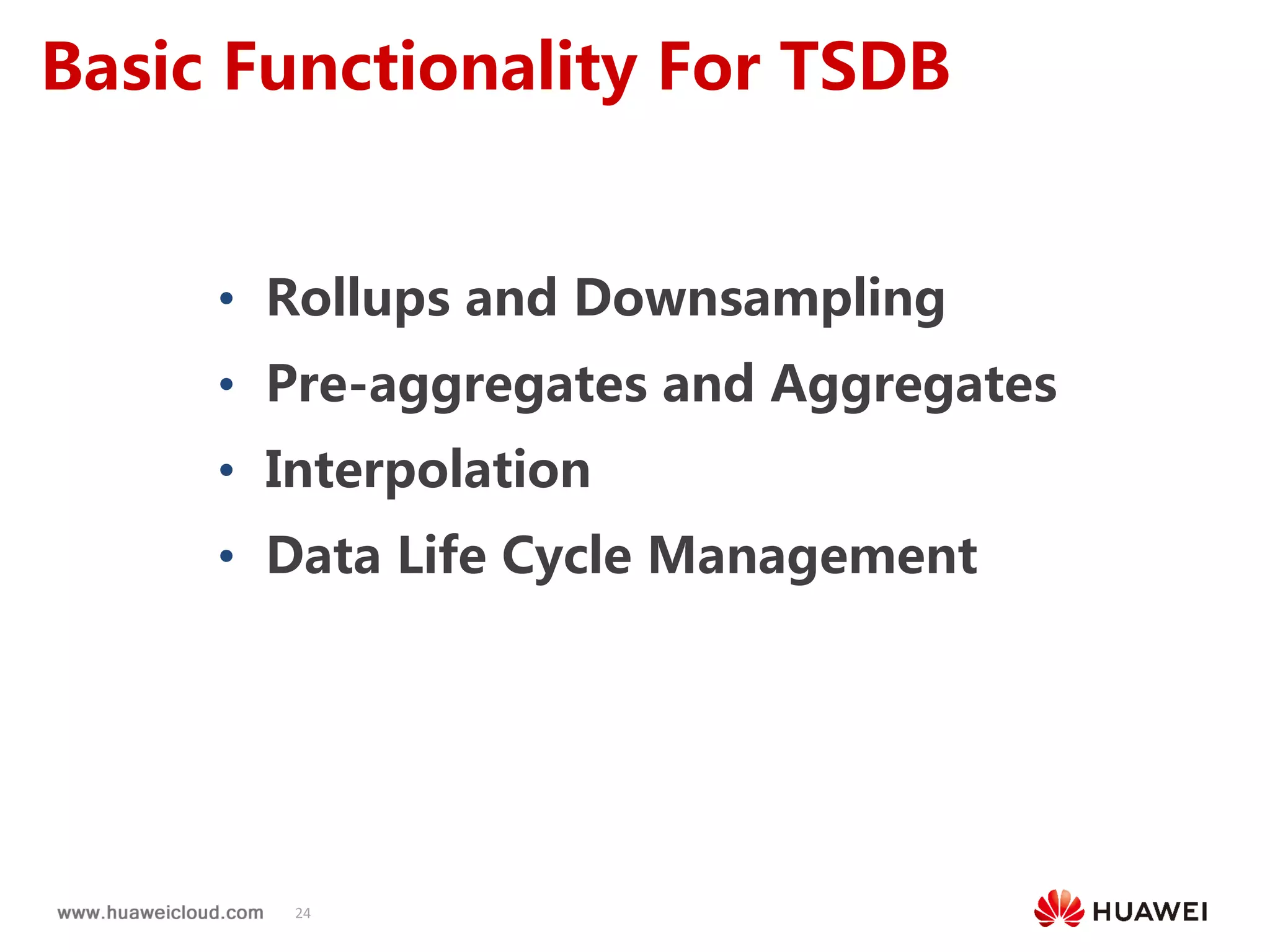
24
Basic Functionality For TSDB
• Rollups and Downsampling
• Pre-aggregates and Aggregates
• Interpolation
• Data Life Cycle Management
25
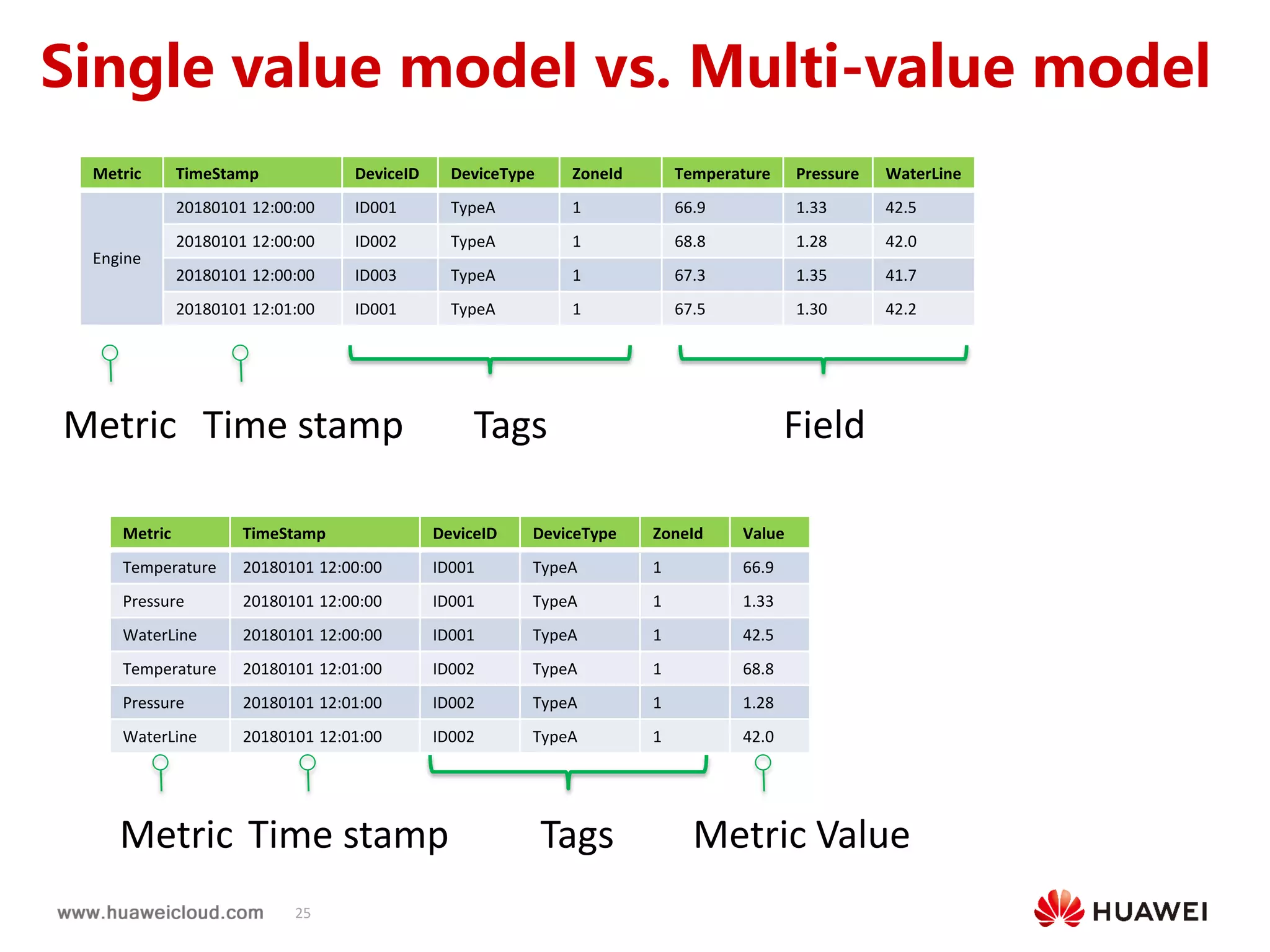
时序数据库单值 vs.多值
Metric TimeStamp DeviceID DeviceType ZoneId Temperature Pressure WaterLine
Engine
20180101 12:00:00 ID001 TypeA 1 66.9 1.33 42.5
20180101 12:00:00 ID002 TypeA 1 68.8 1.28 42.0
20180101 12:00:00 ID003 TypeA 1 67.3 1.35 41.7
20180101 12:01:00 ID001 TypeA 1 67.5 1.30 42.2
Metric TimeStamp DeviceID DeviceType ZoneId Value
Temperature 20180101 12:00:00 ID001 TypeA 1 66.9
Pressure 20180101 12:00:00 ID001 TypeA 1 1.33
WaterLine 20180101 12:00:00 ID001 TypeA 1 42.5
Temperature 20180101 12:01:00 ID002 TypeA 1 68.8
Pressure 20180101 12:01:00 ID002 TypeA 1 1.28
WaterLine 20180101 12:01:00 ID002 TypeA 1 42.0
Tags Field
Tags
Time stampMetric
Time stampMetric Metric Value
Single value model vs. Multi-value model
26
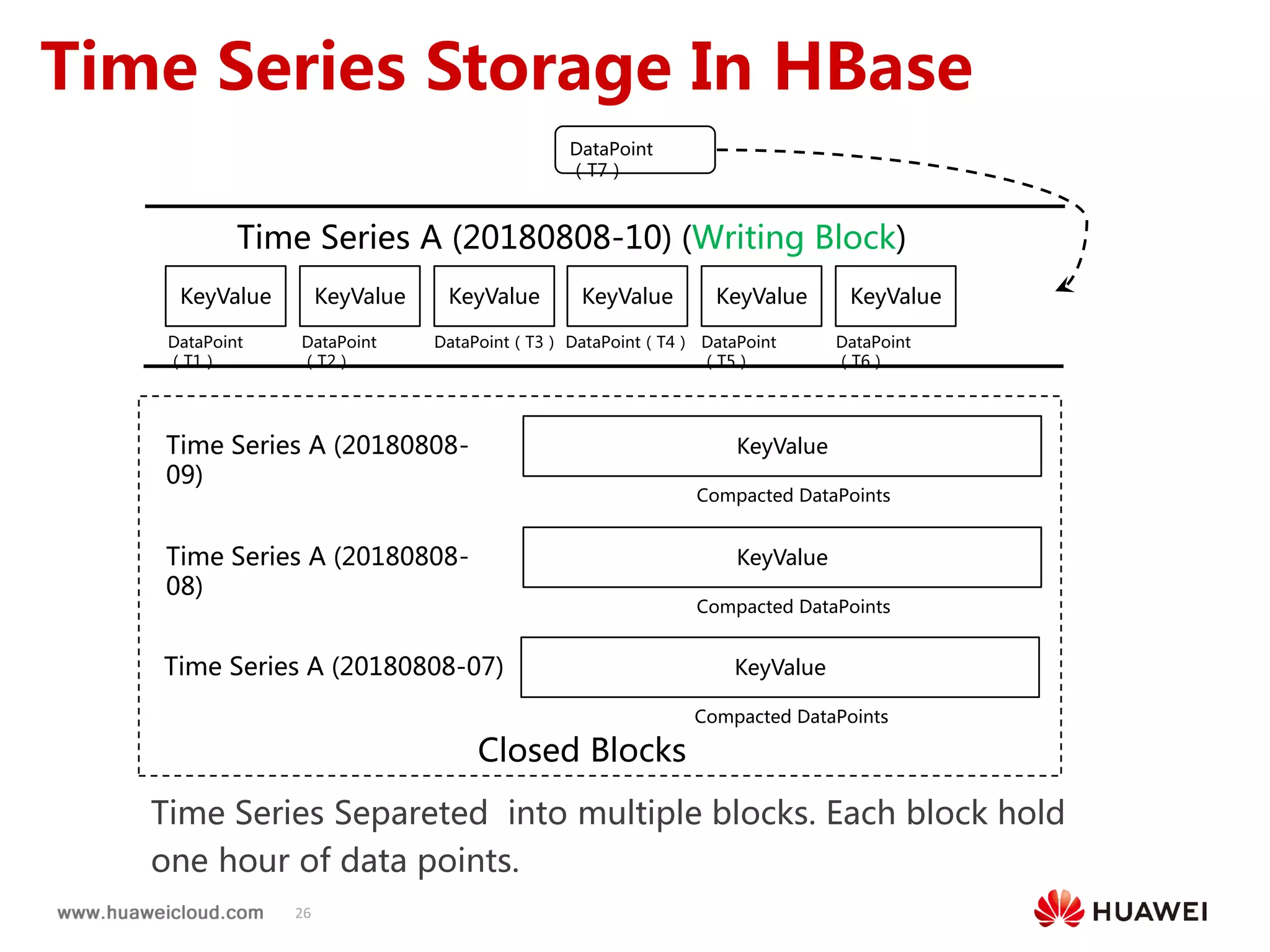
Time Series Storage In HBase
KeyValue KeyValue KeyValue KeyValue KeyValue KeyValue
DataPoint
(T1)
DataPoint
(T7)
Time Series A (20180808-10) (Writing Block)
KeyValue
Compacted DataPoints
Time Series A (20180808-
09)
KeyValue
Compacted DataPoints
Time Series A (20180808-
08)
KeyValue
Compacted DataPoints
Time Series A (20180808-07)
Time Series Separeted into multiple blocks. Each block hold
one hour of data points.
DataPoint
(T2)
DataPoint(T3) DataPoint(T4) DataPoint
(T5)
DataPoint
(T6)
Closed Blocks
27
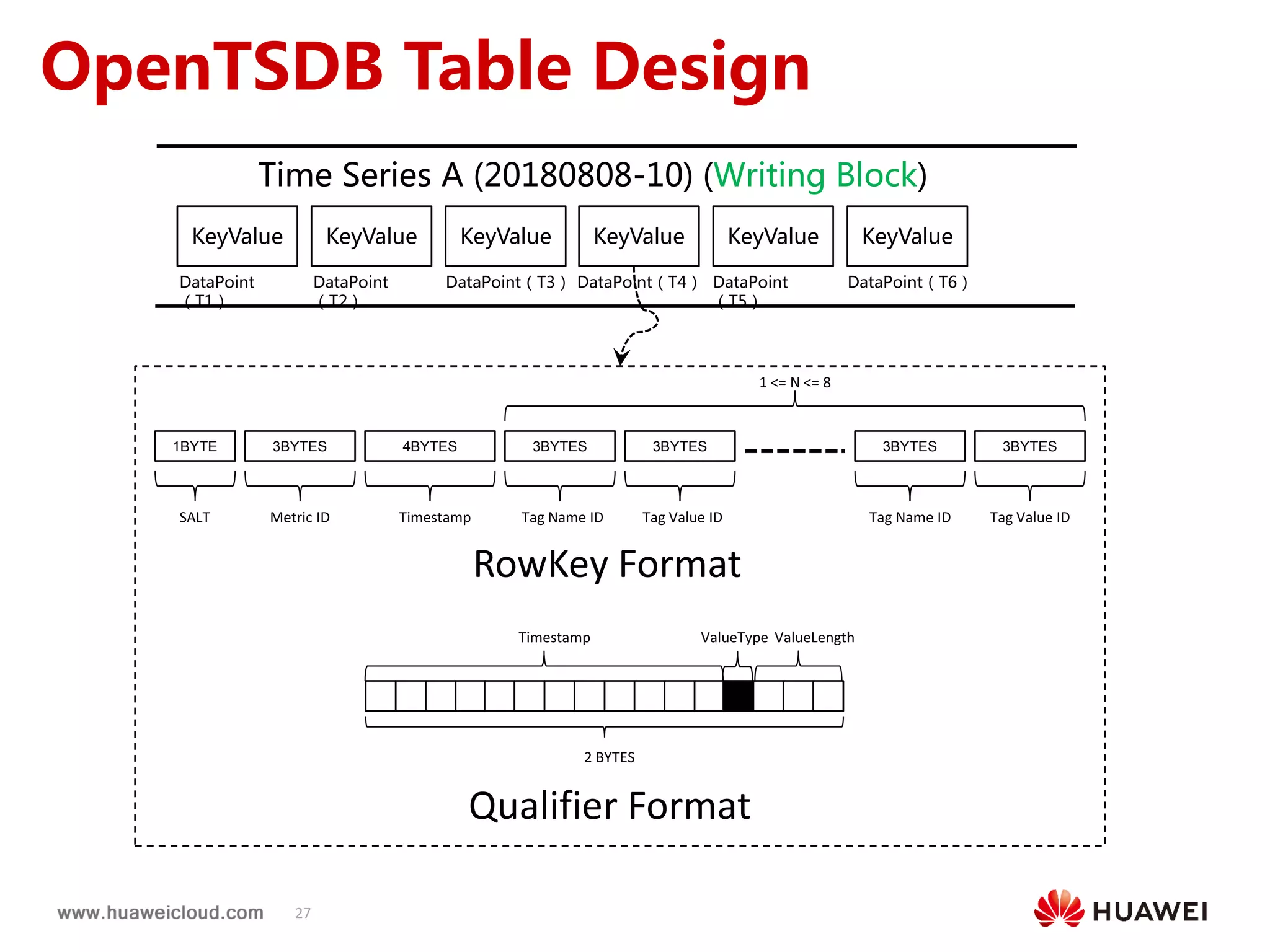
OpenTSDB Table Design
RowKey Format
Qualifier Format
1BYTE 3BYTES 4BYTES 3BYTES 3BYTES 3BYTES 3BYTES
SALT Metric ID Timestamp Tag Name ID Tag Value ID Tag Name ID Tag Value ID
1 <= N <= 8
2 BYTES
Timestamp ValueLengthValueType
KeyValue KeyValue KeyValue KeyValue KeyValue KeyValue
DataPoint
(T1)
Time Series A (20180808-10) (Writing Block)
DataPoint
(T2)
DataPoint(T3) DataPoint(T4) DataPoint
(T5)
DataPoint(T6)
28
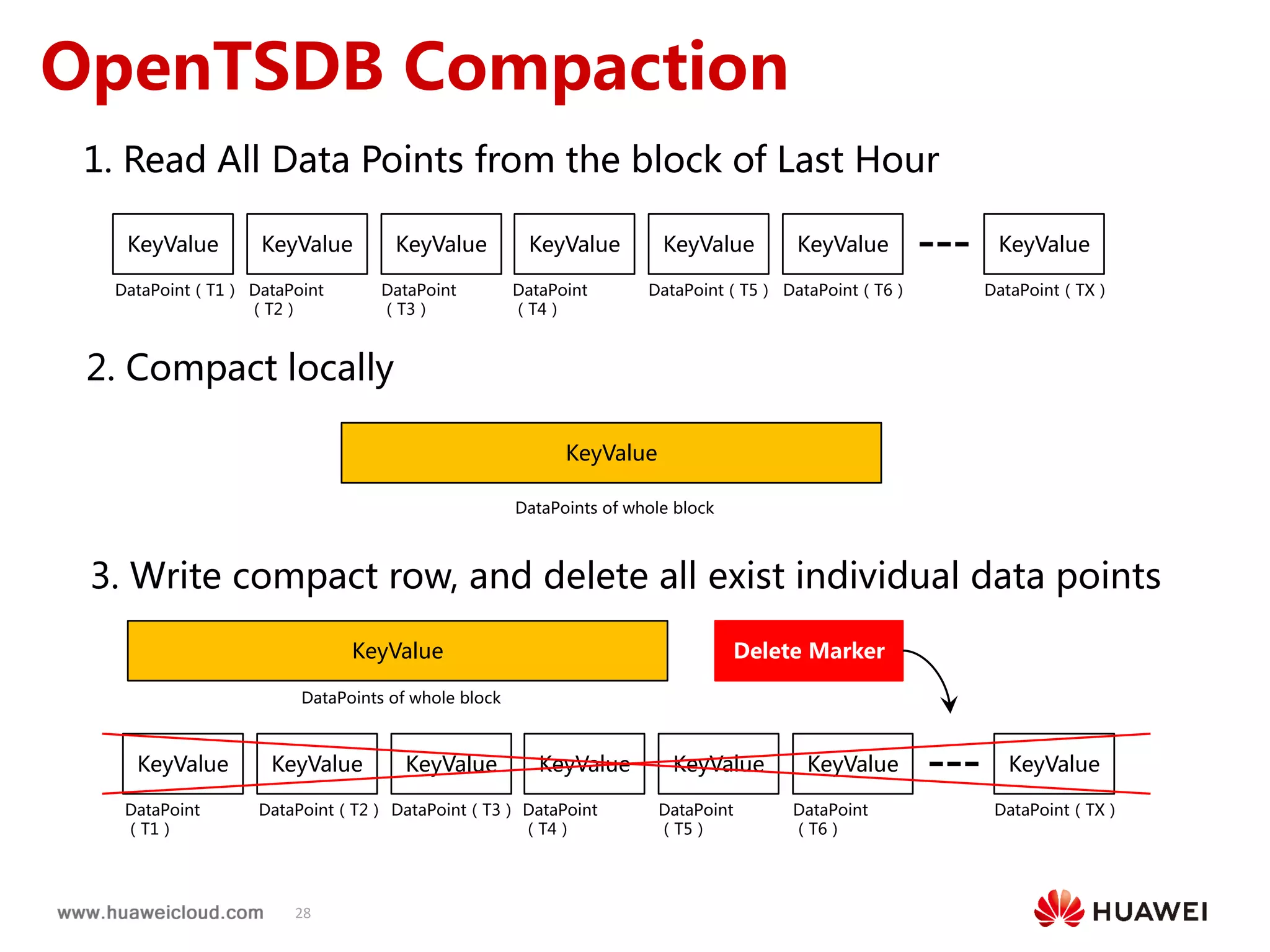
OpenTSDB Compaction
KeyValue KeyValue KeyValue KeyValue KeyValue KeyValue
DataPoint(T1) DataPoint
(T2)
DataPoint
(T3)
DataPoint
(T4)
DataPoint(T5) DataPoint(T6)
KeyValue
DataPoint(TX)
KeyValue KeyValue KeyValue KeyValue KeyValue KeyValue
DataPoint
(T1)
DataPoint(T2) DataPoint(T3) DataPoint
(T4)
DataPoint
(T5)
DataPoint
(T6)
KeyValue
DataPoint(TX)
1. Read All Data Points from the block of Last Hour
2. Compact locally
KeyValue
DataPoints of whole block
3. Write compact row, and delete all exist individual data points
KeyValue
DataPoints of whole block
Delete Marker
2.1 OpenTSDB Improvement
30
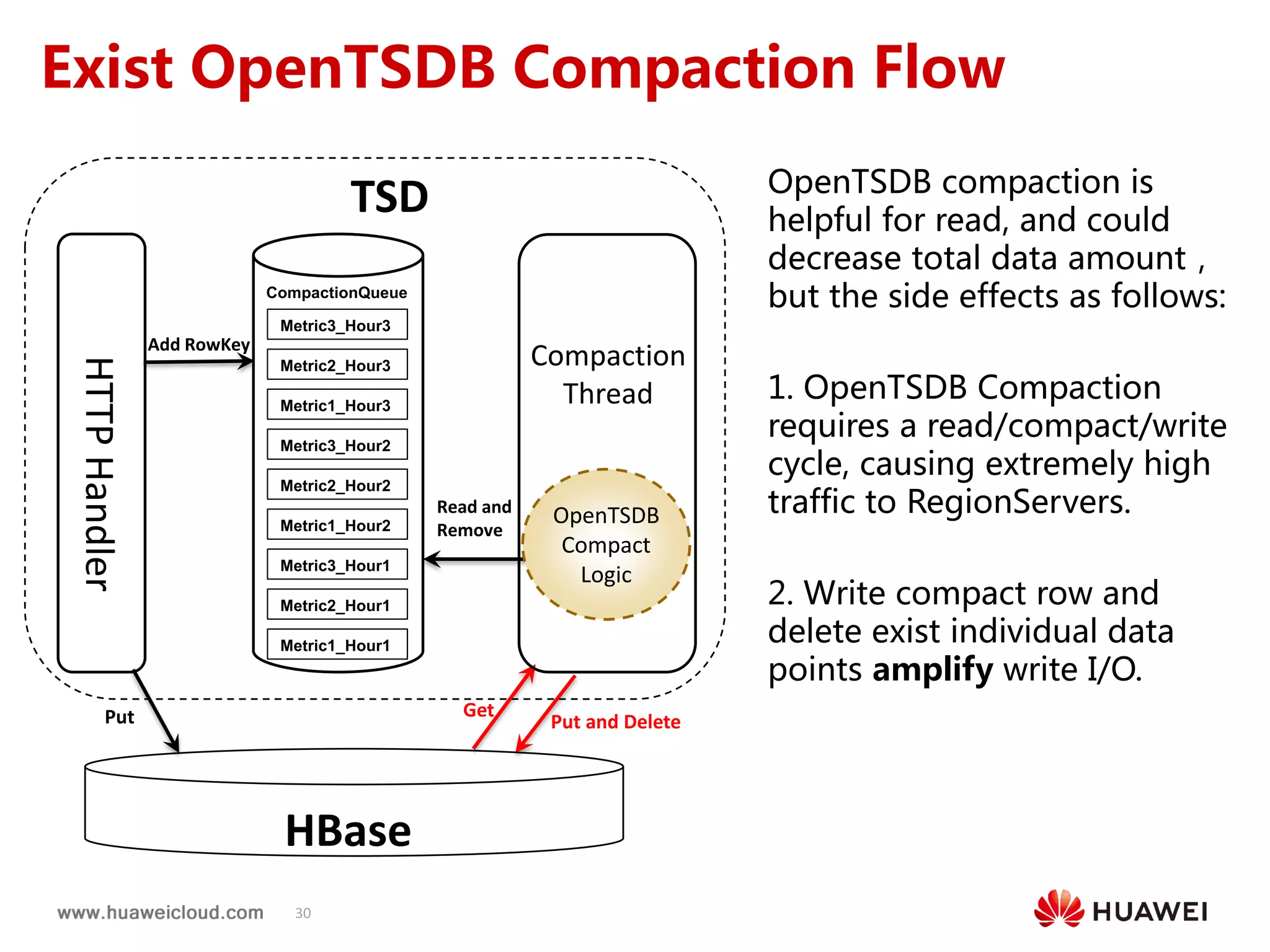
Exist OpenTSDB Compaction Flow
OpenTSDB compaction is
helpful for read, and could
decrease total data amount,
but the side effects as follows:
1. OpenTSDB Compaction
requires a read/compact/write
cycle, causing extremely high
traffic to RegionServers.
2. Write compact row and
delete exist individual data
points amplify write I/O.
CompactionQueue
Metric1_Hour1
Metric2_Hour1
Metric3_Hour1
Metric1_Hour2
Metric2_Hour2
Metric3_Hour2
Metric1_Hour3
Metric2_Hour3
Metric3_Hour3
Put
Read and
Remove
Put and Delete
Get
Add RowKey
OpenTSDB
Compact
Logic
HTTPHandler
Compaction
Thread
HBase
TSD
31
HFileHFile
HFile
HFile MemStore
HFile MemStore
Client(TSD)


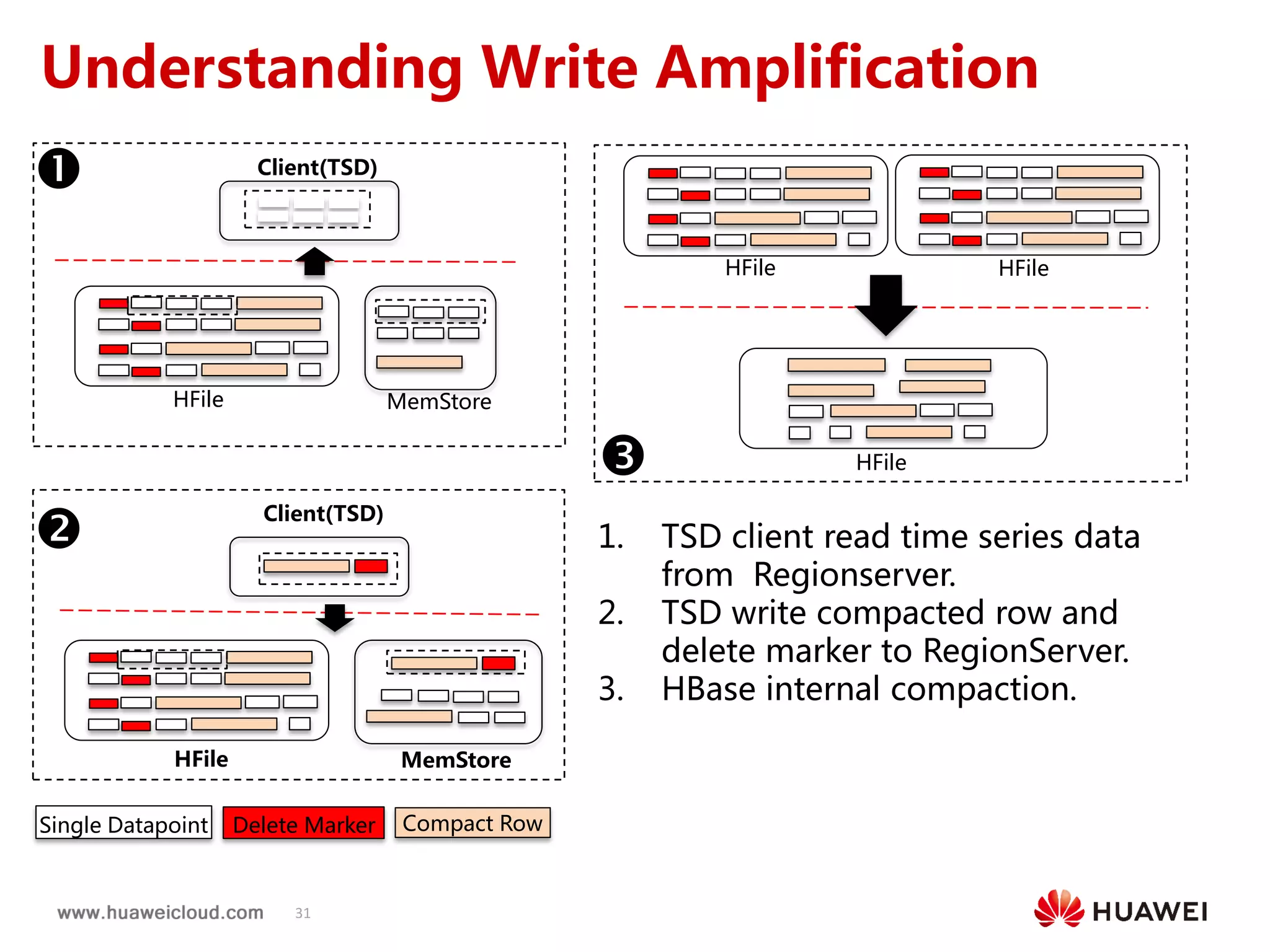
 1. TSD client read time series data
from Regionserver.
2. TSD write compacted row and
delete marker to RegionServer.
3. HBase internal compaction.
Understanding Write Amplification
Client(TSD)
Single Datapoint Delete Marker Compact Row
32
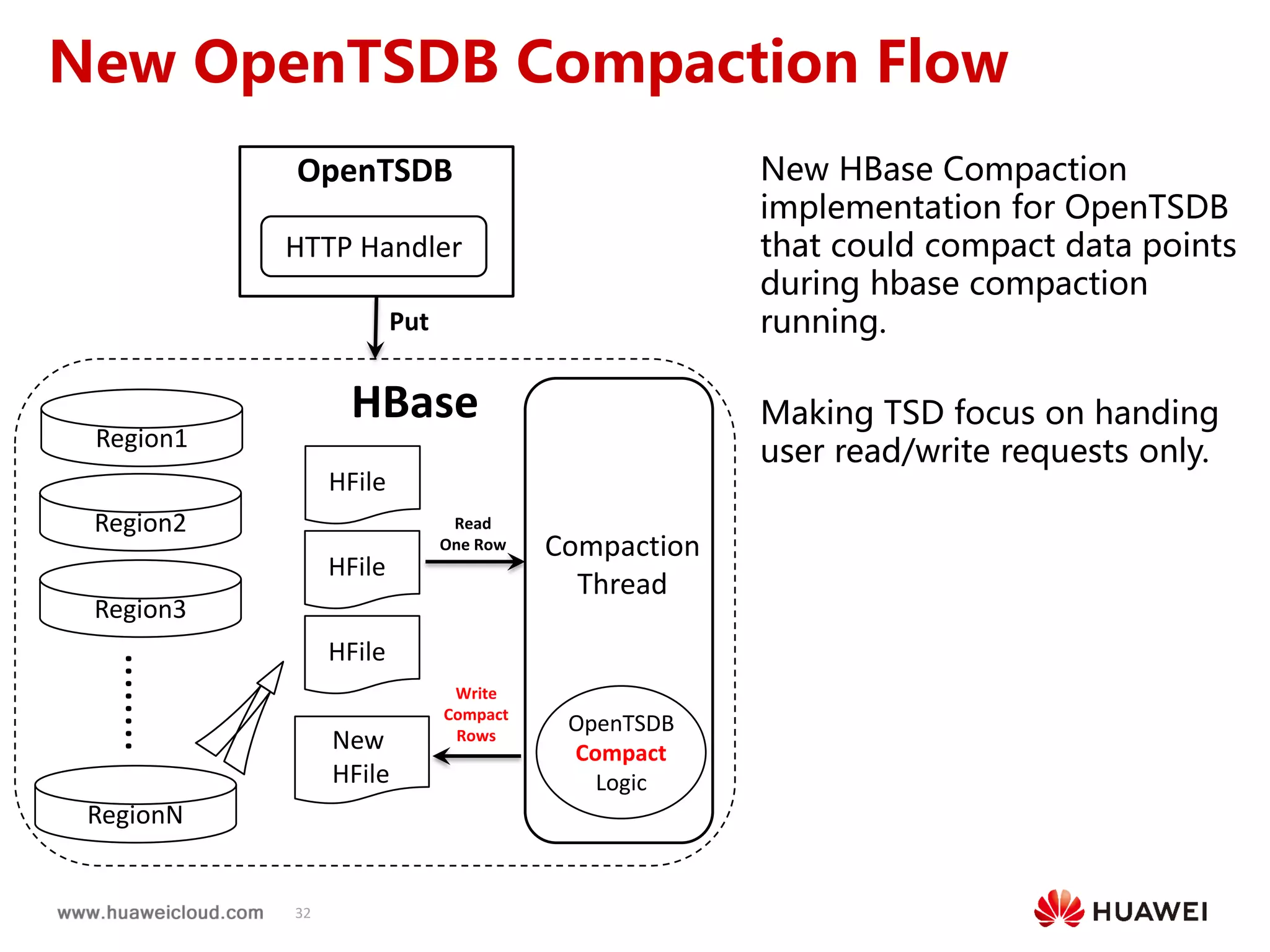
New OpenTSDB Compaction Flow
New HBase Compaction
implementation for OpenTSDB
that could compact data points
during hbase compaction
running.
Making TSD focus on handing
user read/write requests only.
OpenTSDB
OpenTSDB
Compact
Logic
Read
One Row
Write
Compact
Rows
HBase
Put
Compaction
Thread
HTTP Handler
Region1
Region2
Region3
RegionN
........

HFile
HFile
HFile
New
HFile
33
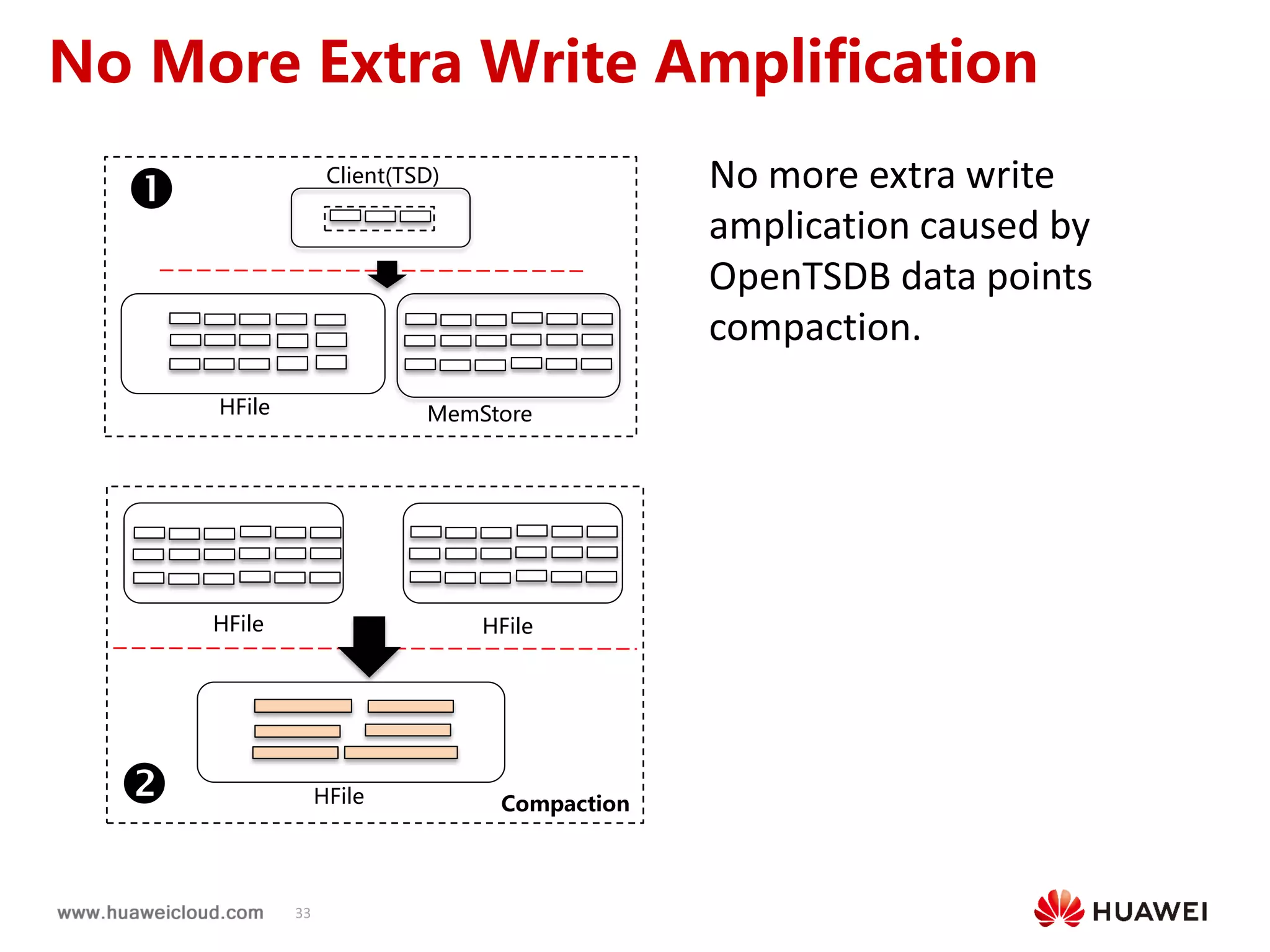
No More Extra Write Amplification
HFile
HFile MemStore
Client(TSD)

HFile HFile
Compaction
No more extra write
amplication caused by
OpenTSDB data points
compaction.
34
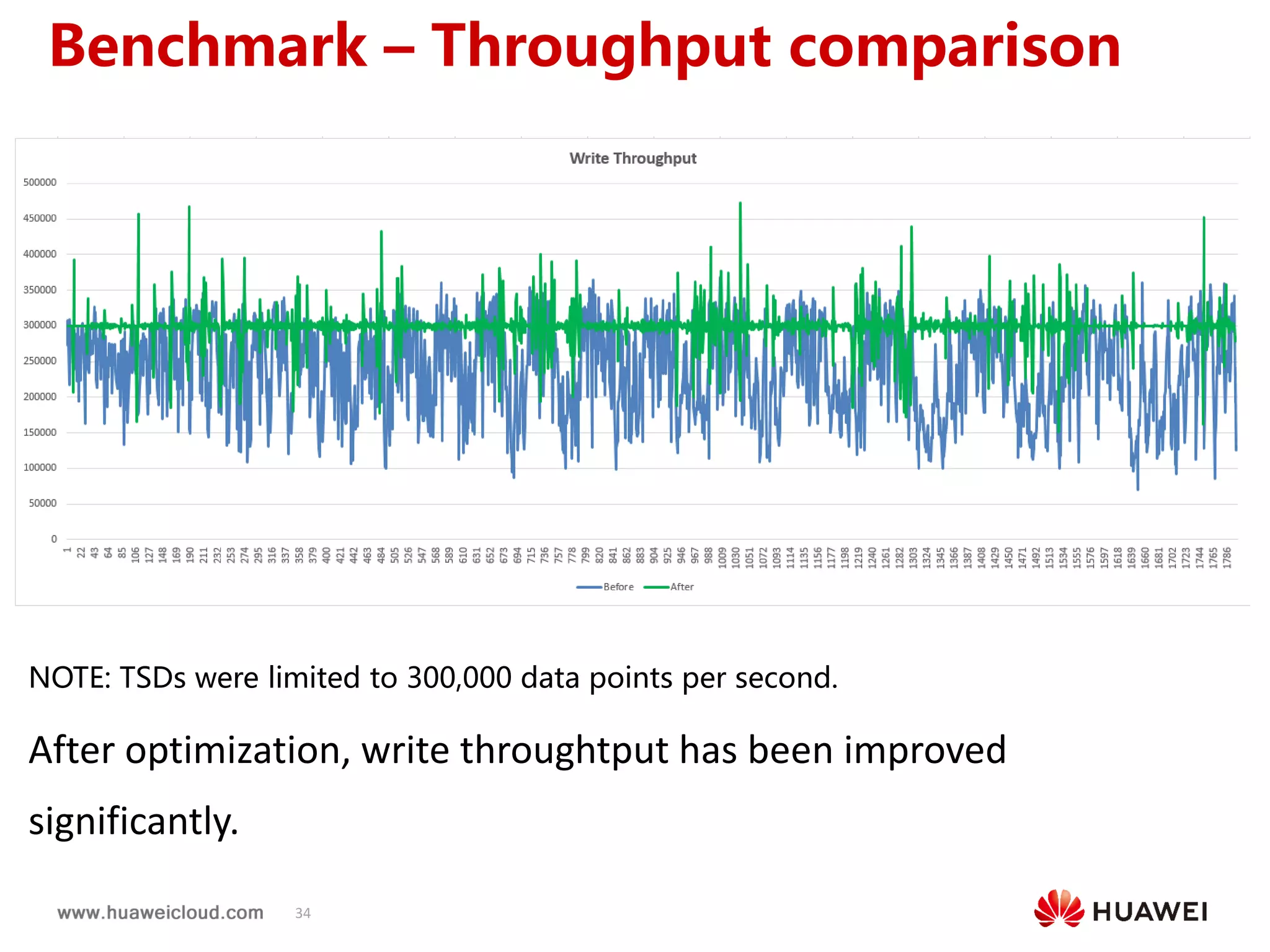
NOTE: TSDs were limited to 300,000 data points per second.
After optimization, write throughtput has been improved
significantly.
Benchmark – Throughput comparison
35
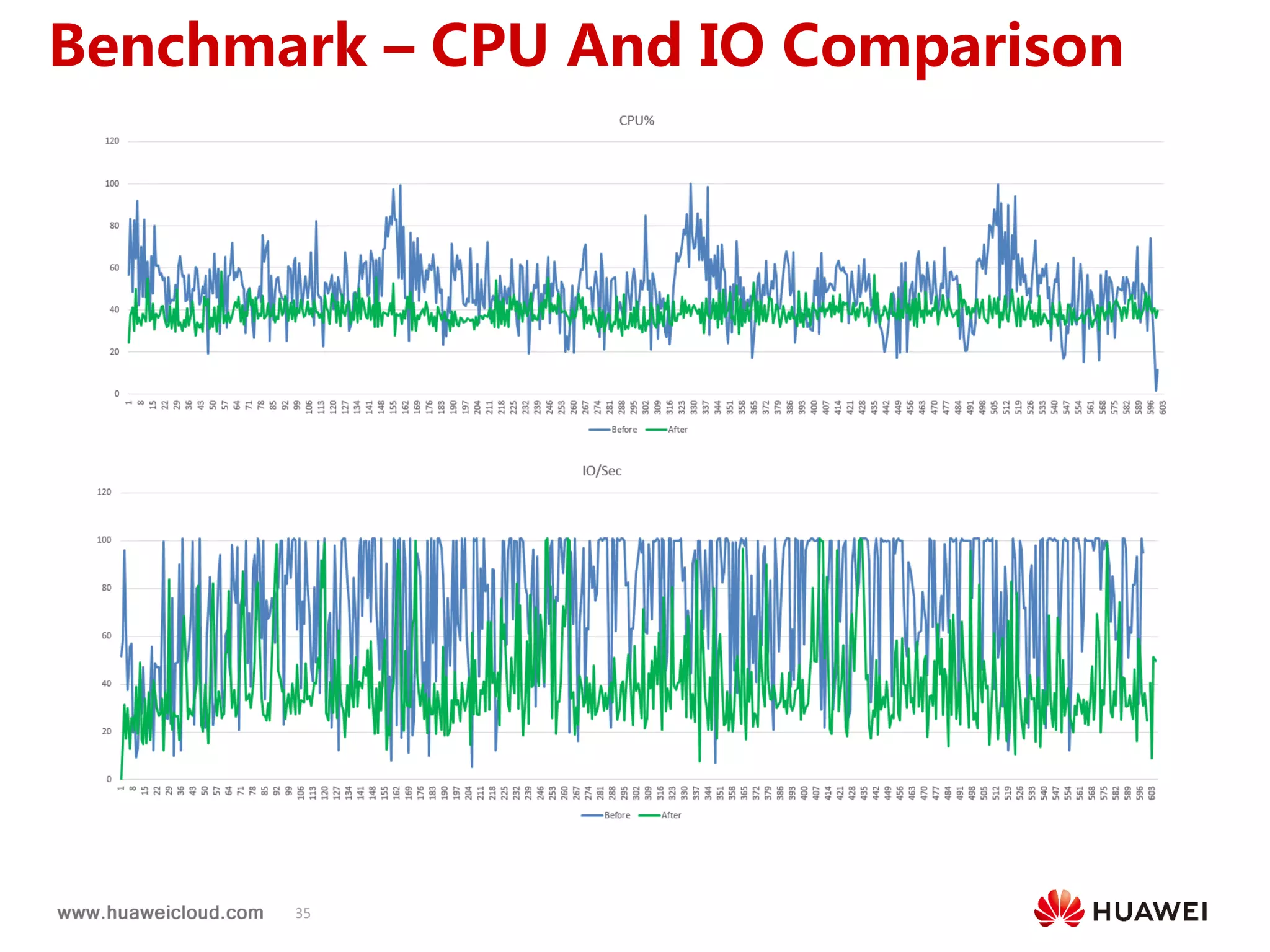
Benchmark – CPU And IO Comparison
36
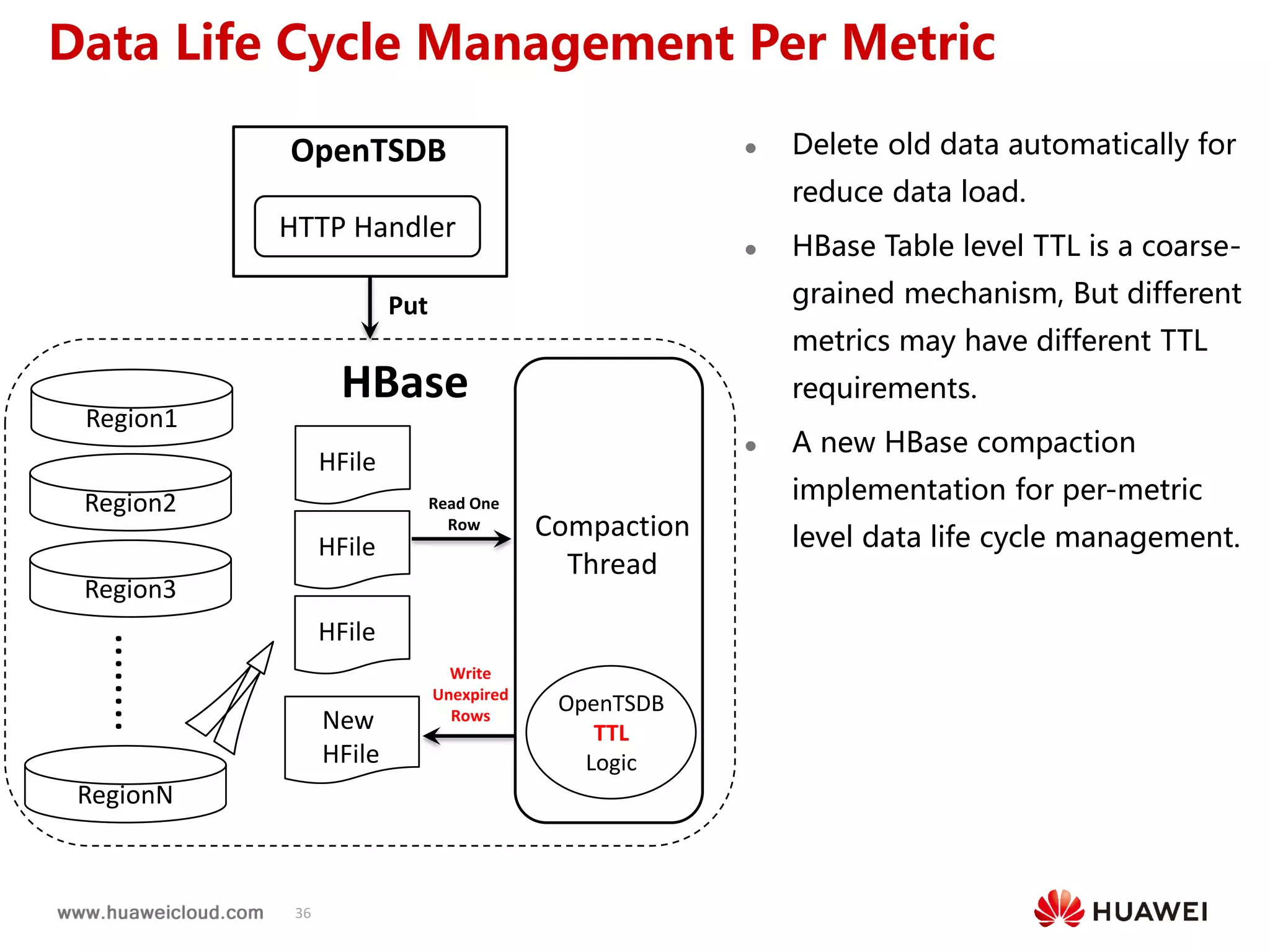
 Delete old data automatically for
reduce data load.
 HBase Table level TTL is a coarse-
grained mechanism, But different
metrics may have different TTL
requirements.
 A new HBase compaction
implementation for per-metric
level data life cycle management.
Data Life Cycle Management Per Metric
OpenTSDB
OpenTSDB
TTL
Logic
Read One
Row
Write
Unexpired
Rows
HBase
Put
Compaction
Thread
HTTP Handler
Region1
Region2
Region3
RegionN
........
HFile
HFile
HFile
New
HFile
37
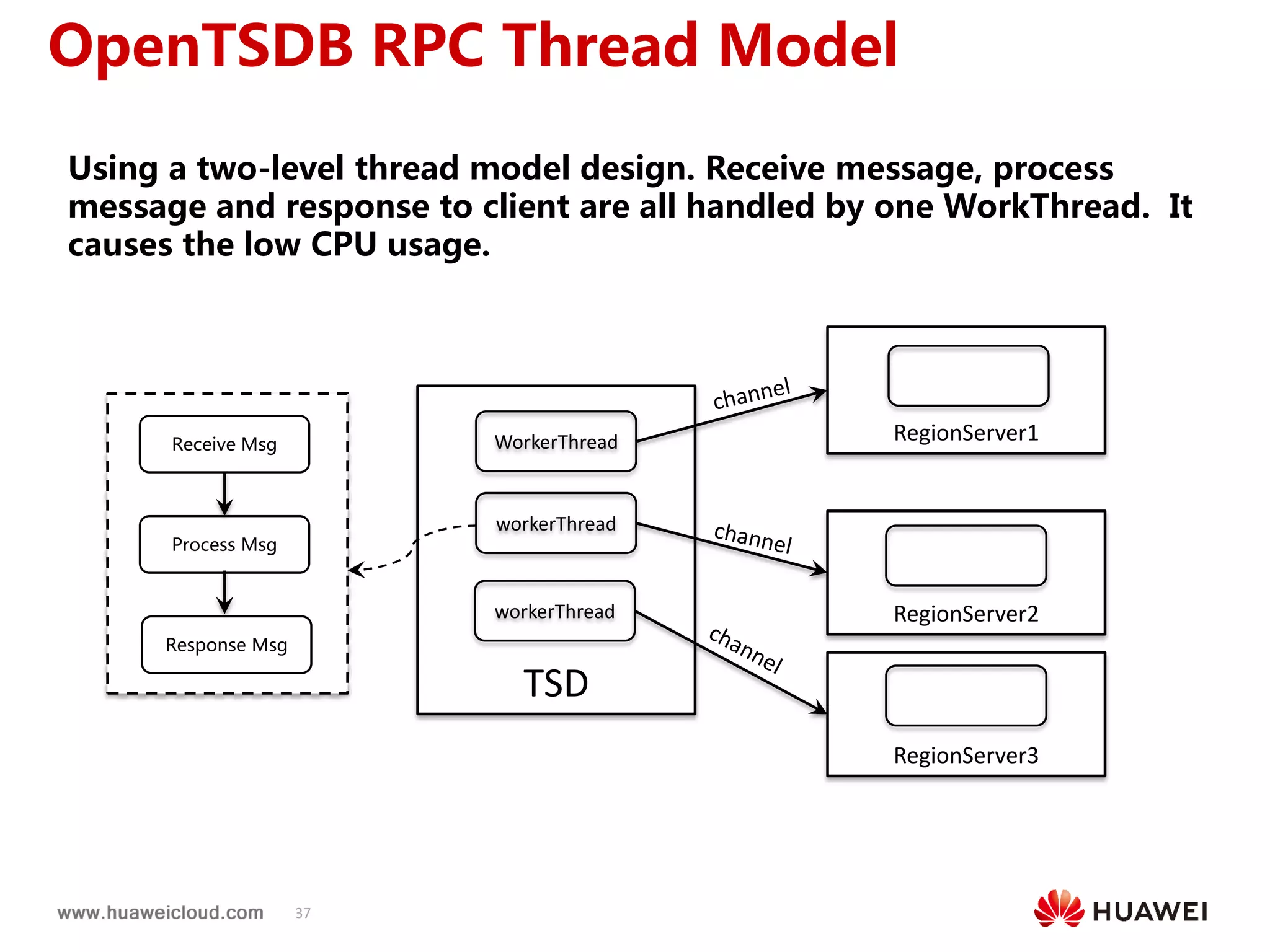
Using a two-level thread model design. Receive message, process
message and response to client are all handled by one WorkThread. It
causes the low CPU usage.
TSD
workerThread
RegionServer1WorkerThread
RegionServer2
RegionServer3
workerThread
OpenTSDB RPC Thread Model
Receive Msg
Process Msg
Response Msg
38
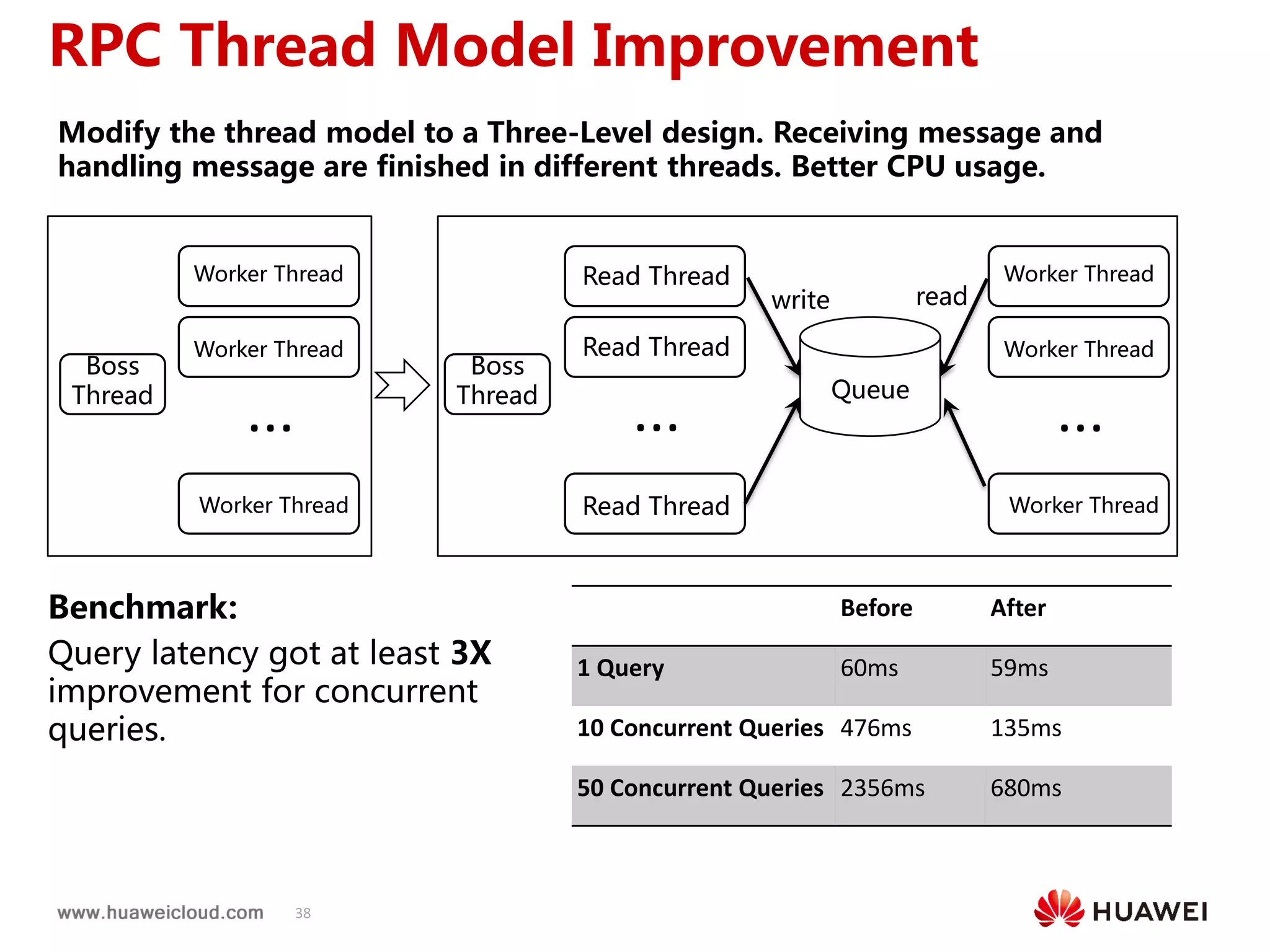
Benchmark:
Query latency got at least 3X
improvement for concurrent
queries.
Before After
1 Query 60ms 59ms
10 Concurrent Queries 476ms 135ms
50 Concurrent Queries 2356ms 680ms
Modify the thread model to a Three-Level design. Receiving message and
handling message are finished in different threads. Better CPU usage.
RPC Thread Model Improvement
Boss
Thread
Read Thread
Read Thread
Read Thread
Queue
Worker Thread
write read
Worker Thread
Worker Thread
... ...
Boss
Thread
Worker Thread
Worker Thread
Worker Thread
...
39
Follow Us(关注我们)
微信公众号华为云CloudTable
NoSQL漫谈公有云HBase服务
Copyright©2018 Huawei Technologies Co., Ltd. All Rights Reserved.
The information in this document may contain predictive statements including, without
limitation, statements regarding the future financial and operating results, future product
portfolio, new technology, etc. There are a number of factors that could cause actual
results and developments to differ materially from those expressed or implied in the
predictive statements. Therefore, such information is provided for reference purpose
only and constitutes neither an offer nor an acceptance. Huawei may change the
information at any time without notice.
Thank You.

HBaseConAsia2018 Track3-4: HBase and OpenTSDB practice at Huawei

  • 1.
    hosted by HBaseConAsia2018 HBase andOpenTSDB Practices at Huawei Pankaj Kumar, Zhongchaoqiang, Guoyijun, Zhiwei {Pankaj.kr, zhongchaoqiang, guoyijun, wei.zhi}@huawei.com
  • 2.
    hosted by HBase TechLead @ Huawei India Apache HBase Contributor 5 years of experience in Big Data related projects $ whoami
  • 3.
    3 HBase @ Huawei Migratedfrom 1.0.2 version 1.3.1 version +  Secondary index  MOB  Multi split Migrating to 2.1.x cluster this year
  • 4.
  • 5.
    Accelerate HMaster Startup EnhancedReplication Reliable Region Assignment HBase Practices
  • 6.
  • 7.
    7 Accelerate HMaster Startup Problem: HMasternot available for longer duration on failover/restart Deployment scenario:  Large cluster with 500+ nodes  5000+ Tables and 120000 + regions  10 namespaces Discovered problems in multiple areas in Master startups like below  Slow region locality computation on startup  Serial region locality calculation  Too much time spent in region locality calculation  HMaster aborting due to namespace initialization failure  Slow SSH/SCP  Similar to HBASE-14190  Table info loading was taking too much time  High Namenode latency  Many other services creating lots of load in NN
  • 8.
    8 Accelerate HMaster Startup Slow region locality computation on startup  Accelerate region Locality computation by computing in parallel  Detach region locality computation on startup  Similar solution HBASE-16570  HMaster aborting due to namespace initialization failure  Assign system table regions ahead of user table regions  Assign system tables to HMaster (configure all system tables to hbase.balancer.tablesOnMaster)  On cluster/master startup, process old HMaster SSH/SCP ahead of other RegionServer  SSH/SCP will replay the WAL and assign the system table regions first
  • 9.
    9 Accelerate HMaster Startup Table Info Loading on Master startup Namespace HDFS Path default t1/.tabledesc/.tableinfo.0000000001 t1/.tabledesc/.tableinfo.0000000002 t1/.tabledesc/.tableinfo.0000000003 t2/.tabledesc/.tableinfo.0000000001 hbase /hbase/data/hbase/acl/.tabledesc/.tableinfo.0000000001 /hbase/data/hbase/meta/.tabledesc/.tableinfo.0000000001 /hbase/data/hbase/namespace/.tabledesc/.tableinfo.0000000001 Operation Path Result Total RPC to NN List operation to get path till all the namespace /hbase/data/* gets file status for all the namespaces 1 List operation on each namespace to get all the tables in each namespace /hbase/data/default get all the file status of all the tables in each namespace 2 ( = total number of namespaces in the cluster) List operation on each table to get all the tableinfo files for the table /hbase/data/default/ t1/. tabledesc get all the file status of all the tableinfo files for the table 5 (= total number of tables in the cluster) Open call for each table’s latest tableinfo file /hbase/data/default/ t1/. tabledesc/.tableinfo. 0000000003 get the stream to tableinfo file 5 (= total number of tables in the cluster) Total RPC 13 Example: Suppose there are two namespace and total 5 tables with below path structure in HDFS Total RPC to NameNode = 1 + namespace count + 2 * table count
  • 10.
    10 Accelerate HMaster Startup TableInfo Loading on Master startup  2011 RPC Calls ( for 10 namespace and 1000 tables in a cluster)  NN is busy then it will hugely impact the startup of HMaster. Solution: Reduce number of RPC to Namenode  HMaster makes a single call to get tableinfo path  Get LocatedFileStatus of all tableinfo paths based on pattern (/hbase/data/*/*/.tabledesc/.tableinfo* )  LocatedFileStatus will also contain block locations of tableinfo file along with FileStatus details  DFS client will directly connect to Datanode through FileSystem#open() using LocatedFileStatus, avoid NN RPC to get the block location of the tableinfo file Improvement: In a highly overloaded HDFS cluster, it took around 97 seconds to load 5000 tables info as compared to 224 seconds earlier.
  • 11.
  • 12.
    12 Adaptive call timeout Problem: Replication may timeout when peer cluster is not able to replicate the entries  Can be solved by increasing hbase.rpc.timeout at source cluster  Impact other RPC request  In Bulkload replication scenario fixed RPC timeout may not guarantee bigger HFile copy  Refer HBASE-14937 Solution:  Source cluster should wait longer  New configuration parameter hbase.replication.rpc.timeout, default value will be same as hbase.rpc.timeout  On each CallTimeOutException increase this replication timeout value by fixed multiplier  Increase the replication to certain number of configured times
  • 13.
    13 Cross realm support Problem: Replication doesn’t work with Kerberos Cross Real Trust where principal domain name is not machine hostname  On new host addition  Add principal name for the newly added hosts in KDC  Generate a new keytab file  Update it across other hosts  Rigorous task for user to create and replace new keytab file Solution:  HBASE- 14866  Configure the peer cluster principal in replication peer config  Refer to HBASE-15254 (Open)  No need to configure in advance, fetch at runtime.  Make RPC call to peer HBase cluster and fetch the Principal  Make RPC connection based on this server principal
  • 14.
  • 15.
    15 RIT Problem Problem:  Regionstuck in transition for longer duration due to some fault in cluster  Zookeeper node version mismatch  Slow RS response  Unstable Network  Client will not be able to perform read/write operation on those regions which are in transition  Balancer will not run  Region can’t be recovered until cluster restart Solution:  Recover the regions by reassigning them  Schedule a chore service  Run periodically and identify the region which stuck in transition from a longer duration (configurable threshold)  Recover the region by reassigning them  New HBCK command to recover regions which are in transition from longer duration
  • 16.
    16 Double Assignment Problem Problem: HMaster may assign region to multiple RegionServer in a faulty cluster environment  Call time out from a overloaded RegionServer  Old or new client may receive inconsistent data  Can’t be recovered until cluster restart Solution:  Multiply assigned regions should be closed and assign uniquely  Region server send server load details to HMaster through heartbeat  Schedule a chore service which run periodically and recover the regions  Collect each region server load from HMaster memory  Identify the duplicate regions from the region list  Validate the duplicate regions with HMaster Assignment Manager in-memory region state  Close the region from the old region server  Assign the region
  • 17.
    17 Double Assignment Problem Example: HMaster AM’sin-memory region state r1:RS1 r2:RS3 r2:RS3 r4:RS1 r5:RS2 r6:RS3 r7:RS1 r8:RS2 Double Assignment Recovery Chore Found region r2 s multiply assigned to RS2 & RS3, so r2 will be closed from RS2 as per AM’s in memory state Region Server (RS1) r1, r4, r7 heartbeatheartbeat heartbeat Region Server (RS2) r2, r5, r8 Region Server (RS3) r3, r6, r2
  • 18.
  • 19.
  • 20.
    20 Time Series 0 1 2 3 4 5 6 7 8 1 23 4 5 6 XX变化曲线图 风力 温度 水位
  • 21.
    21 Time Series …… …… …… Time SeriesDataPoint A time series is a series of numeric data points of some particular metric over time. - OpenTSDB Document
  • 22.
    22 OpenTSDB Schema sys.cpu.user host=webserver01,cpu=01533640130 20 sys.cpu.user host=webserver01,cpu=0 1533640140 25 sys.cpu.user host=webserver01,cpu=0 1533640150 30 sys.cpu.user host=webserver01,cpu=0 1533640160 32 sys.cpu.user host=webserver01,cpu=0 1533640170 35 sys.cpu.user host=webserver01,cpu=0 1533640180 40 metric name tags timestamp valu e OpenTSDB uses a metric name and a group of tags for identifying time series. Tags are used to identify different data sources.
  • 23.
    23 TSDB Characteristics • WriteDominate. Read rate is usually a couple orders of magnitude lower. • Most queries happens on latest data. • Most queries are for aggregate analysis instead of individual data point. • Primarily Inserts. Updates/deletions are rarely happens.
  • 24.
    24 Basic Functionality ForTSDB • Rollups and Downsampling • Pre-aggregates and Aggregates • Interpolation • Data Life Cycle Management
  • 25.
    25 时序数据库单值 vs.多值 Metric TimeStampDeviceID DeviceType ZoneId Temperature Pressure WaterLine Engine 20180101 12:00:00 ID001 TypeA 1 66.9 1.33 42.5 20180101 12:00:00 ID002 TypeA 1 68.8 1.28 42.0 20180101 12:00:00 ID003 TypeA 1 67.3 1.35 41.7 20180101 12:01:00 ID001 TypeA 1 67.5 1.30 42.2 Metric TimeStamp DeviceID DeviceType ZoneId Value Temperature 20180101 12:00:00 ID001 TypeA 1 66.9 Pressure 20180101 12:00:00 ID001 TypeA 1 1.33 WaterLine 20180101 12:00:00 ID001 TypeA 1 42.5 Temperature 20180101 12:01:00 ID002 TypeA 1 68.8 Pressure 20180101 12:01:00 ID002 TypeA 1 1.28 WaterLine 20180101 12:01:00 ID002 TypeA 1 42.0 Tags Field Tags Time stampMetric Time stampMetric Metric Value Single value model vs. Multi-value model
  • 26.
    26 Time Series StorageIn HBase KeyValue KeyValue KeyValue KeyValue KeyValue KeyValue DataPoint (T1) DataPoint (T7) Time Series A (20180808-10) (Writing Block) KeyValue Compacted DataPoints Time Series A (20180808- 09) KeyValue Compacted DataPoints Time Series A (20180808- 08) KeyValue Compacted DataPoints Time Series A (20180808-07) Time Series Separeted into multiple blocks. Each block hold one hour of data points. DataPoint (T2) DataPoint(T3) DataPoint(T4) DataPoint (T5) DataPoint (T6) Closed Blocks
  • 27.
    27 OpenTSDB Table Design RowKeyFormat Qualifier Format 1BYTE 3BYTES 4BYTES 3BYTES 3BYTES 3BYTES 3BYTES SALT Metric ID Timestamp Tag Name ID Tag Value ID Tag Name ID Tag Value ID 1 <= N <= 8 2 BYTES Timestamp ValueLengthValueType KeyValue KeyValue KeyValue KeyValue KeyValue KeyValue DataPoint (T1) Time Series A (20180808-10) (Writing Block) DataPoint (T2) DataPoint(T3) DataPoint(T4) DataPoint (T5) DataPoint(T6)
  • 28.
    28 OpenTSDB Compaction KeyValue KeyValueKeyValue KeyValue KeyValue KeyValue DataPoint(T1) DataPoint (T2) DataPoint (T3) DataPoint (T4) DataPoint(T5) DataPoint(T6) KeyValue DataPoint(TX) KeyValue KeyValue KeyValue KeyValue KeyValue KeyValue DataPoint (T1) DataPoint(T2) DataPoint(T3) DataPoint (T4) DataPoint (T5) DataPoint (T6) KeyValue DataPoint(TX) 1. Read All Data Points from the block of Last Hour 2. Compact locally KeyValue DataPoints of whole block 3. Write compact row, and delete all exist individual data points KeyValue DataPoints of whole block Delete Marker
  • 29.
  • 30.
    30 Exist OpenTSDB CompactionFlow OpenTSDB compaction is helpful for read, and could decrease total data amount, but the side effects as follows: 1. OpenTSDB Compaction requires a read/compact/write cycle, causing extremely high traffic to RegionServers. 2. Write compact row and delete exist individual data points amplify write I/O. CompactionQueue Metric1_Hour1 Metric2_Hour1 Metric3_Hour1 Metric1_Hour2 Metric2_Hour2 Metric3_Hour2 Metric1_Hour3 Metric2_Hour3 Metric3_Hour3 Put Read and Remove Put and Delete Get Add RowKey OpenTSDB Compact Logic HTTPHandler Compaction Thread HBase TSD
  • 31.
    31 HFileHFile HFile HFile MemStore HFile MemStore Client(TSD)   1. TSD client read time series data from Regionserver. 2. TSD write compacted row and delete marker to RegionServer. 3. HBase internal compaction. Understanding Write Amplification Client(TSD) Single Datapoint Delete Marker Compact Row
  • 32.
    32 New OpenTSDB CompactionFlow New HBase Compaction implementation for OpenTSDB that could compact data points during hbase compaction running. Making TSD focus on handing user read/write requests only. OpenTSDB OpenTSDB Compact Logic Read One Row Write Compact Rows HBase Put Compaction Thread HTTP Handler Region1 Region2 Region3 RegionN ........ HFile HFile HFile New HFile
  • 33.
    33 No More ExtraWrite Amplification HFile HFile MemStore Client(TSD)  HFile HFile Compaction No more extra write amplication caused by OpenTSDB data points compaction.
  • 34.
    34 NOTE: TSDs werelimited to 300,000 data points per second. After optimization, write throughtput has been improved significantly. Benchmark – Throughput comparison
  • 35.
    35 Benchmark – CPUAnd IO Comparison
  • 36.
    36  Delete olddata automatically for reduce data load.  HBase Table level TTL is a coarse- grained mechanism, But different metrics may have different TTL requirements.  A new HBase compaction implementation for per-metric level data life cycle management. Data Life Cycle Management Per Metric OpenTSDB OpenTSDB TTL Logic Read One Row Write Unexpired Rows HBase Put Compaction Thread HTTP Handler Region1 Region2 Region3 RegionN ........ HFile HFile HFile New HFile
  • 37.
    37 Using a two-levelthread model design. Receive message, process message and response to client are all handled by one WorkThread. It causes the low CPU usage. TSD workerThread RegionServer1WorkerThread RegionServer2 RegionServer3 workerThread OpenTSDB RPC Thread Model Receive Msg Process Msg Response Msg
  • 38.
    38 Benchmark: Query latency gotat least 3X improvement for concurrent queries. Before After 1 Query 60ms 59ms 10 Concurrent Queries 476ms 135ms 50 Concurrent Queries 2356ms 680ms Modify the thread model to a Three-Level design. Receiving message and handling message are finished in different threads. Better CPU usage. RPC Thread Model Improvement Boss Thread Read Thread Read Thread Read Thread Queue Worker Thread write read Worker Thread Worker Thread ... ... Boss Thread Worker Thread Worker Thread Worker Thread ...
  • 39.
  • 40.
    Copyright©2018 Huawei TechnologiesCo., Ltd. All Rights Reserved. The information in this document may contain predictive statements including, without limitation, statements regarding the future financial and operating results, future product portfolio, new technology, etc. There are a number of factors that could cause actual results and developments to differ materially from those expressed or implied in the predictive statements. Therefore, such information is provided for reference purpose only and constitutes neither an offer nor an acceptance. Huawei may change the information at any time without notice. Thank You.