Hard Drives
A hard disk drive is a hardware device that's used to store
  information like software and files. The primary hard disk
  in a PC is often called the C drive.


For Information on Hard Drives. Please Visit :
  www.theprinterdepo.com
Storage Systems
• Hard Drives
   – 2 Types: SCSI and IDE
• IDE drives-
  – originally developed as alternative to more expensive SCSI
    drives.
  – Modern versions called EIDE drives.
  – Support up to 4 multigigabyte drives.
  – If you want more devices, use SCSI or USB
  – Low-level formatted at the factory
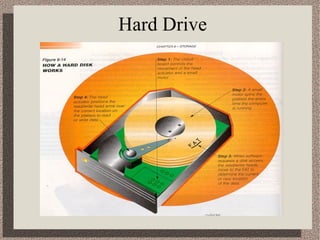
Hard Drive
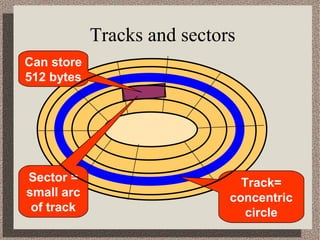
How Data is Organized on Hard Drive Disk
• Tracks-
   – circular areas of the disk
   – Length of a track one circumference of disk
   – Over 1000 on a hard disk
   – Data first written to outer most track
• Sectors-
   – Divides tracks sections
   – On a floppy 9 sectors exits
• Cylinders-
   – Logical groupings of the the same track on each disk surface in a disk
     unit
• Clusters-
   – Groups of sectors used by operating system
   – 64 sectors in one cluster
Tracks and sectors
Can store
512 bytes


Sector =                       Track=
small arc                    concentric
 of track                       circle
Backing up data
• Archival: full backup- contains everything
  from the hard disk
• Incremental: contains only files that have been
  modified since last (previous) backup
• Differential: backs up all the data modified
  since last full backup
• Copy backup: copy duplicate of file, directory,
  or disk to another disk
Backing up data
• Archival: full backup- contains everything
  from the hard disk
• Incremental: contains only files that have been
  modified since last (previous) backup
• Differential: backs up all the data modified
  since last full backup
• Copy backup: copy duplicate of file, directory,
  or disk to another disk

Hard drives

  • 1.
    Hard Drives A harddisk drive is a hardware device that's used to store information like software and files. The primary hard disk in a PC is often called the C drive. For Information on Hard Drives. Please Visit : www.theprinterdepo.com
  • 2.
    Storage Systems • HardDrives – 2 Types: SCSI and IDE • IDE drives- – originally developed as alternative to more expensive SCSI drives. – Modern versions called EIDE drives. – Support up to 4 multigigabyte drives. – If you want more devices, use SCSI or USB – Low-level formatted at the factory
  • 3.
  • 4.
    How Data isOrganized on Hard Drive Disk • Tracks- – circular areas of the disk – Length of a track one circumference of disk – Over 1000 on a hard disk – Data first written to outer most track • Sectors- – Divides tracks sections – On a floppy 9 sectors exits • Cylinders- – Logical groupings of the the same track on each disk surface in a disk unit • Clusters- – Groups of sectors used by operating system – 64 sectors in one cluster
  • 5.
    Tracks and sectors Canstore 512 bytes Sector = Track= small arc concentric of track circle
  • 6.
    Backing up data •Archival: full backup- contains everything from the hard disk • Incremental: contains only files that have been modified since last (previous) backup • Differential: backs up all the data modified since last full backup • Copy backup: copy duplicate of file, directory, or disk to another disk
  • 7.
    Backing up data •Archival: full backup- contains everything from the hard disk • Incremental: contains only files that have been modified since last (previous) backup • Differential: backs up all the data modified since last full backup • Copy backup: copy duplicate of file, directory, or disk to another disk