


Haproxy
Haproxy
HAProxy is a free, very fast and reliable solution offering
high availability, load balancing, and proxying for TCP and
HTTP-based applications
● high availability
● load balancing
● proxying
Installation
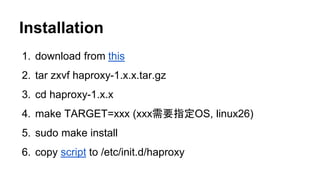
1. download from this
2. tar zxvf haproxy-1.x.x.tar.gz
3. cd haproxy-1.x.x
4. make TARGET=xxx (xxx需要指定OS, linux26)
5. sudo make install
6. copy script to /etc/init.d/haproxy
Configuration
1. /etc/init.d/haproxy
a. CONFIG, HAPROXY
2. /etc/haproxy/haproxy.cfg
a. global 全局配置
b. defaults 默认配置
c. listen admin_stats 统计页面配置
d. listen node_server_in 配置frontend -- 接收请求
e. backend 配置backend -- 处理请求
Configuration
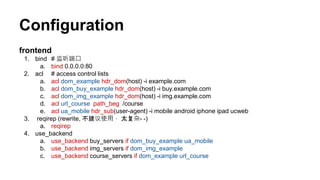
frontend
1. bind # 监听端口
a. bind 0.0.0.0:80
2. acl # access control lists
a. acl dom_example hdr_dom(host) -i example.com
b. acl dom_buy_example hdr_dom(host) -i buy.example.com
c. acl dom_img_example hdr_dom(host) -i img.example.com
d. acl url_course path_beg /course
e. acl ua_mobile hdr_sub(user-agent) -i mobile android iphone ipad ucweb
3. reqirep (rewrite, 不建议使用, 太复杂- -)
a. reqirep
4. use_backend
a. use_backend buy_servers if dom_buy_example ua_mobile
b. use_backend img_servers if dom_img_example
c. use_backend course_servers if dom_example url_course
Configuration
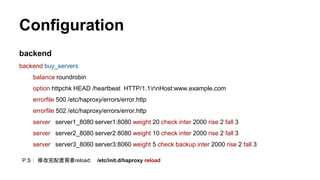
backend
backend buy_servers
balance roundrobin
option httpchk HEAD /heartbeat HTTP/1.1rnHost:www.example.com
errorfile 500 /etc/haproxy/errors/error.http
errorfile 502 /etc/haproxy/errors/error.http
server server1_8080 server1:8080 weight 20 check inter 2000 rise 2 fall 3
server server2_8080 server2:8080 weight 10 check inter 2000 rise 2 fall 3
server server3_8060 server3:8060 weight 5 check backup inter 2000 rise 2 fall 3
P.S: 修改完配置需要reload: /etc/init.d/haproxy reload
Log
1. /var/log/haproxy.log # file path
a. /var/log/haproxy.log.2.gz # cp && gzip -d
2. /etc/logrotate.d/haproxy # logrotate
3. /etc/rsyslog.d/49-haproxy.conf # keep haproxy log out of syslog
4. HTTP log format # doc
Jul 16 11:38:54 localhost haproxy[61457]: 115.54.xxx.8x:39954 [16/Jul/2014:11:38:54.325] node_server_in buy_servers/server1_8080
0/0/1/1/275 200 590 - - ---- 9/9/0/0/0 0/0 "GET /course HTTP/1.1"
[ log time ] [ haproxy pid ] [ user ip ] [ request time ] [ frontend ]
Jul 16 11:28:48 localhost haproxy[61454]: 119.39.3.85:18658 [16/Jul/2014:11:28:48.224] node_server_in
[ backend/server ] [ timer (ms) ] [status code] [ response length] [state]
buy_servers/server1_8080 1/0/0/227/281 200 4896 - - ----
[ connections ] [ queue ] [ method url ]
8/8/1/0/0 0/0 "GET /course HTTP/1.1"
Log
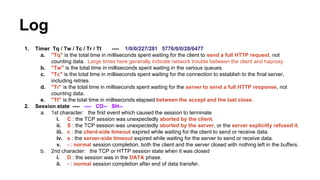
1. Timer Tq / Tw / Tc / Tr / Tt ---- 1/0/0/227/281 5776/0/0/28/6477
a. "Tq" is the total time in milliseconds spent waiting for the client to send a full HTTP request, not
counting data. Large times here generally indicate network trouble between the client and haproxy.
b. "Tw" is the total time in milliseconds spent waiting in the various queues.
c. "Tc" is the total time in milliseconds spent waiting for the connection to establish to the final server,
including retries.
d. "Tr" is the total time in milliseconds spent waiting for the server to send a full HTTP response, not
counting data.
e. "Tt" is the total time in milliseconds elapsed between the accept and the last close.
2. Session state ---- ---- CD-- SH--
a. 1st character: the first event which caused the session to terminate
i. C : the TCP session was unexpectedly aborted by the client.
ii. S : the TCP session was unexpectedly aborted by the server, or the server explicitly refused it.
iii. c : the client-side timeout expired while waiting for the client to send or receive data.
iv. s : the server-side timeout expired while waiting for the server to send or receive data.
v. - : normal session completion, both the client and the server closed with nothing left in the buffers.
b. 2nd character: the TCP or HTTP session state when it was closed
i. D : the session was in the DATA phase.
ii. - : normal session completion after end of data transfer.
Thanks

Introduction to Haproxy

  • 1.
  • 2.
    Haproxy HAProxy is afree, very fast and reliable solution offering high availability, load balancing, and proxying for TCP and HTTP-based applications ● high availability ● load balancing ● proxying
  • 3.
    Installation 1. download fromthis 2. tar zxvf haproxy-1.x.x.tar.gz 3. cd haproxy-1.x.x 4. make TARGET=xxx (xxx需要指定OS, linux26) 5. sudo make install 6. copy script to /etc/init.d/haproxy
  • 4.
    Configuration 1. /etc/init.d/haproxy a. CONFIG,HAPROXY 2. /etc/haproxy/haproxy.cfg a. global 全局配置 b. defaults 默认配置 c. listen admin_stats 统计页面配置 d. listen node_server_in 配置frontend -- 接收请求 e. backend 配置backend -- 处理请求
  • 5.
    Configuration frontend 1. bind #监听端口 a. bind 0.0.0.0:80 2. acl # access control lists a. acl dom_example hdr_dom(host) -i example.com b. acl dom_buy_example hdr_dom(host) -i buy.example.com c. acl dom_img_example hdr_dom(host) -i img.example.com d. acl url_course path_beg /course e. acl ua_mobile hdr_sub(user-agent) -i mobile android iphone ipad ucweb 3. reqirep (rewrite, 不建议使用, 太复杂- -) a. reqirep 4. use_backend a. use_backend buy_servers if dom_buy_example ua_mobile b. use_backend img_servers if dom_img_example c. use_backend course_servers if dom_example url_course
  • 6.
    Configuration backend backend buy_servers balance roundrobin optionhttpchk HEAD /heartbeat HTTP/1.1rnHost:www.example.com errorfile 500 /etc/haproxy/errors/error.http errorfile 502 /etc/haproxy/errors/error.http server server1_8080 server1:8080 weight 20 check inter 2000 rise 2 fall 3 server server2_8080 server2:8080 weight 10 check inter 2000 rise 2 fall 3 server server3_8060 server3:8060 weight 5 check backup inter 2000 rise 2 fall 3 P.S: 修改完配置需要reload: /etc/init.d/haproxy reload
  • 7.
    Log 1. /var/log/haproxy.log #file path a. /var/log/haproxy.log.2.gz # cp && gzip -d 2. /etc/logrotate.d/haproxy # logrotate 3. /etc/rsyslog.d/49-haproxy.conf # keep haproxy log out of syslog 4. HTTP log format # doc Jul 16 11:38:54 localhost haproxy[61457]: 115.54.xxx.8x:39954 [16/Jul/2014:11:38:54.325] node_server_in buy_servers/server1_8080 0/0/1/1/275 200 590 - - ---- 9/9/0/0/0 0/0 "GET /course HTTP/1.1" [ log time ] [ haproxy pid ] [ user ip ] [ request time ] [ frontend ] Jul 16 11:28:48 localhost haproxy[61454]: 119.39.3.85:18658 [16/Jul/2014:11:28:48.224] node_server_in [ backend/server ] [ timer (ms) ] [status code] [ response length] [state] buy_servers/server1_8080 1/0/0/227/281 200 4896 - - ---- [ connections ] [ queue ] [ method url ] 8/8/1/0/0 0/0 "GET /course HTTP/1.1"
  • 8.
    Log 1. Timer Tq/ Tw / Tc / Tr / Tt ---- 1/0/0/227/281 5776/0/0/28/6477 a. "Tq" is the total time in milliseconds spent waiting for the client to send a full HTTP request, not counting data. Large times here generally indicate network trouble between the client and haproxy. b. "Tw" is the total time in milliseconds spent waiting in the various queues. c. "Tc" is the total time in milliseconds spent waiting for the connection to establish to the final server, including retries. d. "Tr" is the total time in milliseconds spent waiting for the server to send a full HTTP response, not counting data. e. "Tt" is the total time in milliseconds elapsed between the accept and the last close. 2. Session state ---- ---- CD-- SH-- a. 1st character: the first event which caused the session to terminate i. C : the TCP session was unexpectedly aborted by the client. ii. S : the TCP session was unexpectedly aborted by the server, or the server explicitly refused it. iii. c : the client-side timeout expired while waiting for the client to send or receive data. iv. s : the server-side timeout expired while waiting for the server to send or receive data. v. - : normal session completion, both the client and the server closed with nothing left in the buffers. b. 2nd character: the TCP or HTTP session state when it was closed i. D : the session was in the DATA phase. ii. - : normal session completion after end of data transfer.
  • 9.

Editor's Notes

  • #7 option 如何检查 dolphin.local:9600/onepiece/heartbeat 如果不行,检查dolphin.local 9600对应的进程在不在 ?how ? telnet?
  • #9 sH server timeout for header