Varnish
Introduction
Varnish
Varnish is an HTTP accelerator. (tutorial)
Install it in front of your web application and it will speed it
up significantly.
Varnish stores data in virtual memory and leaves the task
of deciding what is stored in memory and what gets paged
out to disk to the operating system.
Installation
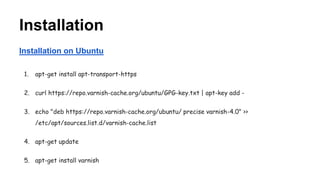
Installation on Ubuntu
1. apt-get install apt-transport-https
2. curl https://repo.varnish-cache.org/ubuntu/GPG-key.txt | apt-key add -
3. echo "deb https://repo.varnish-cache.org/ubuntu/ precise varnish-4.0" >>
/etc/apt/sources.list.d/varnish-cache.list
4. apt-get update
5. apt-get install varnish
Configuration
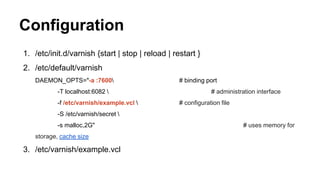
1. /etc/init.d/varnish {start | stop | reload | restart }
2. /etc/default/varnish
DAEMON_OPTS="-a :7600 # binding port
-T localhost:6082  # administration interface
-f /etc/varnish/example.vcl  # configuration file
-S /etc/varnish/secret 
-s malloc,2G" # uses memory for
storage, cache size
3. /etc/varnish/example.vcl
VCL
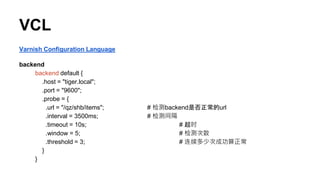
Varnish Configuration Language
backend
backend default {
.host = "tiger.local";
.port = "9600";
.probe = {
.url = "/qz/shb/items"; # 检测backend是否正常的url
.interval = 3500ms; # 检测间隔
.timeout = 10s; # 超时
.window = 5; # 检测次数
.threshold = 3; # 连续多少次成功算正常
}
}
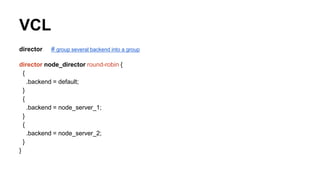
VCL
director # group several backend into a group
director node_director round-robin {
{
.backend = default;
}
{
.backend = node_server_1;
}
{
.backend = node_server_2;
}
}
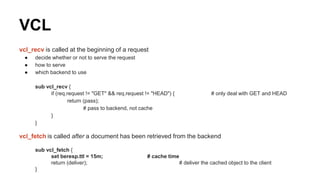
VCL
vcl_recv is called at the beginning of a request
● decide whether or not to serve the request
● how to serve
● which backend to use
sub vcl_recv {
if (req.request != "GET" && req.request != "HEAD") { # only deal with GET and HEAD
return (pass);
# pass to backend, not cache
}
}
vcl_fetch is called after a document has been retrieved from the backend
sub vcl_fetch {
set beresp.ttl = 15m; # cache time
return (deliver); # deliver the cached object to the client
}
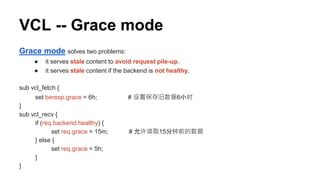
VCL -- Grace mode
Grace mode solves two problems:
● it serves stale content to avoid request pile-up.
● it serves stale content if the backend is not healthy.
sub vcl_fetch {
set beresp.grace = 6h; # 设置保存旧数据6小时
}
sub vcl_recv {
if (req.backend.healthy) {
set req.grace = 15m; # 允许读取15分钟前的数据
} else {
set req.grace = 5h;
}
}
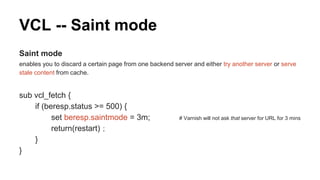
VCL -- Saint mode
Saint mode
enables you to discard a certain page from one backend server and either try another server or serve
stale content from cache.
sub vcl_fetch {
if (beresp.status >= 500) {
set beresp.saintmode = 3m; # Varnish will not ask that server for URL for 3 mins
return(restart);
}
}
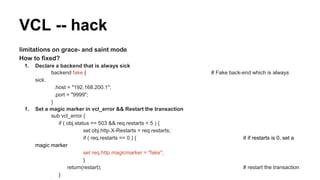
limitations on grace- and saint mode
How to fixed?
1. Declare a backend that is always sick
backend fake { # Fake back-end which is always
sick.
.host = "192.168.200.1";
.port = "9999";
}
1. Set a magic marker in vcl_error && Restart the transaction
sub vcl_error {
if ( obj.status == 503 && req.restarts < 5 ) {
set obj.http.X-Restarts = req.restarts;
if ( req.restarts == 0 ) { # if restarts is 0, set a
magic marker
set req.http.magicmarker = "fake";
}
return(restart); # restart the transaction
}
VCL -- hack
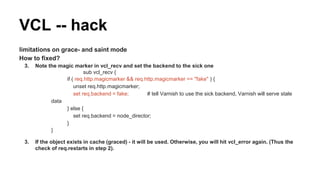
limitations on grace- and saint mode
How to fixed?
3. Note the magic marker in vcl_recv and set the backend to the sick one
sub vcl_recv {
if ( req.http.magicmarker && req.http.magicmarker == "fake" ) {
unset req.http.magicmarker;
set req.backend = fake; # tell Varnish to use the sick backend, Varnish will serve stale
data
} else {
set req.backend = node_director;
}
}
3. If the object exists in cache (graced) - it will be used. Otherwise, you will hit vcl_error again. (Thus the
check of req.restarts in step 2).
VCL -- hack
VCL -- Purges
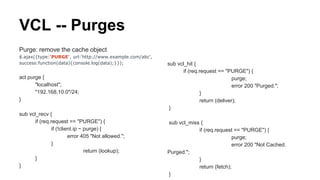
Purge: remove the cache object
$.ajax({type:'PURGE', url:'http://www.example.com/abc',
success:function(data){console.log(data);}});
acl purge {
"localhost";
"192.168.10.0"/24;
}
sub vcl_recv {
if (req.request == "PURGE") {
if (!client.ip ~ purge) {
error 405 "Not allowed.";
}
return (lookup);
}
}
sub vcl_hit {
if (req.request == "PURGE") {
purge;
error 200 "Purged.";
}
return (deliver);
}
sub vcl_miss {
if (req.request == "PURGE") {
purge;
error 200 "Not Cached.
Purged.";
}
return (fetch);
}
Tools
● varnishtop
● varnishhist
● varnishsizes
● varnishstat
● varnishadm
● varnishlog
● varnishncsa

Varnish

  • 1.
  • 2.
    Varnish Varnish is anHTTP accelerator. (tutorial) Install it in front of your web application and it will speed it up significantly. Varnish stores data in virtual memory and leaves the task of deciding what is stored in memory and what gets paged out to disk to the operating system.
  • 3.
    Installation Installation on Ubuntu 1.apt-get install apt-transport-https 2. curl https://repo.varnish-cache.org/ubuntu/GPG-key.txt | apt-key add - 3. echo "deb https://repo.varnish-cache.org/ubuntu/ precise varnish-4.0" >> /etc/apt/sources.list.d/varnish-cache.list 4. apt-get update 5. apt-get install varnish
  • 4.
    Configuration 1. /etc/init.d/varnish {start| stop | reload | restart } 2. /etc/default/varnish DAEMON_OPTS="-a :7600 # binding port -T localhost:6082 # administration interface -f /etc/varnish/example.vcl # configuration file -S /etc/varnish/secret -s malloc,2G" # uses memory for storage, cache size 3. /etc/varnish/example.vcl
  • 5.
    VCL Varnish Configuration Language backend backenddefault { .host = "tiger.local"; .port = "9600"; .probe = { .url = "/qz/shb/items"; # 检测backend是否正常的url .interval = 3500ms; # 检测间隔 .timeout = 10s; # 超时 .window = 5; # 检测次数 .threshold = 3; # 连续多少次成功算正常 } }
  • 6.
    VCL director # groupseveral backend into a group director node_director round-robin { { .backend = default; } { .backend = node_server_1; } { .backend = node_server_2; } }
  • 7.
    VCL vcl_recv is calledat the beginning of a request ● decide whether or not to serve the request ● how to serve ● which backend to use sub vcl_recv { if (req.request != "GET" && req.request != "HEAD") { # only deal with GET and HEAD return (pass); # pass to backend, not cache } } vcl_fetch is called after a document has been retrieved from the backend sub vcl_fetch { set beresp.ttl = 15m; # cache time return (deliver); # deliver the cached object to the client }
  • 8.
    VCL -- Gracemode Grace mode solves two problems: ● it serves stale content to avoid request pile-up. ● it serves stale content if the backend is not healthy. sub vcl_fetch { set beresp.grace = 6h; # 设置保存旧数据6小时 } sub vcl_recv { if (req.backend.healthy) { set req.grace = 15m; # 允许读取15分钟前的数据 } else { set req.grace = 5h; } }
  • 9.
    VCL -- Saintmode Saint mode enables you to discard a certain page from one backend server and either try another server or serve stale content from cache. sub vcl_fetch { if (beresp.status >= 500) { set beresp.saintmode = 3m; # Varnish will not ask that server for URL for 3 mins return(restart); } }
  • 10.
    limitations on grace-and saint mode How to fixed? 1. Declare a backend that is always sick backend fake { # Fake back-end which is always sick. .host = "192.168.200.1"; .port = "9999"; } 1. Set a magic marker in vcl_error && Restart the transaction sub vcl_error { if ( obj.status == 503 && req.restarts < 5 ) { set obj.http.X-Restarts = req.restarts; if ( req.restarts == 0 ) { # if restarts is 0, set a magic marker set req.http.magicmarker = "fake"; } return(restart); # restart the transaction } VCL -- hack
  • 11.
    limitations on grace-and saint mode How to fixed? 3. Note the magic marker in vcl_recv and set the backend to the sick one sub vcl_recv { if ( req.http.magicmarker && req.http.magicmarker == "fake" ) { unset req.http.magicmarker; set req.backend = fake; # tell Varnish to use the sick backend, Varnish will serve stale data } else { set req.backend = node_director; } } 3. If the object exists in cache (graced) - it will be used. Otherwise, you will hit vcl_error again. (Thus the check of req.restarts in step 2). VCL -- hack
  • 12.
    VCL -- Purges Purge:remove the cache object $.ajax({type:'PURGE', url:'http://www.example.com/abc', success:function(data){console.log(data);}}); acl purge { "localhost"; "192.168.10.0"/24; } sub vcl_recv { if (req.request == "PURGE") { if (!client.ip ~ purge) { error 405 "Not allowed."; } return (lookup); } } sub vcl_hit { if (req.request == "PURGE") { purge; error 200 "Purged."; } return (deliver); } sub vcl_miss { if (req.request == "PURGE") { purge; error 200 "Not Cached. Purged."; } return (fetch); }
  • 13.
    Tools ● varnishtop ● varnishhist ●varnishsizes ● varnishstat ● varnishadm ● varnishlog ● varnishncsa