Treasure Data Hands-On: Managing Slowly
Changing Dimensions Using TD Workflow
Agenda
● Introduction
● Treasure Data Workflow
● Overview of Slowly Changing Dimensions
● Window Functions
● Handling Type 2 SCDs using Treasure Data
Introduction
• Scott Mitchell
• Senior Solution Engineer
• Work with Enterprise clients to
maximize the activation of the
client data
• smitchell@treasure-data.com
Introduction
Treasure Data is a Customer Data Platform
“Customer Data Platform (CDP) is a marketer-based management system
that creates a persistent, unified customer database that is accessible to
other systems. Data is pulled from multiple sources, cleaned, and combined
to create a single customer view. This structured data is then made available
to other marketing systems. CDP provides real-time segmentation for
sophisticated personalized marketing.”
https://en.wikipedia.org/wiki/Customer_Data_Platform
Our Customer Data Platform: Foundation
Data Management
1st party data
(Your data)
● Web
● Mobile
● Apps
● CRMs
● Offline
2nd & 3rd party DMPs
(enrichment)
Tool Integration
● Campaigns
● Advertising
● Social media
● Reporting
● BI & data
science
ID Unification
Persistent Storage
Workflow Orchestration
ActivationAll Your Data
Segmentation
Profiles Segments
Measurement
Treasure Data Workflow
DATA ORCHESTRATION AND WORKFLOW MANAGEMENT
•Workflow management across data input, processing and output
•Supports both scheduled & trigger-based execution
•Cloud-based and Client-hosted. Client-hosted version can run custom code.
•Cloud-based version has both web UI & REST API
The core engine is built on our open source project
Digdag
Treasure Workflow allow users to build repeatable data processing pipelines that consist of
Treasure Data jobs.
Overview
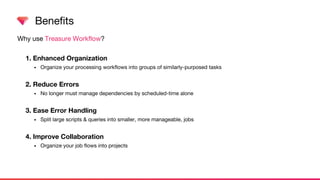
Why use Treasure Workflow?
1. Enhanced Organization
• Organize your processing workflows into groups of similarly-purposed tasks
2. Reduce Errors
• No longer must manage dependencies by scheduled-time alone
3. Ease Error Handling
• Split large scripts & queries into smaller, more manageable, jobs
4. Improve Collaboration
• Organize your job flows into projects
Benefits
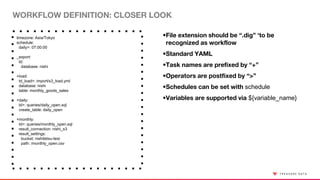
WORKFLOW DEFINITION: CLOSER LOOK
timezone: Asia/Tokyo
schedule:
daily>: 07:00:00
_export:
td:
database: nishi
+load:
td_load>: import/s3_load.yml
database: nishi
table: monthly_goods_sales
+daily:
td>: queries/daily_open.sql
create_table: daily_open
+monthly:
td>: queries/monthly_open.sql
result_connection: nishi_s3
result_settings:
bucket: nishitetsu-test
path: /monthly_open.csv
•File extension should be “.dig” ‘to be
recognized as workflow
•Standard YAML
•Task names are prefixed by “+”
•Operators are postfixed by “>”
•Schedules can be set with schedule
•Variables are supported via ${variable_name}
REPRESENTATIVE OPERATORS
Category Name Description
Control Flow
call>: Call another workflow
loop>: Repeat tasks a specified # of times
for_each>: Loop through a specified list
if>: if/else control flow
Treasure Data
td>: Run a specified TD query
td_run>: Run a saved query
td_ddl>: Create, delete, rename, truncate tables
td_load>: Invoke an input data transfer
td_for_each>: Loop through a query result row by row
AWS
s3_wait>: Wait for new files in S3 & download
redshift>: Run Redshift query
redshift_load>: Load data into Redshift
redshift_unload>: Unload data from Redshift
Google Cloud Platform
bq>: Run BigQuery query
bq_extract>: Unload data from BigQuery to GCS
Slowly Changing
Dimensions
Slowly Changing Dimensions
• Particular dimensions within a dataset that are prone to change
unpredictably
• Example: the phone number or email field of a CRM dataset
• Data available from a CRM usually represents the current, up-to-date value
of each field for each customer
• Storing a history this customer data requires managing these slowly
changing dimensions (SCDs)
Different Ways to Handle SCDs
• Type 1
• Type 2
• Type 3
• Type 4
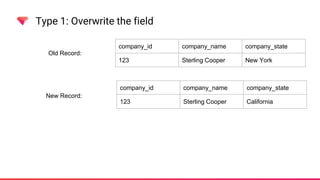
Type 1: Overwrite the field
company_id company_name company_state
123 Sterling Cooper New York
Old Record:
Type 1: Overwrite the field
company_id company_name company_state
123 Sterling Cooper New York
Old Record:
New Record:
company_id company_name company_state
123 Sterling Cooper California
Type 1: Overwrite the field
company_id company_name company_state
123 Sterling Cooper New York
Old Record:
New Record:
company_id company_name company_state
123 Sterling Cooper California
SCD Type 1:
company_id company_name company_state
123 Sterling Cooper California
Type 2: Keep both records, flag the “current” row
company_id company_name company_state
123 Sterling Cooper New York
Old Record:
New Record:
company_id company_name company_state
123 Sterling Cooper California
SCD Type 2:
company_id company_name company_state is_current
123 Sterling Cooper New York 0
123 Sterling Cooper California 1
Type 3: Store the latest two values in one row
company_id company_name company_state
123 Sterling Cooper New York
Old Record:
New Record:
company_id company_name company_state
123 Sterling Cooper California
SCD Type 3:
company_id company_name company_state_current company_state_previous
123 Sterling Cooper California New York
Type 4: Use a separate history table
SCD Type 4:
company_id company_name company_state
123 Sterling Cooper California
company
company_id company_name company_state last_modified_date
123 Sterling Cooper New York 2007-06-19
123 Sterling Cooper California 2008-10-12
company_history
Window Functions
Type 2: Keep both records, flag the “current” row
company_id company_name company_state
123 Sterling Cooper New York
Old Record:
New Record:
company_id company_name company_state
123 Sterling Cooper California
SCD Type 2:
company_id company_name company_state is_current
123 Sterling Cooper New York 0
123 Sterling Cooper California 1
Type 2: Keep both records, flag the “current” row
company_id company_name company_state lastmodifieddate
123 Sterling Cooper New York 2007-06-19
Old Record:
New Record:
SCD Type 2:
company_id company_name company_state lastmodifieddate is_current
123 Sterling Cooper New York 2007-06-19 0
123 Sterling Cooper California 2008-10-12 1
company_id company_name company_state lastmodifieddate
123 Sterling Cooper California 2008-10-12
Type 2: Keep both records, flag the “current” row
company_id company_name company_state lastmodifieddate
123 Sterling Cooper New York 2007-06-19
Old Record:
New Record:
SCD Type 2:
company_id company_name company_state lastmodifieddate is_current
123 Sterling Cooper New York 2007-06-19 0
123 Sterling Cooper California 2008-10-12 1
company_id company_name company_state lastmodifieddate
123 Sterling Cooper California 2008-10-12
Window Functions
• Window functions perform calculations across rows of the query result
• They run after the ‘HAVING’ clause but before the ‘ORDER BY’ clause
• They are written in the ‘SELECT’ clause and display results in their own
column
• They have three parts:
Window Functions
rank() OVER (PARTITION BY company_id ORDER BY lastmodifieddate DESC)
ordering specificationfunction partition specification
Window Functions
SELECT
company_id,
company_name,
company_state,
rank() OVER (PARTITION BY company_id ORDER BY lastmodifieddate DESC) AS isCurrent
FROM company
company_id company_name company_state lastmodifieddate
123 Sterling Cooper New York 2007-06-19
123 Sterling Cooper California 2008-10-12
company
company_id company_name company_state lastmodifieddate is_current
123 Sterling Cooper California 2008-10-12 1
123 Sterling Cooper New York 2007-06-19 2
Window Functions
SELECT
company_id,
company_name,
company_state,
rank() OVER (PARTITION BY company_id ORDER BY lastmodifieddate DESC) AS isCurrent
FROM company
company_id company_name company_state lastmodifieddate is_current
123 Sterling Cooper California 2008-10-12 1
123 Sterling Cooper New York 2007-06-19 2
124 CGC Connecticut 2018-05-22 1
124 CGC New York 2010-08-22 2
Window Functions
SELECT
company_id,
company_name,
company_state,
rank() OVER (PARTITION BY company_id ORDER BY lastmodifieddate ASC) AS isCurrent
FROM company
company_id company_name company_state lastmodifieddate is_current
123 Sterling Cooper California 2008-10-12 2
123 Sterling Cooper New York 2007-06-19 1
124 CGC Connecticut 2018-05-22 2
124 CGC New York 2010-08-22 1
Window Functions
SELECT
company_id,
company_name,
company_state,
rank() OVER (PARTITION BY company_id ORDER BY lastmodifieddate ASC) AS isCurrent
FROM company
company_id company_name company_state lastmodifieddate is_current
123 Sterling Cooper California 2008-10-12 1
123 Sterling Cooper New York 2007-06-19 0
124 CGC Connecticut 2018-05-22 1
124 CGC New York 2010-08-22 0
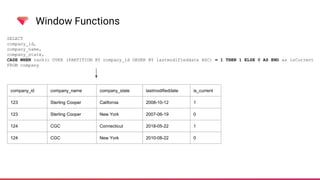
Window Functions
SELECT
company_id,
company_name,
company_state,
CASE WHEN rank() OVER (PARTITION BY company_id ORDER BY lastmodifieddate ASC) = 1 THEN 1 ELSE 0 AS END as isCurrent
FROM company
company_id company_name company_state lastmodifieddate is_current
123 Sterling Cooper California 2008-10-12 1
123 Sterling Cooper New York 2007-06-19 0
124 CGC Connecticut 2018-05-22 1
124 CGC New York 2010-08-22 0
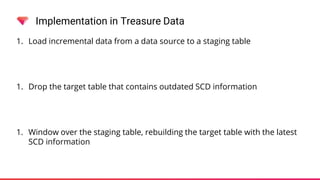
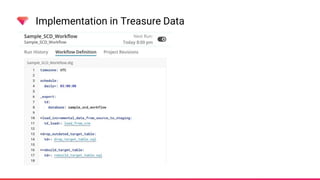
Implementation in Treasure Data
1. Load incremental data from a data source to a staging table
1. Drop the target table that contains outdated SCD information
1. Window over the staging table, rebuilding the target table with the latest
SCD information
Implementation in Treasure Data
1. Load incremental data from a data source to a staging table
1. Drop the target table that contains outdated SCD information
1. Window over the staging table, rebuilding the target table with the latest
SCD information
Implementation in Treasure Data
company_id company_name company_state lastmodifieddate
123 Sterling Cooper New York 2007-06-19
124 CGC New York 2010-08-22
staging_company
company_id company_name company_state lastmodifieddate is_current
123 Sterling Cooper New York 2007-06-19 1
124 CGC New York 2010-08-22 1
target_company
Implementation in Treasure Data
company_id company_name company_state lastmodifieddate
123 Sterling Cooper New York 2007-06-19
124 CGC New York 2010-08-22
123 Sterling Cooper California 2008-10-12
124 CGC Connecticut 2018-05-22
staging_company
company_id company_name company_state lastmodifieddate is_current
123 Sterling Cooper New York 2007-06-19 1
124 CGC New York 2010-08-22 1
target_company
Implementation in Treasure Data
company_id company_name company_state lastmodifieddate
123 Sterling Cooper New York 2007-06-19
124 CGC New York 2010-08-22
123 Sterling Cooper California 2008-10-12
124 CGC Connecticut 2018-05-22
staging_company
target_company
Implementation in Treasure Data
company_id company_name company_state lastmodifieddate
123 Sterling Cooper New York 2007-06-19
124 CGC New York 2010-08-22
123 Sterling Cooper California 2008-10-12
124 CGC Connecticut 2018-05-22
staging_company
company_id company_name company_state lastmodifieddate is_current
123 Sterling Cooper California 2008-10-12 1
123 Sterling Cooper New York 2007-06-19 0
124 CGC Connecticut 2018-05-22 1
124 CGC New York 2010-08-22 0
target_company
Thank You
And
Questions
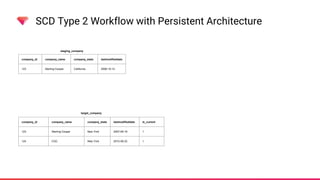
SCD Type 2 Workflow with Persistent Architecture
company_id company_name company_state lastmodifieddate
123 Sterling Cooper California 2008-10-12
staging_company
company_id company_name company_state lastmodifieddate is_current
123 Sterling Cooper New York 2007-06-19 1
124 CGC New York 2010-08-22 1
target_company
SCD Type 2 Workflow with Persistent Architecture
company_id company_name company_state lastmodifieddate
123 Sterling Cooper California 2008-10-12
staging_company
company_id company_name company_state lastmodifieddate is_current
123 Sterling Cooper New York 2007-06-19 1
124 CGC New York 2010-08-22 1
target_company
1. Store a temp table of the current rows that will not be current after the new data is
ingested
company_id company_name company_state lastmodifieddate is_current
123 Sterling Cooper New York 2007-06-19 0
tmp_no_longer_current
SCD Type 2 Workflow with Persistent Architecture
company_id company_name company_state lastmodifieddate
123 Sterling Cooper California 2008-10-12
staging_company
company_id company_name company_state lastmodifieddate is_current
123 Sterling Cooper New York 2007-06-19 1
124 CGC New York 2010-08-22 1
target_company
1. Store a temp table of the current rows that will not be current after the new data is
ingested
company_id company_name company_state lastmodifieddate is_current
123 Sterling Cooper New York 2007-06-19 0
tmp_no_longer_current
SCD Type 2 Workflow with Persistent Architecture
company_id company_name company_state lastmodifieddate
123 Sterling Cooper California 2008-10-12
staging_company
company_id company_name company_state lastmodifieddate is_current
124 CGC New York 2010-08-22 1
target_company
2. Delete from the data lake any current rows that have a matching id in the new data
company_id company_name company_state lastmodifieddate is_current
123 Sterling Cooper New York 2007-06-19 0
tmp_no_longer_current
SCD Type 2 Workflow with Persistent Architecture
company_id company_name company_state lastmodifieddate
123 Sterling Cooper California 2008-10-12
staging_company
company_id company_name company_state lastmodifieddate is_current
124 CGC New York 2010-08-22 1
target_company
3. Insert the temp rows into the target table
company_id company_name company_state lastmodifieddate is_current
123 Sterling Cooper New York 2007-06-19 0
tmp_no_longer_current
SCD Type 2 Workflow with Persistent Architecture
company_id company_name company_state lastmodifieddate
123 Sterling Cooper California 2008-10-12
staging_company
company_id company_name company_state lastmodifieddate is_current
124 CGC New York 2010-08-22 1
123 Sterling Cooper New York 2007-06-19 0
target_company
3. Insert the temp rows into the target table
SCD Type 2 Workflow with Persistent Architecture
company_id company_name company_state lastmodifieddate
123 Sterling Cooper California 2008-10-12
staging_company
company_id company_name company_state lastmodifieddate is_current
124 CGC New York 2010-08-22 1
123 Sterling Cooper New York 2007-06-19 0
target_company
3. Insert the temp rows into the target table
SCD Type 2 Workflow with Persistent Architecture
company_id company_name company_state lastmodifieddate
123 Sterling Cooper California 2008-10-12
staging_company
company_id company_name company_state lastmodifieddate is_current
124 CGC New York 2010-08-22 1
123 Sterling Cooper New York 2007-06-19 0
target_company
4. Insert the new data into the target table
SCD Type 2 Workflow with Persistent Architecture
company_id company_name company_state lastmodifieddate
staging_company
company_id company_name company_state lastmodifieddate is_current
124 CGC New York 2010-08-22 1
123 Sterling Cooper New York 2007-06-19 0
123 Sterling Cooper California 2008-10-12 1
target_company
4. Insert the new data into the target table
SCD Type 2 Workflow with Persistent Architecture
company_id company_name company_state lastmodifieddate
staging_company
company_id company_name company_state lastmodifieddate is_current
124 CGC New York 2010-08-22 1
123 Sterling Cooper New York 2007-06-19 0
123 Sterling Cooper California 2008-10-12 1
target_company
4. Insert the new data into the target table
Contact Information
• Scott Mitchell
• Senior Solution Engineer
• smitchell@treasure-data.com

Hands-On: Managing Slowly Changing Dimensions Using TD Workflow

  • 1.
    Treasure Data Hands-On:Managing Slowly Changing Dimensions Using TD Workflow
  • 2.
    Agenda ● Introduction ● TreasureData Workflow ● Overview of Slowly Changing Dimensions ● Window Functions ● Handling Type 2 SCDs using Treasure Data
  • 3.
    Introduction • Scott Mitchell •Senior Solution Engineer • Work with Enterprise clients to maximize the activation of the client data • smitchell@treasure-data.com
  • 4.
    Introduction Treasure Data isa Customer Data Platform “Customer Data Platform (CDP) is a marketer-based management system that creates a persistent, unified customer database that is accessible to other systems. Data is pulled from multiple sources, cleaned, and combined to create a single customer view. This structured data is then made available to other marketing systems. CDP provides real-time segmentation for sophisticated personalized marketing.” https://en.wikipedia.org/wiki/Customer_Data_Platform
  • 5.
    Our Customer DataPlatform: Foundation Data Management 1st party data (Your data) ● Web ● Mobile ● Apps ● CRMs ● Offline 2nd & 3rd party DMPs (enrichment) Tool Integration ● Campaigns ● Advertising ● Social media ● Reporting ● BI & data science ID Unification Persistent Storage Workflow Orchestration ActivationAll Your Data Segmentation Profiles Segments Measurement
  • 6.
  • 7.
    DATA ORCHESTRATION ANDWORKFLOW MANAGEMENT •Workflow management across data input, processing and output •Supports both scheduled & trigger-based execution •Cloud-based and Client-hosted. Client-hosted version can run custom code. •Cloud-based version has both web UI & REST API The core engine is built on our open source project Digdag
  • 8.
    Treasure Workflow allowusers to build repeatable data processing pipelines that consist of Treasure Data jobs. Overview
  • 9.
    Why use TreasureWorkflow? 1. Enhanced Organization • Organize your processing workflows into groups of similarly-purposed tasks 2. Reduce Errors • No longer must manage dependencies by scheduled-time alone 3. Ease Error Handling • Split large scripts & queries into smaller, more manageable, jobs 4. Improve Collaboration • Organize your job flows into projects Benefits
  • 10.
    WORKFLOW DEFINITION: CLOSERLOOK timezone: Asia/Tokyo schedule: daily>: 07:00:00 _export: td: database: nishi +load: td_load>: import/s3_load.yml database: nishi table: monthly_goods_sales +daily: td>: queries/daily_open.sql create_table: daily_open +monthly: td>: queries/monthly_open.sql result_connection: nishi_s3 result_settings: bucket: nishitetsu-test path: /monthly_open.csv •File extension should be “.dig” ‘to be recognized as workflow •Standard YAML •Task names are prefixed by “+” •Operators are postfixed by “>” •Schedules can be set with schedule •Variables are supported via ${variable_name}
  • 11.
    REPRESENTATIVE OPERATORS Category NameDescription Control Flow call>: Call another workflow loop>: Repeat tasks a specified # of times for_each>: Loop through a specified list if>: if/else control flow Treasure Data td>: Run a specified TD query td_run>: Run a saved query td_ddl>: Create, delete, rename, truncate tables td_load>: Invoke an input data transfer td_for_each>: Loop through a query result row by row AWS s3_wait>: Wait for new files in S3 & download redshift>: Run Redshift query redshift_load>: Load data into Redshift redshift_unload>: Unload data from Redshift Google Cloud Platform bq>: Run BigQuery query bq_extract>: Unload data from BigQuery to GCS
  • 12.
  • 13.
    Slowly Changing Dimensions •Particular dimensions within a dataset that are prone to change unpredictably • Example: the phone number or email field of a CRM dataset • Data available from a CRM usually represents the current, up-to-date value of each field for each customer • Storing a history this customer data requires managing these slowly changing dimensions (SCDs)
  • 14.
    Different Ways toHandle SCDs • Type 1 • Type 2 • Type 3 • Type 4
  • 15.
    Type 1: Overwritethe field company_id company_name company_state 123 Sterling Cooper New York Old Record:
  • 16.
    Type 1: Overwritethe field company_id company_name company_state 123 Sterling Cooper New York Old Record: New Record: company_id company_name company_state 123 Sterling Cooper California
  • 17.
    Type 1: Overwritethe field company_id company_name company_state 123 Sterling Cooper New York Old Record: New Record: company_id company_name company_state 123 Sterling Cooper California SCD Type 1: company_id company_name company_state 123 Sterling Cooper California
  • 18.
    Type 2: Keepboth records, flag the “current” row company_id company_name company_state 123 Sterling Cooper New York Old Record: New Record: company_id company_name company_state 123 Sterling Cooper California SCD Type 2: company_id company_name company_state is_current 123 Sterling Cooper New York 0 123 Sterling Cooper California 1
  • 19.
    Type 3: Storethe latest two values in one row company_id company_name company_state 123 Sterling Cooper New York Old Record: New Record: company_id company_name company_state 123 Sterling Cooper California SCD Type 3: company_id company_name company_state_current company_state_previous 123 Sterling Cooper California New York
  • 20.
    Type 4: Usea separate history table SCD Type 4: company_id company_name company_state 123 Sterling Cooper California company company_id company_name company_state last_modified_date 123 Sterling Cooper New York 2007-06-19 123 Sterling Cooper California 2008-10-12 company_history
  • 21.
  • 22.
    Type 2: Keepboth records, flag the “current” row company_id company_name company_state 123 Sterling Cooper New York Old Record: New Record: company_id company_name company_state 123 Sterling Cooper California SCD Type 2: company_id company_name company_state is_current 123 Sterling Cooper New York 0 123 Sterling Cooper California 1
  • 23.
    Type 2: Keepboth records, flag the “current” row company_id company_name company_state lastmodifieddate 123 Sterling Cooper New York 2007-06-19 Old Record: New Record: SCD Type 2: company_id company_name company_state lastmodifieddate is_current 123 Sterling Cooper New York 2007-06-19 0 123 Sterling Cooper California 2008-10-12 1 company_id company_name company_state lastmodifieddate 123 Sterling Cooper California 2008-10-12
  • 24.
    Type 2: Keepboth records, flag the “current” row company_id company_name company_state lastmodifieddate 123 Sterling Cooper New York 2007-06-19 Old Record: New Record: SCD Type 2: company_id company_name company_state lastmodifieddate is_current 123 Sterling Cooper New York 2007-06-19 0 123 Sterling Cooper California 2008-10-12 1 company_id company_name company_state lastmodifieddate 123 Sterling Cooper California 2008-10-12
  • 25.
    Window Functions • Windowfunctions perform calculations across rows of the query result • They run after the ‘HAVING’ clause but before the ‘ORDER BY’ clause • They are written in the ‘SELECT’ clause and display results in their own column • They have three parts:
  • 26.
    Window Functions rank() OVER(PARTITION BY company_id ORDER BY lastmodifieddate DESC) ordering specificationfunction partition specification
  • 27.
    Window Functions SELECT company_id, company_name, company_state, rank() OVER(PARTITION BY company_id ORDER BY lastmodifieddate DESC) AS isCurrent FROM company company_id company_name company_state lastmodifieddate 123 Sterling Cooper New York 2007-06-19 123 Sterling Cooper California 2008-10-12 company company_id company_name company_state lastmodifieddate is_current 123 Sterling Cooper California 2008-10-12 1 123 Sterling Cooper New York 2007-06-19 2
  • 28.
    Window Functions SELECT company_id, company_name, company_state, rank() OVER(PARTITION BY company_id ORDER BY lastmodifieddate DESC) AS isCurrent FROM company company_id company_name company_state lastmodifieddate is_current 123 Sterling Cooper California 2008-10-12 1 123 Sterling Cooper New York 2007-06-19 2 124 CGC Connecticut 2018-05-22 1 124 CGC New York 2010-08-22 2
  • 29.
    Window Functions SELECT company_id, company_name, company_state, rank() OVER(PARTITION BY company_id ORDER BY lastmodifieddate ASC) AS isCurrent FROM company company_id company_name company_state lastmodifieddate is_current 123 Sterling Cooper California 2008-10-12 2 123 Sterling Cooper New York 2007-06-19 1 124 CGC Connecticut 2018-05-22 2 124 CGC New York 2010-08-22 1
  • 30.
    Window Functions SELECT company_id, company_name, company_state, rank() OVER(PARTITION BY company_id ORDER BY lastmodifieddate ASC) AS isCurrent FROM company company_id company_name company_state lastmodifieddate is_current 123 Sterling Cooper California 2008-10-12 1 123 Sterling Cooper New York 2007-06-19 0 124 CGC Connecticut 2018-05-22 1 124 CGC New York 2010-08-22 0
  • 31.
    Window Functions SELECT company_id, company_name, company_state, CASE WHENrank() OVER (PARTITION BY company_id ORDER BY lastmodifieddate ASC) = 1 THEN 1 ELSE 0 AS END as isCurrent FROM company company_id company_name company_state lastmodifieddate is_current 123 Sterling Cooper California 2008-10-12 1 123 Sterling Cooper New York 2007-06-19 0 124 CGC Connecticut 2018-05-22 1 124 CGC New York 2010-08-22 0
  • 32.
    Implementation in TreasureData 1. Load incremental data from a data source to a staging table 1. Drop the target table that contains outdated SCD information 1. Window over the staging table, rebuilding the target table with the latest SCD information
  • 33.
    Implementation in TreasureData 1. Load incremental data from a data source to a staging table 1. Drop the target table that contains outdated SCD information 1. Window over the staging table, rebuilding the target table with the latest SCD information
  • 34.
  • 35.
    Implementation in TreasureData company_id company_name company_state lastmodifieddate 123 Sterling Cooper New York 2007-06-19 124 CGC New York 2010-08-22 staging_company company_id company_name company_state lastmodifieddate is_current 123 Sterling Cooper New York 2007-06-19 1 124 CGC New York 2010-08-22 1 target_company
  • 36.
    Implementation in TreasureData company_id company_name company_state lastmodifieddate 123 Sterling Cooper New York 2007-06-19 124 CGC New York 2010-08-22 123 Sterling Cooper California 2008-10-12 124 CGC Connecticut 2018-05-22 staging_company company_id company_name company_state lastmodifieddate is_current 123 Sterling Cooper New York 2007-06-19 1 124 CGC New York 2010-08-22 1 target_company
  • 37.
    Implementation in TreasureData company_id company_name company_state lastmodifieddate 123 Sterling Cooper New York 2007-06-19 124 CGC New York 2010-08-22 123 Sterling Cooper California 2008-10-12 124 CGC Connecticut 2018-05-22 staging_company target_company
  • 38.
    Implementation in TreasureData company_id company_name company_state lastmodifieddate 123 Sterling Cooper New York 2007-06-19 124 CGC New York 2010-08-22 123 Sterling Cooper California 2008-10-12 124 CGC Connecticut 2018-05-22 staging_company company_id company_name company_state lastmodifieddate is_current 123 Sterling Cooper California 2008-10-12 1 123 Sterling Cooper New York 2007-06-19 0 124 CGC Connecticut 2018-05-22 1 124 CGC New York 2010-08-22 0 target_company
  • 39.
  • 40.
    SCD Type 2Workflow with Persistent Architecture company_id company_name company_state lastmodifieddate 123 Sterling Cooper California 2008-10-12 staging_company company_id company_name company_state lastmodifieddate is_current 123 Sterling Cooper New York 2007-06-19 1 124 CGC New York 2010-08-22 1 target_company
  • 41.
    SCD Type 2Workflow with Persistent Architecture company_id company_name company_state lastmodifieddate 123 Sterling Cooper California 2008-10-12 staging_company company_id company_name company_state lastmodifieddate is_current 123 Sterling Cooper New York 2007-06-19 1 124 CGC New York 2010-08-22 1 target_company 1. Store a temp table of the current rows that will not be current after the new data is ingested company_id company_name company_state lastmodifieddate is_current 123 Sterling Cooper New York 2007-06-19 0 tmp_no_longer_current
  • 42.
    SCD Type 2Workflow with Persistent Architecture company_id company_name company_state lastmodifieddate 123 Sterling Cooper California 2008-10-12 staging_company company_id company_name company_state lastmodifieddate is_current 123 Sterling Cooper New York 2007-06-19 1 124 CGC New York 2010-08-22 1 target_company 1. Store a temp table of the current rows that will not be current after the new data is ingested company_id company_name company_state lastmodifieddate is_current 123 Sterling Cooper New York 2007-06-19 0 tmp_no_longer_current
  • 43.
    SCD Type 2Workflow with Persistent Architecture company_id company_name company_state lastmodifieddate 123 Sterling Cooper California 2008-10-12 staging_company company_id company_name company_state lastmodifieddate is_current 124 CGC New York 2010-08-22 1 target_company 2. Delete from the data lake any current rows that have a matching id in the new data company_id company_name company_state lastmodifieddate is_current 123 Sterling Cooper New York 2007-06-19 0 tmp_no_longer_current
  • 44.
    SCD Type 2Workflow with Persistent Architecture company_id company_name company_state lastmodifieddate 123 Sterling Cooper California 2008-10-12 staging_company company_id company_name company_state lastmodifieddate is_current 124 CGC New York 2010-08-22 1 target_company 3. Insert the temp rows into the target table company_id company_name company_state lastmodifieddate is_current 123 Sterling Cooper New York 2007-06-19 0 tmp_no_longer_current
  • 45.
    SCD Type 2Workflow with Persistent Architecture company_id company_name company_state lastmodifieddate 123 Sterling Cooper California 2008-10-12 staging_company company_id company_name company_state lastmodifieddate is_current 124 CGC New York 2010-08-22 1 123 Sterling Cooper New York 2007-06-19 0 target_company 3. Insert the temp rows into the target table
  • 46.
    SCD Type 2Workflow with Persistent Architecture company_id company_name company_state lastmodifieddate 123 Sterling Cooper California 2008-10-12 staging_company company_id company_name company_state lastmodifieddate is_current 124 CGC New York 2010-08-22 1 123 Sterling Cooper New York 2007-06-19 0 target_company 3. Insert the temp rows into the target table
  • 47.
    SCD Type 2Workflow with Persistent Architecture company_id company_name company_state lastmodifieddate 123 Sterling Cooper California 2008-10-12 staging_company company_id company_name company_state lastmodifieddate is_current 124 CGC New York 2010-08-22 1 123 Sterling Cooper New York 2007-06-19 0 target_company 4. Insert the new data into the target table
  • 48.
    SCD Type 2Workflow with Persistent Architecture company_id company_name company_state lastmodifieddate staging_company company_id company_name company_state lastmodifieddate is_current 124 CGC New York 2010-08-22 1 123 Sterling Cooper New York 2007-06-19 0 123 Sterling Cooper California 2008-10-12 1 target_company 4. Insert the new data into the target table
  • 49.
    SCD Type 2Workflow with Persistent Architecture company_id company_name company_state lastmodifieddate staging_company company_id company_name company_state lastmodifieddate is_current 124 CGC New York 2010-08-22 1 123 Sterling Cooper New York 2007-06-19 0 123 Sterling Cooper California 2008-10-12 1 target_company 4. Insert the new data into the target table
  • 50.
    Contact Information • ScottMitchell • Senior Solution Engineer • smitchell@treasure-data.com