


Treasure Data
Javascript SDK Hands On
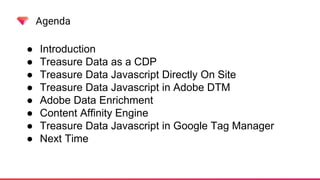
Agenda
● Introduction
● Treasure Data as a CDP
● Treasure Data Javascript Directly On Site
● Treasure Data Javascript in Adobe DTM
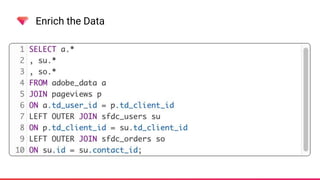
● Adobe Data Enrichment
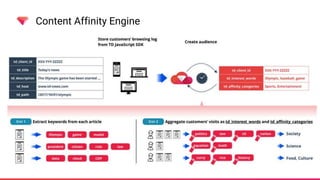
● Content Affinity Engine
● Treasure Data Javascript in Google Tag Manager
● Next Time
Agenda
What this is not
● Adobe DTM Training
● Google Tag Manager Training
Introduction
• Michael D. Healy
• Senior Solution Engineer
• Work with Enterprise clients to
maximize the activation of the
client data
• mhealy@treasure-data.com
Introduction
Treasure Data is a Customer Data Platform
“Customer Data Platform (CDP) is a marketer-based management system
that creates a persistent, unified customer database that is accessible to
other systems. Data is pulled from multiple sources, cleaned, and combined
to create a single customer view. This structured data is then made available
to other marketing systems. CDP provides real-time segmentation for
sophisticated personalized marketing.”
https://en.wikipedia.org/wiki/Customer_Data_Platform
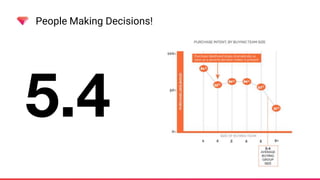
People Making Decisions!
5.4
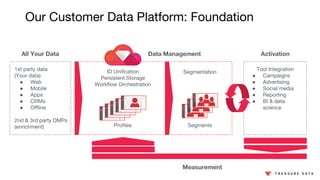
Our Customer Data Platform: Foundation
Data Management
1st party data
(Your data)
● Web
● Mobile
● Apps
● CRMs
● Offline
2nd & 3rd party DMPs
(enrichment)
Tool Integration
● Campaigns
● Advertising
● Social media
● Reporting
● BI & data
science
ID Unification
Persistent Storage
Workflow Orchestration
ActivationAll Your Data
Segmentation
Profiles Segments
Measurement
Introduction
• Javascript is probably just one datasource out of many
• Still the de facto standard for on site tracking
• Treasure Data provides a Javascript SDK
• Can be used independently or inside a tag manager
• Treasure Data is schema less so imports can be flexible
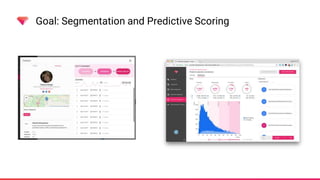
Goal: Segmentation and Predictive Scoring
Javascript SDK
How To Deploy
Yes, we have a code snippet
<!-- Treasure Data -->
<script type="text/javascript">
!function(t,e){if(void
0===e[t]){e[t]=function(){e[t].clients.push(this),this._init=[Array.prototype.slice.call(arguments)]}
,e[t].clients=[];for(var r=function(t){return function(){return
this["_"+t]=this["_"+t]||[],this["_"+t].push(Array.prototype.slice.call(arguments)),this}},s=["addRec
ord","set","trackEvent","trackPageview","trackClicks","ready","fetchGlobalID","fetchUserSegments"],a=
0;a<s.length;a++){var c=s[a];e[t].prototype[c]=r(c)}var
n=document.createElement("script");n.type="text/javascript",n.async=!0,n.src=("https:"===document.loc
ation.protocol?"https:":"http:")+"//cdn.treasuredata.com/sdk/1.9.2/td.min.js";var
i=document.getElementsByTagName("script")[0];i.parentNode.insertBefore(n,i)}}("Treasure",this);
</script>
How To Deploy
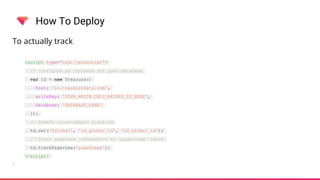
To actually track
<script type="text/javascript">
// Configure an instance for your database
var td = new Treasure({
host: 'in.treasuredata.com',
writeKey: 'YOUR_WRITE_ONLY_APIKEY_IS_HERE',
database: 'DATABASE_NAME'
});
// Enable cross-domain tracking
td.set('$global', 'td_global_id', 'td_global_id');
// Track pageview information to 'pageviews' table
td.trackPageview('pageviews');
</script>
How To Deploy
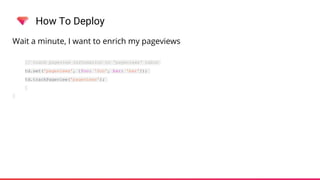
Wait a minute, I want to enrich my pageviews
// track pageview information to 'pageviews' table
td.set('pageviews', {foo: 'foo', bar: 'bar'});
td.trackPageview('pageviews');
How To Deploy
I bet I can’t send data using a tool like cURL ...
# Single Record
$ curl -X POST
-H 'Content-Type: application/json'
-H 'X-TD-Write-Key: your_write_apikey' 
--data-binary '{"name":"komamitsu", "num":1234}' 
https://in.treasuredata.com/js/v3/event/your_db/your_table
# Multiple Records
$ curl -X POST
-H 'Content-Type: application/json'
-H 'X-TD-Write-Key: your_write_apikey' 
-H 'X-TD-Data-Type: k'
--data-binary '{"your_db.your_table":[{"time":1403147720, "name":"komamitsu",
"age":41},{"time":1403147721, "name":"kzk", "age":29}]}' 
https://in.treasuredata.com/js/v3/event
How To Deploy
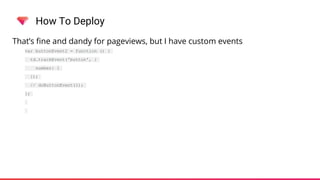
That’s fine and dandy for pageviews, but I have custom events
var buttonEvent2 = function () {
td.trackEvent('button', {
number: 1
});
// doButtonEvent(1);
};
Adobe DTM
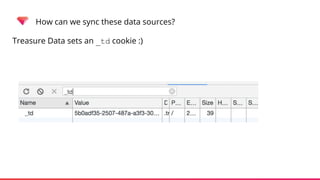
How can we sync these data sources?
Treasure Data sets an _td cookie :)
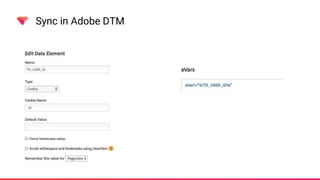
Sync in Adobe DTM
How To Deploy
Let’s code it up!
Adobe Data Enrichment
Enrich the Data
Enrich the Data
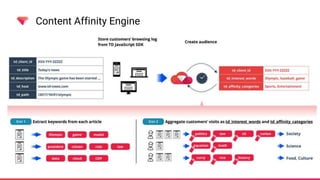
Content Affinity Engine
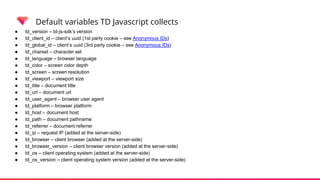
Default variables TD Javascript collects
● td_version – td-js-sdk’s version
● td_client_id – client’s uuid (1st party cookie – see Anonymous IDs)
● td_global_id – client’s uuid (3rd party cookie – see Anonymous IDs)
● td_charset – character set
● td_language – browser language
● td_color – screen color depth
● td_screen – screen resolution
● td_viewport – viewport size
● td_title – document title
● td_url – document url
● td_user_agent – browser user agent
● td_platform – browser platform
● td_host – document host
● td_path – document pathname
● td_referrer – document referrer
● td_ip – request IP (added at the server-side)
● td_browser – client browser (added at the server-side)
● td_browser_version – client browser version (added at the server-side)
● td_os – client operating system (added at the server-side)
● td_os_version – client operating system version (added at the server-side)
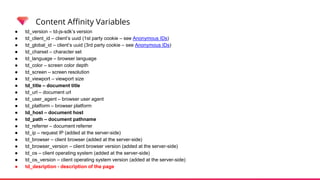
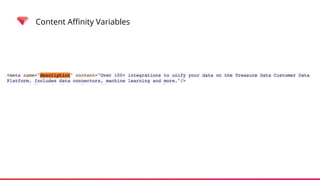
Content Affinity Variables
● td_version – td-js-sdk’s version
● td_client_id – client’s uuid (1st party cookie – see Anonymous IDs)
● td_global_id – client’s uuid (3rd party cookie – see Anonymous IDs)
● td_charset – character set
● td_language – browser language
● td_color – screen color depth
● td_screen – screen resolution
● td_viewport – viewport size
● td_title – document title
● td_url – document url
● td_user_agent – browser user agent
● td_platform – browser platform
● td_host – document host
● td_path – document pathname
● td_referrer – document referrer
● td_ip – request IP (added at the server-side)
● td_browser – client browser (added at the server-side)
● td_browser_version – client browser version (added at the server-side)
● td_os – client operating system (added at the server-side)
● td_os_version – client operating system version (added at the server-side)
● td_desription - description of the page
Content Affinity Variables
Content Affinity Engine
Google Tag Manager
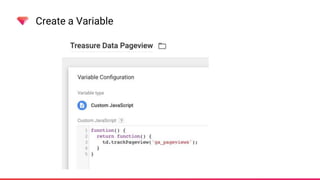
Create a Variable
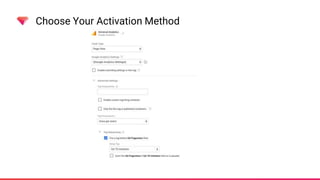
Choose Your Activation Method
Next Time
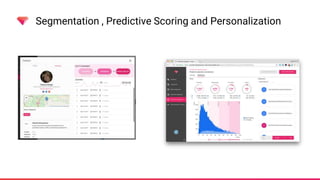
Segmentation , Predictive Scoring and Personalization
Treasure Data Hands On: Introduction to Segmentation,
Predictive Scoring and Syndication
Thurs May 3rd - 10am PST
Registration: https://attendee.gotowebinar.com/register/8369300381552487427
This is a hands-on webinar where we will leverage the data ingested from both
the Treasure Data Javascript SDK and other data sources to build segments of
clients based on attributes and behaviors.
Then we will leverage the predictive scoring engine built into Treasure Data to
analyze the segments and identify the segments with the greatest likelihood of a
positive outcome, finally syndicating that data out through Treasure Data into
final delivery endpoints.
Thank You
And
Questions
Contact Information
• Michael D. Healy
• Senior Solution Engineer
• mhealy@treasure-data.com

Hands On: Javascript SDK

  • 1.
  • 2.
    Agenda ● Introduction ● TreasureData as a CDP ● Treasure Data Javascript Directly On Site ● Treasure Data Javascript in Adobe DTM ● Adobe Data Enrichment ● Content Affinity Engine ● Treasure Data Javascript in Google Tag Manager ● Next Time
  • 3.
    Agenda What this isnot ● Adobe DTM Training ● Google Tag Manager Training
  • 4.
    Introduction • Michael D.Healy • Senior Solution Engineer • Work with Enterprise clients to maximize the activation of the client data • mhealy@treasure-data.com
  • 5.
    Introduction Treasure Data isa Customer Data Platform “Customer Data Platform (CDP) is a marketer-based management system that creates a persistent, unified customer database that is accessible to other systems. Data is pulled from multiple sources, cleaned, and combined to create a single customer view. This structured data is then made available to other marketing systems. CDP provides real-time segmentation for sophisticated personalized marketing.” https://en.wikipedia.org/wiki/Customer_Data_Platform
  • 6.
  • 7.
    Our Customer DataPlatform: Foundation Data Management 1st party data (Your data) ● Web ● Mobile ● Apps ● CRMs ● Offline 2nd & 3rd party DMPs (enrichment) Tool Integration ● Campaigns ● Advertising ● Social media ● Reporting ● BI & data science ID Unification Persistent Storage Workflow Orchestration ActivationAll Your Data Segmentation Profiles Segments Measurement
  • 8.
    Introduction • Javascript isprobably just one datasource out of many • Still the de facto standard for on site tracking • Treasure Data provides a Javascript SDK • Can be used independently or inside a tag manager • Treasure Data is schema less so imports can be flexible
  • 9.
    Goal: Segmentation andPredictive Scoring
  • 10.
  • 11.
    How To Deploy Yes,we have a code snippet <!-- Treasure Data --> <script type="text/javascript"> !function(t,e){if(void 0===e[t]){e[t]=function(){e[t].clients.push(this),this._init=[Array.prototype.slice.call(arguments)]} ,e[t].clients=[];for(var r=function(t){return function(){return this["_"+t]=this["_"+t]||[],this["_"+t].push(Array.prototype.slice.call(arguments)),this}},s=["addRec ord","set","trackEvent","trackPageview","trackClicks","ready","fetchGlobalID","fetchUserSegments"],a= 0;a<s.length;a++){var c=s[a];e[t].prototype[c]=r(c)}var n=document.createElement("script");n.type="text/javascript",n.async=!0,n.src=("https:"===document.loc ation.protocol?"https:":"http:")+"//cdn.treasuredata.com/sdk/1.9.2/td.min.js";var i=document.getElementsByTagName("script")[0];i.parentNode.insertBefore(n,i)}}("Treasure",this); </script>
  • 12.
    How To Deploy Toactually track <script type="text/javascript"> // Configure an instance for your database var td = new Treasure({ host: 'in.treasuredata.com', writeKey: 'YOUR_WRITE_ONLY_APIKEY_IS_HERE', database: 'DATABASE_NAME' }); // Enable cross-domain tracking td.set('$global', 'td_global_id', 'td_global_id'); // Track pageview information to 'pageviews' table td.trackPageview('pageviews'); </script>
  • 13.
    How To Deploy Waita minute, I want to enrich my pageviews // track pageview information to 'pageviews' table td.set('pageviews', {foo: 'foo', bar: 'bar'}); td.trackPageview('pageviews');
  • 14.
    How To Deploy Ibet I can’t send data using a tool like cURL ... # Single Record $ curl -X POST -H 'Content-Type: application/json' -H 'X-TD-Write-Key: your_write_apikey' --data-binary '{"name":"komamitsu", "num":1234}' https://in.treasuredata.com/js/v3/event/your_db/your_table # Multiple Records $ curl -X POST -H 'Content-Type: application/json' -H 'X-TD-Write-Key: your_write_apikey' -H 'X-TD-Data-Type: k' --data-binary '{"your_db.your_table":[{"time":1403147720, "name":"komamitsu", "age":41},{"time":1403147721, "name":"kzk", "age":29}]}' https://in.treasuredata.com/js/v3/event
  • 15.
    How To Deploy That’sfine and dandy for pageviews, but I have custom events var buttonEvent2 = function () { td.trackEvent('button', { number: 1 }); // doButtonEvent(1); };
  • 16.
  • 17.
    How can wesync these data sources? Treasure Data sets an _td cookie :)
  • 18.
  • 19.
  • 20.
  • 21.
  • 22.
  • 23.
  • 24.
  • 25.
    Default variables TDJavascript collects ● td_version – td-js-sdk’s version ● td_client_id – client’s uuid (1st party cookie – see Anonymous IDs) ● td_global_id – client’s uuid (3rd party cookie – see Anonymous IDs) ● td_charset – character set ● td_language – browser language ● td_color – screen color depth ● td_screen – screen resolution ● td_viewport – viewport size ● td_title – document title ● td_url – document url ● td_user_agent – browser user agent ● td_platform – browser platform ● td_host – document host ● td_path – document pathname ● td_referrer – document referrer ● td_ip – request IP (added at the server-side) ● td_browser – client browser (added at the server-side) ● td_browser_version – client browser version (added at the server-side) ● td_os – client operating system (added at the server-side) ● td_os_version – client operating system version (added at the server-side)
  • 26.
    Content Affinity Variables ●td_version – td-js-sdk’s version ● td_client_id – client’s uuid (1st party cookie – see Anonymous IDs) ● td_global_id – client’s uuid (3rd party cookie – see Anonymous IDs) ● td_charset – character set ● td_language – browser language ● td_color – screen color depth ● td_screen – screen resolution ● td_viewport – viewport size ● td_title – document title ● td_url – document url ● td_user_agent – browser user agent ● td_platform – browser platform ● td_host – document host ● td_path – document pathname ● td_referrer – document referrer ● td_ip – request IP (added at the server-side) ● td_browser – client browser (added at the server-side) ● td_browser_version – client browser version (added at the server-side) ● td_os – client operating system (added at the server-side) ● td_os_version – client operating system version (added at the server-side) ● td_desription - description of the page
  • 27.
  • 28.
  • 29.
  • 30.
  • 31.
  • 32.
  • 33.
    Segmentation , PredictiveScoring and Personalization
  • 34.
    Treasure Data HandsOn: Introduction to Segmentation, Predictive Scoring and Syndication Thurs May 3rd - 10am PST Registration: https://attendee.gotowebinar.com/register/8369300381552487427 This is a hands-on webinar where we will leverage the data ingested from both the Treasure Data Javascript SDK and other data sources to build segments of clients based on attributes and behaviors. Then we will leverage the predictive scoring engine built into Treasure Data to analyze the segments and identify the segments with the greatest likelihood of a positive outcome, finally syndicating that data out through Treasure Data into final delivery endpoints.
  • 35.
  • 36.
    Contact Information • MichaelD. Healy • Senior Solution Engineer • mhealy@treasure-data.com