Performance Tuning for Visualforce
and Apex
Stuart Bernstein
ISV Technical Evangelist
Thomas Harris
LMTS, CCE Production Support
John Tan
SMTS, CCE Technical Enablement
Safe Harbor
 Safe harbor statement under the Private Securities Litigation Reform Act of 1995:

 This presentation may contain forward-looking statements that involve risks, uncertainties, and assumptions. If any such uncertainties materialize or if
 any of the assumptions proves incorrect, the results of salesforce.com, inc. could differ materially from the results expressed or implied by the forward-
 looking statements we make. All statements other than statements of historical fact could be deemed forward-looking, including any projections of
 product or service availability, subscriber growth, earnings, revenues, or other financial items and any statements regarding strategies or plans of
 management for future operations, statements of belief, any statements concerning new, planned, or upgraded services or technology developments
 and customer contracts or use of our services.

 The risks and uncertainties referred to above include – but are not limited to – risks associated with developing and delivering new functionality for our
 service, new products and services, our new business model, our past operating losses, possible fluctuations in our operating results and rate of
 growth, interruptions or delays in our Web hosting, breach of our security measures, the outcome of intellectual property and other litigation, risks
 associated with possible mergers and acquisitions, the immature market in which we operate, our relatively limited operating history, our ability to
 expand, retain, and motivate our employees and manage our growth, new releases of our service and successful customer deployment, our limited
 history reselling non-salesforce.com products, and utilization and selling to larger enterprise customers. Further information on potential factors that
 could affect the financial results of salesforce.com, inc. is included in our annual report on Form 10-Q for the most recent fiscal quarter ended July 31,
 2012. This documents and others containing important disclosures are available on the SEC Filings section of the Investor Information section of our
 Web site.

 Any unreleased services or features referenced in this or other presentations, press releases or public statements are not currently available and may
 not be delivered on time or at all. Customers who purchase our services should make the purchase decisions based upon features that are currently
 available. Salesforce.com, inc. assumes no obligation and does not intend to update these forward-looking statements.
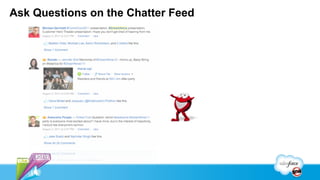
Ask Questions on the Chatter Feed
Stuart Bernstein
ISV Technical Evangelist
Thomas Harris
LMTS, CCE Production Support
John Tan
SMTS, CCE Technical Enablement
Introduction

 This session is designed to help with common Visualforce/Apex
 performance issues targeted towards intermediate/advanced
 Force.com developers.
Agenda

  SOQL/SOSL
  Batch Apex
  Record Lock Contention
  Visualforce
  Debugging Tools
  Q&A
You Need to Build on a Solid Foundation

  Follow SOQL Best practices
  Then tune Apex
  Then tune Visualforce
Indexes Are Vital for Well-performing SOQL

  Without an index the SOQL query will not perform well
  Standard indexes already exist on Record_Type_Id, Division,
   Created_Date, System_Modstamp (Last_Modified_Date),
   Name, Email (for Contacts and Leads), and the unique
   Salesforce record ID (Foreign Keys)
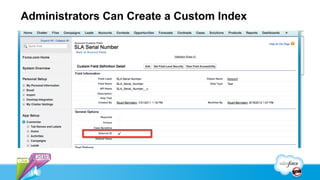
Administrators Can Create a Custom Index
Need Additional Indexes?

  Salesforce support can create single and two-column custom indexes
   on most fields (with the exception of multi-picklists, formula fields that
   reference other objects, and Long Text Area/Rich Text Area)
  Open a case
     -   Sample Query
     -   Bind Variables
     -   Org ID and user ID who would run the query
     -   Suggested index - OPTIONAL
  If they create a case, then SAVE where the index was created
Use a Standard Index

Select name from account where
Id=‘00530000003hQLJ’


Performs quickly because ID is an standard index
Use a Custom Index

Select name from account where
SLA_Serial_Number__c=‘1234567’


Performs quickly because SLA_Serial_Number__c is a custom
index
Use a Custom Index

Select name from account where
SLA_Serial_Number__c=‘’


Doesn’t work because null prevents the index from being used.
Use a Custom Index

Select name from account where
SLA_Serial_Number__c IN :ListOfSerialNums


May work well
if no null variable in ListOfSerialNums
filter matches less than 10% of the total records up to 333,000 records
30% of the total records up to one million records if this was a standard index
(it’s not)
Stay Away From Cross Object References

Select name from contact where
Account.SLA_Serial_Number__c IN
:ListOfSerialNums


Solution
Copy the SLA_Serial_Number and External Id to the contact
OR query for the account IDs with the SLA Serial number first
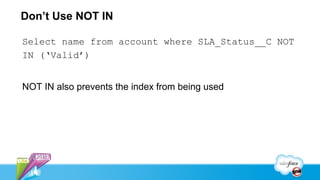
Don’t Use NOT IN

Select name from account where SLA_Status__C NOT
IN (‘Valid’)


NOT IN also prevents the index from being used
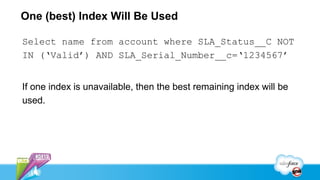
One (best) Index Will Be Used

Select name from account where SLA_Status__C NOT
IN (‘Valid’) AND SLA_Serial_Number__c=‘1234567’


If one index is unavailable, then the best remaining index will be
used.
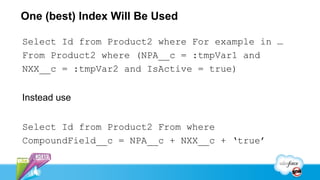
One (best) Index Will Be Used

Select Id from Product2 where For example in …
From Product2 where (NPA__c = :tmpVar1 and
NXX__c = :tmpVar2 and IsActive = true)


Instead use


Select Id from Product2 From where
CompoundField__c = NPA__c + NXX__c + ‘true’
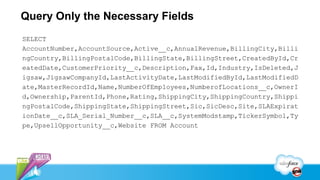
Query Only the Necessary Fields
SELECT
AccountNumber,AccountSource,Active__c,AnnualRevenue,BillingCity,Billi
ngCountry,BillingPostalCode,BillingState,BillingStreet,CreatedById,Cr
eatedDate,CustomerPriority__c,Description,Fax,Id,Industry,IsDeleted,J
igsaw,JigsawCompanyId,LastActivityDate,LastModifiedById,LastModifiedD
ate,MasterRecordId,Name,NumberOfEmployees,NumberofLocations__c,OwnerI
d,Ownership,ParentId,Phone,Rating,ShippingCity,ShippingCountry,Shippi
ngPostalCode,ShippingState,ShippingStreet,Sic,SicDesc,Site,SLAExpirat
ionDate__c,SLA_Serial_Number__c,SLA__c,SystemModstamp,TickerSymbol,Ty
pe,UpsellOpportunity__c,Website FROM Account
SOSL Performance Best Practices

  SOSL queries for the data using a different technique but then
   takes the data and adds the where clause using SOQL
    - Eg FIND {foo} RETURNING Account (Id WHERE City='Rome') is
      analogous to SELECT Id FROM Account WHERE ID IN (<list of Ids
      from search>) AND City='Rome’
  Follow SOQL best practices for the where clause
Batch Apex

 Most common issue is performance of SOQL used in the start()
  method.
 Avoid the use of non-selective filters in the start() method.
   - Queries will perform significantly worse as more data is added.

 Don’t add a non-selective filter to filter out a few rows relative to
  the overall size of the result set. Instead, use Apex to filter out
  rows in the execute() method.
 Avoid errors with bulk saves.
Filter in Execute() Method

 Suppose you have 5M records in Account. You want to process the
  80% of those records represented by this query:
   - SELECT Id FROM Account WHERE Rating__c IN ('Excellent','Good','Moderate')

 Since there is no way to use a selective filter in a query for these
  records, this query will not run quickly even if Rating__c is indexed.
 As an alternative, use this query in the start method:
   - SELECT Id FROM Account

 Filter out the unwanted records in the execute method.
Filter in Execute() Method – Sample Code
   global Database.QueryLocator<SObject> start(Database.BatchableContext bc) {
       return Database.getQueryLocator('SELECT Id FROM Account');
   }


   global void execute(Database.BatchableContext bc, List<Account> scope) {
       List<Account> actualScope = [SELECT Id, Name, Description FROM Account
                                     WHERE Rating__c IN
   ('Excellent','Good','Moderate’)
                                     AND Id IN :scope];
       for(Account acc : actualScope) { /* do something */ }
   }
Concurrent Batch Apex Jobs

  Running concurrent Batch Apex jobs on the same record set can
   lead to contention.
     - Concurrent jobs will likely perform DML that requires locks on the
       same records.
  It’s possible but difficult to parallelize Batch Apex jobs.
      Try to improve performance by increasing the batch size and tuning
       SOQL queries before attempting to run jobs in parallel.
Parent-Child Locking
  Insert of Contact requires locking the parent Account.
  Insert or Update of Event requires locking both the parent Contact and the
   parent Account.
  Insert or Update of Task requires locking both the parent Contact and
   parent Account, if the Task is marked as complete.
  Insert of Case requires locking the parent Contact and parent Account.
  In objects that are part of a master/detail relationship, updating a detail
   record requires locking the parent if roll-up summary fields exist.
Sharing Calculations

  “Implicit” Sharing
    - Record access built into Salesforce applications
  Parent Implicit Sharing (Account only, private sharing model)
    - Access to Contact/Opportunity/Case = Read access to parent
      account
    - not used when sharing on the child is controlled by parent
    - when user loses access to a child, need to check all other children
      to see if we can delete the parent implicit share
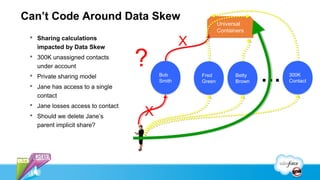
Can’t Code Around Data Skew
                                                           Universal
                                                           Containers
  Sharing calculations
   impacted by Data Skew
                                               X
  300K unassigned contacts
   under account                   ?
  Private sharing model
  Jane has access to a single
                                       Bob
                                       Smith
                                                   Fred
                                                   Green
                                                                 Betty
                                                                 Brown   …   300K
                                                                             Contact

   contact
  Jane losses access to contact
  Should we delete Jane’s         X
   parent implicit share?
Effects of Data Skew

  Sharing calculations run longer
  Concurrent Request Limit error
    - Synchronous Apex request starts counting against the limit waiting
      > 5 sec for lock.
  UNABLE_TO_LOCK_ROW error
    - Timed out waiting 10 seconds to acquire lock.
    - Even if no errors occur, waiting for locks can significantly slow DML
      operations.
Recommendations

  Consider a public read/write sharing model
    - Parent will still be locked. No sharing calculations.
  10K children or less
  Prevent parent-child data skews
    - Detect whether existing accounts already have "reached their limit"
      of child records, and create new accounts.
Visualforce – Best Practices

  http://developer.force.com/dreamforce/11/session/Blazing-Fast-Visu
  View State
    - Filter and Paginate
    - Transient keyword
    - Simplify component hierarchy
    - JavaScript Remoting
Analyzing Performance

  Measure performance in the browser first to see if the
   problem is client-side or server-side.
    - Chrome Developer Tools and the Firebug plugin for Firefox will both
      work for this.
  After confirming the problem is on the server, use the
   Salesforce Developer Console to find areas you can tune.
Analyzing Performance
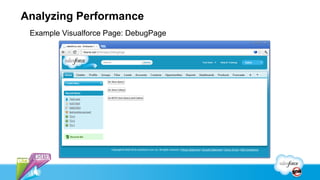
 Example Visualforce Page: DebugPage
Analyzing Performance
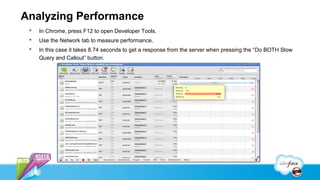
    In Chrome, press F12 to open Developer Tools.
    Use the Network tab to measure performance.
    In this case it takes 8.74 seconds to get a response from the server when pressing the “Do BOTH Slow
     Query and Callout” button.
Analyzing Performance – Developer Console
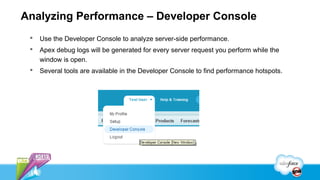
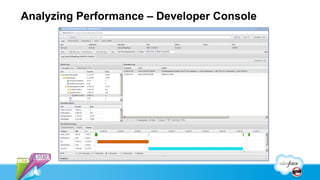
    Use the Developer Console to analyze server-side performance.
    Apex debug logs will be generated for every server request you perform while the
     window is open.
    Several tools are available in the Developer Console to find performance hotspots.
Analyzing Performance – Developer Console
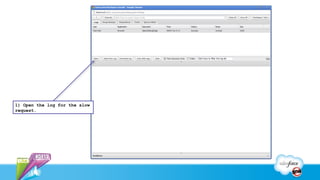
1) Open the log for the slow
request.
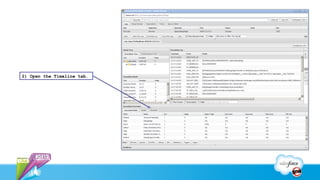
2) Open the Timeline tab.
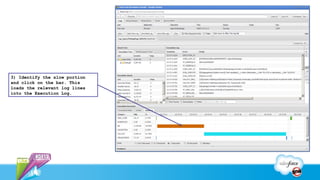
3) Identify the slow portion
and click on the bar. This
loads the relevant log lines
into the Execution Log.
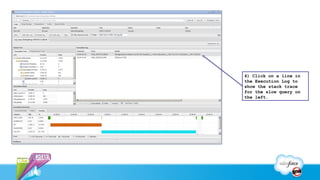
4) Click on a line in
the Execution Log to
show the stack trace
for the slow query on
the left.
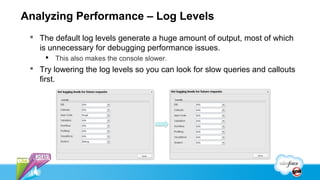
Analyzing Performance – Log Levels
  The default log levels generate a huge amount of output, most of which
   is unnecessary for debugging performance issues.
      This also makes the console slower.
  Try lowering the log levels so you can look for slow queries and callouts
   first.
Analyzing Performance – Heap Dumps

  The Developer Console can also be used to create Apex
   heaps that help in debugging.
  For example, you can use it look at the bind variables for a
   query.
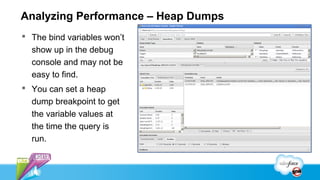
Analyzing Performance – Heap Dumps
 The bind variables won’t
  show up in the debug
  console and may not be
  easy to find.
 You can set a heap
  dump breakpoint to get
  the variable values at
  the time the query is
  run.
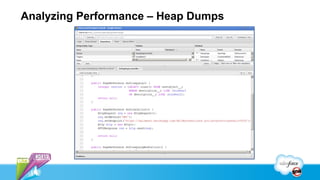
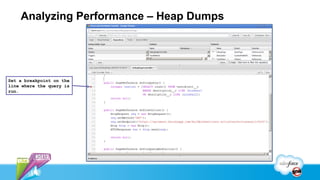
Analyzing Performance – Heap Dumps


Set a breakpoint on the
line where the query is
run.
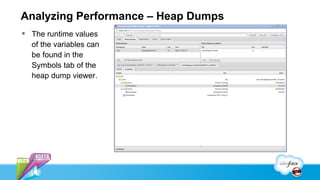
Analyzing Performance – Heap Dumps
 The runtime values
  of the variables can
  be found in the
  Symbols tab of the
  heap dump viewer.
Analyzing Performance – Useful Tools
  Developer Console
  Firebug (http://getfirebug.com)
     -   Web development plugin for Firefox.
  Chrome Developer Tools
     -   Included with Chrome.
  Workbench (https://workbench.developerforce.com)
     -   Good for testing SOQL queries.
  Fiddler (http://www.fiddler2.com/fiddler2)
     -   Windows tool for debugging HTTP traffic, integrates well with IE and Firefox.
Working with Support

  SOQL performance
    - Open a case with org Id, user Id, SOQL and bind variables.
    - Can add custom single and two column indexes.
  Record locks
    - Provide support the org ID and time frame where the issues
      occurred.
    - Provide the IDs of affected records if possible.
Useful Links

 Architect Core Resources
   http://wiki.developerforce.com/page/Architect_Core_Resources
     - Guide to Sharing Architecture
     - Record Access: Under the Hood
     - Best Practices for Deployments with Large Data Volumes
     - Asynchronous Processing in Force.com
     - VF Performance Apex Performance (in progress)
Stuart Bernstein           Thomas Harris            John Tan
ISV Technical Evangelist   LMTS, CCE Production   SMTS, CCE Technical
                                 Support             Enablement
Df12 Performance Tuning

Df12 Performance Tuning

  • 1.
    Performance Tuning forVisualforce and Apex Stuart Bernstein ISV Technical Evangelist Thomas Harris LMTS, CCE Production Support John Tan SMTS, CCE Technical Enablement
  • 2.
    Safe Harbor Safeharbor statement under the Private Securities Litigation Reform Act of 1995: This presentation may contain forward-looking statements that involve risks, uncertainties, and assumptions. If any such uncertainties materialize or if any of the assumptions proves incorrect, the results of salesforce.com, inc. could differ materially from the results expressed or implied by the forward- looking statements we make. All statements other than statements of historical fact could be deemed forward-looking, including any projections of product or service availability, subscriber growth, earnings, revenues, or other financial items and any statements regarding strategies or plans of management for future operations, statements of belief, any statements concerning new, planned, or upgraded services or technology developments and customer contracts or use of our services. The risks and uncertainties referred to above include – but are not limited to – risks associated with developing and delivering new functionality for our service, new products and services, our new business model, our past operating losses, possible fluctuations in our operating results and rate of growth, interruptions or delays in our Web hosting, breach of our security measures, the outcome of intellectual property and other litigation, risks associated with possible mergers and acquisitions, the immature market in which we operate, our relatively limited operating history, our ability to expand, retain, and motivate our employees and manage our growth, new releases of our service and successful customer deployment, our limited history reselling non-salesforce.com products, and utilization and selling to larger enterprise customers. Further information on potential factors that could affect the financial results of salesforce.com, inc. is included in our annual report on Form 10-Q for the most recent fiscal quarter ended July 31, 2012. This documents and others containing important disclosures are available on the SEC Filings section of the Investor Information section of our Web site. Any unreleased services or features referenced in this or other presentations, press releases or public statements are not currently available and may not be delivered on time or at all. Customers who purchase our services should make the purchase decisions based upon features that are currently available. Salesforce.com, inc. assumes no obligation and does not intend to update these forward-looking statements.
  • 3.
    Ask Questions onthe Chatter Feed
  • 4.
    Stuart Bernstein ISV TechnicalEvangelist Thomas Harris LMTS, CCE Production Support John Tan SMTS, CCE Technical Enablement
  • 5.
    Introduction This sessionis designed to help with common Visualforce/Apex performance issues targeted towards intermediate/advanced Force.com developers.
  • 6.
    Agenda  SOQL/SOSL  Batch Apex  Record Lock Contention  Visualforce  Debugging Tools  Q&A
  • 7.
    You Need toBuild on a Solid Foundation  Follow SOQL Best practices  Then tune Apex  Then tune Visualforce
  • 8.
    Indexes Are Vitalfor Well-performing SOQL  Without an index the SOQL query will not perform well  Standard indexes already exist on Record_Type_Id, Division, Created_Date, System_Modstamp (Last_Modified_Date), Name, Email (for Contacts and Leads), and the unique Salesforce record ID (Foreign Keys)
  • 9.
  • 10.
    Need Additional Indexes?  Salesforce support can create single and two-column custom indexes on most fields (with the exception of multi-picklists, formula fields that reference other objects, and Long Text Area/Rich Text Area)  Open a case - Sample Query - Bind Variables - Org ID and user ID who would run the query - Suggested index - OPTIONAL  If they create a case, then SAVE where the index was created
  • 11.
    Use a StandardIndex Select name from account where Id=‘00530000003hQLJ’ Performs quickly because ID is an standard index
  • 12.
    Use a CustomIndex Select name from account where SLA_Serial_Number__c=‘1234567’ Performs quickly because SLA_Serial_Number__c is a custom index
  • 13.
    Use a CustomIndex Select name from account where SLA_Serial_Number__c=‘’ Doesn’t work because null prevents the index from being used.
  • 14.
    Use a CustomIndex Select name from account where SLA_Serial_Number__c IN :ListOfSerialNums May work well if no null variable in ListOfSerialNums filter matches less than 10% of the total records up to 333,000 records 30% of the total records up to one million records if this was a standard index (it’s not)
  • 15.
    Stay Away FromCross Object References Select name from contact where Account.SLA_Serial_Number__c IN :ListOfSerialNums Solution Copy the SLA_Serial_Number and External Id to the contact OR query for the account IDs with the SLA Serial number first
  • 16.
    Don’t Use NOTIN Select name from account where SLA_Status__C NOT IN (‘Valid’) NOT IN also prevents the index from being used
  • 17.
    One (best) IndexWill Be Used Select name from account where SLA_Status__C NOT IN (‘Valid’) AND SLA_Serial_Number__c=‘1234567’ If one index is unavailable, then the best remaining index will be used.
  • 18.
    One (best) IndexWill Be Used Select Id from Product2 where For example in … From Product2 where (NPA__c = :tmpVar1 and NXX__c = :tmpVar2 and IsActive = true) Instead use Select Id from Product2 From where CompoundField__c = NPA__c + NXX__c + ‘true’
  • 19.
    Query Only theNecessary Fields SELECT AccountNumber,AccountSource,Active__c,AnnualRevenue,BillingCity,Billi ngCountry,BillingPostalCode,BillingState,BillingStreet,CreatedById,Cr eatedDate,CustomerPriority__c,Description,Fax,Id,Industry,IsDeleted,J igsaw,JigsawCompanyId,LastActivityDate,LastModifiedById,LastModifiedD ate,MasterRecordId,Name,NumberOfEmployees,NumberofLocations__c,OwnerI d,Ownership,ParentId,Phone,Rating,ShippingCity,ShippingCountry,Shippi ngPostalCode,ShippingState,ShippingStreet,Sic,SicDesc,Site,SLAExpirat ionDate__c,SLA_Serial_Number__c,SLA__c,SystemModstamp,TickerSymbol,Ty pe,UpsellOpportunity__c,Website FROM Account
  • 20.
    SOSL Performance BestPractices  SOSL queries for the data using a different technique but then takes the data and adds the where clause using SOQL - Eg FIND {foo} RETURNING Account (Id WHERE City='Rome') is analogous to SELECT Id FROM Account WHERE ID IN (<list of Ids from search>) AND City='Rome’  Follow SOQL best practices for the where clause
  • 21.
    Batch Apex  Mostcommon issue is performance of SOQL used in the start() method.  Avoid the use of non-selective filters in the start() method. - Queries will perform significantly worse as more data is added.  Don’t add a non-selective filter to filter out a few rows relative to the overall size of the result set. Instead, use Apex to filter out rows in the execute() method.  Avoid errors with bulk saves.
  • 22.
    Filter in Execute()Method  Suppose you have 5M records in Account. You want to process the 80% of those records represented by this query: - SELECT Id FROM Account WHERE Rating__c IN ('Excellent','Good','Moderate')  Since there is no way to use a selective filter in a query for these records, this query will not run quickly even if Rating__c is indexed.  As an alternative, use this query in the start method: - SELECT Id FROM Account  Filter out the unwanted records in the execute method.
  • 23.
    Filter in Execute()Method – Sample Code global Database.QueryLocator<SObject> start(Database.BatchableContext bc) { return Database.getQueryLocator('SELECT Id FROM Account'); } global void execute(Database.BatchableContext bc, List<Account> scope) { List<Account> actualScope = [SELECT Id, Name, Description FROM Account WHERE Rating__c IN ('Excellent','Good','Moderate’) AND Id IN :scope]; for(Account acc : actualScope) { /* do something */ } }
  • 24.
    Concurrent Batch ApexJobs  Running concurrent Batch Apex jobs on the same record set can lead to contention. - Concurrent jobs will likely perform DML that requires locks on the same records.  It’s possible but difficult to parallelize Batch Apex jobs.  Try to improve performance by increasing the batch size and tuning SOQL queries before attempting to run jobs in parallel.
  • 25.
    Parent-Child Locking Insert of Contact requires locking the parent Account.  Insert or Update of Event requires locking both the parent Contact and the parent Account.  Insert or Update of Task requires locking both the parent Contact and parent Account, if the Task is marked as complete.  Insert of Case requires locking the parent Contact and parent Account.  In objects that are part of a master/detail relationship, updating a detail record requires locking the parent if roll-up summary fields exist.
  • 26.
    Sharing Calculations “Implicit” Sharing - Record access built into Salesforce applications  Parent Implicit Sharing (Account only, private sharing model) - Access to Contact/Opportunity/Case = Read access to parent account - not used when sharing on the child is controlled by parent - when user loses access to a child, need to check all other children to see if we can delete the parent implicit share
  • 27.
    Can’t Code AroundData Skew Universal Containers  Sharing calculations impacted by Data Skew X  300K unassigned contacts under account ?  Private sharing model  Jane has access to a single Bob Smith Fred Green Betty Brown … 300K Contact contact  Jane losses access to contact  Should we delete Jane’s X parent implicit share?
  • 28.
    Effects of DataSkew  Sharing calculations run longer  Concurrent Request Limit error - Synchronous Apex request starts counting against the limit waiting > 5 sec for lock.  UNABLE_TO_LOCK_ROW error - Timed out waiting 10 seconds to acquire lock. - Even if no errors occur, waiting for locks can significantly slow DML operations.
  • 29.
    Recommendations  Considera public read/write sharing model - Parent will still be locked. No sharing calculations.  10K children or less  Prevent parent-child data skews - Detect whether existing accounts already have "reached their limit" of child records, and create new accounts.
  • 30.
    Visualforce – BestPractices  http://developer.force.com/dreamforce/11/session/Blazing-Fast-Visu  View State - Filter and Paginate - Transient keyword - Simplify component hierarchy - JavaScript Remoting
  • 31.
    Analyzing Performance Measure performance in the browser first to see if the problem is client-side or server-side. - Chrome Developer Tools and the Firebug plugin for Firefox will both work for this.  After confirming the problem is on the server, use the Salesforce Developer Console to find areas you can tune.
  • 32.
    Analyzing Performance ExampleVisualforce Page: DebugPage
  • 33.
    Analyzing Performance  In Chrome, press F12 to open Developer Tools.  Use the Network tab to measure performance.  In this case it takes 8.74 seconds to get a response from the server when pressing the “Do BOTH Slow Query and Callout” button.
  • 34.
    Analyzing Performance –Developer Console  Use the Developer Console to analyze server-side performance.  Apex debug logs will be generated for every server request you perform while the window is open.  Several tools are available in the Developer Console to find performance hotspots.
  • 35.
    Analyzing Performance –Developer Console
  • 36.
    1) Open thelog for the slow request.
  • 37.
    2) Open theTimeline tab.
  • 38.
    3) Identify theslow portion and click on the bar. This loads the relevant log lines into the Execution Log.
  • 39.
    4) Click ona line in the Execution Log to show the stack trace for the slow query on the left.
  • 40.
    Analyzing Performance –Log Levels  The default log levels generate a huge amount of output, most of which is unnecessary for debugging performance issues.  This also makes the console slower.  Try lowering the log levels so you can look for slow queries and callouts first.
  • 41.
    Analyzing Performance –Heap Dumps  The Developer Console can also be used to create Apex heaps that help in debugging.  For example, you can use it look at the bind variables for a query.
  • 42.
  • 43.
    Analyzing Performance –Heap Dumps  The bind variables won’t show up in the debug console and may not be easy to find.  You can set a heap dump breakpoint to get the variable values at the time the query is run.
  • 44.
    Analyzing Performance –Heap Dumps Set a breakpoint on the line where the query is run.
  • 45.
    Analyzing Performance –Heap Dumps  The runtime values of the variables can be found in the Symbols tab of the heap dump viewer.
  • 46.
    Analyzing Performance –Useful Tools  Developer Console  Firebug (http://getfirebug.com) - Web development plugin for Firefox.  Chrome Developer Tools - Included with Chrome.  Workbench (https://workbench.developerforce.com) - Good for testing SOQL queries.  Fiddler (http://www.fiddler2.com/fiddler2) - Windows tool for debugging HTTP traffic, integrates well with IE and Firefox.
  • 47.
    Working with Support  SOQL performance - Open a case with org Id, user Id, SOQL and bind variables. - Can add custom single and two column indexes.  Record locks - Provide support the org ID and time frame where the issues occurred. - Provide the IDs of affected records if possible.
  • 48.
    Useful Links ArchitectCore Resources  http://wiki.developerforce.com/page/Architect_Core_Resources - Guide to Sharing Architecture - Record Access: Under the Hood - Best Practices for Deployments with Large Data Volumes - Asynchronous Processing in Force.com - VF Performance Apex Performance (in progress)
  • 49.
    Stuart Bernstein Thomas Harris John Tan ISV Technical Evangelist LMTS, CCE Production SMTS, CCE Technical Support Enablement

Editor's Notes

  • #6 Session isn’ t about basic VF/Apex code. We assume you understand basic concepts but we hope that you will be able to learn some new techniques that you can apply to your projects immediately.
  • #7 Ask audience how many have them have seen the Architect Core Resource Library
  • #8 When performance tuning your application it is important that you build on a solid foundation. Should you detect a performance issue, its likely that you will first notice it in the end user experience. Using debugging tools that we will go over later in this presentation you will learn to see if the problem is in Apex, SOQL or Visualforce. Our recommendation is to start by confirming that your SOQL is not performing poorly, fix any problems there and then re-test and tune the rest of your application. In my experience SOQL performance issues are one of the most common issues and the most likely cause of performance issues when dealing with larger implementations. Luckily, there are common best practices that will help you address the majority of these issues.
  • #9 If you come away from this presentation with only one thing, it should be that enabling your SOQL query to use an index is the most important thing to think of when designing your data model and SOQL statements. So what indexes exist already and are standard indexes throughout the system? Read second bullet. These standard indexes should be your go-to fields when writing queries.
  • #10 But what if the standard indexes aren’t sufficient? By creating an external Id you can create a custom index on a field.
  • #11 What if you run out of external ids, or think you need an index on fields not supported by an external id. Opening a case is a great place to start. Salesforce has a performance team to help confirm that you need an index and will create one if necessary. Should a new index be created by support, make sure you make a NOTE of the new index and write it down and tell your developers! There is no way for the administrator to see which indexes have been created by support. There is nothing worse then finding out that the index you need already exists and you just aren’t using it.
  • #12 Our first example is the simplest and shows a common SOQL that I’m sure everyone has run before. It runs quickly because you are using the primary key and retrieving one record.
  • #13 What if you need to have a query perform quickly based on a custom field. For example, here where you have every account associated to an SLA serial number. For this, the administrator can create a custom index by making this field an external id.
  • #14 What about when you want to find all the accounts that don’t have a SLA Serial Number? Why won’t this perform quirky? One of the possible reasons is that searching for null either directly like this or in a list of bind variables prevents the index from being used.
  • #15 Here is the bind variable example. This query may work well but its import to understand what is inside the bind variable and the number of results that the query may return. Based on this example as long as no null variable exists, and the query is not expected to return more then 10% of the data and more then 333,000 records then the custom index would be used
  • #16 Here is an example of a query that you would have assumed may run quickly based on the previous rules but by trying to access the external id on a cross object field you are preventing the index from being used. Here you have two options to solve this. One would be the copy the SLA serial number to the contact or as a second alternative – query for the accounts first with the SLA serial Numbers and then use those id to query for the correct contact.
  • #17 Something else that also prevents an index from being used is the use of NOT IN. Like null, this is something you need to be extremely careful with in your SOQL queries. If you have the ability to change your NOT INs into INs clauses you should see better performance.
  • #18 Just because NOT IN is preventing the SLA_Status index from being used doesn’t prevent the next best index from being used.
  • #19 What about a more complex example? In the top example, there are three possible fields that could be indexes NPA, NXX and IsActive. It’s likely that the Boolean field IsActive is not useful by itself but NPA or NXX could be used. The problem is that only the single BEST index would be used. To solve this issue, copy the three fields into a new field that contains all the information, create an index and query against this new field. BTW, This was a real world example that querying against 12 million records to determine which products were available was taking 5-10 secs to return. After we made the change we saw query take less then two seconds.
  • #20 This is a frequent problem on reviews where a developer has queried all the fields even the ones that are not going to be used. This produces a significant drag on performance and uses additional heap space. Only query the fields you need.
  • #21 Commonly seen in auto-complete functionality. Now, we will switch to Batch Apex and I will turn this over to my co-presenter – Thomas.
  • #22 Only id field of the SOQL in your start method is retrieved.
  • #23 Only id field of the SOQL in your start method is retrieved.
  • #24 Only id field of the SOQL in your start method is retrieved. select id, description from account where account where account_ranking__c in (‘ One ’ , ’ Two ’ , ’ Three ’ ) TO: select id, description from account PLUS do filters in the execute
  • #25 Demonstrate example in org
  • #26 Record locking is standard for salesforce operations and occurs quickly FK validation – Acct/Contact Task/event – polymorphic, last activity date on Acct/Contact Master/Detail – RSF
  • #27 Child implicit sharing – access to parent account = access to contact/opportunity/case to the account owner. Access is defined at the owner’s role in the hierarchy. Can be set to View/Edit/No access. Be careful with triggers that change ownership. Sharing calculations have to be calculated after each trigger. If you have multiple triggers, each changing owner, the calculations occur multiple times.
  • #28 Normally record locking occurs quickly, however, sharing calculation will cause the locks to be held longer Data loader and any other type of edits during this time will have to wait for the lock. Since lock errors take 10 seconds, synchronous Apex requests can go over 5 seconds while waiting to acquire a lock Suppose we change the owner of Contact Bob Smith from Jane to Stu This is a long running operation because we have to determine whether or not to delete Jane’s implicit share on the account If some other user in the meantime tries to add an event to one of these 300k contacts They will be blocked because they need to lock the account where sharing calculations are happening
  • #29 Record Lock Contention and Concurrent Request Limit errors are two symptoms of performance issues. Recipients of the error messages are the victims not the cause. The root cause is harder to diagnose as it involves concurrent requests. We’ll focus on the most common example of record lock contention and apex code. It involves standard locking that occurs in sfdc with parent-child relationships, parent implicit sharing calculations and data skew. Standard locking and sharing calculations happen quickly but we’ll describe how layering data skew on top of them causes record lock contention. We’re not covering other examples where locking and sharing calculations (Role hierarchy changs, Territory Management, Apex sharing rules). To learn more about them in the Sharing white papers on the Architect Core Library. Performance tuning is important even in the absence of the lock contention, requests can still be waiting on locks.
  • #30 Correcting data skew can be painful since you can cause sharing calculations to happen as you move child objects to a new parent.
  • #31 Follow web development best practices. Limit data returned by SOQL. StandardSetController – build-in pagination in list controllers to prevent list views from displaying unbounded data.
  • #32 Demonstrate a debugging session using the developer console
  • #33 Demonstrate a debugging session using the developer console
  • #34 Demonstrate a debugging session using the developer console
  • #35 Demonstrate a debugging session using the developer console
  • #36 Demonstrate a debugging session using the developer console
  • #37 Demonstrate a debugging session using the developer console
  • #38 Demonstrate a debugging session using the developer console
  • #39 Demonstrate a debugging session using the developer console
  • #40 Demonstrate a debugging session using the developer console
  • #41 Demonstrate a debugging session using the developer console
  • #42 Demonstrate a debugging session using the developer console
  • #43 Demonstrate a debugging session using the developer console
  • #44 Demonstrate a debugging session using the developer console
  • #45 Demonstrate a debugging session using the developer console
  • #46 Demonstrate a debugging session using the developer console
  • #47 Demonstrate a debugging session using the developer console