

Sao Paulo
©2015, Amazon Web Services, Inc. or its affiliates. All rights reserved
Building Your Data Warehouse with
Amazon Redshift
Eric Ferreira, AWS (ericfe@)
Selected Amazon Redshift Customers
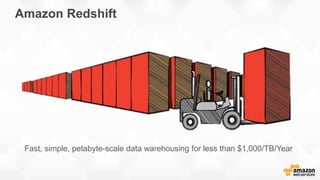
Fast, simple, petabyte-scale data warehousing for less than $1,000/TB/Year
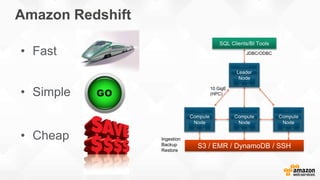
Amazon Redshift
Amazon Redshift
10 GigE
(HPC)
Ingestion
Backup
Restore
JDBC/ODBC• Fast
• Simple
• Cheap
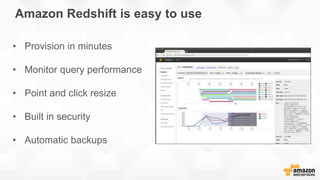
Amazon Redshift is easy to use
• Provision in minutes
• Monitor query performance
• Point and click resize
• Built in security
• Automatic backups
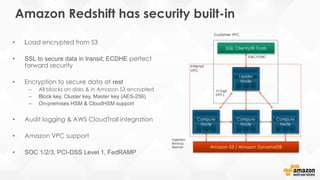
Amazon Redshift has security built-in
• Load encrypted from S3
• SSL to secure data in transit; ECDHE perfect
forward security
• Encryption to secure data at rest
– All blocks on disks & in Amazon S3 encrypted
– Block key, Cluster key, Master key (AES-256)
– On-premises HSM & CloudHSM support
• Audit logging & AWS CloudTrail integration
• Amazon VPC support
• SOC 1/2/3, PCI-DSS Level 1, FedRAMP
10 GigE
(HPC)
Ingestion
Backup
Restore
Customer VPC
Internal
VPC
JDBC/ODBC
• Replication within the cluster and backup to Amazon S3 to maintain multiple copies of
data at all times
• Backups to Amazon S3 are continuous, automatic, and incremental
– Designed for eleven nines of durability
• Continuous monitoring and automated recovery from failures of drives and nodes
• Able to restore snapshots to any Availability Zone within a region
• Easily enable backups to a second region for disaster recovery
Amazon Redshift continuously backs up your data
Amazon Redshift dramatically reduces I/O
• Data compression
• Zone maps
• Direct-attached storage
• Large data block sizes
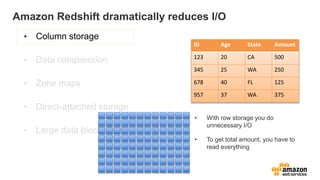
ID Age State Amount
123 20 CA 500
345 25 WA 250
678 40 FL 125
957 37 WA 375
• With row storage you do
unnecessary I/O
• To get total amount, you have to
read everything
Amazon Redshift dramatically reduces I/O
• Data compression
• Zone maps
• Direct-attached storage
• Large data block sizes
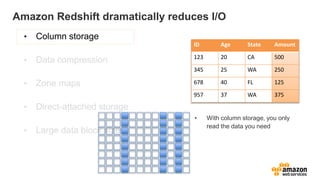
ID Age State Amount
123 20 CA 500
345 25 WA 250
678 40 FL 125
957 37 WA 375
• With column storage, you only
read the data you need
Amazon Redshift dramatically reduces I/O
• Column storage
• Data compression
• Zone maps
• Direct-attached storage
• Large data block sizes
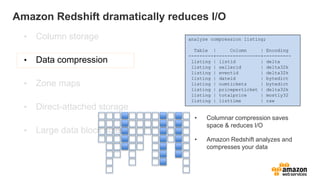
• Columnar compression saves
space & reduces I/O
• Amazon Redshift analyzes and
compresses your data
analyze compression listing;
Table | Column | Encoding
---------+----------------+----------
listing | listid | delta
listing | sellerid | delta32k
listing | eventid | delta32k
listing | dateid | bytedict
listing | numtickets | bytedict
listing | priceperticket | delta32k
listing | totalprice | mostly32
listing | listtime | raw
Amazon Redshift dramatically reduces I/O
• Column storage
• Data compression
• Direct-attached storage
• Large data block sizes
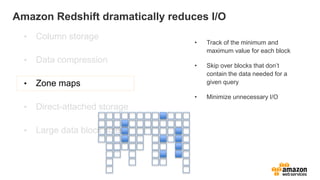
• Track of the minimum and
maximum value for each block
• Skip over blocks that don’t
contain the data needed for a
given query
• Minimize unnecessary I/O
Amazon Redshift dramatically reduces I/O
• Column storage
• Data compression
• Zone maps
• Direct-attached storage
• Large data block sizes
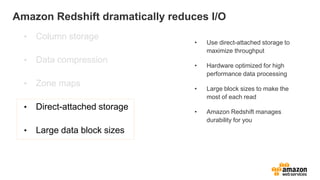
• Use direct-attached storage to
maximize throughput
• Hardware optimized for high
performance data processing
• Large block sizes to make the
most of each read
• Amazon Redshift manages
durability for you
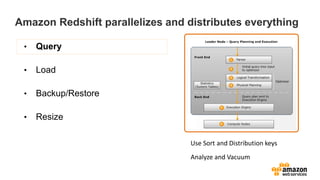
Amazon Redshift parallelizes and distributes everything
• Query
• Load
• Backup/Restore
• Resize
Use Sort and Distribution keys
Analyze and Vacuum
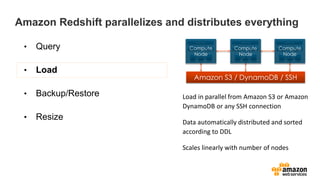
Load in parallel from Amazon S3 or Amazon
DynamoDB or any SSH connection
Data automatically distributed and sorted
according to DDL
Scales linearly with number of nodes
Amazon Redshift parallelizes and distributes everything
• Query
• Load
• Backup/Restore
• Resize
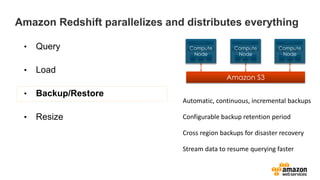
Automatic, continuous, incremental backups
Configurable backup retention period
Cross region backups for disaster recovery
Stream data to resume querying faster
Amazon Redshift parallelizes and distributes everything
• Query
• Load
• Backup/Restore
• Resize
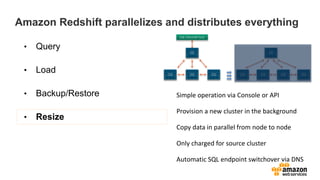
Simple operation via Console or API
Provision a new cluster in the background
Copy data in parallel from node to node
Only charged for source cluster
Automatic SQL endpoint switchover via DNS
Amazon Redshift parallelizes and distributes everything
• Query
• Load
• Backup/Restore
• Resize
Clickstream Analysis for Amazon.com
• Redshift runs web log analysis for
Amazon.com
– 100 node Redshift Cluster (DW1.8XL)
– Over one petabyte workload
– Largest table: 400TB
– 2TB of data per day
• Understand customer behavior
– Who is browsing but not buying
– Which products / features are winners
– What sequence led to higher customer conversion
Redshift Performance Realized
• Scan 15 months of data: 14 minutes
– 2.25 trillion rows
• Load one day worth of data: 10 minutes
– 5 billion rows
• Backfill one month of data: 9.75 hours
– 150 billion rows
• Pig  Amazon Redshift: 2 days to 1 hr
– 10B row join with 700M rows
• Oracle  Amazon Redshift: 90 hours to 8 hrs
– Reduced number of SQLs by a factor of 3
Redshift Performance Realized
• Managed Service
– 20% time of one DBA
• Backup
• Restore
• Resizing
• 2PB cluster
– 100 node dw1.8xl (3yr RI)
– $180/hr
Expanding Amazon Redshift’s Functionality
Custom ODBC and JDBC Drivers
• Up to 35% higher performance than open
source drivers
• Supported by Informatica, Microstrategy,
Pentaho, Qlik, SAS, Tableau
• Will continue to support PostgreSQL
open source drivers
• Download drivers from console
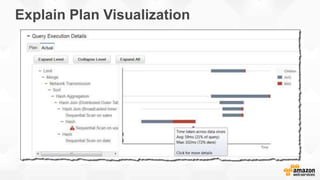
Explain Plan Visualization
User Defined Functions
• We’re enabling User Defined Functions (UDFs) so
you can add your own
– Scalar and Aggregate Functions supported
• You’ll be able to write UDFs using Python 2.7
– Syntax is largely identical to PostgreSQL UDF Syntax
– System and network calls within UDFs are prohibited
• Comes with Pandas, NumPy, and SciPy pre-installed
– You’ll also be able import your own libraries for even more flexibility
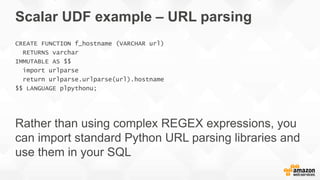
Scalar UDF example – URL parsing
CREATE FUNCTION f_hostname (VARCHAR url)
RETURNS varchar
IMMUTABLE AS $$
import urlparse
return urlparse.urlparse(url).hostname
$$ LANGUAGE plpythonu;
Sorting by Multiple Columns
• Currently support Compound Sort Keys
– Optimized for applications that filter data by one leading
column
• Adding support for Interleaved Sort Keys
– Optimized for filtering data by up to eight columns
– No storage overhead unlike an index
– Lower maintenance penalty compared to indexes
Compound Sort Keys Illustrated
• Records in Redshift
are stored in blocks.
• For this illustration,
let’s assume that
four records fill a
block
• Records with a given
cust_id are all in one
block
• However, records
with a given prod_id
are spread across
four blocks
1
1
1
1
2
3
4
1
4
4
4
2
3
4
4
1
3
3
3
2
3
4
3
1
2
2
2
2
3
4
2
1
1 [1,1] [1,2] [1,3] [1,4]
2 [2,1] [2,2] [2,3] [2,4]
3 [3,1] [3,2] [3,3] [3,4]
4 [4,1] [4,2] [4,3] [4,4]
1 2 3 4
prod_id
cust_id
cust_id prod_id other columns blocks
1 [1,1] [1,2] [1,3] [1,4]
2 [2,1] [2,2] [2,3] [2,4]
3 [3,1] [3,2] [3,3] [3,4]
4 [4,1] [4,2] [4,3] [4,4]
1 2 3 4
prod_id
cust_id
Interleaved Sort Keys Illustrated
• Records with a given
cust_id are spread
across two blocks
• Records with a given
prod_id are also
spread across two
blocks
• Data is sorted in equal
measures for both
keys
1
1
2
2
2
1
2
3
3
4
4
4
3
4
3
1
3
4
4
2
1
2
3
3
1
2
2
4
3
4
1
1
cust_id prod_id other columns blocks
How to use the feature
• New keyword ‘INTERLEAVED’ when defining sort keys
– Existing syntax will still work and behavior is unchanged
– You can choose up to 8 columns to include and can query with any or all of
them
• No change needed to queries
• Benefits are significant
[[ COMPOUND | INTERLEAVED ] SORTKEY ( column_name [, ...] ) ]
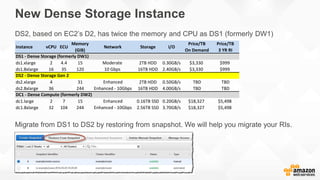
New Dense Storage Instance
DS2, based on EC2’s D2, has twice the memory and CPU as DS1 (formerly DW1)
Instance vCPU ECU
Memory
(GiB)
Network Storage I/O
Price/TB
On Demand
Price/TB
3 YR RI
ds1.xlarge 2 4.4 15 Moderate 2TB HDD 0.30GB/s $3,330 $999
ds1.8xlarge 16 35 120 10 Gbps 16TB HDD 2.40GB/s $3,330 $999
ds2.xlarge 4 31 Enhanced 2TB HDD 0.50GB/s TBD TBD
ds2.8xlarge 36 244 Enhanced - 10Gbps 16TB HDD 4.00GB/s TBD TBD
dc1.large 2 7 15 Enhanced 0.16TB SSD 0.20GB/s $18,327 $5,498
dc1.8xlarge 32 104 244 Enhanced - 10Gbps 2.56TB SSD 3.70GB/s $18,327 $5,498
DS1 - Dense Storage (formerly DW1)
DS2 - Dense Storage Gen 2
DC1 - Dense Compute (formerly DW2)
Migrate from DS1 to DS2 by restoring from snapshot. We will help you migrate your RIs.
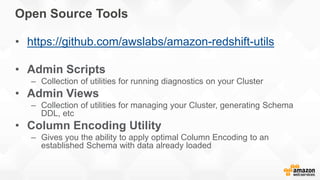
Open Source Tools
• https://github.com/awslabs/amazon-redshift-utils
• Admin Scripts
– Collection of utilities for running diagnostics on your Cluster
• Admin Views
– Collection of utilities for managing your Cluster, generating Schema
DDL, etc
• Column Encoding Utility
– Gives you the ability to apply optimal Column Encoding to an
established Schema with data already loaded
Q&A
Redshift overview

Redshift overview

  • 1.
  • 2.
    ©2015, Amazon WebServices, Inc. or its affiliates. All rights reserved Building Your Data Warehouse with Amazon Redshift Eric Ferreira, AWS (ericfe@)
  • 3.
  • 4.
    Fast, simple, petabyte-scaledata warehousing for less than $1,000/TB/Year Amazon Redshift
  • 5.
  • 6.
    Amazon Redshift iseasy to use • Provision in minutes • Monitor query performance • Point and click resize • Built in security • Automatic backups
  • 7.
    Amazon Redshift hassecurity built-in • Load encrypted from S3 • SSL to secure data in transit; ECDHE perfect forward security • Encryption to secure data at rest – All blocks on disks & in Amazon S3 encrypted – Block key, Cluster key, Master key (AES-256) – On-premises HSM & CloudHSM support • Audit logging & AWS CloudTrail integration • Amazon VPC support • SOC 1/2/3, PCI-DSS Level 1, FedRAMP 10 GigE (HPC) Ingestion Backup Restore Customer VPC Internal VPC JDBC/ODBC
  • 8.
    • Replication withinthe cluster and backup to Amazon S3 to maintain multiple copies of data at all times • Backups to Amazon S3 are continuous, automatic, and incremental – Designed for eleven nines of durability • Continuous monitoring and automated recovery from failures of drives and nodes • Able to restore snapshots to any Availability Zone within a region • Easily enable backups to a second region for disaster recovery Amazon Redshift continuously backs up your data
  • 9.
    Amazon Redshift dramaticallyreduces I/O • Data compression • Zone maps • Direct-attached storage • Large data block sizes ID Age State Amount 123 20 CA 500 345 25 WA 250 678 40 FL 125 957 37 WA 375 • With row storage you do unnecessary I/O • To get total amount, you have to read everything
  • 10.
    Amazon Redshift dramaticallyreduces I/O • Data compression • Zone maps • Direct-attached storage • Large data block sizes ID Age State Amount 123 20 CA 500 345 25 WA 250 678 40 FL 125 957 37 WA 375 • With column storage, you only read the data you need
  • 11.
    Amazon Redshift dramaticallyreduces I/O • Column storage • Data compression • Zone maps • Direct-attached storage • Large data block sizes • Columnar compression saves space & reduces I/O • Amazon Redshift analyzes and compresses your data analyze compression listing; Table | Column | Encoding ---------+----------------+---------- listing | listid | delta listing | sellerid | delta32k listing | eventid | delta32k listing | dateid | bytedict listing | numtickets | bytedict listing | priceperticket | delta32k listing | totalprice | mostly32 listing | listtime | raw
  • 12.
    Amazon Redshift dramaticallyreduces I/O • Column storage • Data compression • Direct-attached storage • Large data block sizes • Track of the minimum and maximum value for each block • Skip over blocks that don’t contain the data needed for a given query • Minimize unnecessary I/O
  • 13.
    Amazon Redshift dramaticallyreduces I/O • Column storage • Data compression • Zone maps • Direct-attached storage • Large data block sizes • Use direct-attached storage to maximize throughput • Hardware optimized for high performance data processing • Large block sizes to make the most of each read • Amazon Redshift manages durability for you
  • 14.
    Amazon Redshift parallelizesand distributes everything • Query • Load • Backup/Restore • Resize Use Sort and Distribution keys Analyze and Vacuum
  • 15.
    Load in parallelfrom Amazon S3 or Amazon DynamoDB or any SSH connection Data automatically distributed and sorted according to DDL Scales linearly with number of nodes Amazon Redshift parallelizes and distributes everything • Query • Load • Backup/Restore • Resize
  • 16.
    Automatic, continuous, incrementalbackups Configurable backup retention period Cross region backups for disaster recovery Stream data to resume querying faster Amazon Redshift parallelizes and distributes everything • Query • Load • Backup/Restore • Resize
  • 17.
    Simple operation viaConsole or API Provision a new cluster in the background Copy data in parallel from node to node Only charged for source cluster Automatic SQL endpoint switchover via DNS Amazon Redshift parallelizes and distributes everything • Query • Load • Backup/Restore • Resize
  • 18.
    Clickstream Analysis forAmazon.com • Redshift runs web log analysis for Amazon.com – 100 node Redshift Cluster (DW1.8XL) – Over one petabyte workload – Largest table: 400TB – 2TB of data per day • Understand customer behavior – Who is browsing but not buying – Which products / features are winners – What sequence led to higher customer conversion
  • 19.
    Redshift Performance Realized •Scan 15 months of data: 14 minutes – 2.25 trillion rows • Load one day worth of data: 10 minutes – 5 billion rows • Backfill one month of data: 9.75 hours – 150 billion rows • Pig  Amazon Redshift: 2 days to 1 hr – 10B row join with 700M rows • Oracle  Amazon Redshift: 90 hours to 8 hrs – Reduced number of SQLs by a factor of 3
  • 20.
    Redshift Performance Realized •Managed Service – 20% time of one DBA • Backup • Restore • Resizing • 2PB cluster – 100 node dw1.8xl (3yr RI) – $180/hr
  • 21.
  • 22.
    Custom ODBC andJDBC Drivers • Up to 35% higher performance than open source drivers • Supported by Informatica, Microstrategy, Pentaho, Qlik, SAS, Tableau • Will continue to support PostgreSQL open source drivers • Download drivers from console
  • 23.
  • 24.
    User Defined Functions •We’re enabling User Defined Functions (UDFs) so you can add your own – Scalar and Aggregate Functions supported • You’ll be able to write UDFs using Python 2.7 – Syntax is largely identical to PostgreSQL UDF Syntax – System and network calls within UDFs are prohibited • Comes with Pandas, NumPy, and SciPy pre-installed – You’ll also be able import your own libraries for even more flexibility
  • 25.
    Scalar UDF example– URL parsing CREATE FUNCTION f_hostname (VARCHAR url) RETURNS varchar IMMUTABLE AS $$ import urlparse return urlparse.urlparse(url).hostname $$ LANGUAGE plpythonu;
  • 26.
    Sorting by MultipleColumns • Currently support Compound Sort Keys – Optimized for applications that filter data by one leading column • Adding support for Interleaved Sort Keys – Optimized for filtering data by up to eight columns – No storage overhead unlike an index – Lower maintenance penalty compared to indexes
  • 27.
    Compound Sort KeysIllustrated • Records in Redshift are stored in blocks. • For this illustration, let’s assume that four records fill a block • Records with a given cust_id are all in one block • However, records with a given prod_id are spread across four blocks 1 1 1 1 2 3 4 1 4 4 4 2 3 4 4 1 3 3 3 2 3 4 3 1 2 2 2 2 3 4 2 1 1 [1,1] [1,2] [1,3] [1,4] 2 [2,1] [2,2] [2,3] [2,4] 3 [3,1] [3,2] [3,3] [3,4] 4 [4,1] [4,2] [4,3] [4,4] 1 2 3 4 prod_id cust_id cust_id prod_id other columns blocks
  • 28.
    1 [1,1] [1,2][1,3] [1,4] 2 [2,1] [2,2] [2,3] [2,4] 3 [3,1] [3,2] [3,3] [3,4] 4 [4,1] [4,2] [4,3] [4,4] 1 2 3 4 prod_id cust_id Interleaved Sort Keys Illustrated • Records with a given cust_id are spread across two blocks • Records with a given prod_id are also spread across two blocks • Data is sorted in equal measures for both keys 1 1 2 2 2 1 2 3 3 4 4 4 3 4 3 1 3 4 4 2 1 2 3 3 1 2 2 4 3 4 1 1 cust_id prod_id other columns blocks
  • 29.
    How to usethe feature • New keyword ‘INTERLEAVED’ when defining sort keys – Existing syntax will still work and behavior is unchanged – You can choose up to 8 columns to include and can query with any or all of them • No change needed to queries • Benefits are significant [[ COMPOUND | INTERLEAVED ] SORTKEY ( column_name [, ...] ) ]
  • 30.
    New Dense StorageInstance DS2, based on EC2’s D2, has twice the memory and CPU as DS1 (formerly DW1) Instance vCPU ECU Memory (GiB) Network Storage I/O Price/TB On Demand Price/TB 3 YR RI ds1.xlarge 2 4.4 15 Moderate 2TB HDD 0.30GB/s $3,330 $999 ds1.8xlarge 16 35 120 10 Gbps 16TB HDD 2.40GB/s $3,330 $999 ds2.xlarge 4 31 Enhanced 2TB HDD 0.50GB/s TBD TBD ds2.8xlarge 36 244 Enhanced - 10Gbps 16TB HDD 4.00GB/s TBD TBD dc1.large 2 7 15 Enhanced 0.16TB SSD 0.20GB/s $18,327 $5,498 dc1.8xlarge 32 104 244 Enhanced - 10Gbps 2.56TB SSD 3.70GB/s $18,327 $5,498 DS1 - Dense Storage (formerly DW1) DS2 - Dense Storage Gen 2 DC1 - Dense Compute (formerly DW2) Migrate from DS1 to DS2 by restoring from snapshot. We will help you migrate your RIs.
  • 31.
    Open Source Tools •https://github.com/awslabs/amazon-redshift-utils • Admin Scripts – Collection of utilities for running diagnostics on your Cluster • Admin Views – Collection of utilities for managing your Cluster, generating Schema DDL, etc • Column Encoding Utility – Gives you the ability to apply optimal Column Encoding to an established Schema with data already loaded
  • 32.

Editor's Notes

  • #3 In this presentation, you will get a look under the covers of Amazon Redshift, a fast, fully-managed, petabyte-scale data warehouse service for less than $1,000 per TB per year. Learn how Amazon Redshift uses columnar technology, optimized hardware, and massively parallel processing to deliver fast query performance on data sets ranging in size from hundreds of gigabytes to a petabyte or more. We'll also walk through techniques for optimizing performance and, you’ll hear from a specific customer and their use case to take advantage of fast performance on enormous datasets leveraging economies of scale on the AWS platform.
  • #4 Nasdaq security, HasOffers loads 60M rows per day in 2 min intervals, Desk: high concurrency user facing portal (read/write cluster), Amazon.com/NTT PB scale. Pinterest saw 50-100x speed ups when moved 300TB from Hadoop to Redshift. Nokia saw 50% reduction in costs.
  • #5 If there is one thing you take away from today’s presentation, I want it to be this. Redshift is a “Fast, Simple, Scalable and Inexpensive Data Warehouse solution” and it is successfully deployed for a variety of use cases.
  • #6 Redshift MPP architecture is key to delivering a solution that is Fast, Simple, Scalable, and Cost Effective.
  • #10 Read only the data you need
  • #11 Read only the data you need
  • #12 Read only the data you need
  • #13 Read only the data you need
  • #14 Read only the data you need
  • #19 Today we will over the role of Amazon Redshift in addressing the Web Log Analysis problem for one of the largest online retailer, Amazon.com <go over the slide with restated language>