Hands on the Gradle
     Painless Android builds


     © 2011 Matthias Käppler
          Qype GmbH


                               S
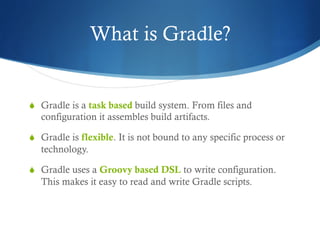
What is Gradle?


S  Gradle is a task based build system. From files and
   configuration it assembles build artifacts.

S  Gradle is flexible. It is not bound to any specific process or
   technology.

S  Gradle uses a Groovy based DSL to write configuration.
   This makes it easy to read and write Gradle scripts.
The Gradle manifesto


S  „Build scripts are code.“

S  Don‘t expect, allow.

S  Don‘t re-invent, re-use.

S  Don‘t inherit, inject.

S  Scale to the complexity of a problem.
   – „Make the impossible possible, the possible easy, and the
   easy elegant.“
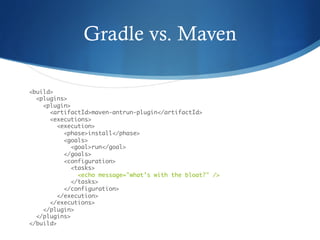
Gradle vs. Maven

<build>

  <plugins>

    <plugin>

      <artifactId>maven-antrun-plugin</artifactId>

      <executions>

         <execution>

           <phase>install</phase>

           <goals>

              <goal>run</goal>

           </goals>

           <configuration>

              <tasks>

                <echo message="what’s with the bloat?" />

              </tasks>

           </configuration>

         </execution>

      </executions>

    </plugin>           

  </plugins>

</build>
Gradle vs. Maven (cont.)


println "dunno, must be a Maven thing."
Gradle vs. Maven (cont.)


S  Maven is declarative.
   Gradle is imperative.

S  Maven is verbose.
   Gradle is concise.

S  Maven assumes Maven.
   Gradle doesn‘t.

S  Maven scales poorly to simple problems.
   Gradle scales with the complexity of a problem.
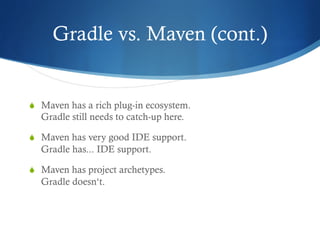
Gradle vs. Maven (cont.)


S  Maven has a rich plug-in ecosystem.
  Gradle still needs to catch-up here.

S  Maven has very good IDE support.
  Gradle has... IDE support.

S  Maven has project archetypes.
  Gradle doesn‘t.
How is Gradle used?


$ls

build/   build.gradle   ...	

...	

$gradle tasks	

$gradle clean build	

$gradle androidInstall androidInstrument
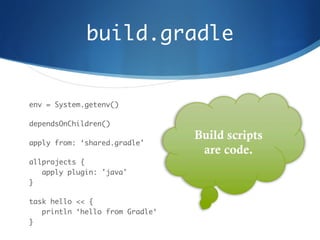
build.gradle	


env = System.getenv()	

dependsOnChildren()	

apply from: ‘shared.gradle'	

allprojects {

   apply plugin: 'java'

}	

task hello << {

   println ‘hello from Gradle‘

}
Demo	


Move along, nothing to see here.
More about tasks


S  There are different ways how tasks can be used or exposed
  in a build script:

  1 – by writing them

  2 – through project.ant

  3 – by applying a plug-in
Writing tasks	


task hello << {

   4.times { println ‘hello from Gradle‘ }

}


hello.dependsOn initLang


hello.someProperty = 1
Writing tasks (cont.)	


project.task(‘hello‘, dependsOn: ‘initLang‘)


greeter = { println it }


hello.doLast greeter.curry(‘hello from Gradle‘)
Ant tasks


S  Ant tasks are first class citizens in Gradle. You access them
    through Groovy‘s AntBuilder DSL.


myProp = ant.properties["my.prop"]


ant.copy {

  from zipTree("/path/to/lib.jar")

  into "$buildDir/extracted-classes"

  exclude "com.example/**"

}
Plug-ins	


S  Most of Gradle‘s functionality comes from plug-ins. This helps in
    keeping the core Gradle APIs lean and clean.


    apply plugin: 'java'

    apply plugin: 'maven'


    ...


    $gradle clean install
Plug-ins (cont.)	


S  Writing Gradle plug-ins is very simple. Check this out.


    class MyPlugin implements Plugin<Project> {

       def apply(Project project) {

          project.task(‘hello‘) << {

             println ‘hello, people‘

          }

       }

    }
Dependencies	


S  Gradle doesn‘t define ist own dependency management system.
    Instead, it builds on Apache Ivy.


repositories {

   mavenCentral()

   mavenRepo urls: "http://my.repo.com"

   flatDir dirs: "libs"

}
Dependencies (cont.)	


S  Dependencies are grouped into configurations. A configuration is
    simply a set of files bound to a name.


dependencies {

   compile "commons-lang:commons-lang:2.5"

   compile fileTree(dir: "libs", include: "*.jar")

   testCompile "junit:junit:4.8.2"

}
Android	


S  There‘s a Gradle plug-in for Android.


https://github.com/jvoegele/gradle-android-plugin
Setting it up	


S  Now:


   buildscript {


        repositories {

           mavenRepo(urls: 'http://jvoegele.com/maven2/‘)

        }


        dependencies {

           classpath 'com.jvoegele.gradle.plugins:android-plugin:0.9.8‘

        }

   }


   apply plugin: com.jvoegele.gradle.plugins.android.AndroidPlugin	

S  Soon:


   apply plugin: 'android'
What‘s in store	


S  The plug-in adds the following tasks:
   S  :androidProcessResources	
   S  :androidPackage	
   S  :androidInstall	
   S  :androidInstrument	
   S  [:proguard]	


   $gradle clean andInstall :test-proj:andInstr
Instrumentation tests	


androidInstrument {


     runners {


          run testpackage: "unit", with: "com.my.UnitTestRunner",
            	name: "instrumentation-unit-tests"


          run annotation: "android.test.suitebuilder.annotation.Smoke"


          run with: "com.my.OtherTestRunner”, options: "…”


     }


}
Thanks	


Thanks for listening!
Android in Practice	


     Charlie Collins, Michael Galpin, Matthias Käppler

     •  Real world practical recipes
     •  Focus on intermediate to professional developers
     •  Two chapters on testing and build automation

     Summer 2011

     MEAP edition available

     http://manning.com/collins

Hands on the Gradle

  • 1.
    Hands on theGradle Painless Android builds © 2011 Matthias Käppler Qype GmbH S
  • 2.
    What is Gradle? S Gradle is a task based build system. From files and configuration it assembles build artifacts. S  Gradle is flexible. It is not bound to any specific process or technology. S  Gradle uses a Groovy based DSL to write configuration. This makes it easy to read and write Gradle scripts.
  • 3.
    The Gradle manifesto S „Build scripts are code.“ S  Don‘t expect, allow. S  Don‘t re-invent, re-use. S  Don‘t inherit, inject. S  Scale to the complexity of a problem. – „Make the impossible possible, the possible easy, and the easy elegant.“
  • 4.
    Gradle vs. Maven <build>
 <plugins>
 <plugin>
 <artifactId>maven-antrun-plugin</artifactId>
 <executions>
 <execution>
 <phase>install</phase>
 <goals>
 <goal>run</goal>
 </goals>
 <configuration>
 <tasks>
 <echo message="what’s with the bloat?" />
 </tasks>
 </configuration>
 </execution>
 </executions>
 </plugin> 
 </plugins>
 </build>
  • 5.
    Gradle vs. Maven(cont.) println "dunno, must be a Maven thing."
  • 6.
    Gradle vs. Maven(cont.) S  Maven is declarative. Gradle is imperative. S  Maven is verbose. Gradle is concise. S  Maven assumes Maven. Gradle doesn‘t. S  Maven scales poorly to simple problems. Gradle scales with the complexity of a problem.
  • 7.
    Gradle vs. Maven(cont.) S  Maven has a rich plug-in ecosystem. Gradle still needs to catch-up here. S  Maven has very good IDE support. Gradle has... IDE support. S  Maven has project archetypes. Gradle doesn‘t.
  • 8.
    How is Gradleused? $ls
 build/ build.gradle ... ... $gradle tasks $gradle clean build $gradle androidInstall androidInstrument
  • 9.
    build.gradle env = System.getenv() dependsOnChildren() applyfrom: ‘shared.gradle' allprojects {
 apply plugin: 'java'
 } task hello << {
 println ‘hello from Gradle‘
 }
  • 10.
  • 11.
    More about tasks S There are different ways how tasks can be used or exposed in a build script: 1 – by writing them 2 – through project.ant 3 – by applying a plug-in
  • 12.
    Writing tasks task hello<< {
 4.times { println ‘hello from Gradle‘ }
 }
 
 hello.dependsOn initLang
 
 hello.someProperty = 1
  • 13.
    Writing tasks (cont.) project.task(‘hello‘,dependsOn: ‘initLang‘)
 
 greeter = { println it }
 
 hello.doLast greeter.curry(‘hello from Gradle‘)
  • 14.
    Ant tasks S  Anttasks are first class citizens in Gradle. You access them through Groovy‘s AntBuilder DSL. 
 myProp = ant.properties["my.prop"]
 
 ant.copy {
 from zipTree("/path/to/lib.jar")
 into "$buildDir/extracted-classes"
 exclude "com.example/**"
 }
  • 15.
    Plug-ins S  Most ofGradle‘s functionality comes from plug-ins. This helps in keeping the core Gradle APIs lean and clean. 
 apply plugin: 'java'
 apply plugin: 'maven'
 
 ...
 
 $gradle clean install
  • 16.
    Plug-ins (cont.) S  WritingGradle plug-ins is very simple. Check this out. 
 class MyPlugin implements Plugin<Project> {
 def apply(Project project) {
 project.task(‘hello‘) << {
 println ‘hello, people‘
 }
 }
 }
  • 17.
    Dependencies S  Gradle doesn‘tdefine ist own dependency management system. Instead, it builds on Apache Ivy. 
 repositories {
 mavenCentral()
 mavenRepo urls: "http://my.repo.com"
 flatDir dirs: "libs"
 }
  • 18.
    Dependencies (cont.) S  Dependenciesare grouped into configurations. A configuration is simply a set of files bound to a name. 
 dependencies {
 compile "commons-lang:commons-lang:2.5"
 compile fileTree(dir: "libs", include: "*.jar")
 testCompile "junit:junit:4.8.2"
 }
  • 19.
    Android S  There‘s aGradle plug-in for Android. 
 https://github.com/jvoegele/gradle-android-plugin
  • 20.
    Setting it up S Now:
 
 buildscript {
 
 repositories {
 mavenRepo(urls: 'http://jvoegele.com/maven2/‘)
 }
 
 dependencies {
 classpath 'com.jvoegele.gradle.plugins:android-plugin:0.9.8‘
 }
 }
 
 apply plugin: com.jvoegele.gradle.plugins.android.AndroidPlugin S  Soon:
 
 apply plugin: 'android'
  • 21.
    What‘s in store S The plug-in adds the following tasks: S  :androidProcessResources S  :androidPackage S  :androidInstall S  :androidInstrument S  [:proguard] 
 
 $gradle clean andInstall :test-proj:andInstr
  • 22.
    Instrumentation tests androidInstrument {
 
 runners {
 
 run testpackage: "unit", with: "com.my.UnitTestRunner", name: "instrumentation-unit-tests"
 
 run annotation: "android.test.suitebuilder.annotation.Smoke"
 
 run with: "com.my.OtherTestRunner”, options: "…”
 
 }
 
 }
  • 23.
  • 24.
    Android in Practice Charlie Collins, Michael Galpin, Matthias Käppler •  Real world practical recipes •  Focus on intermediate to professional developers •  Two chapters on testing and build automation Summer 2011 MEAP edition available http://manning.com/collins