Hands on Gradle
Mushfekur Rahman
Associate Software Engineer
Therap BD Ltd.
Why Build Systems?
• Your may need to share your code
• You may grow old and forget stuff
• IDEs change frequently
• Makes life easier
• Automate product development lifecycle
1. Validate
2. Compile
3. Test
4. Packaging (jar, war, ear, aar, apk…)
5. Deploy and/or Publish
What Are The Options?
• Ant
• Maven
• Gradle
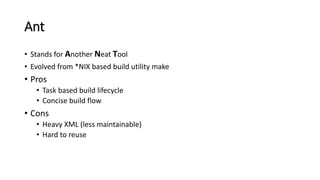
Ant
• Stands for Another Neat Tool
• Evolved from *NIX based build utility make
• Pros
• Task based build lifecycle
• Concise build flow
• Cons
• Heavy XML (less maintainable)
• Hard to reuse
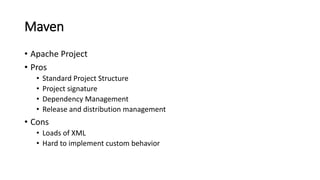
Maven
• Apache Project
• Pros
• Standard Project Structure
• Project signature
• Dependency Management
• Release and distribution management
• Cons
• Loads of XML
• Hard to implement custom behavior
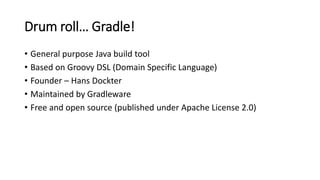
Drum roll… Gradle!
• General purpose Java build tool
• Based on Groovy DSL (Domain Specific Language)
• Founder – Hans Dockter
• Maintained by Gradleware
• Free and open source (published under Apache License 2.0)
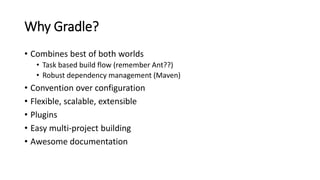
Why Gradle?
• Combines best of both worlds
• Task based build flow (remember Ant??)
• Robust dependency management (Maven)
• Convention over configuration
• Flexible, scalable, extensible
• Plugins
• Easy multi-project building
• Awesome documentation
Who uses Gradle?
Gradle Basics
• Installation
• Make sure you have Java (JRE)
• Download (http://www.gradle.org/downloads)
• Copy (/usr/local or C:UsersPublic)
• Add to system PATH (.bashrc, .bash_profile, environment variable)
• … and voila!
Gradle Basics
• Tasks
• Fundamental unit of build activity
• Tasks are Objects
• Every task is a subclass of DefaultTask (like java.lang.Object)
Gradle Basics (cont.)
• Properties of DefaultTask
• doFirst
• doLast
Gradle Basics (cont.)
• Task Dependency
• Links two tasks
• Used to create build lifecycle DAG
Gradle Basics (cont.)
• Plugins
• Collection of tasks
• Reusable piece of build script
• Example
• jar
• war
• android
Gradle Basics (cont.)
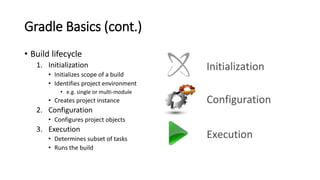
• Build lifecycle
1. Initialization
• Initializes scope of a build
• Identifies project environment
• e.g. single or multi-module
• Creates project instance
2. Configuration
• Configures project objects
3. Execution
• Determines subset of tasks
• Runs the build
Gradle Basics (cont.)
• Build scripts
• build.gradle
• settings.gradle (optional)
• gradle.properties (optional)
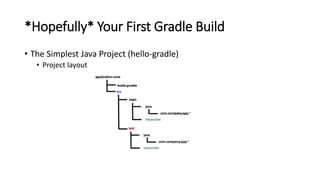
*Hopefully* Your First Gradle Build
• The Simplest Java Project (hello-gradle)
• Project layout
Hello Gradle!
• ‘java’ plugin
• http://www.gradle.org/docs/current/userguide/java_plugin.html
• Tasks
• Configure source set
• Dependency management
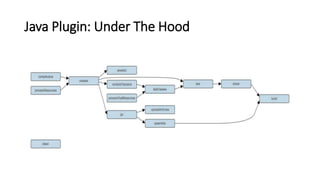
Java Plugin: Under The Hood
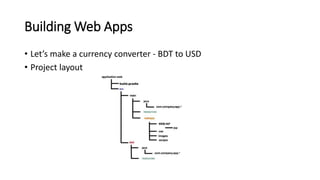
Building Web Apps
• Let’s make a currency converter - BDT to USD
• Project layout
Building Web Apps
• ‘war’ plugin
• Deploying our app
Building Android Apps
• Currency converter for android
• New android build system
• http://tools.android.com/tech-docs/new-build-system/
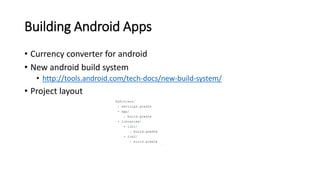
• Project layout
Building Android Apps (cont.)
• ‘android’ plugin
• http://tools.android.com/tech-docs/new-build-system/user-guide
• Tasks
• Packaging options
Gradle Wrapper
• How to manage gradle’s own version
• What if I don’t have gradle installed on my machine?

Hands on Gradle

  • 1.
    Hands on Gradle MushfekurRahman Associate Software Engineer Therap BD Ltd.
  • 2.
    Why Build Systems? •Your may need to share your code • You may grow old and forget stuff • IDEs change frequently • Makes life easier • Automate product development lifecycle 1. Validate 2. Compile 3. Test 4. Packaging (jar, war, ear, aar, apk…) 5. Deploy and/or Publish
  • 3.
    What Are TheOptions? • Ant • Maven • Gradle
  • 4.
    Ant • Stands forAnother Neat Tool • Evolved from *NIX based build utility make • Pros • Task based build lifecycle • Concise build flow • Cons • Heavy XML (less maintainable) • Hard to reuse
  • 5.
    Maven • Apache Project •Pros • Standard Project Structure • Project signature • Dependency Management • Release and distribution management • Cons • Loads of XML • Hard to implement custom behavior
  • 6.
    Drum roll… Gradle! •General purpose Java build tool • Based on Groovy DSL (Domain Specific Language) • Founder – Hans Dockter • Maintained by Gradleware • Free and open source (published under Apache License 2.0)
  • 7.
    Why Gradle? • Combinesbest of both worlds • Task based build flow (remember Ant??) • Robust dependency management (Maven) • Convention over configuration • Flexible, scalable, extensible • Plugins • Easy multi-project building • Awesome documentation
  • 8.
  • 9.
    Gradle Basics • Installation •Make sure you have Java (JRE) • Download (http://www.gradle.org/downloads) • Copy (/usr/local or C:UsersPublic) • Add to system PATH (.bashrc, .bash_profile, environment variable) • … and voila!
  • 10.
    Gradle Basics • Tasks •Fundamental unit of build activity • Tasks are Objects • Every task is a subclass of DefaultTask (like java.lang.Object)
  • 11.
    Gradle Basics (cont.) •Properties of DefaultTask • doFirst • doLast
  • 12.
    Gradle Basics (cont.) •Task Dependency • Links two tasks • Used to create build lifecycle DAG
  • 13.
    Gradle Basics (cont.) •Plugins • Collection of tasks • Reusable piece of build script • Example • jar • war • android
  • 14.
    Gradle Basics (cont.) •Build lifecycle 1. Initialization • Initializes scope of a build • Identifies project environment • e.g. single or multi-module • Creates project instance 2. Configuration • Configures project objects 3. Execution • Determines subset of tasks • Runs the build
  • 15.
    Gradle Basics (cont.) •Build scripts • build.gradle • settings.gradle (optional) • gradle.properties (optional)
  • 16.
    *Hopefully* Your FirstGradle Build • The Simplest Java Project (hello-gradle) • Project layout
  • 17.
    Hello Gradle! • ‘java’plugin • http://www.gradle.org/docs/current/userguide/java_plugin.html • Tasks • Configure source set • Dependency management
  • 18.
  • 19.
    Building Web Apps •Let’s make a currency converter - BDT to USD • Project layout
  • 20.
    Building Web Apps •‘war’ plugin • Deploying our app
  • 21.
    Building Android Apps •Currency converter for android • New android build system • http://tools.android.com/tech-docs/new-build-system/ • Project layout
  • 22.
    Building Android Apps(cont.) • ‘android’ plugin • http://tools.android.com/tech-docs/new-build-system/user-guide • Tasks • Packaging options
  • 23.
    Gradle Wrapper • Howto manage gradle’s own version • What if I don’t have gradle installed on my machine?