Page1 © Hortonworks Inc. 2011 – 2014. All Rights Reserved
Hadoop Security with HDP/PHD
Page2 © Hortonworks Inc. 2011 – 2014. All Rights Reserved
Disclaimer
This document may contain product features and technology directions that are under

development or may be under development in the future.
Technical feasibility, market demand, user feedback, and the Apache Software Foundation
community development process can all effect timing and final delivery.
This document’s description of these features and technology directions does not represent a
contractual commitment from Hortonworks to deliver these features in any generally available
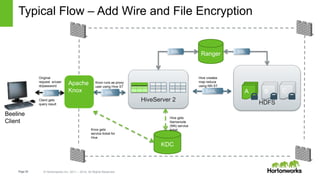
product.
Product features and technology directions are subject to change, and must not be included in
contracts, purchase orders, or sales agreements of any kind.
Page3 © Hortonworks Inc. 2011 – 2014. All Rights Reserved
Agenda
• Hadoop Security
• Kerberos
• Authorization and Auditing with Ranger
• Gateway Security with Knox
• Encryption
Page4 © Hortonworks Inc. 2011 – 2014. All Rights Reserved
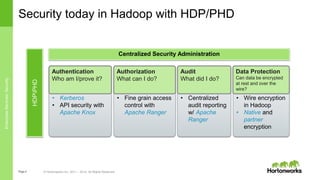
• Wire encryption
in Hadoop
• Native and
partner
encryption
• Centralized
audit reporting
w/ Apache
Ranger
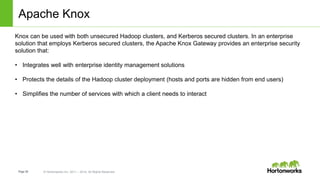
• Fine grain access
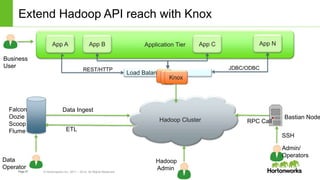
control with
Apache Ranger
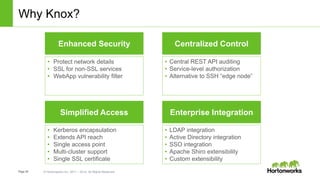
Security today in Hadoop with HDP/PHD
Authorization
What can I do?
Audit
What did I do?
Data Protection
Can data be encrypted
at rest and over the
wire?
• Kerberos
• API security with
Apache Knox
Authentication
Who am I/prove it?
HDPPHD
Centralized Security Administration
EnterpriseServices:Security
Page5 © Hortonworks Inc. 2011 – 2014. All Rights Reserved
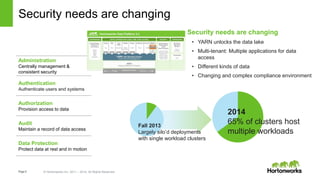
Security needs are changing
Administration
Centrally management &
consistent security
Authentication
Authenticate users and systems
Authorization
Provision access to data
Audit
Maintain a record of data access
Data Protection
Protect data at rest and in motion
Security needs are changing
• YARN unlocks the data lake
• Multi-tenant: Multiple applications for data
access
• Different kinds of data
• Changing and complex compliance environment
2014
65% of clusters host
multiple workloads
Fall 2013
Largely silo’d deployments
with single workload clusters
Page6 © Hortonworks Inc. 2011 – 2014. All Rights Reserved
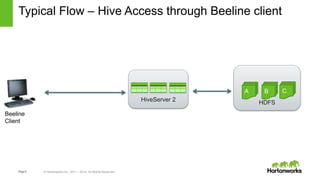
HDFS
Typical Flow – Hive Access through Beeline client
HiveServer 2
A B C
Beeline
Client
Page7 © Hortonworks Inc. 2011 – 2014. All Rights Reserved
HDFS
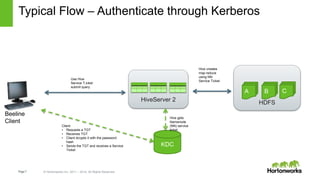
Typical Flow – Authenticate through Kerberos
HiveServer 2
A B C
KDC
Use Hive
Service T,icket
submit query
Hive gets
Namenode
(NN) service
ticket
Hive creates
map reduce
using NN
Service Ticket
Client
• Requests a TGT
• Receives TGT
• Client dcrypts it with the password
hash
• Sends the TGT and receives a Service
Ticket
Beeline
Client
Page8 © Hortonworks Inc. 2011 – 2014. All Rights Reserved
HDFS
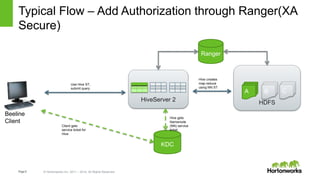
Typical Flow – Add Authorization through Ranger(XA
Secure)
HiveServer 2
A B C
KDC
Use Hive ST,
submit query
Hive gets
Namenode
(NN) service
ticket
Hive creates
map reduce
using NN ST
Ranger
Client gets
service ticket for
Hive
Beeline
Client
Page9 © Hortonworks Inc. 2011 – 2014. All Rights Reserved
HDFS
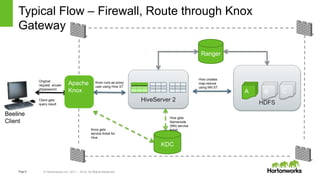
Typical Flow – Firewall, Route through Knox
Gateway
HiveServer 2
A B C
KDC
Use Hive ST,
submit query
Hive gets
Namenode
(NN) service
ticket
Hive creates
map reduce
using NN ST
Ranger
Knox gets
service ticket for
Hive
Knox runs as proxy
user using Hive ST
Original
request w/user
id/password
Client gets
query result
Beeline
Client
Apache
Knox
Page10 © Hortonworks Inc. 2011 – 2014. All Rights Reserved
HDFS
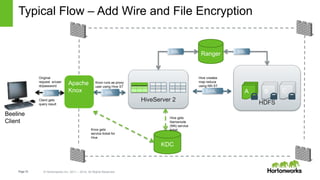
Typical Flow – Add Wire and File Encryption
HiveServer 2
A B C
KDC
Use Hive ST,
submit query
Hive gets
Namenode
(NN) service
ticket
Hive creates
map reduce
using NN ST
Ranger
Knox gets
service ticket for
Hive
Knox runs as proxy
user using Hive ST
Original
request w/user
id/password
Client gets
query result
SSL
Beeline
Client
SSL SASL
SSL SSL
Apache
Knox
Page11 © Hortonworks Inc. 2011 – 2014. All Rights Reserved
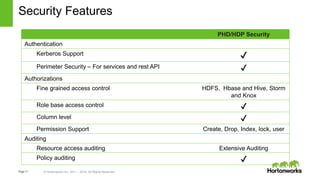
Security Features
PHD/HDP Security
Authentication
Kerberos Support ✔
Perimeter Security – For services and rest API ✔
Authorizations
Fine grained access control HDFS, Hbase and Hive, Storm
and Knox
Role base access control ✔
Column level ✔
Permission Support Create, Drop, Index, lock, user
Auditing
Resource access auditing Extensive Auditing
Policy auditing ✔
Page12 © Hortonworks Inc. 2011 – 2014. All Rights Reserved
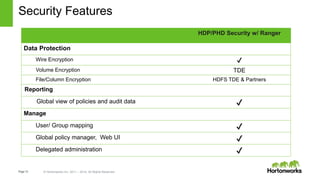
HDP/PHD Security w/ Ranger
Data Protection
Wire Encryption ✔
Volume Encryption TDE
File/Column Encryption HDFS TDE & Partners
Reporting
Global view of policies and audit data ✔
Manage
User/ Group mapping ✔
Global policy manager, Web UI ✔
Delegated administration ✔
Security Features
Page13 © Hortonworks Inc. 2011 – 2014. All Rights Reserved
Partner Integration
Security Integrations:
● Ranger plugins: centralize authorization/audit of 3rd party s/w in Ranger UI
● Via Custom Log4J appender, can stream audit events to INFA infrastructure
● Knox: Route partner APIs through Knox after validating compatibility
● Provide SSO capability to end users
Page14 © Hortonworks Inc. 2011 – 2014. All Rights Reserved
Authentication w/ Kerberos
Page 14
Page15 © Hortonworks Inc. 2011 – 2014. All Rights Reserved
Kerberos in the field
Kerberos no longer “too complex”. Adoption growing.
● Ambari helps automate and manage kerberos integration with cluster
Use: Active directory or a combine Kerberos/Active Directory
● Active Directory is seen most commonly in the field
● Many start with separate MIT KDC and then later grow into the AD KDC
Knox should be considered for API/Perimeter security
● Removes need for Kerberos for end users
● Enables integration with different authentication standards
● Single location to manage security for REST APIs & HTTP based services
● Tip: In DMZ
Page22 © Hortonworks Inc. 2011 – 2014. All Rights Reserved
Authorization and Auditing
Apache Ranger
Page 22
Page23 © Hortonworks Inc. 2011 – 2014. All Rights Reserved
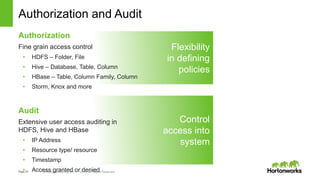
Authorization and Audit
Authorization
Fine grain access control
• HDFS – Folder, File
• Hive – Database, Table, Column
• HBase – Table, Column Family, Column
• Storm, Knox and more
Audit
Extensive user access auditing in
HDFS, Hive and HBase
• IP Address
• Resource type/ resource
• Timestamp
• Access granted or denied
Control
access into
system
Flexibility
in defining
policies
Page24 © Hortonworks Inc. 2011 – 2014. All Rights Reserved
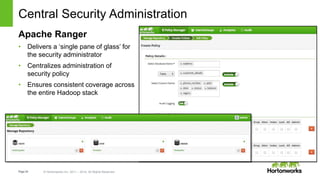
Central Security Administration
Apache Ranger
• Delivers a ‘single pane of glass’ for
the security administrator
• Centralizes administration of
security policy
• Ensures consistent coverage across
the entire Hadoop stack
Page25 © Hortonworks Inc. 2011 – 2014. All Rights Reserved
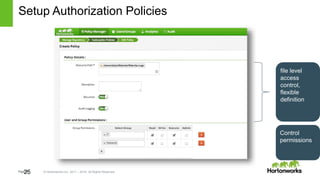
Setup Authorization Policies
25
file level
access
control,
flexible
definition
Control
permissions
Page26 © Hortonworks Inc. 2011 – 2014. All Rights Reserved
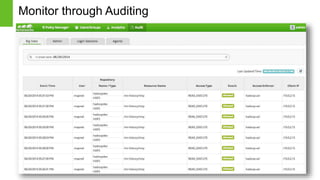
Monitor through Auditing
26
Page27 © Hortonworks Inc. 2011 – 2014. All Rights Reserved
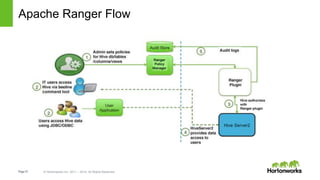
Apache Ranger Flow
Page28 © Hortonworks Inc. 2011 – 2014. All Rights Reserved
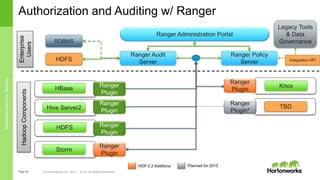
Authorization and Auditing w/ Ranger
HDFS
Ranger Administration Portal
HBase
Hive Server2
Ranger Policy
Server
Ranger Audit
Server
Ranger
Plugin
HadoopComponentsEnterprise
Users
Ranger
Plugin
Ranger
Plugin
Legacy Tools
& Data
Governance
Integration APIHDFS
Knox
Storm
Ranger
Plugin
Ranger
Plugin
RDBMS
HDP 2.2 Additions Planned for 2015
TBD
EnterpriseServices:Security
Ranger
Plugin*
Page29 © Hortonworks Inc. 2011 – 2014. All Rights Reserved
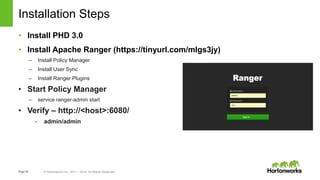
Installation Steps
• Install PHD 3.0
• Install Apache Ranger (https://tinyurl.com/mlgs3jy)
– Install Policy Manager
– Install User Sync
– Install Ranger Plugins
• Start Policy Manager
– service ranger-admin start
• Verify – http://<host>:6080/
- admin/admin
Page30 © Hortonworks Inc. 2011 – 2014. All Rights Reserved
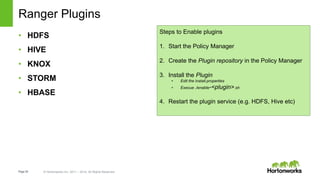
Ranger Plugins
• HDFS
• HIVE
• KNOX
• STORM
• HBASE
Steps to Enable plugins
1. Start the Policy Manager
2. Create the Plugin repository in the Policy Manager
3. Install the Plugin
• Edit the install.properties
• Execue ./enable-<plugin>.sh
4. Restart the plugin service (e.g. HDFS, Hive etc)
Page31 © Hortonworks Inc. 2011 – 2014. All Rights Reserved
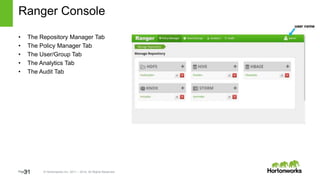
Ranger Console
31
• The Repository Manager Tab
• The Policy Manager Tab
• The User/Group Tab
• The Analytics Tab
• The Audit Tab
Page32 © Hortonworks Inc. 2011 – 2014. All Rights Reserved
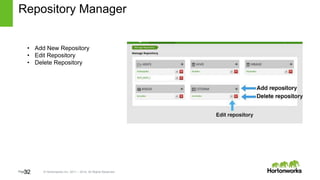
Repository Manager
32
• Add New Repository
• Edit Repository
• Delete Repository
Page33 © Hortonworks Inc. 2011 – 2014. All Rights Reserved
Demo
33
Page34 © Hortonworks Inc. 2011 – 2014. All Rights Reserved
REST API Security through Knox
Securely share Hadoop Cluster
Page 34
Page35 © Hortonworks Inc. 2011 – 2014. All Rights Reserved
Share Data Lake with everyone - Securely
• Simplifies access: Extends Hadoop’s REST/HTTP services by encapsulating Kerberos to within the
Cluster.
• Enhances security: Exposes Hadoop’s REST/HTTP services without revealing network details,
providing SSL out of the box.
• Centralized control: Enforces REST API security centrally, routing requests to multiple Hadoop
clusters.
• Enterprise integration: Supports LDAP, Active Directory, SSO, SAML and other authentication
systems.
Page36 © Hortonworks Inc. 2011 – 2014. All Rights Reserved
Apache Knox
Knox can be used with both unsecured Hadoop clusters, and Kerberos secured clusters. In an enterprise
solution that employs Kerberos secured clusters, the Apache Knox Gateway provides an enterprise security
solution that:
• Integrates well with enterprise identity management solutions
• Protects the details of the Hadoop cluster deployment (hosts and ports are hidden from end users)
• Simplifies the number of services with which a client needs to interact
Page37 © Hortonworks Inc. 2011 – 2014. All Rights Reserved
Load Balancer
Extend Hadoop API reach with Knox
Hadoop Cluster
Application TierApp A App NApp B App C
Data Ingest
ETL
Admin/
Operators
Bastian Node
SSH
RPC Call
Falcon
Oozie
Scoop
Flume
Data
Operator
Business
User
Hadoop
Admin
JDBC/ODBCREST/HTTP
Knox
Page38 © Hortonworks Inc. 2011 – 2014. All Rights Reserved
HDFS
Typical Flow – Add Wire and File Encryption
HiveServer 2
A B C
KDC
Use Hive ST,
submit query
Hive gets
Namenode
(NN) service
ticket
Hive creates
map reduce
using NN ST
Ranger
Knox gets
service ticket for
Hive
Knox runs as proxy
user using Hive ST
Original
request w/user
id/password
Client gets
query result
SSL
Beeline
Client
SSL SASL
SSL SSL
Apache
Knox
Page39 © Hortonworks Inc. 2011 – 2014. All Rights Reserved
Why Knox?
Simplified Access
• Kerberos encapsulation
• Extends API reach
• Single access point
• Multi-cluster support
• Single SSL certificate
Centralized Control
• Central REST API auditing
• Service-level authorization
• Alternative to SSH “edge node”
Enterprise Integration
• LDAP integration
• Active Directory integration
• SSO integration
• Apache Shiro extensibility
• Custom extensibility
Enhanced Security
• Protect network details
• SSL for non-SSL services
• WebApp vulnerability filter
Page40 © Hortonworks Inc. 2011 – 2014. All Rights Reserved
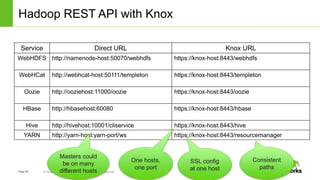
Hadoop REST API with Knox
Service Direct URL Knox URL
WebHDFS http://namenode-host:50070/webhdfs https://knox-host:8443/webhdfs
WebHCat http://webhcat-host:50111/templeton https://knox-host:8443/templeton
Oozie http://ooziehost:11000/oozie https://knox-host:8443/oozie
HBase http://hbasehost:60080 https://knox-host:8443/hbase
Hive http://hivehost:10001/cliservice https://knox-host:8443/hive
YARN http://yarn-host:yarn-port/ws https://knox-host:8443/resourcemanager
Masters could
be on many
different hosts
One hosts,
one port
Consistent
paths
SSL config
at one host
Page41 © Hortonworks Inc. 2011 – 2014. All Rights Reserved
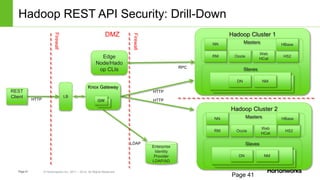
Hadoop REST API Security: Drill-Down
Page 41
REST
Client
Enterprise
Identity
Provider
LDAP/AD
Knox Gateway
GW
GW
Firewall
Firewall
DMZ
LB
Edge
Node/Hado
op CLIs RPC
HTTP
HTTP HTTP
LDAP
Hadoop Cluster 1
Masters
Slaves
RM
NN
Web
HCat
Oozie
DN NM
HS2
Hadoop Cluster 2
Masters
Slaves
RM
NN
Web
HCat
Oozie
DN NM
HS2
HBase
HBase
Page42 © Hortonworks Inc. 2011 – 2014. All Rights Reserved
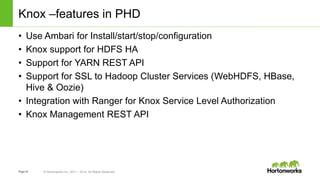
Knox –features in PHD
• Use Ambari for Install/start/stop/configuration
• Knox support for HDFS HA
• Support for YARN REST API
• Support for SSL to Hadoop Cluster Services (WebHDFS, HBase,
Hive & Oozie)
• Integration with Ranger for Knox Service Level Authorization
• Knox Management REST API
Page43 © Hortonworks Inc. 2011 – 2014. All Rights Reserved
Installation
• Installed via Ambari
–This can be done manually
–Start the embeded ldap
• There is good examples in the Apache doc with groovy scripts
–https://knox.apache.org/books/knox-0-4-0/knox-0-4-0.html
Page44 © Hortonworks Inc. 2011 – 2014. All Rights Reserved
Data Protection
Wire and data at rest encryption
Page 44
Page45 © Hortonworks Inc. 2011 – 2014. All Rights Reserved
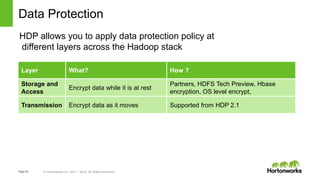
Data Protection
HDP allows you to apply data protection policy at
different layers across the Hadoop stack
Layer What? How ?
Storage and
Access
Encrypt data while it is at rest
Partners, HDFS Tech Preview, Hbase
encryption, OS level encrypt,
Transmission Encrypt data as it moves Supported from HDP 2.1
Page49 © Hortonworks Inc. 2011 – 2014. All Rights Reserved
HDFS Transparent Data Encryption (TDE) in 2.2
• Data encryption on a higher level than the OS one whilst remaining native
and transparent to Hadoop
• End-to-end: data can be both encrypted and decrypted by the clients
• Encryption/decryption using the usual HDFS functions from the client
• No need to requiring to change user application code
• No need to store data encryption keys on HDFS itself
• No need to unencrypted data.
• Data is effectively encrypted at rest, but since it is decrypted on the client
side, it means that it is also encrypted on the wire while being transmitted.
• HDFS file encryption/decryption is transparent to its client
• users can read/write files to/from encryption zone as long they have the permission to
access it
• Depends on installing a Key Management Server
Page53 © Hortonworks Inc. 2011 – 2014. All Rights Reserved
HDFS Transparent Data Encryption (TDE) in 2.2
• Data encryption on a higher level than the OS one whilst remaining native and transparent to Hadoop
• End-to-end: data can be both encrypted and decrypted by the clients
• Encryption/decryption using the usual HDFS functions from the client
• No need to requiring to change user application code
• No need to store data encryption keys on HDFS itself
• No need to unencrypted data.
• Data is effectively encrypted at rest, but since it is decrypted on the client side, it means that it is also
encrypted on the wire while being transmitted.
• HDFS file encryption/decryption is transparent to its client
• users can read/write files to/from encryption zone as long they have the permission to access it
• Depends on installing a Key Management Server
Page54 © Hortonworks Inc. 2011 – 2014. All Rights Reserved
HDFS Transparent Data Encryption (TDE) - Steps
• Install and run KMS on top of HDP 2.2
• Change HDFS params via Ambari
• Create encryption key
• hadoop key create key1 -size 256
• hadoop key list –metadata
• Create an encryption zone using the key
• hdfs dfs -mkdir /zone1
• hdfs crypto -createZone -keyName key1 /zone1
• hdfs –listZones
– http://hortonworks.com/kb/hdfs-transparent-data-encryption/
Page55 © Hortonworks Inc. 2011 – 2014. All Rights Reserved
Thank You

Hadoop security

  • 1.
    Page1 © HortonworksInc. 2011 – 2014. All Rights Reserved Hadoop Security with HDP/PHD
  • 2.
    Page2 © HortonworksInc. 2011 – 2014. All Rights Reserved Disclaimer This document may contain product features and technology directions that are under development or may be under development in the future. Technical feasibility, market demand, user feedback, and the Apache Software Foundation community development process can all effect timing and final delivery. This document’s description of these features and technology directions does not represent a contractual commitment from Hortonworks to deliver these features in any generally available product. Product features and technology directions are subject to change, and must not be included in contracts, purchase orders, or sales agreements of any kind.
  • 3.
    Page3 © HortonworksInc. 2011 – 2014. All Rights Reserved Agenda • Hadoop Security • Kerberos • Authorization and Auditing with Ranger • Gateway Security with Knox • Encryption
  • 4.
    Page4 © HortonworksInc. 2011 – 2014. All Rights Reserved • Wire encryption in Hadoop • Native and partner encryption • Centralized audit reporting w/ Apache Ranger • Fine grain access control with Apache Ranger Security today in Hadoop with HDP/PHD Authorization What can I do? Audit What did I do? Data Protection Can data be encrypted at rest and over the wire? • Kerberos • API security with Apache Knox Authentication Who am I/prove it? HDPPHD Centralized Security Administration EnterpriseServices:Security
  • 5.
    Page5 © HortonworksInc. 2011 – 2014. All Rights Reserved Security needs are changing Administration Centrally management & consistent security Authentication Authenticate users and systems Authorization Provision access to data Audit Maintain a record of data access Data Protection Protect data at rest and in motion Security needs are changing • YARN unlocks the data lake • Multi-tenant: Multiple applications for data access • Different kinds of data • Changing and complex compliance environment 2014 65% of clusters host multiple workloads Fall 2013 Largely silo’d deployments with single workload clusters
  • 6.
    Page6 © HortonworksInc. 2011 – 2014. All Rights Reserved HDFS Typical Flow – Hive Access through Beeline client HiveServer 2 A B C Beeline Client
  • 7.
    Page7 © HortonworksInc. 2011 – 2014. All Rights Reserved HDFS Typical Flow – Authenticate through Kerberos HiveServer 2 A B C KDC Use Hive Service T,icket submit query Hive gets Namenode (NN) service ticket Hive creates map reduce using NN Service Ticket Client • Requests a TGT • Receives TGT • Client dcrypts it with the password hash • Sends the TGT and receives a Service Ticket Beeline Client
  • 8.
    Page8 © HortonworksInc. 2011 – 2014. All Rights Reserved HDFS Typical Flow – Add Authorization through Ranger(XA Secure) HiveServer 2 A B C KDC Use Hive ST, submit query Hive gets Namenode (NN) service ticket Hive creates map reduce using NN ST Ranger Client gets service ticket for Hive Beeline Client
  • 9.
    Page9 © HortonworksInc. 2011 – 2014. All Rights Reserved HDFS Typical Flow – Firewall, Route through Knox Gateway HiveServer 2 A B C KDC Use Hive ST, submit query Hive gets Namenode (NN) service ticket Hive creates map reduce using NN ST Ranger Knox gets service ticket for Hive Knox runs as proxy user using Hive ST Original request w/user id/password Client gets query result Beeline Client Apache Knox
  • 10.
    Page10 © HortonworksInc. 2011 – 2014. All Rights Reserved HDFS Typical Flow – Add Wire and File Encryption HiveServer 2 A B C KDC Use Hive ST, submit query Hive gets Namenode (NN) service ticket Hive creates map reduce using NN ST Ranger Knox gets service ticket for Hive Knox runs as proxy user using Hive ST Original request w/user id/password Client gets query result SSL Beeline Client SSL SASL SSL SSL Apache Knox
  • 11.
    Page11 © HortonworksInc. 2011 – 2014. All Rights Reserved Security Features PHD/HDP Security Authentication Kerberos Support ✔ Perimeter Security – For services and rest API ✔ Authorizations Fine grained access control HDFS, Hbase and Hive, Storm and Knox Role base access control ✔ Column level ✔ Permission Support Create, Drop, Index, lock, user Auditing Resource access auditing Extensive Auditing Policy auditing ✔
  • 12.
    Page12 © HortonworksInc. 2011 – 2014. All Rights Reserved HDP/PHD Security w/ Ranger Data Protection Wire Encryption ✔ Volume Encryption TDE File/Column Encryption HDFS TDE & Partners Reporting Global view of policies and audit data ✔ Manage User/ Group mapping ✔ Global policy manager, Web UI ✔ Delegated administration ✔ Security Features
  • 13.
    Page13 © HortonworksInc. 2011 – 2014. All Rights Reserved Partner Integration Security Integrations: ● Ranger plugins: centralize authorization/audit of 3rd party s/w in Ranger UI ● Via Custom Log4J appender, can stream audit events to INFA infrastructure ● Knox: Route partner APIs through Knox after validating compatibility ● Provide SSO capability to end users
  • 14.
    Page14 © HortonworksInc. 2011 – 2014. All Rights Reserved Authentication w/ Kerberos Page 14
  • 15.
    Page15 © HortonworksInc. 2011 – 2014. All Rights Reserved Kerberos in the field Kerberos no longer “too complex”. Adoption growing. ● Ambari helps automate and manage kerberos integration with cluster Use: Active directory or a combine Kerberos/Active Directory ● Active Directory is seen most commonly in the field ● Many start with separate MIT KDC and then later grow into the AD KDC Knox should be considered for API/Perimeter security ● Removes need for Kerberos for end users ● Enables integration with different authentication standards ● Single location to manage security for REST APIs & HTTP based services ● Tip: In DMZ
  • 16.
    Page22 © HortonworksInc. 2011 – 2014. All Rights Reserved Authorization and Auditing Apache Ranger Page 22
  • 17.
    Page23 © HortonworksInc. 2011 – 2014. All Rights Reserved Authorization and Audit Authorization Fine grain access control • HDFS – Folder, File • Hive – Database, Table, Column • HBase – Table, Column Family, Column • Storm, Knox and more Audit Extensive user access auditing in HDFS, Hive and HBase • IP Address • Resource type/ resource • Timestamp • Access granted or denied Control access into system Flexibility in defining policies
  • 18.
    Page24 © HortonworksInc. 2011 – 2014. All Rights Reserved Central Security Administration Apache Ranger • Delivers a ‘single pane of glass’ for the security administrator • Centralizes administration of security policy • Ensures consistent coverage across the entire Hadoop stack
  • 19.
    Page25 © HortonworksInc. 2011 – 2014. All Rights Reserved Setup Authorization Policies 25 file level access control, flexible definition Control permissions
  • 20.
    Page26 © HortonworksInc. 2011 – 2014. All Rights Reserved Monitor through Auditing 26
  • 21.
    Page27 © HortonworksInc. 2011 – 2014. All Rights Reserved Apache Ranger Flow
  • 22.
    Page28 © HortonworksInc. 2011 – 2014. All Rights Reserved Authorization and Auditing w/ Ranger HDFS Ranger Administration Portal HBase Hive Server2 Ranger Policy Server Ranger Audit Server Ranger Plugin HadoopComponentsEnterprise Users Ranger Plugin Ranger Plugin Legacy Tools & Data Governance Integration APIHDFS Knox Storm Ranger Plugin Ranger Plugin RDBMS HDP 2.2 Additions Planned for 2015 TBD EnterpriseServices:Security Ranger Plugin*
  • 23.
    Page29 © HortonworksInc. 2011 – 2014. All Rights Reserved Installation Steps • Install PHD 3.0 • Install Apache Ranger (https://tinyurl.com/mlgs3jy) – Install Policy Manager – Install User Sync – Install Ranger Plugins • Start Policy Manager – service ranger-admin start • Verify – http://<host>:6080/ - admin/admin
  • 24.
    Page30 © HortonworksInc. 2011 – 2014. All Rights Reserved Ranger Plugins • HDFS • HIVE • KNOX • STORM • HBASE Steps to Enable plugins 1. Start the Policy Manager 2. Create the Plugin repository in the Policy Manager 3. Install the Plugin • Edit the install.properties • Execue ./enable-<plugin>.sh 4. Restart the plugin service (e.g. HDFS, Hive etc)
  • 25.
    Page31 © HortonworksInc. 2011 – 2014. All Rights Reserved Ranger Console 31 • The Repository Manager Tab • The Policy Manager Tab • The User/Group Tab • The Analytics Tab • The Audit Tab
  • 26.
    Page32 © HortonworksInc. 2011 – 2014. All Rights Reserved Repository Manager 32 • Add New Repository • Edit Repository • Delete Repository
  • 27.
    Page33 © HortonworksInc. 2011 – 2014. All Rights Reserved Demo 33
  • 28.
    Page34 © HortonworksInc. 2011 – 2014. All Rights Reserved REST API Security through Knox Securely share Hadoop Cluster Page 34
  • 29.
    Page35 © HortonworksInc. 2011 – 2014. All Rights Reserved Share Data Lake with everyone - Securely • Simplifies access: Extends Hadoop’s REST/HTTP services by encapsulating Kerberos to within the Cluster. • Enhances security: Exposes Hadoop’s REST/HTTP services without revealing network details, providing SSL out of the box. • Centralized control: Enforces REST API security centrally, routing requests to multiple Hadoop clusters. • Enterprise integration: Supports LDAP, Active Directory, SSO, SAML and other authentication systems.
  • 30.
    Page36 © HortonworksInc. 2011 – 2014. All Rights Reserved Apache Knox Knox can be used with both unsecured Hadoop clusters, and Kerberos secured clusters. In an enterprise solution that employs Kerberos secured clusters, the Apache Knox Gateway provides an enterprise security solution that: • Integrates well with enterprise identity management solutions • Protects the details of the Hadoop cluster deployment (hosts and ports are hidden from end users) • Simplifies the number of services with which a client needs to interact
  • 31.
    Page37 © HortonworksInc. 2011 – 2014. All Rights Reserved Load Balancer Extend Hadoop API reach with Knox Hadoop Cluster Application TierApp A App NApp B App C Data Ingest ETL Admin/ Operators Bastian Node SSH RPC Call Falcon Oozie Scoop Flume Data Operator Business User Hadoop Admin JDBC/ODBCREST/HTTP Knox
  • 32.
    Page38 © HortonworksInc. 2011 – 2014. All Rights Reserved HDFS Typical Flow – Add Wire and File Encryption HiveServer 2 A B C KDC Use Hive ST, submit query Hive gets Namenode (NN) service ticket Hive creates map reduce using NN ST Ranger Knox gets service ticket for Hive Knox runs as proxy user using Hive ST Original request w/user id/password Client gets query result SSL Beeline Client SSL SASL SSL SSL Apache Knox
  • 33.
    Page39 © HortonworksInc. 2011 – 2014. All Rights Reserved Why Knox? Simplified Access • Kerberos encapsulation • Extends API reach • Single access point • Multi-cluster support • Single SSL certificate Centralized Control • Central REST API auditing • Service-level authorization • Alternative to SSH “edge node” Enterprise Integration • LDAP integration • Active Directory integration • SSO integration • Apache Shiro extensibility • Custom extensibility Enhanced Security • Protect network details • SSL for non-SSL services • WebApp vulnerability filter
  • 34.
    Page40 © HortonworksInc. 2011 – 2014. All Rights Reserved Hadoop REST API with Knox Service Direct URL Knox URL WebHDFS http://namenode-host:50070/webhdfs https://knox-host:8443/webhdfs WebHCat http://webhcat-host:50111/templeton https://knox-host:8443/templeton Oozie http://ooziehost:11000/oozie https://knox-host:8443/oozie HBase http://hbasehost:60080 https://knox-host:8443/hbase Hive http://hivehost:10001/cliservice https://knox-host:8443/hive YARN http://yarn-host:yarn-port/ws https://knox-host:8443/resourcemanager Masters could be on many different hosts One hosts, one port Consistent paths SSL config at one host
  • 35.
    Page41 © HortonworksInc. 2011 – 2014. All Rights Reserved Hadoop REST API Security: Drill-Down Page 41 REST Client Enterprise Identity Provider LDAP/AD Knox Gateway GW GW Firewall Firewall DMZ LB Edge Node/Hado op CLIs RPC HTTP HTTP HTTP LDAP Hadoop Cluster 1 Masters Slaves RM NN Web HCat Oozie DN NM HS2 Hadoop Cluster 2 Masters Slaves RM NN Web HCat Oozie DN NM HS2 HBase HBase
  • 36.
    Page42 © HortonworksInc. 2011 – 2014. All Rights Reserved Knox –features in PHD • Use Ambari for Install/start/stop/configuration • Knox support for HDFS HA • Support for YARN REST API • Support for SSL to Hadoop Cluster Services (WebHDFS, HBase, Hive & Oozie) • Integration with Ranger for Knox Service Level Authorization • Knox Management REST API
  • 37.
    Page43 © HortonworksInc. 2011 – 2014. All Rights Reserved Installation • Installed via Ambari –This can be done manually –Start the embeded ldap • There is good examples in the Apache doc with groovy scripts –https://knox.apache.org/books/knox-0-4-0/knox-0-4-0.html
  • 38.
    Page44 © HortonworksInc. 2011 – 2014. All Rights Reserved Data Protection Wire and data at rest encryption Page 44
  • 39.
    Page45 © HortonworksInc. 2011 – 2014. All Rights Reserved Data Protection HDP allows you to apply data protection policy at different layers across the Hadoop stack Layer What? How ? Storage and Access Encrypt data while it is at rest Partners, HDFS Tech Preview, Hbase encryption, OS level encrypt, Transmission Encrypt data as it moves Supported from HDP 2.1
  • 40.
    Page49 © HortonworksInc. 2011 – 2014. All Rights Reserved HDFS Transparent Data Encryption (TDE) in 2.2 • Data encryption on a higher level than the OS one whilst remaining native and transparent to Hadoop • End-to-end: data can be both encrypted and decrypted by the clients • Encryption/decryption using the usual HDFS functions from the client • No need to requiring to change user application code • No need to store data encryption keys on HDFS itself • No need to unencrypted data. • Data is effectively encrypted at rest, but since it is decrypted on the client side, it means that it is also encrypted on the wire while being transmitted. • HDFS file encryption/decryption is transparent to its client • users can read/write files to/from encryption zone as long they have the permission to access it • Depends on installing a Key Management Server
  • 41.
    Page53 © HortonworksInc. 2011 – 2014. All Rights Reserved HDFS Transparent Data Encryption (TDE) in 2.2 • Data encryption on a higher level than the OS one whilst remaining native and transparent to Hadoop • End-to-end: data can be both encrypted and decrypted by the clients • Encryption/decryption using the usual HDFS functions from the client • No need to requiring to change user application code • No need to store data encryption keys on HDFS itself • No need to unencrypted data. • Data is effectively encrypted at rest, but since it is decrypted on the client side, it means that it is also encrypted on the wire while being transmitted. • HDFS file encryption/decryption is transparent to its client • users can read/write files to/from encryption zone as long they have the permission to access it • Depends on installing a Key Management Server
  • 42.
    Page54 © HortonworksInc. 2011 – 2014. All Rights Reserved HDFS Transparent Data Encryption (TDE) - Steps • Install and run KMS on top of HDP 2.2 • Change HDFS params via Ambari • Create encryption key • hadoop key create key1 -size 256 • hadoop key list –metadata • Create an encryption zone using the key • hdfs dfs -mkdir /zone1 • hdfs crypto -createZone -keyName key1 /zone1 • hdfs –listZones – http://hortonworks.com/kb/hdfs-transparent-data-encryption/
  • 43.
    Page55 © HortonworksInc. 2011 – 2014. All Rights Reserved Thank You