Page1 © Hortonworks Inc. 2011 – 2014. All Rights Reserved
Apache Slider
Shivaji Dutta
Sr. Partner Solutions Engineer
Page2 © Hortonworks Inc. 2011 – 2014. All Rights Reserved
Disclaimer
This document may contain product features and technology directions that are under
development or may be under development in the future.
Technical feasibility, market demand, user feedback, and the Apache Software Foundation
community development process can all effect timing and final delivery.
This document’s description of these features and technology directions does not represent a
contractual commitment from Hortonworks to deliver these features in any generally available
product.
Product features and technology directions are subject to change, and must not be included in
contracts, purchase orders, or sales agreements of any kind.
Page3 © Hortonworks Inc. 2011 – 2014. All Rights Reserved
Agenda
• Apache Slider Overview
• Yarn Overview
• Why Slider
• Slider Internals/Architecture
• Slider App Packaging
• Ambari and Slider
• Q/A
Page4 © Hortonworks Inc. 2011 – 2014. All Rights Reserved
Slider Overview
Page5 © Hortonworks Inc. 2011 – 2014. All Rights Reserved
Apache Slider
- Open Source in-incubation Project
- http://slider.incubator.apache.org/index.html
- Platform for
- Deployment, Management & Monitoring
- Long Running applications on a Hadoop/YARN Cluster
- Built and Runs on Hadoop YARN Framework
- It makes it EASY and SIMPLE
Page6 © Hortonworks Inc. 2011 – 2014. All Rights Reserved
YARN
Page7 © Hortonworks Inc. 2011 – 2014. All Rights Reserved
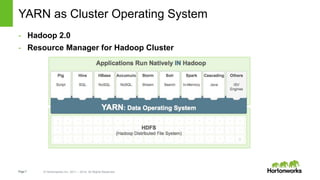
YARN as Cluster Operating System
- Hadoop 2.0
- Resource Manager for Hadoop Cluster
Page8 © Hortonworks Inc. 2011 – 2014. All Rights Reserved
YARN
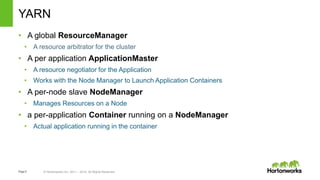
• A global ResourceManager
• A resource arbitrator for the cluster
• A per application ApplicationMaster
• A resource negotiator for the Application
• Works with the Node Manager to Launch Application Containers
• A per-node slave NodeManager
• Manages Resources on a Node
• a per-application Container running on a NodeManager
• Actual application running in the container
Page9 © Hortonworks Inc. 2011 – 2014. All Rights Reserved
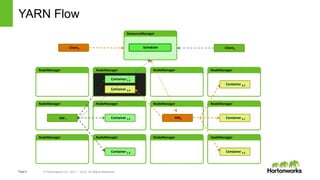
YARN Flow
NodeManager NodeManager NodeManager NodeManager
Container 1.1
Container 2.4
ResourceManager
NodeManager NodeManager NodeManager NodeManager
Container 1.2
Container 1.3
AM 1
Container 2.2
Container 2.1
Container 2.3
AM2
SchedulerClient2 Client1
Page10 © Hortonworks Inc. 2011 – 2014. All Rights Reserved
YARN - Powerful but Complex
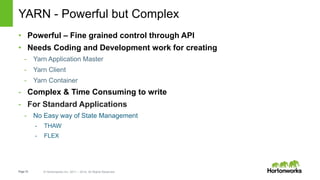
• Powerful – Fine grained control through API
• Needs Coding and Development work for creating
- Yarn Application Master
- Yarn Client
- Yarn Container
- Complex & Time Consuming to write
- For Standard Applications
- No Easy way of State Management
- THAW
- FLEX
Page11 © Hortonworks Inc. 2011 – 2014. All Rights Reserved
Long Running Applications
- Difference from Map-Red
Page12 © Hortonworks Inc. 2011 – 2014. All Rights Reserved
Long Running Application - Needs
- Management
- Install
- Configure
- Start/Stop
- Reconfigure
- Activate/Reactivate
- Upgrade
- Rolling Upgrade
- Security
- Scalability
- Monitoring
Page13 © Hortonworks Inc. 2011 – 2014. All Rights Reserved
Slider
Page14 © Hortonworks Inc. 2011 – 2014. All Rights Reserved
Why Slider ?
• Full YARN-integration takes effort
• Code for every component and action
• Powerful and finer control
• YARN delivers access to all the data in HDFS –and the Cluster
Resources
• Maturing Hadoop stack needs an Agile platform to integrate
• E.g. HBASE, HIVE, MAP REDUCE, APP Servers
• Integrate to Management tools like - Ambari– to monitor applications in-
a cluster
Page15 © Hortonworks Inc. 2011 – 2014. All Rights Reserved
Slider’s view of an Application
Page 15
• An application is a set of components
• A component is a daemon/launched exe
– configuration
– scripts, data files, etc.
• Component may have one or more instances
• Component instances are managed
• Example
– HBase Application (3 components)
– HBase Master
– HBase RegionServer
– HBase REST service
Page16 © Hortonworks Inc. 2011 – 2014. All Rights Reserved
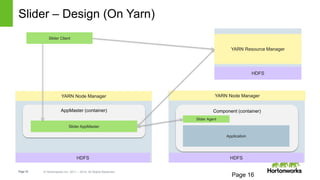
Slider – Design (On Yarn)
Page 16
YARN Node Manager
Component (container)AppMaster (container)
YARN Node Manager
HDFS
Slider Agent
Application
Slider AppMaster
Slider Client
HDFS
HDFS
YARN Resource Manager
Page17 © Hortonworks Inc. 2011 – 2014. All Rights Reserved
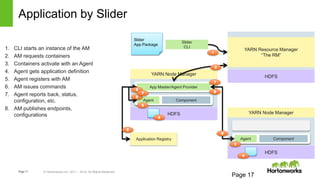
Application by Slider
Page 17
Slider
App Package
Slider
CLI
HDFS
YARN Resource Manager
“The RM”
HDFS
YARN Node Manager
Agent Component
HDFS
YARN Node Manager
Agent Component
1. CLI starts an instance of the AM
2. AM requests containers
3. Containers activate with an Agent
4. Agent gets application definition
5. Agent registers with AM
6. AM issues commands
7. Agent reports back, status,
configuration, etc.
8. AM publishes endpoints,
configurations
Application Registry
App Master/Agent Provider
Page18 © Hortonworks Inc. 2011 – 2014. All Rights Reserved
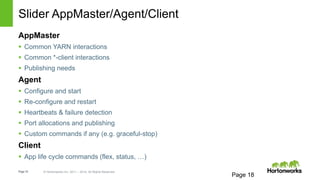
Slider AppMaster/Agent/Client
Page 18
AppMaster
 Common YARN interactions
 Common *-client interactions
 Publishing needs
Agent
 Configure and start
 Re-configure and restart
 Heartbeats & failure detection
 Port allocations and publishing
 Custom commands if any (e.g. graceful-stop)
Client
 App life cycle commands (flex, status, …)
Page19 © Hortonworks Inc. 2011 – 2014. All Rights Reserved
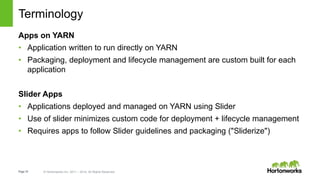
Terminology
Apps on YARN
• Application written to run directly on YARN
• Packaging, deployment and lifecycle management are custom built for each
application
Slider Apps
• Applications deployed and managed on YARN using Slider
• Use of slider minimizes custom code for deployment + lifecycle management
• Requires apps to follow Slider guidelines and packaging ("Sliderize")
Page20 © Hortonworks Inc. 2011 – 2014. All Rights Reserved
Slider – Getting Started
Page21 © Hortonworks Inc. 2011 – 2014. All Rights Reserved
Executing Slider
• Install Apache Slider on to a Yarn Cluster
• Create a “sliderized” Application Package
• Setup the config files
• Execute it from Slider client
E.g. ./slider create cl1 --image hdfs://NN:8020/slider/agent/slider-agent.tar.gz -
-template /work/appConf.json --resources /work/resources.json
slider <ACTION> [<name>] [<OPTIONS>]
Page22 © Hortonworks Inc. 2011 – 2014. All Rights Reserved
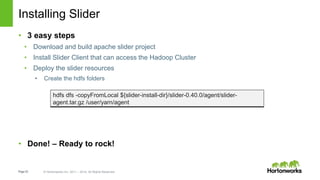
Installing Slider
• 3 easy steps
• Download and build apache slider project
• Install Slider Client that can access the Hadoop Cluster
• Deploy the slider resources
• Create the hdfs folders
• Done! – Ready to rock!
hdfs dfs -copyFromLocal ${slider-install-dir}/slider-0.40.0/agent/slider-
agent.tar.gz /user/yarn/agent
Page23 © Hortonworks Inc. 2011 – 2014. All Rights Reserved
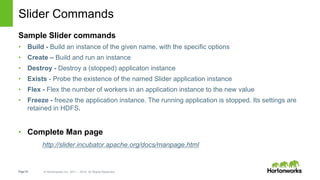
Slider Commands
Sample Slider commands
• Build - Build an instance of the given name, with the specific options
• Create – Build and run an instance
• Destroy - Destroy a (stopped) applicaton instance
• Exists - Probe the existence of the named Slider application instance
• Flex - Flex the number of workers in an application instance to the new value
• Freeze - freeze the application instance. The running application is stopped. Its settings are
retained in HDFS.
• Complete Man page
http://slider.incubator.apache.org/docs/manpage.html
Page24 © Hortonworks Inc. 2011 – 2014. All Rights Reserved
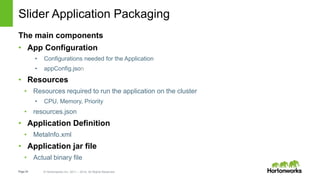
Slider Application Packaging
The main components
• App Configuration
• Configurations needed for the Application
• appConfig.json
• Resources
• Resources required to run the application on the cluster
• CPU, Memory, Priority
• resources.json
• Application Definition
• MetaInfo.xml
• Application jar file
• Actual binary file
Page25 © Hortonworks Inc. 2011 – 2014. All Rights Reserved
© Hortonworks Inc. 2014
Memcached on YARN
Sample Slider App
Page 25
Page26 © Hortonworks Inc. 2011 – 2014. All Rights Reserved
Other Application Packages
Page 26
Reference doc for Memcached Application
• http://slider.incubator.apache.org/docs/slider_specs/hello_world_slider_app.html
Slider github repo has other app
 Accumulo
 HBase
 Storm
 Memcached-windows
Page27 © Hortonworks Inc. 2011 – 2014. All Rights Reserved
Next?
Page28 © Hortonworks Inc. 2011 – 2014. All Rights Reserved
Its get Better
Ambari Views for Slider
• Ambari View that manages the life cycle of “Slider”ized apps
Page29 © Hortonworks Inc. 2011 – 2014. All Rights Reserved
Thank You

Apache Slider

  • 1.
    Page1 © HortonworksInc. 2011 – 2014. All Rights Reserved Apache Slider Shivaji Dutta Sr. Partner Solutions Engineer
  • 2.
    Page2 © HortonworksInc. 2011 – 2014. All Rights Reserved Disclaimer This document may contain product features and technology directions that are under development or may be under development in the future. Technical feasibility, market demand, user feedback, and the Apache Software Foundation community development process can all effect timing and final delivery. This document’s description of these features and technology directions does not represent a contractual commitment from Hortonworks to deliver these features in any generally available product. Product features and technology directions are subject to change, and must not be included in contracts, purchase orders, or sales agreements of any kind.
  • 3.
    Page3 © HortonworksInc. 2011 – 2014. All Rights Reserved Agenda • Apache Slider Overview • Yarn Overview • Why Slider • Slider Internals/Architecture • Slider App Packaging • Ambari and Slider • Q/A
  • 4.
    Page4 © HortonworksInc. 2011 – 2014. All Rights Reserved Slider Overview
  • 5.
    Page5 © HortonworksInc. 2011 – 2014. All Rights Reserved Apache Slider - Open Source in-incubation Project - http://slider.incubator.apache.org/index.html - Platform for - Deployment, Management & Monitoring - Long Running applications on a Hadoop/YARN Cluster - Built and Runs on Hadoop YARN Framework - It makes it EASY and SIMPLE
  • 6.
    Page6 © HortonworksInc. 2011 – 2014. All Rights Reserved YARN
  • 7.
    Page7 © HortonworksInc. 2011 – 2014. All Rights Reserved YARN as Cluster Operating System - Hadoop 2.0 - Resource Manager for Hadoop Cluster
  • 8.
    Page8 © HortonworksInc. 2011 – 2014. All Rights Reserved YARN • A global ResourceManager • A resource arbitrator for the cluster • A per application ApplicationMaster • A resource negotiator for the Application • Works with the Node Manager to Launch Application Containers • A per-node slave NodeManager • Manages Resources on a Node • a per-application Container running on a NodeManager • Actual application running in the container
  • 9.
    Page9 © HortonworksInc. 2011 – 2014. All Rights Reserved YARN Flow NodeManager NodeManager NodeManager NodeManager Container 1.1 Container 2.4 ResourceManager NodeManager NodeManager NodeManager NodeManager NodeManager NodeManager NodeManager NodeManager Container 1.2 Container 1.3 AM 1 Container 2.2 Container 2.1 Container 2.3 AM2 SchedulerClient2 Client1
  • 10.
    Page10 © HortonworksInc. 2011 – 2014. All Rights Reserved YARN - Powerful but Complex • Powerful – Fine grained control through API • Needs Coding and Development work for creating - Yarn Application Master - Yarn Client - Yarn Container - Complex & Time Consuming to write - For Standard Applications - No Easy way of State Management - THAW - FLEX
  • 11.
    Page11 © HortonworksInc. 2011 – 2014. All Rights Reserved Long Running Applications - Difference from Map-Red
  • 12.
    Page12 © HortonworksInc. 2011 – 2014. All Rights Reserved Long Running Application - Needs - Management - Install - Configure - Start/Stop - Reconfigure - Activate/Reactivate - Upgrade - Rolling Upgrade - Security - Scalability - Monitoring
  • 13.
    Page13 © HortonworksInc. 2011 – 2014. All Rights Reserved Slider
  • 14.
    Page14 © HortonworksInc. 2011 – 2014. All Rights Reserved Why Slider ? • Full YARN-integration takes effort • Code for every component and action • Powerful and finer control • YARN delivers access to all the data in HDFS –and the Cluster Resources • Maturing Hadoop stack needs an Agile platform to integrate • E.g. HBASE, HIVE, MAP REDUCE, APP Servers • Integrate to Management tools like - Ambari– to monitor applications in- a cluster
  • 15.
    Page15 © HortonworksInc. 2011 – 2014. All Rights Reserved Slider’s view of an Application Page 15 • An application is a set of components • A component is a daemon/launched exe – configuration – scripts, data files, etc. • Component may have one or more instances • Component instances are managed • Example – HBase Application (3 components) – HBase Master – HBase RegionServer – HBase REST service
  • 16.
    Page16 © HortonworksInc. 2011 – 2014. All Rights Reserved Slider – Design (On Yarn) Page 16 YARN Node Manager Component (container)AppMaster (container) YARN Node Manager HDFS Slider Agent Application Slider AppMaster Slider Client HDFS HDFS YARN Resource Manager
  • 17.
    Page17 © HortonworksInc. 2011 – 2014. All Rights Reserved Application by Slider Page 17 Slider App Package Slider CLI HDFS YARN Resource Manager “The RM” HDFS YARN Node Manager Agent Component HDFS YARN Node Manager Agent Component 1. CLI starts an instance of the AM 2. AM requests containers 3. Containers activate with an Agent 4. Agent gets application definition 5. Agent registers with AM 6. AM issues commands 7. Agent reports back, status, configuration, etc. 8. AM publishes endpoints, configurations Application Registry App Master/Agent Provider
  • 18.
    Page18 © HortonworksInc. 2011 – 2014. All Rights Reserved Slider AppMaster/Agent/Client Page 18 AppMaster  Common YARN interactions  Common *-client interactions  Publishing needs Agent  Configure and start  Re-configure and restart  Heartbeats & failure detection  Port allocations and publishing  Custom commands if any (e.g. graceful-stop) Client  App life cycle commands (flex, status, …)
  • 19.
    Page19 © HortonworksInc. 2011 – 2014. All Rights Reserved Terminology Apps on YARN • Application written to run directly on YARN • Packaging, deployment and lifecycle management are custom built for each application Slider Apps • Applications deployed and managed on YARN using Slider • Use of slider minimizes custom code for deployment + lifecycle management • Requires apps to follow Slider guidelines and packaging ("Sliderize")
  • 20.
    Page20 © HortonworksInc. 2011 – 2014. All Rights Reserved Slider – Getting Started
  • 21.
    Page21 © HortonworksInc. 2011 – 2014. All Rights Reserved Executing Slider • Install Apache Slider on to a Yarn Cluster • Create a “sliderized” Application Package • Setup the config files • Execute it from Slider client E.g. ./slider create cl1 --image hdfs://NN:8020/slider/agent/slider-agent.tar.gz - -template /work/appConf.json --resources /work/resources.json slider <ACTION> [<name>] [<OPTIONS>]
  • 22.
    Page22 © HortonworksInc. 2011 – 2014. All Rights Reserved Installing Slider • 3 easy steps • Download and build apache slider project • Install Slider Client that can access the Hadoop Cluster • Deploy the slider resources • Create the hdfs folders • Done! – Ready to rock! hdfs dfs -copyFromLocal ${slider-install-dir}/slider-0.40.0/agent/slider- agent.tar.gz /user/yarn/agent
  • 23.
    Page23 © HortonworksInc. 2011 – 2014. All Rights Reserved Slider Commands Sample Slider commands • Build - Build an instance of the given name, with the specific options • Create – Build and run an instance • Destroy - Destroy a (stopped) applicaton instance • Exists - Probe the existence of the named Slider application instance • Flex - Flex the number of workers in an application instance to the new value • Freeze - freeze the application instance. The running application is stopped. Its settings are retained in HDFS. • Complete Man page http://slider.incubator.apache.org/docs/manpage.html
  • 24.
    Page24 © HortonworksInc. 2011 – 2014. All Rights Reserved Slider Application Packaging The main components • App Configuration • Configurations needed for the Application • appConfig.json • Resources • Resources required to run the application on the cluster • CPU, Memory, Priority • resources.json • Application Definition • MetaInfo.xml • Application jar file • Actual binary file
  • 25.
    Page25 © HortonworksInc. 2011 – 2014. All Rights Reserved © Hortonworks Inc. 2014 Memcached on YARN Sample Slider App Page 25
  • 26.
    Page26 © HortonworksInc. 2011 – 2014. All Rights Reserved Other Application Packages Page 26 Reference doc for Memcached Application • http://slider.incubator.apache.org/docs/slider_specs/hello_world_slider_app.html Slider github repo has other app  Accumulo  HBase  Storm  Memcached-windows
  • 27.
    Page27 © HortonworksInc. 2011 – 2014. All Rights Reserved Next?
  • 28.
    Page28 © HortonworksInc. 2011 – 2014. All Rights Reserved Its get Better Ambari Views for Slider • Ambari View that manages the life cycle of “Slider”ized apps
  • 29.
    Page29 © HortonworksInc. 2011 – 2014. All Rights Reserved Thank You

Editor's Notes

  • #6 Apache Slider It is an open source project. Deployment, Management and Monitoring Distributed Application on a Apache YARN Cluster
  • #8 What YARN Does YARN enhances the power of a Hadoop compute cluster in the following ways: Scalability The processing power in data centers continues to grow quickly. Because YARN ResourceManager focuses exclusively on scheduling, it can manage those larger clusters much more easily. Compatibility with MapReduce Existing MapReduce applications and users can run on top of YARN without disruption to their existing processes. Improved cluster utilization. The ResourceManager is a pure scheduler that optimizes cluster utilization according to criteria such as capacity guarantees, fairness, and SLAs. Also, unlike before, there are no named map and reduce slots, which helps to better utilize cluster resources. Support for workloads other than MapReduce Additional programming models such as graph processing and iterative modeling are now possible for data processing. These added models allow enterprises to realize near real-time processing and increased ROI on their Hadoop investments. Agility With MapReduce becoming a user-land library, it can evolve independently of the underlying resource manager layer and in a much more agile manner.
  • #10 Servers run YARN Node Managers NM's heartbeat to Resource Manager RM schedules work over cluster RM allocates containers to apps NMs start containers NMs report container health