Getting To One Instructional Technology Mentor Grant Program   Cheryl Capozzoli GTO Mentor
GTO Goals and Responsibilities Assess current K-12 teacher/staff instructional technology needs Devise and implement Instructional Technology support and training plans Ongoing evaluations of IT interventions and practices Assist teachers with implementation differentiated instructional practices Assist Administration with administrative technology implementation needs Provide ongoing support for latest IT innovations
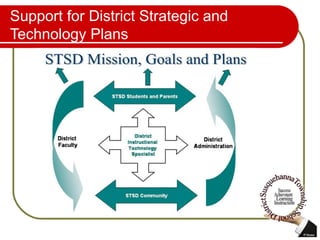
Support for District Strategic and Technology Plans
Why Technology? Today’s child must be offered educational opportunities that allow them experiences to learn with today’s best instructional tools and strategies. We need to continue our commitment in providing our students with productive 21 st  Century skills. By utilizing the best integrated educational innovations and practices, we will better prepare them for their future endeavors. “ If we teach today’s students as we taught yesterday’s, we rob them of tomorrow.” What the world  is  depends upon what we  do  with it.  John Dewey
What is a CPS? Classroom Performance System Allows for full classroom student participation Anonymous responses  Provides teacher with data collection Import assessments, surveys, polls Rapid student response and instant feedback Highly interactive It’s Fun
What is Moodle? Online Web Development tool for Interactive Classroom Environments Secure  Free access through the CAIU 3 rd  -12 th   grade STSD students have access Teachers are using the interactive environments Student centered environment Real time access http://moodle.caiu.org
What are Blogs? A personal Weblog or online Web Journal Create a blog for class information and notes Students can respond and ask questions Classmates can communicate or discuss classroom events Protected areas through moodle sites and sites for educational use only Students are already blogging so why not provide an opportunity for educational  blogs
What is a Wiki? Online interactive text editor Can be used for collaborations (group projects) On demand anywhere any time collaborations Protected K-12 wikispaces to member only subscriptions http://capsitpage.wikispaces.com
What is a SMART Board? Interactive White Board Students are engaged in learning through a highly visual and interactive teaching tool Visual and kinesthetic learners benefit greatly Sparks creativity and participation Lesson plan development and archiving for critical classroom information Supplements, supports and reinforces  many instructional concepts and  strategies
What is the Internet 2? The  Internet 2  is not a new internet, it is an advanced internet backbone capable of wide variety of bandwidth-intensive applications deployed at higher performance and greater reliability and security  Streaming media, Video Conferencing, Virtual Field Trips High speed connectivity to high bandwidth sites # of Schools Connected  http://k20.internet2.edu/survey/results/org_aggregated_survey_results.cfm
What is Web 2.0? New version of the web not a new internet Adds interactivity through web based applications Provides services such as communications, collaborations and interactions Provides a wider range of instructional technology capabilities Wikis Blogs Online collaborations File storage Interactive classrooms
Some GTO Accomplishments Increase of STSD teachers practicing integrated instructional strategies Improved staff technology understanding, use and integration practices Interactive and collaborative classroom environments through use of various IT tools Increased student participation, collaboration and discussion IT tools purchased effectively fully utilized and integrated
Some Sample Project Interventions SMART Board Lessons Sample Lessons Moodle  Sites CPS Assessments Google Earth Projects United Streaming Podcasts  1   2   3 Wikis LFS HS Curriculum
In Closing If we continue our efforts in providing our students with rich and captivating educational experiences through the use of effective instructional technology tools and strategies, we will maintain our high expectations and standards of graduating productive, well rounded and highly prepared young adults for 21 st  Century post secondary education or workforce experiences.
Thank You! Thank you for your continued support  of the GTO Instructional Technology position and for sharing the vision in the future educational technology successes at STSD.  I take much pride in working in such a progressive and supportive school district.

GTO Board Presentation

  • 1.
    Getting To OneInstructional Technology Mentor Grant Program Cheryl Capozzoli GTO Mentor
  • 2.
    GTO Goals andResponsibilities Assess current K-12 teacher/staff instructional technology needs Devise and implement Instructional Technology support and training plans Ongoing evaluations of IT interventions and practices Assist teachers with implementation differentiated instructional practices Assist Administration with administrative technology implementation needs Provide ongoing support for latest IT innovations
  • 3.
    Support for DistrictStrategic and Technology Plans
  • 4.
    Why Technology? Today’schild must be offered educational opportunities that allow them experiences to learn with today’s best instructional tools and strategies. We need to continue our commitment in providing our students with productive 21 st Century skills. By utilizing the best integrated educational innovations and practices, we will better prepare them for their future endeavors. “ If we teach today’s students as we taught yesterday’s, we rob them of tomorrow.” What the world is depends upon what we do with it. John Dewey
  • 5.
    What is aCPS? Classroom Performance System Allows for full classroom student participation Anonymous responses Provides teacher with data collection Import assessments, surveys, polls Rapid student response and instant feedback Highly interactive It’s Fun
  • 6.
    What is Moodle?Online Web Development tool for Interactive Classroom Environments Secure Free access through the CAIU 3 rd -12 th grade STSD students have access Teachers are using the interactive environments Student centered environment Real time access http://moodle.caiu.org
  • 7.
    What are Blogs?A personal Weblog or online Web Journal Create a blog for class information and notes Students can respond and ask questions Classmates can communicate or discuss classroom events Protected areas through moodle sites and sites for educational use only Students are already blogging so why not provide an opportunity for educational blogs
  • 8.
    What is aWiki? Online interactive text editor Can be used for collaborations (group projects) On demand anywhere any time collaborations Protected K-12 wikispaces to member only subscriptions http://capsitpage.wikispaces.com
  • 9.
    What is aSMART Board? Interactive White Board Students are engaged in learning through a highly visual and interactive teaching tool Visual and kinesthetic learners benefit greatly Sparks creativity and participation Lesson plan development and archiving for critical classroom information Supplements, supports and reinforces many instructional concepts and strategies
  • 10.
    What is theInternet 2? The Internet 2 is not a new internet, it is an advanced internet backbone capable of wide variety of bandwidth-intensive applications deployed at higher performance and greater reliability and security Streaming media, Video Conferencing, Virtual Field Trips High speed connectivity to high bandwidth sites # of Schools Connected http://k20.internet2.edu/survey/results/org_aggregated_survey_results.cfm
  • 11.
    What is Web2.0? New version of the web not a new internet Adds interactivity through web based applications Provides services such as communications, collaborations and interactions Provides a wider range of instructional technology capabilities Wikis Blogs Online collaborations File storage Interactive classrooms
  • 12.
    Some GTO AccomplishmentsIncrease of STSD teachers practicing integrated instructional strategies Improved staff technology understanding, use and integration practices Interactive and collaborative classroom environments through use of various IT tools Increased student participation, collaboration and discussion IT tools purchased effectively fully utilized and integrated
  • 13.
    Some Sample ProjectInterventions SMART Board Lessons Sample Lessons Moodle Sites CPS Assessments Google Earth Projects United Streaming Podcasts 1 2 3 Wikis LFS HS Curriculum
  • 14.
    In Closing Ifwe continue our efforts in providing our students with rich and captivating educational experiences through the use of effective instructional technology tools and strategies, we will maintain our high expectations and standards of graduating productive, well rounded and highly prepared young adults for 21 st Century post secondary education or workforce experiences.
  • 15.
    Thank You! Thankyou for your continued support of the GTO Instructional Technology position and for sharing the vision in the future educational technology successes at STSD. I take much pride in working in such a progressive and supportive school district.