The Times are Changing
Kicking it up a
Notch!

Technology Integration for the 21st
Century Learner…
•   Vision and support from leadership
•   Appropriate training
•   Knowledge of CCCS and/or CCSS
•   Access to hardware and software
•   Technical support or resources
•   Community support
•   Financial support
•   Policies and standards that support new learning
•   Culture that encourages and promotes risk taking


Essential Environmental Conditions for
‘successful’ Technology Integration
• A willingness to take a risk,
• A need to change the status quo,
• The desire to learn new ways of
  delivery, so that everyone learns.


And when all else fails…
•   First step… Interest and motivation
•   Small… with an idea
•   Try …
•   Succeed or fail…
•   Tweak it…
•   Try again.


Where to start ?
• Learning curve…
• Comfortable and familiar…
• Yes, it takes a certain amount of time to prepare…
  but you can…and you have it for the next class or
  the next year
• Success or failure…
• Frustration…
• Use it or lose it…
• Students will enjoy the change…
• Experience

What you can expect…
• According to the Beloit College Mindset list
  (http://www.beloit.edu/mindset/advisory/),
• Feel that the "digital world is routine and technology
  is just too slow."
• More tech savvy and spend more hours plugged into
  the "Matrix", than any other generation before them.


Our      ‘21st    Century’ Students…
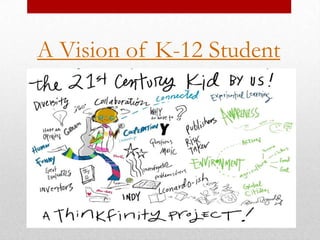
A Vision of K-12 Student
• Showing a YouTube video in class,
• Using PowerPoint to present,

                   WE ARE HERE!
• Let’s start taking it to the next level & look at teaching these
  children differently
   •   Don’t need to teach the technology,
   •   Need to teach them to use technology as a communication tool,
   •   Need to teach our students to think, analyze and draw conclusions,
   •   The Goal is to improve student achievement and address 21st
       Century skills.


Where am I heading with this…
• School Fusion –
  • Blogging and Podcasting,
     • Supports composing @ the Computer – CCSS,
     • Reflective,
• Clickers
  • Formative Assessments,
  • Check for understanding,
• TV’s, Youtube Access, Brain Pop


Already have…
• Happens across the curriculum,
• Deepens and enhances the learning process,
• Four key components of learning:
  •   active engagement,
  •   participation in groups,
  •   frequent interaction and feedback, and
  •   connection to real-world experts.
• Achieved when the use of technology is routine and
  transparent and when technology supports curricular goals.


Effective Tech Integration
• Changes the way teachers teach,
• Provides effective ways to reach different types of learners
  and assess student understanding through multiple means,
• Enhances the relationship between teacher and student,
• Teachers grow into roles of adviser, content expert, and
  coach,
• Make teaching and learning more meaningful and fun.


Effective Tech Integration
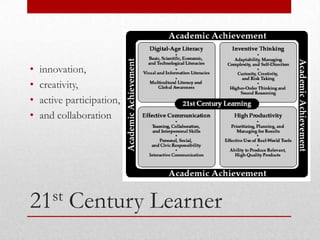
•   innovation,
•   creativity,
•   active participation,
•   and collaboration


21st       Century Learner
• Inquire, think critically, and gain knowledge.
• Draw conclusions, make informed decisions, apply
  knowledge to new situations, and create new knowledge.
• Share knowledge and participate ethically and productively
  as members of our democratic society.
• Pursue personal and aesthetic growth.


21st     Century Skills
•   Media Sharing
•   Digital Storytelling
•   Manage and Organize
•   Social Networking and Communication
•   Content Collaboration


Tech Integration Websites should…
• Many free website building sites – FRIENDLY & Easy
  • Weebly -
    http://sprinklesandcupcakes.weebly.com/index.html
  • Freewebs
  • Webs
  • Google Sites
• Many project applications for ALL subjects
  • Research and present new material,
  • Access on the internet,
  • Groups of students can research different pages on a
    Subject,


Student Websites
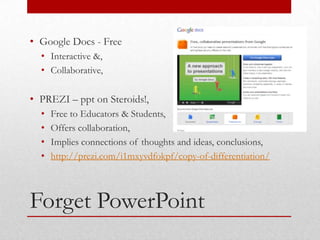
• Google Docs - Free
  • Interactive &,
  • Collaborative,

• PREZI – ppt on Steroids!,
  •   Free to Educators & Students,
  •   Offers collaboration,
  •   Implies connections of thoughts and ideas, conclusions,
  •   http://prezi.com/i1mxyvdfokpf/copy-of-differentiation/


Forget PowerPoint
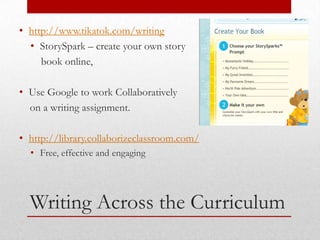
• http://www.tikatok.com/writing
  • StorySpark – create your own story
     book online,

• Use Google to work Collaboratively
  on a writing assignment.

• http://library.collaborizeclassroom.com/
  • Free, effective and engaging


  Writing Across the Curriculum
http://www.readwritethink.org/

• Complete Lesson Plans
• Inquiry and Analysis
• INTERACTIVE


Read, Write, Think
• Game-based Learning
  • Can be online
    •   http://www.icivics.org/
    •   http://muzzylane.com/project/making_history
    •   http://www.educationarcade.org/projects
    •   http://www.educationalsimulations.com/products.html
  • Can be created
    •   Game Maker,
    •   Game Star,
    •   Scratch and
    •   Alice


Get your Game On…
• Google Doc’s Training
  • http://www.google.com/educators/p_docs.html
  • http://edutraining.googleapps.com/

• SimpleK12.com
  • Free Webinars,
  • Free training books,

• Atomic Learning – District pays for account


Where can I go next…
https://sites.google.com/site/insttechresource/home


Instructional Technology
Portal Website
Abbot & Costello
Think Differently

Kicking it up a notch!

  • 1.
    The Times areChanging
  • 2.
    Kicking it upa Notch! Technology Integration for the 21st Century Learner…
  • 3.
    Vision and support from leadership • Appropriate training • Knowledge of CCCS and/or CCSS • Access to hardware and software • Technical support or resources • Community support • Financial support • Policies and standards that support new learning • Culture that encourages and promotes risk taking Essential Environmental Conditions for ‘successful’ Technology Integration
  • 4.
    • A willingnessto take a risk, • A need to change the status quo, • The desire to learn new ways of delivery, so that everyone learns. And when all else fails…
  • 5.
    First step… Interest and motivation • Small… with an idea • Try … • Succeed or fail… • Tweak it… • Try again. Where to start ?
  • 6.
    • Learning curve… •Comfortable and familiar… • Yes, it takes a certain amount of time to prepare… but you can…and you have it for the next class or the next year • Success or failure… • Frustration… • Use it or lose it… • Students will enjoy the change… • Experience What you can expect…
  • 7.
    • According tothe Beloit College Mindset list (http://www.beloit.edu/mindset/advisory/), • Feel that the "digital world is routine and technology is just too slow." • More tech savvy and spend more hours plugged into the "Matrix", than any other generation before them. Our ‘21st Century’ Students…
  • 8.
    A Vision ofK-12 Student
  • 9.
    • Showing aYouTube video in class, • Using PowerPoint to present, WE ARE HERE! • Let’s start taking it to the next level & look at teaching these children differently • Don’t need to teach the technology, • Need to teach them to use technology as a communication tool, • Need to teach our students to think, analyze and draw conclusions, • The Goal is to improve student achievement and address 21st Century skills. Where am I heading with this…
  • 10.
    • School Fusion– • Blogging and Podcasting, • Supports composing @ the Computer – CCSS, • Reflective, • Clickers • Formative Assessments, • Check for understanding, • TV’s, Youtube Access, Brain Pop Already have…
  • 11.
    • Happens acrossthe curriculum, • Deepens and enhances the learning process, • Four key components of learning: • active engagement, • participation in groups, • frequent interaction and feedback, and • connection to real-world experts. • Achieved when the use of technology is routine and transparent and when technology supports curricular goals. Effective Tech Integration
  • 12.
    • Changes theway teachers teach, • Provides effective ways to reach different types of learners and assess student understanding through multiple means, • Enhances the relationship between teacher and student, • Teachers grow into roles of adviser, content expert, and coach, • Make teaching and learning more meaningful and fun. Effective Tech Integration
  • 13.
    innovation, • creativity, • active participation, • and collaboration 21st Century Learner
  • 14.
    • Inquire, thinkcritically, and gain knowledge. • Draw conclusions, make informed decisions, apply knowledge to new situations, and create new knowledge. • Share knowledge and participate ethically and productively as members of our democratic society. • Pursue personal and aesthetic growth. 21st Century Skills
  • 15.
    Media Sharing • Digital Storytelling • Manage and Organize • Social Networking and Communication • Content Collaboration Tech Integration Websites should…
  • 16.
    • Many freewebsite building sites – FRIENDLY & Easy • Weebly - http://sprinklesandcupcakes.weebly.com/index.html • Freewebs • Webs • Google Sites • Many project applications for ALL subjects • Research and present new material, • Access on the internet, • Groups of students can research different pages on a Subject, Student Websites
  • 17.
    • Google Docs- Free • Interactive &, • Collaborative, • PREZI – ppt on Steroids!, • Free to Educators & Students, • Offers collaboration, • Implies connections of thoughts and ideas, conclusions, • http://prezi.com/i1mxyvdfokpf/copy-of-differentiation/ Forget PowerPoint
  • 18.
    • http://www.tikatok.com/writing • StorySpark – create your own story book online, • Use Google to work Collaboratively on a writing assignment. • http://library.collaborizeclassroom.com/ • Free, effective and engaging Writing Across the Curriculum
  • 19.
    http://www.readwritethink.org/ • Complete LessonPlans • Inquiry and Analysis • INTERACTIVE Read, Write, Think
  • 20.
    • Game-based Learning • Can be online • http://www.icivics.org/ • http://muzzylane.com/project/making_history • http://www.educationarcade.org/projects • http://www.educationalsimulations.com/products.html • Can be created • Game Maker, • Game Star, • Scratch and • Alice Get your Game On…
  • 21.
    • Google Doc’sTraining • http://www.google.com/educators/p_docs.html • http://edutraining.googleapps.com/ • SimpleK12.com • Free Webinars, • Free training books, • Atomic Learning – District pays for account Where can I go next…
  • 22.
  • 23.
  • 24.

Editor's Notes

  • #12 http://www.edutopia.org/technology-integration-introduction
  • #22 Atomic LearningUsername:         First initial last name underscore waynePassword:           wayne