Classroom Rules and Regulations
 1. Listen carefully.
 2. Follow directions.
 3. Work Quietly. Do not disturb
others who are working.
 4. Respect others. Be kind with
your words and actions.
 5. Respect school and personal
property.
 6. Work and play safely.
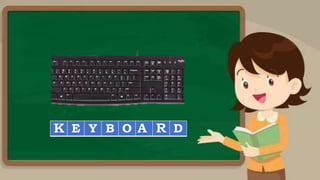
Direction: Complete the puzzle by filling in the box
with the appropriate letters based on the given
pictures in computer parts.
M N I T R
E Y B O D
S E A R
O S E
LESSON 1 - USE
HAND TOOLS
LO1. PREPARE HAND TOOLS
1. Prepare hand tools and equipment according to
function and task requirement.
The learner shall;
1.Identify the different tools needed in
computer hardware servicing
2. Select the best tool for each task
3.Value the importance of following proper
use of tools
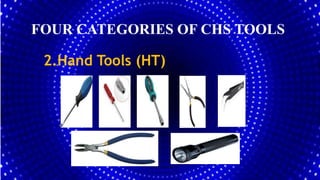
FOUR CATEGORIES OF CHS TOOLS
2.Hand Tools (HT)
FOUR CATEGORIES OF HARDWARE TOOLS
2.Hand Tools (HT)
 A hand tool is a device that can
manually operated by hands.
FOUR CATEGORIES OF HARDWARE TOOLS
2.Hand Tools (HT)
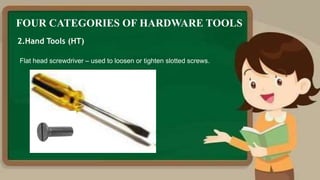
Flat head screwdriver – used to loosen or tighten slotted screws.
FOUR CATEGORIES OF HARDWARE TOOLS
2.Hand Tools (HT)
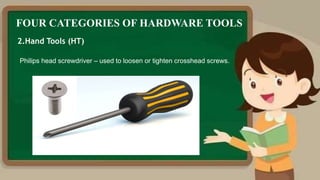
Philips head screwdriver – used to loosen or tighten crosshead screws.
FOUR CATEGORIES OF HARDWARE TOOLS
2.Hand Tools (HT)
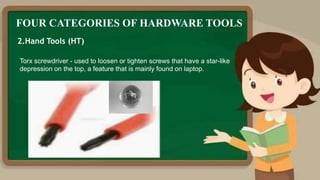
Torx screwdriver - used to loosen or tighten screws that have a star-like
depression on the top, a feature that is mainly found on laptop.
FOUR CATEGORIES OF HARDWARE TOOLS
2.Hand Tools (HT)
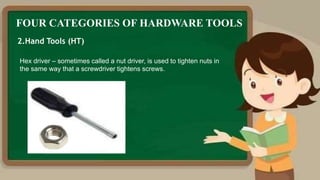
Hex driver – sometimes called a nut driver, is used to tighten nuts in
the same way that a screwdriver tightens screws.
FOUR CATEGORIES OF HARDWARE TOOLS
2.Hand Tools (HT)
Needle-nose plier – used to hold small parts.
FOUR CATEGORIES OF HARDWARE TOOLS
2.Hand Tools (HT)
Tweezers – used to manipulate small parts.
FOUR CATEGORIES OF HARDWARE TOOLS
2.Hand Tools (HT)
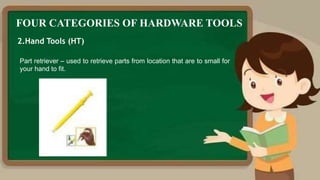
Part retriever – used to retrieve parts from location that are to small for
your hand to fit.
FOUR CATEGORIES OF HARDWARE TOOLS
2.Hand Tools (HT)
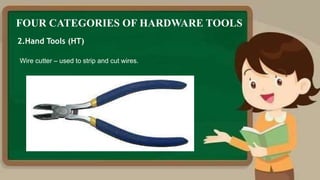
Wire cutter – used to strip and cut wires.

FOUR CATEGORIES OF HARDWARE TOOLS
2.Hand Tools (HT)
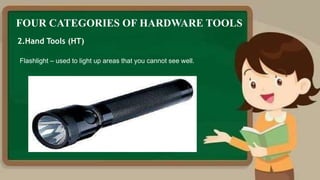
Flashlight – used to light up areas that you cannot see well.
FOUR CATEGORIES OF HARDWARE TOOLS
3.Cleaning Tools (CT)
 Having the appropriate cleaning tools is
essential when maintaining or repairing
computers.

 Using these tools ensures that computer
components are not damaged during
cleaning.

FOUR CATEGORIES OF HARDWARE TOOLS
3.Cleaning Tools (CT)
Lint-free cloth and brush – used to clean different computer
components without scratching or leaving debris.
FOUR CATEGORIES OF HARDWARE TOOLS
3.Cleaning Tools (CT)
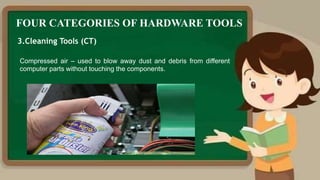
Compressed air – used to blow away dust and debris from different
computer parts without touching the components.
FOUR CATEGORIES OF HARDWARE TOOLS
3.Cleaning Tools (CT)
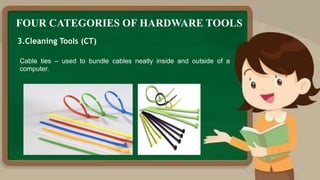
Cable ties – used to bundle cables neatly inside and outside of a
computer.
FOUR CATEGORIES OF HARDWARE TOOLS
3.Cleaning Tools (CT)
Parts organizer – used to hold screw, jumpers, fasteners and other
small parts and prevents them from getting mixed together.
FOUR CATEGORIES OF HARDWARE TOOLS
4.Diagnostic Tools (DT)
 Computers are easier to use and
more dependable with each new
generation of hardware and operating
system update, but that doesn't mean
they're problem-free.
FOUR CATEGORIES OF HARDWARE TOOLS
4.Diagnostic Tools (DT)
Multimeter – used to test the integrity of circuits and the quality of
electricity in computer components.
FOUR CATEGORIES OF HARDWARE TOOLS
4.Diagnostic Tools (DT)
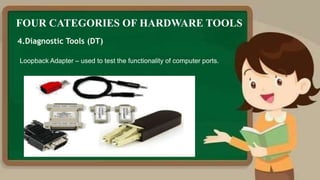
Loopback Adapter – used to test the functionality of computer ports.
1. How many categories that we
have in our hardware tools?
2. Why do we need to identify the
proper tool to be used every time
we do computer repair?
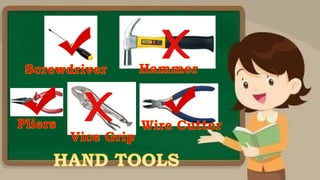
Flat Head
Screwdriver
Philip Head
Screwdriver
Flat Head
Screwdriver
Philip Head
Screwdriver
Wire Cutter
Needle Nose Plier
Candle
Flashlight
Candle
Flashlight
Which tools used to test
the integrity of circuits
and the quality of
electricity in computer
components?
Multi tester
Loop Back Adapter
Activity Sheet 2
Directions: Write TRUE if the statement is correct and FALSE if it is wrong. Write
your answers on a separate sheet of paper.
_______ 1. Selecting the best tool for each task requires training in the proper use
of the tools, field experience in their safe use, and following the
manufacturer’s guidance and instructions for that specific tool.
_______ 2. When obtaining the tool, all the associated tooling and consumable
parts, as recommended by the manufacturer, must be included.
_______ 3. The safe use of a tool depends on using the tool for the purpose for
which it was designed and also for other purposes where it can be used
as substitute where tool is not available.
_______ 4. All tools should be kept in good condition with regular maintenance.
_______ 5. Preparing for a task includes also the sequence of tasks to be done
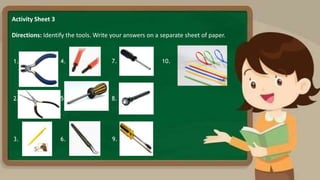
Activity Sheet 3
Directions: Identify the tools. Write your answers on a separate sheet of paper.
1.
2.
3.
4.
5.
6.
7.
8.
9.
10.
Activity Sheet 5
Directions: Read and understand the statement. You will be graded through the
following rubrics.
Q1. What is the importance of knowing the appropriate hand
tools for Computer System Servicing?

GRADE 9 PPT LESSON 1 CHS.pptx

  • 3.
    Classroom Rules andRegulations  1. Listen carefully.  2. Follow directions.  3. Work Quietly. Do not disturb others who are working.  4. Respect others. Be kind with your words and actions.  5. Respect school and personal property.  6. Work and play safely.
  • 4.
    Direction: Complete thepuzzle by filling in the box with the appropriate letters based on the given pictures in computer parts.
  • 5.
    M N IT R
  • 6.
    E Y BO D
  • 7.
  • 8.
  • 11.
    LESSON 1 -USE HAND TOOLS LO1. PREPARE HAND TOOLS 1. Prepare hand tools and equipment according to function and task requirement.
  • 12.
    The learner shall; 1.Identifythe different tools needed in computer hardware servicing 2. Select the best tool for each task 3.Value the importance of following proper use of tools
  • 13.
    FOUR CATEGORIES OFCHS TOOLS 2.Hand Tools (HT)
  • 14.
    FOUR CATEGORIES OFHARDWARE TOOLS 2.Hand Tools (HT)  A hand tool is a device that can manually operated by hands.
  • 15.
    FOUR CATEGORIES OFHARDWARE TOOLS 2.Hand Tools (HT) Flat head screwdriver – used to loosen or tighten slotted screws.
  • 16.
    FOUR CATEGORIES OFHARDWARE TOOLS 2.Hand Tools (HT) Philips head screwdriver – used to loosen or tighten crosshead screws.
  • 17.
    FOUR CATEGORIES OFHARDWARE TOOLS 2.Hand Tools (HT) Torx screwdriver - used to loosen or tighten screws that have a star-like depression on the top, a feature that is mainly found on laptop.
  • 18.
    FOUR CATEGORIES OFHARDWARE TOOLS 2.Hand Tools (HT) Hex driver – sometimes called a nut driver, is used to tighten nuts in the same way that a screwdriver tightens screws.
  • 19.
    FOUR CATEGORIES OFHARDWARE TOOLS 2.Hand Tools (HT) Needle-nose plier – used to hold small parts.
  • 20.
    FOUR CATEGORIES OFHARDWARE TOOLS 2.Hand Tools (HT) Tweezers – used to manipulate small parts.
  • 21.
    FOUR CATEGORIES OFHARDWARE TOOLS 2.Hand Tools (HT) Part retriever – used to retrieve parts from location that are to small for your hand to fit.
  • 23.
    FOUR CATEGORIES OFHARDWARE TOOLS 2.Hand Tools (HT) Wire cutter – used to strip and cut wires.
  • 24.
    FOUR CATEGORIES OFHARDWARE TOOLS 2.Hand Tools (HT) Flashlight – used to light up areas that you cannot see well.
  • 25.
    FOUR CATEGORIES OFHARDWARE TOOLS 3.Cleaning Tools (CT)  Having the appropriate cleaning tools is essential when maintaining or repairing computers.  Using these tools ensures that computer components are not damaged during cleaning.
  • 27.
    FOUR CATEGORIES OFHARDWARE TOOLS 3.Cleaning Tools (CT) Lint-free cloth and brush – used to clean different computer components without scratching or leaving debris.
  • 28.
    FOUR CATEGORIES OFHARDWARE TOOLS 3.Cleaning Tools (CT) Compressed air – used to blow away dust and debris from different computer parts without touching the components.
  • 29.
    FOUR CATEGORIES OFHARDWARE TOOLS 3.Cleaning Tools (CT) Cable ties – used to bundle cables neatly inside and outside of a computer.
  • 30.
    FOUR CATEGORIES OFHARDWARE TOOLS 3.Cleaning Tools (CT) Parts organizer – used to hold screw, jumpers, fasteners and other small parts and prevents them from getting mixed together.
  • 31.
    FOUR CATEGORIES OFHARDWARE TOOLS 4.Diagnostic Tools (DT)  Computers are easier to use and more dependable with each new generation of hardware and operating system update, but that doesn't mean they're problem-free.
  • 32.
    FOUR CATEGORIES OFHARDWARE TOOLS 4.Diagnostic Tools (DT) Multimeter – used to test the integrity of circuits and the quality of electricity in computer components.
  • 33.
    FOUR CATEGORIES OFHARDWARE TOOLS 4.Diagnostic Tools (DT) Loopback Adapter – used to test the functionality of computer ports.
  • 35.
    1. How manycategories that we have in our hardware tools? 2. Why do we need to identify the proper tool to be used every time we do computer repair?
  • 37.
  • 38.
  • 39.
  • 40.
  • 41.
  • 42.
    Which tools usedto test the integrity of circuits and the quality of electricity in computer components? Multi tester Loop Back Adapter
  • 44.
    Activity Sheet 2 Directions:Write TRUE if the statement is correct and FALSE if it is wrong. Write your answers on a separate sheet of paper. _______ 1. Selecting the best tool for each task requires training in the proper use of the tools, field experience in their safe use, and following the manufacturer’s guidance and instructions for that specific tool. _______ 2. When obtaining the tool, all the associated tooling and consumable parts, as recommended by the manufacturer, must be included. _______ 3. The safe use of a tool depends on using the tool for the purpose for which it was designed and also for other purposes where it can be used as substitute where tool is not available. _______ 4. All tools should be kept in good condition with regular maintenance. _______ 5. Preparing for a task includes also the sequence of tasks to be done
  • 45.
    Activity Sheet 3 Directions:Identify the tools. Write your answers on a separate sheet of paper. 1. 2. 3. 4. 5. 6. 7. 8. 9. 10.
  • 46.
    Activity Sheet 5 Directions:Read and understand the statement. You will be graded through the following rubrics. Q1. What is the importance of knowing the appropriate hand tools for Computer System Servicing?

Editor's Notes

  • #10 Amazing u just learn how to select the proper tools needed for computer hardware servicing The proper selection of tools is essential in Computer hardware servicing There is a japanese word seire which means sort We need to be organized to be more productive.
  • #11 Tools that not needed may be put back in the separate storage compartment.
  • #25 There is a saying that cleanliness is next to godleness that’s why our group of tools are the cleaning tools.
  • #26 One of the major problem in computer are messy cables
  • #27 What would you do if you see your computer is looking like this? Will you clean it? How would you clean it? What tools are you going to use? Are you going to wash it with water? Don’t do that okey? Cleaning your computer with water is very dangerous and can cause a lot of damage in your computer
  • #28 If dirt and stains are visible, you must just use a brush or a lint free cloth for dirt and stains a lint free cloth is the best to use as cleaning tool it can prevent esd and does not build up a charge and also protect your computer form scratches. However, the brush can brush away the dirt and dust from our computer system.
  • #29 One of the major problem in computer are messy cables, what we do about it? The answer is this
  • #30 Cables ties can make our cables neat and organize
  • #39 Screw driver have different types are used to loosening ang fasten screw.
  • #41 If your workplace has a limited light source you may use flashlight, to light your computers dark area.
  • #42 If your workplace has a limited light source you may use flashlight, to light your computers dark area.
  • #43 Do you find the game interesting? Me too….I hope it help getting you familiarize the proper uses of the different hand tools