Google Scholar : Google for research
Wouter Gerritsma, February 2014
Contents
 General Google syntax
 Google Scholar specifics
 Advanced Search & Metadata quality
 Stemming, synonyms, UK/US spelling
 Results ranking (SERP)
● Citing
 Recent literature
 Open Access Versions
 Alerts
 My Library, My Citations
 Metrics
 GS quality
 GS results in Google
General Google syntax
 Use ["phrase searching"]
 Search for file type ["land degradation" ext:pdf]
 Search for specific domains ["land ownership" site:.ac.uk]
 Search in titles [allintitle:anatomy plants water]
 Search with OR ["carbon dioxide" OR CO2]
 Exclude terms ["nutrient cycling" –nitrogen]
 Combine ["carbon dioxide" OR CO2 intitle:"nutrient
cycling" ext:pdf site:.edu]
More tips:Google better with Google
What you can't do
 Using numerical ranges
["Theobroma cacao" 2013...2014]
 Use the year facet instead
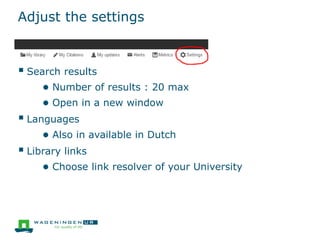
Adjust the settings
 Search results
● Number of results : 20 max
● Open in a new window
 Languages
● Also in available in Dutch
 Library links
● Choose link resolver of your University
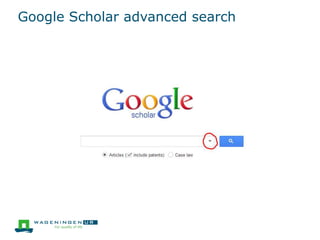
Google Scholar advanced search
 Author search [author:"KE Giller"]
Stemming, synonyms
 Inclusion of word variants is unclear. (Google Scholar has
a smaller dictionary than Google.com)
 No verbatim search, but phrases do work! ["behaviour"]
 Search explicitly for word variants still works
[~behaviour]
 Parentheses () do not work in Google (Scholar)!
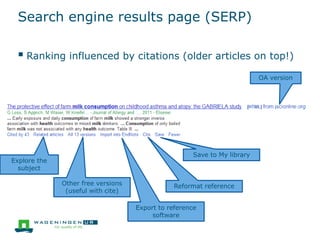
Search engine results page (SERP)
 Ranking influenced by citations (older articles on top!)
OA version
Save to My library
Reformat reference
Export to reference
software
Other free versions
(useful with cite)
Explore the
subject
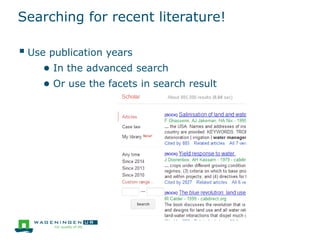
Searching for recent literature!
 Use publication years
● In the advanced search
● Or use the facets in search result
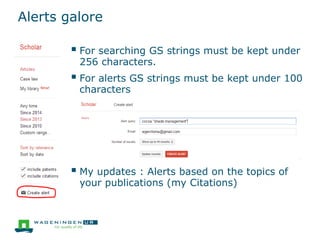
Alerts galore
 For searching GS strings must be kept under
256 characters.
 For alerts GS strings must be kept under 100
characters
 My updates : Alerts based on the topics of
your publications (my Citations)
My Citations & My Library
 My Citations
● Your personal profile page, concentrating on
publication lists and citations.
● Identifies you co-author network
 My library
● Your saved articles
● Also lists all your references "cited by me"
● No plugin for word processors (yet)
Google Scholar quality
 Coverage is still unclear
● Coverage is constantly growing, probably the most
comprehensive scholarly literature database (Harzing,
2014. Scientometrics 98 (1): 565-575. http://dx.doi.org/10.1007/s11192-013-0975-y)
● Not all OA repositories are (fully) indexed
(https://atmire.com/website/?q=content/google-scholar-and-dspace)
● Concentrates on scientific articles, share of books is
growing, Grey Lit from repositories partially
included
 For systematic reviews Pubmed alone is sufficient,
complementary searches in GS and other indexes are a
necessity (Bramer, et al. 2013. Systematic Reviews 2 (1): 115. http://dx.doi.org/10.1186/2046-4053-2-115)
 Metadata sometimes problematic, the version function
under the snippet helps
Google Scholar and Google
 Google and Google Scholar are separate indexes!
 Google Scholar results are pushed in Google when
searching for scientific subjects
● Make use of that reminder!
● Not the other way around
 Some repositories are covered in Google but not in
Google Scholar
Thank you!
On the Web:
@wowter
wowter.net
http://www.slideshare.net/Wowter/google-scholar-google-for-research
http://tinyurl.com/7r67fmm

Google scholar : Google for research

  • 1.
    Google Scholar :Google for research Wouter Gerritsma, February 2014
  • 2.
    Contents  General Googlesyntax  Google Scholar specifics  Advanced Search & Metadata quality  Stemming, synonyms, UK/US spelling  Results ranking (SERP) ● Citing  Recent literature  Open Access Versions  Alerts  My Library, My Citations  Metrics  GS quality  GS results in Google
  • 3.
    General Google syntax Use ["phrase searching"]  Search for file type ["land degradation" ext:pdf]  Search for specific domains ["land ownership" site:.ac.uk]  Search in titles [allintitle:anatomy plants water]  Search with OR ["carbon dioxide" OR CO2]  Exclude terms ["nutrient cycling" –nitrogen]  Combine ["carbon dioxide" OR CO2 intitle:"nutrient cycling" ext:pdf site:.edu] More tips:Google better with Google
  • 4.
    What you can'tdo  Using numerical ranges ["Theobroma cacao" 2013...2014]  Use the year facet instead
  • 5.
    Adjust the settings Search results ● Number of results : 20 max ● Open in a new window  Languages ● Also in available in Dutch  Library links ● Choose link resolver of your University
  • 6.
  • 7.
    Google Scholar advancedsearch  Author search [author:"KE Giller"]
  • 8.
    Stemming, synonyms  Inclusionof word variants is unclear. (Google Scholar has a smaller dictionary than Google.com)  No verbatim search, but phrases do work! ["behaviour"]  Search explicitly for word variants still works [~behaviour]  Parentheses () do not work in Google (Scholar)!
  • 9.
    Search engine resultspage (SERP)  Ranking influenced by citations (older articles on top!) OA version Save to My library Reformat reference Export to reference software Other free versions (useful with cite) Explore the subject
  • 10.
    Searching for recentliterature!  Use publication years ● In the advanced search ● Or use the facets in search result
  • 11.
    Alerts galore  Forsearching GS strings must be kept under 256 characters.  For alerts GS strings must be kept under 100 characters  My updates : Alerts based on the topics of your publications (my Citations)
  • 12.
    My Citations &My Library  My Citations ● Your personal profile page, concentrating on publication lists and citations. ● Identifies you co-author network  My library ● Your saved articles ● Also lists all your references "cited by me" ● No plugin for word processors (yet)
  • 13.
    Google Scholar quality Coverage is still unclear ● Coverage is constantly growing, probably the most comprehensive scholarly literature database (Harzing, 2014. Scientometrics 98 (1): 565-575. http://dx.doi.org/10.1007/s11192-013-0975-y) ● Not all OA repositories are (fully) indexed (https://atmire.com/website/?q=content/google-scholar-and-dspace) ● Concentrates on scientific articles, share of books is growing, Grey Lit from repositories partially included  For systematic reviews Pubmed alone is sufficient, complementary searches in GS and other indexes are a necessity (Bramer, et al. 2013. Systematic Reviews 2 (1): 115. http://dx.doi.org/10.1186/2046-4053-2-115)  Metadata sometimes problematic, the version function under the snippet helps
  • 14.
    Google Scholar andGoogle  Google and Google Scholar are separate indexes!  Google Scholar results are pushed in Google when searching for scientific subjects ● Make use of that reminder! ● Not the other way around  Some repositories are covered in Google but not in Google Scholar
  • 15.
    Thank you! On theWeb: @wowter wowter.net http://www.slideshare.net/Wowter/google-scholar-google-for-research http://tinyurl.com/7r67fmm