Rachel Miller Research Computing Lab
CUDA is a programming language that uses the Graphical Processing Unit (GPU) Allows calculations to be performed in parallel, giving significant speedup Used with C programs http://members.tripod.com/~Michael_Art/Animal_Fun/Baracuda.gif
GPUs are designed to make high speed parallel calculations for displaying graphics, such as games Use available resources! Over 100 million GPUs are already deployed 30-100x Speed-up over other microprocessors for some applications
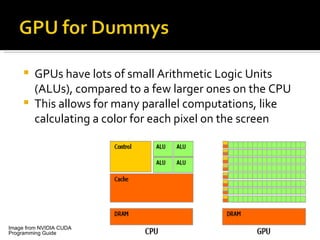
GPUs have lots of small Arithmetic Logic Units (ALUs), compared to a few larger ones on the CPU This allows for many parallel computations, like calculating a color for each pixel on the screen Image from NVIDIA CUDA Programming Guide
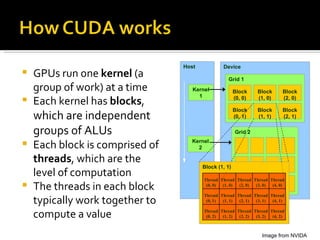
GPUs run one  kernel  (a group of work) at a time Each kernel has  blocks ,  which are independent groups of ALUs Each block is comprised of  threads , which are the level of computation The threads in each block typically work together to compute a value Image from NVIDA Host Kernel 1 Kernel 2 Device Grid 1 Block (0, 0) Block (1, 0) Block (2, 0) Block (0, 1) Block (1, 1) Block (2, 1) Grid 2 Block (1, 1) Thread (0, 1) Thread (1, 1) Thread (2, 1) Thread (3, 1) Thread (4, 1) Thread (0, 2) Thread (1, 2) Thread (2, 2) Thread (3, 2) Thread (4, 2) Thread (0, 0) Thread (1, 0) Thread (2, 0) Thread (3, 0) Thread (4, 0)
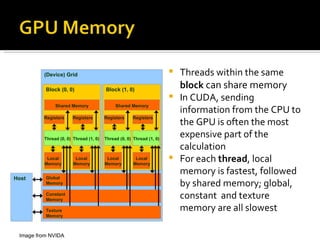
Threads within the same  block  can share memory In CUDA, sending information from the CPU to the GPU is often the most expensive part of the calculation For each  thread , local memory is fastest, followed by shared memory; global, constant  and texture memory are all slowest Image from NVIDA (Device) Grid Constant Memory Texture Memory Global Memory Block (0, 0) Shared Memory Local Memory Thread (0, 0) Registers Local Memory Thread (1, 0) Registers Block (1, 0) Shared Memory Local Memory Thread (0, 0) Registers Local Memory Thread (1, 0) Registers Host
Each thread “knows” the x and y coordinates of the block it is in, and the coordinates of where it is in the block These positions can be used to compute a unique thread ID for each thread The computational work done will depend on the value of this thread ID Example: the thread ID corresponds to a group of matrix elements
All threads in a block will run in parallel  IF  they are all following the same code; its important to eliminate logical branches, to keep all threads running at the same time Threads can only reference local memory and shared memory, so any needed information should be put into shared memory
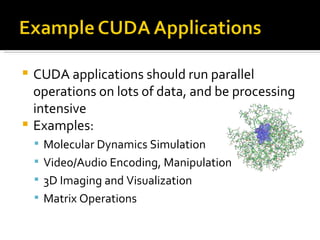
CUDA applications should run parallel operations on lots of data, and be processing intensive Examples: Molecular Dynamics Simulation Video/Audio Encoding, Manipulation 3D Imaging and Visualization Matrix Operations
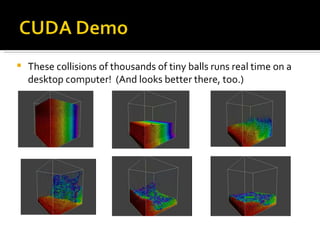
These collisions of thousands of tiny balls runs real time on a desktop computer!  (And looks better there, too.)
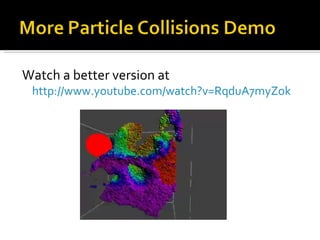
Watch a better version at http://www.youtube.com/watch?v=RqduA7myZok
Over 170 premade CUDA tools exist, and would be useful building blocks for applications Areas include Imaging, Video & Audio Processing, Molecular Dynamics, Signal Processing CUDA can also help an existing application meet its need for speed Process huge datasets faster Can achieve close to real time data processing
Nvidia (the makers of CUDA) created a MATLAB plug-in for accelerating standard MATLAB 2D FFTs  CUDA has a graphics toolbox for MATLAB More MATLAB plug-ins to come!
 

CUDA

  • 1.
  • 2.
    CUDA is aprogramming language that uses the Graphical Processing Unit (GPU) Allows calculations to be performed in parallel, giving significant speedup Used with C programs http://members.tripod.com/~Michael_Art/Animal_Fun/Baracuda.gif
  • 3.
    GPUs are designedto make high speed parallel calculations for displaying graphics, such as games Use available resources! Over 100 million GPUs are already deployed 30-100x Speed-up over other microprocessors for some applications
  • 4.
    GPUs have lotsof small Arithmetic Logic Units (ALUs), compared to a few larger ones on the CPU This allows for many parallel computations, like calculating a color for each pixel on the screen Image from NVIDIA CUDA Programming Guide
  • 5.
    GPUs run one kernel (a group of work) at a time Each kernel has blocks , which are independent groups of ALUs Each block is comprised of threads , which are the level of computation The threads in each block typically work together to compute a value Image from NVIDA Host Kernel 1 Kernel 2 Device Grid 1 Block (0, 0) Block (1, 0) Block (2, 0) Block (0, 1) Block (1, 1) Block (2, 1) Grid 2 Block (1, 1) Thread (0, 1) Thread (1, 1) Thread (2, 1) Thread (3, 1) Thread (4, 1) Thread (0, 2) Thread (1, 2) Thread (2, 2) Thread (3, 2) Thread (4, 2) Thread (0, 0) Thread (1, 0) Thread (2, 0) Thread (3, 0) Thread (4, 0)
  • 6.
    Threads within thesame block can share memory In CUDA, sending information from the CPU to the GPU is often the most expensive part of the calculation For each thread , local memory is fastest, followed by shared memory; global, constant and texture memory are all slowest Image from NVIDA (Device) Grid Constant Memory Texture Memory Global Memory Block (0, 0) Shared Memory Local Memory Thread (0, 0) Registers Local Memory Thread (1, 0) Registers Block (1, 0) Shared Memory Local Memory Thread (0, 0) Registers Local Memory Thread (1, 0) Registers Host
  • 7.
    Each thread “knows”the x and y coordinates of the block it is in, and the coordinates of where it is in the block These positions can be used to compute a unique thread ID for each thread The computational work done will depend on the value of this thread ID Example: the thread ID corresponds to a group of matrix elements
  • 8.
    All threads ina block will run in parallel IF they are all following the same code; its important to eliminate logical branches, to keep all threads running at the same time Threads can only reference local memory and shared memory, so any needed information should be put into shared memory
  • 9.
    CUDA applications shouldrun parallel operations on lots of data, and be processing intensive Examples: Molecular Dynamics Simulation Video/Audio Encoding, Manipulation 3D Imaging and Visualization Matrix Operations
  • 10.
    These collisions ofthousands of tiny balls runs real time on a desktop computer! (And looks better there, too.)
  • 11.
    Watch a betterversion at http://www.youtube.com/watch?v=RqduA7myZok
  • 12.
    Over 170 premadeCUDA tools exist, and would be useful building blocks for applications Areas include Imaging, Video & Audio Processing, Molecular Dynamics, Signal Processing CUDA can also help an existing application meet its need for speed Process huge datasets faster Can achieve close to real time data processing
  • 13.
    Nvidia (the makersof CUDA) created a MATLAB plug-in for accelerating standard MATLAB 2D FFTs CUDA has a graphics toolbox for MATLAB More MATLAB plug-ins to come!
  • 14.