



Chris Abraham Presents: How to Use
Google+ for your Business


  March 13, 2012
Your moderator for today: Frank Reed

                   • Managing Editor of

                                                            #18
                     marketingpilgrim.com


                   • Internet and Social Media marketing
                     education and consulting
                     frankareed.com


                   • Weekly contributor to             blog
                     “Frank Fridays”

     @frankreed   frank@frankareed.com       919-285-1515

 2
Thanks to all of
    How to Use       our sponsors
    Google+ for
     Business


           Chris
          Abraham


3
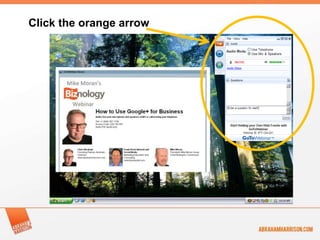
Click the orange arrow


4
Your speaker for today: Chris Abraham

                   • Co-Founder and President of
                     Abraham & Harrison, LLC

                   • Avid Blogger/Contributor:


                   • Social Media/Technology
                     Consultant

   @chrisabraham       chris@ahpr.us    202-352-5051
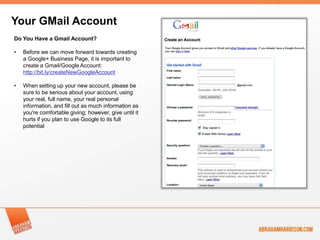
Your GMail Account
Do You Have a Gmail Account?

•   Before we can move forward towards creating
    a Google+ Business Page, it is important to
    create a Gmail/Google Account:
    http://bit.ly/createNewGoogleAccount

•   When setting up your new account, please be
    sure to be serious about your account, using
    your real, full name, your real personal
    information, and fill out as much information as
    you're comfortable giving; however, give until it
    hurts if you plan to use Google to its full
    potential
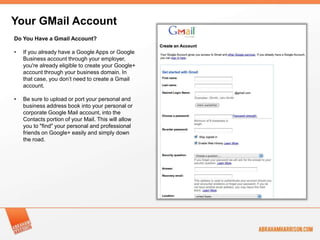
Your GMail Account
Do You Have a Gmail Account?

•   If you already have a Google Apps or Google
    Business account through your employer,
    you're already eligible to create your Google+
    account through your business domain. In
    that case, you don’t need to create a Gmail
    account.

•   Be sure to upload or port your personal and
    business address book into your personal or
    corporate Google Mail account, into the
    Contacts portion of your Mail. This will allow
    you to "find" your personal and professional
    friends on Google+ easily and simply down
    the road.
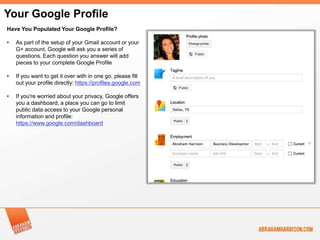
Your Google Profile
Have You Populated Your Google Profile?

•   As part of the setup of your Gmail account or your
    G+ account, Google will ask you a series of
    questions. Each question you answer will add
    pieces to your complete Google Profile

•   If you want to get it over with in one go, please fill
    out your profile directly: https://profiles.google.com

•   If you're worried about your privacy, Google offers
    you a dashboard, a place you can go to limit
    public data access to your Google personal
    information and profile:
    https://www.google.com/dashboard
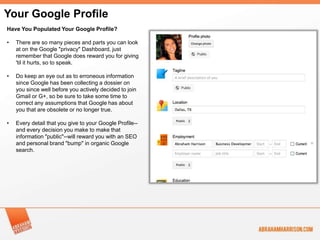
Your Google Profile
Have You Populated Your Google Profile?

•   There are so many pieces and parts you can look
    at on the Google "privacy" Dashboard, just
    remember that Google does reward you for giving
    'til it hurts, so to speak.

•   Do keep an eye out as to erroneous information
    since Google has been collecting a dossier on
    you since well before you actively decided to join
    Gmail or G+, so be sure to take some time to
    correct any assumptions that Google has about
    you that are obsolete or no longer true.

•   Every detail that you give to your Google Profile--
    and every decision you make to make that
    information "public"--will reward you with an SEO
    and personal brand "bump" in organic Google
    search.
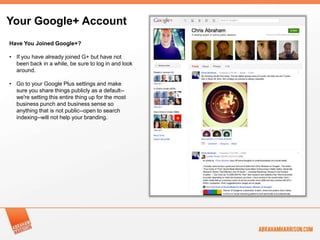
Your Google+ Account
Have You Joined Google+?

• If you have already joined G+ but have not
  been back in a while, be sure to log in and look
  around.

• Go to your Google Plus settings and make
  sure you share things publicly as a default--
  we're setting this entire thing up for the most
  business punch and business sense so
  anything that is not public--open to search
  indexing--will not help your branding.
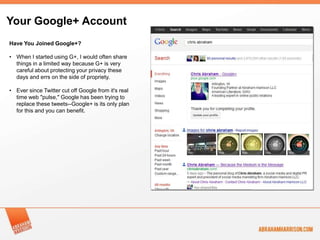
Your Google+ Account
Have You Joined Google+?

• When I started using G+, I would often share
  things in a limited way because G+ is very
  careful about protecting your privacy these
  days and errs on the side of propriety.

• Ever since Twitter cut off Google from it's real
  time web "pulse," Google has been trying to
  replace these tweets--Google+ is its only plan
  for this and you can benefit.
Set Up Your Google+ Account
Have You Created a Google+
Business Page?

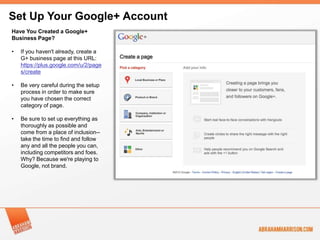
•   If you haven't already, create a
    G+ business page at this URL:
    https://plus.google.com/u/2/page
    s/create

•   Be very careful during the setup
    process in order to make sure
    you have chosen the correct
    category of page.

•   Be sure to set up everything as
    thoroughly as possible and
    come from a place of inclusion--
    take the time to find and follow
    any and all the people you can,
    including competitors and foes.
    Why? Because we're playing to
    Google, not brand.
Set Up Your Google+ Account:
Have You Created a Google+
Business Page?

•   Google, like all social networks,
    prioritizes search result benefits
    on the size and importance of
    one's social graph as well as
    based on keywords.

•   Organize your circles with care
    because you cannot have more
    than 5,000 people in one circle--
    so don't just pile everyone into
    "Following.”

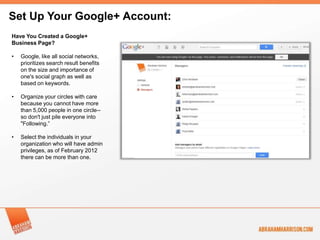
•   Select the individuals in your
    organization who will have admin
    privileges, as of February 2012
    there can be more than one.
Set Up Your Google+ Account
Seeding Content to your Google+ Business
Page.

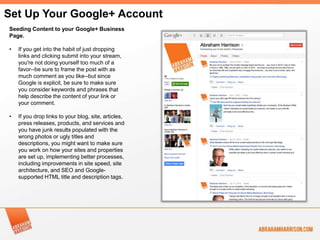
•   If you get into the habit of just dropping
    links and clicking submit into your stream,
    you're not doing yourself too much of a
    favor--be sure to frame the post with as
    much comment as you like--but since
    Google is explicit, be sure to make sure
    you consider keywords and phrases that
    help describe the content of your link or
    your comment.

•   If you drop links to your blog, site, articles,
    press releases, products, and services and
    you have junk results populated with the
    wrong photos or ugly titles and
    descriptions, you might want to make sure
    you work on how your sites and properties
    are set up, implementing better processes,
    including improvements in site speed, site
    architecture, and SEO and Google-
    supported HTML title and description tags.
Set Up Your Google+ Account
Seeding Content to your Google+ Business
Page.

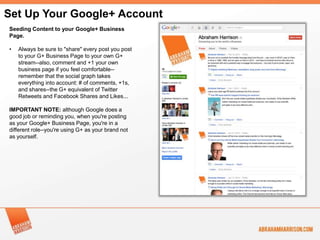
•   Always be sure to "share" every post you post
    to your G+ Business Page to your own G+
    stream--also, comment and +1 your own
    business page if you feel comfortable--
    remember that the social graph takes
    everything into account: # of comments, +1s,
    and shares--the G+ equivalent of Twitter
    Retweets and Facebook Shares and Likes...

IMPORTANT NOTE: although Google does a
good job or reminding you, when you're posting
as your Google+ Business Page, you're in a
different role--you're using G+ as your brand not
as yourself.
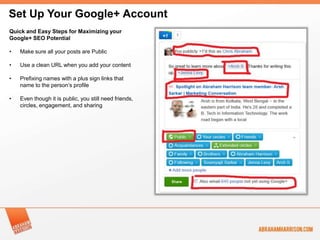
Set Up Your Google+ Account
Quick and Easy Steps for Maximizing your
Google+ SEO Potential

•   Make sure all your posts are Public

•   Use a clean URL when you add your content

•   Prefixing names with a plus sign links that
    name to the person’s profile

•   Even though it is public, you still need friends,
    circles, engagement, and sharing
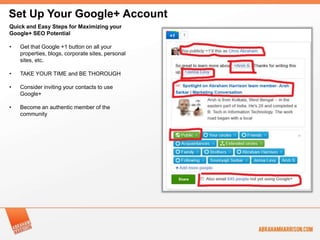
Set Up Your Google+ Account
Quick and Easy Steps for Maximizing your
Google+ SEO Potential

•   Get that Google +1 button on all your
    properties, blogs, corporate sites, personal
    sites, etc.

•   TAKE YOUR TIME and BE THOROUGH

•   Consider inviting your contacts to use
    Google+

•   Become an authentic member of the
    community
Questions?
Thanks for your time, I’ve enjoyed speaking with you!


Chris Abraham
Abraham Harrison
www.abrahamharrison.com
cabraham@abrahamharrison.com
Don’t stop now!                        Don’t forget our sponsors


                     April 3, 2012
                   11:00 to 11:30 ET
                  Global Search
 Mike Moran         Marketing

 Sign up now at http://bit.ly/AqpJVa

For more information: www.mikemoran.com

   19

Google+ For Business Webinar Slides

  • 1.
    Chris Abraham Presents:How to Use Google+ for your Business March 13, 2012
  • 2.
    Your moderator fortoday: Frank Reed • Managing Editor of #18 marketingpilgrim.com • Internet and Social Media marketing education and consulting frankareed.com • Weekly contributor to blog “Frank Fridays” @frankreed frank@frankareed.com 919-285-1515 2
  • 3.
    Thanks to allof How to Use our sponsors Google+ for Business Chris Abraham 3
  • 4.
  • 5.
    Your speaker fortoday: Chris Abraham • Co-Founder and President of Abraham & Harrison, LLC • Avid Blogger/Contributor: • Social Media/Technology Consultant @chrisabraham chris@ahpr.us 202-352-5051
  • 6.
    Your GMail Account DoYou Have a Gmail Account? • Before we can move forward towards creating a Google+ Business Page, it is important to create a Gmail/Google Account: http://bit.ly/createNewGoogleAccount • When setting up your new account, please be sure to be serious about your account, using your real, full name, your real personal information, and fill out as much information as you're comfortable giving; however, give until it hurts if you plan to use Google to its full potential
  • 7.
    Your GMail Account DoYou Have a Gmail Account? • If you already have a Google Apps or Google Business account through your employer, you're already eligible to create your Google+ account through your business domain. In that case, you don’t need to create a Gmail account. • Be sure to upload or port your personal and business address book into your personal or corporate Google Mail account, into the Contacts portion of your Mail. This will allow you to "find" your personal and professional friends on Google+ easily and simply down the road.
  • 8.
    Your Google Profile HaveYou Populated Your Google Profile? • As part of the setup of your Gmail account or your G+ account, Google will ask you a series of questions. Each question you answer will add pieces to your complete Google Profile • If you want to get it over with in one go, please fill out your profile directly: https://profiles.google.com • If you're worried about your privacy, Google offers you a dashboard, a place you can go to limit public data access to your Google personal information and profile: https://www.google.com/dashboard
  • 9.
    Your Google Profile HaveYou Populated Your Google Profile? • There are so many pieces and parts you can look at on the Google "privacy" Dashboard, just remember that Google does reward you for giving 'til it hurts, so to speak. • Do keep an eye out as to erroneous information since Google has been collecting a dossier on you since well before you actively decided to join Gmail or G+, so be sure to take some time to correct any assumptions that Google has about you that are obsolete or no longer true. • Every detail that you give to your Google Profile-- and every decision you make to make that information "public"--will reward you with an SEO and personal brand "bump" in organic Google search.
  • 10.
    Your Google+ Account HaveYou Joined Google+? • If you have already joined G+ but have not been back in a while, be sure to log in and look around. • Go to your Google Plus settings and make sure you share things publicly as a default-- we're setting this entire thing up for the most business punch and business sense so anything that is not public--open to search indexing--will not help your branding.
  • 11.
    Your Google+ Account HaveYou Joined Google+? • When I started using G+, I would often share things in a limited way because G+ is very careful about protecting your privacy these days and errs on the side of propriety. • Ever since Twitter cut off Google from it's real time web "pulse," Google has been trying to replace these tweets--Google+ is its only plan for this and you can benefit.
  • 12.
    Set Up YourGoogle+ Account Have You Created a Google+ Business Page? • If you haven't already, create a G+ business page at this URL: https://plus.google.com/u/2/page s/create • Be very careful during the setup process in order to make sure you have chosen the correct category of page. • Be sure to set up everything as thoroughly as possible and come from a place of inclusion-- take the time to find and follow any and all the people you can, including competitors and foes. Why? Because we're playing to Google, not brand.
  • 13.
    Set Up YourGoogle+ Account: Have You Created a Google+ Business Page? • Google, like all social networks, prioritizes search result benefits on the size and importance of one's social graph as well as based on keywords. • Organize your circles with care because you cannot have more than 5,000 people in one circle-- so don't just pile everyone into "Following.” • Select the individuals in your organization who will have admin privileges, as of February 2012 there can be more than one.
  • 14.
    Set Up YourGoogle+ Account Seeding Content to your Google+ Business Page. • If you get into the habit of just dropping links and clicking submit into your stream, you're not doing yourself too much of a favor--be sure to frame the post with as much comment as you like--but since Google is explicit, be sure to make sure you consider keywords and phrases that help describe the content of your link or your comment. • If you drop links to your blog, site, articles, press releases, products, and services and you have junk results populated with the wrong photos or ugly titles and descriptions, you might want to make sure you work on how your sites and properties are set up, implementing better processes, including improvements in site speed, site architecture, and SEO and Google- supported HTML title and description tags.
  • 15.
    Set Up YourGoogle+ Account Seeding Content to your Google+ Business Page. • Always be sure to "share" every post you post to your G+ Business Page to your own G+ stream--also, comment and +1 your own business page if you feel comfortable-- remember that the social graph takes everything into account: # of comments, +1s, and shares--the G+ equivalent of Twitter Retweets and Facebook Shares and Likes... IMPORTANT NOTE: although Google does a good job or reminding you, when you're posting as your Google+ Business Page, you're in a different role--you're using G+ as your brand not as yourself.
  • 16.
    Set Up YourGoogle+ Account Quick and Easy Steps for Maximizing your Google+ SEO Potential • Make sure all your posts are Public • Use a clean URL when you add your content • Prefixing names with a plus sign links that name to the person’s profile • Even though it is public, you still need friends, circles, engagement, and sharing
  • 17.
    Set Up YourGoogle+ Account Quick and Easy Steps for Maximizing your Google+ SEO Potential • Get that Google +1 button on all your properties, blogs, corporate sites, personal sites, etc. • TAKE YOUR TIME and BE THOROUGH • Consider inviting your contacts to use Google+ • Become an authentic member of the community
  • 18.
    Questions? Thanks for yourtime, I’ve enjoyed speaking with you! Chris Abraham Abraham Harrison www.abrahamharrison.com cabraham@abrahamharrison.com
  • 19.
    Don’t stop now! Don’t forget our sponsors April 3, 2012 11:00 to 11:30 ET Global Search Mike Moran Marketing Sign up now at http://bit.ly/AqpJVa For more information: www.mikemoran.com 19