An Introduction to the Power of
         Google Plus

    Wednesday 5th December, 2012
Topics of Conversation


• The Background

• Google Plus vs. Facebook

• Why Business’ need Google Plus

• How to get started

• Connecting your Page to your Website

• Interesting Google Plus-ers (examples)

• Things to consider before you get going
G+ - The Background
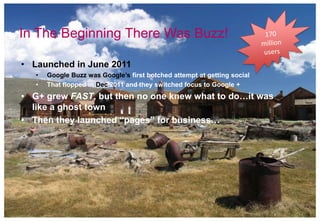
In The Beginning There Was Buzz!

• Launched in June 2011
   •   Google Buzz was Google’s first botched attempt at getting social
   •   That flopped in Dec 2011 and they switched focus to Google +
• G+ grew FAST, but then no one knew what to do…it was
  like a ghost town
• Then they launched “pages” for business…
What is Google+ Then?

- It‟s not Facebook!
   -   You don‟t go there to hang out with your long lost best buddy from school
- Google says it‟s not a “social network” but you do share
  posts, pages, photos and videos with your friends, family &
  customers
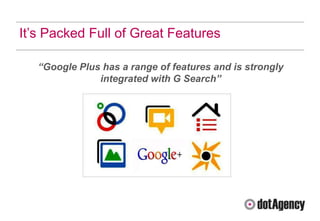
It‟s Packed Full of Great Features

   “Google Plus has a range of features and is strongly
               integrated with G Search”
Why Did Google Build It?

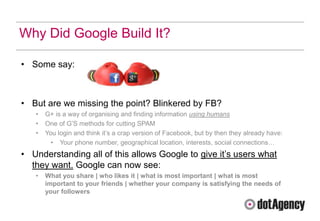
• Some say:


• But are we missing the point? Blinkered by FB?
   •   G+ is a way of organising and finding information using humans
   •   One of G‟S methods for cutting SPAM
   •   You login and think it‟s a crap version of Facebook, but by then they already have:
         • Your phone number, geographical location, interests, social connections…
• Understanding all of this allows Google to give it‟s users what
  they want. Google can now see:
   •   What you share | who likes it | what is most important | what is most
       important to your friends | whether your company is satisfying the needs of
       your followers
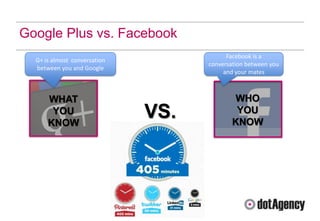
Google Plus vs. Facebook
                                          Facebook is a
  G+ is almost conversation
                                    conversation between you
  between you and Google
                                         and your mates


      WHAT                                  WHO
       YOU
      KNOW
                              VS.            YOU
                                            KNOW
Why Business’ Need Google
Plus
Top 5 Reasons Your Business Needs G+

1. Brand Awareness / Visibility


2. Community building & networking


3. Search – impact on SEO; extra traffic to your site


4. Gives content more authority and credibility


5. Content fits all – works on all devices (mobile, tablet, PC) is local &

   personal
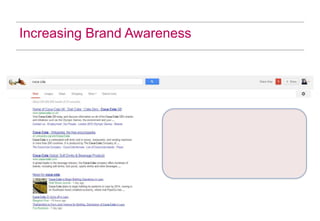
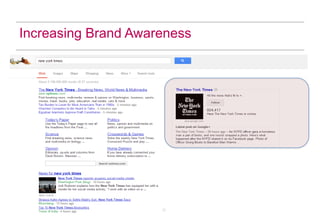
Increasing Brand Awareness
Community Building & Networking

• Hangouts: Create hangouts and talk about relevant topics or join other ppls
  hangouts
• Badges: Add the G+ button to your website and blog posts
• Other Social profiles: Ask existing contacts on Twitter, FB, offline to join your
  circles
• Write about G+: This is a great way to spark discussion.
• Find and Follow key influencers: Google lets you see what‟s hot and
  recommended on the left rail under the heading “Explore.” Go there. Check
  out the hottest posts, comment and don‟t forget to speak to people!
Impact on SEO

• As we mentioned earlier, Google has integrated all of it‟s products all of which
  tie back to search

• This means there‟s therefore a huge impact on your SEO, as everything on
  G+ is indexed (posts, comments, status)

• „Search plus your world‟ – a new way of presenting personalised SERPs
  based on +1 votes from those in your circles

• See more traffic from Google search – by boosting search ranking and
  improving CTRs.
Authority & Credibility (aka Author Rank)

Hands up if you remember Panda?!
• It was all about creating great quality content, but how does Google know
  what content is good and bad?

Google now asks a few questions when reviewing content:
   1. Is this post written by an expert on this subject?
   2. What quality control has been done on this content?
   3. Is the site a recognised authority on this subject?
   4. Is this content mass produced and farmed out across a network of sites?


 “The answers to these questions formulate Author Rank…where
 the reputation of individual authors becomes part of the ranking
                            algorithm.”
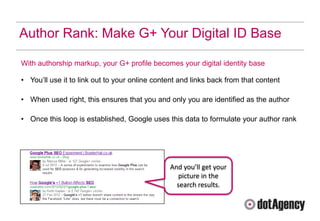
Author Rank: Make G+ Your Digital ID Base

With authorship markup, your G+ profile becomes your digital identity base

• You‟ll use it to link out to your online content and links back from that content

• When used right, this ensures that you and only you are identified as the author

• Once this loop is established, Google uses this data to formulate your author rank


                                               And you’ll get your
                                                 picture in the
                                                 search results.
Getting Started
Sounds Great, How Do I Get Started?

1.   Set-up your G+ business page
2.   Optimise it
3.   Start creating and sharing great content
4.   Build targeted circles
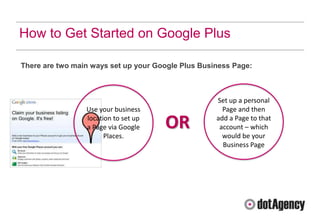
How to Get Started on Google Plus

There are two main ways set up your Google Plus Business Page:


                                                    Set up a personal
                 Use your business                    Page and then
                 location to set up
                 a Page via Google    OR            add a Page to that
                                                     account – which
                       Places.                        would be your
                                                      Business Page
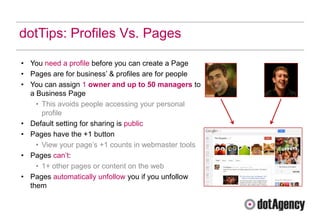
dotTips: Profiles Vs. Pages

• You need a profile before you can create a Page
• Pages are for business‟ & profiles are for people
• You can assign 1 owner and up to 50 managers to
  a Business Page
    • This avoids people accessing your personal
      profile
• Default setting for sharing is public
• Pages have the +1 button
    • View your page‟s +1 counts in webmaster tools
• Pages can‟t:
    • 1+ other pages or content on the web
• Pages automatically unfollow you if you unfollow
  them
Chose Your Cover & Profile Images Carefully

• Your G+ cover image and profile picture is a fabulous opportunity to show a deeper
  more meaningful and creative side to your brand

• G+ also doesn‟t many brand restrictions (unlike Facebook) so it means you add
  your strap line, or brand name, or your promotions here!

• It‟s your banner ad, so make the most of this free advertising space!

Be innovative, be inspiring, be creative and most importantly be on brand
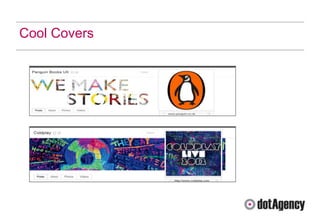
Cool Covers
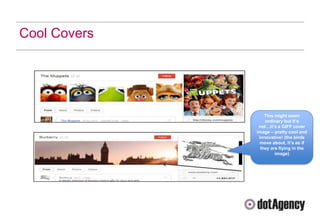
Cool Covers


                  This might seem
                  ordinary but it’s
               not…it’s a GIFF cover
              image – pretty cool and
               innovative! (the birds
               move about, it’s as if
                they are flying in the
                       image)
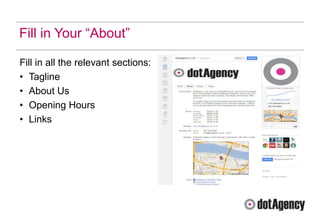
Fill in Your “About”

Fill in all the relevant sections:
• Tagline
• About Us
• Opening Hours
• Links
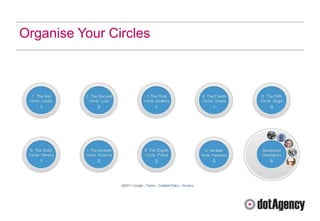
Organise Your Circles
Working in Circles

- By default, G+ comes with two
  standard circles:
- Public - share content here and it‟ll be
  visible to everyone on G+ and the
  entire www
- Extended – that‟s sharing content with
  the people in the circles of the people
  in your circles
   -   Pages can‟t share to extended circles
   -   Pages can’t add people to circles until that
       person has added the page to their circle or
       mentioned it
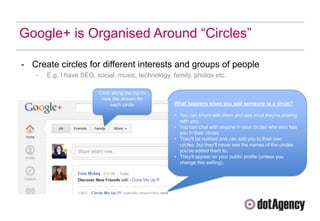
Google+ is Organised Around “Circles”

- Create circles for different interests and groups of people
   -   E.g. I have SEO, social, music, technology, family, photos etc.

                         Click along the top to
                          view the stream for
                              each circle          What happens when you add someone to a circle?

                                                   • You can share with them and see what they're sharing
                                                     with you.
                                                   • You can chat with anyone in your circles who also has
                                                     you in their circles.
                                                   • They'll be notified and can add you to their own
                                                     circles, but they'll never see the names of the circles
                                                     you've added them to.
                                                   • They'll appear on your public profile (unless you
                                                     change this setting).
Creating Targeted G+ Circles


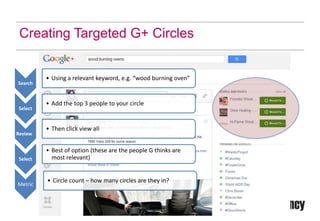
          • Using a relevant keyword, e.g. “wood burning oven”
Search


          • Add the top 3 people to your circle
 Select


          • Then click view all
Review


          • Best of option (these are the people G thinks are
 Select     most relevant)


          • Circle count – how many circles are they in?
Metric
Creating Targeted G+ Circles

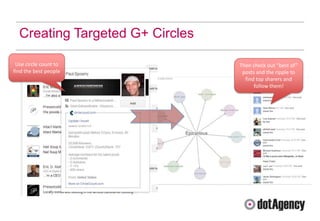
 Use circle count to             Then check out “best of”
find the best people              posts and the ripple to
                                   find top sharers and
                                       follow them!
Connecting Your Website
Add the G+ Badge To Your Site

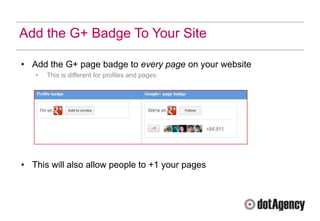
• Add the G+ page badge to every page on your website
   •   This is different for profiles and pages:


• This will also allow people to +1 your pages
Connect to Your Website & Other Social Channels

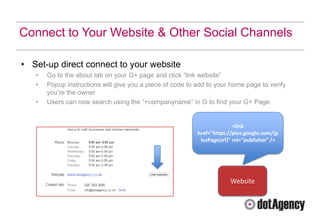
• Set-up direct connect to your website
   •   Go to the about tab on your G+ page and click “link website”
   •   Popup instructions will give you a piece of code to add to your home page to verify
       you‟re the owner
   •   Users can now search using the “+companyname” in G to find your G+ Page


                                                                         <link
                                                           href="https://plus.google.com/{p
                                                            lusPageUrl}" rel="publisher" />


                                                                       Website
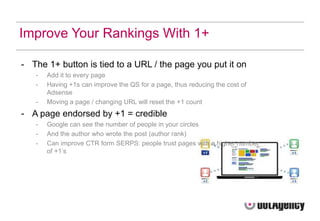
Improve Your Rankings With 1+

- The 1+ button is tied to a URL / the page you put it on
   -   Add it to every page
   -   Having +1s can improve the QS for a page, thus reducing the cost of
       Adsense
   -   Moving a page / changing URL will reset the +1 count
- A page endorsed by +1 = credible
   -   Google can see the number of people in your circles
   -   And the author who wrote the post (author rank)
   -   Can improve CTR form SERPS: people trust pages with a higher number
       of +1‟s
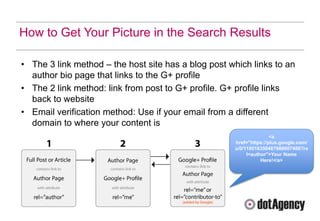
How to Get Your Picture in the Search Results

• The 3 link method – the host site has a blog post which links to an
  author bio page that links to the G+ profile
• The 2 link method: link from post to G+ profile. G+ profile links
  back to website
• Email verification method: Use if your email from a different
  domain to where your content is
                                                                    <a
                                                     href="https://plus.google.com/
                                                     u/0/118016350487988607488?re
                                                          l=author">Your Name
                                                                Here!</a>
Interesting Google Plus-ers
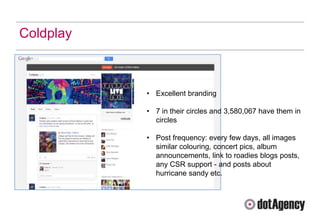
Coldplay


           • Excellent branding

           • 7 in their circles and 3,580,067 have them in
             circles

           • Post frequency: every few days, all images
             similar colouring, concert pics, album
             announcements, link to roadies blogs posts,
             any CSR support - and posts about
             hurricane sandy etc.
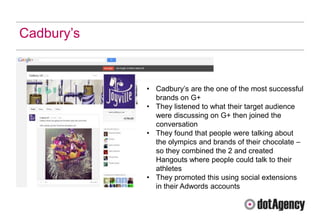
Cadbury‟s


            • Cadbury‟s are the one of the most successful
              brands on G+
            • They listened to what their target audience
              were discussing on G+ then joined the
              conversation
            • They found that people were talking about
              the olympics and brands of their chocolate –
              so they combined the 2 and created
              Hangouts where people could talk to their
              athletes
            • They promoted this using social extensions
              in their Adwords accounts
Things to Think About Before
You Get Plussed Up
Ask Yourself Some Questions…

                 How do I want
 What do I          people to
 want to        perceive me / my
                     brand?
 achieve?
                                   What do I
                                   want to do
                                     on G+
dotTips - Making The Most Out of G+

1. Engage with other Pages – be relevant and don‟t just spam them with
   information on your company.
2. Share and promote content across G+ and your other social channels
3. Interact with people who engage with your Page –
   respond, comment, +1 their posts.
4. Use hash tags to get your content seen within different conversation
   streams.
5. Be smart about how you create your circles – and then you can share
   the right content with the right people (NOTE: Check that public share
   setting before you hit publish).
Thanks for attending our Google
Plus Breakfast Meeting!


Any questions?

dotAgency Google+ breakfast meeting presentation

  • 1.
    An Introduction tothe Power of Google Plus Wednesday 5th December, 2012
  • 2.
    Topics of Conversation •The Background • Google Plus vs. Facebook • Why Business’ need Google Plus • How to get started • Connecting your Page to your Website • Interesting Google Plus-ers (examples) • Things to consider before you get going
  • 3.
    G+ - TheBackground
  • 4.
    In The BeginningThere Was Buzz! • Launched in June 2011 • Google Buzz was Google’s first botched attempt at getting social • That flopped in Dec 2011 and they switched focus to Google + • G+ grew FAST, but then no one knew what to do…it was like a ghost town • Then they launched “pages” for business…
  • 5.
    What is Google+Then? - It‟s not Facebook! - You don‟t go there to hang out with your long lost best buddy from school - Google says it‟s not a “social network” but you do share posts, pages, photos and videos with your friends, family & customers
  • 6.
    It‟s Packed Fullof Great Features “Google Plus has a range of features and is strongly integrated with G Search”
  • 7.
    Why Did GoogleBuild It? • Some say: • But are we missing the point? Blinkered by FB? • G+ is a way of organising and finding information using humans • One of G‟S methods for cutting SPAM • You login and think it‟s a crap version of Facebook, but by then they already have: • Your phone number, geographical location, interests, social connections… • Understanding all of this allows Google to give it‟s users what they want. Google can now see: • What you share | who likes it | what is most important | what is most important to your friends | whether your company is satisfying the needs of your followers
  • 8.
    Google Plus vs.Facebook Facebook is a G+ is almost conversation conversation between you between you and Google and your mates WHAT WHO YOU KNOW VS. YOU KNOW
  • 9.
  • 10.
    Top 5 ReasonsYour Business Needs G+ 1. Brand Awareness / Visibility 2. Community building & networking 3. Search – impact on SEO; extra traffic to your site 4. Gives content more authority and credibility 5. Content fits all – works on all devices (mobile, tablet, PC) is local & personal
  • 11.
  • 12.
  • 13.
    Community Building &Networking • Hangouts: Create hangouts and talk about relevant topics or join other ppls hangouts • Badges: Add the G+ button to your website and blog posts • Other Social profiles: Ask existing contacts on Twitter, FB, offline to join your circles • Write about G+: This is a great way to spark discussion. • Find and Follow key influencers: Google lets you see what‟s hot and recommended on the left rail under the heading “Explore.” Go there. Check out the hottest posts, comment and don‟t forget to speak to people!
  • 14.
    Impact on SEO •As we mentioned earlier, Google has integrated all of it‟s products all of which tie back to search • This means there‟s therefore a huge impact on your SEO, as everything on G+ is indexed (posts, comments, status) • „Search plus your world‟ – a new way of presenting personalised SERPs based on +1 votes from those in your circles • See more traffic from Google search – by boosting search ranking and improving CTRs.
  • 15.
    Authority & Credibility(aka Author Rank) Hands up if you remember Panda?! • It was all about creating great quality content, but how does Google know what content is good and bad? Google now asks a few questions when reviewing content: 1. Is this post written by an expert on this subject? 2. What quality control has been done on this content? 3. Is the site a recognised authority on this subject? 4. Is this content mass produced and farmed out across a network of sites? “The answers to these questions formulate Author Rank…where the reputation of individual authors becomes part of the ranking algorithm.”
  • 16.
    Author Rank: MakeG+ Your Digital ID Base With authorship markup, your G+ profile becomes your digital identity base • You‟ll use it to link out to your online content and links back from that content • When used right, this ensures that you and only you are identified as the author • Once this loop is established, Google uses this data to formulate your author rank And you’ll get your picture in the search results.
  • 17.
  • 18.
    Sounds Great, HowDo I Get Started? 1. Set-up your G+ business page 2. Optimise it 3. Start creating and sharing great content 4. Build targeted circles
  • 19.
    How to GetStarted on Google Plus There are two main ways set up your Google Plus Business Page: Set up a personal Use your business Page and then location to set up a Page via Google OR add a Page to that account – which Places. would be your Business Page
  • 20.
    dotTips: Profiles Vs.Pages • You need a profile before you can create a Page • Pages are for business‟ & profiles are for people • You can assign 1 owner and up to 50 managers to a Business Page • This avoids people accessing your personal profile • Default setting for sharing is public • Pages have the +1 button • View your page‟s +1 counts in webmaster tools • Pages can‟t: • 1+ other pages or content on the web • Pages automatically unfollow you if you unfollow them
  • 21.
    Chose Your Cover& Profile Images Carefully • Your G+ cover image and profile picture is a fabulous opportunity to show a deeper more meaningful and creative side to your brand • G+ also doesn‟t many brand restrictions (unlike Facebook) so it means you add your strap line, or brand name, or your promotions here! • It‟s your banner ad, so make the most of this free advertising space! Be innovative, be inspiring, be creative and most importantly be on brand
  • 22.
  • 23.
    Cool Covers This might seem ordinary but it’s not…it’s a GIFF cover image – pretty cool and innovative! (the birds move about, it’s as if they are flying in the image)
  • 24.
    Fill in Your“About” Fill in all the relevant sections: • Tagline • About Us • Opening Hours • Links
  • 25.
  • 26.
    Working in Circles -By default, G+ comes with two standard circles: - Public - share content here and it‟ll be visible to everyone on G+ and the entire www - Extended – that‟s sharing content with the people in the circles of the people in your circles - Pages can‟t share to extended circles - Pages can’t add people to circles until that person has added the page to their circle or mentioned it
  • 27.
    Google+ is OrganisedAround “Circles” - Create circles for different interests and groups of people - E.g. I have SEO, social, music, technology, family, photos etc. Click along the top to view the stream for each circle What happens when you add someone to a circle? • You can share with them and see what they're sharing with you. • You can chat with anyone in your circles who also has you in their circles. • They'll be notified and can add you to their own circles, but they'll never see the names of the circles you've added them to. • They'll appear on your public profile (unless you change this setting).
  • 28.
    Creating Targeted G+Circles • Using a relevant keyword, e.g. “wood burning oven” Search • Add the top 3 people to your circle Select • Then click view all Review • Best of option (these are the people G thinks are Select most relevant) • Circle count – how many circles are they in? Metric
  • 29.
    Creating Targeted G+Circles Use circle count to Then check out “best of” find the best people posts and the ripple to find top sharers and follow them!
  • 30.
  • 31.
    Add the G+Badge To Your Site • Add the G+ page badge to every page on your website • This is different for profiles and pages: • This will also allow people to +1 your pages
  • 32.
    Connect to YourWebsite & Other Social Channels • Set-up direct connect to your website • Go to the about tab on your G+ page and click “link website” • Popup instructions will give you a piece of code to add to your home page to verify you‟re the owner • Users can now search using the “+companyname” in G to find your G+ Page <link href="https://plus.google.com/{p lusPageUrl}" rel="publisher" /> Website
  • 33.
    Improve Your RankingsWith 1+ - The 1+ button is tied to a URL / the page you put it on - Add it to every page - Having +1s can improve the QS for a page, thus reducing the cost of Adsense - Moving a page / changing URL will reset the +1 count - A page endorsed by +1 = credible - Google can see the number of people in your circles - And the author who wrote the post (author rank) - Can improve CTR form SERPS: people trust pages with a higher number of +1‟s
  • 34.
    How to GetYour Picture in the Search Results • The 3 link method – the host site has a blog post which links to an author bio page that links to the G+ profile • The 2 link method: link from post to G+ profile. G+ profile links back to website • Email verification method: Use if your email from a different domain to where your content is <a href="https://plus.google.com/ u/0/118016350487988607488?re l=author">Your Name Here!</a>
  • 35.
  • 36.
    Coldplay • Excellent branding • 7 in their circles and 3,580,067 have them in circles • Post frequency: every few days, all images similar colouring, concert pics, album announcements, link to roadies blogs posts, any CSR support - and posts about hurricane sandy etc.
  • 37.
    Cadbury‟s • Cadbury‟s are the one of the most successful brands on G+ • They listened to what their target audience were discussing on G+ then joined the conversation • They found that people were talking about the olympics and brands of their chocolate – so they combined the 2 and created Hangouts where people could talk to their athletes • They promoted this using social extensions in their Adwords accounts
  • 38.
    Things to ThinkAbout Before You Get Plussed Up
  • 39.
    Ask Yourself SomeQuestions… How do I want What do I people to want to perceive me / my brand? achieve? What do I want to do on G+
  • 40.
    dotTips - MakingThe Most Out of G+ 1. Engage with other Pages – be relevant and don‟t just spam them with information on your company. 2. Share and promote content across G+ and your other social channels 3. Interact with people who engage with your Page – respond, comment, +1 their posts. 4. Use hash tags to get your content seen within different conversation streams. 5. Be smart about how you create your circles – and then you can share the right content with the right people (NOTE: Check that public share setting before you hit publish).
  • 41.
    Thanks for attendingour Google Plus Breakfast Meeting! Any questions?

Editor's Notes

  • #13 A customer did raise the point yesterday in fact that this new listing on the RHS could potentially decrease their CTR from their regular organic search result, whilst we haven’t done any testing on this yet, I would counter that with the argument that if you don’t claim you page and make it great then you’re missing out on traffic form this other source and you’re also loosing control of what is placed on the RHS when someone searches for your brand. I know that I would rather risk a slight drop in traffic form the main listing for the upside that I could get new and more targeted traffic from the G+ page itself. We will be doing some testing on this in the new year and will publish our findings on our G+ page
  • #14 There are lots of useful tools and features within Google plus that can help you build your community and network with potential customers. Hangouts we have already touched on, but it’s worth joining other people’s hangouts to listen and find out more about what is being discussed in this space in your industry. In order to help build your Google plus community you’re going to need to let people know you are there so add the G+ badge in a clear place on every page of your site. If you already have a strong, engaged following on other social networks tell these people to come over and join you on G+ too – the chance to do more (e.g. hanging out on video) might tempt them to check it out. Writing about Google plus itself always sparks discussion as it’s still a fiarly new network and people are just finding their feet and learning how best to use it. As an example, you could post about what challenges you might have had, what success’ and tips on how to use it. Another key component in building your community is to find and follow key influencers – you need advocates and people are very active in order to get your message out. We will discuss some techiques around how to do this in more detail shortly.
  • #15 As we mentioned earlier, Google plus can be same as fantastic integration project from Google where by they have combined all of their different services into one platform. One of the key elements to this is search. You will find that everything on Google plus gets indexed virtually instantaneously. The other massive impact is personalised search or search plus your world as Google calls it. If you are signed into G+ when you search Google will take information from your profile and your previous activity on G+ to better determine what might be the most relevant answer to your query. An example I saw of this is one guy who is an avid Miami Dolphins fan and his mate who is a marine biologist – when he searches “dolphins” he gets the latest results and fixture for his favourtie football team, but when his friend searches she gets information about her sea loving friends. These personalized results might also mean that you are more likely to see content that has been shared by people in your circles or even extended circles. SEOs take note this is a fantastic way to tap in to your target audience form another avenue.
  • #16 I’m sure everyone here will have heard of the Google Panda update and I’m sure some of you might even have your own horror story. It certainly took out a lot of SEO cowboys! In essence it was a change to the way that Google ranks pages based primarily on content and the quality of that content. Spammers had been building sites on which they chucked low quality content written on a low budget by non-native speakers who were not experts in the given subject matter. They did this purely to place links in the content back to the website they were trying to promote. This becomes an issue when half of the top 10 search results are made up of rubbish pages made purely for search engines and not for people. Remember Google wants people to find results that are relevant and that answer their query. To get round this part of the algorithm change involved the introduction of what is now termed “author Rank” Google asks questions of each post that it finds to try and establish that it is written by an author who understands and specializes in the subject. As an author you can build popularity by constantly publishing content that is voted up with social signals.

  • #29 Install cicrclecount.com