© 2009 IBM Corporation
·Click to add text
Erwin Earley - IBM STG Lab Services & Training
Kurt Ruby – IBM STG Lab Services & Training
Jason Furmanek – IBM STG Lab Services & Training
22 May 2014
Linux on Power
Agenda
2 © 2014 IBM Corporation
 Download this slide
 http://ouo.io/ZTKdy
IBM Presentation Template Full Version
Why Are We Talking About Linux?
3 © 2014 IBM Corporation
 Linux is the world's fastest growing Operating System
 Over 90% of world's fastest supercomputers, including top 10 in TOP500 list, run on Linux
 8 of the world's top 10 websites, including Google, YouTube, Yahoo, Facebook, and Twitter
run on Linux
 80% of all Stock Exchanges in the world rely on Linux
 95% of the servers used by Hollywood studios for animation films run on Linux
 U.S. Department of Defense is the “single biggest install base for Red Hat Linux” in the
world.
Implementa
Hints, Tip
Best Practi
tion
s,
ces
4 © 2014 IBM Corporation
Installation / Package Management
5 © 2014 IBM Corporation
 Consider use of installation server for environments with multiple Linux instances
 Consider use of kickstart (RedHat) or autoyast (SuSE) response files for unattended
installations
 Configure use of distributor provided repository
 For detached systems, setup local repository file based on distributor media
 Leverage use of Linux on Power Service and Productivity Tools to for advanced Power
platform functionality
– Use provided RPM to install recommended packages
– Setup local repository if system is detached
Migration / Backup
6 © 2014 IBM Corporation
 When migrating / cloning image file consider the following
– Resetting of MPIO identifiers
– Resetting of Network identifiers
 For Bare Metal Restore consider the following
– Need to safe off disk configuration information
– Need to safe LVM information
Collecting Installation Information
7 © 2014 IBM Corporation
Following Data Should be Collected Prior to Installation
Storage Considerations
–What Storage connection type will be used
–How much storage will be allocated
–Are dual-VIO servers being used
–Is Logical Volume Management (LVM) or raw-disk/disk-partitions to be
used for storage management
Linux Distribution Considerations
–What Distribution of Linux will be installed
–What additional packges need to be installed
• Is media for distribution readily available
–Will physical media, ISO images or network repository be used for
installation
–Is a network based installation server required
Collecting Installation Information
8 © 2014 IBM Corporation
Network Considerations
–Will physical or virtual network adapters be used
–How many network interfaces are required
–Will network bonding be established in Linux
–Is Firewall protection required
–Is SELinux implementation/configuration required
Other Considerations
–Is any High Availability to be setup for the Linux Storage
–Is any High Availability to be setup for the Linux-supported
services
A Quick Comment about SELinux
9 © 2014 IBM Corporation
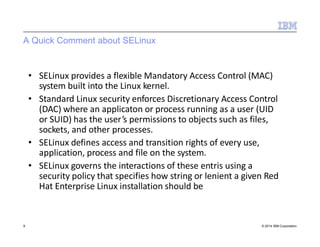
• SELinux provides a flexible Mandatory Access Control (MAC)
system built into the Linux kernel.
• Standard Linux security enforces Discretionary Access Control
(DAC) where an applicaton or process running as a user (UID
or SUID) has the user’s permissions to objects such as files,
sockets, and other processes.
• SELinux defines access and transition rights of every use,
application, process and file on the system.
• SELinux governs the interactions of these entris using a
security policy that specifies how string or lenient a given Red
Hat Enterprise Linux installation should be
A Quick Comment About SELinux
10 © 2014 IBM Corporation
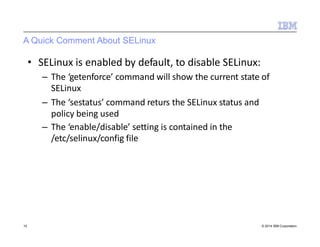
• SELinux is enabled by default, to disable SELinux:
– The ‘getenforce’ command will show the current state of
SELinux
– The ‘sestatus’ command returs the SELinux status and
policy being used
– The ‘enable/disable’ setting is contained in the
/etc/selinux/config file
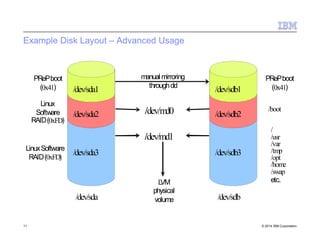
Example Disk Layout – Advanced Usage
manual mirroring
throughdd
11 © 2014 IBM Corporation
PRePboot
(0x41)
Linux
Software
RAID(0xFD)
PRePboot
(0x41)/dev/sda1 /dev/sdb1
/boot/dev/md0/dev/sda2 /dev/sdb2
/
/usr
/var
/tmp
/opt
/home
/swap
etc.
/dev/md1
LinuxSoftware
RAID(0xFD)
/dev/sda3 /dev/sdb3
LVM
physical
volume/dev/sda /dev/sdb
Automating Installation – KickStart (RHE) or AutoYast (SLES)
12 © 2014 IBM Corporation
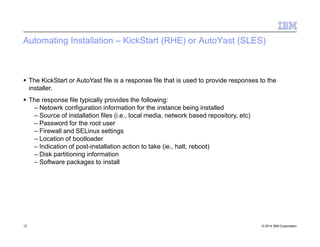
 The KickStart or AutoYast file is a response file that is used to provide responses to the
installer.
 The response file typically provides the following:
– Netowrk configuration information for the instance being installed
– Source of installation files (i.e., local media, network based repository, etc)
– Password for the root user
– Firewall and SELinux settings
– Location of bootloader
– Indication of post-installation action to take (ie., halt, reboot)
– Disk partitioning information
– Software packages to install
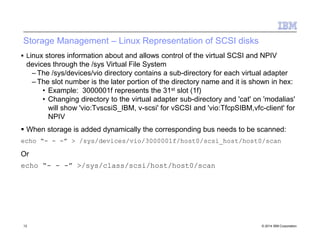
Storage Management – Linux Representation of SCSI disks
13 © 2014 IBM Corporation
 Linux stores information about and allows control of the virtual SCSI and NPIV
devices through the /sys Virtual File System
– The /sys/devices/vio directory contains a sub-directory for each virtual adapter
– The slot number is the later portion of the directory name and it is shown in hex:
• Example: 3000001f represents the 31st slot (1f)
• Changing directory to the virtual adapter sub-directory and 'cat' on 'modalias'
will show 'vio:TvscsiS_IBM, v-scsi' for vSCSI and 'vio:TfcpSIBM,vfc-client' for
NPIV
 When storage is added dynamically the corresponding bus needs to be scanned:
echo “- - -” > /sys/devices/vio/3000001f/host0/scsi_host/host0/scan
Or
echo “- - -” >/sys/class/scsi/host/host0/scan
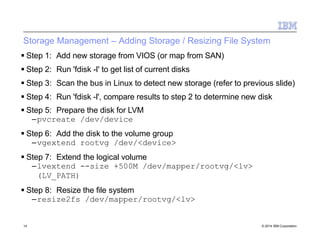
Storage Management – Adding Storage / Resizing File System
14 © 2014 IBM Corporation
 Step 1: Add new storage from VIOS (or map from SAN)
 Step 2: Run 'fdisk -l' to get list of current disks
 Step 3: Scan the bus in Linux to detect new storage (refer to previous slide)
 Step 4: Run 'fdisk -l', compare results to step 2 to determine new disk
 Step 5: Prepare the disk for LVM
–pvcreate /dev/device
 Step 6: Add the disk to the volume group
–vgextend rootvg /dev/<device>
 Step 7: Extend the logical volume
–lvextend --size +500M /dev/mapper/rootvg/<lv>
(LV_PATH)
 Step 8: Resize the file system
–resize2fs /dev/mapper/rootvg/<lv>
Network Bonding
15 © 2014 IBM Corporation
Bonding facilitates the binding of multiple Network Interface
Controllers into a single channel through the following:
–Bonding kernel module
–Special network interface (called a channel bonding
interface)
Channel bonding enables
–Two or more network interfaces to act as one
–Increase bandwidth
–Redundancy
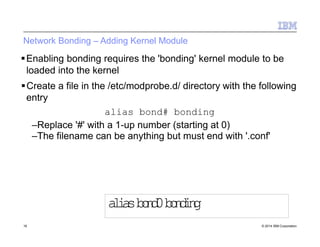
Network Bonding – Adding Kernel Module
16 © 2014 IBM Corporation
Enabling bonding requires the 'bonding' kernel module to be
loaded into the kernel
Create a file in the /etc/modprobe.d/ directory with the following
entry
alias bond# bonding
–Replace '#' with a 1-up number (starting at 0)
–The filename can be anything but must end with '.conf'
aliasbond0bonding
Network Bonding – Network Configuration
17 © 2014 IBM Corporation
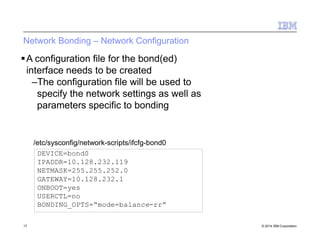
A configuration file for the bond(ed)
interface needs to be created
–The configuration file will be used to
specify the network settings as well as
parameters specific to bonding
DEVICE=bond0
IPADDR=10.128.232.119
NETMASK=255.255.252.0
GATEWAY=10.128.232.1
ONBOOT=yes
USERCTL=no
BONDING_OPTS=“mode=balance-rr”
/etc/sysconfig/network-scripts/ifcfg-bond0
Network Bonding – Bonding Options
18 © 2014 IBM Corporation
 There are a number of options that can be configured for the bonding
interface
 A recommendation is to ensure that both the 'arp_interval' and
'arp_ip_target' be specified. Failure to do so can cause degradation of
network performance in the event that a link fails
–arp_ip_target – specifies the target IP address of ARP requests. Up to
16 addresses can be specified
–arp_interval – specifies how often ARP monitoring occurs
 Another good parameter to set is the 'mode' parameter which is used to
specify the bonding policy including load balancing policies
https://access.redhat.com/site/documentation/en-
US/Red_Hat_Enterprise_Linux/6/html/Deployment_Guide/sec-Using_Channel_Bonding.html
Network Bonding – Network Configuration (cont.)
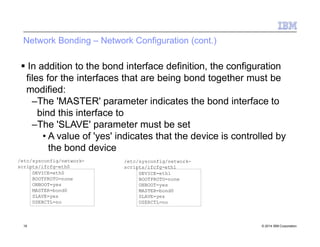
 In addition to the bond interface definition, the configuration
files for the interfaces that are being bond together must be
modified:
–The 'MASTER' parameter indicates the bond interface to
bind this interface to
–The 'SLAVE' parameter must be set
• A value of 'yes' indicates that the device is controlled by
the bond device
DEVICE=eth0
BOOTPROTO=none
ONBOOT=yes
MASTER=bond0
SLAVE=yes
USERCTL=no
/etc/sysconfig/network-
scripts/ifcfg-eth0
DEVICE=eth1
BOOTPROTO=none
ONBOOT=yes
MASTER=bond0
SLAVE=yes
USERCTL=no
19 © 2014 IBM Corporation
/etc/sysconfig/network-
scripts/ifcfg-eth1
Establishing a Local Package Repository
 Package repositories help to streamline the process of package
installation and package management
 The Yellowdog Updater Modified (yum) too in RedHat uses package
repositories to install packages, including resolving package
dependencies
 Default installation will establish a repository definition to a RedHat
provided repository
 Internal RedHat Network Satelites can also be established
 For systems without external network access it may be desirable to
establish a local repository
 Typically the installation media will be used as the source for the
repository
20 © 2014 IBM Corporation
Establishing a Local Package Repository
21 © 2014 IBM Corporation
 Step 1: Create an ISO image from the installation media
dd if=/dev/sr0 of=/tmp/RHEL65.iso
 Step 2: Add mount information to the /etc/fstab file
/tmp/RHEL65.iso /media/RHEL65 iso9660 loop,ro,auto 0 0
 Step 3: Mount the ISO
mount /media/RHEL65
 Step 4: Create the repository definition file in /etc/yum.repos.d/
–[RHEL65]
–name=Local RedHat 6.5 Repository
–baseurl=file:///media/RHEL65
–gpgkey=file:///media/RHEL65/RPM-GPG-key-redhat-
release
–gpgcheck=1
–enabled=1
Linux on
Power Platf
Options
orm
22 © 2014 IBM Corporation
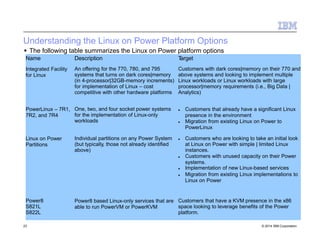
Understanding the Linux on Power Platform Options
 The following table summarizes the Linux on Power platform options
Name
Integrated Facility
for Linux
23 © 2014 IBM Corporation
Description
An offering for the 770, 780, and 795
systems that turns on dark cores|memory
(in 4-processor|32GB-memory increments)
for implementation of Linux – cost
competitive with other hardware platforms
Target
Customers with dark cores|memory on their 770 and
above systems and looking to implement multiple
Linux workloads or Linux workloads with large
processor|memory requirements (i.e., Big Data |
Analytics)
PowerLinux – 7R1,
7R2, and 7R4
One, two, and four socket power systems
for the implementation of Linux-only
workloads
 Customers that already have a significant Linux
presence in the environment
 Migration from existing Linux on Power to
PowerLinux
Linux on Power
Partitions
Individual partitions on any Power System
(but typically, those not already identified
above)
 Customers who are looking to take an initial look
at Linux on Power with simple | limited Linux
instances.
 Customers with unused capacity on their Power
systems.
 Implementation of new Linux-based services
 Migration from existing Linux implementations to
Linux on Power
Power8
S821L
S822L
Power8 based Linux-only services that are
able to run PowerVM or PowerKVM
Customers that have a KVM presence in the x86
space looking to leverage benefits of the Power
platform.
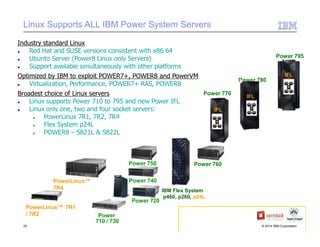
Linux Supports ALL IBM Power System Servers
Industry standard Linux
 Red Hat and SUSE versions consistent with x86 64
 Ubunto Server (Power8 Linux only Servers)
 Support available simultaneously with other platforms
Optimized by IBM to exploit POWER7+, POWER8 and PowerVM
 Virtualization, Performance, POWER7+ RAS, POWER8
Broadest choice of Linux servers
 Linux supports Power 710 to 795 and new Power IFL
 Linux only one, two and four socket servers:
 PowerLinux 7R1, 7R2, 7R4
 Flex System p24L
 POWER8 – S821L & S822L
Power 720
Power
710 / 730
Power 740
Power 750
PowerLinux™ 7R1
/ 7R2
Power 760
Power 770
Power 780
Power 795
IBM Flex System
p460, p260, p24L
PowerLinux™
7R4
IFL
IFL
IFL
24 © 2014 IBM Corporation
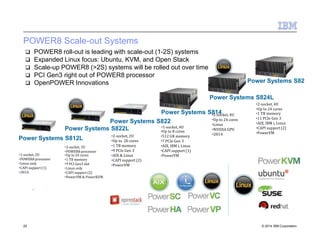
POWER8 Scale-out Systems
Power Systems S822L
Power Systems S812L
•2‐socket, 2U
•POWER8 processor
Power Systems S822
•1‐socket, 4U
Power Systems S8•21‐s4ocket, 4U
Power Systems S82
Power Systems S824L
•2‐socket, 4U
•Up to 24 cores
•1‐socket, 2U
•POWER8 processor
•Linux only
•CAPI support (1)
•2H14
•Up to 24 cores
•1 TB memory
•9 PCI Gen3 slot
•Linux only
•CAPI support (2)
•PowerVM & PowerKVM
•2‐socket, 2U
•Up to 20 cores
•1 TB memory
•9 PCIe Gen 3
•AIX & Linux
•CAPI support (2)
•PowerVM
•Up to 8 cores
•512 GB memory
•7 PCIe Gen 3
•AIX, IBM i, Linux
•CAPI support (1)
•PowerVM
•1 TB memory
•11 PCIe Gen 3
•AIX, IBM i, Linux
•CAPI support (2)
•PowerVM
•Up to 24 cores
•Linux
•NVIDIA GPU
•2H14
 POWER8 roll-out is leading with scale-out (1-2S) systems
 Expanded Linux focus: Ubuntu, KVM, and Open Stack
 Scale-up POWER8 (>2S) systems will be rolled out over time
 PCI Gen3 right out of POWER8 processor
 OpenPOWER Innovations
25 © 2014 IBM Corporation
Integrated
Facility for
Linux (IFL
)
26 © 2014 IBM Corporation
What is Power IFL?
27 © 2014 IBM Corporation
 IFL stands for Integrated Facility for Linux
 It is a bundle of 4 Power core activations, 32 GB memory activation, and PowerVM
Enterprise Edition that can only run Linux (not AIX or IBM I)
 It is priced aggressively to compete with stand alone x86 Linux servers
 There is no difference between IFL and regular Power cores except for price.
What is IFL – Offering Overview
28 © 2014 IBM Corporation
 Design/Structure of Offering
– Offer an attractive price on the virtual stack of CuoD capacity deployed exclusively for
Linux workloads
– Available as CuoD on Power 770, 780 & 795
• Single 4-core & 32GB activations (CuoD) & PowerVM license price for Linux – not
physical processor books & DIMMs
• HWMA and SWMA for PowerVM for Linux priced separately
• Linux license & SWMA acquired separately
 General Availability – October 2013
– Initially, the “honor system” (i.e., soft compliance)
• PCR 2010 created to request Firmware fence delivery in future
• Power clients must sign a contract addendum agreeing to segregate # course
purchased with Linux activation feature in separate LPARs/pools for AIX/IBM I
– Linux engines may be purchased for capacity above the minimum required cores on a
system
– PowerVM EE License entitled for the Linux-exclusive cores on Power 770-795
• These license entitlements & corresponding SWMA PID may coexist with PowerVM
EE (for AIX and/or IBM I) license & SWMA PIDs on a single system.
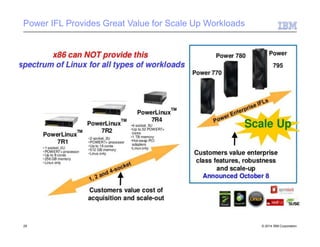
Power IFL Provides Great Value for Scale Up Workloads
29 © 2014 IBM Corporation
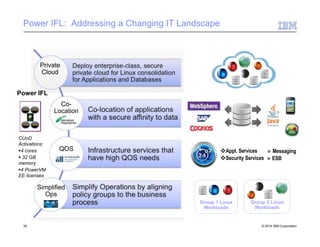
Power IFL: Addressing a Changing IT Landscape
Group 1 Linux
Workloads
Group 2 Linux
Workloads
Private
Cloud
Power IFL
Co-
Location
QOS
Simplified
Ops
Appl. Services  Messaging
Security Services  ESB
CUoD
Activations:
4 cores
 32 GB
memory
4 PowerVM
EE licenses
30 © 2014 IBM Corporation
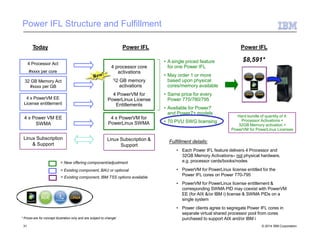
Power IFL Structure and Fulfillment
32 GB Memory Act
#xxxx per GB
4 x PowerVM EE
License entitlement
4 x Power VM EE
SWMA
Linux Subscription
& Support
Today
4 Processor Act
#xxxx per core
Power IFL
= New offering component/adjustment
= Existing component, BAU or optional
= Existing component, IBM TSS options available
• A single priced feature
for one Power IFL
• May order 1 or more
based upon physical
cores/memory available
• Same price for every
Power 770/780/795
• Available for Power7
and Power7+ models
• 70 PVU SWG licensing
Fulfillment details:
• Each Power IFL feature delivers 4 Processor and
32GB Memory Activations– not physical hardware,
e.g. processor cards/books/nodes
• PowerVM for PowerLinux license entitled for the
Power IFL cores on Power 770-795
• PowerVM for PowerLinux license entitlement &
corresponding SWMA PID may coexist with PowerVM
EE (for AIX &/or IBM i) license & SWMA PIDs on a
single system
• Power clients agree to segregate Power IFL cores in
separate virtual shared processor pool from cores
purchased to support AIX and/or IBM i
4 processor core
activations
2 GB memory
activations
4 PowerVM for
PowerLinux License
Entitlements
3
4 x PowerVM for
PowerLinux SWMA
* Prices are for concept illustration only and are subject to change/
Linux Subscription &
Support
$8,591*
Hard bundle of quantity of 4:
Processor Activations +
32GB Memory activation +
PowerVM for PowerLinux Licenses
Power IFL
31 © 2014 IBM Corporation
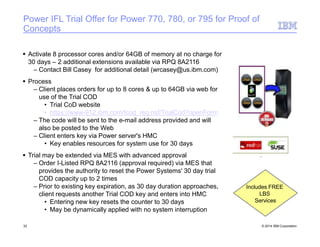
Power IFL Trial Offer for Power 770, 780, or 795 for Proof of
Concepts
 Activate 8 processor cores and/or 64GB of memory at no charge for
30 days – 2 additional extensions available via RPQ 8A2116
– Contact Bill Casey for additional detail (wrcasey@us.ibm.com)
 Process
– Client places orders for up to 8 cores & up to 64GB via web for
use of the Trial COD
• Trial CoD website
• https://www-912.ibm.com/tcod_reg.nsf/TrialCod?openForm
– The code will be sent to the e-mail address provided and will
also be posted to the Web
– Client enters key via Power server's HMC
• Key enables resources for system use for 30 days
 Trial may be extended via MES with advanced approval
– Order I-Listed RPQ 8A2116 (approval required) via MES that
provides the authority to reset the Power Systems' 30 day trial
COD capacity up to 2 times
– Prior to existing key expiration, as 30 day duration approaches,
client requests another Trial COD key and enters into HMC
• Entering new key resets the counter to 30 days
• May be dynamically applied with no system interruption
Includes FREE
LBS
Services
32 © 2014 IBM Corporation
PowerKV
M
33 © 2014 IBM Corporation
What is KVM
34 © 2014 IBM Corporation
 KVM delivers server virtualization based on open source Kernel-based Virtual Machine
(KVM) Linux technology
 KVM enables the sharing of real compute, memory, and I/O resources through server
virtualization
 KVM-based server virtualization enables optimization and the commitment of resources like
CPU and memory
What the heck is KVM?
35 © 2014 IBM Corporation
KVM = Kernel Virtual Machine
Consists of a number of different components
Primarily, a kernel module: kvm.ko
Brings core virtualization and hypervisor features to the Linux kernel
A userspace program/facility: QEmu
Provides emulation and virtual devices + control mechanisms
A standard interface library: libvirt
Standard library used to manage virtual machines
Provides an API
These pieces convert a Linux kernel into a hypervisor
Existing Linux scheduler and facilities leveraged
Virtual machines exists as userspace processes to the kernel/hypervisor
This Linux kernel is designated as the “Host”
Virtual Machines are called “Guests”
KVM runs on just about every platform that Linux has been ported to.
Now it works on Power!
KVM – At A Glance
• KVM (Kernel-based Virtual machine) – Linux kernel module that turns Linux
into a hypervisor
• Requires hardware virtualization extensions
• Including paravirtualization where applicable
• Supports multiple architectures including PowerPC
• Competitive performance and feature set
• Advanced memory management
• Tightly integrated into Linux
Paravirtualization – a virtualization technique that presents a software
interface to virtual machines (VM) that is similar but not identical to
that of the underlying hardware
36 © 2014 IBM Corporation
The KVM Approach to Virtualization
37 © 2014 IBM Corporation
• A hypervisor needs
• A scheduler and memory management
• An I/O stack
• Device drivers
• A management stack
• Networking
• Platform Support Code
• Linux has support for all of the above
• KVM reuses as much of the Linux-base code as possible
• KVM's focus is on virtualization, leaves other components to respective
developers
• KVM benefits (and will continue to benefit) from related advances in Linux
What the heck is PowerKVM?
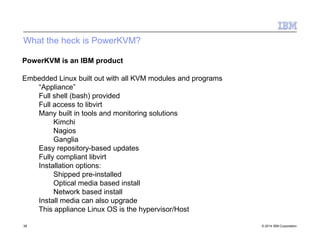
38 © 2014 IBM Corporation
PowerKVM is an IBM product
Embedded Linux built out with all KVM modules and programs
“Appliance”
Full shell (bash) provided
Full access to libvirt
Many built in tools and monitoring solutions
Kimchi
Nagios
Ganglia
Easy repository-based updates
Fully compliant libvirt
Installation options:
Shipped pre-installed
Optical media based install
Network based install
Install media can also upgrade
This appliance Linux OS is the hypervisor/Host
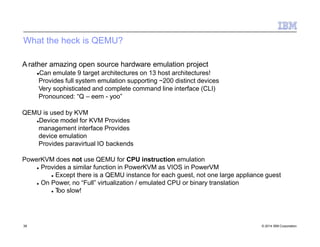
What the heck is QEMU?
39 © 2014 IBM Corporation
A rather amazing open source hardware emulation project
Can emulate 9 target architectures on 13 host architectures!
Provides full system emulation supporting ~200 distinct devices
Very sophisticated and complete command line interface (CLI)
Pronounced: “Q – eem - yoo”
QEMU is used by KVM
Device model for KVM Provides
management interface Provides
device emulation
Provides paravirtual IO backends
PowerKVM does not use QEMU for CPU instruction emulation
 Provides a similar function in PowerKVM as VIOS in PowerVM
 Except there is a QEMU instance for each guest, not one large appliance guest
 On Power, no “Full” virtualization / emulated CPU or binary translation
 Too slow!
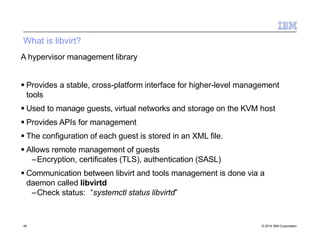
What is libvirt?
40 © 2014 IBM Corporation
A hypervisor management library
 Provides a stable, cross-platform interface for higher-level management
tools
 Used to manage guests, virtual networks and storage on the KVM host
 Provides APIs for management
 The configuration of each guest is stored in an XML file.
 Allows remote management of guests
–Encryption, certificates (TLS), authentication (SASL)
 Communication between libvirt and tools management is done via a
daemon called libvirtd
–Check status: “systemctl status libvirtd”
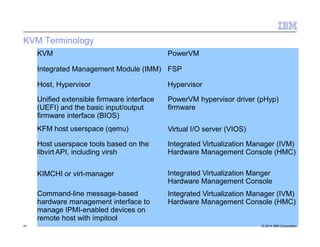
KVM Terminology
KVM
41 © 2014 IBM Corporation
PowerVM
Integrated Management Module (IMM) FSP
Host, Hypervisor Hypervisor
Unified extensible firmware interface
(UEFI) and the basic input/output
firmware interface (BIOS)
KFM host userspace (qemu)
PowerVM hypervisor driver (pHyp)
firmware
Virtual I/O server (VIOS)
Host userspace tools based on the
libvirt API, including virsh
Integrated Virtualization Manager (IVM)
Hardware Management Console (HMC)
KIMCHI or virt-manager Integrated Virtualization Manger
Hardware Management Console
Integrated Virtualization Manager (IVM)
Hardware Management Console (HMC)
Command-line message-based
hardware management interface to
manage IPMI-enabled devices on
remote host with impitool
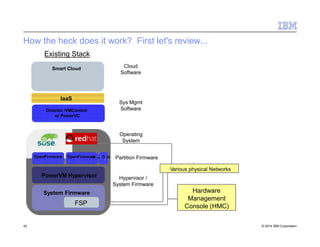
How the heck does it work? First let's review...
PowerVM Hypervisor
Director /VMControl
or PowerVC
Existing Stack
Hypervisor /
System Firmware
Sys Mgmt
Software
Smart Cloud Cloud
Software
Operating
System
System Firmware
FSP
Partition FirmwareOpenFirmware
IaaS
Various physical Networks
OpenFirmware
Hardware
Management
Console (HMC)
V
I
O
S
42 © 2014 IBM Corporation
Virtualization and the POWER architecture
43 © 2014 IBM Corporation
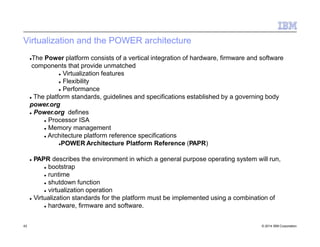
The Power platform consists of a vertical integration of hardware, firmware and software
components that provide unmatched
 Virtualization features
 Flexibility
 Performance
 The platform standards, guidelines and specifications established by a governing body
power.org
 Power.org defines
 Processor ISA
 Memory management
 Architecture platform reference specifications
POWER Architecture Platform Reference (PAPR)
 PAPR describes the environment in which a general purpose operating system will run,
 bootstrap
 runtime
 shutdown function
 virtualization operation
 Virtualization standards for the platform must be implemented using a combination of
 hardware, firmware and software.
Power Systems Software Stack
PowerVM Hypervisor
Hypervisor /
System Firmware
Operating
System
System Firmware
FSP
Partition FirmwareOpenFirmware OpenFirmware
V
I
O
S
POWER7 Hardware
[PAPR] Platform interfaces
44 © 2014 IBM Corporation
Virtualization and the POWER architecture
45 © 2014 IBM Corporation
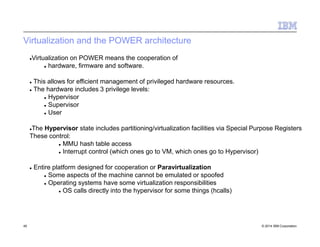
Virtualization on POWER means the cooperation of
 hardware, firmware and software.
 This allows for efficient management of privileged hardware resources.
 The hardware includes 3 privilege levels:
 Hypervisor
 Supervisor
 User
The Hypervisor state includes partitioning/virtualization facilities via Special Purpose Registers
These control:
 MMU hash table access
 Interrupt control (which ones go to VM, which ones go to Hypervisor)
 Entire platform designed for cooperation or Paravirtualization
 Some aspects of the machine cannot be emulated or spoofed
 Operating systems have some virtualization responsibilities
 OS calls directly into the hypervisor for some things (hcalls)
Always Paravirtualized
46 © 2014 IBM Corporation
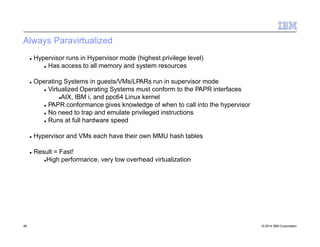
 Hypervisor runs in Hypervisor mode (highest privilege level)
 Has access to all memory and system resources
 Operating Systems in guests/VMs/LPARs run in supervisor mode
 Virtualized Operating Systems must conform to the PAPR interfaces
AIX, IBM i, and ppc64 Linux kernel
 PAPR conformance gives knowledge of when to call into the hypervisor
 No need to trap and emulate privileged instructions
 Runs at full hardware speed
 Hypervisor and VMs each have their own MMU hash tables
 Result = Fast!
High performance, very low overhead virtualization
The POWER Hypervisor (pHyp)
47 © 2014 IBM Corporation
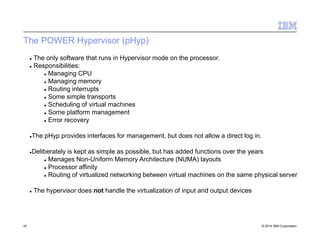
 The only software that runs in Hypervisor mode on the processor.
 Responsibilities:
 Managing CPU
 Managing memory
 Routing interrupts
 Some simple transports
 Scheduling of virtual machines
 Some platform management
 Error recovery
The pHyp provides interfaces for management, but does not allow a direct log in.
Deliberately is kept as simple as possible, but has added functions over the years
 Manages Non-Uniform Memory Architecture (NUMA) layouts
 Processor affinity
 Routing of virtualized networking between virtual machines on the same physical server
 The hypervisor does not handle the virtualization of input and output devices
Power Systems Software Stack with KVM
PowerKVM
Hypervisor
Operating
System
FSP
Partition FirmwareSLOF
OPAL
Firmware
SLOF
POWER8 Hardware
[PAPR] Platform interfaces
System Firmware
qemu qemu
48 © 2014 IBM Corporation
The PowerKVM Hypervisor
49 © 2014 IBM Corporation
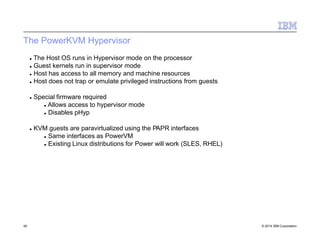
 The Host OS runs in Hypervisor mode on the processor
 Guest kernels run in supervisor mode
 Host has access to all memory and machine resources
 Host does not trap or emulate privileged instructions from guests
 Special firmware required
 Allows access to hypervisor mode
 Disables pHyp
 KVM guests are paravirtualized using the PAPR interfaces
 Same interfaces as PowerVM
 Existing Linux distributions for Power will work (SLES, RHEL)
The PowerKVM Hypervisor
50 © 2014 IBM Corporation
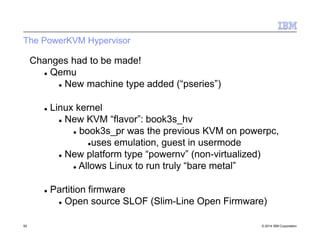
Changes had to be made!
 Qemu
 New machine type added (“pseries”)
 Linux kernel
 New KVM “flavor”: book3s_hv
 book3s_pr was the previous KVM on powerpc,
uses emulation, guest in usermode
 New platform type “powernv” (non-virtualized)
 Allows Linux to run truly “bare metal”
 Partition firmware
 Open source SLOF (Slim-Line Open Firmware)
The PowerKVM Hypervisor
51 © 2014 IBM Corporation
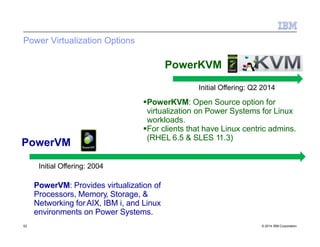
Power Virtualization Options
PowerKVM
PowerVM
Initial Offering: 2004
PowerVM: Provides virtualization of
Processors, Memory, Storage, &
Networking forAIX, IBM i, and Linux
environments on Power Systems.
Initial Offering: Q2 2014
PowerKVM: Open Source option for
virtualization on Power Systems for Linux
workloads.
For clients that have Linux centric admins.
(RHEL 6.5 & SLES 11.3)
52 © 2014 IBM Corporation
© 2014 IBM Corporation53
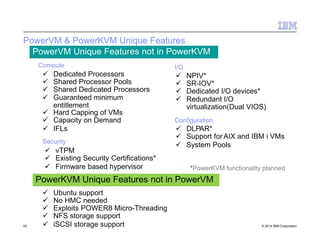
PowerVM & PowerKVM Unique Features
PowerVM Unique Features not in PowerKVM
 Dedicated Processors
 Shared Processor Pools
 Shared Dedicated Processors
 Guaranteed minimum
entitlement
 Hard Capping of VMs
 Capacity on Demand
 IFLs
Compute
Security
 vTPM
 Existing Security Certifications*
 Firmware based hypervisor
I/O
 NPIV*
 SR-IOV*
 Dedicated I/O devices*
 Redundant I/O
virtualization(Dual VIOS)
Configuration
 DLPAR*
 Support for AIX and IBM i VMs
 System Pools
 Ubuntu support
 No HMC needed
 Exploits POWER8 Micro-Threading
 NFS storage support
 iSCSI storage support
PowerKVM Unique Features not in PowerVM
*PowerKVM functionality planned
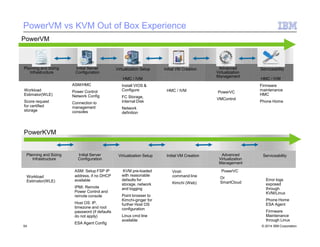
PowerVM vs KVM Out of Box Experience
Planning and Sizing
Infrastructure
Initial Server
Configuration
Virtualization Setup Initial VM Creation Advanced
Virtualization
Management
Serviceability
Workload
Estimator(WLE)
Score request
for certified
storage
ASM/HMC
Power Control
Network Config
Connection to
management
consoles
HMC / IVM
Install VIOS &
Configure
FC Storage,
Internal Disk
Network
definition
HMC / IVM
Firmware
maintenance
HMC
Phone Home
PowerVM
HMC / IVM PowerVC
VMControl
Planning and Sizing
Infrastructure
Initial Server
Configuration
Virtualization Setup Initial VM Creation Advanced
Virtualization
Management
PowerVC
Or
SmartCloud
54 © 2014 IBM Corporation
Serviceability
Workload
Estimator(WLE)
ASM: Setup FSP IP
address, if no DHCP
available
IPMI: Remote
Power Control and
remote console
Host OS: IP,
timezone and root
password (if defaults
do not apply)
ESA Agent Config
KVM pre-loaded
with reasonable
defaults for
storage, network
and logging
Point browser to
Kimchi-ginger for
further Host OS
configuration
Linux cmd line
available
Error logs
exposed
through
KVM/Linux
Phone Home
ESA Agent
Firmware
Maintenance
through Linux
PowerKVM
Virsh
command line
Kimchi (Web)
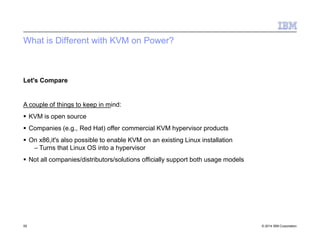
What is Different with KVM on Power?
55 © 2014 IBM Corporation
Let's Compare
A couple of things to keep in mind:
 KVM is open source
 Companies (e.g., Red Hat) offer commercial KVM hypervisor products
 On x86,it's also possible to enable KVM on an existing Linux installation
– Turns that Linux OS into a hypervisor
 Not all companies/distributors/solutions officially support both usage models
What is different with KVM on Power?
56 © 2014 IBM Corporation
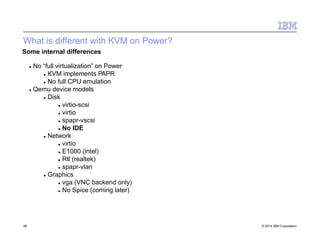
Some internal differences
 No “full virtualization” on Power
 KVM implements PAPR
 No full CPU emulation
 Qemu device models
 Disk
 virtio-scsi
 virtio
 spapr-vscsi
 No IDE
 Network
 virtio
 E1000 (intel)
 Rtl (realtek)
 spapr-vlan
 Graphics
 vga (VNC backend only)
 No Spice (coming later)
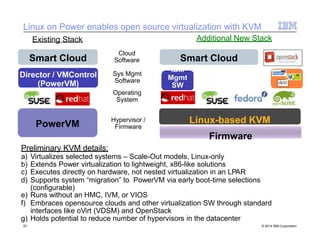
Linux on Power enables open source virtualization with KVM
Linux-based KVM
Firmware
PowerVM
Hypervisor /
Firmware
Smart Cloud
IBM
Mgmt
SW
Smart Cloud
Director / VMControl
(PowerVM)
Existing Stack Additional New Stack
Sys Mgmt
Software
Operating
System
Cloud
Software
X
C
AT
Preliminary KVM details:
a) Virtualizes selected systems – Scale-Out models, Linux-only
b) Extends Power virtualization to lightweight, x86-like solutions
c) Executes directly on hardware, not nested virtualization in an LPAR
d) Supports system “migration” to PowerVM via early boot-time selections
(configurable)
e) Runs without an HMC, IVM, or VIOS
f) Embraces opensource clouds and other virtualization SW through standard
interfaces like oVirt (VDSM) and OpenStack
g) Holds potential to reduce number of hypervisors in the datacenter
57 © 2014 IBM Corporation
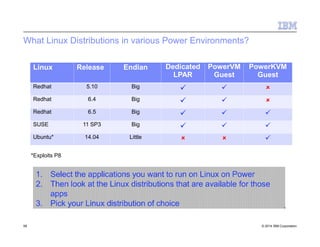
What Linux Distributions in various Power Environments?
*Exploits P8
1. Select the applications you want to run on Linux on Power
2. Then look at the Linux distributions that are available for those
apps
3. Pick your Linux distribution of choice
58 © 2014 IBM Corporation
Linux Release Endian Dedicated
LPAR
PowerVM
Guest
PowerKVM
Guest
Redhat 5.10 Big   
Redhat 6.4 Big   
Redhat 6.5 Big   
SUSE 11 SP3 Big   
Ubuntu* 14.04 Little   
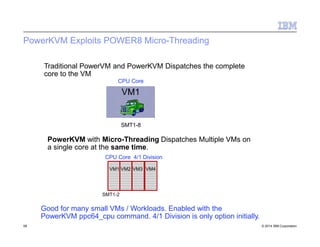
PowerKVM Exploits POWER8 Micro-Threading
Traditional PowerVM and PowerKVM Dispatches the complete
core to the VM
CPU Core
VM1
SMT1-8
PowerKVM with Micro-Threading Dispatches Multiple VMs on
a single core at the same time.
CPU Core 4/1 Division
VM1 VM2 VM3 VM4
SMT1-2
Good for many small VMs / Workloads. Enabled with the
PowerKVM ppc64_cpu command. 4/1 Division is only option initially.
59 © 2014 IBM Corporation
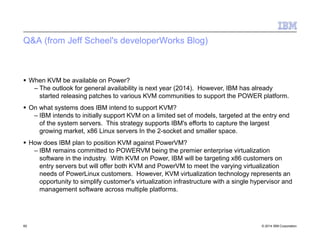
Q&A (from Jeff Scheel's developerWorks Blog)
60 © 2014 IBM Corporation
 When KVM be available on Power?
– The outlook for general availability is next year (2014). However, IBM has already
started releasing patches to various KVM communities to support the POWER platform.
 On what systems does IBM intend to support KVM?
– IBM intends to initially support KVM on a limited set of models, targeted at the entry end
of the system servers. This strategy supports IBM's efforts to capture the largest
growing market, x86 Linux servers In the 2-socket and smaller space.
 How does IBM plan to position KVM against PowerVM?
– IBM remains committed to POWERVM being the premier enterprise virtualization
software in the industry. With KVM on Power, IBM will be targeting x86 customers on
entry servers but will offer both KVM and PowerVM to meet the varying virtualization
needs of PowerLinux customers. However, KVM virtualization technology represents an
opportunity to simplify customer's virtualization infrastructure with a single hypervisor and
management software across multiple platforms.
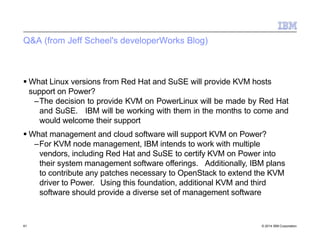
Q&A (from Jeff Scheel's developerWorks Blog)
61 © 2014 IBM Corporation
 What Linux versions from Red Hat and SuSE will provide KVM hosts
support on Power?
–The decision to provide KVM on PowerLinux will be made by Red Hat
and SuSE. IBM will be working with them in the months to come and
would welcome their support
 What management and cloud software will support KVM on Power?
–For KVM node management, IBM intends to work with multiple
vendors, including Red Hat and SuSE to certify KVM on Power into
their system management software offerings. Additionally, IBM plans
to contribute any patches necessary to OpenStack to extend the KVM
driver to Power. Using this foundation, additional KVM and third
software should provide a diverse set of management software
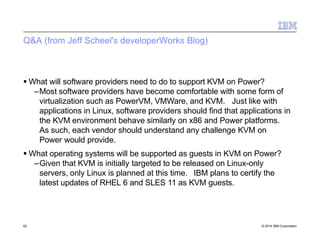
Q&A (from Jeff Scheel's developerWorks Blog)
62 © 2014 IBM Corporation
 What will software providers need to do to support KVM on Power?
–Most software providers have become comfortable with some form of
virtualization such as PowerVM, VMWare, and KVM. Just like with
applications in Linux, software providers should find that applications in
the KVM environment behave similarly on x86 and Power platforms.
As such, each vendor should understand any challenge KVM on
Power would provide.
 What operating systems will be supported as guests in KVM on Power?
–Given that KVM is initially targeted to be released on Linux-only
servers, only Linux is planned at this time. IBM plans to certify the
latest updates of RHEL 6 and SLES 11 as KVM guests.
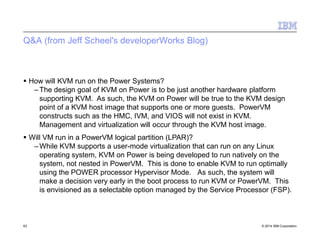
Q&A (from Jeff Scheel's developerWorks Blog)
63 © 2014 IBM Corporation
 How will KVM run on the Power Systems?
– The design goal of KVM on Power is to be just another hardware platform
supporting KVM. As such, the KVM on Power will be true to the KVM design
point of a KVM host image that supports one or more guests. PowerVM
constructs such as the HMC, IVM, and VIOS will not exist in KVM.
Management and virtualization will occur through the KVM host image.
 Will VM run in a PowerVM logical partition (LPAR)?
– While KVM supports a user-mode virtualization that can run on any Linux
operating system, KVM on Power is being developed to run natively on the
system, not nested in PowerVM. This is done to enable KVM to run optimally
using the POWER processor Hypervisor Mode. As such, the system will
make a decision very early in the boot process to run KVM or PowerVM. This
is envisioned as a selectable option managed by the Service Processor (FSP).
Q&A (from Jeff Scheel's developerWorks Blog)
64 © 2014 IBM Corporation
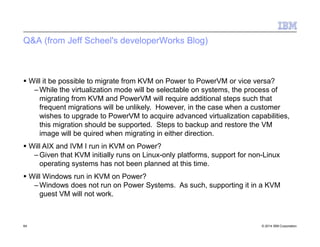
 Will it be possible to migrate from KVM on Power to PowerVM or vice versa?
– While the virtualization mode will be selectable on systems, the process of
migrating from KVM and PowerVM will require additional steps such that
frequent migrations will be unlikely. However, in the case when a customer
wishes to upgrade to PowerVM to acquire advanced virtualization capabilities,
this migration should be supported. Steps to backup and restore the VM
image will be quired when migrating in either direction.
 Will AIX and IVM I run in KVM on Power?
– Given that KVM initially runs on Linux-only platforms, support for non-Linux
operating systems has not been planned at this time.
 Will Windows run in KVM on Power?
– Windows does not run on Power Systems. As such, supporting it in a KVM
guest VM will not work.
Management Tools
65 © 2014 IBM Corporation
• There are multiple tools for managing a KVM environment:
• Kimchi – Web based / open source driven
• Intended for small environments / POCs
• Open Stack – community driven
• Intended for enterprise level management
• PowerVC / SCE – IBM product
• Intended for enterprise level management
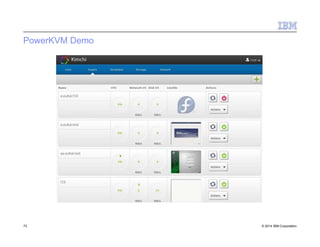
Kimchi – Host Page
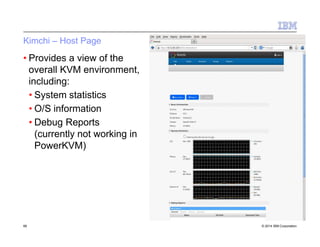
• Provides a view of the
overall KVM environment,
including:
• System statistics
• O/S information
• Debug Reports
(currently not working in
PowerKVM)
66 © 2014 IBM Corporation
Kimchi – Guests Page
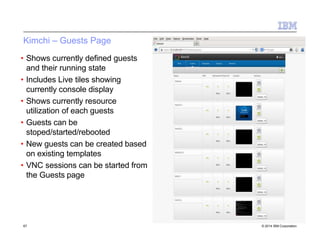
• Shows currently defined guests
and their running state
• Includes Live tiles showing
currently console display
• Shows currently resource
utilization of each guests
• Guests can be
stoped/started/rebooted
• New guests can be created based
on existing templates
• VNC sessions can be started from
the Guests page
67 © 2014 IBM Corporation
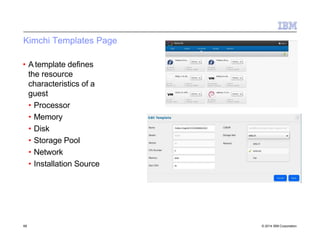
Kimchi Templates Page
• A template defines
the resource
characteristics of a
guest
• Processor
• Memory
• Disk
• Storage Pool
• Network
• Installation Source
68 © 2014 IBM Corporation
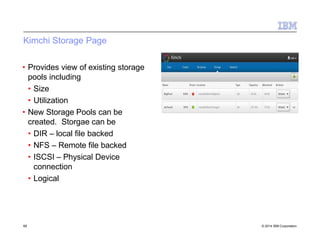
Kimchi Storage Page
• Provides view of existing storage
pools including
• Size
• Utilization
• New Storage Pools can be
created. Storgae can be
• DIR – local file backed
• NFS – Remote file backed
• ISCSI – Physical Device
connection
• Logical
69 © 2014 IBM Corporation
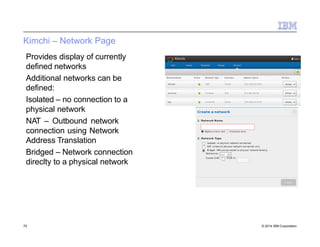
Kimchi – Network Page
Provides display of currently
defined networks
Additional networks can be
defined:
Isolated – no connection to a
physical network
NAT – Outbound network
connection using Network
Address Translation
Bridged – Network connection
direclty to a physical network
70 © 2014 IBM Corporation
virsh
• Provides a shell interface for working with KVM functions
• Common commands:
• 'help' – provide of all virsh commands
• 'console' – provide a console interface to a guest
• 'list –all' – list all guests and their current state
• There are commands for working with:
71 © 2014 IBM Corporation
• Domains
• Host and Hypervisors
• Interfaces
• Network Filtering
• Networking
• Node Devices
•Snapshots
•Storage Pools
•Storage Volume
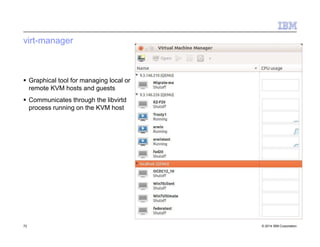
virt-manager
 Graphical tool for managing local or
remote KVM hosts and guests
 Communicates through the libvirtd
process running on the KVM host
72 © 2014 IBM Corporation
PowerKVM Demo
73 © 2014 IBM Corporation
OpenPow
Consortiu
er
m
74 © 2014 IBM Corporation
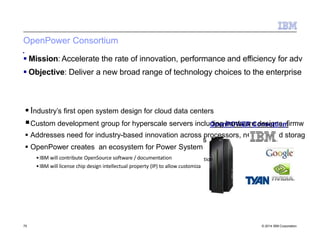
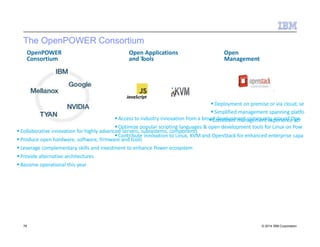
OpenPower Consortium
 Industry’s first open system design for cloud data centers
Custom development group for hyperscale servers includOipnegnhPaOrWdwEaRreCodnessoigrntius,mfirmw
 Addresses need for industry-based innovation across processors, n
 OpenPower creates an ecosystem for Power System
•IBM will contribute OpenSource software / documentation
•IBM will license chip design intellectual property (IP) to allow customiza
etwork and storag
s
tion
 Mission: Accelerate the rate of innovation, performance and efficiency for adv
 Objective: Deliver a new broad range of technology choices to the enterprise
75 © 2014 IBM Corporation
The OpenPOWER Consortium
Collaborative innovation for highly advanced servers, subsystems, components
Produce open hardware, software, firmware and tools
Leverage complementary skills and investment to enhance Power ecosystem
Provide alternative architectures
Become operational this year
OpenPOWER
Consortium
Deployment on premise or via cloud; se
Simplified management spanning platfo
Access to industry innovation from a broadCodnesviestloepnmt menatncaogmemmeunntiteyxpaeroriuenndceOapcer
Optimize popular scripting languages & open development tools for Linux on Pow
Open
Management
Open Applications
and Tools
Contribute innovation to Linux, KVM and OpenStack for enhanced enterprise capa
JavaScript
76 © 2014 IBM Corporation
© 2014 IBM Corporation
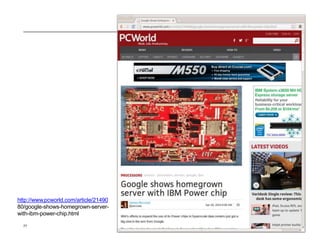
http://www.pcworld.com/article/21490
80/google-shows-homegrown-server-
with-ibm-power-chip.html
77
© 2014 IBM Corporation
78
Big Data
79 © 2014 IBM Corporation
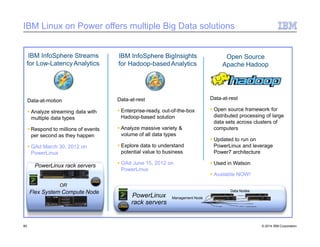
IBM Linux on Power offers multiple Big Data solutions
IBM InfoSphere BigInsights
for Hadoop-basedAnalytics
Data-at-motion
 Analyze streaming data with
multiple data types
 Respond to millions of events
per second as they happen
 GAd March 30, 2012 on
PowerLinux
Data-at-rest
 Enterprise-ready, out-of-the-box
Hadoop-based solution
 Analyze massive variety &
volume of all data types
 Explore data to understand
potential value to business
 GAd June 15, 2012 on
PowerLinux
IBM InfoSphere Streams
for Low-LatencyAnalytics
PowerLinux
rack servers
Management Node
Data Nodes
PowerLinux rack servers
OR
Flex System Compute Node
Open Source
Apache Hadoop
80 © 2014 IBM Corporation
Data-at-rest
 Open source framework for
distributed processing of large
data sets across clusters of
computers
 Updated to run on
PowerLinux and leverage
Power7 architecture
 Used in Watson
 Available NOW!
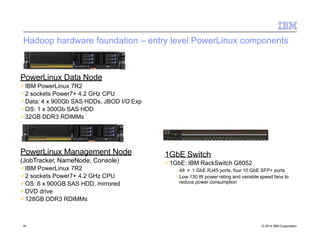
Hadoop hardware foundation – entry level PowerLinux components
PowerLinux Data Node
IBM PowerLinux 7R2
2 sockets Power7+ 4.2 GHz CPU
Data: 4 x 900Gb SAS HDDs, JBOD I/O Exp
OS: 1 x 300Gb SAS HDD
32GB DDR3 RDIMMs
PowerLinux Management Node
(JobTracker, NameNode, Console)
IBM PowerLinux 7R2
2 sockets Power7+ 4.2 GHz CPU
OS: 6 x 900GB SAS HDD, mirrored
DVD drive
128GB DDR3 RDIMMs
1GbE Switch
1GbE: IBM RackSwitch G8052
– 48 × 1 GbE RJ45 ports, four 10 GbE SFP+ ports
– Low 130 W power rating and variable speed fans to
reduce power consumption
81 © 2014 IBM Corporation
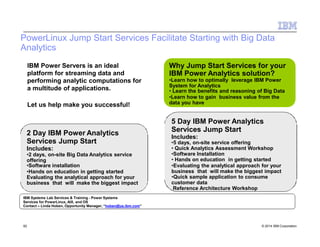
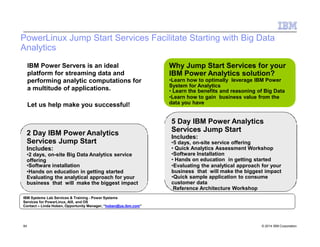
PowerLinux Jump Start Services Facilitate Starting with Big Data
Analytics
Why Jump Start Services for your
IBM Power Analytics solution?
•Learn how to optimally leverage IBM Power
System for Analytics
• Learn the benefits and reasoning of Big Data
•Learn how to gain business value from the
data you have
5 Day IBM Power Analytics
Services Jump Start
Includes:
•5 days, on-site service offering
• Quick Analytics Assessment Workshop
•Software Installation
• Hands on education in getting started
•Evaluating the analytical approach for your
business that will make the biggest impact
•Quick sample application to consume
customer data
Reference Architecture Workshop
2 Day IBM Power Analytics
Services Jump Start
Includes:
•2 days, on-site Big Data Analytics service
offering
•Software installation
•Hands on education in getting started
Evaluating the analytical approach for your
business that will make the biggest impact
IBM Systems Lab Services & Training - Power Systems
Services for PowerLinux, AIX, and OS
Contact – Linda Hoben, Opportunity Manager, “hoben@us.ibm.com”
82 © 2014 IBM Corporation
IBM Power Servers is an ideal
platform for streaming data and
performing analytic computations for
a multitude of applications.
Let us help make you successful!
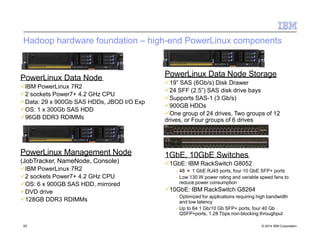
Hadoop hardware foundation – high-end PowerLinux components
PowerLinux Data Node
IBM PowerLinux 7R2
2 sockets Power7+ 4.2 GHz CPU
Data: 29 x 900Gb SAS HDDs, JBOD I/O Exp
OS: 1 x 300Gb SAS HDD
96GB DDR3 RDIMMs
PowerLinux Management Node
(JobTracker, NameNode, Console)
IBM PowerLinux 7R2
2 sockets Power7+ 4.2 GHz CPU
OS: 6 x 900GB SAS HDD, mirrored
DVD drive
128GB DDR3 RDIMMs
PowerLinux Data Node Storage
19” SAS (6Gb/s) Disk Drawer
24 SFF (2.5”) SAS disk drive bays
Supports SAS-1 (3 Gb/s)
900GB HDDs
One group of 24 drives, Two groups of 12
drives, or Four groups of 6 drives
1GbE, 10GbE Switches
1GbE: IBM RackSwitch G8052
– 48 × 1 GbE RJ45 ports, four 10 GbE SFP+ ports
– Low 130 W power rating and variable speed fans to
reduce power consumption
10GbE: IBM RackSwitch G8264
– Optimized for applications requiring high bandwidth
and low latency
– Up to 64 1 Gb/10 Gb SFP+ ports, four 40 Gb
QSFP+ports, 1.28 Tbps non-blocking throughput
83 © 2014 IBM Corporation
PowerLinux Jump Start Services Facilitate Starting with Big Data
Analytics
Why Jump Start Services for your
IBM Power Analytics solution?
•Learn how to optimally leverage IBM Power
System for Analytics
• Learn the benefits and reasoning of Big Data
•Learn how to gain business value from the
data you have
5 Day IBM Power Analytics
Services Jump Start
Includes:
•5 days, on-site service offering
• Quick Analytics Assessment Workshop
•Software Installation
• Hands on education in getting started
•Evaluating the analytical approach for your
business that will make the biggest impact
•Quick sample application to consume
customer data
Reference Architecture Workshop
2 Day IBM Power Analytics
Services Jump Start
Includes:
•2 days, on-site Big Data Analytics service
offering
•Software installation
•Hands on education in getting started
Evaluating the analytical approach for your
business that will make the biggest impact
IBM Systems Lab Services & Training - Power Systems
Services for PowerLinux, AIX, and OS
Contact – Linda Hoben, Opportunity Manager, “hoben@us.ibm.com”
84 © 2014 IBM Corporation
IBM Power Servers is an ideal
platform for streaming data and
performing analytic computations for
a multitude of applications.
Let us help make you successful!
Developm
Topics
ent
85 © 2014 IBM Corporation
Advance Toolchain 7 Highlights
86 © 2014 IBM Corporation
 GCC-4.8 and POWER8 support!
 POWER7 and POWER8 optimized libraries
 Upstream gdb debugger
 Upstream tools!
– oprofiel/operf, ocount, valgrind, itrace
 Multi-core exploitation libraries
– Intel TBB, Amino CBB, Userspace RCU, TCMalloc
 New support liraries
– Libhugetbfs, zlib, etc
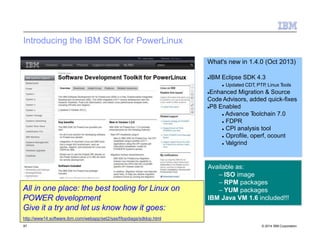
Introducing the IBM SDK for PowerLinux
What's new in 1.4.0 (Oct 2013)
IBM Eclipse SDK 4.3
 Updated CDT, PTP, Linux Tools
Enhanced Migration & Source
Code Advisors, added quick-fixes
P8 Enabled
 Advance Toolchain 7.0
 FDPR
 CPI analysis tool
 Oprofile, operf, ocount
 Valgrind
Available as:
– ISO image
– RPM packages
– YUM packages
IBM Java VM 1.6 included!!!
All in one place: the best tooling for Linux on
POWER development
Give it a try and let us know how it goes:
http://www14.software.ibm.com/webapp/set2/sas/f/lopdiags/sdklop.html
87 © 2014 IBM Corporation
88 © 2014 IBM Corporation
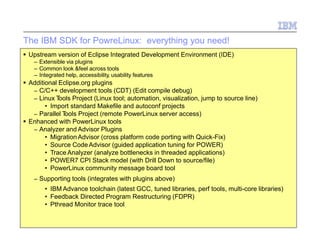
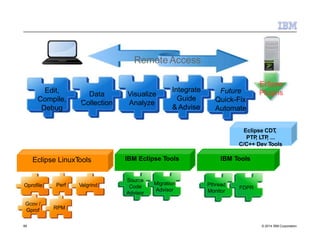
The IBM SDK for PowreLinux: everything you need!
 Upstream version of Eclipse Integrated Development Environment (IDE)
– Extensible via plugins
– Common look &feel across tools
– Integrated help, accessibility, usability features
 Additional Eclipse.org plugins
– C/C++ development tools (CDT) (Edit compile debug)
– Linux Tools Project (Linux tool; automation, visualization, jump to source line)
• Import standard Makefile and autoconf projects
– Parallel Tools Project (remote PowerLinux server access)
 Enhanced with PowerLinux tools
– Analyzer and Advisor Plugins
• Migration Advisor (cross platform code porting with Quick-Fix)
• Source Code Advisor (guided application tuning for POWER)
• Trace Analyzer (analyze bottlenecks in threaded applications)
• POWER7 CPI Stack model (with Drill Down to source/file)
• PowerLinux community message board tool
– Supporting tools (integrates with plugins above)
• IBM Advance toolchain (latest GCC, tuned libraries, perf tools, multi-core libraries)
• Feedback Directed Program Restructuring (FDPR)
• Pthread Monitor trace tool
Data
Collection
Visualize
Analyze
Integrate
Guide
& Advise
Future
Quick-Fix
Automate
Oprofile
Remote Access
Eclipse
Plugins
ValgrindPerf
Gcov /
Gprof RPM
Eclipse LinuxTools
Eclipse CDT,
PTP, LTP, ...
C/C++ Dev Tools
Migration
Advisor
Source
Code
Advisor
IBM Eclipse Tools
Edit,
Compile,
Debug
IBM Tools
FDPR
Pthread
Monitor
89 © 2014 IBM Corporation
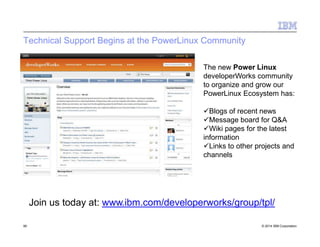
Technical Support Begins at the PowerLinux Community
The new Power Linux
developerWorks community
to organize and grow our
PowerLinux Ecosystem has:
Blogs of recent news
Message board for Q&A
Wiki pages for the latest
information
Links to other projects and
channels
90 © 2014 IBM Corporation
Join us today at: www.ibm.com/developerworks/group/tpl/

Presentation linux on power

  • 1.
    © 2009 IBMCorporation ·Click to add text Erwin Earley - IBM STG Lab Services & Training Kurt Ruby – IBM STG Lab Services & Training Jason Furmanek – IBM STG Lab Services & Training 22 May 2014 Linux on Power
  • 2.
    Agenda 2 © 2014IBM Corporation  Download this slide  http://ouo.io/ZTKdy IBM Presentation Template Full Version
  • 3.
    Why Are WeTalking About Linux? 3 © 2014 IBM Corporation  Linux is the world's fastest growing Operating System  Over 90% of world's fastest supercomputers, including top 10 in TOP500 list, run on Linux  8 of the world's top 10 websites, including Google, YouTube, Yahoo, Facebook, and Twitter run on Linux  80% of all Stock Exchanges in the world rely on Linux  95% of the servers used by Hollywood studios for animation films run on Linux  U.S. Department of Defense is the “single biggest install base for Red Hat Linux” in the world.
  • 4.
  • 5.
    Installation / PackageManagement 5 © 2014 IBM Corporation  Consider use of installation server for environments with multiple Linux instances  Consider use of kickstart (RedHat) or autoyast (SuSE) response files for unattended installations  Configure use of distributor provided repository  For detached systems, setup local repository file based on distributor media  Leverage use of Linux on Power Service and Productivity Tools to for advanced Power platform functionality – Use provided RPM to install recommended packages – Setup local repository if system is detached
  • 6.
    Migration / Backup 6© 2014 IBM Corporation  When migrating / cloning image file consider the following – Resetting of MPIO identifiers – Resetting of Network identifiers  For Bare Metal Restore consider the following – Need to safe off disk configuration information – Need to safe LVM information
  • 7.
    Collecting Installation Information 7© 2014 IBM Corporation Following Data Should be Collected Prior to Installation Storage Considerations –What Storage connection type will be used –How much storage will be allocated –Are dual-VIO servers being used –Is Logical Volume Management (LVM) or raw-disk/disk-partitions to be used for storage management Linux Distribution Considerations –What Distribution of Linux will be installed –What additional packges need to be installed • Is media for distribution readily available –Will physical media, ISO images or network repository be used for installation –Is a network based installation server required
  • 8.
    Collecting Installation Information 8© 2014 IBM Corporation Network Considerations –Will physical or virtual network adapters be used –How many network interfaces are required –Will network bonding be established in Linux –Is Firewall protection required –Is SELinux implementation/configuration required Other Considerations –Is any High Availability to be setup for the Linux Storage –Is any High Availability to be setup for the Linux-supported services
  • 9.
    A Quick Commentabout SELinux 9 © 2014 IBM Corporation • SELinux provides a flexible Mandatory Access Control (MAC) system built into the Linux kernel. • Standard Linux security enforces Discretionary Access Control (DAC) where an applicaton or process running as a user (UID or SUID) has the user’s permissions to objects such as files, sockets, and other processes. • SELinux defines access and transition rights of every use, application, process and file on the system. • SELinux governs the interactions of these entris using a security policy that specifies how string or lenient a given Red Hat Enterprise Linux installation should be
  • 10.
    A Quick CommentAbout SELinux 10 © 2014 IBM Corporation • SELinux is enabled by default, to disable SELinux: – The ‘getenforce’ command will show the current state of SELinux – The ‘sestatus’ command returs the SELinux status and policy being used – The ‘enable/disable’ setting is contained in the /etc/selinux/config file
  • 11.
    Example Disk Layout– Advanced Usage manual mirroring throughdd 11 © 2014 IBM Corporation PRePboot (0x41) Linux Software RAID(0xFD) PRePboot (0x41)/dev/sda1 /dev/sdb1 /boot/dev/md0/dev/sda2 /dev/sdb2 / /usr /var /tmp /opt /home /swap etc. /dev/md1 LinuxSoftware RAID(0xFD) /dev/sda3 /dev/sdb3 LVM physical volume/dev/sda /dev/sdb
  • 12.
    Automating Installation –KickStart (RHE) or AutoYast (SLES) 12 © 2014 IBM Corporation  The KickStart or AutoYast file is a response file that is used to provide responses to the installer.  The response file typically provides the following: – Netowrk configuration information for the instance being installed – Source of installation files (i.e., local media, network based repository, etc) – Password for the root user – Firewall and SELinux settings – Location of bootloader – Indication of post-installation action to take (ie., halt, reboot) – Disk partitioning information – Software packages to install
  • 13.
    Storage Management –Linux Representation of SCSI disks 13 © 2014 IBM Corporation  Linux stores information about and allows control of the virtual SCSI and NPIV devices through the /sys Virtual File System – The /sys/devices/vio directory contains a sub-directory for each virtual adapter – The slot number is the later portion of the directory name and it is shown in hex: • Example: 3000001f represents the 31st slot (1f) • Changing directory to the virtual adapter sub-directory and 'cat' on 'modalias' will show 'vio:TvscsiS_IBM, v-scsi' for vSCSI and 'vio:TfcpSIBM,vfc-client' for NPIV  When storage is added dynamically the corresponding bus needs to be scanned: echo “- - -” > /sys/devices/vio/3000001f/host0/scsi_host/host0/scan Or echo “- - -” >/sys/class/scsi/host/host0/scan
  • 14.
    Storage Management –Adding Storage / Resizing File System 14 © 2014 IBM Corporation  Step 1: Add new storage from VIOS (or map from SAN)  Step 2: Run 'fdisk -l' to get list of current disks  Step 3: Scan the bus in Linux to detect new storage (refer to previous slide)  Step 4: Run 'fdisk -l', compare results to step 2 to determine new disk  Step 5: Prepare the disk for LVM –pvcreate /dev/device  Step 6: Add the disk to the volume group –vgextend rootvg /dev/<device>  Step 7: Extend the logical volume –lvextend --size +500M /dev/mapper/rootvg/<lv> (LV_PATH)  Step 8: Resize the file system –resize2fs /dev/mapper/rootvg/<lv>
  • 15.
    Network Bonding 15 ©2014 IBM Corporation Bonding facilitates the binding of multiple Network Interface Controllers into a single channel through the following: –Bonding kernel module –Special network interface (called a channel bonding interface) Channel bonding enables –Two or more network interfaces to act as one –Increase bandwidth –Redundancy
  • 16.
    Network Bonding –Adding Kernel Module 16 © 2014 IBM Corporation Enabling bonding requires the 'bonding' kernel module to be loaded into the kernel Create a file in the /etc/modprobe.d/ directory with the following entry alias bond# bonding –Replace '#' with a 1-up number (starting at 0) –The filename can be anything but must end with '.conf' aliasbond0bonding
  • 17.
    Network Bonding –Network Configuration 17 © 2014 IBM Corporation A configuration file for the bond(ed) interface needs to be created –The configuration file will be used to specify the network settings as well as parameters specific to bonding DEVICE=bond0 IPADDR=10.128.232.119 NETMASK=255.255.252.0 GATEWAY=10.128.232.1 ONBOOT=yes USERCTL=no BONDING_OPTS=“mode=balance-rr” /etc/sysconfig/network-scripts/ifcfg-bond0
  • 18.
    Network Bonding –Bonding Options 18 © 2014 IBM Corporation  There are a number of options that can be configured for the bonding interface  A recommendation is to ensure that both the 'arp_interval' and 'arp_ip_target' be specified. Failure to do so can cause degradation of network performance in the event that a link fails –arp_ip_target – specifies the target IP address of ARP requests. Up to 16 addresses can be specified –arp_interval – specifies how often ARP monitoring occurs  Another good parameter to set is the 'mode' parameter which is used to specify the bonding policy including load balancing policies https://access.redhat.com/site/documentation/en- US/Red_Hat_Enterprise_Linux/6/html/Deployment_Guide/sec-Using_Channel_Bonding.html
  • 19.
    Network Bonding –Network Configuration (cont.)  In addition to the bond interface definition, the configuration files for the interfaces that are being bond together must be modified: –The 'MASTER' parameter indicates the bond interface to bind this interface to –The 'SLAVE' parameter must be set • A value of 'yes' indicates that the device is controlled by the bond device DEVICE=eth0 BOOTPROTO=none ONBOOT=yes MASTER=bond0 SLAVE=yes USERCTL=no /etc/sysconfig/network- scripts/ifcfg-eth0 DEVICE=eth1 BOOTPROTO=none ONBOOT=yes MASTER=bond0 SLAVE=yes USERCTL=no 19 © 2014 IBM Corporation /etc/sysconfig/network- scripts/ifcfg-eth1
  • 20.
    Establishing a LocalPackage Repository  Package repositories help to streamline the process of package installation and package management  The Yellowdog Updater Modified (yum) too in RedHat uses package repositories to install packages, including resolving package dependencies  Default installation will establish a repository definition to a RedHat provided repository  Internal RedHat Network Satelites can also be established  For systems without external network access it may be desirable to establish a local repository  Typically the installation media will be used as the source for the repository 20 © 2014 IBM Corporation
  • 21.
    Establishing a LocalPackage Repository 21 © 2014 IBM Corporation  Step 1: Create an ISO image from the installation media dd if=/dev/sr0 of=/tmp/RHEL65.iso  Step 2: Add mount information to the /etc/fstab file /tmp/RHEL65.iso /media/RHEL65 iso9660 loop,ro,auto 0 0  Step 3: Mount the ISO mount /media/RHEL65  Step 4: Create the repository definition file in /etc/yum.repos.d/ –[RHEL65] –name=Local RedHat 6.5 Repository –baseurl=file:///media/RHEL65 –gpgkey=file:///media/RHEL65/RPM-GPG-key-redhat- release –gpgcheck=1 –enabled=1
  • 22.
    Linux on Power Platf Options orm 22© 2014 IBM Corporation
  • 23.
    Understanding the Linuxon Power Platform Options  The following table summarizes the Linux on Power platform options Name Integrated Facility for Linux 23 © 2014 IBM Corporation Description An offering for the 770, 780, and 795 systems that turns on dark cores|memory (in 4-processor|32GB-memory increments) for implementation of Linux – cost competitive with other hardware platforms Target Customers with dark cores|memory on their 770 and above systems and looking to implement multiple Linux workloads or Linux workloads with large processor|memory requirements (i.e., Big Data | Analytics) PowerLinux – 7R1, 7R2, and 7R4 One, two, and four socket power systems for the implementation of Linux-only workloads  Customers that already have a significant Linux presence in the environment  Migration from existing Linux on Power to PowerLinux Linux on Power Partitions Individual partitions on any Power System (but typically, those not already identified above)  Customers who are looking to take an initial look at Linux on Power with simple | limited Linux instances.  Customers with unused capacity on their Power systems.  Implementation of new Linux-based services  Migration from existing Linux implementations to Linux on Power Power8 S821L S822L Power8 based Linux-only services that are able to run PowerVM or PowerKVM Customers that have a KVM presence in the x86 space looking to leverage benefits of the Power platform.
  • 24.
    Linux Supports ALLIBM Power System Servers Industry standard Linux  Red Hat and SUSE versions consistent with x86 64  Ubunto Server (Power8 Linux only Servers)  Support available simultaneously with other platforms Optimized by IBM to exploit POWER7+, POWER8 and PowerVM  Virtualization, Performance, POWER7+ RAS, POWER8 Broadest choice of Linux servers  Linux supports Power 710 to 795 and new Power IFL  Linux only one, two and four socket servers:  PowerLinux 7R1, 7R2, 7R4  Flex System p24L  POWER8 – S821L & S822L Power 720 Power 710 / 730 Power 740 Power 750 PowerLinux™ 7R1 / 7R2 Power 760 Power 770 Power 780 Power 795 IBM Flex System p460, p260, p24L PowerLinux™ 7R4 IFL IFL IFL 24 © 2014 IBM Corporation
  • 25.
    POWER8 Scale-out Systems PowerSystems S822L Power Systems S812L •2‐socket, 2U •POWER8 processor Power Systems S822 •1‐socket, 4U Power Systems S8•21‐s4ocket, 4U Power Systems S82 Power Systems S824L •2‐socket, 4U •Up to 24 cores •1‐socket, 2U •POWER8 processor •Linux only •CAPI support (1) •2H14 •Up to 24 cores •1 TB memory •9 PCI Gen3 slot •Linux only •CAPI support (2) •PowerVM & PowerKVM •2‐socket, 2U •Up to 20 cores •1 TB memory •9 PCIe Gen 3 •AIX & Linux •CAPI support (2) •PowerVM •Up to 8 cores •512 GB memory •7 PCIe Gen 3 •AIX, IBM i, Linux •CAPI support (1) •PowerVM •1 TB memory •11 PCIe Gen 3 •AIX, IBM i, Linux •CAPI support (2) •PowerVM •Up to 24 cores •Linux •NVIDIA GPU •2H14  POWER8 roll-out is leading with scale-out (1-2S) systems  Expanded Linux focus: Ubuntu, KVM, and Open Stack  Scale-up POWER8 (>2S) systems will be rolled out over time  PCI Gen3 right out of POWER8 processor  OpenPOWER Innovations 25 © 2014 IBM Corporation
  • 26.
  • 27.
    What is PowerIFL? 27 © 2014 IBM Corporation  IFL stands for Integrated Facility for Linux  It is a bundle of 4 Power core activations, 32 GB memory activation, and PowerVM Enterprise Edition that can only run Linux (not AIX or IBM I)  It is priced aggressively to compete with stand alone x86 Linux servers  There is no difference between IFL and regular Power cores except for price.
  • 28.
    What is IFL– Offering Overview 28 © 2014 IBM Corporation  Design/Structure of Offering – Offer an attractive price on the virtual stack of CuoD capacity deployed exclusively for Linux workloads – Available as CuoD on Power 770, 780 & 795 • Single 4-core & 32GB activations (CuoD) & PowerVM license price for Linux – not physical processor books & DIMMs • HWMA and SWMA for PowerVM for Linux priced separately • Linux license & SWMA acquired separately  General Availability – October 2013 – Initially, the “honor system” (i.e., soft compliance) • PCR 2010 created to request Firmware fence delivery in future • Power clients must sign a contract addendum agreeing to segregate # course purchased with Linux activation feature in separate LPARs/pools for AIX/IBM I – Linux engines may be purchased for capacity above the minimum required cores on a system – PowerVM EE License entitled for the Linux-exclusive cores on Power 770-795 • These license entitlements & corresponding SWMA PID may coexist with PowerVM EE (for AIX and/or IBM I) license & SWMA PIDs on a single system.
  • 29.
    Power IFL ProvidesGreat Value for Scale Up Workloads 29 © 2014 IBM Corporation
  • 30.
    Power IFL: Addressinga Changing IT Landscape Group 1 Linux Workloads Group 2 Linux Workloads Private Cloud Power IFL Co- Location QOS Simplified Ops Appl. Services  Messaging Security Services  ESB CUoD Activations: 4 cores  32 GB memory 4 PowerVM EE licenses 30 © 2014 IBM Corporation
  • 31.
    Power IFL Structureand Fulfillment 32 GB Memory Act #xxxx per GB 4 x PowerVM EE License entitlement 4 x Power VM EE SWMA Linux Subscription & Support Today 4 Processor Act #xxxx per core Power IFL = New offering component/adjustment = Existing component, BAU or optional = Existing component, IBM TSS options available • A single priced feature for one Power IFL • May order 1 or more based upon physical cores/memory available • Same price for every Power 770/780/795 • Available for Power7 and Power7+ models • 70 PVU SWG licensing Fulfillment details: • Each Power IFL feature delivers 4 Processor and 32GB Memory Activations– not physical hardware, e.g. processor cards/books/nodes • PowerVM for PowerLinux license entitled for the Power IFL cores on Power 770-795 • PowerVM for PowerLinux license entitlement & corresponding SWMA PID may coexist with PowerVM EE (for AIX &/or IBM i) license & SWMA PIDs on a single system • Power clients agree to segregate Power IFL cores in separate virtual shared processor pool from cores purchased to support AIX and/or IBM i 4 processor core activations 2 GB memory activations 4 PowerVM for PowerLinux License Entitlements 3 4 x PowerVM for PowerLinux SWMA * Prices are for concept illustration only and are subject to change/ Linux Subscription & Support $8,591* Hard bundle of quantity of 4: Processor Activations + 32GB Memory activation + PowerVM for PowerLinux Licenses Power IFL 31 © 2014 IBM Corporation
  • 32.
    Power IFL TrialOffer for Power 770, 780, or 795 for Proof of Concepts  Activate 8 processor cores and/or 64GB of memory at no charge for 30 days – 2 additional extensions available via RPQ 8A2116 – Contact Bill Casey for additional detail (wrcasey@us.ibm.com)  Process – Client places orders for up to 8 cores & up to 64GB via web for use of the Trial COD • Trial CoD website • https://www-912.ibm.com/tcod_reg.nsf/TrialCod?openForm – The code will be sent to the e-mail address provided and will also be posted to the Web – Client enters key via Power server's HMC • Key enables resources for system use for 30 days  Trial may be extended via MES with advanced approval – Order I-Listed RPQ 8A2116 (approval required) via MES that provides the authority to reset the Power Systems' 30 day trial COD capacity up to 2 times – Prior to existing key expiration, as 30 day duration approaches, client requests another Trial COD key and enters into HMC • Entering new key resets the counter to 30 days • May be dynamically applied with no system interruption Includes FREE LBS Services 32 © 2014 IBM Corporation
  • 33.
    PowerKV M 33 © 2014IBM Corporation
  • 34.
    What is KVM 34© 2014 IBM Corporation  KVM delivers server virtualization based on open source Kernel-based Virtual Machine (KVM) Linux technology  KVM enables the sharing of real compute, memory, and I/O resources through server virtualization  KVM-based server virtualization enables optimization and the commitment of resources like CPU and memory
  • 35.
    What the heckis KVM? 35 © 2014 IBM Corporation KVM = Kernel Virtual Machine Consists of a number of different components Primarily, a kernel module: kvm.ko Brings core virtualization and hypervisor features to the Linux kernel A userspace program/facility: QEmu Provides emulation and virtual devices + control mechanisms A standard interface library: libvirt Standard library used to manage virtual machines Provides an API These pieces convert a Linux kernel into a hypervisor Existing Linux scheduler and facilities leveraged Virtual machines exists as userspace processes to the kernel/hypervisor This Linux kernel is designated as the “Host” Virtual Machines are called “Guests” KVM runs on just about every platform that Linux has been ported to. Now it works on Power!
  • 36.
    KVM – AtA Glance • KVM (Kernel-based Virtual machine) – Linux kernel module that turns Linux into a hypervisor • Requires hardware virtualization extensions • Including paravirtualization where applicable • Supports multiple architectures including PowerPC • Competitive performance and feature set • Advanced memory management • Tightly integrated into Linux Paravirtualization – a virtualization technique that presents a software interface to virtual machines (VM) that is similar but not identical to that of the underlying hardware 36 © 2014 IBM Corporation
  • 37.
    The KVM Approachto Virtualization 37 © 2014 IBM Corporation • A hypervisor needs • A scheduler and memory management • An I/O stack • Device drivers • A management stack • Networking • Platform Support Code • Linux has support for all of the above • KVM reuses as much of the Linux-base code as possible • KVM's focus is on virtualization, leaves other components to respective developers • KVM benefits (and will continue to benefit) from related advances in Linux
  • 38.
    What the heckis PowerKVM? 38 © 2014 IBM Corporation PowerKVM is an IBM product Embedded Linux built out with all KVM modules and programs “Appliance” Full shell (bash) provided Full access to libvirt Many built in tools and monitoring solutions Kimchi Nagios Ganglia Easy repository-based updates Fully compliant libvirt Installation options: Shipped pre-installed Optical media based install Network based install Install media can also upgrade This appliance Linux OS is the hypervisor/Host
  • 39.
    What the heckis QEMU? 39 © 2014 IBM Corporation A rather amazing open source hardware emulation project Can emulate 9 target architectures on 13 host architectures! Provides full system emulation supporting ~200 distinct devices Very sophisticated and complete command line interface (CLI) Pronounced: “Q – eem - yoo” QEMU is used by KVM Device model for KVM Provides management interface Provides device emulation Provides paravirtual IO backends PowerKVM does not use QEMU for CPU instruction emulation  Provides a similar function in PowerKVM as VIOS in PowerVM  Except there is a QEMU instance for each guest, not one large appliance guest  On Power, no “Full” virtualization / emulated CPU or binary translation  Too slow!
  • 40.
    What is libvirt? 40© 2014 IBM Corporation A hypervisor management library  Provides a stable, cross-platform interface for higher-level management tools  Used to manage guests, virtual networks and storage on the KVM host  Provides APIs for management  The configuration of each guest is stored in an XML file.  Allows remote management of guests –Encryption, certificates (TLS), authentication (SASL)  Communication between libvirt and tools management is done via a daemon called libvirtd –Check status: “systemctl status libvirtd”
  • 41.
    KVM Terminology KVM 41 ©2014 IBM Corporation PowerVM Integrated Management Module (IMM) FSP Host, Hypervisor Hypervisor Unified extensible firmware interface (UEFI) and the basic input/output firmware interface (BIOS) KFM host userspace (qemu) PowerVM hypervisor driver (pHyp) firmware Virtual I/O server (VIOS) Host userspace tools based on the libvirt API, including virsh Integrated Virtualization Manager (IVM) Hardware Management Console (HMC) KIMCHI or virt-manager Integrated Virtualization Manger Hardware Management Console Integrated Virtualization Manager (IVM) Hardware Management Console (HMC) Command-line message-based hardware management interface to manage IPMI-enabled devices on remote host with impitool
  • 42.
    How the heckdoes it work? First let's review... PowerVM Hypervisor Director /VMControl or PowerVC Existing Stack Hypervisor / System Firmware Sys Mgmt Software Smart Cloud Cloud Software Operating System System Firmware FSP Partition FirmwareOpenFirmware IaaS Various physical Networks OpenFirmware Hardware Management Console (HMC) V I O S 42 © 2014 IBM Corporation
  • 43.
    Virtualization and thePOWER architecture 43 © 2014 IBM Corporation The Power platform consists of a vertical integration of hardware, firmware and software components that provide unmatched  Virtualization features  Flexibility  Performance  The platform standards, guidelines and specifications established by a governing body power.org  Power.org defines  Processor ISA  Memory management  Architecture platform reference specifications POWER Architecture Platform Reference (PAPR)  PAPR describes the environment in which a general purpose operating system will run,  bootstrap  runtime  shutdown function  virtualization operation  Virtualization standards for the platform must be implemented using a combination of  hardware, firmware and software.
  • 44.
    Power Systems SoftwareStack PowerVM Hypervisor Hypervisor / System Firmware Operating System System Firmware FSP Partition FirmwareOpenFirmware OpenFirmware V I O S POWER7 Hardware [PAPR] Platform interfaces 44 © 2014 IBM Corporation
  • 45.
    Virtualization and thePOWER architecture 45 © 2014 IBM Corporation Virtualization on POWER means the cooperation of  hardware, firmware and software.  This allows for efficient management of privileged hardware resources.  The hardware includes 3 privilege levels:  Hypervisor  Supervisor  User The Hypervisor state includes partitioning/virtualization facilities via Special Purpose Registers These control:  MMU hash table access  Interrupt control (which ones go to VM, which ones go to Hypervisor)  Entire platform designed for cooperation or Paravirtualization  Some aspects of the machine cannot be emulated or spoofed  Operating systems have some virtualization responsibilities  OS calls directly into the hypervisor for some things (hcalls)
  • 46.
    Always Paravirtualized 46 ©2014 IBM Corporation  Hypervisor runs in Hypervisor mode (highest privilege level)  Has access to all memory and system resources  Operating Systems in guests/VMs/LPARs run in supervisor mode  Virtualized Operating Systems must conform to the PAPR interfaces AIX, IBM i, and ppc64 Linux kernel  PAPR conformance gives knowledge of when to call into the hypervisor  No need to trap and emulate privileged instructions  Runs at full hardware speed  Hypervisor and VMs each have their own MMU hash tables  Result = Fast! High performance, very low overhead virtualization
  • 47.
    The POWER Hypervisor(pHyp) 47 © 2014 IBM Corporation  The only software that runs in Hypervisor mode on the processor.  Responsibilities:  Managing CPU  Managing memory  Routing interrupts  Some simple transports  Scheduling of virtual machines  Some platform management  Error recovery The pHyp provides interfaces for management, but does not allow a direct log in. Deliberately is kept as simple as possible, but has added functions over the years  Manages Non-Uniform Memory Architecture (NUMA) layouts  Processor affinity  Routing of virtualized networking between virtual machines on the same physical server  The hypervisor does not handle the virtualization of input and output devices
  • 48.
    Power Systems SoftwareStack with KVM PowerKVM Hypervisor Operating System FSP Partition FirmwareSLOF OPAL Firmware SLOF POWER8 Hardware [PAPR] Platform interfaces System Firmware qemu qemu 48 © 2014 IBM Corporation
  • 49.
    The PowerKVM Hypervisor 49© 2014 IBM Corporation  The Host OS runs in Hypervisor mode on the processor  Guest kernels run in supervisor mode  Host has access to all memory and machine resources  Host does not trap or emulate privileged instructions from guests  Special firmware required  Allows access to hypervisor mode  Disables pHyp  KVM guests are paravirtualized using the PAPR interfaces  Same interfaces as PowerVM  Existing Linux distributions for Power will work (SLES, RHEL)
  • 50.
    The PowerKVM Hypervisor 50© 2014 IBM Corporation Changes had to be made!  Qemu  New machine type added (“pseries”)  Linux kernel  New KVM “flavor”: book3s_hv  book3s_pr was the previous KVM on powerpc, uses emulation, guest in usermode  New platform type “powernv” (non-virtualized)  Allows Linux to run truly “bare metal”  Partition firmware  Open source SLOF (Slim-Line Open Firmware)
  • 51.
    The PowerKVM Hypervisor 51© 2014 IBM Corporation
  • 52.
    Power Virtualization Options PowerKVM PowerVM InitialOffering: 2004 PowerVM: Provides virtualization of Processors, Memory, Storage, & Networking forAIX, IBM i, and Linux environments on Power Systems. Initial Offering: Q2 2014 PowerKVM: Open Source option for virtualization on Power Systems for Linux workloads. For clients that have Linux centric admins. (RHEL 6.5 & SLES 11.3) 52 © 2014 IBM Corporation
  • 53.
    © 2014 IBMCorporation53 PowerVM & PowerKVM Unique Features PowerVM Unique Features not in PowerKVM  Dedicated Processors  Shared Processor Pools  Shared Dedicated Processors  Guaranteed minimum entitlement  Hard Capping of VMs  Capacity on Demand  IFLs Compute Security  vTPM  Existing Security Certifications*  Firmware based hypervisor I/O  NPIV*  SR-IOV*  Dedicated I/O devices*  Redundant I/O virtualization(Dual VIOS) Configuration  DLPAR*  Support for AIX and IBM i VMs  System Pools  Ubuntu support  No HMC needed  Exploits POWER8 Micro-Threading  NFS storage support  iSCSI storage support PowerKVM Unique Features not in PowerVM *PowerKVM functionality planned
  • 54.
    PowerVM vs KVMOut of Box Experience Planning and Sizing Infrastructure Initial Server Configuration Virtualization Setup Initial VM Creation Advanced Virtualization Management Serviceability Workload Estimator(WLE) Score request for certified storage ASM/HMC Power Control Network Config Connection to management consoles HMC / IVM Install VIOS & Configure FC Storage, Internal Disk Network definition HMC / IVM Firmware maintenance HMC Phone Home PowerVM HMC / IVM PowerVC VMControl Planning and Sizing Infrastructure Initial Server Configuration Virtualization Setup Initial VM Creation Advanced Virtualization Management PowerVC Or SmartCloud 54 © 2014 IBM Corporation Serviceability Workload Estimator(WLE) ASM: Setup FSP IP address, if no DHCP available IPMI: Remote Power Control and remote console Host OS: IP, timezone and root password (if defaults do not apply) ESA Agent Config KVM pre-loaded with reasonable defaults for storage, network and logging Point browser to Kimchi-ginger for further Host OS configuration Linux cmd line available Error logs exposed through KVM/Linux Phone Home ESA Agent Firmware Maintenance through Linux PowerKVM Virsh command line Kimchi (Web)
  • 55.
    What is Differentwith KVM on Power? 55 © 2014 IBM Corporation Let's Compare A couple of things to keep in mind:  KVM is open source  Companies (e.g., Red Hat) offer commercial KVM hypervisor products  On x86,it's also possible to enable KVM on an existing Linux installation – Turns that Linux OS into a hypervisor  Not all companies/distributors/solutions officially support both usage models
  • 56.
    What is differentwith KVM on Power? 56 © 2014 IBM Corporation Some internal differences  No “full virtualization” on Power  KVM implements PAPR  No full CPU emulation  Qemu device models  Disk  virtio-scsi  virtio  spapr-vscsi  No IDE  Network  virtio  E1000 (intel)  Rtl (realtek)  spapr-vlan  Graphics  vga (VNC backend only)  No Spice (coming later)
  • 57.
    Linux on Powerenables open source virtualization with KVM Linux-based KVM Firmware PowerVM Hypervisor / Firmware Smart Cloud IBM Mgmt SW Smart Cloud Director / VMControl (PowerVM) Existing Stack Additional New Stack Sys Mgmt Software Operating System Cloud Software X C AT Preliminary KVM details: a) Virtualizes selected systems – Scale-Out models, Linux-only b) Extends Power virtualization to lightweight, x86-like solutions c) Executes directly on hardware, not nested virtualization in an LPAR d) Supports system “migration” to PowerVM via early boot-time selections (configurable) e) Runs without an HMC, IVM, or VIOS f) Embraces opensource clouds and other virtualization SW through standard interfaces like oVirt (VDSM) and OpenStack g) Holds potential to reduce number of hypervisors in the datacenter 57 © 2014 IBM Corporation
  • 58.
    What Linux Distributionsin various Power Environments? *Exploits P8 1. Select the applications you want to run on Linux on Power 2. Then look at the Linux distributions that are available for those apps 3. Pick your Linux distribution of choice 58 © 2014 IBM Corporation Linux Release Endian Dedicated LPAR PowerVM Guest PowerKVM Guest Redhat 5.10 Big    Redhat 6.4 Big    Redhat 6.5 Big    SUSE 11 SP3 Big    Ubuntu* 14.04 Little   
  • 59.
    PowerKVM Exploits POWER8Micro-Threading Traditional PowerVM and PowerKVM Dispatches the complete core to the VM CPU Core VM1 SMT1-8 PowerKVM with Micro-Threading Dispatches Multiple VMs on a single core at the same time. CPU Core 4/1 Division VM1 VM2 VM3 VM4 SMT1-2 Good for many small VMs / Workloads. Enabled with the PowerKVM ppc64_cpu command. 4/1 Division is only option initially. 59 © 2014 IBM Corporation
  • 60.
    Q&A (from JeffScheel's developerWorks Blog) 60 © 2014 IBM Corporation  When KVM be available on Power? – The outlook for general availability is next year (2014). However, IBM has already started releasing patches to various KVM communities to support the POWER platform.  On what systems does IBM intend to support KVM? – IBM intends to initially support KVM on a limited set of models, targeted at the entry end of the system servers. This strategy supports IBM's efforts to capture the largest growing market, x86 Linux servers In the 2-socket and smaller space.  How does IBM plan to position KVM against PowerVM? – IBM remains committed to POWERVM being the premier enterprise virtualization software in the industry. With KVM on Power, IBM will be targeting x86 customers on entry servers but will offer both KVM and PowerVM to meet the varying virtualization needs of PowerLinux customers. However, KVM virtualization technology represents an opportunity to simplify customer's virtualization infrastructure with a single hypervisor and management software across multiple platforms.
  • 61.
    Q&A (from JeffScheel's developerWorks Blog) 61 © 2014 IBM Corporation  What Linux versions from Red Hat and SuSE will provide KVM hosts support on Power? –The decision to provide KVM on PowerLinux will be made by Red Hat and SuSE. IBM will be working with them in the months to come and would welcome their support  What management and cloud software will support KVM on Power? –For KVM node management, IBM intends to work with multiple vendors, including Red Hat and SuSE to certify KVM on Power into their system management software offerings. Additionally, IBM plans to contribute any patches necessary to OpenStack to extend the KVM driver to Power. Using this foundation, additional KVM and third software should provide a diverse set of management software
  • 62.
    Q&A (from JeffScheel's developerWorks Blog) 62 © 2014 IBM Corporation  What will software providers need to do to support KVM on Power? –Most software providers have become comfortable with some form of virtualization such as PowerVM, VMWare, and KVM. Just like with applications in Linux, software providers should find that applications in the KVM environment behave similarly on x86 and Power platforms. As such, each vendor should understand any challenge KVM on Power would provide.  What operating systems will be supported as guests in KVM on Power? –Given that KVM is initially targeted to be released on Linux-only servers, only Linux is planned at this time. IBM plans to certify the latest updates of RHEL 6 and SLES 11 as KVM guests.
  • 63.
    Q&A (from JeffScheel's developerWorks Blog) 63 © 2014 IBM Corporation  How will KVM run on the Power Systems? – The design goal of KVM on Power is to be just another hardware platform supporting KVM. As such, the KVM on Power will be true to the KVM design point of a KVM host image that supports one or more guests. PowerVM constructs such as the HMC, IVM, and VIOS will not exist in KVM. Management and virtualization will occur through the KVM host image.  Will VM run in a PowerVM logical partition (LPAR)? – While KVM supports a user-mode virtualization that can run on any Linux operating system, KVM on Power is being developed to run natively on the system, not nested in PowerVM. This is done to enable KVM to run optimally using the POWER processor Hypervisor Mode. As such, the system will make a decision very early in the boot process to run KVM or PowerVM. This is envisioned as a selectable option managed by the Service Processor (FSP).
  • 64.
    Q&A (from JeffScheel's developerWorks Blog) 64 © 2014 IBM Corporation  Will it be possible to migrate from KVM on Power to PowerVM or vice versa? – While the virtualization mode will be selectable on systems, the process of migrating from KVM and PowerVM will require additional steps such that frequent migrations will be unlikely. However, in the case when a customer wishes to upgrade to PowerVM to acquire advanced virtualization capabilities, this migration should be supported. Steps to backup and restore the VM image will be quired when migrating in either direction.  Will AIX and IVM I run in KVM on Power? – Given that KVM initially runs on Linux-only platforms, support for non-Linux operating systems has not been planned at this time.  Will Windows run in KVM on Power? – Windows does not run on Power Systems. As such, supporting it in a KVM guest VM will not work.
  • 65.
    Management Tools 65 ©2014 IBM Corporation • There are multiple tools for managing a KVM environment: • Kimchi – Web based / open source driven • Intended for small environments / POCs • Open Stack – community driven • Intended for enterprise level management • PowerVC / SCE – IBM product • Intended for enterprise level management
  • 66.
    Kimchi – HostPage • Provides a view of the overall KVM environment, including: • System statistics • O/S information • Debug Reports (currently not working in PowerKVM) 66 © 2014 IBM Corporation
  • 67.
    Kimchi – GuestsPage • Shows currently defined guests and their running state • Includes Live tiles showing currently console display • Shows currently resource utilization of each guests • Guests can be stoped/started/rebooted • New guests can be created based on existing templates • VNC sessions can be started from the Guests page 67 © 2014 IBM Corporation
  • 68.
    Kimchi Templates Page •A template defines the resource characteristics of a guest • Processor • Memory • Disk • Storage Pool • Network • Installation Source 68 © 2014 IBM Corporation
  • 69.
    Kimchi Storage Page •Provides view of existing storage pools including • Size • Utilization • New Storage Pools can be created. Storgae can be • DIR – local file backed • NFS – Remote file backed • ISCSI – Physical Device connection • Logical 69 © 2014 IBM Corporation
  • 70.
    Kimchi – NetworkPage Provides display of currently defined networks Additional networks can be defined: Isolated – no connection to a physical network NAT – Outbound network connection using Network Address Translation Bridged – Network connection direclty to a physical network 70 © 2014 IBM Corporation
  • 71.
    virsh • Provides ashell interface for working with KVM functions • Common commands: • 'help' – provide of all virsh commands • 'console' – provide a console interface to a guest • 'list –all' – list all guests and their current state • There are commands for working with: 71 © 2014 IBM Corporation • Domains • Host and Hypervisors • Interfaces • Network Filtering • Networking • Node Devices •Snapshots •Storage Pools •Storage Volume
  • 72.
    virt-manager  Graphical toolfor managing local or remote KVM hosts and guests  Communicates through the libvirtd process running on the KVM host 72 © 2014 IBM Corporation
  • 73.
    PowerKVM Demo 73 ©2014 IBM Corporation
  • 74.
  • 75.
    OpenPower Consortium  Industry’sfirst open system design for cloud data centers Custom development group for hyperscale servers includOipnegnhPaOrWdwEaRreCodnessoigrntius,mfirmw  Addresses need for industry-based innovation across processors, n  OpenPower creates an ecosystem for Power System •IBM will contribute OpenSource software / documentation •IBM will license chip design intellectual property (IP) to allow customiza etwork and storag s tion  Mission: Accelerate the rate of innovation, performance and efficiency for adv  Objective: Deliver a new broad range of technology choices to the enterprise 75 © 2014 IBM Corporation
  • 76.
    The OpenPOWER Consortium Collaborativeinnovation for highly advanced servers, subsystems, components Produce open hardware, software, firmware and tools Leverage complementary skills and investment to enhance Power ecosystem Provide alternative architectures Become operational this year OpenPOWER Consortium Deployment on premise or via cloud; se Simplified management spanning platfo Access to industry innovation from a broadCodnesviestloepnmt menatncaogmemmeunntiteyxpaeroriuenndceOapcer Optimize popular scripting languages & open development tools for Linux on Pow Open Management Open Applications and Tools Contribute innovation to Linux, KVM and OpenStack for enhanced enterprise capa JavaScript 76 © 2014 IBM Corporation
  • 77.
    © 2014 IBMCorporation http://www.pcworld.com/article/21490 80/google-shows-homegrown-server- with-ibm-power-chip.html 77
  • 78.
    © 2014 IBMCorporation 78
  • 79.
    Big Data 79 ©2014 IBM Corporation
  • 80.
    IBM Linux onPower offers multiple Big Data solutions IBM InfoSphere BigInsights for Hadoop-basedAnalytics Data-at-motion  Analyze streaming data with multiple data types  Respond to millions of events per second as they happen  GAd March 30, 2012 on PowerLinux Data-at-rest  Enterprise-ready, out-of-the-box Hadoop-based solution  Analyze massive variety & volume of all data types  Explore data to understand potential value to business  GAd June 15, 2012 on PowerLinux IBM InfoSphere Streams for Low-LatencyAnalytics PowerLinux rack servers Management Node Data Nodes PowerLinux rack servers OR Flex System Compute Node Open Source Apache Hadoop 80 © 2014 IBM Corporation Data-at-rest  Open source framework for distributed processing of large data sets across clusters of computers  Updated to run on PowerLinux and leverage Power7 architecture  Used in Watson  Available NOW!
  • 81.
    Hadoop hardware foundation– entry level PowerLinux components PowerLinux Data Node IBM PowerLinux 7R2 2 sockets Power7+ 4.2 GHz CPU Data: 4 x 900Gb SAS HDDs, JBOD I/O Exp OS: 1 x 300Gb SAS HDD 32GB DDR3 RDIMMs PowerLinux Management Node (JobTracker, NameNode, Console) IBM PowerLinux 7R2 2 sockets Power7+ 4.2 GHz CPU OS: 6 x 900GB SAS HDD, mirrored DVD drive 128GB DDR3 RDIMMs 1GbE Switch 1GbE: IBM RackSwitch G8052 – 48 × 1 GbE RJ45 ports, four 10 GbE SFP+ ports – Low 130 W power rating and variable speed fans to reduce power consumption 81 © 2014 IBM Corporation
  • 82.
    PowerLinux Jump StartServices Facilitate Starting with Big Data Analytics Why Jump Start Services for your IBM Power Analytics solution? •Learn how to optimally leverage IBM Power System for Analytics • Learn the benefits and reasoning of Big Data •Learn how to gain business value from the data you have 5 Day IBM Power Analytics Services Jump Start Includes: •5 days, on-site service offering • Quick Analytics Assessment Workshop •Software Installation • Hands on education in getting started •Evaluating the analytical approach for your business that will make the biggest impact •Quick sample application to consume customer data Reference Architecture Workshop 2 Day IBM Power Analytics Services Jump Start Includes: •2 days, on-site Big Data Analytics service offering •Software installation •Hands on education in getting started Evaluating the analytical approach for your business that will make the biggest impact IBM Systems Lab Services & Training - Power Systems Services for PowerLinux, AIX, and OS Contact – Linda Hoben, Opportunity Manager, “hoben@us.ibm.com” 82 © 2014 IBM Corporation IBM Power Servers is an ideal platform for streaming data and performing analytic computations for a multitude of applications. Let us help make you successful!
  • 83.
    Hadoop hardware foundation– high-end PowerLinux components PowerLinux Data Node IBM PowerLinux 7R2 2 sockets Power7+ 4.2 GHz CPU Data: 29 x 900Gb SAS HDDs, JBOD I/O Exp OS: 1 x 300Gb SAS HDD 96GB DDR3 RDIMMs PowerLinux Management Node (JobTracker, NameNode, Console) IBM PowerLinux 7R2 2 sockets Power7+ 4.2 GHz CPU OS: 6 x 900GB SAS HDD, mirrored DVD drive 128GB DDR3 RDIMMs PowerLinux Data Node Storage 19” SAS (6Gb/s) Disk Drawer 24 SFF (2.5”) SAS disk drive bays Supports SAS-1 (3 Gb/s) 900GB HDDs One group of 24 drives, Two groups of 12 drives, or Four groups of 6 drives 1GbE, 10GbE Switches 1GbE: IBM RackSwitch G8052 – 48 × 1 GbE RJ45 ports, four 10 GbE SFP+ ports – Low 130 W power rating and variable speed fans to reduce power consumption 10GbE: IBM RackSwitch G8264 – Optimized for applications requiring high bandwidth and low latency – Up to 64 1 Gb/10 Gb SFP+ ports, four 40 Gb QSFP+ports, 1.28 Tbps non-blocking throughput 83 © 2014 IBM Corporation
  • 84.
    PowerLinux Jump StartServices Facilitate Starting with Big Data Analytics Why Jump Start Services for your IBM Power Analytics solution? •Learn how to optimally leverage IBM Power System for Analytics • Learn the benefits and reasoning of Big Data •Learn how to gain business value from the data you have 5 Day IBM Power Analytics Services Jump Start Includes: •5 days, on-site service offering • Quick Analytics Assessment Workshop •Software Installation • Hands on education in getting started •Evaluating the analytical approach for your business that will make the biggest impact •Quick sample application to consume customer data Reference Architecture Workshop 2 Day IBM Power Analytics Services Jump Start Includes: •2 days, on-site Big Data Analytics service offering •Software installation •Hands on education in getting started Evaluating the analytical approach for your business that will make the biggest impact IBM Systems Lab Services & Training - Power Systems Services for PowerLinux, AIX, and OS Contact – Linda Hoben, Opportunity Manager, “hoben@us.ibm.com” 84 © 2014 IBM Corporation IBM Power Servers is an ideal platform for streaming data and performing analytic computations for a multitude of applications. Let us help make you successful!
  • 85.
  • 86.
    Advance Toolchain 7Highlights 86 © 2014 IBM Corporation  GCC-4.8 and POWER8 support!  POWER7 and POWER8 optimized libraries  Upstream gdb debugger  Upstream tools! – oprofiel/operf, ocount, valgrind, itrace  Multi-core exploitation libraries – Intel TBB, Amino CBB, Userspace RCU, TCMalloc  New support liraries – Libhugetbfs, zlib, etc
  • 87.
    Introducing the IBMSDK for PowerLinux What's new in 1.4.0 (Oct 2013) IBM Eclipse SDK 4.3  Updated CDT, PTP, Linux Tools Enhanced Migration & Source Code Advisors, added quick-fixes P8 Enabled  Advance Toolchain 7.0  FDPR  CPI analysis tool  Oprofile, operf, ocount  Valgrind Available as: – ISO image – RPM packages – YUM packages IBM Java VM 1.6 included!!! All in one place: the best tooling for Linux on POWER development Give it a try and let us know how it goes: http://www14.software.ibm.com/webapp/set2/sas/f/lopdiags/sdklop.html 87 © 2014 IBM Corporation
  • 88.
    88 © 2014IBM Corporation The IBM SDK for PowreLinux: everything you need!  Upstream version of Eclipse Integrated Development Environment (IDE) – Extensible via plugins – Common look &feel across tools – Integrated help, accessibility, usability features  Additional Eclipse.org plugins – C/C++ development tools (CDT) (Edit compile debug) – Linux Tools Project (Linux tool; automation, visualization, jump to source line) • Import standard Makefile and autoconf projects – Parallel Tools Project (remote PowerLinux server access)  Enhanced with PowerLinux tools – Analyzer and Advisor Plugins • Migration Advisor (cross platform code porting with Quick-Fix) • Source Code Advisor (guided application tuning for POWER) • Trace Analyzer (analyze bottlenecks in threaded applications) • POWER7 CPI Stack model (with Drill Down to source/file) • PowerLinux community message board tool – Supporting tools (integrates with plugins above) • IBM Advance toolchain (latest GCC, tuned libraries, perf tools, multi-core libraries) • Feedback Directed Program Restructuring (FDPR) • Pthread Monitor trace tool
  • 89.
    Data Collection Visualize Analyze Integrate Guide & Advise Future Quick-Fix Automate Oprofile Remote Access Eclipse Plugins ValgrindPerf Gcov/ Gprof RPM Eclipse LinuxTools Eclipse CDT, PTP, LTP, ... C/C++ Dev Tools Migration Advisor Source Code Advisor IBM Eclipse Tools Edit, Compile, Debug IBM Tools FDPR Pthread Monitor 89 © 2014 IBM Corporation
  • 90.
    Technical Support Beginsat the PowerLinux Community The new Power Linux developerWorks community to organize and grow our PowerLinux Ecosystem has: Blogs of recent news Message board for Q&A Wiki pages for the latest information Links to other projects and channels 90 © 2014 IBM Corporation Join us today at: www.ibm.com/developerworks/group/tpl/