Nigel Gibson – November 2010
Who are we?
• Quick intros
Objective
• To look at the tools being made available to us
• To exchange some ideas about how they might be
used
–We’ll try to make something!
• To point out some useful resources that you can check
out later
Constraints
• I don’t know how specific modules might use them
• I don’t know how they might be developed
• If I list everything I don’t know we’ll be here forever......
Process
• I’ll show some slides explaining the background
–(Death by PowerPoint – you know it makes sense!)
• Then we’ll play with some online stuff
• We’ll create a resource for reference
• Or, if the connection falls over, I’ll try to explain things
using the medium of interpretive dance
The online stuff
• Will be on my Google account as I don’t have access
through TutorHome yet
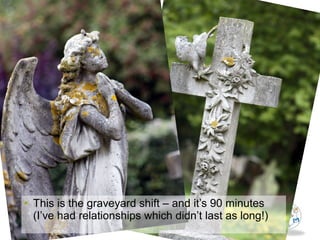
• This is the graveyard shift – and it’s 90 minutes
(I’ve had relationships which didn’t last as long!)
So.............
• I’ll try to keep things moving but if you do fall asleep
please don’t snore
Context
• As part of the VLE development the OU has joined with
Google to provide some applications
• Google will also be providing student email accounts
What will I get?
• Calendar
• Talk (IM Chat)
• Documents
–Word processor
–Spreadsheets
–Presentations
–Drawings
• Sites
http://learn.open.ac.uk/file.php/4450/!via/resourcepage/65902761/4450/moddata/resourcepage/2010-09-22-GoogleAppsToolset.pdf
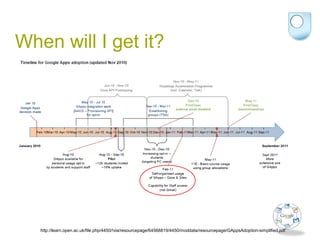
When will I get it?
http://learn.open.ac.uk/file.php/4450/!via/resourcepage/64568819/4450/moddata/resourcepage/GAppsAdoption-simplified.pdf
Overarching principles
• Available wherever an internet connection can be made
• Can be accessed on some mobile devices
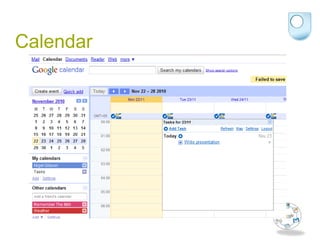
Let’s look at the tools - Calendar
• Can be synchronised with other calendars (Outlook and
others) and import/export CSV files
• Integrate with other online tools such as “Remember
the milk” and weather forecast
Calendar
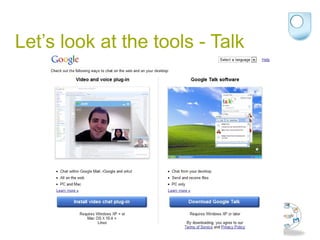
Let’s look at the tools - Talk
Let’s look at the tools - Documents
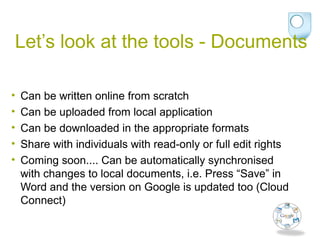
• Can be written online from scratch
• Can be uploaded from local application
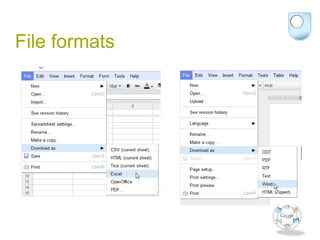
• Can be downloaded in the appropriate formats
• Share with individuals with read-only or full edit rights
• Coming soon.... Can be automatically synchronised
with changes to local documents, i.e. Press “Save” in
Word and the version on Google is updated too (Cloud
Connect)
File formats
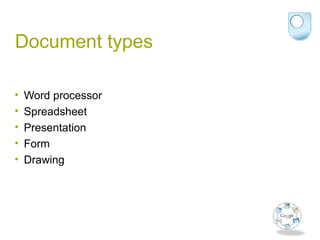
Document types
• Word processor
• Spreadsheet
• Presentation
• Form
• Drawing
Let’s look at the tools - Sites
• Create your own web sites very quickly
• Useful for supporting specific events, i.e. Tutorials
• Can be used as a way of aggregating resources
Summary
• Lots of new toys
• Some might be of use
• Any questions so far?

Google apps

  • 1.
    Nigel Gibson –November 2010
  • 2.
    Who are we? •Quick intros
  • 3.
    Objective • To lookat the tools being made available to us • To exchange some ideas about how they might be used –We’ll try to make something! • To point out some useful resources that you can check out later
  • 4.
    Constraints • I don’tknow how specific modules might use them • I don’t know how they might be developed • If I list everything I don’t know we’ll be here forever......
  • 5.
    Process • I’ll showsome slides explaining the background –(Death by PowerPoint – you know it makes sense!) • Then we’ll play with some online stuff • We’ll create a resource for reference • Or, if the connection falls over, I’ll try to explain things using the medium of interpretive dance
  • 6.
    The online stuff •Will be on my Google account as I don’t have access through TutorHome yet
  • 7.
    • This isthe graveyard shift – and it’s 90 minutes (I’ve had relationships which didn’t last as long!)
  • 8.
    So............. • I’ll tryto keep things moving but if you do fall asleep please don’t snore
  • 9.
    Context • As partof the VLE development the OU has joined with Google to provide some applications • Google will also be providing student email accounts
  • 10.
    What will Iget? • Calendar • Talk (IM Chat) • Documents –Word processor –Spreadsheets –Presentations –Drawings • Sites http://learn.open.ac.uk/file.php/4450/!via/resourcepage/65902761/4450/moddata/resourcepage/2010-09-22-GoogleAppsToolset.pdf
  • 11.
    When will Iget it? http://learn.open.ac.uk/file.php/4450/!via/resourcepage/64568819/4450/moddata/resourcepage/GAppsAdoption-simplified.pdf
  • 12.
    Overarching principles • Availablewherever an internet connection can be made • Can be accessed on some mobile devices
  • 13.
    Let’s look atthe tools - Calendar • Can be synchronised with other calendars (Outlook and others) and import/export CSV files • Integrate with other online tools such as “Remember the milk” and weather forecast
  • 14.
  • 15.
    Let’s look atthe tools - Talk
  • 16.
    Let’s look atthe tools - Documents • Can be written online from scratch • Can be uploaded from local application • Can be downloaded in the appropriate formats • Share with individuals with read-only or full edit rights • Coming soon.... Can be automatically synchronised with changes to local documents, i.e. Press “Save” in Word and the version on Google is updated too (Cloud Connect)
  • 17.
  • 18.
    Document types • Wordprocessor • Spreadsheet • Presentation • Form • Drawing
  • 19.
    Let’s look atthe tools - Sites • Create your own web sites very quickly • Useful for supporting specific events, i.e. Tutorials • Can be used as a way of aggregating resources
  • 20.
    Summary • Lots ofnew toys • Some might be of use • Any questions so far?