Google Analytics
Google Analytics Presentation
What is Google Analytics?
In SEO there are so many factors that are important for your website
and Google Analytics is one of them it’s very beneficial for your
website in SEO, that allows you to analyze the Insight of your
website for marketing purpose,which gives you every detail of users
and how users are interacting with your website and it also provide
the information about users location,devices,sessions,conversions
etc.
How to integrate Google Analytics ?
1. First make an account on Google Analytics.
2. Then goes to admin section and click on create account.
3. After adding a account Then you have to add a tracking code of
Google analytics to your wordpress website so that Google
analytics can collect data of your website.(given in the picture
below)
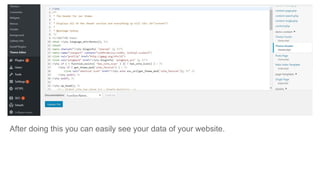
4. After copying Tracking Code go to your wordpress website > Dashboard >
Appearance > Theme editor > select Theme header and paste it. (picture given
below)
After doing this you can easily see your data of your website.
Overview of Google Analytics
There are 4 important tabs in Google Analytics.
1. Home
2. Customization
3. Reports
- Realtime
-Audience
-Acquisition
-Behavior
-Conversion
4. Admin
Conversion Rate- is the
percentage of website visitors
who buy something on the site.
Sessions- how users interacting
with your website during set
period of time on your website
before they leave.
Home- We can see the overall data of your website and active users and their
activities. Some terms you should know about this section-
Users- number of new and returning people who visit your website during a set
period of time.
Revenue- number of transaction of purchased product.
Customization - This helps you to create and customize report that you made and
decides how the reports should be displayed. You can also create custom alerts
which means it gives you notification on email about changes in website traffic like
-sudden traffic drop, traffic spike or conversion etc. to solve problems of your website
immediately.
Real time- overview of how many users are on your site right now, which pages or
events they're interacting with during a set period of time.
.
Now you can see there are more terms in real report that you should know in
detail.These terms will tell you about every detail of users in depth so first is
Location- shows the current location of active users country wise on site.
Traffic sources- shows the source through which people found your site for
example Direct Traffic, Referring, Urls Search Engines, Other.
Content- shows the current active users on which pages/screens have been
viewed by them in .
Events- shows an event action taken by active users during their session.
Conversion- shows the number of active users who completed each goal, and the
percentage of total users who completed each goal by them.
Audience- overview of active users who showed common activities,
attributes,location,language,devices or interest in a particular set period of time.
In Audience section there are more terms in audience report that you should know
detail of users in depth.
Active users- shows about users and new users and how many times they visited
your website in the last 7 or 30 days in the selected time period.
Demographics- shows about the age, gender or interests of user.
Interests- shows data about how users browse about your website by expressing
their interest in affinity category and when user is ready to purchase products
activities or services in the specified category called In- Markert category and by
other categories etc.
Geo- shows about the language and location of users.
Behavior- shows about the new and returning visitors and details of session and
bounce rate.
Technology- shows about browser and network of users.
Mobile- shows about the devices of user like desktop,tablet or mobile.
Benchmarking- It compares your site's performance to previous results and helps
to improve your site with your competitors.
User Flow- it defines how a user performs a task, how they navigate through your
site, where they exit during the website visit step-by-step in user flow diagram
based on a selected dimension.
Acquisition this is the key section which tells you overview of where your visitors
originated from, such as search engines, social networks or website referrals.
In Acquisition section there are more terms that you should know in depth.
All Traffic- it shows about the different type of data like-
Channel it shows groups of sources and there are some default channels such as
organic,direct,referral,social,paid search,other,affiliates,display.
Treemap- it is use to display hierarchy of your data in a tree like structure.
Source/medium- it shows the origin of traffic through source means search engine (ex
google ) or domain and medium means category of the source (ex. organic search).
Referrals- user that came to your site from sources and clicks on a hyperlink to go to
a new page on a different website it define as a referral link.
Behavior this section will tell you about what pages users visit and what actions
they take while visiting on your website in a particular set period of time.
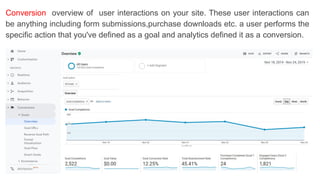
Conversion overview of user interactions on your site. These user interactions can
be anything including form submissions,purchase downloads etc. a user performs the
specific action that you've defined as a goal and analytics defined it as a conversion.
Overview- when a user may view the same page several times and each view is
counted as a pageview and a single user views a page more than once during the
same visit, only the original view is counted as a unique pageviews and when a user
means if you visit a single article or page on a website and then leave, that factor
counted as a bounce rate it also shows that when the first page user view to the last
page they visit before leaving your site called behavior flow.
Site content- it shows that what page or content performs best on your website.
Site speed- it hows a graph of the average load time of all pages throughout your
website.
Site content- when a user Use your website’s search box to perform a search on your
website.
Events- you'll need to set up event tracking code on your website and it allows you to
track specific interactions such as contact us etc.
Admin- this section is use to create accounts, tracking codes,adding properties ,
linking your account with website and you can change permissions etc.

Google Analytics Tutorial

  • 1.
  • 2.
    What is GoogleAnalytics? In SEO there are so many factors that are important for your website and Google Analytics is one of them it’s very beneficial for your website in SEO, that allows you to analyze the Insight of your website for marketing purpose,which gives you every detail of users and how users are interacting with your website and it also provide the information about users location,devices,sessions,conversions etc.
  • 3.
    How to integrateGoogle Analytics ? 1. First make an account on Google Analytics. 2. Then goes to admin section and click on create account. 3. After adding a account Then you have to add a tracking code of Google analytics to your wordpress website so that Google analytics can collect data of your website.(given in the picture below)
  • 4.
    4. After copyingTracking Code go to your wordpress website > Dashboard > Appearance > Theme editor > select Theme header and paste it. (picture given below)
  • 5.
    After doing thisyou can easily see your data of your website.
  • 6.
    Overview of GoogleAnalytics There are 4 important tabs in Google Analytics. 1. Home 2. Customization 3. Reports - Realtime -Audience -Acquisition -Behavior -Conversion 4. Admin
  • 7.
    Conversion Rate- isthe percentage of website visitors who buy something on the site. Sessions- how users interacting with your website during set period of time on your website before they leave. Home- We can see the overall data of your website and active users and their activities. Some terms you should know about this section- Users- number of new and returning people who visit your website during a set period of time. Revenue- number of transaction of purchased product.
  • 8.
    Customization - Thishelps you to create and customize report that you made and decides how the reports should be displayed. You can also create custom alerts which means it gives you notification on email about changes in website traffic like -sudden traffic drop, traffic spike or conversion etc. to solve problems of your website immediately.
  • 9.
    Real time- overviewof how many users are on your site right now, which pages or events they're interacting with during a set period of time. .
  • 10.
    Now you cansee there are more terms in real report that you should know in detail.These terms will tell you about every detail of users in depth so first is Location- shows the current location of active users country wise on site. Traffic sources- shows the source through which people found your site for example Direct Traffic, Referring, Urls Search Engines, Other. Content- shows the current active users on which pages/screens have been viewed by them in . Events- shows an event action taken by active users during their session. Conversion- shows the number of active users who completed each goal, and the percentage of total users who completed each goal by them.
  • 11.
    Audience- overview ofactive users who showed common activities, attributes,location,language,devices or interest in a particular set period of time.
  • 12.
    In Audience sectionthere are more terms in audience report that you should know detail of users in depth. Active users- shows about users and new users and how many times they visited your website in the last 7 or 30 days in the selected time period. Demographics- shows about the age, gender or interests of user. Interests- shows data about how users browse about your website by expressing their interest in affinity category and when user is ready to purchase products activities or services in the specified category called In- Markert category and by other categories etc. Geo- shows about the language and location of users. Behavior- shows about the new and returning visitors and details of session and bounce rate.
  • 13.
    Technology- shows aboutbrowser and network of users. Mobile- shows about the devices of user like desktop,tablet or mobile. Benchmarking- It compares your site's performance to previous results and helps to improve your site with your competitors. User Flow- it defines how a user performs a task, how they navigate through your site, where they exit during the website visit step-by-step in user flow diagram based on a selected dimension.
  • 14.
    Acquisition this isthe key section which tells you overview of where your visitors originated from, such as search engines, social networks or website referrals.
  • 15.
    In Acquisition sectionthere are more terms that you should know in depth. All Traffic- it shows about the different type of data like- Channel it shows groups of sources and there are some default channels such as organic,direct,referral,social,paid search,other,affiliates,display. Treemap- it is use to display hierarchy of your data in a tree like structure. Source/medium- it shows the origin of traffic through source means search engine (ex google ) or domain and medium means category of the source (ex. organic search). Referrals- user that came to your site from sources and clicks on a hyperlink to go to a new page on a different website it define as a referral link.
  • 16.
    Behavior this sectionwill tell you about what pages users visit and what actions they take while visiting on your website in a particular set period of time.
  • 17.
    Conversion overview ofuser interactions on your site. These user interactions can be anything including form submissions,purchase downloads etc. a user performs the specific action that you've defined as a goal and analytics defined it as a conversion.
  • 18.
    Overview- when auser may view the same page several times and each view is counted as a pageview and a single user views a page more than once during the same visit, only the original view is counted as a unique pageviews and when a user means if you visit a single article or page on a website and then leave, that factor counted as a bounce rate it also shows that when the first page user view to the last page they visit before leaving your site called behavior flow. Site content- it shows that what page or content performs best on your website. Site speed- it hows a graph of the average load time of all pages throughout your website. Site content- when a user Use your website’s search box to perform a search on your website. Events- you'll need to set up event tracking code on your website and it allows you to track specific interactions such as contact us etc.
  • 19.
    Admin- this sectionis use to create accounts, tracking codes,adding properties , linking your account with website and you can change permissions etc.