Robust Risk Management is
Essential in ALL Business
Endeavours
“Why a spreadsheet will not cut it…”
Andrew Ferguson, FIE Aust,
CPEng, CPL, MBA,
BEng
Risk Decisions Pty Ltd
4 Oct 2015
Phone: 0408 466 276
andrew.ferguson@riskdecisions.com
© Risk Decisions, 2015
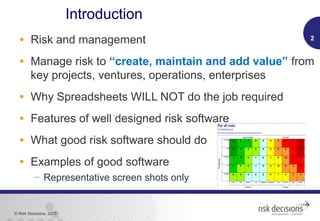
Introduction
• Risk and management
• Manage risk to “create, maintain and add value” from
key projects, ventures, operations, enterprises
• Why Spreadsheets WILL NOT do the job required
• Features of well designed risk software
• What good risk software should do
• Examples of good software
 Representative screen shots only
2
© Risk Decisions, 2015
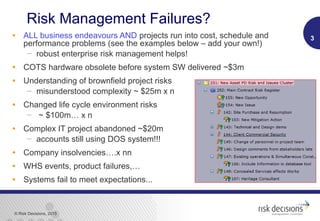
Risk Management Failures?
• ALL business endeavours AND projects run into cost, schedule and
performance problems (see the examples below – add your own!)
 robust enterprise risk management helps!
• COTS hardware obsolete before system SW delivered ~$3m
• Understanding of brownfield project risks
 misunderstood complexity ~ $25m x n
• Changed life cycle environment risks
 ~ $100m… x n
• Complex IT project abandoned ~$20m
 accounts still using DOS system!!!
• Company insolvencies….x nn
• WHS events, product failures,…
• Systems fail to meet expectations...
3
© Risk Decisions, 2015
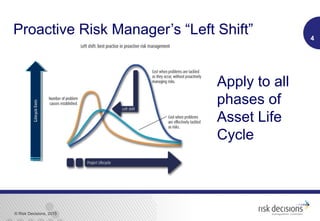
Proactive Risk Manager’s “Left Shift” 4LifecycleCosts
LifecycleCosts
Apply to all
phases of
Asset Life
Cycle
© Risk Decisions, 2015
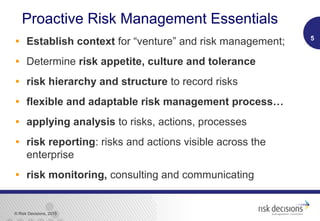
Proactive Risk Management Essentials
• Establish context for “venture” and risk management;
• Determine risk appetite, culture and tolerance
• risk hierarchy and structure to record risks
• flexible and adaptable risk management process…
• applying analysis to risks, actions, processes
• risk reporting: risks and actions visible across the
enterprise
• risk monitoring, consulting and communicating
5
© Risk Decisions, 2015
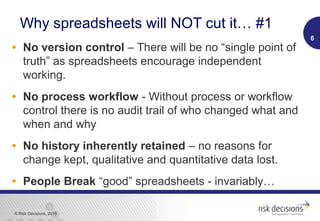
Why spreadsheets will NOT cut it… #1
• No version control – There will be no “single point of
truth” as spreadsheets encourage independent
working.
• No process workflow - Without process or workflow
control there is no audit trail of who changed what and
when and why
• No history inherently retained – no reasons for
change kept, qualitative and quantitative data lost.
• People Break “good” spreadsheets - invariably…
6
© Risk Decisions, 2015
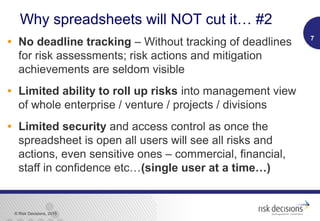
Why spreadsheets will NOT cut it… #2
• No deadline tracking – Without tracking of deadlines
for risk assessments; risk actions and mitigation
achievements are seldom visible
• Limited ability to roll up risks into management view
of whole enterprise / venture / projects / divisions
• Limited security and access control as once the
spreadsheet is open all users will see all risks and
actions, even sensitive ones – commercial, financial,
staff in confidence etc…(single user at a time…)
7
© Risk Decisions, 2015
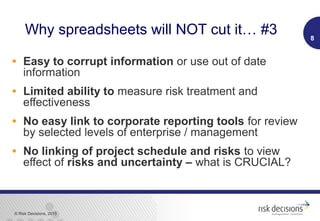
Why spreadsheets will NOT cut it… #3
• Easy to corrupt information or use out of date
information
• Limited ability to measure risk treatment and
effectiveness
• No easy link to corporate reporting tools for review
by selected levels of enterprise / management
• No linking of project schedule and risks to view
effect of risks and uncertainty – what is CRUCIAL?
8
© Risk Decisions, 2015
Benefits of Good Risk Software #1
• Standardisation across organisation / divisions
• User Configurable to suit level of user
 Smaller projects need less functions but same power
• Web Based – easy multi user access across time
zones, clients, stakeholders
• Multiple Simultaneous Access – no overwriting, ability to
selectively lock parts of project / enterprise structure
9
© Risk Decisions, 2015
Benefits of Good Risk Software #2
• Data Security - visibility and access can be
controlled
• Integrated Schedule / Costs risk assessment
 Import directly from key Project schedule tools (MS
Project, Primavera…)
• Enterprise Risk Management
 Scalable to manage risk, opportunities and issues
across enterprise functions, projects, operations,
divisions, subcontractors – link to key objectives
© Risk Decisions, 2015
• Smaller projects gain access to world class
tool through concurrent licencing – trains
people for large projects – common tool /
process use
• Executive reporting
 Wide range of flexible reports - standard, ad hoc,
 Charts, tables, dashboards,
 pdf, MS Office outputs…
 Integration into enterprise reporting tools
11
Benefits of Good Risk Software #3
© Risk Decisions, 2015
• Speed and efficiency!
 Excel based systems soak up time on data consolidation,
manipulation, reformatting, quality and error checking
(~84% have errors)
 A robust and mature Risk Management SW Tool enables
this time to be spent on adding value to the risk based
decision making process that is essential to good
management
• Out of the box usability – low cost implementation
and maintenance over life cycle
• Good Support - Technical / Business and Training
12
Benefits of Good Risk Software #4
© Risk Decisions, 2015
• The Following slides show some examples of
what good risk software can do
 We agree that in some cases a spreadsheet can do the
same or a similar function
• But not without careful design and ongoing effort
• And someone can break or change the settings unknowingly
• Only one person can use it at a time
• You will have difficulty in saving the history and trends
• And so on
• View and Enjoy
13
Example Graphics from Good Risk Software
© Risk Decisions, 2015
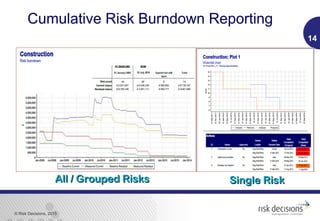
Cumulative Risk Burndown Reporting
14
All / Grouped RisksAll / Grouped Risks Single RiskSingle Risk
© Risk Decisions, 2015
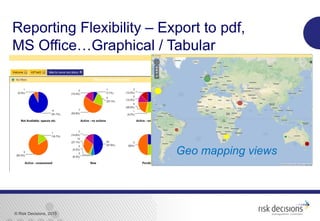
Reporting Flexibility – Export to pdf,
MS Office…Graphical / Tabular
Geo mapping views
© Risk Decisions, 2015
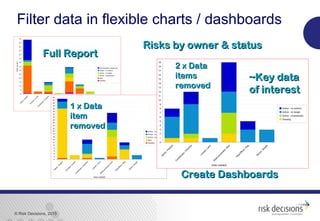
Filter data in flexible charts / dashboards
~Key data~Key data
of interestof interest
1 x Data1 x Data
itemitem
removedremoved
Full ReportFull Report
Risks by owner & statusRisks by owner & status
2 x Data2 x Data
itemsitems
removedremoved
Create DashboardsCreate Dashboards
© Risk Decisions, 2015
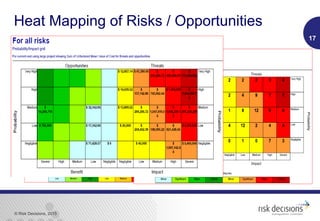
Heat Mapping of Risks / Opportunities
17
© Risk Decisions, 2015
18
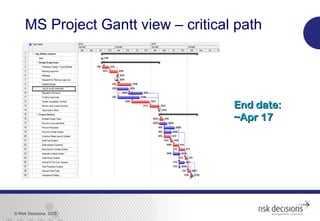
End date:End date:
~Apr 17~Apr 17
MS Project Gantt view – critical path
© Risk Decisions, 2015
19
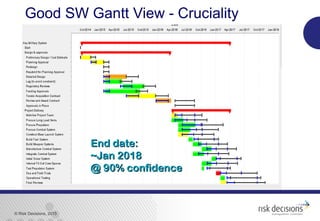
Good SW Gantt View - Cruciality
End date:End date:
~Jan 2018~Jan 2018
@ 90% confidence@ 90% confidence
© Risk Decisions, 2015
20
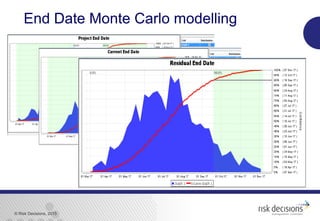
End Date Monte Carlo modelling
© Risk Decisions, 2015
21
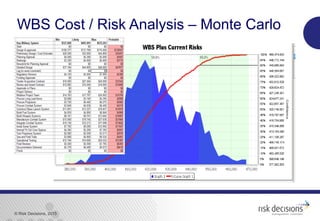
WBS Cost / Risk Analysis – Monte Carlo
© Risk Decisions, 2015
22
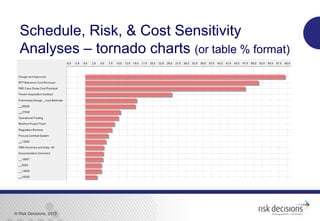
Schedule, Risk, & Cost Sensitivity
Analyses – tornado charts (or table % format)
© Risk Decisions, 2015
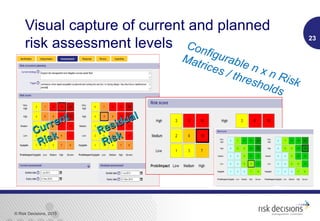
Visual capture of current and planned
risk assessment levels 23
Configurable n x n Risk
Matrices / thresholds
Current
Current
Risk
Risk Residual
Residual
Risk
Risk
© Risk Decisions, 2015
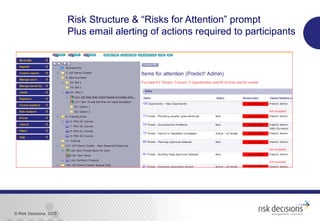
Risk Structure & “Risks for Attention” prompt
Plus email alerting of actions required to participants
© Risk Decisions, 2015
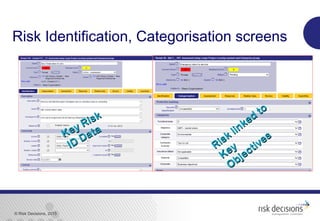
Risk Identification, Categorisation screens
Risk linked
to
Risk linked
to
Key
Key
Objectives
ObjectivesKey Risk
Key Risk
ID Data
ID Data
© Risk Decisions, 2015
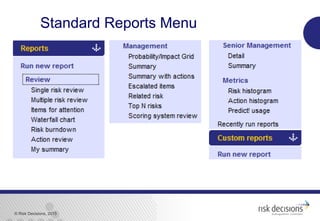
Standard Reports Menu
© Risk Decisions, 2015
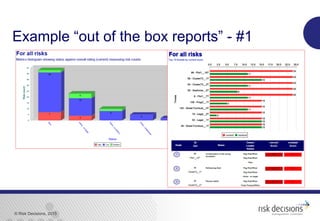
Example “out of the box reports” - #1
© Risk Decisions, 2015
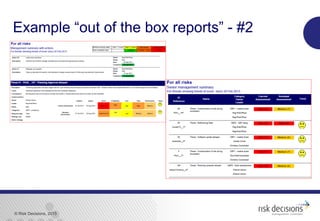
Example “out of the box reports” - #2
© Risk Decisions, 2015
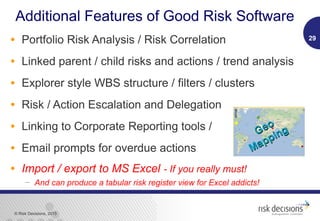
Additional Features of Good Risk Software
• Portfolio Risk Analysis / Risk Correlation
• Linked parent / child risks and actions / trend analysis
• Explorer style WBS structure / filters / clusters
• Risk / Action Escalation and Delegation
• Linking to Corporate Reporting tools /
• Email prompts for overdue actions
• Import / export to MS Excel - If you really must!
 And can produce a tabular risk register view for Excel addicts!
29
Geo
Geo
Mapping
Mapping
© Risk Decisions, 2015
Conclusions
• “…if a company is using a spreadsheet for their risk
management; it suggests that their risk management
process is superficial and probably ineffective…”
 Source: Senior Manager (with Government and Industry experience)
• Sound asset management and project management
NEEDS proactive risk management over the full asset
life cycle
• A spreadsheet will NOT do the job.
• Good risk management culture and software WILL!
30
© Risk Decisions, 2015
MS Excel
Import schedule or create structure
0%
5%
10%
15%
20%
25%
30%
35%
40%
45%
50%
55%
60%
65%
70%
75%
80%
85%
90%
95%
Lag before Building Regs
Fit Window s
All permissions in Place
Cast Floor
Mortgage Application
Fit Doors
Fit Door Frames
Review and Award Contract
Procure Double Glazing
Tender Construction Contract
Detailed Design
Match & Procure Bricks
Construct Roof
Paint
Plaster Walls and Ceilings
1st Fix Services
2nd Fix Services
Build Walls to DPClevel
Preliminary Design / Cost Estimate
Procure Plumbing /Sanitary Ware
Build Walls to Roof Level
Mobilise tosite
Construct Foundations
Building Regulations
Construction
Planning Approval
Design & approvals
Tornado Chart for AmberGold Project
0%
5%
10%
15%
20%
25%
30%
35%
40%
45%
50%
55%
60%
65%
70%
75%
80%
85%
90%
95%
Lag before Building Regs
Fit Window s
All permissions in Place
Cast Floor
Mortgage Application
Fit Doors
Fit Door Frames
Review and Aw ard Contract
Procure Double Glazing
Tender Construction Contract
Detailed Design
Match & Procure Bricks
Construct Roof
Paint
Plaster Walls and Ceilings
1st Fix Services
2nd Fix Services
Build Walls to DPC level
Preliminary Design / Cost Estimate
Procure Plumbing /Sanitary Ware
Build Walls to Roof Level
Mobilise to site
Construct Foundations
Building Regulations
Construction
Planning Approval
Design & approvals
Tornado Chart for AmberGold Project
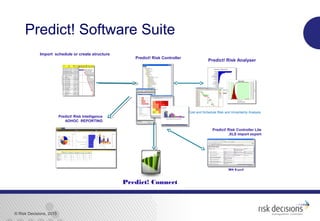
Predict! Risk Analyser
Predict! Risk Controller Lite
.XLS import export
Predict! Risk Controller
Cost and Schedule Risk and Uncertainty Analysis
Predict! Risk Intelligence
ADHOC REPORTING
Predict! Connect
Predict! Software Suite
© Risk Decisions, 2015
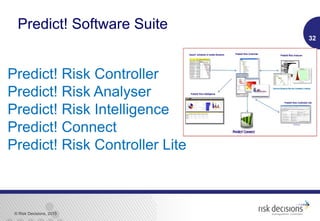
Predict! Risk Controller
Predict! Risk Analyser
Predict! Risk Intelligence
Predict! Connect
Predict! Risk Controller Lite
32
Predict! Software Suite
© Risk Decisions, 2015
QuestionsQuestions
Are there rocks inAre there rocks in
clouds?clouds?

Good Risk Software and Why a Spreadsheet will not DO IT!

  • 1.
    Robust Risk Managementis Essential in ALL Business Endeavours “Why a spreadsheet will not cut it…” Andrew Ferguson, FIE Aust, CPEng, CPL, MBA, BEng Risk Decisions Pty Ltd 4 Oct 2015 Phone: 0408 466 276 andrew.ferguson@riskdecisions.com
  • 2.
    © Risk Decisions,2015 Introduction • Risk and management • Manage risk to “create, maintain and add value” from key projects, ventures, operations, enterprises • Why Spreadsheets WILL NOT do the job required • Features of well designed risk software • What good risk software should do • Examples of good software  Representative screen shots only 2
  • 3.
    © Risk Decisions,2015 Risk Management Failures? • ALL business endeavours AND projects run into cost, schedule and performance problems (see the examples below – add your own!)  robust enterprise risk management helps! • COTS hardware obsolete before system SW delivered ~$3m • Understanding of brownfield project risks  misunderstood complexity ~ $25m x n • Changed life cycle environment risks  ~ $100m… x n • Complex IT project abandoned ~$20m  accounts still using DOS system!!! • Company insolvencies….x nn • WHS events, product failures,… • Systems fail to meet expectations... 3
  • 4.
    © Risk Decisions,2015 Proactive Risk Manager’s “Left Shift” 4LifecycleCosts LifecycleCosts Apply to all phases of Asset Life Cycle
  • 5.
    © Risk Decisions,2015 Proactive Risk Management Essentials • Establish context for “venture” and risk management; • Determine risk appetite, culture and tolerance • risk hierarchy and structure to record risks • flexible and adaptable risk management process… • applying analysis to risks, actions, processes • risk reporting: risks and actions visible across the enterprise • risk monitoring, consulting and communicating 5
  • 6.
    © Risk Decisions,2015 Why spreadsheets will NOT cut it… #1 • No version control – There will be no “single point of truth” as spreadsheets encourage independent working. • No process workflow - Without process or workflow control there is no audit trail of who changed what and when and why • No history inherently retained – no reasons for change kept, qualitative and quantitative data lost. • People Break “good” spreadsheets - invariably… 6
  • 7.
    © Risk Decisions,2015 Why spreadsheets will NOT cut it… #2 • No deadline tracking – Without tracking of deadlines for risk assessments; risk actions and mitigation achievements are seldom visible • Limited ability to roll up risks into management view of whole enterprise / venture / projects / divisions • Limited security and access control as once the spreadsheet is open all users will see all risks and actions, even sensitive ones – commercial, financial, staff in confidence etc…(single user at a time…) 7
  • 8.
    © Risk Decisions,2015 Why spreadsheets will NOT cut it… #3 • Easy to corrupt information or use out of date information • Limited ability to measure risk treatment and effectiveness • No easy link to corporate reporting tools for review by selected levels of enterprise / management • No linking of project schedule and risks to view effect of risks and uncertainty – what is CRUCIAL? 8
  • 9.
    © Risk Decisions,2015 Benefits of Good Risk Software #1 • Standardisation across organisation / divisions • User Configurable to suit level of user  Smaller projects need less functions but same power • Web Based – easy multi user access across time zones, clients, stakeholders • Multiple Simultaneous Access – no overwriting, ability to selectively lock parts of project / enterprise structure 9
  • 10.
    © Risk Decisions,2015 Benefits of Good Risk Software #2 • Data Security - visibility and access can be controlled • Integrated Schedule / Costs risk assessment  Import directly from key Project schedule tools (MS Project, Primavera…) • Enterprise Risk Management  Scalable to manage risk, opportunities and issues across enterprise functions, projects, operations, divisions, subcontractors – link to key objectives
  • 11.
    © Risk Decisions,2015 • Smaller projects gain access to world class tool through concurrent licencing – trains people for large projects – common tool / process use • Executive reporting  Wide range of flexible reports - standard, ad hoc,  Charts, tables, dashboards,  pdf, MS Office outputs…  Integration into enterprise reporting tools 11 Benefits of Good Risk Software #3
  • 12.
    © Risk Decisions,2015 • Speed and efficiency!  Excel based systems soak up time on data consolidation, manipulation, reformatting, quality and error checking (~84% have errors)  A robust and mature Risk Management SW Tool enables this time to be spent on adding value to the risk based decision making process that is essential to good management • Out of the box usability – low cost implementation and maintenance over life cycle • Good Support - Technical / Business and Training 12 Benefits of Good Risk Software #4
  • 13.
    © Risk Decisions,2015 • The Following slides show some examples of what good risk software can do  We agree that in some cases a spreadsheet can do the same or a similar function • But not without careful design and ongoing effort • And someone can break or change the settings unknowingly • Only one person can use it at a time • You will have difficulty in saving the history and trends • And so on • View and Enjoy 13 Example Graphics from Good Risk Software
  • 14.
    © Risk Decisions,2015 Cumulative Risk Burndown Reporting 14 All / Grouped RisksAll / Grouped Risks Single RiskSingle Risk
  • 15.
    © Risk Decisions,2015 Reporting Flexibility – Export to pdf, MS Office…Graphical / Tabular Geo mapping views
  • 16.
    © Risk Decisions,2015 Filter data in flexible charts / dashboards ~Key data~Key data of interestof interest 1 x Data1 x Data itemitem removedremoved Full ReportFull Report Risks by owner & statusRisks by owner & status 2 x Data2 x Data itemsitems removedremoved Create DashboardsCreate Dashboards
  • 17.
    © Risk Decisions,2015 Heat Mapping of Risks / Opportunities 17
  • 18.
    © Risk Decisions,2015 18 End date:End date: ~Apr 17~Apr 17 MS Project Gantt view – critical path
  • 19.
    © Risk Decisions,2015 19 Good SW Gantt View - Cruciality End date:End date: ~Jan 2018~Jan 2018 @ 90% confidence@ 90% confidence
  • 20.
    © Risk Decisions,2015 20 End Date Monte Carlo modelling
  • 21.
    © Risk Decisions,2015 21 WBS Cost / Risk Analysis – Monte Carlo
  • 22.
    © Risk Decisions,2015 22 Schedule, Risk, & Cost Sensitivity Analyses – tornado charts (or table % format)
  • 23.
    © Risk Decisions,2015 Visual capture of current and planned risk assessment levels 23 Configurable n x n Risk Matrices / thresholds Current Current Risk Risk Residual Residual Risk Risk
  • 24.
    © Risk Decisions,2015 Risk Structure & “Risks for Attention” prompt Plus email alerting of actions required to participants
  • 25.
    © Risk Decisions,2015 Risk Identification, Categorisation screens Risk linked to Risk linked to Key Key Objectives ObjectivesKey Risk Key Risk ID Data ID Data
  • 26.
    © Risk Decisions,2015 Standard Reports Menu
  • 27.
    © Risk Decisions,2015 Example “out of the box reports” - #1
  • 28.
    © Risk Decisions,2015 Example “out of the box reports” - #2
  • 29.
    © Risk Decisions,2015 Additional Features of Good Risk Software • Portfolio Risk Analysis / Risk Correlation • Linked parent / child risks and actions / trend analysis • Explorer style WBS structure / filters / clusters • Risk / Action Escalation and Delegation • Linking to Corporate Reporting tools / • Email prompts for overdue actions • Import / export to MS Excel - If you really must!  And can produce a tabular risk register view for Excel addicts! 29 Geo Geo Mapping Mapping
  • 30.
    © Risk Decisions,2015 Conclusions • “…if a company is using a spreadsheet for their risk management; it suggests that their risk management process is superficial and probably ineffective…”  Source: Senior Manager (with Government and Industry experience) • Sound asset management and project management NEEDS proactive risk management over the full asset life cycle • A spreadsheet will NOT do the job. • Good risk management culture and software WILL! 30
  • 31.
    © Risk Decisions,2015 MS Excel Import schedule or create structure 0% 5% 10% 15% 20% 25% 30% 35% 40% 45% 50% 55% 60% 65% 70% 75% 80% 85% 90% 95% Lag before Building Regs Fit Window s All permissions in Place Cast Floor Mortgage Application Fit Doors Fit Door Frames Review and Award Contract Procure Double Glazing Tender Construction Contract Detailed Design Match & Procure Bricks Construct Roof Paint Plaster Walls and Ceilings 1st Fix Services 2nd Fix Services Build Walls to DPClevel Preliminary Design / Cost Estimate Procure Plumbing /Sanitary Ware Build Walls to Roof Level Mobilise tosite Construct Foundations Building Regulations Construction Planning Approval Design & approvals Tornado Chart for AmberGold Project 0% 5% 10% 15% 20% 25% 30% 35% 40% 45% 50% 55% 60% 65% 70% 75% 80% 85% 90% 95% Lag before Building Regs Fit Window s All permissions in Place Cast Floor Mortgage Application Fit Doors Fit Door Frames Review and Aw ard Contract Procure Double Glazing Tender Construction Contract Detailed Design Match & Procure Bricks Construct Roof Paint Plaster Walls and Ceilings 1st Fix Services 2nd Fix Services Build Walls to DPC level Preliminary Design / Cost Estimate Procure Plumbing /Sanitary Ware Build Walls to Roof Level Mobilise to site Construct Foundations Building Regulations Construction Planning Approval Design & approvals Tornado Chart for AmberGold Project Predict! Risk Analyser Predict! Risk Controller Lite .XLS import export Predict! Risk Controller Cost and Schedule Risk and Uncertainty Analysis Predict! Risk Intelligence ADHOC REPORTING Predict! Connect Predict! Software Suite
  • 32.
    © Risk Decisions,2015 Predict! Risk Controller Predict! Risk Analyser Predict! Risk Intelligence Predict! Connect Predict! Risk Controller Lite 32 Predict! Software Suite
  • 33.
    © Risk Decisions,2015 QuestionsQuestions Are there rocks inAre there rocks in clouds?clouds?

Editor's Notes

  • #3 This paper will discuss the need for a robust risk management culture in the management of capital assets including software systems, defence systems as well as commercial assets including water treatment infrastructure, mining assets and utilities (including power distribution, telecommunications and power generation). Risk Management Tool Options purpose designed software OR spreadsheets bespoke databases MS Word tables and various manual methods Latter methods have failings companies rarely track mitigation actions to risk mitigation or treatment results various manual methods which can include action plans, meeting agendas, meeting minutes, costing workshop notes, and so on.
  • #4 Many projects run into cost, schedule and performance problems robust risk management helps! Purchase of $3M system hardware that became obsolete before SW was ready… Design complexity of military vehicle upgrade overwhelmed design team… customer misunderstood complexity risks to project Retro fit of Air conditioning system for European main battle tank $10M lost when project cancelled Design and through life problems of Collins Submarine Changed operating environment affected systems reliability over life cycle Complex Company finance systems abandoned after $20M spent Company still uses their old DOS based accounting system
  • #5 Key aim is to discover and treat risks early PROACTIVELY. Risk management is essential in asset management Risk based decision making - essential in all stages These stages include: design and development acquisition / production operations and maintenance disposal
  • #6 Establish context for asset and risk management; Determine risk appetite, culture and tolerance risk hierarchy and structure to record risks and opportunities; flexible and adaptable risk management process Understandable – including the managers; system of identifying, assessing, approving risks, managing and rejecting risk; encouraging all management and staff to identify and propose possible risks; allocating responsibilities for the management, mitigation and treatment of risks; managing and tracking mitigation or avoidance actions for each risk; applying analysis (mathematics and statistics) to risk management processes; and risk reporting: making risks and their management actions visible across the enterprise risk monitoring and communicating
  • #13 84% error rate quoted from UK data – probably worse in the colonies! Recent spreadsheet summation missed a $750K RISK impact
  • #14 84% error rate quoted from UK data – probably worse in the colonies! Recent spreadsheet summation missed a $750K RISK impact
  • #15 Explain differences between 2 charts….
  • #17 PRI chart, selectively remove data no needed, thus concentrate on key data of interest. Note number of data items reduced without “redesigning the report/chart”…
  • #19 Original MS Project gantt chart view showing critical path No indication of how critical each activity is to end date or key milestones!
  • #21 MS project 3 point estimates plus impact of “mitigated risks: = residual.
  • #23 AND SCHEDULE
  • #24 Prompt for risk commencement and expiry dates Ability to map risk levels over time across all risk in pre set report formats
  • #30 Other points to cover – option to use quanitative or qualitative inputs PRC matrix uses higher level of impact - cost, time, reputation, other user attributes needed
  • #31 Quote from senior person who had worked in both private and government enterprises. Note that the new Cwlth PGPA Act requires all government agencies to have a robust risk management system in accordance with ISO 31000
  • #32 Our Predict! software provides a complete and fully integrated risk management and analysis package: Predict! Risk Controller: get a true enterprise view of risk with a state-of-the-art web-based risk database for identifying, assessing, managing and reporting on risks, opportunities, issues and mitigation strategies. Predict! Risk Analyser: set realistic budgets, know how much contingency you need, and find the real likelihood of meeting your cost and schedule targets with the leading risk and uncertainty analysis tool. Predict! Risk Controller Lite: – make risk management easy with this Microsoft Excel interface to Predict! Risk Controller. Predict! Risk Intelligence: - an easy to use web-based reporting tool that allows you to build, share and interrogate interactive reports. Predict! Connect: - extracts data out of Predict! Risk Controller for use with any corporate reporting tool (e.g. SAP, Microsoft Reporting Services, IBM Cognos, SharePoint).