   Risks are potential problem/uncertainty that might
    affect the successful completion of a software project.
   Risk analysis and management are intended to help a
    software team understand and manage uncertainty
    during the development process.
   The work product is called a Risk Mitigation,
    Monitoring, and Management Plan (RMMM).
 Two risk Strategies :
1. Reactive strategy
  Software team does nothing till the risk becomes
  real.
2. Proactive strategy
  Risk management begins long before technical
  work starts.
  Risks are identified and prioritized by importance.
  Then team builds a plan to avoid risks if they can
  or minimize their probability of occurrence or
  establish plan if risks become real.
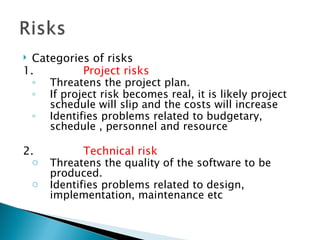
 Categories of risks
1.         Project risks
  ◦ Threatens the project plan.
  ◦ If project risk becomes real, it is likely project
     schedule will slip and the costs will increase
  ◦ Identifies problems related to budgetary,
     schedule , personnel and resource

2.             Technical risk
  o     Threatens the quality of the software to be
        produced.
    o   Identifies problems related to design,
        implementation, maintenance etc
3.Business risk
•  Threatens the viability of the software to be built.
• Eg of business risk

4. Building an excellent product that no one wants.

5. Building a product that no longer fits into the
   overall business strategy.
6. Building a product that the sales force do not how
   to sell.
7. Change of management

8. Losing budgetary
  Steps for risk analysis
2. Risk Identification
• Lists the risks associated with a specific project.
• Use a risk item checklist to identify risks

   Risk item check list – A set of questions relevant to each risk.
A project manager attains a feeling of staffing risk by answering
the following set questions---
8. Are enough people available ?
9. Are the best people available ?
10.Will the project team members be working full time / part time
   on the project ?
11.Have the staff members received necessary training?
No. of negative responses to the questions ∝ degree to which the
   project is at a staffing risk
2. Risk projection
•  Also called risk estimation.
• Rates each risk in 2 ways :

4. Find the probability of occurrence of each risk.

5. Find the impact of the problems associated with each risk.

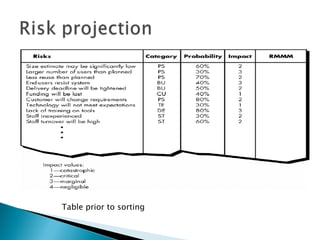
Steps 1 : Prepare a risk table.
a) Lists all risks identified in the first column.
b) Category of the risk is identified in the second column.
                 PS – project size risk.
                 TE – Technical risk.
                 BU – Business risk.
c) Probability of occurrence is entered in the third column.
   Individual team members are polled for their estimates in a
   round robin fashion until a single consensus is obtained.
d) Impact of each risk on the 4 risk components is assessed .
4 risk components are
1. Performance
If the risk becomes real will the requirements be met and will
the product be fit for its intended use?
2. Cost
If the risk becomes real will the project budget be maintained?
3. Support
If the risk becomes real will the resultant software be easy to
correct , adapt and enhance?
4. Schedule
Will the project schedule be maintained and the product will be
delivered on time if the risk becomes real?

The impact of each risk on the 4 components can be
categorized as
              1- Catastrophic
              2- Critical
              3- Marginal
              4- Negligible
The values are averaged to determine an overall impact value.
Table prior to sorting
•   Next the table is sorted by high probability
    and high impact.
•   Project manager defines a cut off line
    implying only risks above the line will be
    managed.
•   The column labeled RMMM contains a pointer
    into a Risk Mitigation Monitoring and
    Management Plan(A collection of risk
    information sheets developed for all risks
    that lie above the cutoff line)
Steps 2 : Assessing the risk impact .
a) Estimate the cost of each risk in the table.
• How to estimate the cost of each risk ?
Eg :
   Assume that the software team defines a project risk in the following
   manner:
  Risk identification. Only 70 percent of the software components
  scheduled for reuse will, in fact, be integrated into the application.
  The remaining functionality will have to be custom developed.
  Risk probability. 80% (likely).
  Risk impact. 60 reusable software components were planned. If
  only 70 percent can be used, 18 components would have to be
  developed from scratch (in addition to other custom software that
  has been scheduled for development). Since the average component
  is 100 LOC and local data indicate that the software engineering
  cost for each LOC is $14.00, the overall cost (impact) to develop the
  components would be 18 x 100 x 14 = $25,200.
b) Calculate the risk exposure foe each risk in the
  table ----
Risk exposure. RE = Prob. Of occurrence x cost of risk
                     =0.80 x 25,200 ~ $20,200.
c) Calculate the total exposure for all risks(above the
  cutoff line)

The total risk exposure provides a means for
adjusting the final cost estimates for a project.
If RE is greater than 50 % of the project cost ,
  the
viability of the project must be evaluated
3. Risk Refinement
•   During early stages of project planning, a risk may be stated
    quite generally.
•   As time passes and more is learned about the project and the
    risk, it may be possible to refine the risk.
•   One way to do this is to represent the risk in condition-
    transition-consequence (CTC)
•   Given that <condition> then there is concern that (possibly)
    <consequence>.
•   Using the CTC format for the reuse risk ----
•   Given that all reusable software components must conform to
    specific design standards and that some do not conform,
    then there is concern that (possibly) only 70 % of the planned
    reusable modules may actually be integrated into the as-built
    system, resulting in the need to custom engineer the
    remaining 30 % of components.
•   This general condition can be refined in the following
    manner:
    Sub condition 1
    Certain reusable components were developed by a third party with no
     knowledge of internal design standards.
    Sub condition 2
    Certain reusable components have been implemented in a language
    that is not supported on the target environment.
4. Risk Mitigation Monitoring and Management
All the risk analysis activities presented so far have single goal
i.e to assist the project team in developing a strategy to deal
with risk.
An effective strategy is--
6.   Risk Mitigation (avoidance)
For example,
Assume Risk -High staff turnover is noted as a project risk,
                Prob. Of occurrence -70% ( high) and
                Impact-2 (critical)
To mitigate this risk, project management must develop a
    strategy for
reducing turnover.
Among the possible steps to be taken --
   Meet with current staff to determine causes for turnover (e.g.,
    poor working conditions, low pay, and competitive job market).
   Mitigate those causes that are under our control before the project
    starts.
   Organize project teams so that information about each
    development activity is widely dispersed.
   Define documentation standards and establish mechanisms to be
    sure that documents are developed in a timely manner.
   Assign a backup staff member for every critical
    technologist.
2. Risk monitoring
   As the project proceeds, risk monitoring activities commence.
   The project manager monitors factors that may provide an
    indication of whether the risk is becoming more or less likely.

    In the case of high staff turnover, the following
    factors can be monitored:
   General attitude of team members based on project
    pressures.
   The degree to which the team has jelled.
   Interpersonal relationships among team members.
   Potential problems with compensation and benefits.
   The availability of jobs within the company and outside it.
   Also the project manager should monitor the
    effectiveness of risk mitigation steps.

   The project manager should monitor documents
    carefully to ensure that each can stand on its own
    and that each imparts information that would be
    necessary if a newcomer were forced to join the
    software team somewhere in the middle of the
    project.
3. Risk management
• Assumes that mitigation efforts have failed and that the risk

  has become a reality (a number of people announce that they
  are leaving)
• If the mitigation strategy has been followed, backup is

  available, information is documented, and knowledge has
  been dispersed across the team.
• Those individuals who are leaving are asked to stop all work

  and spend their last weeks in “knowledge transfer mode. This
  might include video-based knowledge capture, the
  development of “commentary documents,” and/or meeting
  with other team members who will remain on the project.
   The RMMM plan documents all work performed as
    part of risk analysis and are used by the project
    manager as part of the overall project plan.
   Some software teams do not develop a formal RMMM
    document. Rather, each risk is documented
    individually using a risk information sheet (RIS)
   Once RMMM has been documented and the project
    has begun, risk mitigation and monitoring steps
    commence. And if the risk becomes real then the
    project manager applies the management steps.
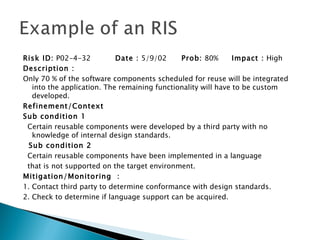
Risk ID: P02-4-32           Date : 5/9/02     Prob: 80%        Impact : High
Description :
Only 70 % of the software components scheduled for reuse will be integrated
   into the application. The remaining functionality will have to be custom
   developed.
Refinement/Context
Sub condition 1
 Certain reusable components were developed by a third party with no
   knowledge of internal design standards.
  Sub condition 2
 Certain reusable components have been implemented in a language
 that is not supported on the target environment.
Mitigation/Monitoring :
1. Contact third party to determine conformance with design standards.
2. Check to determine if language support can be acquired.
Management Plan :
• RE computed to be $20,200. Allocate this amount

  within project cost.
• Develop revised schedule assuming 18 additional

  components will have to be custom built.
• Allocate staff accordingly.

Current Status :
6/12/2010 : Mitigation steps initiated.

Risk analysis

  • 2.
    Risks are potential problem/uncertainty that might affect the successful completion of a software project.  Risk analysis and management are intended to help a software team understand and manage uncertainty during the development process.  The work product is called a Risk Mitigation, Monitoring, and Management Plan (RMMM).
  • 3.
     Two riskStrategies : 1. Reactive strategy Software team does nothing till the risk becomes real. 2. Proactive strategy Risk management begins long before technical work starts. Risks are identified and prioritized by importance. Then team builds a plan to avoid risks if they can or minimize their probability of occurrence or establish plan if risks become real.
  • 4.
     Categories ofrisks 1. Project risks ◦ Threatens the project plan. ◦ If project risk becomes real, it is likely project schedule will slip and the costs will increase ◦ Identifies problems related to budgetary, schedule , personnel and resource 2. Technical risk o Threatens the quality of the software to be produced. o Identifies problems related to design, implementation, maintenance etc
  • 5.
    3.Business risk • Threatens the viability of the software to be built. • Eg of business risk 4. Building an excellent product that no one wants. 5. Building a product that no longer fits into the overall business strategy. 6. Building a product that the sales force do not how to sell. 7. Change of management 8. Losing budgetary
  • 6.
     Stepsfor risk analysis 2. Risk Identification • Lists the risks associated with a specific project. • Use a risk item checklist to identify risks Risk item check list – A set of questions relevant to each risk. A project manager attains a feeling of staffing risk by answering the following set questions--- 8. Are enough people available ? 9. Are the best people available ? 10.Will the project team members be working full time / part time on the project ? 11.Have the staff members received necessary training? No. of negative responses to the questions ∝ degree to which the project is at a staffing risk
  • 7.
    2. Risk projection • Also called risk estimation. • Rates each risk in 2 ways : 4. Find the probability of occurrence of each risk. 5. Find the impact of the problems associated with each risk. Steps 1 : Prepare a risk table. a) Lists all risks identified in the first column. b) Category of the risk is identified in the second column. PS – project size risk. TE – Technical risk. BU – Business risk.
  • 8.
    c) Probability ofoccurrence is entered in the third column. Individual team members are polled for their estimates in a round robin fashion until a single consensus is obtained. d) Impact of each risk on the 4 risk components is assessed . 4 risk components are 1. Performance If the risk becomes real will the requirements be met and will the product be fit for its intended use? 2. Cost If the risk becomes real will the project budget be maintained? 3. Support If the risk becomes real will the resultant software be easy to correct , adapt and enhance?
  • 9.
    4. Schedule Will theproject schedule be maintained and the product will be delivered on time if the risk becomes real? The impact of each risk on the 4 components can be categorized as 1- Catastrophic 2- Critical 3- Marginal 4- Negligible The values are averaged to determine an overall impact value.
  • 10.
  • 11.
    Next the table is sorted by high probability and high impact. • Project manager defines a cut off line implying only risks above the line will be managed. • The column labeled RMMM contains a pointer into a Risk Mitigation Monitoring and Management Plan(A collection of risk information sheets developed for all risks that lie above the cutoff line)
  • 12.
    Steps 2 :Assessing the risk impact . a) Estimate the cost of each risk in the table. • How to estimate the cost of each risk ? Eg : Assume that the software team defines a project risk in the following manner: Risk identification. Only 70 percent of the software components scheduled for reuse will, in fact, be integrated into the application. The remaining functionality will have to be custom developed. Risk probability. 80% (likely). Risk impact. 60 reusable software components were planned. If only 70 percent can be used, 18 components would have to be developed from scratch (in addition to other custom software that has been scheduled for development). Since the average component is 100 LOC and local data indicate that the software engineering cost for each LOC is $14.00, the overall cost (impact) to develop the components would be 18 x 100 x 14 = $25,200.
  • 13.
    b) Calculate therisk exposure foe each risk in the table ---- Risk exposure. RE = Prob. Of occurrence x cost of risk =0.80 x 25,200 ~ $20,200. c) Calculate the total exposure for all risks(above the cutoff line) The total risk exposure provides a means for adjusting the final cost estimates for a project. If RE is greater than 50 % of the project cost , the viability of the project must be evaluated
  • 14.
    3. Risk Refinement • During early stages of project planning, a risk may be stated quite generally. • As time passes and more is learned about the project and the risk, it may be possible to refine the risk. • One way to do this is to represent the risk in condition- transition-consequence (CTC) • Given that <condition> then there is concern that (possibly) <consequence>.
  • 15.
    Using the CTC format for the reuse risk ---- • Given that all reusable software components must conform to specific design standards and that some do not conform, then there is concern that (possibly) only 70 % of the planned reusable modules may actually be integrated into the as-built system, resulting in the need to custom engineer the remaining 30 % of components. • This general condition can be refined in the following manner: Sub condition 1 Certain reusable components were developed by a third party with no knowledge of internal design standards. Sub condition 2 Certain reusable components have been implemented in a language that is not supported on the target environment.
  • 16.
    4. Risk MitigationMonitoring and Management All the risk analysis activities presented so far have single goal i.e to assist the project team in developing a strategy to deal with risk. An effective strategy is-- 6. Risk Mitigation (avoidance) For example, Assume Risk -High staff turnover is noted as a project risk, Prob. Of occurrence -70% ( high) and Impact-2 (critical)
  • 17.
    To mitigate thisrisk, project management must develop a strategy for reducing turnover. Among the possible steps to be taken --  Meet with current staff to determine causes for turnover (e.g., poor working conditions, low pay, and competitive job market).  Mitigate those causes that are under our control before the project starts.  Organize project teams so that information about each development activity is widely dispersed.  Define documentation standards and establish mechanisms to be sure that documents are developed in a timely manner.  Assign a backup staff member for every critical technologist.
  • 18.
    2. Risk monitoring  As the project proceeds, risk monitoring activities commence.  The project manager monitors factors that may provide an indication of whether the risk is becoming more or less likely. In the case of high staff turnover, the following factors can be monitored:  General attitude of team members based on project pressures.  The degree to which the team has jelled.  Interpersonal relationships among team members.  Potential problems with compensation and benefits.  The availability of jobs within the company and outside it.
  • 19.
    Also the project manager should monitor the effectiveness of risk mitigation steps.  The project manager should monitor documents carefully to ensure that each can stand on its own and that each imparts information that would be necessary if a newcomer were forced to join the software team somewhere in the middle of the project.
  • 20.
    3. Risk management •Assumes that mitigation efforts have failed and that the risk has become a reality (a number of people announce that they are leaving) • If the mitigation strategy has been followed, backup is available, information is documented, and knowledge has been dispersed across the team. • Those individuals who are leaving are asked to stop all work and spend their last weeks in “knowledge transfer mode. This might include video-based knowledge capture, the development of “commentary documents,” and/or meeting with other team members who will remain on the project.
  • 21.
    The RMMM plan documents all work performed as part of risk analysis and are used by the project manager as part of the overall project plan.  Some software teams do not develop a formal RMMM document. Rather, each risk is documented individually using a risk information sheet (RIS)  Once RMMM has been documented and the project has begun, risk mitigation and monitoring steps commence. And if the risk becomes real then the project manager applies the management steps.
  • 22.
    Risk ID: P02-4-32 Date : 5/9/02 Prob: 80% Impact : High Description : Only 70 % of the software components scheduled for reuse will be integrated into the application. The remaining functionality will have to be custom developed. Refinement/Context Sub condition 1 Certain reusable components were developed by a third party with no knowledge of internal design standards. Sub condition 2 Certain reusable components have been implemented in a language that is not supported on the target environment. Mitigation/Monitoring : 1. Contact third party to determine conformance with design standards. 2. Check to determine if language support can be acquired.
  • 23.
    Management Plan : •RE computed to be $20,200. Allocate this amount within project cost. • Develop revised schedule assuming 18 additional components will have to be custom built. • Allocate staff accordingly. Current Status : 6/12/2010 : Mitigation steps initiated.