Presented By:
Chhipani Tarjani(AL05)
Thakkar Grishma(AL67)
GMAIL
INDEX
• What is Gmail?
• Features
• Platforms
• Security
• Integrated Apps with Gmail
GMAIL
• E-mail means Electronic mail.
• E-mail is the technology of sending and receiving
electronic message over the internet.it is most widely
used and popular form of communication over the
internet.
• G-mail means Google mail.
• Gmail is free email service developed by Google.
• Users can access Gmail on the web and through mobile
apps for andriod and ios , as well as through third-party
programs that synchronize email content
through POP or IMAP protocols.
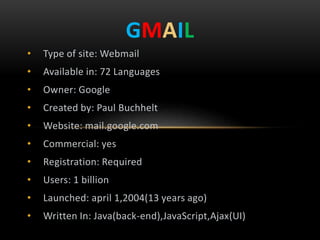
• Type of site: Webmail
• Available in: 72 Languages
• Owner: Google
• Created by: Paul Buchhelt
• Website: mail.google.com
• Commercial: yes
• Registration: Required
• Users: 1 billion
• Launched: april 1,2004(13 years ago)
• Written In: Java(back-end),JavaScript,Ajax(UI)
GMAIL
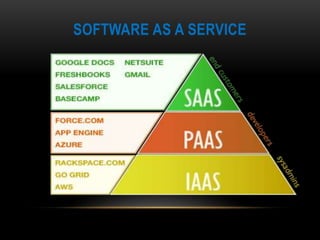
SOFTWARE AS A SERVICE
FEATURES
• Storage:-
o Gmail was launched with 1 gigabyte (GB) of storage space.
o On April 1, 2005, the first anniversary of Gmail, the limit was
doubled to 2 gigabytes of storage. Georges Harik , the
product management director for Gmail, stated that Google
would "keep giving people more space forever.
o On May 13, 2013, Google announced the overall merge of
storage across Gmail, Google Drive, and Google+ Photos,
allowing users 15 gigabytes of included storage among the
three services.
o Users can buy additional storage, shared among
Gmail, Google Drive and Google Photos, through a monthly
subscription plan. As of 2017, storage of up to 15 gigabytes is
included, and paid plans are available for up to
30 terabytes for personal use.
• Interface:-
o The Gmail user interface initially differed from other webmail
systems with its focus on search and conversation threading
of emails, grouping several messages between two or more
people onto a single page, an approach that was later copied
by its competitors. Gmail's user interface designer, Kevin Fox
intended users to feel as if they were always on one page and
just changing things on that page, rather than having to
navigate to other places.
o Gmail's interface also makes use of 'labels' (tags) that replace
the conventional folders and provide a more flexible method
of organizing email; filters for automatically organizing,
deleting or forwarding incoming emails to other addresses;
and importance markers for automatically marking messages
as 'important'.
FEATURES
• Tabbed Inbox:-
o In May 2013, Google updated the Gmail inbox with tabs
which allow the application to categorize the user's
emails. The five tabs are: Primary, Social, Promotions,
Updates, and Forums. In addition to customization
options, the entire update can be disabled, allowing
users to return to the traditional inbox structure.
FEATURES
• Spam Filter:-
o Gmail's spam filtering features a community-driven system:
when any user marks an email as spam, this provides
information to help the system identify similar future
messages for all Gmail users.
FEATURES
• Search:-
o Gmail incorporates a search bar for searching emails. The
search bar can also search Contacts, files stored in Google
Drive, events from Google Calendar, and Google Sites.
• Google Voice in Gmail Chat:-
o In August 2010, Google released a plugin that provides
integrated telephone service within Gmail's Google
Chat interface. The feature initially lacked an official name,
with Google referring to it as both "Google Voice in Gmail
chat" and "Call Phones in Gmail". The service logged over one
million calls in 24 hours.
o In March 2014, Google Voice was discontinued, and replaced
with functionality from Google Hangouts, another
communication platform from Google.
FEATURES
• Money Transfer and Payment Options:-
o In May 2013, Google announced the integration
between Google Wallet and Gmail, which would allow Gmail
users to send money as email attachments. Although the
sender must use a Gmail account, the recipient does not
need to be using a Gmail address. The feature has no
transaction fees, but there are limits to amount of money
that can be sent. Initially only available on the web, the
feature was expanded to the Android app in March 2017, for
people living in the United States.
FEATURES
INBOX BY GMAIL
• Inbox by Gmail scans the user's incoming Gmail messages for
information. It gathers email messages related to the same overall
topic to an organized bundle with a title describing the bundle's
content. For example, flight tickets, car rentals, and hotel
reservations are grouped to "Travel", giving the user an easier
overview of emails.
• In June 2015, Google added an "Undo Send" feature to Inbox, giving
users 10 seconds to undo sending a message.
• In November 2015, Google added "Smart Reply" functionality to the
mobile apps. With Smart Reply, Inbox determines which emails can
be answered with a short reply, generating three example responses,
and enabling users to send one with a single tap.
GOOGLE TRIPS
• In September 2016, Google released Google Trips, an app that,
based on information from a user's Gmail messages,
automatically generates travel cards. A travel card contains
itinerary details, such as plane tickets and car rentals, and
recommends activities, food and drinks, and attractions based
on location, time, and interests. The app also has offline
functionality.[
• In April 2017, Google Trips received an update adding several
significant features. The app now also scans Gmail for bus and
train tickets, and allows users to manually input trip
reservations. Users can send trip details to other users' email,
and if the recipient also has Google Trips, the information will
be automatically available in their apps as well.
PLATFORM
• Web Browsers:-
o Gmail's "basic HTML" version will work on almost all
browsers. The modern AJAX version is officially supported in
the current and previous major releases of Google Chrome,
Mozilla Firefox, Internet Explorer, Microsoft
Edge and Safari web browsers on a rolling basis.
• Mobile:-
o In addition to the native apps on iOS and Android, users can
access Gmail through the web browser on a mobile device.
• Third party programs:-
o Third-party programs can be used to access Gmail, using
the POP or IMAP protocols.
SECURITY
• Google has supported secure HTTPS since the day it launched.
• In June 2012, a new security feature was introduced to protect users
from state-sponsored attacks. A banner will appear at the top of the
page that warns users of an unauthorized account compromise.
• In March 2014, Google announced that an encrypted HTTPS connection
will be used for the sending and receiving of all Gmail emails, and "every
single email message you send or receive 100% of them is encrypted
while moving internally" through the company's systems.
• In 2007, Google fixed a cross-site scripting security issue that could let
attackers collect information from Gmail contact lists.
• Gmail uses transport layer security (TLS) to automatically encrypt
emails sent and received. On the web and on Android devices, users
can check if a message is encrypted by checking if the message has a
closed or open red padlock.
SOCIAL NETWORK INTEGRATION
• Google Buzz
• Google+
• G Suite
GOOGLE BUZZ
• Google Buzz was a social networking, microblogging and messaging
tool that was developed by Google and integrated into their web-
based email program, Gmail.
• Users could share links, photos, videos, status messages and
comments organized in "conversations" and visible in the user's
inbox.
GOOGLE+
• Google+ is an internet based social network that is owned and
operated by Google.
• Google+ launched in June 2011. Features included the ability to post
photos and status updates to the stream or interest based
communities, group different types of relationships (rather than
simply "friends") into Circles, a multi-person instant messaging, text
and video chat called Hangouts, events, location tagging, and the
ability to edit and upload photos to private cloud-based albums.
G SUITE
• G Suite (formerly Google Apps for Work and Google Apps for Your
Domain) is a brand of cloud computing, productivity and
collaboration tools, software and products developed by Google,
launched on August 28, 2006.
• G Suite comprises Gmail, Hangouts, Calendar, and Google+ for
communication; Drive for storage; Docs, Sheets, Slides, Forms,
and Sites for collaboration; and, depending on the plan, an Admin
panel and Vault for managing users and the services. It also includes
the digital interactive whiteboard Jamboard.
• G Suite adds enterprise features such as custom email addresses at
a domain(@yourcompany.com), option for unlimited cloud storage
(depending on plan and number of members), additional
administrative tools and advanced settings, as well as 24/7 phone
and email support.
HANGOUT
• Google Hangouts is a communication platform developed
by Google which includes instant messaging, video chat, SMS and
VOIP features.
• Hangouts allows conversations between two or more users. The
service can be accessed online through the Gmail or Google+ webs
• In Android 4.4, Hangouts is integrated with text messages sending
and receiving functions, which is the default SMS app on the Nexus
5. For other Android phones, users can choose to open the SMS
function when they download the new version of Hangouts
via Google Play .
Gmail

Gmail

  • 1.
  • 2.
    INDEX • What isGmail? • Features • Platforms • Security • Integrated Apps with Gmail
  • 3.
    GMAIL • E-mail meansElectronic mail. • E-mail is the technology of sending and receiving electronic message over the internet.it is most widely used and popular form of communication over the internet. • G-mail means Google mail. • Gmail is free email service developed by Google. • Users can access Gmail on the web and through mobile apps for andriod and ios , as well as through third-party programs that synchronize email content through POP or IMAP protocols.
  • 4.
    • Type ofsite: Webmail • Available in: 72 Languages • Owner: Google • Created by: Paul Buchhelt • Website: mail.google.com • Commercial: yes • Registration: Required • Users: 1 billion • Launched: april 1,2004(13 years ago) • Written In: Java(back-end),JavaScript,Ajax(UI) GMAIL
  • 5.
  • 6.
    FEATURES • Storage:- o Gmailwas launched with 1 gigabyte (GB) of storage space. o On April 1, 2005, the first anniversary of Gmail, the limit was doubled to 2 gigabytes of storage. Georges Harik , the product management director for Gmail, stated that Google would "keep giving people more space forever. o On May 13, 2013, Google announced the overall merge of storage across Gmail, Google Drive, and Google+ Photos, allowing users 15 gigabytes of included storage among the three services. o Users can buy additional storage, shared among Gmail, Google Drive and Google Photos, through a monthly subscription plan. As of 2017, storage of up to 15 gigabytes is included, and paid plans are available for up to 30 terabytes for personal use.
  • 7.
    • Interface:- o TheGmail user interface initially differed from other webmail systems with its focus on search and conversation threading of emails, grouping several messages between two or more people onto a single page, an approach that was later copied by its competitors. Gmail's user interface designer, Kevin Fox intended users to feel as if they were always on one page and just changing things on that page, rather than having to navigate to other places. o Gmail's interface also makes use of 'labels' (tags) that replace the conventional folders and provide a more flexible method of organizing email; filters for automatically organizing, deleting or forwarding incoming emails to other addresses; and importance markers for automatically marking messages as 'important'. FEATURES
  • 8.
    • Tabbed Inbox:- oIn May 2013, Google updated the Gmail inbox with tabs which allow the application to categorize the user's emails. The five tabs are: Primary, Social, Promotions, Updates, and Forums. In addition to customization options, the entire update can be disabled, allowing users to return to the traditional inbox structure. FEATURES
  • 9.
    • Spam Filter:- oGmail's spam filtering features a community-driven system: when any user marks an email as spam, this provides information to help the system identify similar future messages for all Gmail users. FEATURES • Search:- o Gmail incorporates a search bar for searching emails. The search bar can also search Contacts, files stored in Google Drive, events from Google Calendar, and Google Sites.
  • 10.
    • Google Voicein Gmail Chat:- o In August 2010, Google released a plugin that provides integrated telephone service within Gmail's Google Chat interface. The feature initially lacked an official name, with Google referring to it as both "Google Voice in Gmail chat" and "Call Phones in Gmail". The service logged over one million calls in 24 hours. o In March 2014, Google Voice was discontinued, and replaced with functionality from Google Hangouts, another communication platform from Google. FEATURES
  • 11.
    • Money Transferand Payment Options:- o In May 2013, Google announced the integration between Google Wallet and Gmail, which would allow Gmail users to send money as email attachments. Although the sender must use a Gmail account, the recipient does not need to be using a Gmail address. The feature has no transaction fees, but there are limits to amount of money that can be sent. Initially only available on the web, the feature was expanded to the Android app in March 2017, for people living in the United States. FEATURES
  • 12.
    INBOX BY GMAIL •Inbox by Gmail scans the user's incoming Gmail messages for information. It gathers email messages related to the same overall topic to an organized bundle with a title describing the bundle's content. For example, flight tickets, car rentals, and hotel reservations are grouped to "Travel", giving the user an easier overview of emails. • In June 2015, Google added an "Undo Send" feature to Inbox, giving users 10 seconds to undo sending a message. • In November 2015, Google added "Smart Reply" functionality to the mobile apps. With Smart Reply, Inbox determines which emails can be answered with a short reply, generating three example responses, and enabling users to send one with a single tap.
  • 13.
    GOOGLE TRIPS • InSeptember 2016, Google released Google Trips, an app that, based on information from a user's Gmail messages, automatically generates travel cards. A travel card contains itinerary details, such as plane tickets and car rentals, and recommends activities, food and drinks, and attractions based on location, time, and interests. The app also has offline functionality.[ • In April 2017, Google Trips received an update adding several significant features. The app now also scans Gmail for bus and train tickets, and allows users to manually input trip reservations. Users can send trip details to other users' email, and if the recipient also has Google Trips, the information will be automatically available in their apps as well.
  • 14.
    PLATFORM • Web Browsers:- oGmail's "basic HTML" version will work on almost all browsers. The modern AJAX version is officially supported in the current and previous major releases of Google Chrome, Mozilla Firefox, Internet Explorer, Microsoft Edge and Safari web browsers on a rolling basis. • Mobile:- o In addition to the native apps on iOS and Android, users can access Gmail through the web browser on a mobile device. • Third party programs:- o Third-party programs can be used to access Gmail, using the POP or IMAP protocols.
  • 15.
    SECURITY • Google hassupported secure HTTPS since the day it launched. • In June 2012, a new security feature was introduced to protect users from state-sponsored attacks. A banner will appear at the top of the page that warns users of an unauthorized account compromise. • In March 2014, Google announced that an encrypted HTTPS connection will be used for the sending and receiving of all Gmail emails, and "every single email message you send or receive 100% of them is encrypted while moving internally" through the company's systems. • In 2007, Google fixed a cross-site scripting security issue that could let attackers collect information from Gmail contact lists. • Gmail uses transport layer security (TLS) to automatically encrypt emails sent and received. On the web and on Android devices, users can check if a message is encrypted by checking if the message has a closed or open red padlock.
  • 16.
    SOCIAL NETWORK INTEGRATION •Google Buzz • Google+ • G Suite
  • 17.
    GOOGLE BUZZ • GoogleBuzz was a social networking, microblogging and messaging tool that was developed by Google and integrated into their web- based email program, Gmail. • Users could share links, photos, videos, status messages and comments organized in "conversations" and visible in the user's inbox.
  • 18.
    GOOGLE+ • Google+ isan internet based social network that is owned and operated by Google. • Google+ launched in June 2011. Features included the ability to post photos and status updates to the stream or interest based communities, group different types of relationships (rather than simply "friends") into Circles, a multi-person instant messaging, text and video chat called Hangouts, events, location tagging, and the ability to edit and upload photos to private cloud-based albums.
  • 19.
    G SUITE • GSuite (formerly Google Apps for Work and Google Apps for Your Domain) is a brand of cloud computing, productivity and collaboration tools, software and products developed by Google, launched on August 28, 2006. • G Suite comprises Gmail, Hangouts, Calendar, and Google+ for communication; Drive for storage; Docs, Sheets, Slides, Forms, and Sites for collaboration; and, depending on the plan, an Admin panel and Vault for managing users and the services. It also includes the digital interactive whiteboard Jamboard. • G Suite adds enterprise features such as custom email addresses at a domain(@yourcompany.com), option for unlimited cloud storage (depending on plan and number of members), additional administrative tools and advanced settings, as well as 24/7 phone and email support.
  • 20.
    HANGOUT • Google Hangoutsis a communication platform developed by Google which includes instant messaging, video chat, SMS and VOIP features. • Hangouts allows conversations between two or more users. The service can be accessed online through the Gmail or Google+ webs • In Android 4.4, Hangouts is integrated with text messages sending and receiving functions, which is the default SMS app on the Nexus 5. For other Android phones, users can choose to open the SMS function when they download the new version of Hangouts via Google Play .